
tokentray
Claude Code, Codex, Gemini (Antigravity), Cursor, Grok & OpenCode usage limits live in the Windows taskbar — session & weekly limits, reset times, pace warni…
Install with your AI
Paste into Claude Code, Cursor, or any agent — it reads the repo and wires the tool into your project.
Install and set up tokentray (release-binary project) into my current project.
Found on https://claudeers.com/tokentray
Repo: https://github.com/emrecengdev/tokentray
Homepage/docs: https://github.com/emrecengdev/tokentray/releases/latest
Detected install method: release-binary → inspect the README
Category: devtools. Platforms: cli, api, desktop, web.
Read the repo's README for exact setup and env vars, then install it and wire it into my project.

Claudeers Health Verdict:
unknown; community-verified: false. Confirm the source before running anything.
Grab the latest release asset from GitHub.
# download a build from https://github.com/emrecengdev/tokentray/releases
git clone https://github.com/emrecengdev/tokentray
// compatibility
| Platforms | cli, api, desktop, web |
|---|---|
| Operating systems | — |
| AI compatibility | claude |
| License | MIT |
| Pricing | open-source |
| Language | C# |

A Claude Code usage monitor for Windows — and Codex, Gemini (Antigravity), Grok, Cursor and OpenCode too.
Your 5-hour session and weekly limits live next to the clock, with the exact time each one refills
and a heads-up before you run out. No browser tab, no /usage command, no telemetry.
Download for Windows · Quick start · Supported tools · FAQ · Türkçe
See it at a glance
Every tool you use gets a spot on the taskbar: session and weekly usage side by side, each number
with its own reset — 03:00 when it's today, 2d when it's days away, and a 40m countdown in the last hour. Colors only change when
something needs your attention.

Hover for the details
Rest the pointer on the widget and a card lists every limit with the exact time it refills. No clicking, no focus stolen.

Click for the whole picture
The panel reads your numbers back to you in one sentence per tool — plenty left, 87% used but this pace lasts until 04:00, or at this pace it runs out 2 hours before it refills — then lays out every window, plan and account. With three or more tools it opens into two columns.

The pace notch
Percentages tell you where you are. The notch tells you whether you'll make it. Every bar carries a mark for how much of its window has already passed; stay behind it and your allowance lasts until the reset.

Make it yours
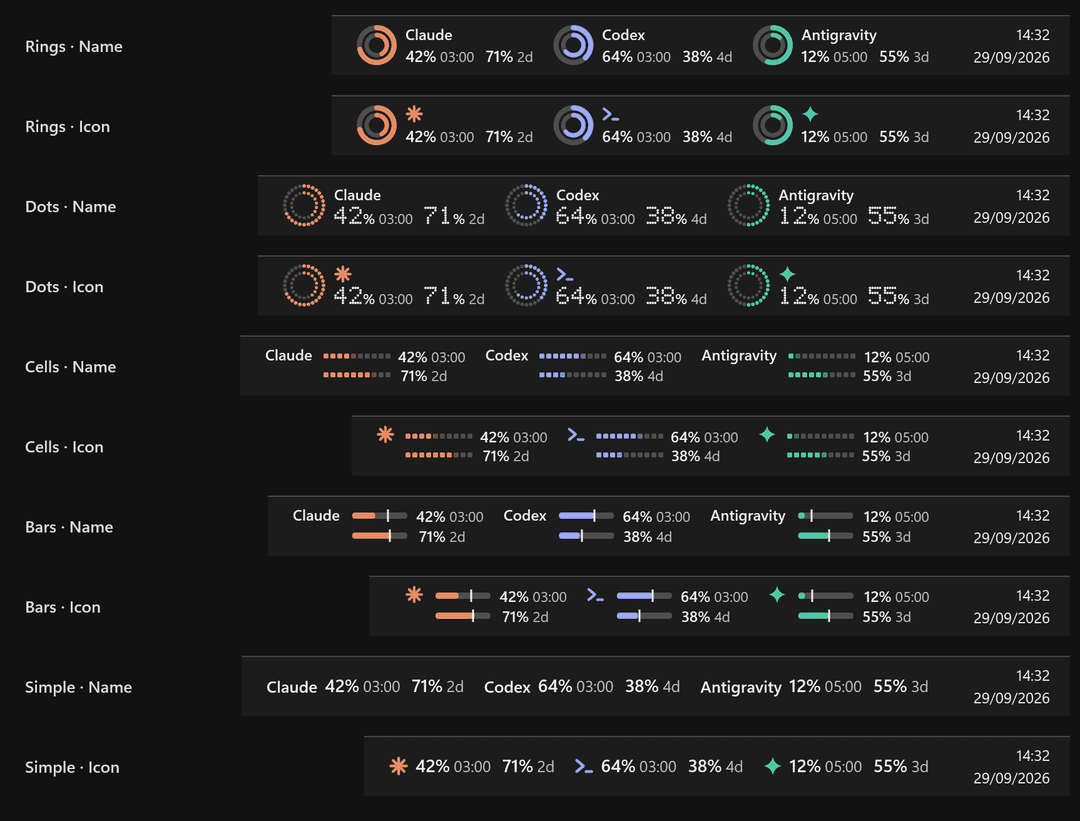
Five taskbar styles — Rings, Dots, Cells, Bars, Simple — each with the tool's name or a compact icon. Choose what it shows (session, weekly, reset time), used or left, and a light, dark or system theme. Settings preview every option with your own numbers before you pick.
Everything else it does
- Warnings that don't nag: a notification at 20% and 5% left and when a limit refills, once per cycle.
- Several accounts: add another Claude Code or Codex config folder; each account keeps its own numbers and notifications.
- Plans at a glance: Max 5x / 20x, Pro, Plus, Google AI Pro / Ultra — straight from your sign-in.
- Never blank: the last reading survives restarts; if a sign-in expires or the network drops, numbers stay visible, dimmed, with an amber dot.
- Polite to the services: every
Retry-Afteris honored, across restarts and manual refreshes. - Knows its place: if taskbar buttons need the room, the widget turns compact, then steps aside; the tray icon stays.
- Native feel: acrylic panel on Windows 11, per-monitor DPI, respects reduced motion, keyboard-friendly panel, English and Turkish.
Supported tools
| Tool | Limits shown | Signed in via | |
|---|---|---|---|
 | Claude Code — Pro, Max 5x, Max 20x | 5-hour session, weekly, per-model weekly (e.g. Opus) | Claude Code CLI, or the Claude desktop app (same account only) |
 | Codex — ChatGPT Plus, Pro | 5-hour session where your plan has one, weekly | Codex CLI |
 | Google Antigravity (Gemini) | 5-hour and weekly for Gemini models, plus the Claude & GPT pool | Antigravity |
 | Grok Build | Weekly or monthly credit pool | Grok CLI |
 | Cursor | Included usage this billing month, API usage | Cursor |
 | OpenCode Go | 5-hour, weekly, monthly | A workspace id and session cookie you provide |
Tools found on your PC switch on by themselves; the rest are one toggle away in Settings → General.
Quick start
- Download the zip for your PC from the latest release.
- Unzip it anywhere and run
TokenTray.exe. The panel opens once to show what it found. - Optional: Settings → General → Start with Windows.
| Download | For | Size |
|---|---|---|
TokenTray-…-win-x64.zip | Most PCs. Single file, nothing else to install. | ~70 MB |
TokenTray-…-win-arm64.zip | Snapdragon and other ARM laptops. | ~70 MB |
TokenTray-…-win-x64-small.zip | PCs with the .NET 10 Desktop Runtime. | 6 MB |
[!NOTE] TokenTray isn't code-signed yet, so SmartScreen may ask the first time: More info → Run anyway. Each release ships
SHA256SUMS.txtso you can check what you downloaded.
Requirements: Windows 10 (1809+) or Windows 11, x64 or ARM64, and at least one signed-in tool from the list above.
| Do this | To |
|---|---|
| Hover the widget | See every limit with its exact reset time |
| Click the widget or tray icon | Open the panel |
| Right-click | Refresh now · Settings · Quit |
| Settings → Taskbar | Pick a style and variant, what it shows, and its position |
| Settings → General | Tools, extra accounts, used or left, theme, emails, notifications, check interval |
If Windows 11 tucks the tray icon under ^, drag it onto the taskbar to keep it in view.
Privacy and security
TokenTray has no server. It reads the sign-ins already on your PC and asks each tool's own usage endpoint — the same numbers the tool shows you — and nothing else leaves your machine.
flowchart LR
    S["Sign-ins already on your PC<br/>Claude Code, Codex, Antigravity, Grok, Cursor"] -- "read only" --> T(("TokenTray"))
    T -- "HTTPS, your own token" --> E["Each tool's official<br/>usage endpoint"]
    E -- "percentages and reset times" --> T
    T --> U["Taskbar widget<br/>panel and notifications"]
- Read-only. Tokens are never refreshed, copied or written. When a sign-in expires, open the tool once and it renews itself.
- No telemetry, no analytics, no accounts.
- Stays local: settings in
%APPDATA%\TokenTray; the last reading and notification history in%LOCALAPPDATA%\TokenTray. - Claude desktop app: its sign-in is encrypted for your Windows user. TokenTray decrypts it with Windows DPAPI, as the app does, and uses it only when it's the same account as your Claude Code CLI.
Found a vulnerability? Please report it privately — see SECURITY.md.
FAQ
How do I see my Claude Code usage limits on Windows?
Sign in to Claude Code (
claude) or the Claude desktop app, then run TokenTray. Your 5-hour session and weekly limits appear next to the clock — the same numbers Claude shows in its usage settings, with the reset time beside each.
Does it show the Codex 5-hour limit?
Yes, when your ChatGPT plan has one. TokenTray shows exactly the windows Codex reports for your account. If there's only a weekly limit, that's all you'll see — no empty placeholders.
What does the percentage mean — used or left?
Used by default, matching Claude and Codex. Switch to left in Settings → General → Numbers show.
It says "sign-in expired". What do I do?
Open the tool once — run
claude, codex or grok, or open Antigravity or Cursor — and it renews its own sign-in. Until then TokenTray keeps your last reading on screen, dimmed.
Why is the shortest check interval two minutes?
Claude's usage endpoint answers frequent requests with 429 Too Many Requests. Two minutes stays well inside that, and TokenTray waits out every
Retry-After.
Vertical taskbar, auto-hide, several monitors?
The widget lives on the main monitor's horizontal taskbar and moves with auto-hide. With a vertical taskbar, the tray icon and panel still work.
Is it affiliated with Anthropic, OpenAI, Google, xAI or Cursor?
No. TokenTray is an independent open-source project, not affiliated with or endorsed by any of them. The tool icons are simple geometric marks, not their logos.
Build from source
git clone https://github.com/emrecengdev/tokentray
cd tokentray
dotnet test                          # 50 unit tests, no network
dotnet run --project src/TokenTray   # run it
.\publish.ps1 -Version 1.1.0         # release zips + SHA256SUMS in .\dist
Requires the .NET 10 SDK. src/TokenTray.Core holds providers, polling, pace and caching with no UI; src/TokenTray is the WPF app.
Every image in this README is drawn by TokenTray itself from sample data — no screenshots of real accounts:
TokenTray.exe --render-media docs\media, then python tools\make_hero.py docs\media.
Contributing
Reports from tools, plans and Windows setups we can't test ourselves are gold — Cursor, OpenCode Go, Grok monthly plans, Codex plans with a 5-hour window, Windows 10 and ARM64. See CONTRIBUTING.md.
If TokenTray saved you from a surprise limit, a ⭐ helps other people find it.
License
MIT © Emre Canik. Product names belong to their owners.
// faq
What is tokentray?
Claude Code, Codex, Gemini (Antigravity), Cursor, Grok & OpenCode usage limits live in the Windows taskbar — session & weekly limits, reset times, pace warnings.. It is open-source on GitHub.
Is tokentray free to use?
tokentray is open-source under the MIT license, so it is free to use.
What category does tokentray belong to?
tokentray is listed under devtools in the Claudeers registry of Claude-compatible tools.
// embed badge

[](https://claudeers.com/tokentray)
// retro hit counter

[](https://claudeers.com/tokentray)
// reviews
// guestbook
// related in Developer Tools
 🔓
🔓The agent harness performance optimization system. Skills, instincts, memory, security, and research-first development for Claude Code, Codex, Opencode, Curs…
 🔓
🔓Makes your AI agent think like the laziest senior dev in the room. The best code is the code you never wrote.
 🔓
🔓Use Garry Tan's exact Claude Code setup: 23 opinionated tools that serve as CEO, Designer, Eng Manager, Release Manager, Doc Engineer, and QA
 🔓
🔓AI coding assistant skill (Claude Code, Codex, OpenCode, Cursor, Gemini CLI, and more). Turn any folder of code, SQL schemas, R scripts, shell scripts, docs,…