
token-sprite
🌱 一只养在 macOS 桌面上的小精灵,用你本机 Claude Code + Codex 的真实 token 用量自动养大。npm install && npm start 即可。
Install with your AI
Paste into Claude Code, Cursor, or any agent — it reads the repo and wires the tool into your project.
Install and set up token-sprite (git-clone project) into my current project.
Found on https://claudeers.com/token-sprite
Repo: https://github.com/shiyubao78/token-sprite
Homepage/docs: —
Detected install method: git-clone → git clone https://github.com/shiyubao78/token-sprite
Category: devops. Platforms: cli, api, desktop.
Read the repo's README for exact setup and env vars, then install it and wire it into my project.

Claudeers Health Verdict:
active; community-verified: false. Confirm the source before running anything.
git clone https://github.com/shiyubao78/token-sprite
// compatibility
| Platforms | cli, api, desktop |
|---|---|
| Operating systems | — |
| AI compatibility | claude |
| License | NOASSERTION |
| Pricing | open-source |
| Language | JavaScript |
🌱 Token 小精灵 / Token Sprite
你写下的每个 Token,都在让它长大。
Every token you write helps it grow.
把真实的 AI 编程用量变成一只住在桌面角落、一路破壳进化的小精灵。
Turn your real AI-coding usage into a tiny desktop companion that hatches, evolves, and grows with you.
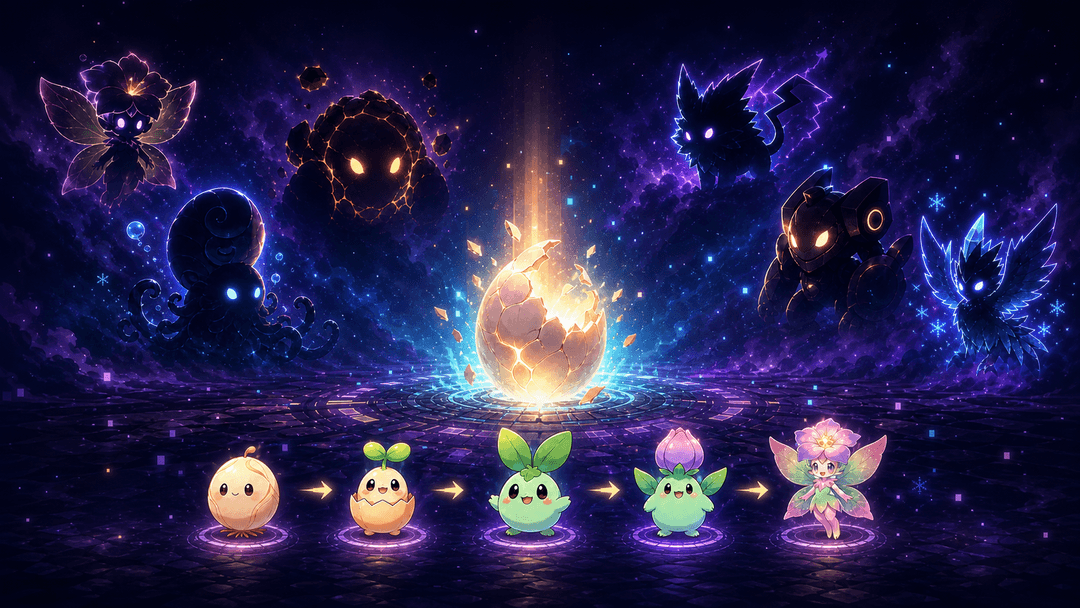
CODE → HATCH → EVOLVE → COLLECT
写代码获得真实 Token → 达成成就抽精灵蛋 → 五段进化 → 收进图鉴。
Write code, earn real tokens, hatch mystery eggs, evolve through five stages, and complete your collection.
macOS · Windows · Linux · 本地读取 / Local-only · 不上传 / Nothing uploaded
🥚 孵化与进化 / Hatch & Evolve
选一颗蛋,它会吸收你真实使用掉的 Token,从破壳一路成长到最终化形。
Choose an egg and feed it with the tokens you actually use, from first crack to final form.
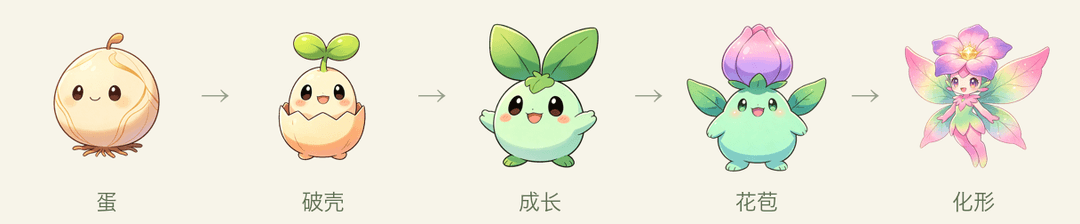
六种属性、六条完整进化线:草木、海洋、岩浆、雷电、机械与冰晶。破壳前,你永远不知道会遇见谁。
Six elements, six complete evolution lines: flora, ocean, magma, thunder, mech, and ice. You will not know who is inside until the egg hatches.
抽到重复的同类蛋?在孵化器里一键合并——喂养进度全累加,还按稀有度额外送 token,加速孵一只喜欢的。
Got duplicate eggs of the same species? Merge them in the incubator—progress stacks and you earn bonus tokens by rarity, fast-tracking a favorite.
✨ 为什么特别 / Why It’s Different
- 真实劳动养出来 / Powered by real work:读取本地 AI 编程工具的真实 Token 用量,写多少就长多少。 / It grows from your actual local AI-coding usage.
- 会陪你 / A companion, not a counter:连续工作会劝你休息,深夜会提醒早点睡,久别重逢会向你招手。 / It nudges you to rest, sleep, and come back without turning work into pressure.
- 桌面常驻 / Always on your desktop:悬浮置顶、自由拖动,也能缩成侧边探头。 / Always on top, draggable, and able to peek quietly from the screen edge.
- 孵化收集 / Hatch and collect:成就 → 抽蛋 → 进化 → 图鉴,让每次写代码都有期待。 / Achievements unlock eggs; eggs evolve into creatures for your collection.
- 全本地私密 / Private by design:只读本机日志,用量绝不上传;仅正式版会向 GitHub 查询有无新版本。 / Usage stays on your machine and is never uploaded; only released builds check GitHub for new versions.
🏆 成就与抽蛋 / Achievements & Hatching
达成成就获得抽蛋券;每张券大概率开出对应稀有度,并有 15% 概率提升一档。新手期门槛低、发券快,前几天就能集齐前 4 只、挑一只重点养。
Complete achievements to earn egg tickets. Each ticket usually matches its rarity, with a 15% chance to upgrade by one tier. Early achievements are quick, so you can collect the first few species in days and pick a favorite.
| 成就 / Achievement | 条件 / Requirement | 奖励 / Reward |
|---|---|---|
| 初次相遇 / First Meeting | 敲下第一个 token / Your first token | 🟢 普通 / Common |
| 小试牛刀 / Warming Up | 累计 100M / 100M total | 🔵 稀有 / Rare |
| 渐入佳境 / Getting There | 累计 500M / 500M total | 🟢 普通 / Common |
| 破壳时刻 / First Hatch | 孵出第一只精灵 / Hatch your first | 🔵 稀有 / Rare |
| 初出茅庐 / First Steps | 累计 1B Token / 1B total tokens | 🟢 普通 / Common |
| 双修 / Dual Wielder | 两个工具各累计 ≥ 300M / 300M+ in two tools | 🟢 普通 / Common |
| 昼夜不息 / Night Coder | 深夜写代码满 3 天 / Code overnight on 3 days | 🟢 普通 / Common |
| 爆种 / Overdrive | 单日破 2B / 2B in one day | 🔵 稀有 / Rare |
| 一周不辍 / Seven-Day Streak | 连续开工 7 天 / 7-day streak | 🔵 稀有 / Rare |
| 里程碑 / Milestone | 连续 30 天或累计 10B / 30 days or 10B total | 🟣 史诗 / Epic |
| 传说之路 / Path to Legend | 累计破 100B / 100B total | 🟡 传说 / Legendary |
抽到的是一颗蛋。放进孵化器继续写代码,完成五段进化才会正式收进图鉴。
Every draw gives you an egg. Keep coding to complete all five stages and add its final form to your collection.
| 稀有度 / Rarity | 孵化所需 Token / Tokens to Hatch |
|---|---|
| 🟢 普通 / Common | 0.5B |
| 🔵 稀有 / Rare | 2B |
| 🟣 史诗 / Epic | 8B |
| 🟡 传说 / Legendary | 30B |
数值可在
src/config/achievements.js与src/config/rarities.js调整。
Balance values live insrc/config/achievements.jsandsrc/config/rarities.js.
🖥️ 界面一览 / A Look Inside
全本地、免登录,一个悬浮小窗搞定:改名、抽卡、孵化、图鉴、成就。
Fully local, no login — one floating window: rename, draw, hatch, collect, and earn achievements.
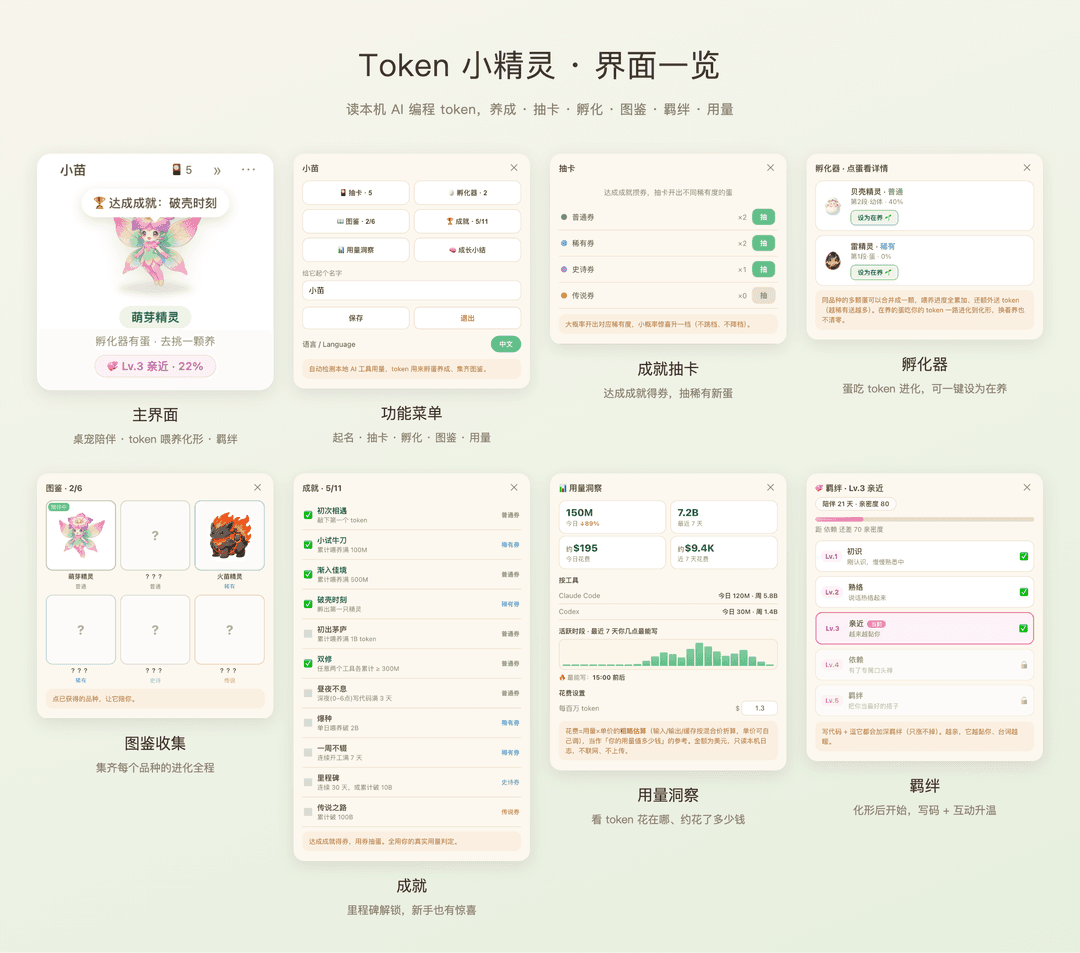
| 界面 / Panel | 能做什么 / What you do |
|---|---|
| 🏠 主界面 / Main | 桌面悬浮桌宠,实时显示孵化进度(精确到 0.01%)/ Floating pet with live hatch progress (down to 0.01%) |
| ⚙️ 菜单 / Menu | 给精灵改名、进入各功能、开关开机自启 / Rename your sprite, open features, toggle auto-launch |
| 🎴 抽卡 / Gacha | 用成就攒的券抽不同稀有度的蛋 / Spend achievement tickets to draw eggs of varying rarity |
| 🥚 孵化器 / Incubator | 多颗蛋切换养,各记各的进度、不清零 / Raise multiple eggs, each keeps its own progress |
| 📖 图鉴 / Collection | 收集 6 种精灵,点已获得的让它陪伴 / Collect 6 species; tap an owned one to make it your companion |
| 🏆 成就 / Achievements | 达成条件得券,全用真实 token 用量判定 / Earn tickets by hitting milestones, all judged on real token usage |
🚀 快速开始 / Quick Start
需要 Node.js 20+,支持 macOS、Windows 与 Linux。
Requires Node.js 20+ and runs on macOS, Windows, and Linux.
macOS 普通用户安装 / Install on macOS
普通用户请从 GitHub Releases 下载最新的 .dmg,打开后把 Token 小精灵拖进“应用程序”。若未签名,首次打开右键点图标选“打开”通过一次系统提示即可。源码方式主要面向开发者。
Download the latest .dmg from GitHub Releases and drag Token Sprite into Applications. If it is unsigned, right-click the app and choose “Open” once to pass Gatekeeper. The source workflow below is mainly for developers.
有新版时,正式版会弹窗提醒;菜单栏的小精灵图标 → 检查更新 也会打开下载页,下载新版 .dmg 覆盖安装即可,成长数据保留。
When a new version is available, released builds show a reminder. The menu-bar icon → Check for Updates opens the download page; grab the new .dmg and reinstall over the old one—your growth data is kept.
如果小精灵不在桌面上,点击菜单栏的小精灵图标 → 召回小精灵。显示器拔插、分辨率变化或睡眠恢复后,如果窗口完全跑出屏幕,应用也会自动把它带回来。
If your sprite disappears, choose Recall Sprite from its menu-bar icon. It also returns automatically after display changes or wake when its window is fully off-screen.
从源码运行 / Run from source
git clone https://github.com/shiyubao78/token-sprite.git
cd token-sprite
npm install
npm start
启动后,小精灵会出现在桌面右下角。
Once started, your sprite appears in the bottom-right corner of the desktop.
🤖 一句话让 Agent 帮你装 / Let Your Agent Install It
把下面这句话直接发给 Codex、Claude Code 或其他能操作终端的 Agent:
Send this directly to Codex, Claude Code, or any terminal-capable agent:
帮我安装并运行 github.com/shiyubao78/token-sprite
Install and run github.com/shiyubao78/token-sprite for me.
仓库内置 AGENTS.md 与 CLAUDE.md,Agent 可以自动完成克隆、安装与启动。
The repository includes AGENTS.md and CLAUDE.md, so an agent can clone, install, and launch it for you.
🔄 一句话让 Agent 帮你更新 / Let Your Agent Update It
想升级到最新版,同样发一句话给 Agent 即可,成长数据会保留:
To upgrade to the latest version, just send your agent one line—your growth data is kept:
帮我把 token-sprite 更新到最新版
Update token-sprite to the latest version for me.
源码方式安装的,Agent 会 git pull 最新代码并重装启动;下载安装版的,Agent 会取最新 Release 覆盖旧版。
For source installs the agent runs git pull and reinstalls; for downloaded builds it fetches the latest release and replaces the old app.
🧩 工作原理 / How It Works
应用会自动检测本机支持的 AI 工具,读取本地日志中的 Token 用量。没安装的工具会自动跳过,数据不会离开你的电脑。
The app detects supported AI tools and reads token usage from local logs. Missing tools are skipped automatically, and your data never leaves your computer.
| 工具 / Tool | 本地读取位置 / Local Data Source |
|---|---|
| Claude Code | ~/.claude/projects/**/*.jsonl |
| Codex | ~/.codex/**/rollout-*.jsonl |
安装时会记录基准,此后从 0 开始养;你新使用多少 Token,它就成长多少。
A baseline is recorded on installation. Only new usage counts toward your sprite’s growth.
只能统计在本地保存可解析用量日志的工具。服务端用量无法从本机读取。
Only tools that store parseable usage logs locally can be counted. Cloud-only usage is not accessible.
添加其他工具 / Add Another Tool
如果 Gemini CLI、OpenCode、Aider 等工具会把用量写进本地日志,可以在 scripts/usage.mjs 的 READERS 中增加读取器:
async function readYourTool() {
  const root = join(homedir(), '.yourtool');
  if (!(await exists(root))) return null;
  let total = 0, recentTokens = 0, todayTokens = 0, lastActivityAt = 0;
  // 遍历本地日志并累加用量 / Parse local logs and accumulate usage.
  return { total, recentTokens, todayTokens, lastActivityAt };
}

export const READERS = [
  /* existing readers */
  { source: 'yourtool', label: 'Your Tool', read: readYourTool },
];
也可以直接让你的 Agent 完成:
You can also ask your agent to do it:
查看我本地
<工具>的用量日志格式,为 token-sprite 添加读取器。
Inspect my local<tool>usage logs and add a reader to token-sprite.
📦 打包桌面应用 / Package the Desktop App
在目标系统上运行对应命令,产物会写入 release/:
Run the matching command on the target operating system. Builds are written to release/.
npm run pack         # macOS universal app
npm run pack:mac:release # macOS universal DMG + ZIP + update metadata
npm run pack:win     # Windows portable app + installer
npm run pack:linux   # Linux AppImage
- macOS 本地构建:没有 Developer ID 凭证时仍是未签名版本,首次运行可能需要右键选择“打开”。正式 Release 必须经过签名和 Apple 公证。
- Windows:SmartScreen 拦截时选择“更多信息 → 仍要运行”。
- Linux:先为 AppImage 添加执行权限;透明和置顶效果取决于桌面环境。
- Packaging must run on its target OS. GitHub Actions can also build all three platforms.
🔧 自定义 / Customize
- 品种、稀有度、名称、图片路径 / Species, rarity, names, and artwork:
src/config/species.js - 成就、门槛、抽卡概率 / Achievements, thresholds, and odds:
src/config/achievements.js,src/config/rarities.js - 自定义形象 / Custom artwork:
assets/sprite/<species>/1-seed.png…5-adult.png
每个阶段使用 512×512 透明 PNG。
Each stage uses a 512×512 transparent PNG.
📄 License
非商业授权 / Noncommercial. 本项目禁止商业使用。
- 源代码 / Source code: PolyForm Noncommercial 1.0.0
- 美术素材 / Art assets(
assets/**): CC BY-NC 4.0
可自由用于个人、学习、非营利用途;使用素材需署名。内置形象为 AI 生成,仅作示例,可自行替换。
Free for personal, educational, and nonprofit use; assets require attribution. Built-in artwork is AI-generated as an example and can be replaced.
// faq
What is token-sprite?
🌱 一只养在 macOS 桌面上的小精灵,用你本机 Claude Code + Codex 的真实 token 用量自动养大。npm install && npm start 即可。. It is open-source on GitHub.
Is token-sprite free to use?
token-sprite is open-source under the NOASSERTION license, so it is free to use.
What category does token-sprite belong to?
token-sprite is listed under devops in the Claudeers registry of Claude-compatible tools.
// embed badge

[](https://claudeers.com/token-sprite)
// retro hit counter

[](https://claudeers.com/token-sprite)
// reviews
// guestbook
// related in DevOps & CI/CD
 🔓
🔓⭐AI-driven public opinion & trend monitor with multi-platform aggregation, RSS, and smart alerts.🎯 告别信息过载,你的 AI 舆情监控助手与热点筛选工具!聚合多平台热点 + RSS 订阅,支持关键词精准筛选。AI…
 🔓
🔓Use Claude Code as the foundation for coding infrastructure, allowing you to decide how to interact with the model while enjoying updates from Anthropic.
 🔓
🔓Professional Antigravity Account Manager & Switcher. One-click seamless account switching for Antigravity Tools. Built with Tauri v2 + React (Rust).专业的 Antig…
 🔓
🔓Roadmap to becoming an ASP.NET Core developer in 2026