
token-optimizer
Find the ghost tokens. Fix them. Survive compaction. Avoid context quality decay.
Install with your AI
Paste into Claude Code, Cursor, or any agent — it reads the repo and wires the tool into your project.
Install and set up token-optimizer (claude-plugin project) into my current project.
Found on https://claudeers.com/token-optimizer
Repo: https://github.com/alexgreensh/token-optimizer
Homepage/docs: —
Detected install method: claude-plugin → /plugin install token-optimizer@alexgreensh/token-optimizer
Category: plugins. Platforms: cli, api, desktop, web.
Read the repo's README for exact setup and env vars, then install it and wire it into my project.

Claudeers Health Verdict:
active; community-verified: false. Confirm the source before running anything.
/plugin marketplace add alexgreensh/token-optimizer
/plugin install token-optimizer@alexgreensh/token-optimizer
git clone https://github.com/alexgreensh/token-optimizer
// compatibility
| Platforms | cli, api, desktop, web |
|---|---|
| Operating systems | — |
| AI compatibility | claude |
| License | NOASSERTION |
| Pricing | open-source |
| Language | Python |
Cut the tokens you waste. Keep the work you'd lose.
Optimize every session, then watch the dollars add up on the dashboard.
Most token tools only touch one slice of the problem.
They compress command output, which covers 15-25% of your context on a good day. The other 75-85% (bloated configs, unused skills, duplicate system prompts, stale memory, plus the 60-70% you lose on every compaction) goes untouched.
Token Optimizer covers all of it, keeps your work alive across compactions, measures whether the optimization actually helped, and gives you a live dashboard that shows every token, every dollar, and every turn, auto-updated after every session. Runs fully local. Zero baseline context overhead. Zero runtime dependencies.
Works on Claude Code (CLI and VS Code), OpenCode, OpenClaw, Codex, Hermes, and GitHub Copilot (CLI and VS Code, beta) today. Windsurf, Cursor, and more on the way.
TL;DR
Install the plugin. Most of it runs automatically from that point:
| What | How | |
|---|---|---|
| Once | Run /token-optimizer after install | Scans your setup, finds waste, fixes it for you |
| Automatic | Everything else | Smart Compaction (checkpoints before, restores after), active compression, quality scoring, loop detection, read deduplication, model routing nudges, and more. Runs in the background every session |
| Automatic | Dashboard | Updates after every session with tokens, dollars, quality grades, session history |
| When you want | /token-coach | Analyzes 30 days of your session history. Shows where you're efficient and where you're not, helps plan new projects for minimal waste |
| When you want | /token-optimizer quick | 10-second health check: context fill, quality score, top issues |
Install, run the audit once, everything else just works.
Install
Recommended on every platform (macOS, Linux, Windows):
/plugin marketplace add alexgreensh/token-optimizer
/plugin install token-optimizer@alexgreensh-token-optimizer
Then in Claude Code: /token-optimizer
Please enable auto-update after installing. Claude Code ships third-party marketplaces with auto-update off by default, and plugin authors cannot change that default. So you won't get bug fixes automatically unless you turn it on. In Claude Code:
/plugin→ Marketplaces tab → selectalexgreensh-token-optimizer→ Enable auto-update. One-time, 10 seconds, and you'll never miss a fix again. Token Optimizer also prints a one-time reminder on your first SessionStart so you don't forget.
Windows users: read this first
The plugin install above is the only path you should use on Windows. Do not also run the install.sh script described below — that's a bash installer for macOS/Linux/WSL, and combining the two creates an EBUSY: resource busy or locked error because Git Bash holds Windows file handles open while the plugin system is trying to clone.
Repo size note: our repo is ~3 MB (218 files, ~2,700 git objects). If your /plugin marketplace add attempt seems to be downloading gigabytes, it's not us — cancel and check whether Claude Code is cloning a different URL or network state. You can verify by cloning manually: git clone --bare https://github.com/alexgreensh/token-optimizer.git should finish in under a second and produce a ~2.6 MB directory.
If you've already hit the EBUSY error:
- Close every Claude Code window and Git Bash terminal.
- Open Task Manager and end any lingering
git.exeprocesses. - Delete both folders if they exist:
C:\Users\<you>\.claude\token-optimizerC:\Users\<you>\.claude\plugins\marketplaces\alexgreensh-token-optimizer
- If Windows still refuses to delete (file in use), reboot, then delete.
- Open a fresh Claude Code window and run the two
/plugincommands above.
Manual ZIP fallback (advanced, if plugin install repeatedly fails): download a versioned source ZIP from the latest GitHub Release, download that release's CHECKSUMS.sha256, verify the extracted scripts, then run python measure.py setup-quality-bar from C:\Users\<you>\.claude\token-optimizer\. Note: on Windows the command is python, not python3.
macOS / Linux only: script install (alternative)
If you prefer a script-managed install on macOS or Linux, this works too and auto-updates daily by re-running the verified installer against the latest release tag. Do not run this on Windows, and do not run it alongside the plugin install above on any platform. Pick one method.
tmp="$(mktemp -d)"
release_json="$(curl -fsSL https://api.github.com/repos/alexgreensh/token-optimizer/releases/latest)"
tag="$(python3 -c 'import json,sys; print(json.load(sys.stdin)["tag_name"])' <<<"$release_json")"
checksums="$(python3 -c 'import json,sys; data=json.load(sys.stdin); print(next(a["browser_download_url"] for a in data["assets"] if a["name"]=="CHECKSUMS.sha256"))' <<<"$release_json")"
git clone --branch "$tag" --depth 1 https://github.com/alexgreensh/token-optimizer.git ~/.claude/token-optimizer
curl -fsSL -o "$tmp/CHECKSUMS.sha256" "$checksums"
install_sum="$(grep '  install.sh$' "$tmp/CHECKSUMS.sha256")"
(cd ~/.claude/token-optimizer && (printf '%s\n' "$install_sum" | sha256sum -c - --quiet 2>/dev/null || printf '%s\n' "$install_sum" | shasum -a 256 -c - --quiet))
bash ~/.claude/token-optimizer/install.sh
rm -rf "$tmp"
This verifies install.sh before executing it. The installer then resolves the latest GitHub release tag, checks out that tag, and verifies every installed runtime file against that release's checksums. If you're offline or behind a restrictive proxy, set TOKEN_OPTIMIZER_SKIP_VERIFY=1 before running.
Works on Claude Code (CLI and VS Code), OpenCode, OpenClaw, Codex, Hermes, and GitHub Copilot (CLI and VS Code, beta — see docs/copilot.md). Each platform has its own native plugin. No bridging, no shared runtime, zero cross-platform dependencies.
Codex
Token Optimizer works on OpenAI Codex (CLI and Desktop). Same core engine, adapted for AGENTS.md, GPT-5.x models, intelligence levels, and Codex's hook surface. Some Claude Code mechanisms have Codex-native equivalents rather than identical hooks; the Codex docs call out the few upstream hook gaps honestly.
codex plugin marketplace add alexgreensh/token-optimizer
Then in the Codex TUI: /plugins and install Token Optimizer. Ask for it conversationally: "Run Token Optimizer".
After install, set up hooks and the bookmarkable dashboard:
TOKEN_OPTIMIZER_RUNTIME=codex python3 skills/token-optimizer/scripts/measure.py codex-install --project "$PWD"
TOKEN_OPTIMIZER_RUNTIME=codex python3 skills/token-optimizer/scripts/measure.py setup-daemon
Dashboard: http://localhost:24843/token-optimizer (separate port from Claude Code's 24842, both can run side by side).
Auto-updates on startup via git ls-remote. Manual: codex plugin marketplace upgrade.
See docs/codex.md for the full feature parity table, hook profiles, and Codex model pricing.
OpenCode
Native TypeScript plugin for OpenCode with full Claude Code feature parity. Context-quality scoring engine, smart compaction with mode-aware context injection, session continuity, quality nudges, loop detection, and a built-in dashboard.
opencode plugin token-optimizer-opencode
Or add it to your opencode.json (or .opencode/opencode.jsonc) plugin array:
{
  "plugin": ["token-optimizer-opencode"]
}
No global npm? Local build install: clone this repo and run the bundled installer. It builds the plugin and drops it into ~/.config/opencode/plugins/, which OpenCode auto-loads. Requires Bun and registry or cache access unless dependencies are already present:
git clone https://github.com/alexgreensh/token-optimizer.git
token-optimizer/install.sh --opencode
Two custom tools are available inside OpenCode:
token_statusfor on-demand quality reportstoken_dashboardto generate and open the visual dashboard
Works with every model OpenCode supports: Anthropic, OpenAI, Google, DeepSeek, Qwen, Mistral, xAI, and local models. MRCR quality curves are calibrated per model family.
See opencode/README.md for full docs, configuration options, and environment variable overrides.
OpenClaw
Native TypeScript plugin for OpenClaw agent systems. Zero Python dependency, zero runtime dependencies, zero telemetry. Works with any model your gateway is configured against: Claude, GPT-5, Gemini, DeepSeek, local via Ollama.
# From GitHub (recommended)
openclaw plugins install github:alexgreensh/token-optimizer

# From ClawHub
openclaw plugins install token-optimizer
Inside OpenClaw, run /token-optimizer for a guided audit with coaching.
See openclaw/README.md for full docs.
Hermes
Beta (v0.1.0). Token Optimizer for NousResearch Hermes — the autonomous agent that lives in your terminal and messaging apps. Per-turn usage capture, cost, context-quality scoring, before/after savings, a proactive pre-turn context nudge, and a dashboard — all read from Hermes's own
~/.hermes/state.db. Model-agnostic: each session is priced at its real model (Nous Portal, OpenRouter, OpenAI, Anthropic, local), so free/cheap models never show inflated savings.
Native Python plugin. Installs into ~/.hermes/plugins/token-optimizer/, which Hermes auto-loads. Read-only access to your Hermes data, no telemetry, no Python dependency conflicts.
git clone https://github.com/alexgreensh/token-optimizer.git
token-optimizer/install.sh --hermes
Verify the install:
token-optimizer/install.sh --hermes --dry-run   # preview
python3 token-optimizer/skills/token-optimizer/scripts/measure.py hermes-doctor
Inside Hermes:
/token-optimizer— usage + context-quality summary for recent sessionshermes token-optimizer— open the dashboard (http://localhost:24844)- A short context nudge appears automatically before a turn once context fills past ~70%
See hermes/README.md for full docs.
GitHub Copilot
Beta. Token Optimizer for GitHub Copilot — both the CLI and VS Code. Copilot now bills in AI Credits and nothing in the product answers "what is this session costing me." This adapter does, using Copilot's own cost figures (per-request
copilotUsageNanoAiuin VS Code, premium-request totals on the CLI) — never a re-derived pricing table. Per-session cost and tokens, context-quality scoring, capability-gated context savers, before/after savings, and the shared dashboard.
Native Python, read-only access to Copilot's own data, no telemetry, no dependencies. The CLI and VS Code surfaces are separate session populations — never merged, never summed.
Run these three lines from any folder — the first downloads the repo into a new token-optimizer/ folder, the second moves into it, the third installs:
git clone --depth 1 https://github.com/alexgreensh/token-optimizer.git
cd token-optimizer
bash install.sh --copilot
Verify the install (run these from inside the token-optimizer folder you just cd'd into):
bash install.sh --copilot --dry-run   # preview without writing anything
TOKEN_OPTIMIZER_RUNTIME=copilot python3 skills/token-optimizer/scripts/measure.py copilot-doctor
Already have Token Optimizer installed (plugin or script install)? Skip the clone — and don't look for install.sh inside ~/.claude/skills/token-optimizer, it only exists at the repo root. The installer module ships with the skill, so run it directly:
TOKEN_OPTIMIZER_RUNTIME=copilot python3 ~/.claude/skills/token-optimizer/scripts/measure.py copilot-install
Adjust the path if your measure.py lives elsewhere — any up-to-date copy works. Script installs can equivalently run bash ~/.claude/token-optimizer/install.sh --copilot.
Using Copilot:
copilot-summary— credits-led cost + token summary for recent sessionscopilot-doctor— per-source readiness + hook capability check- User-level CLI hooks (
~/.copilot/hooks/) add bash output compression and session-start continuity restore, each gated on what your installed Copilot CLI version actually supports - For VS Code per-request credit costs, enable both
github.copilot.chat.agentDebugLogsettings (they log full prompt text to disk, so the switch is yours)
Copilot CLI ships weekly and its hook fields break and regress between releases, so every engine feature is gated on a per-version capability map and auto-activates when upstream support lands. See copilot/README.md and docs/copilot.md for full docs and the honest feature-by-feature status.
Full Visibility: See Every Token, Every Dollar, Every Turn
Most tools tell you your context is full. Token Optimizer shows you exactly where every token went, how much each turn cost, which skills and MCP servers actually fired, and which ones are just sitting there eating your budget.

One single-file HTML dashboard. Auto-regenerates after every session via the SessionEnd hook. Bookmark http://localhost:24842/token-optimizer and it's always current. Zero baseline context overhead, no telemetry, zero setup after install.
What the dashboard tracks
- Per-turn token breakdown for every API call: input, output, cache-read, cache-write, with spike detection highlighting context jumps
- Cache analysis: stacked bars showing input vs output vs cache-read vs cache-write split, with TTL mix (
1hvs5m) and hit rate alongside - Pacing metrics between calls so you can see whether a thread was steady or stop-start
- Cost across 4 pricing tiers: Anthropic API, Vertex Global, Vertex Regional, AWS Bedrock. Set your tier once and every session updates
- Color-coded quality scores overlaid on every session: green healthy, yellow degrading, red trouble
- Subagent cost breakdown: orchestrator vs worker spend, top offenders ranked by cost, flags when subagents consume over 30%
- Top 5 costliest prompts per session, pairing each user message with the cost of the response
- Skill adoption trends: which skills you actually invoke vs just having installed
- Model mix over time: Opus, Sonnet, Haiku breakdown across every session
- CLAUDE.md and MEMORY.md health cards on the Overview tab with line count, orphan count, and status at a glance
- Drift detection: config snapshots compared across time so you catch creep before it costs you
- Savings tracker: cumulative dollars saved from optimizations, checkpoint restores, and tool-output replacements
/context shows a capacity bar. Proxy compressors print a terminal report. Token Optimizer shows the receipts, auto-updated, with zero baseline context overhead.
Launch it
python3 measure.py setup-daemon           # Bookmarkable URL at http://localhost:24842/token-optimizer
python3 measure.py dashboard --serve      # One-time serve over HTTP
By default the dashboard binds to localhost, reachable only from your own machine. On a headless or shared box where you want LAN access, set TOKEN_OPTIMIZER_DASHBOARD_HOST=0.0.0.0 before running setup-daemon:
TOKEN_OPTIMIZER_DASHBOARD_HOST=0.0.0.0 python3 measure.py setup-daemon
setup-daemon now honors this variable (the older dashboard --serve path already did). Because the daemon runs under launchd / systemd / Task Scheduler with an empty environment, the host you choose is persisted to a small dashboard-host file next to the daemon, so the background service binds it correctly. This setting is per-runtime: each daemon (Claude, Codex, Hermes, Copilot) persists its own host, so run setup-daemon under each runtime you want to expose. The setting is sticky: re-running setup-daemon without the variable (for example during an upgrade) keeps your last choice. It is cleared only when you change it or run setup-daemon --uninstall. Allowed values are 127.0.0.1, localhost, and 0.0.0.0; anything else is rejected with a warning and falls back to localhost. In network mode the dashboard is view-only for LAN visitors: the token endpoint is loopback-locked, so the per-install token that gates every toggle can only be fetched from the machine itself. LAN visitors can view the dashboard; skill and MCP toggles work only from the machine running the daemon.
Throughout this README, whenever a feature mentions it's also visible on the dashboard, that means it lives inside this same HTML page. One place, everything tracked.
What Makes This Different
Three kinds of token waste, and most tools fix one
Structural waste: bloated CLAUDE.md, unused skills, duplicate system reminders, stale MEMORY.md, invisible entries past line 200, dead MCP servers. Often the biggest share in high-waste setups, and it compounds, since a leaner prefix means a smaller cache-read bill on every turn that follows. Almost nobody touches this.
Runtime waste: verbose command output, oversized MCP results, and re-read files that flood your context mid-session. The slice proxy compressors handle.
Behavioral waste: the habits that quietly burn tokens. Letting the cache expire, compacting too late, looping on a failing approach, running Opus where Haiku would do, switching models mid-session and killing your cache. Token Coach analyzes 30 days of your session history to surface patterns no single session reveals: quality trending down, sessions creeping longer, cache hit rates falling, cost per session climbing. It even distinguishes when a cache drop is caused by a model switch (expected) vs. a config change (fixable).
Token Optimizer covers all three. And because it checkpoints your session before compaction fires and restores what the summary dropped, the savings stick instead of vanishing the moment auto-compact kicks in.
Fully local, zero dependencies, zero telemetry
Pure Python stdlib on Claude Code and Codex. TypeScript with zero runtime deps on OpenCode and OpenClaw. Nothing to pip install, no analytics endpoint, no phone-home. Every measurement is a local SQLite write to a file you own under your runtime home. You can inspect it, export it, or delete it.
Zero baseline context overhead
Token Optimizer runs as an external process. It doesn't inject always-on instructions into your context and it doesn't add MCP overhead. Optional quality nudges and checkpoint restore hints are short, event-triggered messages when they are useful; idle overhead stays zero.
/context shows the dashboard light. Token Optimizer opens the hood.
/context tells you that your context is 73% full. Token Optimizer tells you which 12K are wasted on skills you never use, flags 47 orphaned MEMORY.md topic files Claude can't see, checkpoints your decisions before compaction destroys them, and gives you a quality score that tracks how much dumber your AI is getting as the session wears on.
How it compares
| Token Optimizer | Headroom | RTK | context-mode | /context | |
|---|---|---|---|---|---|
| Tool output compression | 🟢 30+ CLI families, credential-safe, toggleable | 🟢 6 algorithms incl. model-based | 🟢 100+ command filters | 🟢 Sandbox + summary | 🔴 |
| First-read file skeletons | 🟢 Shadow-validated, fail-open, full original retrievable | 🔴 | 🔴 | 🔴 | 🔴 |
| Tabular/JSON compression | 🟢 Value-preserving columnar | 🟢 SmartCrusher | 🔴 | 🟡 Generic summary | 🔴 |
| Read dedup and delta diffs | 🟢 Re-reads serve diff only | 🔴 | 🔴 | 🔴 | 🔴 |
| Compaction survival | 🟢 Progressive checkpoints, restore, tool output digest | 🔴 | 🔴 | 🟡 Session guide only | 🔴 |
| Conversation history | 🟢 Progressive checkpoints + compaction restore | 🔴 | 🔴 | 🟡 Session guide | 🔴 |
| Model routing and behavioral coaching | 🟢 11 detectors, subagent cost breakdown, anti-patterns | 🔴 | 🔴 | 🔴 | 🟡 Basic suggestions |
| Historical trend analysis | 🟢 30-day trends, quality/cost/cache/duration correlation, model-switch detection | 🔴 | 🔴 | 🔴 | 🔴 |
| Loop and spin detection | 🟢 Catches behavioral loops before they burn | 🔴 | 🔴 | 🔴 | 🔴 |
| Context quality scoring | 🟢 7-signal quality score with grades | 🔴 | 🔴 | 🔴 | 🟡 Capacity % only |
| Structural waste audit | 🟢 Deep per-component (CLAUDE.md, skills, MCP, memory) | 🔴 | 🔴 | 🔴 | 🟡 Summary only |
| CLAUDE.md and MEMORY.md health | 🟢 8 auditors + attention-curve scoring | 🔴 | 🔴 | 🔴 | 🔴 |
| Measures if compression helped | 🟢 Local telemetry, before/after tokens, dollar savings | 🔴 | 🟡 rtk gain (token counts only) | 🔴 | 🔴 |
| Fleet-level cross-agent analysis | 🟢 | 🔴 | 🔴 | 🔴 | 🔴 |
| Cache-safe | 🟢 Never modifies existing context prefix | 🟡 Proxy mode rewrites in-flight | 🟢 Pre-shell only | 🟡 MCP overhead | 🟢 |
| Zero baseline context overhead | 🟢 External process, no context injection | 🔴 Injects instructions | 🟢 Shell-level only | 🔴 MCP server overhead | 🟢 Native |
| Zero runtime dependencies | 🟢 Pure stdlib (Python/TypeScript) | 🟡 Python + Rust + optional model | 🟢 Single Rust binary | 🟡 SQLite adapter required | 🟢 N/A |
| Zero telemetry | 🟢 | 🟢 | 🟡 Opt-in | 🟡 Varies | 🟢 |
| Multi-platform | 🟢 Claude Code, VS Code, Codex, OpenClaw, OpenCode, Hermes | 🟢 Claude Code, Cursor, Codex, Aider, Copilot | 🟢 14 integrations | 🟢 15 integrations | 🔴 Claude Code only |
Every claim in this table is tested against real sessions and a 57-fixture compression suite you can run yourself. See the full benchmark methodology and results.
What It Saves
Savings come from all three waste types. Some are measured from real token deltas, some are estimated from your baselines and current pricing, and some are enabled (a setting Token Optimizer recommends, like an MCP output cap, that does the saving once you apply it). The dollar figures are API-equivalent: literal cash if you pay per token (API, Bedrock, Vertex), and capacity plus quality if you are on a flat subscription (more work per session, fewer compaction wipeouts, less drift before you hit a limit).
Pricing uses the current published Anthropic rates used by the modeled Opus profile: $5 input, $25 output, $0.50 cache-read, $6.25 5m cache-write, and $10 1h cache-write per million tokens.
What different users can expect (modeled estimates)
| Profile | Monthly input mix | Structural waste trimmed | Est. monthly value (API-equivalent) |
|---|---|---|---|
| Light | ~0.3B | ~5K/session | ~$80-150 |
| Typical heavy | ~2B | ~10-20K/session | ~$300-600 |
| Heavy + high-waste | ~6B+ | ~35K/session | ~$1,500-2,500 |
These are modeled from the volume, structural waste trimmed, cache-hit rate, and model mix, not guarantees. Your number is your own.
Estimated savings for a heavy user
Modeled on a real heavy-Opus usage profile from local trends data: 428 sessions, 12,430 API calls, and 2.23B total input mix over 30 days. The measured split is 8.7M fresh input, 2.13B cache-read input, 88.5M cache-write input, and 9.65M output. The structural line uses a historical starting-context baseline of ~45K tokens before the first user message, with ~15K-20K prefix tokens trimmed by Token Optimizer. Estimated potential value across the three pillars:
In that historical-baseline scenario, structural is the giant: the diagram models how a leaner prefix can reduce future input, cache-write, and cache-read work. Runtime compression and behavioral coaching add on top. Estimated potential, not a guarantee. On a flat subscription it shows up as capacity and quality rather than cash.
Trust & Safety FAQ
🎯 Can Token Optimizer degrade my context quality?
No. Structural optimization only removes genuinely unused components (skills you never invoke, duplicate configs, orphaned memory entries). Active Compression controls can be disabled with a single command or env var. The context-quality scoring system actively tracks degradation, so if anything ever hurt quality, the score would show it.
💾 Does it break the prompt cache?
No, and this matters. The prompt cache depends on a stable prefix. Any tool that edits or removes blocks already in your conversation invalidates the cache and costs you more, not less.
Token Optimizer never touches content that's already in your context. It works on new content entering your window (compression), and on what happens before and after compaction (checkpoints and restore). Your cache prefix stays intact, which means Token Optimizer actually saves you money twice:
- Less input per turn. Fewer structural tokens means a smaller context, so every message processes faster and cheaper.
- Cheaper cache reads on every turn forward. A smaller stable prefix means a smaller cache-read bill on every subsequent message. This compounds across the session.
Be careful with tools that claim to "clean up" your context mid-session. If they modify or remove existing conversation blocks, they break your cache. The cost of re-sending a full prefix at uncached rates on the next 50 messages easily wipes out whatever they saved you.
🔒 Does it send any data anywhere?
No analytics, no telemetry endpoint, no product data leaves your machine. Measurement events are local SQLite rows you own. Install and update paths may call GitHub to fetch releases, checksums, or marketplace metadata; set TOKEN_OPTIMIZER_SKIP_VERIFY=1 only if you explicitly accept skipping release verification.
🛟 Can it hurt my session?
No. All hooks are non-blocking with fail-open design. If a Token Optimizer script ever errors, your command runs normally. Compression features are all individually toggleable. Checkpoints are additive. Quality scoring is read-only measurement.
📦 Does it have any runtime dependencies?
No. Pure Python stdlib on Claude Code and Codex. TypeScript with zero runtime deps on OpenCode and OpenClaw. What you clone (or opencode plugin token-optimizer-opencode) is everything it needs.
🧰 Which platforms does it support?
Claude Code (CLI and VS Code), OpenCode, OpenClaw, Codex, Hermes, and GitHub Copilot (beta) today, with native support for each.
What each platform gets:
| Capability | Claude Code / Codex | OpenClaw | OpenCode | Hermes | Copilot (beta) |
|---|---|---|---|---|---|
| Quality scoring | 7 signals (dual composite) | 7 signals (two-stage) | 7 signals (MRCR curves) | 3 signals (delegated) | 3 signals (session-level) |
| Output compression | 🟢 Full | 🟢 Native TS | Platform-native | 🟢 Via Python delegation | 🟡 Capability-gated per CLI version |
| Continuity + checkpoints | 🟢 | 🟢 | 🟢 | 🟢 | 🟡 Session-start restore |
| Dashboard + savings | 🟢 | 🟢 | 🟢 | 🟢 (via bridge) | 🟢 Credits-led (cost pass-through) |
| Cache Health watchdog | 🟢 | 🟡 Watchdog-only | 🟡 Watchdog-only | 🟡 Watchdog-only | 🟡 Watchdog-only |
| Keep-Warm automation | 🟢 Claude Code (macOS scheduler) ¹ | 🔴 | 🔴 | 🔴 | 🔴 |
| Dashboard light mode | 🟢 ² | 🟡 Follow-up | 🟡 Follow-up | n/a (no UI) | n/a (no UI) |
¹ Keep-Warm ships for Claude Code on macOS (the launchd scheduler installs on opt-in; Linux/Windows scheduler is a follow-up — the keepwarm-tick engine itself is cross-platform and can be wired to your own cron/timer). Codex is a documented gap: OpenAI caching is automatic with no cache-write premium, so there is no re-write cost to recover, and codex exec resume appends rather than forking. Hermes/OpenClaw/OpenCode/Copilot are watchdog-only.
² Light mode covers the main dashboard and Codex (transitive — same rendered template) natively, and VS Code via the editor's native theme tokens. OpenClaw and OpenCode light mode is a follow-up (their dashboards are compiled from TypeScript and need a tsc rebuild).
Quality signal counts differ because each platform targets a different measurement context: Claude Code/Codex measures session-level telemetry, OpenClaw measures run-level outcomes, OpenCode does file-level analysis with per-model degradation curves. The grade scale (S/A/B/C/D/F) is identical everywhere.
Copilot runs in beta with honesty built in: several Copilot CLI hook powers change between weekly upstream releases, so every engine feature is gated on a per-version capability map and auto-activates when upstream support lands. The full feature-by-feature status, including what Copilot does not yet expose to companions (per-request CLI token data, compaction steering), lives in docs/copilot.md.
Windsurf and Cursor are next on the roadmap.
🔐 How does install.sh verify file integrity?
The installer resolves the latest GitHub Release tag, checks out that tag, fetches CHECKSUMS.sha256 from the same release (not from the repo tree), then verifies every script file against those checksums. This out-of-band verification means a compromised commit cannot swap both the code and the checksums simultaneously. If the checksum fetch fails or any file fails verification, the installer exits with a non-zero status and rolls back an updated install. You can also verify manually:
# Download checksums from the latest release
curl -sL $(gh release view --json assets -q '.assets[] | select(.name=="CHECKSUMS.sha256") | .url') -o /tmp/checksums.sha256

# Verify your install
cd ~/.claude/token-optimizer && shasum -a 256 -c /tmp/checksums.sha256
Why install this first
Every Claude Code session starts with invisible overhead: system prompt, tool definitions, skills, MCP servers, CLAUDE.md, MEMORY.md. A typical power user burns 50-70K tokens before typing a word.
With Opus 4.6 and Sonnet 4.6 now at 1M context, that feels like breathing room. The problems still compound:
- Quality degrades as context fills. MRCR drops from 93% to 76% between 256K and 1M. Your AI gets measurably dumber as the window fills.
- Rate limits hit faster. Ghost tokens count toward your plan's usage caps on every message, cached or not. 50K overhead times 100 messages is 5M tokens burned on nothing.
- Compaction is catastrophic. 60-70% of your conversation gone per compaction. After 2-3 compactions, you've lost 88-95%. And each compaction means re-sending all that overhead again.
- Higher effort means faster burn. More thinking tokens per response means you hit compaction sooner, which means more total tokens across the session.
- You can't fix what you can't see. Without per-turn visibility into cache hits, model mix, and subagent spend, every "it feels slow" guess costs money. The dashboard shows exactly which turn was the expensive one.
Token Optimizer tracks all of this. Quality score, degradation bands, compaction loss, drift detection, per-turn cost across four pricing tiers, and skill-and-MCP attribution for every session. Zero baseline context overhead.
"But doesn't removing tokens hurt the model?" No. Token Optimizer only touches what's safe to touch. Structural optimization removes genuinely unused components (duplicate configs, unused skill frontmatter, orphaned memory entries), never the conversation itself. Active Compression works on new content entering your window (smart re-reads, credential-safe command summaries) and on the compaction boundary (checkpoints before auto-compact, restore after). Nothing already in your context gets edited or removed, which means your prompt cache stays intact. The context-quality scoring system tracks degradation in real time, and most users see scores improve after optimization because the model has more room for real work.
Smart Compaction and Session Continuity
When auto-compact fires, 60-70% of your conversation vanishes. Decisions, error-fix sequences, agent state, all gone.
Smart Compaction catches all of it as checkpoints before compaction fires, then restores what the summary dropped. It also injects a digest of large tool outputs the model previously processed, so after compaction the model knows what it already saw without re-reading everything from scratch. Sessions pick up where you left off, even after a crash or /clear. Checkpoint history and compaction loss per session are also visible on the dashboard.
Compression savings only stick if your session survives the compaction. Saving tokens on git status doesn't help if the next auto-compact wipes out the decision that made you run git status in the first place. Smart Compaction closes that loop: checkpoint your decisions, restore them after compaction, and remind the model what outputs it already processed so it doesn't waste tokens re-reading them.
python3 measure.py setup-smart-compact # checkpoint + restore hooks
Progressive Checkpoints
Instead of waiting for emergency compaction, Token Optimizer captures session state at multiple thresholds: 20%, 35%, 50%, 65%, and 80% context fill, plus quality drops below 80, 70, 50, and 40. It also snapshots before agent fan-out and after large edit batches. On restore, it picks the richest eligible checkpoint, not just the most recent one.
Background guards handle one-shot threshold capture, cooldown suppression, and deterministic extraction. No LLM calls in the checkpoint path.
Tool Result Archive (model-aware, no manual lookups)
Large MCP tool results (>4KB) get archived to disk automatically and replaced with a short preview plus an inline hint like [Full result archived (12,400 chars). Use 'expand abc123' to retrieve.]
That hint is visible to Claude, not just you. So after a compaction (when the original tool result has been summarized away), if the model needs the full output again to answer your next question, it invokes expand abc123 itself and the archived content comes back through the CLI. No command re-run, no lost output, no context cost in the meantime.
Native Bash/Read/Grep-style outputs are archived for continuity too, but Claude's current PostToolUse API cannot replace those already-returned results. Those durability archives are not counted as token savings.
You can run expand yourself too when you want to see a specific archived result, but the primary flow is automatic: the model sees the hint, the model asks for the bytes, the bytes come back.
python3 measure.py expand --list                 # List all archived tool results
python3 measure.py expand <tool-use-id>          # Retrieve a specific archived result manually
Session Continuity
Sessions auto-checkpoint on end, /clear, and crashes. On a fresh session, Token Optimizer drops a short in-context pointer to the most recent relevant checkpoint, so Claude can pull the right prior state on its own if the new conversation needs it. No auto-replay of stale context, no user action required, just a breadcrumb the model can follow when it matters.
Enable optional local-only checkpoint telemetry to see whether checkpoints are firing and which triggers are active:
TOKEN_OPTIMIZER_CHECKPOINT_TELEMETRY=1 python3 measure.py checkpoint-stats --days 7
Cold-Resume-Lean: reopen a stale session for free
Long sessions degrade. The usual move is to keep grinding in a bloated, low-quality
context or to --resume, which re-loads the entire transcript at full cost. Token
Optimizer adds a third option: let the old session go, then reopen it lean.
Open a fresh session and just ask for it in plain language:
"Let's continue the auth refactor — check what we discussed last session."
Token Optimizer reconstructs a lean context for the right same-project prior
session (active task, where you left off, key decisions, modified files, git state)
straight from its checkpoint — no LLM call, no full-transcript cold-resume. Name a
topic and it picks that session; stay vague ("where we left off") and it grabs the
most recent one in the project. It never pulls another project's context. The only
cost is your new session's normal first turn reading the injected summary, typically
~160K cache-write tokens cheaper than a --resume.
You can also drive it manually:
python3 measure.py resume-lean                       # list reopenable cold sessions
python3 measure.py resume-lean <#|session_id> --print # emit the lean context block
claude "$(python3 measure.py resume-lean 1 --print)"  # seed a fresh session with it
Fresh-session nudge. When a session runs long (high context fill) and quality
drops below 70, Token Optimizer nudges you once: it tells you how many tokens (and
the API-$ equivalent) you'd reclaim by starting fresh right now, and reassures you
that your task, decisions, and files are already checkpointed so a new session picks
up exactly where you stopped. The reclaimed savings are tracked as a realized
Lean resumes line in the Savings view. Tune or disable via
TOKEN_OPTIMIZER_FRESH_NUDGE_QUALITY (default 70) and
TOKEN_OPTIMIZER_FRESH_NUDGE_MIN_FILL (default 50).
Quality Scoring
The quality score reports two composites: Resource Health for monotonic session risk, and Session Efficiency for behavior that can improve or regress during the session.
| Score | Signals | What It Means For You |
|---|---|---|
| Resource Health | Context fill, compaction depth, absolute waste tokens | How close are you to the degradation cliff, and how much hard capacity has already been lost. |
| Session Efficiency | Stale reads, bloated results, decision density, agent efficiency | Whether the session is using its tokens well right now. |
| Detail signals | Duplicate reminders and per-category waste estimates | Extra diagnostics for explaining why a score moved. |
Efficiency Grades
Every quality score includes a letter grade for quick triage. The status line shows something like ContextQ:A(82), and the same grade appears in the dashboard, coach tab, and CLI output.
| Grade | Range | Meaning |
|---|---|---|
| S | 90-100 | Peak efficiency. Everything is clean. |
| A | 80-89 | Healthy. Minor optimization possible. |
| B | 70-79 | Degradation starting. Worth investigating. |
| C | 55-69 | Significant waste. Coach mode will help. |
| D | 40-54 | Serious problems. Multiple anti-patterns likely. |
| F | 0-39 | Context is rotting. Immediate action needed. |
Degradation Bands
The status bar shifts color as your context fills:
- Green (<50% fill): peak quality zone
- Yellow (50-70%): degradation starting
- Orange (70-80%): quality dropping
- Red (80%+): severe, consider /clear
What Degradation Actually Looks Like
Real session. 708 messages, 2 compactions, 88% of the original context gone. Without the quality score, you'd have no idea.
Active Compression (v5)
Token Optimizer no longer just measures context bloat. It actively reduces it. Seven features target specific waste patterns, each with honest risk assessment and dashboard toggles.
On by default: Quality Nudges, Loop Detection, Delta Mode, Structure Map, Bash Compression (16 handlers), Activity Mode Detection, Decision Extraction.
Five compression controls are toggleable from the Manage tab in the dashboard, via CLI (measure.py v5 enable|disable <feature>), or with environment variables. Activity Mode and Decision Extraction are hook-managed continuity features.
| Feature | Default | Potential Savings | Risk |
|---|---|---|---|
| Quality Nudges | ON | Measured per-compact (fill% recovery) | None |
| Loop Detection | ON | Measured per-loop (actual turn content) | None |
| Delta Mode | ON | ~20% (smart re-reads) | Low |
| Structure Map | ON (soft-block) | ~30% (large file re-reads, up to 99% per file) | Low |
| Bash Compression | ON | ~10% (CLI output) | Low |
| Activity Mode | ON | Adapts compaction to session phase | None |
| Decision Extraction | ON | Preserves decisions across compactions | None |
Privacy note: Every feature runs on your machine. No analytics endpoint, no phone-home, no cloud sync. "Measurement" and "beta telemetry" always mean local-only SQLite writes to a file you own, and you can inspect, export, or delete that file at any time. Network use is limited to install/update checks against GitHub or package registries for the install method you chose.
Quality Nudges (ON by default, fully automatic)
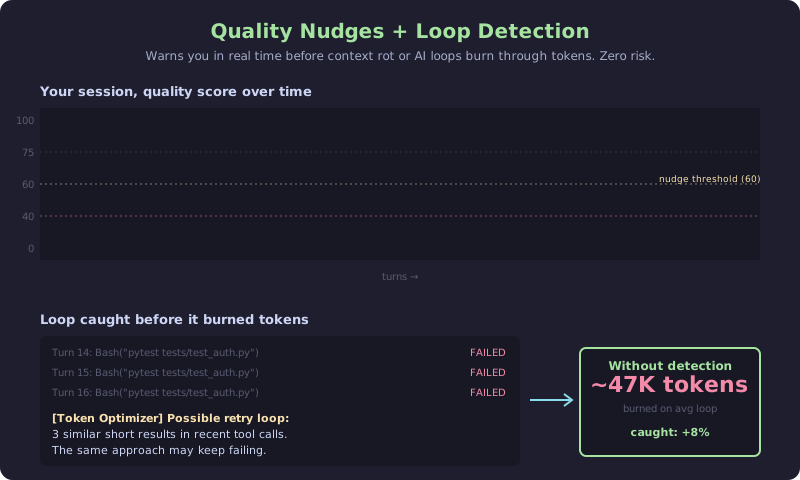
Watches your context quality in real time. When the score drops 15+ points or crosses below 60, an inline system note enters the context that reads something like [Token Optimizer] Quality dropped to 58. Consider /compact to protect context.
Claude sees that note on the next turn and surfaces the warning to you naturally, or adjusts behavior on its own. You don't have to watch a dashboard or remember thresholds. The nudge shows up right where decisions get made, with zero setup after install.
Value: catches context rot early so /compact lands at the right moment, before you lose decisions to compaction.
How it works: runs inside the existing quality-cache hook on every UserPromptSubmit. Cooldown of 5 minutes between nudges, max 3 per session. Suppressed on the first check after a compaction, so you don't get warned about quality you just fixed.
Risk: none. Only adds a short note to context, never removes anything.
Loop Detection (ON by default, fully automatic)
Catches the AI getting stuck on a retry loop before it burns through tokens. When similarity crosses the threshold, a short inline note lands in the context flagging the loop so the model breaks out of it, with no user action needed. Savings are measured from the actual content of the looping turns, not estimated.
Value: post-hoc detectors found that loop sessions average 47K wasted tokens. Real-time detection prevents this. Every caught loop logs the measured token cost of the loop turns to your local telemetry.
How it works: compares the last 4 user messages and last 5 tool results for similarity. Fires at confidence ≥0.7 with a session cap of 2 notes. Uses fixed message templates and never echoes user content back.
Risk: none. Only adds a short note.
Delta Mode (ON by default, your biggest single win)
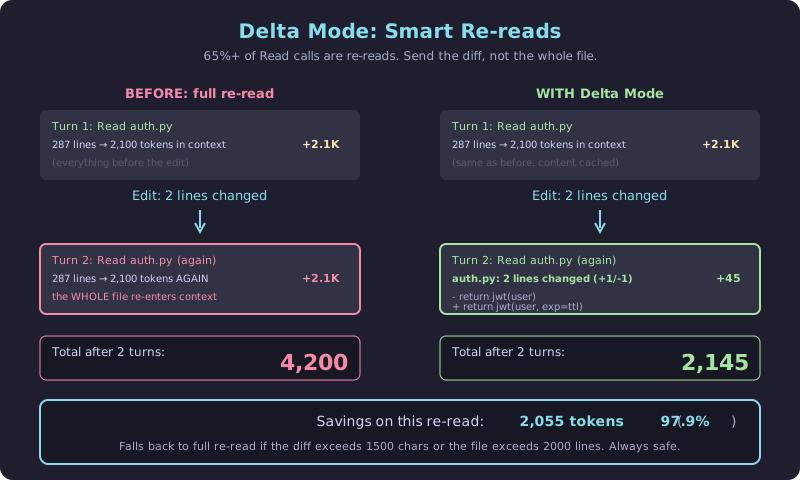
When the AI re-reads a file after editing it, the Read call returns only what changed instead of the whole file. Fully automatic, no configuration, no user action. 65%+ of Read calls in real sessions are re-reads, which makes this the highest-impact v5 feature.
Value: typical sessions re-read the same file 2-5 times. Delta mode sends only the diff. A 2,000-token file re-read becomes a 50-token diff, for 97% savings on that specific read.
// faq
What is token-optimizer?
Find the ghost tokens. Fix them. Survive compaction. Avoid context quality decay. . It is open-source on GitHub.
Is token-optimizer free to use?
token-optimizer is open-source under the NOASSERTION license, so it is free to use.
What category does token-optimizer belong to?
token-optimizer is listed under plugins in the Claudeers registry of Claude-compatible tools.
// embed badge

[](https://claudeers.com/token-optimizer)
// retro hit counter

[](https://claudeers.com/token-optimizer)
// reviews
// guestbook
// related in Claude Plugins
 🔓
🔓A single CLAUDE.md file to improve Claude Code behavior, derived from Andrej Karpathy's observations on LLM coding pitfalls.
 🔓
🔓Claude Code is an agentic coding tool that lives in your terminal, understands your codebase, and helps you code faster by executing routine tasks, explainin…
 🔓
🔓"CLI-Anything: Making ALL Software Agent-Native" -- CLI-Hub: https://clianything.cc/
🔓financial-services — a Claude ecosystem project on GitHub.