
tmux-claude-session-manager
Run many Claude Code sessions across your projects, each in its own tmux session — then list them, see which are done vs. still working, and jump to one from…
Install with your AI
Paste into Claude Code, Cursor, or any agent — it reads the repo and wires the tool into your project.
Install and set up tmux-claude-session-manager (release-binary project) into my current project.
Found on https://claudeers.com/tmux-claude-session-manager
Repo: https://github.com/craftzdog/tmux-claude-session-manager
Homepage/docs: https://www.devas.life/i-made-a-claude-code-session-manager-for-tmux/
Detected install method: release-binary → inspect the README
Category: devops. Platforms: cli, api.
Read the repo's README for exact setup and env vars, then install it and wire it into my project.

Claudeers Health Verdict:
active; community-verified: false. Confirm the source before running anything.
Grab the latest release asset from GitHub.
# download a build from https://github.com/craftzdog/tmux-claude-session-manager/releases
git clone https://github.com/craftzdog/tmux-claude-session-manager
// compatibility
| Platforms | cli, api |
|---|---|
| Operating systems | — |
| AI compatibility | claude |
| License | MIT |
| Pricing | open-source |
| Language | Shell |
tmux-claude-session-manager
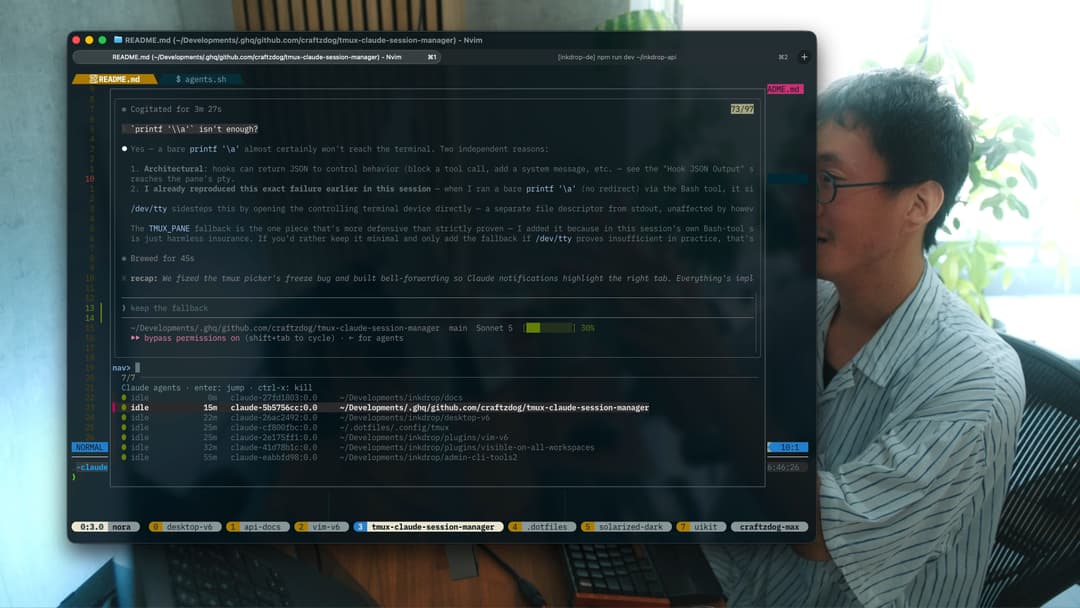
Run many Claude Code sessions across your projects, each in its own tmux session — then list them, see which are done vs. still working, and jump to one from a single popup.
If you launch Claude per-directory (one nested session per project), you quickly end up with a dozen of them and no way to tell which are finished without opening each one. This plugin gives you:
- 🔢 A central picker (
prefix+u) listing every running Claude session. - 🟢 Live status per session —
working/waiting/idle— driven by Claude Code hooks, so you instantly see which need you. - 👁️ A live preview of each session's screen right in the picker.
- 🎯 Smart jump — selecting a session switches your client to the window it was launched from, then resumes it in a popup over it.
- 🚀 A launcher (
prefix+y) that opens/attaches a Claude session for the current directory. - ❌ Quick kill (
ctrl-x) of finished sessions from the picker.
Status is optional: without the hooks the picker still lists, previews, jumps,
and kills — sessions just show ? instead of a color.
Prerequisites
- tmux ≥ 3.2 (for
display-popup) - fzf — the picker UI
- Claude Code CLI (the
claudecommand) - bash; macOS or Linux
Install (tpm)
Add to ~/.tmux.conf (or ~/.config/tmux/tmux.conf):
set -g @plugin 'craftzdog/tmux-claude-session-manager'
Then hit prefix + I to install.
Keybinding note: by default the plugin binds
prefix+y(launch) andprefix+u(list). If your config binds those elsewhere, either change the options below, or make sure the plugin loads after your own bindings (putrun '~/.tmux/plugins/tpm/tpm'after them) so the one you want wins.
Manual install
git clone https://github.com/craftzdog/tmux-claude-session-manager ~/clone/path
Add to ~/.tmux.conf, then reload (prefix + r or tmux source ~/.tmux.conf):
run-shell ~/clone/path/claude_session_manager.tmux
Usage
| Key | Action |
|---|---|
prefix + y | Launch (or re-attach to) a Claude session for the current directory, in a popup |
prefix + u | Open the session picker |
Inside the picker:
| Key | Action |
|---|---|
enter | Jump to the session (switches to its origin window, resumes in the popup) |
ctrl-x | Kill the highlighted session |
↑ / ↓, type to filter | fzf navigation |
Sessions needing your attention (waiting, idle) sort to the top.
Status setup (optional, recommended)
Status comes from Claude Code hooks
that stamp each session's state onto its tmux session. Add the following to your
Claude Code settings (~/.claude/settings.json), merging into any existing
hooks block. Adjust the path if your plugins live elsewhere (e.g.
~/.tmux/plugins/...):
{
  "hooks": {
    "UserPromptSubmit": [
      {
        "matcher": "",
        "hooks": [
          {
            "type": "command",
            "command": "$HOME/.config/tmux/plugins/tmux-claude-session-manager/scripts/state.sh working"
          }
        ]
      }
    ],
    "Notification": [
      {
        "matcher": "permission_prompt",
        "hooks": [
          {
            "type": "command",
            "command": "$HOME/.config/tmux/plugins/tmux-claude-session-manager/scripts/state.sh waiting"
          }
        ]
      }
    ],
    "PreToolUse": [
      {
        "matcher": "AskUserQuestion",
        "hooks": [
          {
            "type": "command",
            "command": "$HOME/.config/tmux/plugins/tmux-claude-session-manager/scripts/state.sh waiting"
          }
        ]
      }
    ],
    "Stop": [
      {
        "matcher": "",
        "hooks": [
          {
            "type": "command",
            "command": "$HOME/.config/tmux/plugins/tmux-claude-session-manager/scripts/state.sh idle"
          }
        ]
      }
    ]
  }
}
The state machine:
| Event | State | Meaning |
|---|---|---|
UserPromptSubmit | 🔴 working | Busy — leave it |
Notification (permission) | 🟡 waiting | Needs permission |
PreToolUse (AskUserQuestion) | 🟡 waiting | Asking you a question |
Stop | 🟢 idle | Turn finished — your move |
Claude Code reloads
hooksdynamically — no restart needed. Sessions that are already running start reporting status on their next event once the hooks are added.
Options
Set any of these before the plugin loads (defaults shown):
set -g @claude_launch_key     'y'        # prefix key: launch/open for current dir
set -g @claude_list_key       'u'        # prefix key: open the picker
set -g @claude_command        'claude'   # command run in new sessions
set -g @claude_args           ''         # extra args appended to the command
set -g @claude_session_prefix 'claude-'  # tmux session name prefix
set -g @claude_popup_width     '90%'     # popup width
set -g @claude_popup_height    '90%'     # popup height
For example, to skip permission prompts in launched sessions:
set -g @claude_args '--dangerously-skip-permissions'
How it works
- The launcher creates a detached
claude-<hash-of-dir>tmux session runningclaude, records the window it came from in@claude_origin, and attaches to it in a popup. - The hooks set
@claude_state/@claude_state_aton each session as Claude works. - The picker lists sessions matching the prefix, reads their state and a live
capture-panepreview, and on selection moves your client to the session's origin window before resuming it in the popup. - Pressing
prefix+ufrom inside a session popup detaches that popup first (closing it), then reopens the picker full-size on the outer host client — so you never end up with a cramped popup-in-popup.
License
MIT © Takuya Matsuyama
// faq
What is tmux-claude-session-manager?
Run many Claude Code sessions across your projects, each in its own tmux session — then list them, see which are done vs. still working, and jump to one from a single popup.. It is open-source on GitHub.
Is tmux-claude-session-manager free to use?
tmux-claude-session-manager is open-source under the MIT license, so it is free to use.
What category does tmux-claude-session-manager belong to?
tmux-claude-session-manager is listed under devops in the Claudeers registry of Claude-compatible tools.
// embed badge

[](https://claudeers.com/tmux-claude-session-manager)
// retro hit counter

[](https://claudeers.com/tmux-claude-session-manager)
// reviews
// guestbook
// related in DevOps & CI/CD
 🔓
🔓⭐AI-driven public opinion & trend monitor with multi-platform aggregation, RSS, and smart alerts.🎯 告别信息过载,你的 AI 舆情监控助手与热点筛选工具!聚合多平台热点 + RSS 订阅,支持关键词精准筛选。AI…
 🔓
🔓Use Claude Code as the foundation for coding infrastructure, allowing you to decide how to interact with the model while enjoying updates from Anthropic.
 🔓
🔓Professional Antigravity Account Manager & Switcher. One-click seamless account switching for Antigravity Tools. Built with Tauri v2 + React (Rust).专业的 Antig…
 🔓
🔓Roadmap to becoming an ASP.NET Core developer in 2026