
the-antislop
A Claude Code skill that detects and fixes AI-generated writing patterns. 35+ patterns, tiered scoring, editor mode.
Install with your AI
Paste into Claude Code, Cursor, or any agent — it reads the repo and wires the tool into your project.
Install and set up the-antislop (claude-skill project) into my current project.
Found on https://claudeers.com/the-antislop
Repo: https://github.com/aplaceforallmystuff/the-antislop
Homepage/docs: —
Detected install method: claude-skill → # copy this skill into .claude/skills/the-antislop/
Category: skills. Platforms: cli, api, desktop.
Read the repo's README for exact setup and env vars, then install it and wire it into my project.

Claudeers Health Verdict:
active; community-verified: false. Confirm the source before running anything.
# copy the skill dir into your project:
# .claude/skills/the-antislop/   (or ~/.claude/skills/the-antislop/ for all projects)
git clone https://github.com/aplaceforallmystuff/the-antislop
// compatibility
| Platforms | cli, api, desktop |
|---|---|
| Operating systems | — |
| AI compatibility | claude |
| License | MIT |
| Pricing | open-source |
| Language | Shell |
The AntiSlop
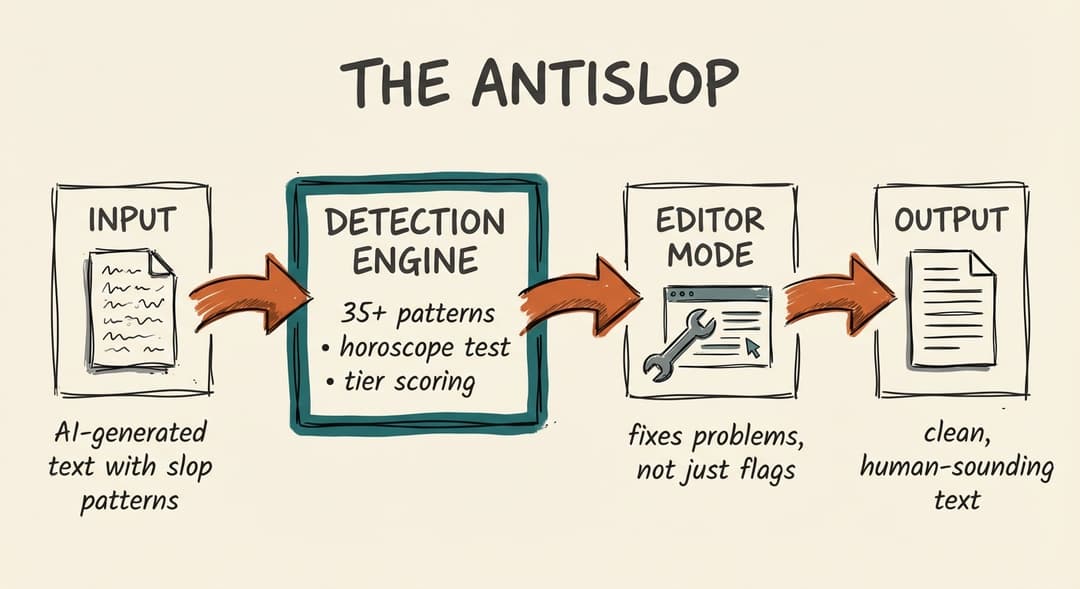
A Claude Code skill that detects and fixes AI-generated writing patterns. More comprehensive than detection alone — it actually rewrites the problems.
Why This Exists
AI-generated text has tells. Wikipedia's Signs of AI Writing documents 24 patterns. But detection alone isn't enough. You need a tool that:
- Detects comprehensively — 35+ patterns across content, language, style, and structure
- Scores severity — Not all patterns are equally bad (tiered system)
- Actually fixes problems — Editor mode rewrites, not just flags
- Catches structural tells — Staccato fragments, manufactured personality, uniformity
Installation
Option 1: Skills CLI
npx skills add aplaceforallmystuff/the-antislop
Option 2: Clone to skills directory
mkdir -p ~/.claude/skills
git clone https://github.com/aplaceforallmystuff/the-antislop.git ~/.claude/skills/the-antislop
Usage
In Claude Code, Claude Desktop, or any Claude interface with skill support:
/antislop

[paste your text here]
Or ask Claude directly:
Run antislop on this draft: [your text]
The Horoscope Test
"Could anyone have written this, for anyone?"
If yes, it's slop. Like a horoscope — technically applicable to everyone, resonant with no one.
Detection Categories
Tier 1: Remove Immediately
- delve, game-changer, revolutionary, leverage, unlock potential
- "it's worth noting," "in today's digital landscape"
- moreover, furthermore, cutting-edge
Tier 2: Suspicious When Repeated
- here's the thing, at the end of the day, the bottom line
- paired adjectives ("comprehensive and thorough")
- template openings ("In this post, we'll cover...")
Tier 3: Watch for Clusters
- transition words (however, firstly, moving forward)
- corporate buzzwords (robust, seamless, scalable)
Structural Patterns (Often Missed)
- Staccato fragments: "Short. Punchy. Exhausting."
- Sentence uniformity: Every sentence 10-15 words
- Comparator sentences: "This isn't X. It's Y."
- Manufactured personality: Fake developer snark
- Self-promotional framing: Author's achievements as headline
Scoring System
| Pattern Type | Points |
|---|---|
| Tier 1 phrase | +3 |
| Tier 2 (repeated) | +2 |
| Tier 3 cluster | +2 |
| Failed horoscope test | +5 |
| Staccato fragment spam | +4 |
| Manufactured personality | +4 |
- 0-5: Low risk
- 6-12: Medium risk (significant editing needed)
- 13+: High risk (likely unedited AI)
Editor Mode
Unlike detection-only tools, The AntiSlop fixes problems by default:
- Removes Tier 1 phrases
- Deduplicates Tier 2 phrases
- Combines staccato fragments into flowing prose
- Replaces comparator sentences with direct statements
- Varies sentence lengths
Request "audit only" if you just want detection without edits.
Example
Before:
Let's delve into how AI is revolutionizing the landscape. It's worth noting that these game-changing tools are unlocking potential at scale. The speed is impressive. The quality is enhanced. The adoption is growing.
After:
Here's how teams are using AI coding tools. In a 2024 Google study, developers completed simple functions 55% faster, but showed no improvement on debugging. The tools handle boilerplate well — config files, test scaffolding, repetitive refactors — but can't tell when they're wrong.
Further Reading
For more on AI writing patterns and maintaining your authentic voice, see the AI Writing Field Guide.
Related Skills
Part of the aplaceforallmystuff skills collection:
- voice-editor — 6-pass editing to match your voice profile
- voice-analyzer — Create the VOICE.md that personalizes detection
- slop-detector — Lightweight detection-only variant
Credits
- Pattern research from Wikipedia: Signs of AI Writing
- WikiProject AI Cleanup
- Finnish study on "delve" usage (56,878 essays)
- Georgia Tech analysis (168.3M articles)
License
MIT
Author
Jim Christian (@jimchristian)
// faq
What is the-antislop?
A Claude Code skill that detects and fixes AI-generated writing patterns. 35+ patterns, tiered scoring, editor mode.. It is open-source on GitHub.
Is the-antislop free to use?
the-antislop is open-source under the MIT license, so it is free to use.
What category does the-antislop belong to?
the-antislop is listed under skills in the Claudeers registry of Claude-compatible tools.
// embed badge

[](https://claudeers.com/the-antislop)
// retro hit counter

[](https://claudeers.com/the-antislop)
// reviews
// guestbook
// related in Claude Skills
 🔓
🔓An agentic skills framework & software development methodology that works.
 🔓
🔓 🔓
🔓💫 Toolkit to help you get started with Spec-Driven Development
 🔓
🔓AI coding assistant skill (Claude Code, Codex, OpenCode, Cursor, Gemini CLI, and more). Turn any folder of code, SQL schemas, R scripts, shell scripts, docs,…