
t3code
The best way to control Claude Code, Codex and more from any computer or phone
Install with your AI
Paste into Claude Code, Cursor, or any agent — it reads the repo and wires the tool into your project.
Install and set up t3code (claude-plugin project) into my current project.
Found on https://claudeers.com/t3code
Repo: https://github.com/pingdotgg/t3code
Homepage/docs: https://t3.codes
Detected install method: claude-plugin → /plugin install t3code@pingdotgg/t3code
Category: automation. Platforms: cli, api, desktop, web, mobile.
Read the repo's README for exact setup and env vars, then install it and wire it into my project.

Claudeers Health Verdict:
unknown; community-verified: false. Confirm the source before running anything.
⚠ Unverified / not recently updated — review before pasting a run-this config.
/plugin marketplace add pingdotgg/t3code
/plugin install t3code@pingdotgg/t3code
git clone https://github.com/pingdotgg/t3code
// compatibility
| Platforms | cli, api, desktop, web, mobile |
|---|---|
| Operating systems | — |
| AI compatibility | claude |
| License | MIT |
| Pricing | open-source |
| Language | TypeScript |

T3 Code
The open-source control plane for coding agents.
Download · iOS · Android · Web · Docs · Discord
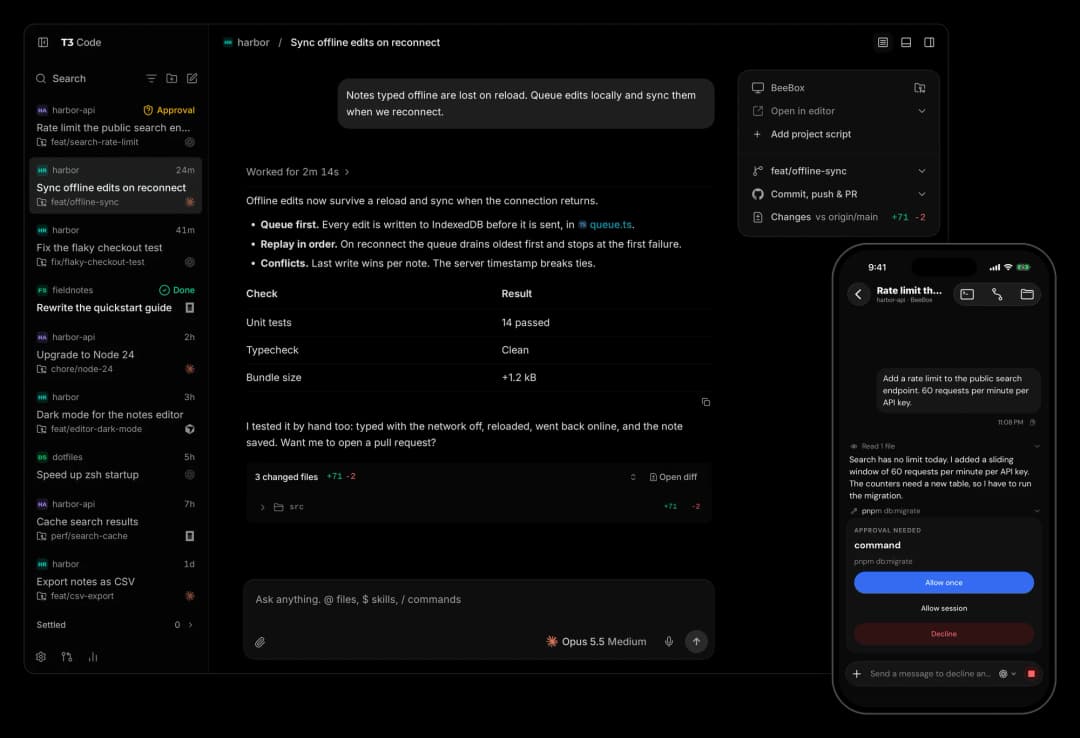
T3 Code runs the coding agents on your machine and gives them one fast interface. Start a thread at your desk, then approve the next step from your phone.
It works with Claude Code, Codex, Cursor, OpenCode, Grok Build, Antigravity, Kiro, Pi, Muse Code, fx, and any ACP agent. If an agent is set up on your computer, T3 Code can control it.
What you get
- Your subscriptions. T3 Code does not resell tokens. It drives the agents you are already signed in to.
- Every agent in one place. Change models in the middle of a thread. Let Claude hand a task to Codex.
- Desktop, web, and phone. One server, and every client shows the same threads. There are apps for iOS and Android.
- Remote ready. Run agents on any machine. Connect over your local network, Tailscale, or T3 Connect.
- Git built in. Each thread can work in its own worktree. Review the diff, then commit, push, and open a pull request with one button.
- Fast. Performance is a feature here. We measure it, and we treat a dropped frame as a bug.
- Open. MIT licensed. If you don't like something, fork it.
Install
Desktop app
Download T3 Code for macOS, Windows, or Linux. You can also use a package manager:
| Platform | Command |
|---|---|
| macOS | brew install --cask t3-code |
| Windows | winget install T3Tools.T3Code or scoop install extras/t3code |
| Arch Linux | yay -S t3code-bin |
| Nix | nix profile add github:NixOS/nixpkgs/nixos-unstable#t3code |
| Debian, Ubuntu | .deb from Releases |
Command line
This installs the t3 command. Run t3 to start the server and open the web app.
curl -fsSL https://t3.codes/install.sh | sh
On Windows, in PowerShell:
irm https://t3.codes/install.ps1 | iex
To try it once without an install, run npx t3@latest.
Phone
Get the app from the App Store or Google Play. Then follow remote access to connect it to your computer.
Sign in to an agent
T3 Code needs one agent that is installed and signed in. For example, install Claude Code and run claude auth login, or install Codex CLI and run codex login.
Provider setup has the steps for each agent. Install T3 Code covers nightly builds, AppImage, WSL, and NixOS.
"Wait, what are you selling me?"
Nothing. We built T3 Code because we wanted the best possible development experience with agents. We were inspired by existing solutions like the Codex desktop app, Conductor, Claude Desktop and Cursor Glass, but none met our bar.
We wanted something performant, remote-ready, and truly open. If we ever go the wrong direction, we want you to have everything you need to fork and build the tool that you want.
Documentation
- Install and first run
- Remote access from a phone or another machine
- Permission modes
- Source control
- Connect outside agents over MCP
- FAQ
All docs has the full list.
Contributing
We have limited review capacity. Small, focused fixes are the most likely to be merged. Features need an approved discussion first.
- Read CONTRIBUTING.md before you report a bug or open a pull request.
- Put feature requests in Ideas.
- Build from source with the development runbook. The architecture overview explains how it works.
- Get help in Discord.
License
// faq
What is t3code?
The best way to control Claude Code, Codex and more from any computer or phone. It is open-source on GitHub.
Is t3code free to use?
t3code is open-source under the MIT license, so it is free to use.
What category does t3code belong to?
t3code is listed under automation in the Claudeers registry of Claude-compatible tools.
// embed badge

[](https://claudeers.com/t3code)
// retro hit counter

[](https://claudeers.com/t3code)
// reviews
// guestbook
// related in Automation & Workflows
 🔓
 🔓
The API to search, scrape, and interact with the web at scale. 🔥
 🔓
🌐 Make websites accessible for AI agents. Automate tasks online with ease.
 🔓
Taste-Skill - gives your AI good taste. stops the AI from generating boring, generic slop
// built by
1 of its contributors also build on official projects — inspector
→ see how t3code connects across the ecosystem