
switchboard
A Claude Code plugin (mod) that shows every local Claude Code session in one Board pane in Claude Desktop — see which sessions are working, idle, or waiting…
Install with your AI
Paste into Claude Code, Cursor, or any agent — it reads the repo and wires the tool into your project.
Install and set up switchboard (claude-plugin project) into my current project.
Found on https://claudeers.com/switchboard-3
Repo: https://github.com/wide3751/switchboard
Homepage/docs: —
Detected install method: claude-plugin → /plugin install switchboard@wide3751/switchboard
Category: plugins. Platforms: cli, api, desktop, web.
Read the repo's README for exact setup and env vars, then install it and wire it into my project.

Claudeers Health Verdict:
active; community-verified: false. Confirm the source before running anything.
/plugin marketplace add wide3751/switchboard
/plugin install switchboard@wide3751/switchboard
git clone https://github.com/wide3751/switchboard
// compatibility
| Platforms | cli, api, desktop, web |
|---|---|
| Operating systems | — |
| AI compatibility | claude |
| License | MIT |
| Pricing | open-source |
| Language | TypeScript |

English | 繁體中文 | 简体中文 | 日本語 | 한국어
switchboard: a session board for Claude Code (a Claude Code mod)
A Claude Code plugin, built on Claude Code mods. When you run many Claude Code sessions at once, it lists every local session in one Board, so you can see at a glance which are working, which are idle and which are waiting on you, then jump to one with a click.
Sessions in the Claude Desktop Code tab and claude in iTerm, Terminal.app or the VS Code terminal all show up in the same list. Desktop and the terminal are supported equally; either one alone gets you everything.
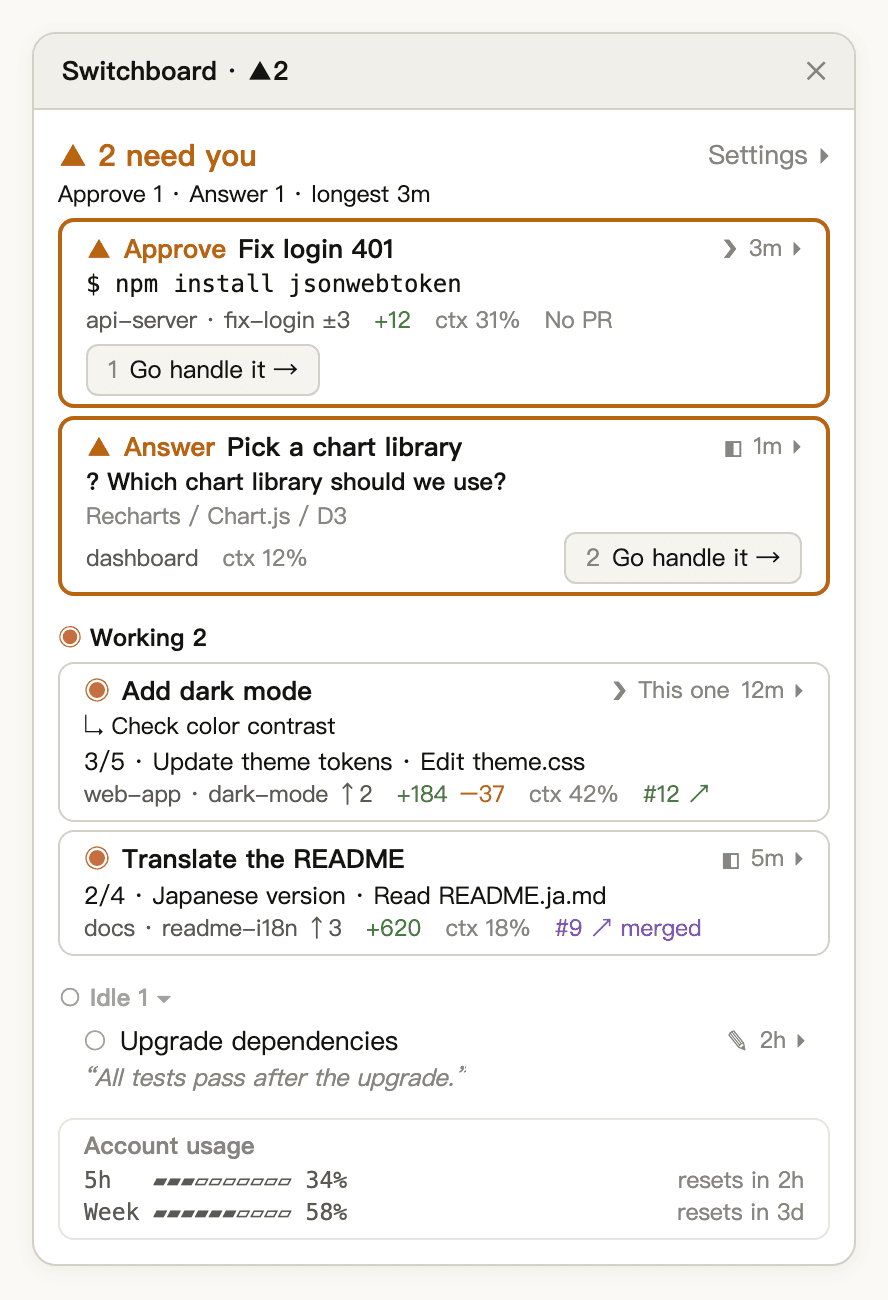
Illustration: two sessions need you (an approval and a question, each with a numbered “Go handle it” button), two are working, one is idle, and account usage sits at the bottom.
The way a switchboard operator sees which lines are lit, switchboard has every session report its own state and puts the ones waiting on you at the top:
| State | Meaning | Example |
|---|---|---|
| ▲ Needs You | Nothing moves until you look | A permission prompt for npm install, a multiple-choice question, a question box at the end of a Desktop turn, a turn stopped by an API error |
| ◉ Working | Claude is running a turn | Thinking, calling tools, running subagents; a finished turn whose background tasks (background subagents or Bash) are still running. Each running background task gets a line under the card with its title |
| ○ Idle | The turn is over and nothing is blocked | Finished and waiting for your next prompt; a turn you interrupted yourself |
| Ended | The session was closed or its process exited | Removed from the list at once |
Needs You only reacts to explicit signals, so when it lights up, something really is waiting on you. A question Claude asks in plain text counts as Idle; the last-reply preview on its row lets you spot it.
Quick start
claude plugin marketplace add wide3751/switchboard
claude plugin install switchboard@switchboard
Then follow the path for where you use Claude Code (or both):
Desktop: restart Claude Desktop and open any session in the Code tab. The Board appears on the right by itself, and from then on it opens in every Desktop session. If it doesn't appear, type /switchboard:open.
Terminal: restart claude. An ▦ Open board button appears above the prompt; click it or type /switchboard:open to open the Board. To have it open every time, go to Settings ▸ › General on the Board and check CLI sessions next to "Open the board automatically in" (the terminal has to be at least 144 columns wide).
Sessions that were already open before you installed still show up on the list, but with basic status only; restart them to get full details.
You can also paste this to Claude Code or any other coding agent and let it install switchboard for you:
Install switchboard by following https://github.com/wide3751/switchboard/blob/main/README.md
Usage
| Command | Description |
|---|---|
/switchboard:open | Open the Board in this session, in Desktop or a terminal |
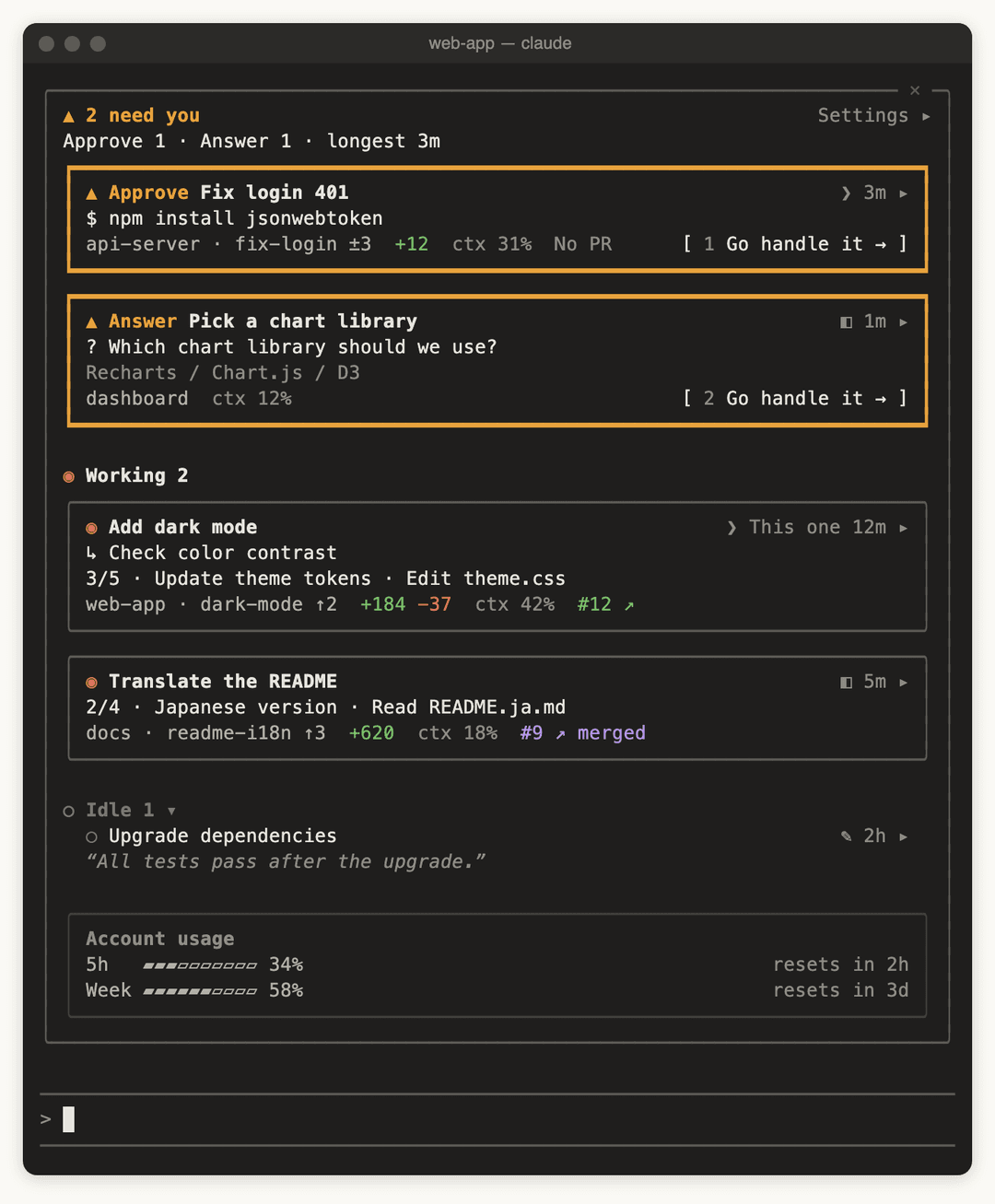
Illustration: the Board above the prompt in an 80-column terminal, with the same content as in Desktop.
On the Board:
- Header: when sessions are waiting on you,
▲ 2 need you, then a line with the breakdown and the longest wait, for exampleApprove 1 · Answer 1 · longest 3m; otherwise✓ Nothing needs you. - Sections: Needs You → Working → Idle. Needs You is ordered by how long each session has been waiting, longest first. Click the Idle heading to collapse it.
- Cards: the first line shows the state and the title; the second shows the one thing that matters most, such as the command it wants to run, the question and its options, current progress, or an idle session's last reply; the last line holds fields such as folder, branch, changes,
ctx 31%and the PR. - Go handle it: a Needs You card has 1 Go handle it → at its bottom right. Click it, or press
1–9while the Board has focus, to jump to that session. - Click a title to jump to that session: a Desktop session opens in Claude Desktop; a session in iTerm or Terminal.app switches to its tab.
- Click the time and
▸(for example3m ▸) to expand a card: the branch and the base it is compared with, a context usage bar, connectors, the full path and background tasks. - Account usage: on a subscription, 5-hour and weekly rate-limit usage; on API billing, the total spent. Once usage reaches 95%, it moves up under the header to warn you.
- While the Board is closed: the button above the prompt carries the needs-you count, for example ▲2 need you · ▦ Open; one click opens the Board.
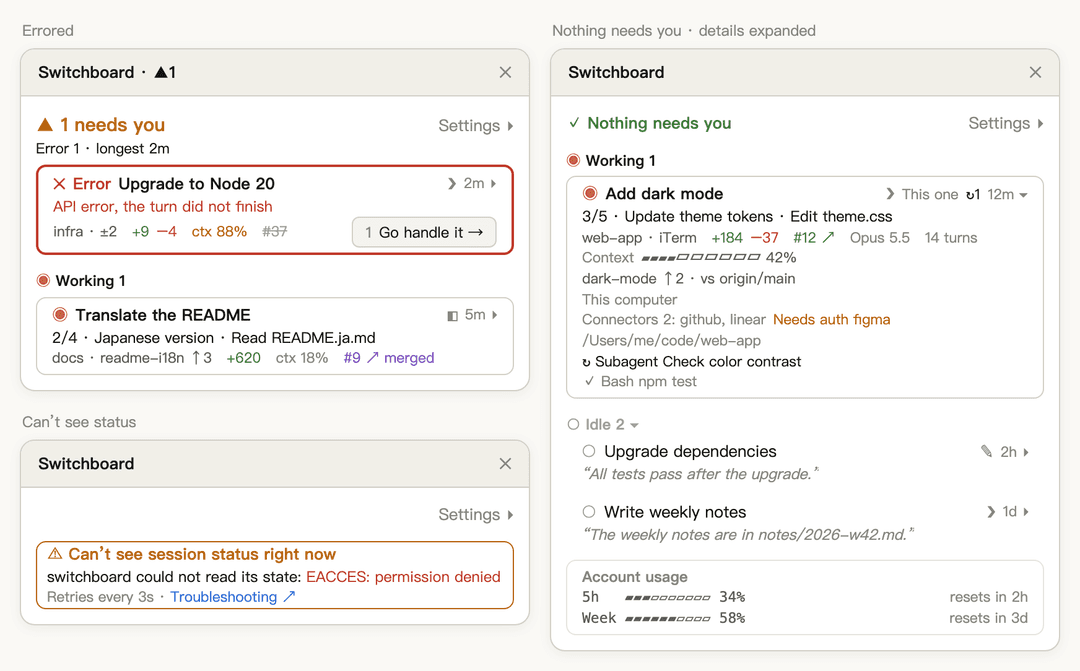
Illustration: top left, an errored session (thick red border); right, nothing needs you and one card is expanded; bottom left, the alert card when session status can't be seen.
Keyboard in a terminal (for when your terminal doesn't report mouse clicks):
| Key | Action |
|---|---|
ctrl+x tab | Move from the prompt into the Board |
tab / shift+tab | Move between buttons and titles |
enter | Press the selected button or title |
1–9 | Press the Go handle it → with that number |
esc | Go back to the prompt, leaving the Board open |
ctrl+x x | Close the Board |
Settings (click Settings ▸ at the right end of the header; shared by all sessions):
- Card content: choose which fields Needs You, Working and Idle cards show, or just pick Compact, Standard or Detailed
- Open the board automatically in: on by default for Desktop sessions and off for CLI sessions, set separately
- Language: Auto, English, 日本語, 한국어, 简体中文, 繁體中文
- Billing: Auto, Subscription (shows rate limits), API (shows cost)
Notifications: switchboard sends none of its own and leaves alerts to Claude Code and Claude Desktop. In a terminal, type /config in claude to set the notification method; for Desktop, allow Claude in System Settings › Notifications.
For every field, symbol, sorting rule and per-terminal detail, see the full usage guide.
Supported environments
Where claude runs | Listed on the Board | Opens the Board | Click to jump | Tested |
|---|---|---|---|---|
| Claude Desktop Code tab | ✓ | ✓ | ✓ | ✓ |
| iTerm | ✓ | ✓ | ✓ | ✓ |
| Terminal.app | ✓ | ✓ | ✓ | ✓ |
| VS Code integrated terminal | ✓ | ✓ | Shows the folder | Not yet |
| Other terminals (Warp, Ghostty, …) and tmux | ✓ | ✓ | Shows the folder | Partly |
| VS Code extension (graphical UI) | — | ✕ | — | Not yet |
The first time you jump to iTerm or Terminal.app, macOS asks whether to allow controlling it; choose Allow.
Privacy and security
switchboard runs entirely on your computer and sends nothing to any service of its own.
What it reads
- Claude Code's own session records (
~/.claude/sessions/*.json), to know which sessions exist - The status reports it writes itself
- Other sessions' transcripts are never read
What it writes
- One status report per session in
~/.claude/switchboard/reports/, a plain JSON file you can open at any time - It holds the title (the first ~40 characters of the first prompt), model, branch, current activity, approval preview, a short excerpt of the last reply, context usage and so on
- Before writing, fragments that look like secrets (such as
Bearer …,token=…,sk-…,ghp_…) are replaced with•••; this is best effort and can't catch everything - Stale reports are removed automatically after a session ends
Commands it runs
ps(taskliston Windows): which sessions are still alivegit: branch and changes, read in each session's own foldergh pr view: the pull request, using your ownghlogin; this is the only command that goes over the network, and withoutghnothing doesopen,osascript(rundll32on Windows): only when you click, to switch to the session or tab, or to open a PR in the browser
Apart from removing its own stale reports, switchboard never modifies your files or repos. All the code is open source (MIT), so you can check it yourself. For item-by-item details, see Privacy and data.
Requirements
- macOS, Linux or Windows; jumping to a session works on macOS, and on Windows for Claude Desktop sessions
- Claude Code in either place (or both):
- the Code tab of the Claude Desktop app
claudein a terminal (iTerm, Terminal.app, the VS Code integrated terminal, …)
- Claude Code v2.1.299 or newer. Older versions reject how the Board is drawn, so it opens blank. In Desktop, type
/statusin the Code tab; in a terminal, runclaude --version. The Claude Code bundled with Desktop can be a different version from the one in your terminal, so check both - Optional:
gitfor branch and change details, andghsigned in for pull request details
Update, disable or uninstall
Update (running install again on an installed plugin does not upgrade it):
claude plugin marketplace update switchboard
claude plugin update switchboard@switchboard
Disable for now (stays installed; turn it back on with enable):
claude plugin disable switchboard@switchboard
Remove completely:
claude plugin uninstall switchboard@switchboard
claude plugin marketplace remove switchboard
rm -rf ~/.claude/switchboard
- The last line deletes the status reports, which stay behind when the plugin is removed. If you set
CLAUDE_CONFIG_DIR, delete$CLAUDE_CONFIG_DIR/switchboardinstead. On Windows, delete%USERPROFILE%\.claude\switchboard - After updating, disabling or removing, restart Claude Desktop and any open
claudefor it to take effect
Limitations
- Jumping works on macOS, and on Windows for Desktop sessions only: on Windows, clicking a Claude Desktop session takes you there, but CLI sessions in a terminal don't jump yet; on Linux the Board shows session status, but clicking a title doesn't jump to the session.
- CLI sessions jump only in iTerm and Terminal.app: other terminals only show the folder the session is in.
- Narrow terminals don't open it by themselves: it needs at least 144 columns; in a narrower terminal, click the button above the prompt and it opens at any width.
- Updated every 3 seconds: changes show up within a few seconds, not instantly.
- Sessions open before you installed show basic status only: no Errored state, approval preview or last reply; restart them to fix it.
- Local sessions only: subagents and cloud sessions are not listed.
Troubleshooting
When session status can't be seen, the "Troubleshooting ↗" link on the Board's alert card leads here.
| Symptom | What to do |
|---|---|
A row says switchboard not loaded, basic status only | That session was open before you installed; restart it |
/switchboard:open answers that the hooks did not load | Check that your Claude Code version supports mods, then restart this session. If it still fails, start claude --debug and look for hooks module switchboard in the log |
⚠ Can’t see session status right now, saying no session records were found | Your Claude Code version is too old, or CLAUDE_CONFIG_DIR points somewhere other than the folder Claude Code actually uses |
⚠ Can’t see session status right now, with red text below | The red text is the raw error. The Board retries every 3 seconds, so a passing error clears by itself; if it keeps showing, start claude --debug to look into it |
⚠ Can’t see session status right now, saying a folder can't be read | Check that the folder exists and that you can read it |
| The Board opens but is completely blank | Your Claude Code is older than v2.1.299. Run claude update, then restart the session |
On Windows, the folder shown is /.claude/sessions | Versions before 0.10.0 can't find your home folder on Windows. Update switchboard, then start a new session |
| No PR shown | Install gh and run gh auth login; the folder must be a GitHub repository |
| Clicking a CLI session doesn't jump | Only iTerm and Terminal.app can jump. If those don't jump either, allow controlling them in System Settings › Privacy & Security › Automation |
For anything else, see the full troubleshooting guide.
Contributing
Issues and pull requests are welcome. Before changing behavior, read GLOSSARY.md for the terminology and the decisions in docs/adr/ (both in Chinese). When you add or change UI text, update all five languages in agens-view/hooks/i18n.ts.
License
// faq
What is switchboard?
A Claude Code plugin (mod) that shows every local Claude Code session in one Board pane in Claude Desktop — see which sessions are working, idle, or waiting on you.. It is open-source on GitHub.
Is switchboard free to use?
switchboard is open-source under the MIT license, so it is free to use.
What category does switchboard belong to?
switchboard is listed under plugins in the Claudeers registry of Claude-compatible tools.
// embed badge

[](https://claudeers.com/switchboard-3)
// retro hit counter

[](https://claudeers.com/switchboard-3)
// reviews
// guestbook
// related in Claude Plugins
 🔓
A single CLAUDE.md file to improve Claude Code behavior, derived from Andrej Karpathy's observations on LLM coding pitfalls.
 🔓
Claude Code is an agentic coding tool that lives in your terminal, understands your codebase, and helps you code faster by executing routine tasks, explainin…
 🔓
"CLI-Anything: Making ALL Software Agent-Native" -- CLI-Hub: https://clianything.cc/
🔓financial-services — a Claude ecosystem project on GitHub.