
swirl-search
AI Search & RAG Without Moving Your Data. Get instant answers from your company's knowledge across 100+ apps while keeping data secure. Deploy in minutes, no…
Install with your AI
Paste into Claude Code, Cursor, or any agent — it reads the repo and wires the tool into your project.
Install and set up swirl-search (git-clone project) into my current project.
Found on https://claudeers.com/swirl-search
Repo: https://github.com/swirlai/swirl-search
Homepage/docs: https://swirlaiconnect.com/
Detected install method: git-clone → git clone https://github.com/swirlai/swirl-search
Category: mcp-servers. Platforms: api, desktop, web.
Read the repo's README for exact setup and env vars, then install it and wire it into my project.

Claudeers Health Verdict:
active; community-verified: false. Confirm the source before running anything.
git clone https://github.com/swirlai/swirl-search
// compatibility
| Platforms | api, desktop, web |
|---|---|
| Operating systems | — |
| AI compatibility | claude |
| License | Apache-2.0 |
| Pricing | open-source |
| Language | Python |

Swirl Community Edition
Open-source federated metasearch and RAG over your enterprise sources — without moving your data.
Quick Start · Configuration · Connectors · Integrations · Key Features · Contributing
📦 Latest: Release Notes · what's new in each Community release.
🔎 What is Swirl?
Swirl adapts and distributes user queries to anything with a search API — search engines, databases, NoSQL engines, cloud/SaaS services, data silos. It uses Large Language Models to re-rank the unified results without extracting or indexing anything.
Swirl exposes its federated search and RAG via REST API and via the Model Context Protocol (MCP), so Claude Desktop, Claude Code, Cursor, and other MCP clients can answer questions against your private sources through swirl-mcp-server — no data movement, no per-source plumbing in the agent.
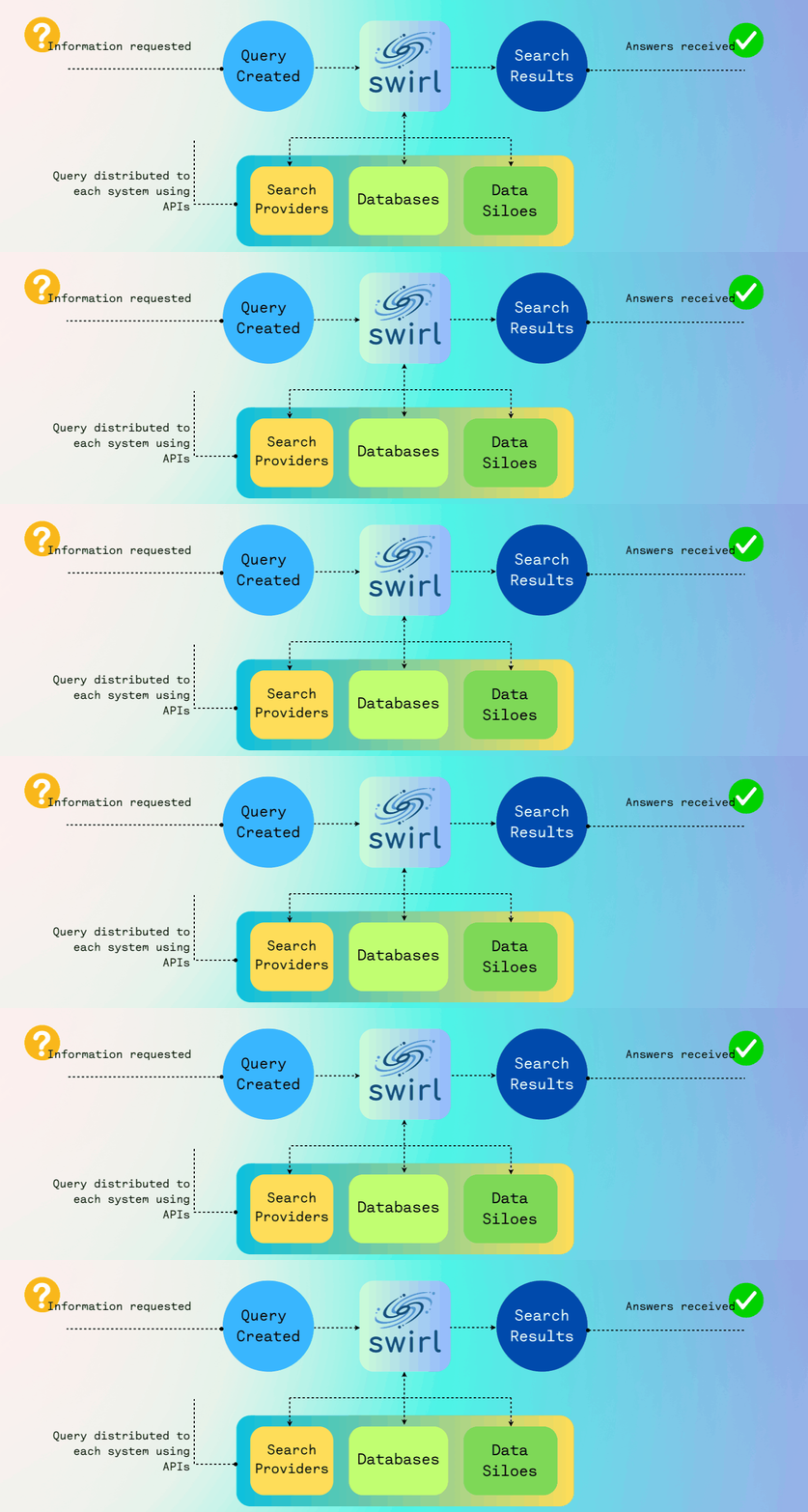

Swirl can connect to databases (SQL, NoSQL, Google BigQuery), public data services (Google PSE, arXiv, etc.), and enterprise sources (Microsoft 365, Jira, Miro, etc.), and generate insights with AI models like ChatGPT.
🚀 Quick Start
| Component | Tested versions |
|---|---|
| Python | 3.13+ |
| Docker Compose | v2.20+ |
| OS | macOS, Linux, Windows (WSL2) |
Option A — Docker (recommended)
The only one-command path. Option B below requires Python 3.13+, Redis, and a spaCy model download.
Requirements: Docker Desktop must be running. Windows users: configure WSL 2 or Hyper-V per Docker's Windows requirements.
# Download the compose file
curl https://raw.githubusercontent.com/swirlai/swirl-search/main/docker-compose.yaml -o docker-compose.yaml

# Optional: enable RAG with OpenAI
export OPENAI_API_KEY='your-key-here'

# Microsoft 365 OAuth callback (defaults below work for local Docker;
# see the M365 Guide to enable M365 connectors)
export MSAL_CB_PORT=8000
export MSAL_HOST=localhost

# Start Swirl (macOS / Linux / Windows)
docker compose pull && docker compose up
Open http://localhost:8000 and log in with admin / password.
Note: The Docker quickstart is intended for evaluation and development. The container does not retain data or configuration when shut down. For persistent deployment, see the Installation - Community guide, the Admin Guide, or the Kubernetes Deployment guide for cluster setups.
Option B — Developer install (from source)
For Swirl contributors and anyone customizing the platform. Requires Python 3.13+, a running Redis, and the spaCy en_core_web_lg model.
git clone https://github.com/swirlai/swirl-search.git
cd swirl-search
pip install -r requirements.txt
python -m spacy download en_core_web_lg

python swirl.py setup
python swirl.py start
Open http://localhost:8000/swirl/ and log in with admin / password.
🩺 Troubleshooting
| Symptom | Cause | Fix |
|---|---|---|
Error: bind: address already in use on docker compose up | Port 8000 already taken by another process | Stop the conflicting process, or override the port in docker-compose.yaml ("8001:8000") and open http://localhost:8001. |
| AI Summary empty / "No response from Generative AI" | OPENAI_API_KEY (or Azure equivalents) not set in the Swirl environment | export OPENAI_API_KEY=… before docker compose up. The key must be in Swirl's env, not your shell after start. |
| Credentials changed in the UI disappear after restart | The Docker quickstart does not persist state | Reapply credentials after each docker compose up, or move to a persistent deployment (see the Admin Guide). |
| M365 login loops, "redirect URI mismatch", or AADSTS50011 | Azure App Registration's redirect URI doesn't match MSAL_HOST / MSAL_CB_PORT | Make the Azure redirect URI exactly match http://{MSAL_HOST}:{MSAL_CB_PORT}/swirl/microsoft/callback (see the M365 Guide). |
python swirl.py start errors out talking to Redis | Local Redis isn't running (Option B only) | Start Redis first: redis-server (Homebrew/apt-get) or run the Redis Docker image and point Swirl at it. |
⚙️ Configuration
SearchProviders
Add credentials to the preloaded SearchProvider fixtures at /swirl/searchproviders/ or via the Django admin at /admin/swirl/searchprovider/. Each provider maps a connector type to a URL, credentials, and query/result mappings. Full configuration reference: SearchProviders Guide.
Microsoft 365
Swirl supports OAuth2 search across M365 Outlook, OneDrive, SharePoint, and Teams. Setup requires approval from an M365 administrator. See the M365 Guide for full instructions.
M365 Quick Reference
When M365 is configured, Swirl recognizes these tag-prefix shortcuts in the search query, routing to just the matching providers:
| Prefix | Source |
|---|---|
sharepoint: | SharePoint Sites |
onedrive: | OneDrive |
outlook: | Outlook Messages |
teams: | Microsoft Teams |
microsoft: | All M365 sources |
Example: sharepoint: Q3 budget searches only SharePoint for "Q3 budget". The same <tag>:<query> syntax works for any tag configured on a SearchProvider (e.g., arxiv:, github:, epmc:).
AI / LLM Providers
Configure a ChatGPT or GenAI SearchProvider with your OpenAI or compatible API key to enable real-time RAG. See the AI Guide.
🔌 Connectors
Swirl ships with 40+ pre-configured SearchProviders covering public web, scientific literature, Microsoft 365, developer tools, CRMs, databases, vector stores, and more. A representative selection:
| Category | Connectors | What it searches |
|---|---|---|
| Public web | Google PSE, Internet Archive, Google News, Hacker News | Web pages, news, RSS feeds, archived content |
| Scientific | arXiv, EuropePMC | Preprints and biomedical literature |
| Microsoft 365 | SharePoint, OneDrive, Outlook (mail + calendar), Teams | M365 OAuth2 across files, messages, events, chats |
| Developer | GitHub (Code, Issues, PRs, Commits), JetBrains YouTrack | Source, tickets, pull requests, articles |
| Atlassian | Confluence, Jira, Trello | Wiki, issues, task boards |
| CRM / Ops | HubSpot (Deals, Companies, Contacts), ServiceNow, Crunchbase | Pipelines, accounts, knowledge / catalog, organizations |
| Databases | Google BigQuery, Snowflake, MongoDB, SQLite3, Apache Solr | Structured records via parameterized queries |
| Search engines | Elasticsearch, OpenSearch | Existing search clusters |
| Vector | Pinecone, Qdrant | Semantic / embedding stores |
| Entities | LittleSis, OpenSanctions | People, companies, sanctioned entities |
| Legal | CourtListener (US), National Archives (UK) | Case law and government records |
| Other | Asana, Miro, Blockchain (Transactions + Wallets) | Tasks, drawings, on-chain data |
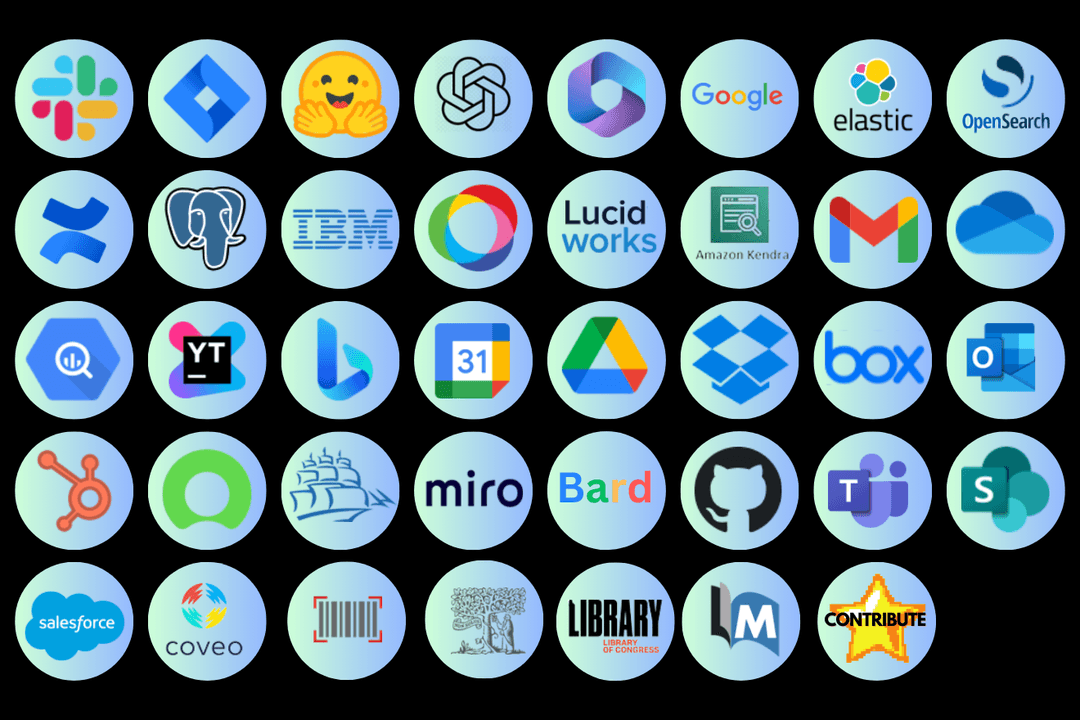
➕ Need a connector? Open an issue or contribute one — see Contributing.
🔗 Integrations
swirl-mcp-server
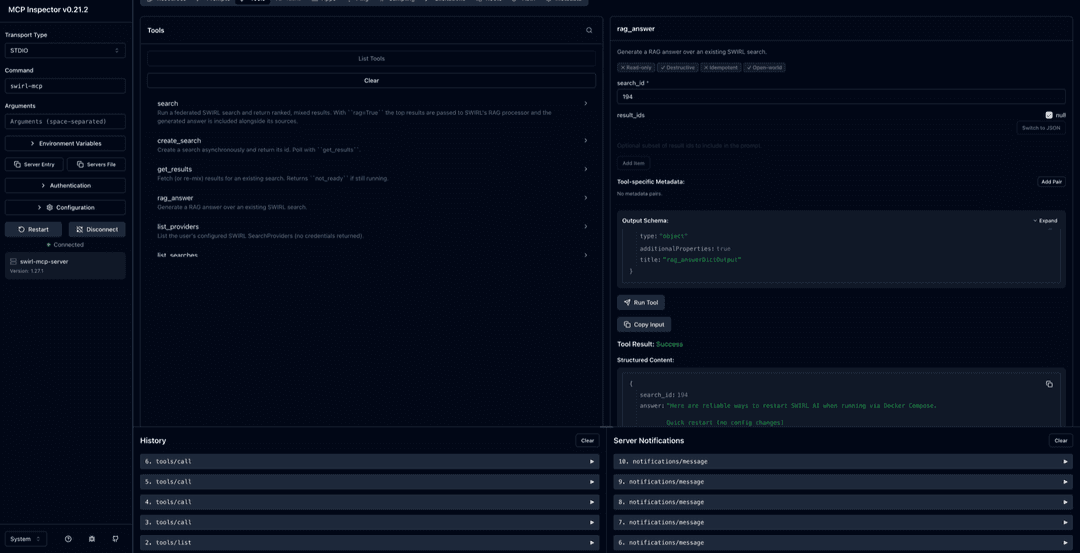
swirl-mcp-server is a Model Context Protocol adapter for Swirl. It exposes Swirl's federated search and RAG as MCP tools so Claude Desktop, Claude Code, Cursor, and other MCP clients can answer questions against your Swirl-connected sources without any data leaving your network.
Demo
Prerequisites
- Swirl Community 4.x running — see Quick Start above
- Python 3.10+ on the machine running the MCP server
- For
rag=true(generated answers): Swirl itself needs anOPENAI_API_KEY(or Azure OpenAI equivalents) — set it in Swirl's environment beforedocker compose up. Plainsearchworks without one.
Configuration
Install: pipx install git+https://github.com/swirlai/swirl-mcp-server. Then add to Claude Desktop's config (~/Library/Application Support/Claude/claude_desktop_config.json on macOS, %APPDATA%\Claude\claude_desktop_config.json on Windows):
{
  "mcpServers": {
    "swirl": {
      "command": "swirl-mcp",
      "env": {
        "SWIRL_BASE_URL": "http://localhost:8000",
        "SWIRL_USERNAME": "<your-swirl-username>",
        "SWIRL_PASSWORD": "<your-swirl-password>"
      }
    }
  }
}
Restart Claude Desktop and swirl should appear in the tools menu. Read more in the MCP Server guide or at swirlai/swirl-mcp-server — six MCP tools (search, rag_answer, list_providers, create_search, get_results, list_searches), with Claude Code and Cursor configs in examples/.
mike
mike is an open-source project assistant that uses Swirl for federated search and document import. When connected, mike's project chat gains two tools:
search_external— searches all active Swirl providers and returns ranked results into the conversationimport_document— fetches a document (PDF, DOCX, DOC) found via Swirl and imports it into the current project
Demo
▶️ Swirl Community × Mike OSS: Fetching & Summarizing SharePoint Docs with Claude
Prerequisites
- Swirl Community 4.5 or later — earlier versions don't include the integration points mike needs. Earlier versions are welcome to add support via PR! 🙂
- mike built from willchen96/mike#14 or later — this PR contains the Swirl integration changes
- A running mike backend (
npm run devinbackend/) - Optional: Microsoft 365 OAuth configured in Swirl for M365 document fetch
Configuration
In mike's backend/.env:
# SWIRL federated search (optional — enables search_external and import_document tools)
SWIRL_URL=http://localhost:8000

# Authenticate with a DRF token:
SWIRL_TOKEN=your-swirl-api-token

# Or with username/password Basic auth (takes precedence over SWIRL_TOKEN if both are set):
# SWIRL_USERNAME=admin
# SWIRL_PASSWORD=your-swirl-password
mike consumes Swirl's M365 Quick Reference tag-prefix syntax (sharepoint:, onedrive:, etc.) directly in user queries.
M365 document fetch
When mike's import_document tool receives a SharePoint or OneDrive URL, it proxies the download through Swirl's /swirl/fetch-document/ endpoint, which handles the Microsoft Graph API three-step fetch using the user's stored OAuth token. No M365 credentials need to be in mike's environment.
🌟 Key Features
| ✦ | Feature |
|---|---|
| 📌 | Microsoft 365 integration and OAUTH2 support |
| 🔍 | SearchProvider configurations for all included Connectors |
| ✏️ | Adaptation of the query for each provider including NOT rewriting, AND/OR pass-through |
| ⏳ | Synchronous or asynchronous search federation via REST API |
| 🛎️ | Optional subscribe feature to continuously monitor any search for new results |
| 🛠️ | Pipelining of Processor stages for real-time query, response and result transformation |
| 🗄️ | Results stored in SQLite3 or PostgreSQL for post-processing and analytics |
| 📖 | Matching on word stems and stopword handling via NLTK |
| 🚫 | Duplicate detection by field or Cosine Similarity threshold |
| 🔄 | Re-ranking via Cosine Vector Similarity using spaCy and NLTK |
| 🎚️ | Result mixers — relevancy, date, round-robin |
| ✒️ | Optional spell correction using TextBlob |
| 🔌 | Extensible Connector and Mixer objects |
👩💻 Contributing
- Join the Swirl Slack Community
- Branch off
developwith a descriptive name - Submit a PR — we follow Gitflow loosely
New to GitHub? The GitHub contributing guide is a great starting point.
📖 Documentation
Get started — Overview · Quick Start · Installation - Community · Release Notes
Use Swirl — User Guide · AI Search · AI Search Assistant · Glossary
Configure connectors — SearchProviders · M365 · AI / RAG · MCP Server
Operate — Admin Guide · Kubernetes · Monitoring · Security · Troubleshooting
Build & contribute — Developer Guide · Developer Reference · Tutorials · Contributions
👷♂️ Support
- Slack: Swirl Community
- Email: [email protected]
- Enterprise / managed service: [email protected]
// faq
What is swirl-search?
AI Search & RAG Without Moving Your Data. Get instant answers from your company's knowledge across 100+ apps while keeping data secure. Deploy in minutes, not months.. It is open-source on GitHub.
Is swirl-search free to use?
swirl-search is open-source under the Apache-2.0 license, so it is free to use.
What category does swirl-search belong to?
swirl-search is listed under data in the Claudeers registry of Claude-compatible tools.
// embed badge

[](https://claudeers.com/swirl-search)
// retro hit counter

[](https://claudeers.com/swirl-search)
// reviews
// guestbook
// related in MCP Servers
 🔓
🔓f.k.a. Awesome ChatGPT Prompts. Share, discover, and collect prompts from the community. Free and open source — self-host for your organization with complete…
 🔓
🔓A cross-platform desktop All-in-One assistant for Claude Code, Codex, OpenCode, OpenClaw, Gemini CLI & Hermes Agent. Only official website: ccswitch.io
 🔓
🔓🪨 why use many token when few token do trick — Claude Code skill that cuts 65% of tokens by talking like caveman
 🔓
🔓An open-source AI agent that brings the power of Gemini directly into your terminal.
// built by
1 of its contributors also build on official projects — claude-cookbooks, claude-quickstarts
→ see how swirl-search connects across the ecosystem