
suzhe-ui
The web design method behind suzhe.ai, as a Claude Skill. Two registers, one signature visual per page, fewer elements, smooth on every device. 苏哲 UI
Install with your AI
Paste into Claude Code, Cursor, or any agent — it reads the repo and wires the tool into your project.
Install and set up suzhe-ui (claude-plugin project) into my current project.
Found on https://claudeers.com/suzhe-ui
Repo: https://github.com/suzhe-ai/suzhe-ui
Homepage/docs: https://suzhe.ai
Detected install method: claude-plugin → /plugin install suzhe-ui@suzhe-ai/suzhe-ui
Category: skills. Platforms: api, web.
Read the repo's README for exact setup and env vars, then install it and wire it into my project.

Claudeers Health Verdict:
unknown; community-verified: false. Confirm the source before running anything.
⚠ Unverified / not recently updated — review before pasting a run-this config.
/plugin marketplace add suzhe-ai/suzhe-ui
/plugin install suzhe-ui@suzhe-ai/suzhe-ui
git clone https://github.com/suzhe-ai/suzhe-ui
// compatibility
| Platforms | api, web |
|---|---|
| Operating systems | — |
| AI compatibility | claude |
| License | Apache-2.0 |
| Pricing | open-source |
| Language | CSS |
suzhe-ui
suzhe-ui is a Claude Skill that teaches Claude the web design method behind suzhe.ai: an Apple-grade restrained skeleton, one signature visual per page, and nothing that doesn't earn its place.
Install it once. From then on, whenever Claude builds or redesigns a web page, it works this way.
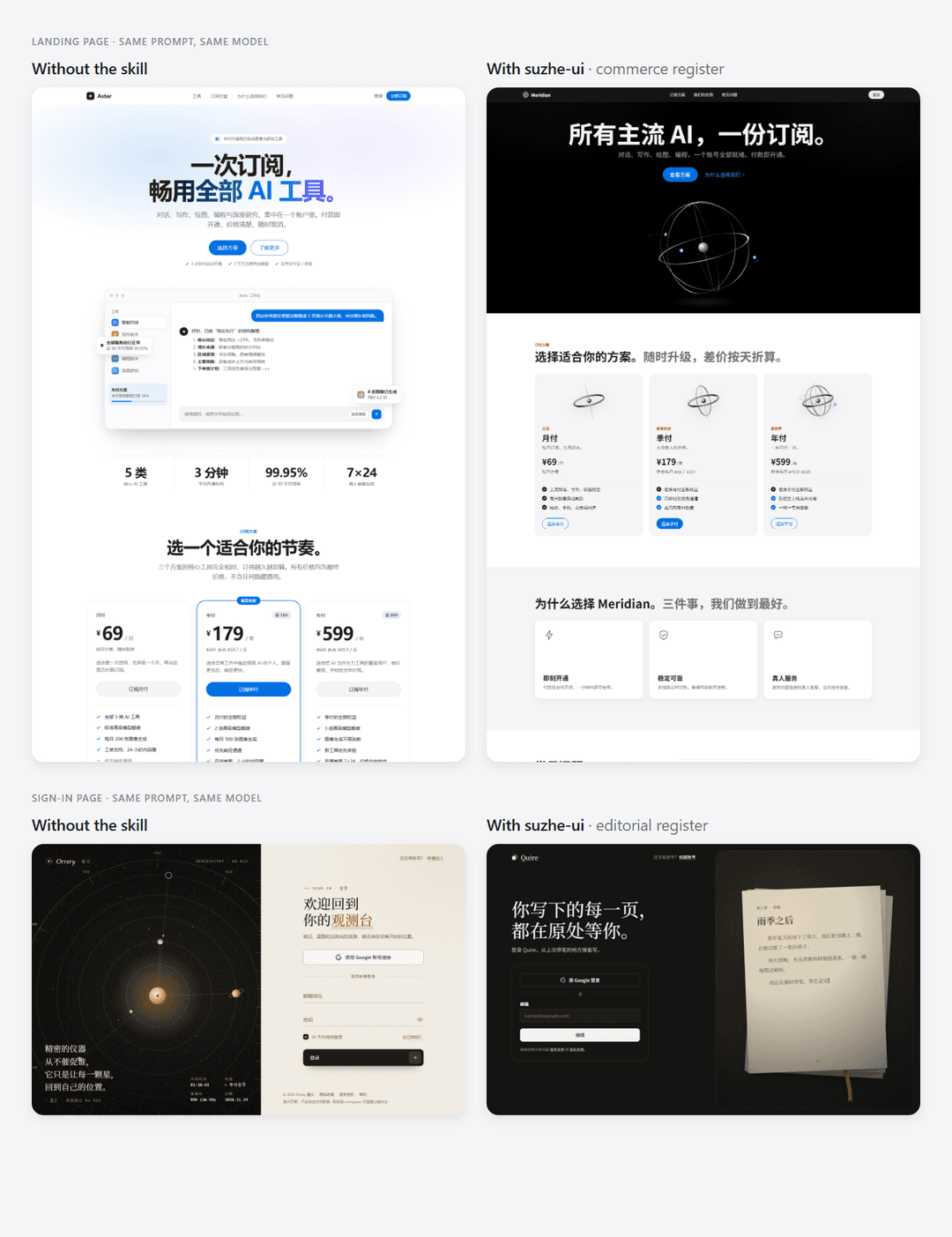
Same prompt, same model. Left: without the skill. Right: with suzhe-ui.
The method
- Know the page type and its register first. Brand pages and shop flows speak the commerce register; sign-in, about pages and share cards are identity moments in the editorial register; formal pages (docs, terms, notices) and tools (mail, dashboards) have their own rules. One page, one register.
- Commerce register. Three backgrounds only — white,
#f5f5f7, black — alternating so adjacent sections never match. System fonts. One accent,#0071e3. Pill buttons. Third-party brand colours are accents, never full-bleed fills. - Editorial register. Warm paper (
#faf9f5) or warm black (#141413), one serif statement, ink buttons instead of blue, thin borders, no heavy shadows. - Signature. Every page gets one visual that belongs to this product and this task — never a copy of someone else's homepage.
- Less. Hide what is unavailable. Help text is one sentence. Result pages show the result and nothing else.
- Timing. Hints appear only when the user has actually missed something. Motion marks state changes; completion glows, it doesn't explode.
- Smooth on every device. Beautiful on a flagship and fluid on a cheap phone — heavy effects degrade by device tier.
- Improve incrementally. Never rebuild a page people already find comfortable in one go.
Every rule comes from real redesign rounds on a live site, including 16 rejected attempts and why they failed (rejected.md).
Install
Claude Code — as a plugin
/plugin marketplace add suzhe-ai/suzhe-ui
/plugin install suzhe-ui@suzhe-ui
Claude Code — manual copy
git clone https://github.com/suzhe-ai/suzhe-ui.git
cp -r suzhe-ui/skills/suzhe-ui ~/.claude/skills/
To use it in a single project only, copy it to <your-project>/.claude/skills/ instead.
Claude.ai
Download suzhe-ui.zip from the latest release, then upload it in Customize → Skills → + → Upload a skill.
Usage
There is nothing to call. Just ask for what you want:
- "Build a landing page for my AI subscription service."
- "Make this login page feel premium, not like every other white card."
- "This page is cluttered. Clean it up."
You can also say "Use suzhe-ui" explicitly. The skill is written in English and works in any language; Claude writes your page copy in your language. A full Chinese edition lives in docs/zh-CN.
What's inside
skills/suzhe-ui/
├── SKILL.md                  The method: page types & registers, skeleton, signature, less, timing, consistency
├── references/
│   ├── tokens.css            Tokens for both registers and base styles, ready to copy
│   ├── components.md         Nav, hero, sections, cards, buttons, forms, modals, toasts, footer
│   ├── page-types.md         Brand, identity, formal, tool and flow pages
│   ├── motion-perf.md        Motion rules, long-task progress, device-tiered effects
│   ├── rejected.md           16 rejected approaches and why
│   └── checklist.md          Engineering pitfalls and a pre-ship checklist
├── assets/starter.html       A starter brand page built on the tokens
└── evals/                    Test cases, runnable with `claude plugin eval`
docs/zh-CN/                   Full Chinese edition (中文版)
Community
| Website | suzhe.ai |
| Telegram group | t.me/suzheaichat |
| Telegram channel | t.me/suzheaichannel |
| Contact Suzhe on Telegram | @RJ_HeatDeath |
| QQ group | 1131825420 |
Issues and pull requests are welcome.
License
Apache License 2.0. The Suzhe AI names and logo are not covered by the license; see NOTICE.
// faq
What is suzhe-ui?
The web design method behind suzhe.ai, as a Claude Skill. Two registers, one signature visual per page, fewer elements, smooth on every device. 苏哲 UI. It is open-source on GitHub.
Is suzhe-ui free to use?
suzhe-ui is open-source under the Apache-2.0 license, so it is free to use.
What category does suzhe-ui belong to?
suzhe-ui is listed under skills in the Claudeers registry of Claude-compatible tools.
// embed badge

[](https://claudeers.com/suzhe-ui)
// retro hit counter

[](https://claudeers.com/suzhe-ui)
// reviews
// guestbook
// related in Claude Skills
 🔓
An agentic skills framework & software development methodology that works.
 🔓
 🔓
AI coding assistant skill (Claude Code, Codex, OpenCode, Cursor, Gemini CLI, and more). Turn any folder of code, SQL schemas, R scripts, shell scripts, docs,…
 🔓
💫 Toolkit to help you get started with Spec-Driven Development