
super-video-agent
Free, source-available Claude Code skill that draws narrated videos in code: YouTube Shorts, explainers, 3D flights. Install in two commands.
Install with your AI
Paste into Claude Code, Cursor, or any agent — it reads the repo and wires the tool into your project.
Install and set up super-video-agent (claude-plugin project) into my current project.
Found on https://claudeers.com/super-video-agent
Repo: https://github.com/ww-w-ai/super-video-agent
Homepage/docs: https://www.youtube.com/@ww-w-ai
Detected install method: claude-plugin → /plugin install super-video-agent@ww-w-ai/super-video-agent
Category: plugins. Platforms: cli, api, web.
Read the repo's README for exact setup and env vars, then install it and wire it into my project.

Claudeers Health Verdict:
active; community-verified: false. Confirm the source before running anything.
/plugin marketplace add ww-w-ai/super-video-agent
/plugin install super-video-agent@ww-w-ai/super-video-agent
git clone https://github.com/ww-w-ai/super-video-agent
// compatibility
| Platforms | cli, api, web |
|---|---|
| Operating systems | — |
| AI compatibility | claude |
| License | NOASSERTION |
| Pricing | open-source |
| Language | JavaScript |
Super Video Agent
Make a narrated film from a PDF, an essay or a topic. Every frame is drawn in code, with no video model. A free, source-available Claude Code plugin.
Install in Claude Code:
/plugin marketplace add ww-w-ai/marketplace
/plugin install super-video-agent@ww-w-ai
Then ask for a video in plain words, or run /super-video-agent. Other install routes: Install.
At a glance (measured):
- An 88-second short from three 10-page PDFs: about $22 of model cost and one hour of model time. The voice in that run came from a local model.
- A 40-second 3D flight film renders in 11–20 minutes on a CPU with 4 workers.
- After the render, one voice line, one scene or one language changes without rendering the rest again.
- Voice: local models (Qwen3-TTS, Fish Speech, MeloTTS) run on your computer with no per-character charge; hosted services (Fish Audio, ElevenLabs, Typecast) bill per character or per byte of text.
One skill covers the film types below. Each row names the file that holds the method, so you can read how it works before you install anything.
| Film type | How the picture is made | Method |
|---|---|---|
| Shorts, 16:9 explainers, 1:1 and 4:5 feed posts | Canvas, SVG and Web Audio in one HTML page, drawn as a function of time | references/pipeline.md |
| 3D films | Blender when an installed copy passes a test render; Three.js/WebGL otherwise | references/blender.md, references/3d.md |
| 2.5D photo parallax | one photo cut into depth layers under one camera move | references/parallax.md |
| Build and assembly films | an LDraw model file baked into build order, placement and insertion direction | references/assembly.md |
| Language versions | the picture rendered once; each language's voice and captions laid over it | scripts/dub.mjs |
Give Claude Opus 5.5 a PDF, an essay or a topic, and get back a narrated film in your own cloned voice or a voice you pick: a YouTube Short, a 16:9 explainer, a square feed post, a 3D film or a photo brought to life. Every frame is drawn in code, and after the render you can swap one voice line, one scene or one language without touching the rest. Super Video Agent is a Claude Code plugin that works the way the code-drawn films Reddit shared in September 2026 were made, plus what those films did not have: read-out rules and a pronunciation dictionary for any language, edits after the render that leave the rest of the film alone, any frame size and format, a four-session pipeline tuned for cost, and a sound-effect library cued from the script.
Measured on a real job, three 10-page basketball scouting PDFs → an 88-second short: script $4.05, script review $1.75, film $16.34. That's about $22 and one hour of model time. The voice in that run was synthesized on a local model; a hosted voice adds its own per-character charge.
Gallery
Every film below was made with this skill and is published on YouTube. Click a clip to watch the film.
 3D product ad Short: a foldable phone comes apart layer by layer. | 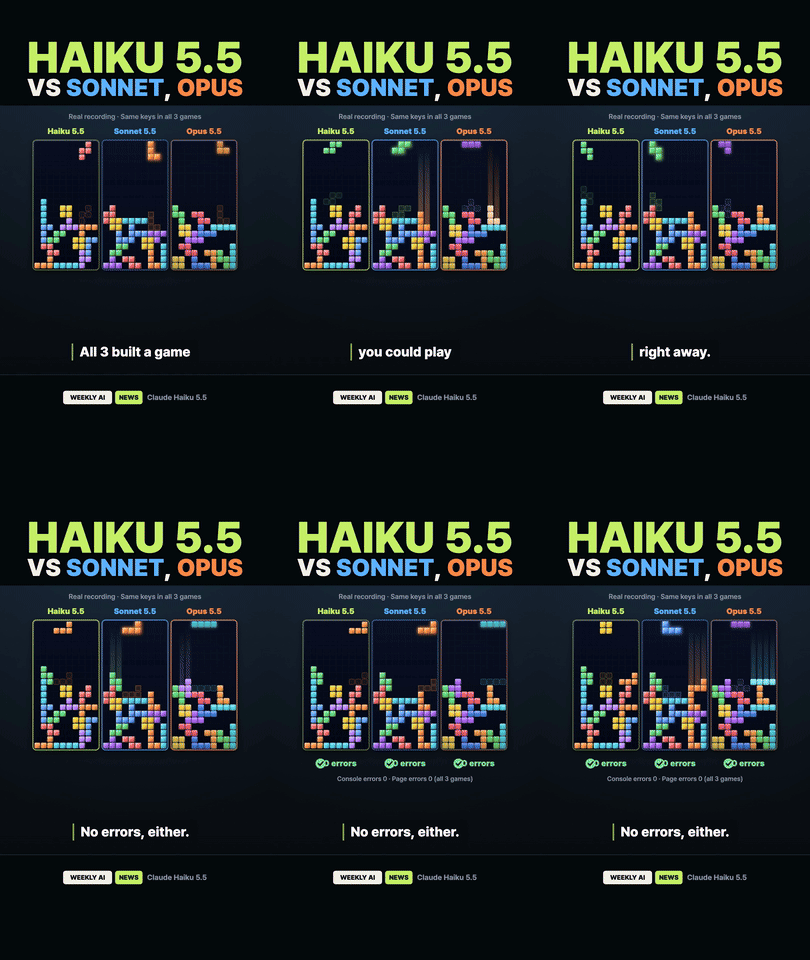 Benchmark news Short: three AI-built Tetris games race side by side. | 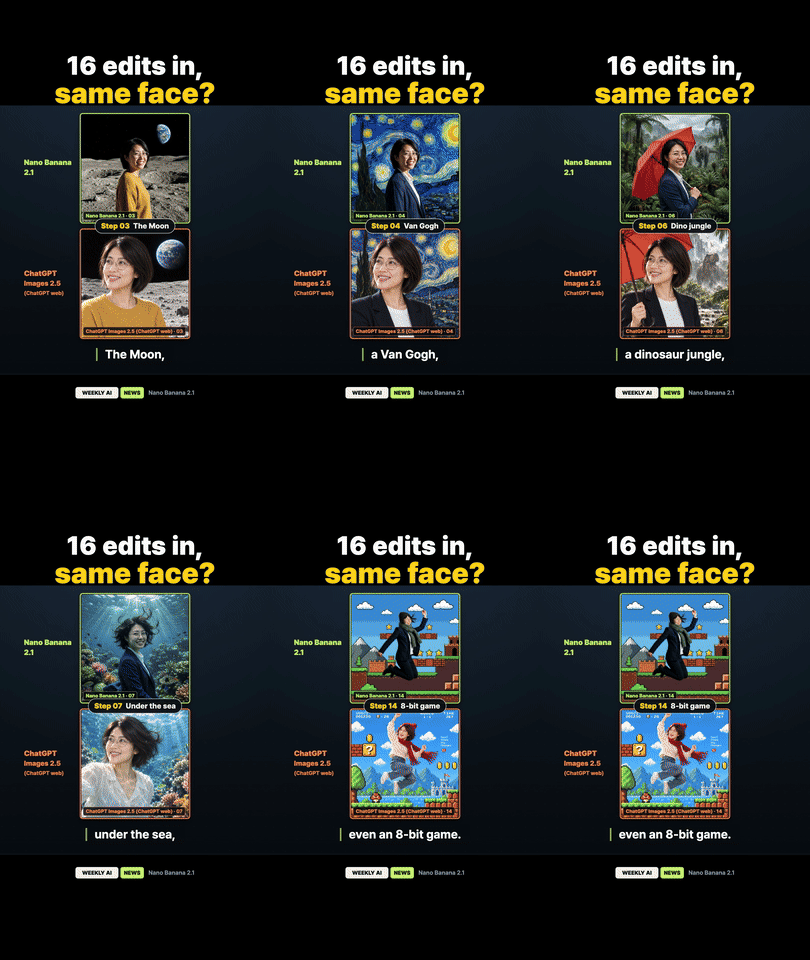 Image comparison Short: two image models redraw the same face. |
 Long-form news show: a monthly AI recap with a 3D anchor. | 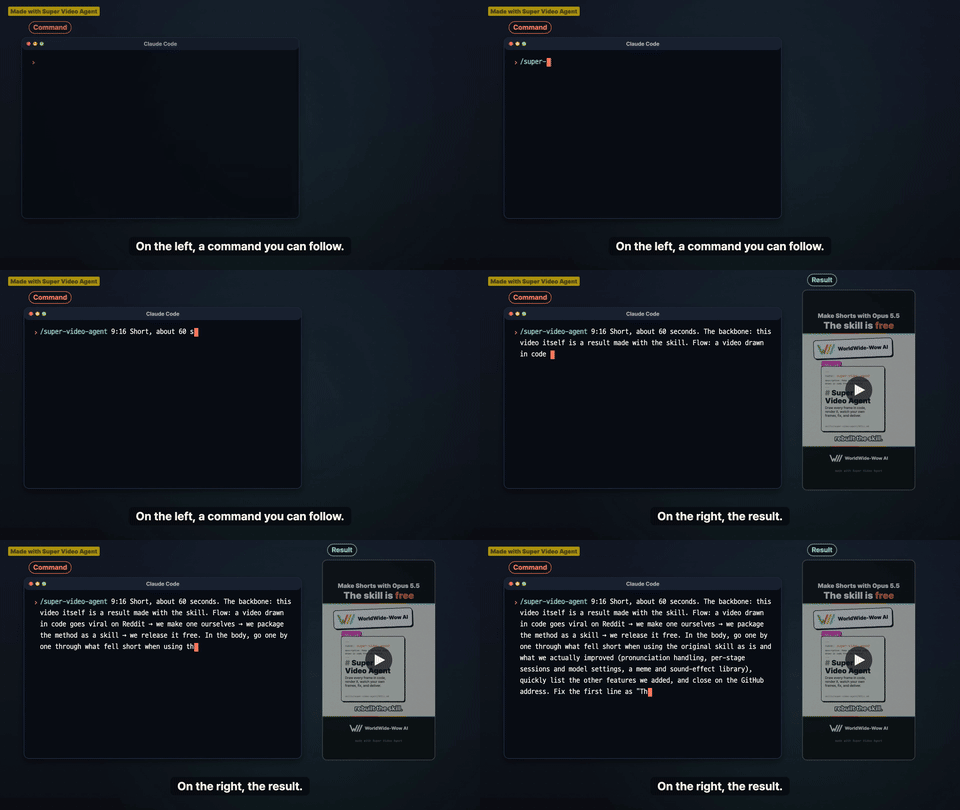 Long-form tutorial: the command on the left, the finished Short on the right. |
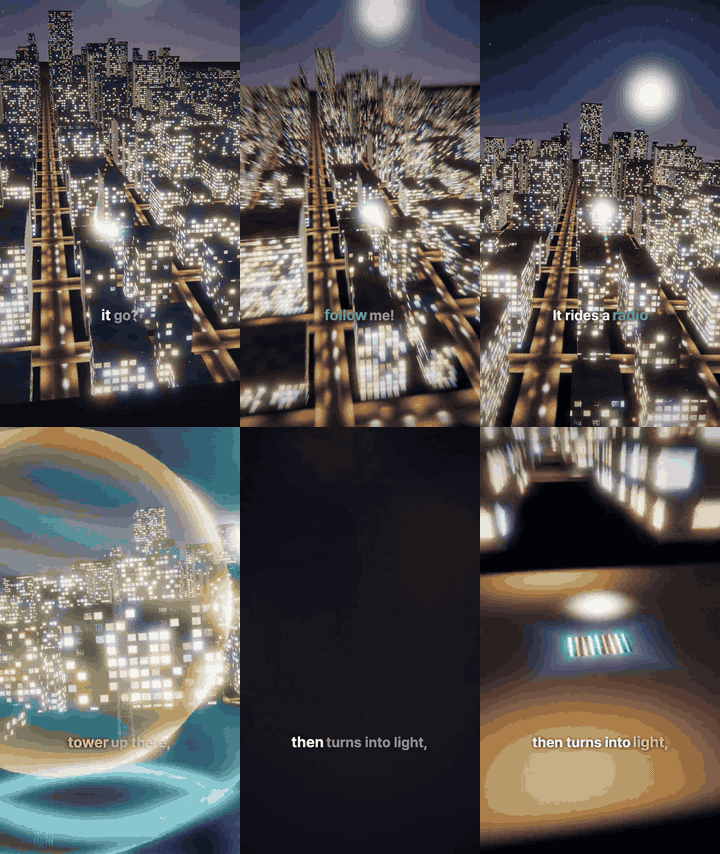
3D flight (top of this page): a 40-second Short, one continuous camera flight from a phone screen, over a night city, down an undersea cable, into a data center and a GPU chip, and back to the phone as the answer appears. Drawn in code with Three.js/WebGL, with no video or image model. ▶ English (MP4, 7.5 MB) · Korean
Use
Install it first (Install). Then, in Claude Code with Opus 5.5, run the skill and say what you want:
/super-video-agent Make a YouTube Short from this PDF. Use my voice from me.wav (transcript: "…").
Installed as a plugin, the command shows up as /super-video-agent:super-video-agent; type
/super-video-agent and pick it from the list. You can also skip the command: asking for a video
in plain words starts the skill too.
The skill first asks whether to follow the Shorts formula (hook first, fast lines, a banded frame with a fixed hook title) or free style, the frame size and length if it can't infer them, where the film should stop for your review, and whether other languages come later over the same picture. If you hand it a finished script or storyboard, it asks whether to use it as written or rework it.
3D films
Say "3D" and the skill takes the 3D path by itself:
/super-video-agent Show what happens after you press Enter on an AI prompt, in 3D like a video game
Already have Blender? The agent runs a small EEVEE test render (scripts/probe-blender.mjs) and
uses Blender for new 3D films if the test passes. Otherwise it uses the built-in Three.js workflow.
You do not need to install Blender, and the skill never downloads it. SVA_BLENDER_BIN names one
Blender to test. Three.js is not bundled; the agent installs it into your reel when that path is used.
An explicit renderer choice takes precedence, and existing films keep their renderer.
Details: references/blender.md, references/3d.md.
Photos, builds and other languages
/super-video-agent Make this photo move in 2.5D for the opening, with the source credited on screen
- 2.5D photo parallax. One photo is cut into three depth layers (polygon cuts by default; alpha
masks and depth maps optional), and one camera move slides near layers more than far ones. The
engine reports any layer whose edge would show during the move, with the scale that fixes it.
The photo's source, creator and license go into
FILM.md, and a readable credit stays on screen while the photo shows (references/parallax.md). - Build and assembly films. Hand over a model in the LDraw text format and its parts folder.
scripts/ldraw-bake.mjsbakes the build order, each part's placement, its insertion direction and a path check; a missing part stops the bake and is named. One technique the skill knows: the manual page on the left and the 3D model on the right, both driven by the same step index. A film with no narration runs on a silent clock (scripts/silent-clock.mjs) (references/assembly.md). - Any language over one picture. Your language's voice is made first and sets the clock. The
picture renders once with no captions baked in, and every language, yours included, is laid over
it with
dub.mjs. A line that runs long is sped up by at most 10% or listed for rewording; the picture does not move.
Adding image and video models
The default needs no image or video model: every frame is drawn in code. When you want more on screen — a photo-real background, a product shot, a few seconds of generated motion — name the tool and the shot in the same message.
The request below is an example only. Swap in the tools and routes you use; the skill does not ship with or default to any of them.
/super-video-agent Make a 60-second promo from this deck. Generate the opening background with
Codex image generation, and a 5-second product clip with Seedance through browser-use.
Say how to reach each tool (a CLI, an API key, or a browser you are logged in to), or generate the
files yourself and hand them over. Either way, generated media is material: the
skill composes each scene around it and records every file's source and license in FILM.md.
Why
In September 2026, Reddit filled up with films Claude Opus 5.5 made entirely in code, like a train journey in risograph style, an SNES anime battle, and a stick-man YouTube Short. The prompts were short. The model picked its own tools and checked its own renders.
We tried it for our own channel and hit the same three walls every time:
- Timing drifts. Scenes timed by estimate miss the narration by seconds once a real voice reads the script.
- Voices misread. Numbers, names and English words come out wrong, and you only notice after the render.
- Every fix is a full re-render. Changing one line meant regenerating the voice and the whole film.
So we built Super Video Agent: a skill that gets past those three walls and leaves the model free to design each film.
Key features
Super Video Agent keeps the model's freedom (no templates for the look unless you bring one) and adds five things the model cannot do by itself:
- Read-out rules for every language: the voice says numbers, names and English words right the first time.
- Fix only what changed, after the render: swap one line, one scene or one language; the rest stays.
- Any frame, any format, your own template: Shorts, 16:9, square, 3D, photo parallax, build films, series episodes.
- Four stages, four sessions, tuned effort: about $22 for an 88-second film.
- Sound effects cued from the script: placed on the word, scored for fit.
1. Read-out rules for every language
A synthetic voice reads the spelling, and no language is spoken exactly as it is spelled. Super Video Agent writes the spoken form into the script before any voice is made. It works in any language the voice engine speaks: a common checklist covers numbers, units, names and acronyms everywhere, and languages with their own rule file get the sounds their spelling hides.
A paid TTS service may not need this. But with these rules, a low-cost or local TTS library often gets it right too.
| Language | Written | Spoken (say) | Rule |
|---|---|---|---|
| English | Opus 5.5, $16.34 | Opus five point five, sixteen dollars thirty-four | versions and money said in words |
| Korean | 4.4, 6월 | 사쩜사, 유월 | decimal point said [쩜]; fixed month forms |
| Japanese | 3本, 6本 | さんぼん, ろっぽん | counters change sound |
| Chinese | 2个, 27.3% | 两个, 百分之二十七点三 | 两 before counters; percent order flips |
A wrong reading quoted on purpose ("not X but Y") is spelled as it sounds too, because voice models quietly correct common misreadings.
For words the spelling can't carry, a pronunciation dictionary in plan.json supports three
fixes: respell the word in the language's own script, give its IPA (International Phonetic Alphabet — the pronunciation symbols dictionaries use) to engines that read SSML (Speech Synthesis Markup Language)
<phoneme> tags, or swap the word. One entry covers every line that uses the word; captions
keep the original spelling.
"pronounce": { "Nguyen": { "say": "Win", "ipa": "ˈŋwiən" } }
Every generated line is then transcribed back with speech-to-text. Only a gross miss is
flagged — more than half of the line wrong, or a take under 70% or over 140% of the line's
length — because STT has its own error on names and homophones. A flag is evidence to listen to,
not an automatic retry: voice.mjs --retry-flagged N re-makes flagged lines only when you ask.
A pronunciation fix keeps the line's time slot, so the film does not re-render.
(references/readout.md, scripts/lib/pronounce.mjs, scripts/lib/stt-compare.mjs, scripts/voice.mjs --lines)
2. Fix only what changed, after the render
A rendered film is not locked. Each piece of it can be swapped on its own: a narration line, a caption, a scene, a language, the opening or the ending. Nothing else moves, so the parts you already approved stay exactly as they were.
| You want to change | What runs | What stays |
|---|---|---|
| One narration line: a word, the tone, a misread | voice.mjs --lines <id> re-records it, trims it to its voiced span and fits it into the old slot: sped up by at most 1.1×, with the minimum breath kept after it. A take that still does not fit is refused and the old clip stays | the picture and every other line |
| A changed line, heard in context | preview-changes.mjs <reel> --lines <ids> --media <mixed.mp4> cuts each changed line from the previous line's end to the next line's start, with picture, narration and bed together | the film |
| Caption wording or where a line breaks | edit plan.json (a | sets the break), then run dub.mjs again on a picture-first film | the picture |
| One scene | render.mjs --only <shot> renders that shot and splices it into the film; render.mjs --span <from>-<to> re-renders only those seconds. Blender pictures re-render only the affected frame ranges | every other shot |
| A second language | dub.mjs --lang <code> lays that language's voice and captions over the same picture | the picture, rendered once |
| Room to breathe between a language's lines | dub.mjs --min-gap <sec> slows only the slots where a line runs into the next, picture and effects together, until the gap reaches <sec>; the voice keeps its speed | the voice, the first and last frames, every other language |
| A re-timed or re-placed voice track | render.mjs --narration <wav> --timings <json> renders with that track in place of the reel's own | voice/narration.wav and voice/timings.json |
| An opening and an ending for upload | join.mjs attaches them and reports loudness, click risk and frame match at each join | the body film |
When changes come over several rounds, every request goes into one cumulative list in FILM.md
with its state (done, open, changed by a later request). Each round is planned and checked against
the whole list, so a new change does not undo an earlier one.
Measured on the 3D film in the gallery: one full render took 11–20 minutes. After review, eight
voice and caption fixes went in (a changed word, a question whose ending had to rise, a one-word
caption left alone on its line) without rendering the 3D picture again. A 2D film re-renders only
the changed shots, in minutes.
(scripts/voice.mjs, scripts/dub.mjs, scripts/render.mjs, scripts/preview-changes.mjs, scripts/join.mjs)
For existing recordings, follow the audio editing guide: adjust pauses and tempo locally, then replace narration without rendering the picture again.
3. Any frame, any format, your own template
- Any frame size. Four sizes come ready with one flag: 9:16 (Shorts, Reels, TikTok), 16:9 (YouTube, slides), 1:1 and 4:5 (feed posts). Any other size works too, because the renderer uses the width and height the page declares.
- Any look. Pick the Shorts formula (hook first, fast lines, a banded frame with a fixed title), free style (the model designs the look for this film), or bring your own template: a layout, brand colors and fonts, a series title card. The skill builds every scene inside it.
- Any kind of film. A narrated explainer from a PDF or an article, a promo from a deck, a news desk or live-score screen drawn in code, a 3D film in Blender or WebGL, a 2.5D photo parallax, a build film from a model file, a series episode with its own opening and ending, and language versions that share one picture.
- It keeps getting better. We pick a harder film on purpose each time and fold what it took back into the skill. The films in the gallery are the test bench.
4. Four stages, four sessions, tuned effort
Each stage reads only the files the previous one left, so each runs in a fresh session with its own effort level. Measured on the 88-second film:
| Stage | Output | Effort | Cost |
|---|---|---|---|
| Script | plan.json, FILM.md (facts with sources) | xhigh | $4.05 |
| Review | locked plan.json after six passes | low | $1.75 |
| Voice | voice/ with measured timings.json | low | $0 (local model in this run) |
| Film | reel.html, out/final-<timestamp>.mp4 | xhigh | $16.34 |
"Effort" is Claude's setting for how long the model thinks before it answers, from low to
max. More effort costs more and takes longer, so it only pays where the work needs it.
To see where it matters, we wrote the script for the same film at every effort level and checked every number in it against the source PDFs:
| Effort | Cost | Time | Number errors vs. source |
|---|---|---|---|
| low | $2.21 | 2m35s | 0 |
| medium | $2.13 | 1m57s | 0 |
| high | $3.40 | 6m11s | 0 |
| xhigh | $4.05 | 6m05s | 0 |
| max | $8.04 | 23m14s | 0 |
- Every level got the facts right, so a cheaper level is a safe choice for the script when cost
matters.
maxcost about four timesmediumand took twelve times as long. - The review stage runs at
lowand still caught two things the script session missed: a line that could be read two ways, and a unit that the voice would have said twice.
After a film, the skill prints the time, sessions, cost and tokens per stage, plus the speech
synthesis usage logged per request (scripts/runner/cost-report.mjs). Details: the "Four stages,
four sessions" section of SKILL.md.
5. Sound effects cued from the script
A "ding" as the list starts, a drum hit on the punchline: these small sounds keep a Short alive, and placing them by hand in an editor is slow. Here the model places them while it writes the script.
- You keep a sound library. A folder of your own effect files (and short reaction clips),
with a
catalog.jsonthat says what each one is and whether you may use it commercially. - The model picks the sound for each line. It searches the library by keyword and pins each sound to a moment in that line: its start, its end, or a specific word ("on the word right").
- The renderer mixes it in at exactly that moment. Each sound is trimmed to length, faded out, and leveled so a loud file does not drown the voice. A short video clip plays frame by frame on the same timeline.
Licenses are checked for you: a file not marked for commercial use is left out of a public film unless you allow it. No sound files ship with this repo, since most sound packs carry their own terms.
You don't need a library to have sound. The skill makes its own effects in code
(scripts/engine/reel-audio.js): click, type, thud, whoosh, pop, tick, ding and pluck, built
from noise and oscillators while the film renders. No files, no licenses to check, and the same
cue always makes the same sound, so a re-render matches.
(scripts/assets.mjs, references/pipeline.md, "Asset library")
Every effect is then scored for fit: does it match the size, material and speed of what happens
on screen, and does it belong to this film's world? Each sound is measured first (length, peak,
attack, brightness, pitch trend), then judged by TypeSafe AI's Jev when TYPESAFE_API_KEY is set
(pass at 0.8 of 1), or by the current model from a scoring sheet. A sound that fails is redesigned
for this film, up to three rounds.
(scripts/sfx-cards.mjs, references/sound.md §7)
Also in the box
Voice
- The voice comes first, and the picture follows it. The narration is made and measured
before any scene exists.
voice/timings.jsonrecords when every line and word starts, and every scene is timed from it, so a caption never runs ahead of the voice (scripts/voice.mjs). - Your own voice, or any engine. Clone your voice from a 5–15 s recording on your own computer
(Qwen3-TTS or Fish Speech), use a hosted service (Fish Audio, ElevenLabs, Typecast), MeloTTS, or
recordings you made yourself. Fish Audio (S2) and ElevenLabs (v3/v4) also take delivery marks
such as
{confident}or{pause}in a line's spoken text, translated into each model's own tags; the caption never shows them. A line can carry its own voice, so one film can have several speakers. - One read per voice, cut per line. Every provider makes all lines of one voice in one request and the skill cuts it per line, so the voice keeps one read across the film.
- Every line is heard back. After the voice is made, speech-to-text listens to each line and compares it with the script, and a waveform check looks for a cut start, a cut end or a click. Flagged lines are named with their id, so you know which ones to listen to.
- Every line ending is audited. Each installed clip is compared with its untrimmed raw take: if
20 ms or more of the last syllable went missing, the line is flagged
END_CUT, and the fix is to install the raw take again, with no new synthesis. - Clean endings from local clones. Local voice models often clip the last syllable. The skill has the voice say a short word after each line, like a clapper between takes, and cuts in the pause before it, so each line ends naturally.
- Pick the tone by ear. Before the whole narration is made, the skill can record the opening
line in two to four tones (
voice.mjs --takes) and show them side by side. The one you pick (--pick) becomes the tone for every line.
Script
- Narration that flows. Each line gets its own pause: short when the next line continues the thought, long at a scene change. Sentences end so they connect, and commas are kept for emphasis, so the voice does not sound read off a page.
- Breath is a plan setting.
meta.minBreathMs(default 500 ms) is the shortest pause between lines. Fast live talk such as sports play-by-play can run near 200 ms withmeta.gapMsnear 250, while a line'spauseAfterMskeeps a held silence exactly as written. - Five review passes before any voice. Facts against the source, story, spoken wording, read-out, and a final read-through. The voice is made once, after the script is locked.
Picture
- The same frame every time. Each page draws a frame from the time alone (
seek(t)), so the same moment always gives the same pixels. Previews, re-renders and checks all agree. - Text clear of the app buttons. Captions stay out of the areas where Shorts and TikTok put their buttons and titles (x 80–888, y 200–1470 at 1080×1920). Pictures still fill the whole frame.
- Captions that break where you read. Captions split at punctuation first, then into rows of
even length, and a one-word leftover joins its neighbor. A
|in the script sets a break by hand; the voice never reads it. - Caption contrast, measured. The render and every language version report each line's caption
contrast against the picture behind it as a WCAG ratio (
dub/<code>/contrast.jsonfor a dub).
Checks and output
- The film checks itself. After rendering,
scripts/review.mjsmakes a contact sheet and checks for frozen frames, text that spills out of its box, loudness, sound effects that miss their moment, and silent gaps. You get numbers, plus the timestamps worth listening to. - Every render is kept. Each render gets its own timestamped file, and
out/final.mp4always points to the newest one. A player that has the film open is never broken by a new render, and you can compare versions.
Install
Requires Node 22+, FFmpeg on PATH, and a Chromium for Playwright.
The skill
As a Claude Code plugin:
/plugin marketplace add ww-w-ai/marketplace
/plugin install super-video-agent@ww-w-ai
On first use the skill installs its Node dependency and Chromium into its own folder
(node scripts/setup.mjs), then checks FFmpeg.
As a Codex plugin:
codex plugin marketplace add ww-w-ai/marketplace
codex plugin add super-video-agent@ww-w-ai
To update, run codex plugin marketplace upgrade ww-w-ai, then the same add command again.
As a standalone skill (Claude Code or Codex):
git clone https://github.com/ww-w-ai/super-video-agent /tmp/super-video-agent
cp -R /tmp/super-video-agent/skills/super-video-agent ~/.claude/skills/super-video-agent   # Codex: ~/.codex/skills/super-video-agent
node ~/.claude/skills/super-video-agent/scripts/setup.mjs
Voice and the speech check
Set up at least one voice provider; with none, the voice step stops and lists what to set. Local providers run on your computer; hosted providers run on the service's servers and need an API key. Clone only your own voice, or one you have permission to use.
To clone your voice locally with Qwen3-TTS:
-
Make a Python environment (Python 3.12, as Qwen3-TTS recommends) and install the voice model:
python3.12 -m venv ~/.venvs/sva-voice ~/.venvs/sva-voice/bin/pip install -U qwen-tts -
The first film downloads the weights from Hugging Face: about 4.2 GB for the 1.7B model, about 2.3 GB for 0.6B.
-
Record 5–15 s of your own voice that ends on a finished sentence, and write down exactly what you said. The skill uses the two as
meta.voice.refAudioandrefText.
The speech check transcribes every line with mlx-whisper on Apple silicon macOS: the small model
first, then the turbo model only on lines whose first transcript looks doubtful.
python3.11 -m venv ~/.venvs/sva-stt
~/.venvs/sva-stt/bin/pip install mlx-whisper
Then run setup.mjs --stt-models once (for a standalone install:
node ~/.claude/skills/super-video-agent/scripts/setup.mjs --stt-models) to download the two models
(several hundred MB to a few GB). On other machines, SVA_STT_ENGINE=groq with GROQ_API_KEY uses a
hosted Whisper API; only then does audio leave your computer. With neither, the check is skipped with
a notice.
Tell the skill where the two Pythons are. Add these to ~/.zshenv (or your shell's profile):
export SVA_QWEN3_PYTHON=~/.venvs/sva-voice/bin/python
export SVA_STT_PYTHON=~/.venvs/sva-stt/bin/python
Qwen3-TTS models:
| Model | Download | Notes |
|---|---|---|
Qwen/Qwen3-TTS-12Hz-1.7B-Base (default) | about 4.2 GB | clearer words, fewer slurred endings |
Qwen/Qwen3-TTS-12Hz-0.6B-Base | about 2.3 GB | lighter; less clear |
Set it for every film with SVA_QWEN3_MODEL, or for one film with meta.voice.model. On a
machine with an NVIDIA GPU, set SVA_QWEN3_DEVICE=cuda.
Every variable the skill reads:
| Variable | Points to | Needed for |
|---|---|---|
SVA_QWEN3_PYTHON | a Python where import qwen_tts works (Qwen3-TTS) | local voice cloning |
SVA_QWEN3_MODEL | a Qwen3-TTS model id (default Qwen/Qwen3-TTS-12Hz-1.7B-Base) | another model on every film; meta.voice.model in a plan still wins |
SVA_FISH_DIR | a folder holding fish-speech/ (the checkout) and .venv-tts/ (its Python) | local Fish Speech |
SVA_MELO_PYTHON | a Python with MeloTTS | local MeloTTS |
SVA_QWEN3_DEVICE, SVA_FISH_DEVICE | mps (default), cuda or cpu | non-Apple machines |
FISH_AUDIO_API_KEY (or FISH_API_KEY), FISH_AUDIO_VOICE_ID | your Fish Audio key and voice | hosted Fish Audio |
ELEVENLABS_API_KEY, ELEVENLABS_VOICE_ID | your ElevenLabs key and voice | hosted ElevenLabs |
TYPECAST_API_KEY, TYPECAST_VOICE_ID | your Typecast API key and voice (tc_…) | hosted Typecast |
SAY_VOICE | a macOS say voice name (default Yuna) | macOS only, with --provider say |
SVA_STT_ENGINE | mlx (default) or groq | the speech check |
SVA_STT_PYTHON | a Python with mlx-whisper installed | the speech check (skipped with a notice if unset) |
SVA_STT_MODEL, SVA_STT_MODEL_RECHECK | first-pass and recheck models (default small, turbo) | optional |
GROQ_API_KEY | your Groq key | the speech check with SVA_STT_ENGINE=groq |
SVA_BLENDER_BIN | an absolute path to one Blender executable; only that one is tested | optional, 3D films |
SVA_ASSET_LIB | your sound library folder (default ~/.super-video-agent/library) | optional |
Where to set them — all of these are environment variables. Pick the one place that fits your setup:
| Setup | Where |
|---|---|
| Claude Code (any OS) | env in ~/.claude/settings.json: {"env": {"ELEVENLABS_API_KEY": "..."}} |
| macOS · Linux, zsh | export ELEVENLABS_API_KEY="..." in ~/.zshenv |
| Linux, bash | export ELEVENLABS_API_KEY="..." in ~/.bashrc |
| Windows (PowerShell) | run setx ELEVENLABS_API_KEY "...", then open a new terminal |
Which voice model
With no --provider, voice.mjs picks from what you set up, in this order, and prints which one
ran: your own recordings (voice/in/), Qwen3-TTS with a reference voice, Fish Audio, ElevenLabs,
Typecast, MeloTTS. Fish Speech and macOS say run when you name them. Every synthesis request is
logged to tts-usage.jsonl (characters sent, seconds returned, the cost the provider reported).
| Model | Where it runs | Cost | Speed | Set up with |
|---|---|---|---|---|
| Qwen3-TTS 1.7B / 0.6B | your computer | no per-character charge | slowest of these | SVA_QWEN3_PYTHON + a 5–15 s recording of your voice |
| Fish Speech | your computer | no per-character charge | not measured here | SVA_FISH_DIR |
| MeloTTS | your computer | no per-character charge | fast; one Korean speaker | SVA_MELO_PYTHON |
| Fish Audio | Fish Audio servers | per UTF-8 byte of text; the default s2.1-pro-free costs nothing while Fish Audio offers it (announced through 2026-11-30) | seconds per line | FISH_AUDIO_API_KEY, FISH_AUDIO_VOICE_ID |
| ElevenLabs | ElevenLabs servers | per character, tags included | seconds per line | ELEVENLABS_API_KEY, ELEVENLABS_VOICE_ID |
| Typecast | Typecast servers | per character | seconds per line | TYPECAST_API_KEY, TYPECAST_VOICE_ID |
Qwen3-TTS
- What it is. An open voice model from the Qwen team. It copies a voice from one short recording, so the film speaks in your voice.
- What you install. The repository holds only the code that calls it. You install the
qwen-ttspackage yourself (see above), and the model downloads from Hugging Face on the first film. - Speed. 10 short lines (20 s of speech) took 2 min 54 s on an Apple Silicon Mac, including loading the model and the speech-to-text check.
- The recording decides the result. Use 5–15 s of clean speech that ends on a finished sentence, plus its exact transcript. A recording cut mid-word put that syllable onto the start of 11 of 21 generated lines; cutting it on a sentence end fixed it.
- 1.7B and 0.6B. 1.7B spoke clearer words with fewer slurred endings; 0.6B is lighter.
- Delivery. Its delivery is even; it does not act out emotions. In our test it never raised the end of a question (0 of 10).
Fish Audio
- What it is. A hosted voice service. Use one of its library voices, or clone your own voice with an API key.
- Price. Billed per UTF-8 byte of input. The default model
s2.1-pro-freeis offered at no cost (announced through 2026-11-30);s2.1-prois its billed twin. - Delivery tags. It follows tone marks such as
{confident}or{excited}. Fish reads a Short flat unless told otherwise, so 9:16 films on Fish get{confident}by default. - Question endings. It rarely raised the end of a question: 3 of 23 measurable takes, and no tag we tried changed that.
ElevenLabs
- What it is. A hosted voice service with many stock voices and instant cloning. The default
model is
eleven_multilingual_v2;eleven_v3andeleven_v4take audio tags. - Price. Billed per character, audio tags included. Library voices work through the API only on a paid plan.
- Key permissions. A restricted API key needs the text-to-speech permission. Listing voices
also needs
voices_read; without it, put a stock voice id inELEVENLABS_VOICE_ID. - Word timings. It returns its own word timings.
- One read for the whole film. Sent one line at a time,
eleven_v3cut off the end of a Korean line in 9 of 18 takes; read in one request ending in[pause], 0 of 25.
Typecast
- What it is. A hosted voice service with many character voices. The model is
ssfm-v30. - Price. Billed per character.
- Emotion. One emotion preset per request instead of inline tags:
meta.voice.emotion(normal,happy,sad,angry,whisper,toneup,tonedown; defaultnormal). Lines keep their?and!, so the model reads the intonation from the punctuation. A line with its ownemotionis made alone with that preset. Measured:toneupraises the pitch of the whole sentence, not only its end. - Word timings. It returns its own word times.
Question endings: what we measured
In English and Korean, a yes/no question usually sounds like a question only when its last syllable goes up ("Is it ready?↗"). A voice model often reads it flat or falling, so it sounds like a statement. We recorded two Korean questions, "다음 토큰은 뭘까?" and "여기가 엔비디아 세상인가?", several times with each model and measured whether the last syllable was more than 2 semitones higher than the one before it.
| Model | Takes whose last syllable went up |
|---|---|
ElevenLabs eleven_v3 | 5 of 10 |
ElevenLabs eleven_multilingual_v2 | 4 of 10 |
Fish Audio s2.1-pro-free | 3 of 23 measurable |
| Qwen3-TTS 1.7B | 0 of 10 |
A falling end is not always wrong: questions with what/where/why often fall. So the skill does not
judge it. Listen, and re-record only that line (voice.mjs --lines <id>) until one sounds right.
Full method, per-take numbers and limits: Question intonation and read-out accuracy in four TTS models.
Fonts
Every word in the film is drawn by the page itself, so the font travels with the film as a file.
Each new reel copies its font files into assets/fonts/, and the preview and the final render
use those same files.
- Default: Pretendard. Free under the SIL Open Font License, with Korean and Latin in one family. Install it once on your computer; every new reel then copies it in automatically. A Korean handwriting font you have installed is copied too, for hand-written notes.
- Any font you like. Tell the model which one ("titles in Noto Serif", "use my brand font"). It copies that font file into the reel and uses it. Pick a font whose license allows use in videos.
- No font installed. Text falls back to the system sans-serif. The film still renders, but the look depends on the fonts of the machine it was made on.
Sound library (optional)
Put your own effect files and a catalog.json in ~/.super-video-agent/library, or point
SVA_ASSET_LIB to a folder elsewhere; when it is set, it wins (format: references/pipeline.md, "Asset library").
Without a library, the effects the skill makes in code still play.
Credits
Super Video Agent started from what these Reddit posts showed Claude Opus 5.5 can do when it is given a premise and room to work. Thank you to their makers.
| Post | What it showed |
|---|---|
| Opus 5.5 is insane at making videos — u/Silver-Chipmunk7744, r/singularity | A full SNES-style anime battle rendered from code, from a one-page story prompt |
| I asked Opus 5.5 to create an animation on how LLMs work — u/cody-fifth-door, r/claude | A narrated parody explainer from a 23-word prompt |
| Opus 5.5 One Shot Video Generation — u/AzorAhai1TK, r/ClaudeAI | Picture and sound both programmed, tools left to the model |
| Opus 5.5 made six films, each one drawn under the rules of an old physical medium — u/datathe1st, r/ClaudeAI | A written notebook per film, kept between passes |
| I gave Claude Opus 5.5 an MP3 and a few lines of art direction. It built a 50-shot painted music video entirely in code, with no video or image model — u/DigitalDaydreamers1, r/singularity | A 50-shot music video steered by short notes |
| Opus 5.5 creates a train journey drawn entirely in JavaScript — u/mshort3, r/ClaudeAI | A film drawn as a pure function of time, reviewed on contact sheets |
| Opus 5.5 made this whole YouTube Short in one HTML file. No images, no video editor, just code — u/quitpornio, r/ClaudeCode | Voice first: measured line times drive the picture |
Runtime dependencies and their licenses are listed in THIRD-PARTY-NOTICES.md.
Built by DubDubDub Corp. · Super Video Agent License 1.0: use and modify it to make your own videos, commercial ones included. Reselling it, bundling it into paid courses or products, hosting it as a service, and redistributing it are not allowed. Versions 1.3.3 and earlier remain under Apache-2.0.
// faq
What is super-video-agent?
Free, source-available Claude Code skill that draws narrated videos in code: YouTube Shorts, explainers, 3D flights. Install in two commands.. It is open-source on GitHub.
Is super-video-agent free to use?
super-video-agent is open-source under the NOASSERTION license, so it is free to use.
What category does super-video-agent belong to?
super-video-agent is listed under plugins in the Claudeers registry of Claude-compatible tools.
// embed badge

[](https://claudeers.com/super-video-agent)
// retro hit counter

[](https://claudeers.com/super-video-agent)
// reviews
// guestbook
// related in Claude Plugins
 🔓
A single CLAUDE.md file to improve Claude Code behavior, derived from Andrej Karpathy's observations on LLM coding pitfalls.
 🔓
Claude Code is an agentic coding tool that lives in your terminal, understands your codebase, and helps you code faster by executing routine tasks, explainin…
 🔓
"CLI-Anything: Making ALL Software Agent-Native" -- CLI-Hub: https://clianything.cc/
🔓financial-services — a Claude ecosystem project on GitHub.