
Stratawright
Stratawright is an agentic DAW that your AI agent (Claude Code, Cursor, Codex) can natively control so you can focus purely on making music.
Install with your AI
Paste into Claude Code, Cursor, or any agent — it reads the repo and wires the tool into your project.
Install and set up Stratawright (git-clone project) into my current project.
Found on https://claudeers.com/stratawright
Repo: https://github.com/Goldwaterfung/Stratawright
Homepage/docs: —
Detected install method: git-clone → git clone https://github.com/Goldwaterfung/Stratawright
Category: skills. Platforms: cli.
Read the repo's README for exact setup and env vars, then install it and wire it into my project.

Claudeers Health Verdict:
active; community-verified: false. Confirm the source before running anything.
git clone https://github.com/Goldwaterfung/Stratawright
// compatibility
| Platforms | cli |
|---|---|
| Operating systems | — |
| AI compatibility | claude |
| License | CC-BY-4.0 |
| Pricing | open-source |
| Language | C++ |
 Stratawright: The Open-Source AI DAW for Agentic Music Production
Stratawright
Get your session mixed, balanced, and organized in seconds.
Stop wasting time on tedious DAW setup—tell your AI assistant what you need and stay in your creative flow.
Why Agentic DAW • Quick Start • FAQ • Showcase Use Cases • Agent Capabilities • Key Features • Developer Guide • License
Overview
You opened your DAW to create music—not to burn half your brain on shortcuts, modifier keys, and complex control interfaces. Let tools serve your creativity, not your memory.
Stratawright is an agentic DAW that your AI agent can natively control so you can focus purely on making music. Instead of spending 30 minutes manually levelling tracks for streaming, removing background noise from recordings, or routing effect plugins across every track, just tell your AI agent (Claude Code, Cursor, Codex, Hermes, or Gemini) what you want in plain English. Your session gets prepped, balanced, and ready for production in seconds.
Why an Agentic DAW?
Traditional DAWs were built for a keyboard-and-mouse era where every single operation required manual labor. As sessions grow to 100+ tracks, your creative energy gets drained by repetitive mechanical tasks.
| Traditional DAW Workflow | Stratawright Agentic Workflow |
|---|---|
| Hundreds of Clicks & Manual Edits: Manually selecting, gain-staging, color-coding, and routing 100 tracks one-by-one. | One Single Command: A single natural language prompt controls 100+ tracks deterministically in a split second. |
| The Shortcut Tax: Searching online for forgotten keyboard shortcuts and complex modifier keys. | Natural Language: Just tell your AI agent what you want in plain English. |
| Dumb Track Labels: DAWs treat track names as plain text strings, forcing you to manually group and bus them. | Semantic Intelligence: AI agents understand instrument context (GTR_L_57 → Guitar Bus) and group stems automatically. |
| Creative Interruption: Stopping your flow state to handle technical preferences, gain staging, and file prep. | Pure Creative Flow: The AI agent works in the background as your tireless studio assistant. |
Quick Start & Agentic Setup
No terminal commands or manual compilation required. Open your AI agent (Claude Code, Codex, Cursor, Hermes, Gemini CLI, OpenCode, and 50+ more) and tell it to handle the setup:
1. Clone the Repository
Clone the project repository to your local system:
git clone https://github.com/Goldwaterfung/Stratawright.git
cd Stratawright
Or tell your AI agent:
Clone https://github.com/Goldwaterfung/Stratawright and set up the project for me
2. Build & Setup Stratawright (Agent compiles the app)
Tell your agent:
Build and package Stratawright for me
(Your agent will automatically run ./scripts/install_dependencies.sh and ./scripts/build.sh release --package under the hood).
3. Install the Skill (Teaches your agent how to control DAW)
Install directly via skills.sh (Vercel Agent Skills Registry):
npx skills add Goldwaterfung/Stratawright/skills/daw-cli
Or tell your AI agent in chat:
Install the daw-cli skill from https://github.com/Goldwaterfung/Stratawright
Option 2: Manual Skill Directory Setup
To manually install the skill into your preferred AI agent framework, copy or symlink the skills/daw-cli/ directory:
| Agent Framework | Local Workspace Skill Path | Global User Skill Path |
|---|---|---|
| Codex | .agents/skills/daw-cli | ~/.agents/skills/daw-cli |
| Claude Code / Co-Work | .claude/skills/daw-cli | ~/.claude/skills/daw-cli |
| Hermes | .hermes/skills/daw-cli | ~/.hermes/skills/daw-cli |
| Antigravity | .agents/skills/daw-cli | ~/.gemini/config/skills/daw-cli |
| Gemini CLI | .gemini/skills/daw-cli | ~/.gemini/skills/daw-cli |
| OpenCode | .opencode/skills/daw-cli | ~/.config/opencode/skills/daw-cli |
Once installed, your agent uses skills/daw-cli/SKILL.md as its operational manual.
Showcase Use Cases
Below are real-time demonstrations of daw-cli executing agentic workflows in Stratawright.
🎬 Use Case 1: Instant Multi-Track Ingestion, Clip Placement & Auto-Coloring
Natural Language Prompt:
"Import all the audio files in/Volumes/AudioDrives/Stems/Song_Session_A/. Place all clips at the start of the timeline. Clean up all the dirty file extensions and underscores in the track names, and auto-color the tracks based on their instrument types so my session is clean and organized."
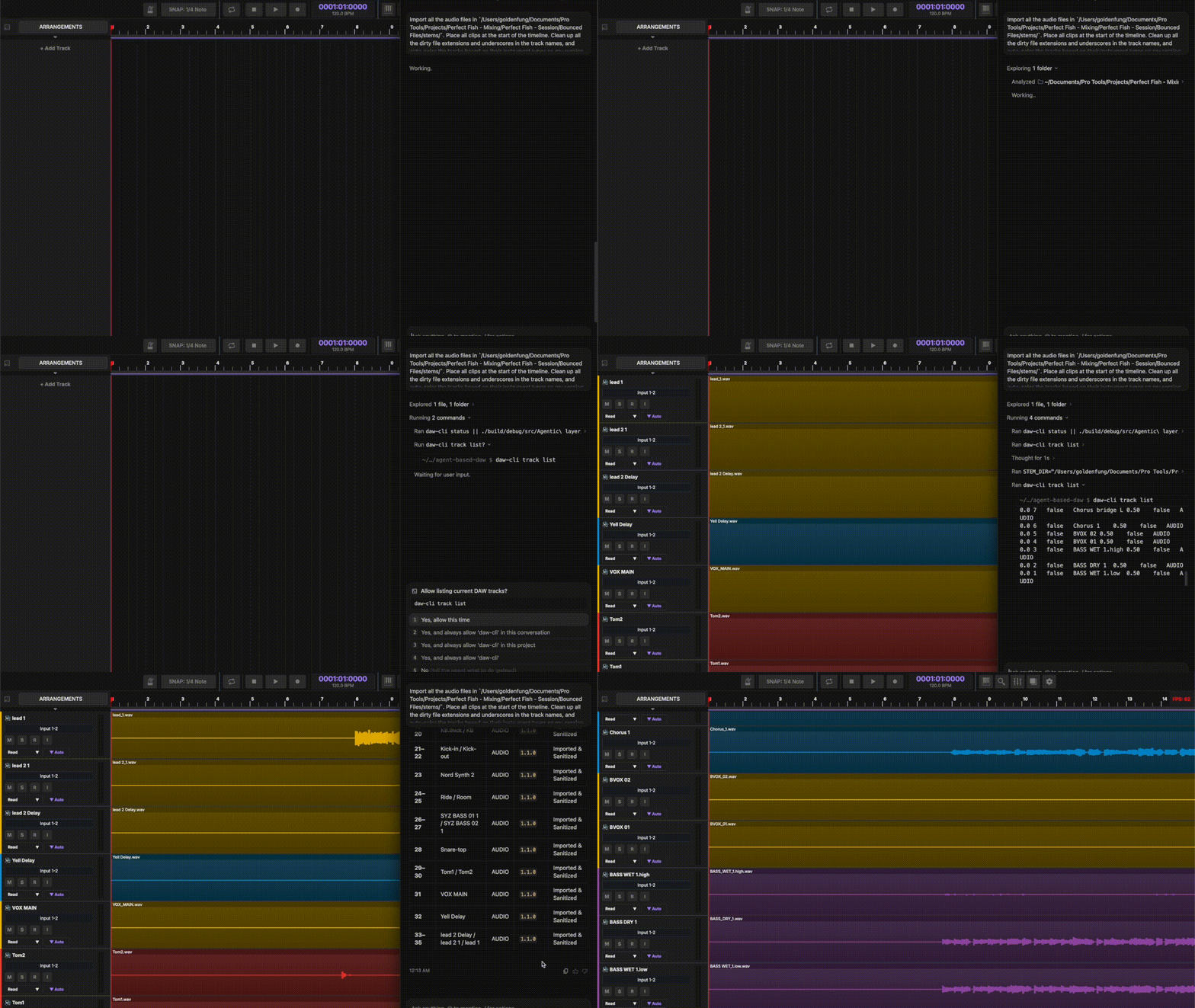
- Key Commands:
daw-cli track create,daw-cli clip add-audio,daw-cli track sanitize-names,daw-cli track auto-color
🎬 Use Case 2: Multi-Track Session Orchestration & Fader Layout
Natural Language Prompt:
"Set up a 124 BPM session with an 8-piece drum kit: Kick, Snare Top, Snare Bottom, Hi-Hat, Tom 1, Tom 2, and stereo Overheads. Color them automatically, set all faders to -6 dB for headroom, and pan the overheads 100% left and right."
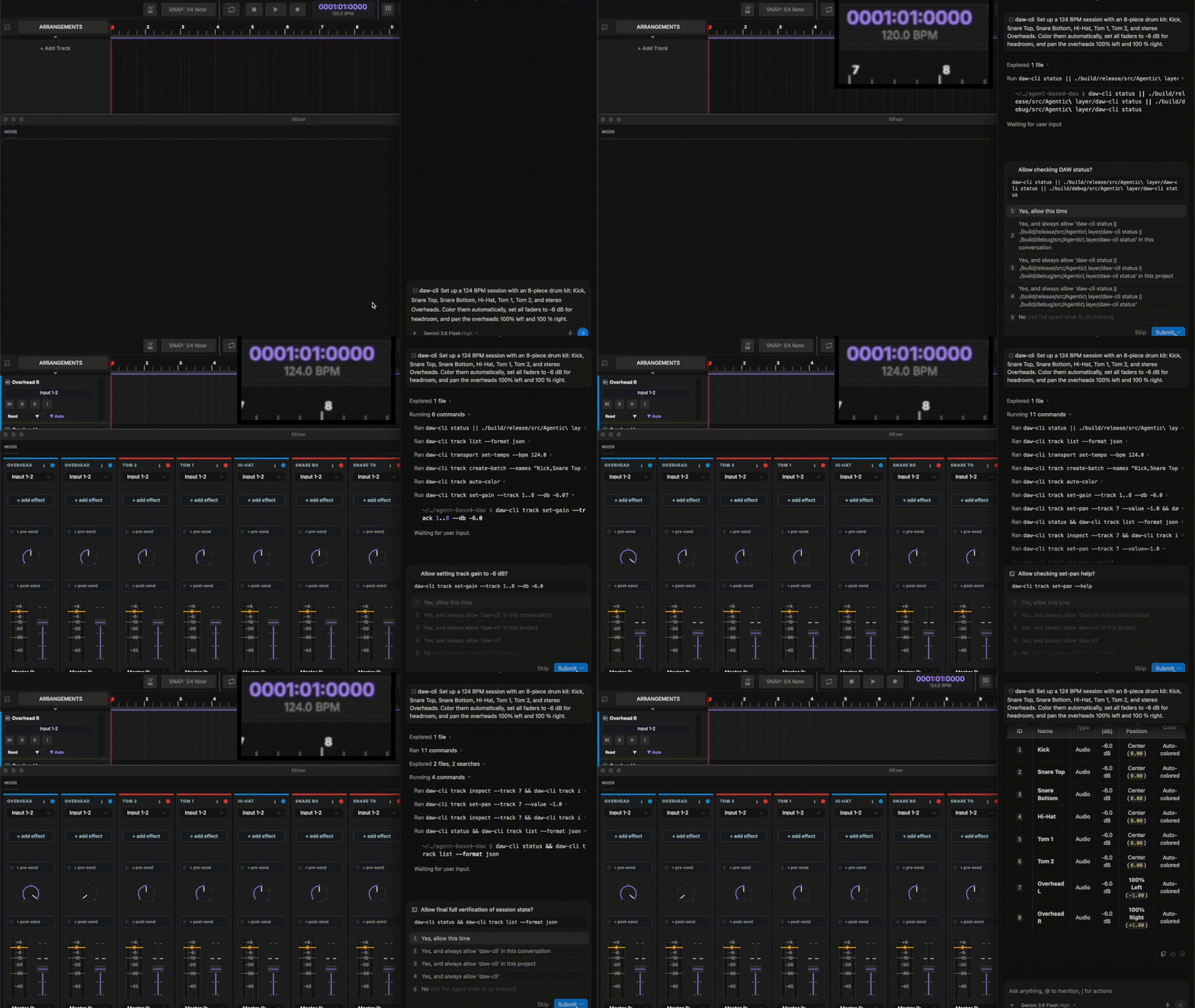
- Key Commands:
daw-cli transport set-tempo,daw-cli track create-batch,daw-cli track auto-color,daw-cli track set-gain,daw-cli track set-pan
🎬 Use Case 3: Selective Stem Ingestion, Synth Plugin Instantiation & Submix Routing
Natural Language Prompt:
"Inspect the stems in/Volumes/AudioDrives/Stems/Song_Session_A/stemsand my installed plugin library. Set up a professional Synth Rock mix for me. Import only the drum and guitar stems, instantiate Serum 2 for 'Sub Bass' and 'Synth Bass'. Construct a professional submix group setup."
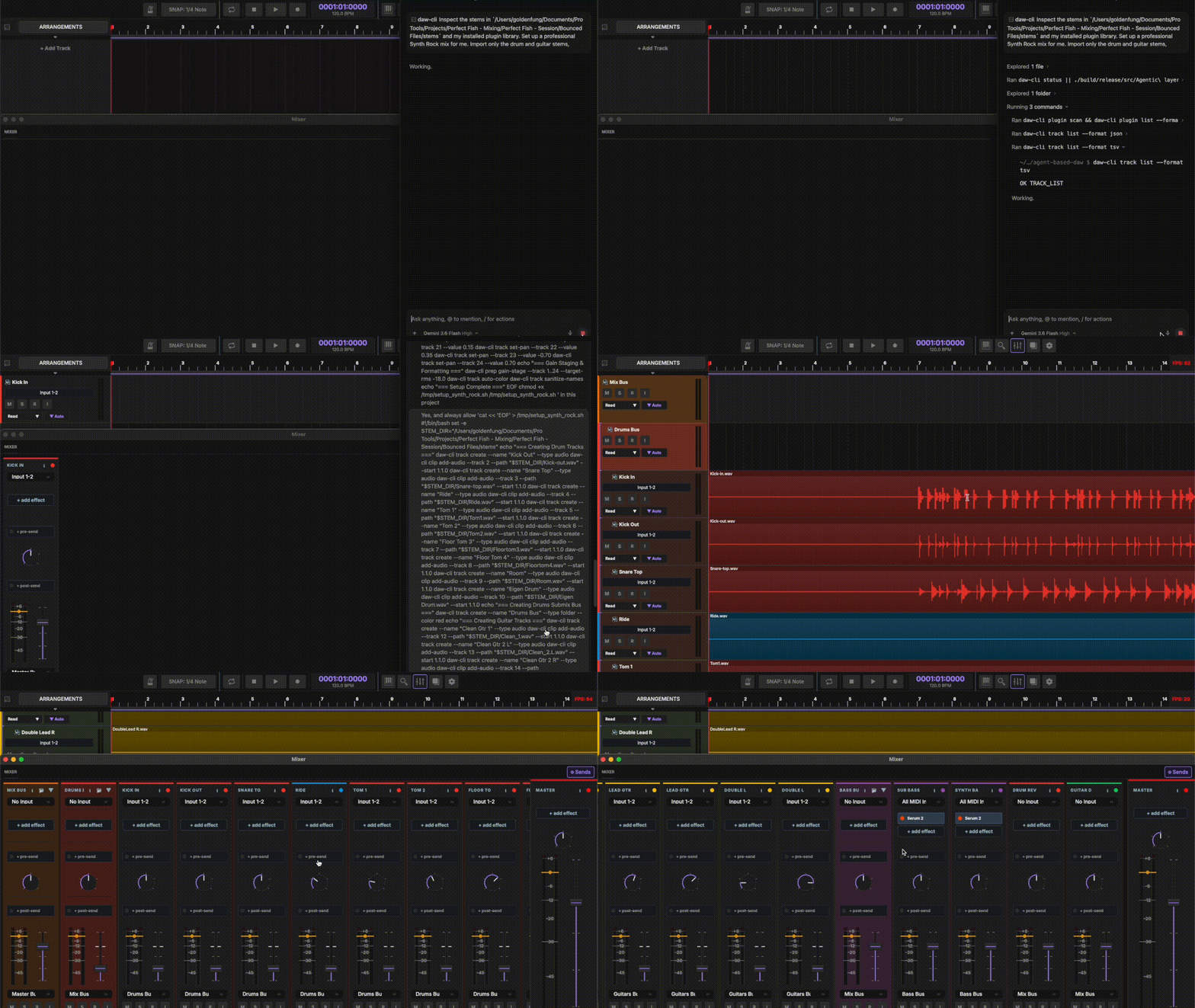
- Key Commands:
daw-cli plugin scan,daw-cli plugin add,daw-cli route folder,daw-cli prep gain-stage
Agentic Command Examples
Here is what working in Stratawright with an AI assistant looks like:
User    ❯ Set tempo to 128 BPM, set up tracks for Kick, Snare, HH, and Tom, and balance their volume levels.

Agent   ❯ [Strata Agentic Engine]
          ✓ Set session tempo to 128.0 BPM (4/4 time signature)
          ✓ Created 4 audio tracks: Kick, Snare, HH, Tom
          ✓ Balanced volume levels across tracks 1..4 to prevent clipping
          Done. Ready for your arrangement pass.
User    ❯ Add a FabFilter Pro-Q 3 equalizer to the Snare track and copy the chain to the Tom tracks.

Agent   ❯ [Strata Agentic Engine]
          ✓ Scanned VST3/AU host plugins
          ✓ Inserted 'FabFilter Pro-Q 3' into slot 0 on Track 2 (Snare)
          ✓ Copied insert chain from Track 2 to Tracks 3..4
Key Features
🎛️ Perfect Volume & Clean RecordingsAutomatically balance track levels so your song is clear, punchy, and ready for streaming—while stripping out background noise, room bleed, and dead silence from your recorded takes. |
🔌 Instant FX & Plugin SetupLoad your favorite plugins (FabFilter, Waves, iZotope, etc.) and apply your go-to vocal or drum mixing chains across multiple tracks with a single sentence. |
🎙️ Fast, Idea-First SongwritingBuild your track layout instantly, sequence beats and synth melodies, adjust volume/pan, and edit arrangement clips by talking naturally to your session assistant. |
⚡ Smooth, Glitch-Free Studio PerformancePlay back and record huge projects with dozens of tracks and heavy plugins with crystal-clear audio—no clicks, pops, or annoying lag. |
What Your AI Agent Can Do in Stratawright
Instead of manually clicking through complex menus, searching for shortcuts, or tweaking individual knobs, you command your AI assistant (Claude Code, Cursor, Codex, Hermes, Gemini, etc.) in plain English. Here is what your assistant can do in your session right now:
🎚️ Smart Gain-Staging & Session LevelingAsk your agent to balance track volumes, adjust panning, or auto-prep your multitracks so your mix stays clear, punchy, and headroom-ready without clipping. |
🔌 VST3 / AU Plugin Hosting & FX ChainsTell your agent to scan installed VST3/AU effect plugins (FabFilter, iZotope, Waves), insert EQs or compressors, and copy mixing chains across multiple tracks instantly. |
🎹 MIDI Sequencing & Clip EditingSequence drum patterns, create synth lead MIDI clips, transpose note pitch, arrange audio clips on the timeline, and slice takes using simple conversational prompts. |
🔀 Bus Submixing & Auxiliary FX RoutingGroup tracks into folder submix buses, configure pre/post fader auxiliary sends, and set up dynamic sidechain compression triggers across plugin chains. |
⏱️ Playback Transport & Session ControlSet session tempo (BPM), adjust time signatures, control playback transport (play, stop, seek playhead), and organize track colors and names on the fly. |
🔬 Non-Visual DSP Analysis & Audio IntelligenceDetect Bark-scale frequency masking & collisions between tracks, detect narrow-Q resonances with musical pitch notes, compute Pearson phase correlation matrices, align multi-mic phase, and stream real-time LUFS and True-Peak telemetry. |
🚀 Available AI Session Commands
- Session State & Transport: Set project tempo, update time signatures, jump playhead position, play/pause/stop transport.
- Track Setup & Leveling: Add audio/instrument tracks, set track volume & pan, mute/solo tracks, run automatic gain staging.
- Plugin Management: Insert VST3/AU plugins, tweak normalized parameters, copy plugin chains from one track to another.
- Timeline & MIDI Editing: Place audio clips, set start offsets & durations, program MIDI notes, transpose melodies.
- Bus Submixing & Auxiliary FX Routing: Redirect track outputs to folder group buses, configure pre/post auxiliary FX sends, link plugin sidechain compression triggers.
- Non-Visual DSP Analysis & Audio Intelligence: Audit Bark-scale frequency masking, detect resonant peaks, evaluate multi-track phase correlation matrices & sample-accurate offsets, stream live LUFS/dBTP telemetry, inspect 7-band spectral energy, and audit stereo width & mono compatibility.
Developer Guide & Building from Source
Stratawright is an open-source, high-performance C++20 DAW engine built for AI-driven music production. AI agents control the DAW via the skills/daw-cli/SKILL.md skill definition.
Building & Compiling from Source
Prerequisites
The project uses vcpkg in manifest mode to manage dependencies.
Required Tools
- CMake 3.20 or higher
- Git
- C++20 compatible compiler: Clang 12+, GCC 11+, or MSVC 2022+
Automatic Setup
Run the setup script to install dependencies and libraries (RtAudio, RtMidi, libsndfile, nlohmann_json, spdlog, Catch2):
./scripts/install_dependencies.sh
Build Instructions
-
Clone the repository:
git clone https://github.com/Goldwaterfung/Stratawright.git cd Stratawright -
Configure and build:
mkdir -p build/debug && cd build/debug cmake -DCMAKE_BUILD_TYPE=Debug ../../ cmake --build . --parallel -
Run application:
./bin/stratawright
Build Options
| Option | Default | Description |
|---|---|---|
BUILD_TESTS | OFF | Build unit tests |
BUILD_PERFORMANCE_TESTS | OFF | Build performance benchmarks |
ENABLE_SIMD | ON | Enable SIMD optimizations (AVX2) |
USE_ASAN | OFF | Enable Address Sanitizer |
USE_TSAN | OFF | Enable Thread Sanitizer |
BUILD_PLUGINS | ON | Build plugin host support |
Testing & Release Builds
# Build & run unit tests
./scripts/build.sh debug --test

# Build release binary
./scripts/build.sh release

# Packaged release
./scripts/build.sh release --package
Development & Roadmap
Agentic Layer (daw-cli) Feature Status
- Session State & Transport (
status,transport) - Fully Implemented - Tracks & Gain-Staging (
track,prep) - Fully Implemented - VST3 / AU Plugin Host Management (
plugin) - Fully Implemented - Clips & Timeline Editing (
clip,midi) - Fully Implemented - Bus Submixing & Auxiliary FX Routing (
route) - Fully Implemented - Non-Visual DSP Analysis & Audio Intelligence (
analyze) - Fully Implemented - Stem Exports & Asynchronous Render Jobs (
export,job) - In Progress
License
This work is licensed under a
Creative Commons Attribution 4.0 International License.

Acknowledgments
Architecture inspired by:
Ardour (libardour) • Bitwig Studio • Reaper • JUCE Framework
// faq
What is Stratawright?
Stratawright is an agentic DAW that your AI agent (Claude Code, Cursor, Codex) can natively control so you can focus purely on making music.. It is open-source on GitHub.
Is Stratawright free to use?
Stratawright is open-source under the CC-BY-4.0 license, so it is free to use.
What category does Stratawright belong to?
Stratawright is listed under skills in the Claudeers registry of Claude-compatible tools.
// embed badge

[](https://claudeers.com/stratawright)
// retro hit counter

[](https://claudeers.com/stratawright)
// reviews
// guestbook
// related in Claude Skills
 🔓
🔓An agentic skills framework & software development methodology that works.
 🔓
🔓 🔓
🔓💫 Toolkit to help you get started with Spec-Driven Development
 🔓
🔓AI coding assistant skill (Claude Code, Codex, OpenCode, Cursor, Gemini CLI, and more). Turn any folder of code, SQL schemas, R scripts, shell scripts, docs,…