
spotlight
Open-source Agent Skill that turns a website, phone clips or a CSV into a finished short video: launch videos, promo reels and narrated explainers, made by C…
Install with your AI
Paste into Claude Code, Cursor, or any agent — it reads the repo and wires the tool into your project.
Install and set up spotlight (claude-plugin project) into my current project.
Found on https://claudeers.com/spotlight
Repo: https://github.com/AmirSbss/spotlight
Homepage/docs: —
Detected install method: claude-plugin → /plugin install spotlight@AmirSbss/spotlight
Category: skills. Platforms: cli, web.
Read the repo's README for exact setup and env vars, then install it and wire it into my project.

Claudeers Health Verdict:
active; community-verified: false. Confirm the source before running anything.
/plugin marketplace add AmirSbss/spotlight
/plugin install spotlight@AmirSbss/spotlight
git clone https://github.com/AmirSbss/spotlight
// compatibility
| Platforms | cli, web |
|---|---|
| Operating systems | — |
| AI compatibility | claude |
| License | MIT |
| Pricing | open-source |
| Language | JavaScript |
spotlight: short videos made by your AI coding agent
spotlight is a free, open-source Agent Skill that turns a website, a folder of phone clips or a spreadsheet into a finished short video. You get a launch video, a promo reel or a narrated explainer, made by Claude Code, Codex CLI, Hermes Agent or any AI agent that reads SKILL.md. Each video comes with music, captions in your language (Arabic and Persian included), a poster and a caption ready to post. Every one is measured and reviewed by a second AI agent before you see it.
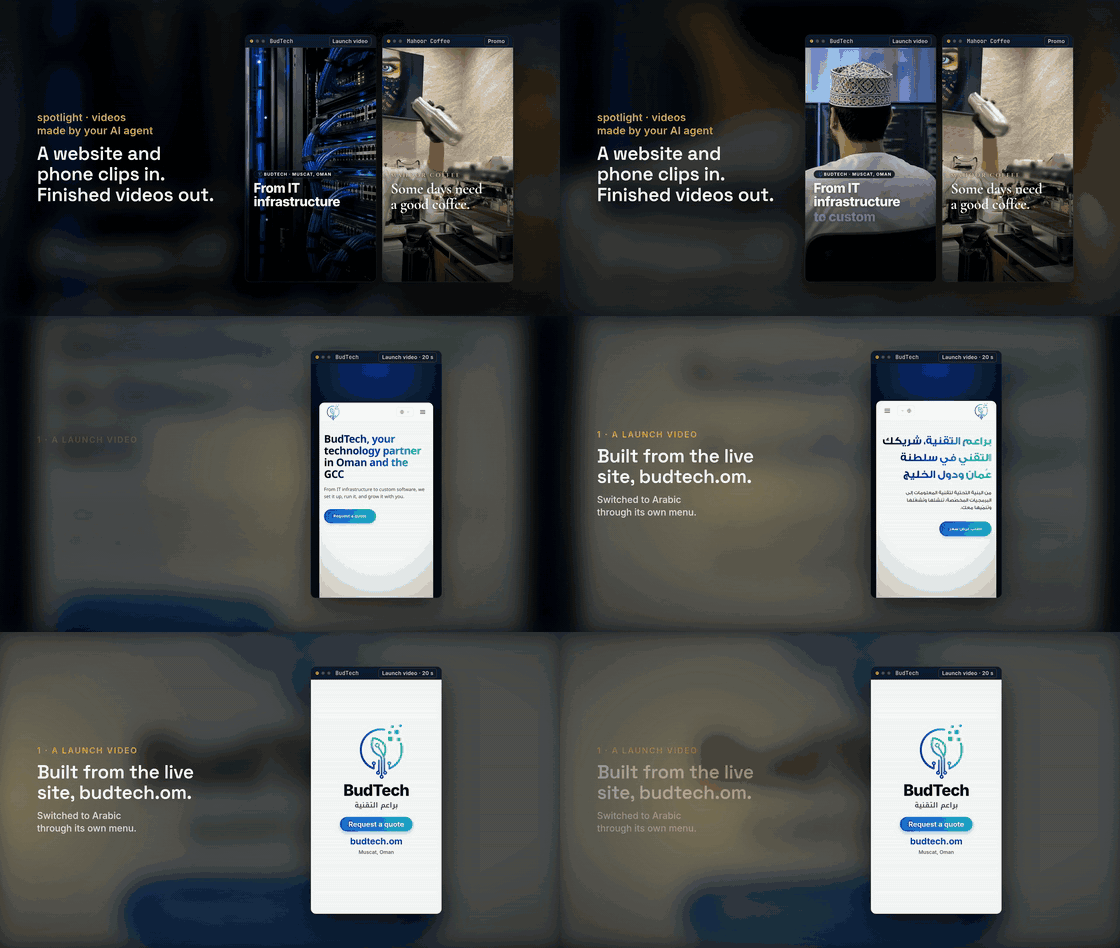
A website and a folder of phone clips in, finished videos out: BudTech's launch video and Mahoor Coffee's promo, both made with spotlight. So was this video. Watch it with sound, or see the square cut for LinkedIn.
Example videos made with spotlight
| Video | Made from | Mode |
|---|---|---|
| BudTech launch video | the live website budtech.om | brag, vertical, 20 s |
| Mahoor Coffee promo (Persian cut) | twelve phone clips and a logo | promo, vertical, 20 s |
| Why spotlight checks its own videos | check results and a critic report | explain, landscape, 60 s, narrated |
| spotlight's own launch video (square) | the BudTech and Mahoor Coffee videos | brag, landscape and square, 23 s |
Each folder holds the video, its poster, the plan, sources.md (where every line on screen came from) and the critic's reports.
What can spotlight make?
spotlight has three modes. You give it whatever you have, and the agent picks the mode, works out the story, picks the shots and writes the words.
| Mode | You give it | You get |
|---|---|---|
| brag | a website or a code project | a 15 to 25 s launch video built from the real product |
| promo | your own footage and photos, plus a line about the business | a 15 to 30 s promo reel where your material is the star |
| explain | a topic, a CSV or JSON file, maybe a site or footage | a 60 to 180 s explainer, which is a presentation as a video |
How do I turn my website into a launch video?
Give the agent the live site, or run it inside the project:
/spotlight https://your-app.com
/spotlight . --tone yc-parody
spotlight captures the site's copy, colours, fonts, logo and pages, finds the two or three moments where the product does its job, and builds the video from your real UI. Tones include polished, cinematic, deadpan, chaotic and yc-parody.
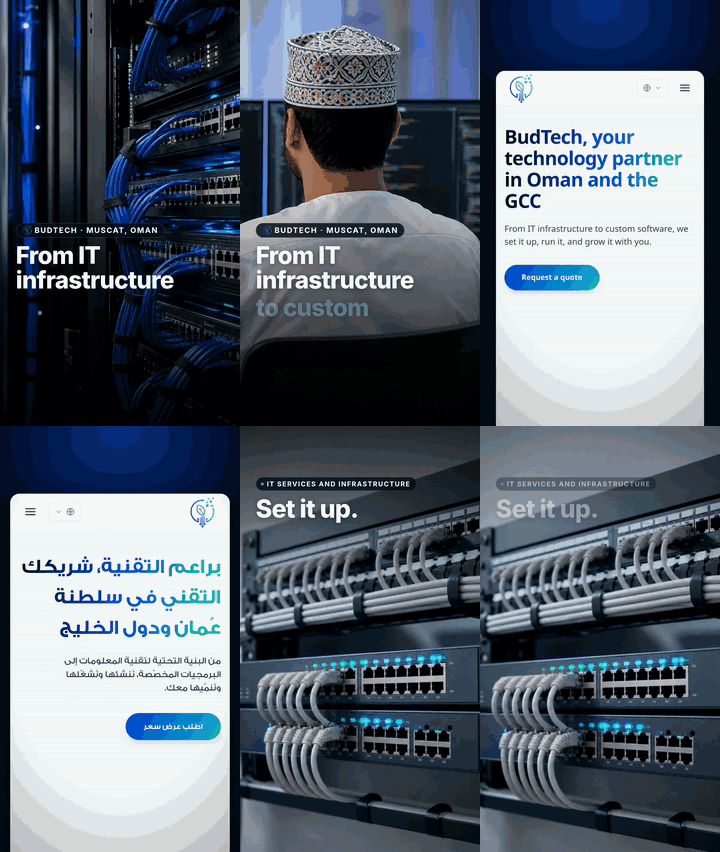
A 20-second launch video made from the live site of BudTech, an IT services company in Muscat, Oman, owned by spotlight's author. Every word on screen is the site's own, and the video switches the real site from English to Arabic through its language menu. Watch it with sound. Three critic rounds took the video from a dark, slow first cut to SHIP (plan, reports).
How do I turn phone videos into a promo reel?
Point it at the folder and say what the business is:
/spotlight ~/Videos/opening-night "Grand opening Friday at 7. First coffee is on us."
It sorts the clips, drops the shaky and dark ones, opens on the strongest moving shot and ends on your call to action. The captions sell a feeling in the brand's voice instead of describing what's already on screen.
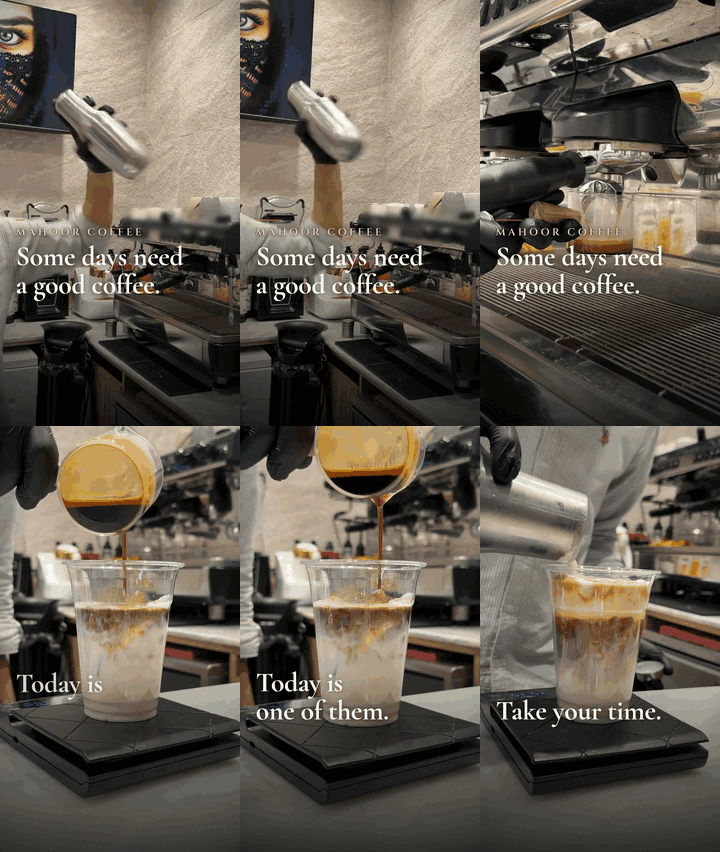
A 20-second promo for Mahoor Coffee, cut from twelve of the café's own phone clips and its logo. Its captions are one thread about a good day with a good coffee. Watch it with sound, or see the Persian cut. Three critic rounds caught the espresso machine maker's slogan, another café's branded cup and captions hidden under Instagram's buttons (plan, reports). The footage and logo belong to the café and are used with permission.
How do I make an explainer video from data?
Give it the topic and the file:
/spotlight "why we moved support to async" tickets.csv --mode explain --voice
You get a landscape explainer: a hook question, three to five sections that each make one claim and show the evidence, then a takeaway. Charts are drawn from your data, and every number on screen is the exact string in your file. --voice adds narration read by a local text-to-speech model.

A 60-second narrated explainer about spotlight's own quality check, built from real check results and a real critic report. An agent that knew spotlight only from its SKILL.md started it, then it went through two more critic rounds. Watch it with sound. Its sources trace every line on screen, and its plan has the command and the three critic rounds (reports).
Can spotlight make videos in Arabic, Persian or other languages?
Yes. Pass --lang fa, --lang ar, --lang de or any other language code, or let it take the language from your brief or your site. Persian and Arabic letters stay joined and run right to left, and numbers and Latin names inside them keep their order. Narration is available in English, Persian, Italian, Dutch and Ukrainian.
Can I get vertical, square and landscape versions?
Yes. Promos and launch videos default to vertical 1080x1920 for Reels, Shorts and TikTok, and explainers to landscape 1920x1080. Pass --format square or --format landscape, or ask "make it square for LinkedIn". It reuses the work folder, so it re-renders instead of starting over.
What do I get?
A spotlight-output/ folder, timestamped if one already exists:
video.mp4: H.264 at 30 fps and −14 LUFS, with the poster embedded as cover artmusic-only.mp4: the same video over the music alone (when the mix has effects or narration), for adding your own voice-overposter.jpg: the strongest settled framecaption.txt: a caption ready to post, in the video's languageplan.md: the angle, the shot list and the music cuessources.md: every line of on-screen text and every number, next to where it came fromwork/: everything needed for a re-cut
How does spotlight make a video?
The agent writes a brief and a shot plan, then builds the video as a web page where every frame is a function of time, and Chromium captures it frame by frame. Bundled scripts do the fiddly parts:
footage.pyturns any photo or clip into upright, frame-exact material. It copes with HEIC, HDR, rotated phone video and odd frame rates, and it encodes the final video.site.mjscaptures a website's copy, colours, fonts, logo, screens and a full-page image, within a hard time limit.capture.mjsrenders frames in parallel, and the result matches a single-threaded render pixel for pixel.- The render kit draws charts (bar, line, donut and a counting number) from your data, diagrams whose lines draw in, a dotted globe with routes between real places, and an extruded 3D logo.
mix.pylevels the music, ducks it under the narration and sets each sound effect so it's heard without ever peaking over the music.voice.pyreads narration aloud with Piper, locally, using only voices whose licences allow commercial use.
How does spotlight check a video before you see it?
Twice over: once by measurement, once by a critic.
- Measured:
footage.py checkfails a video whose loudness misses −14 LUFS, whose true peak is over −1.5 dBTP or that is missing a frame. It flags any stretch outside the end card that sits still for more than 0.6 s, and the agent fixes every one. It also writes a contact sheet with timestamps. - Critiqued: a fresh AI agent that didn't build the video watches the frames, reads the measurements and writes down what's wrong. The builder fixes it, and another fresh agent confirms. This runs for up to three rounds.
Every fact, price and number on screen comes from something you gave it, and sources.md lists where. AI images are optional, appear only as clearly illustrative backgrounds, and the caption says when one is used.
Which AI agents can use spotlight?
Any agent that reads SKILL.md and can run shell commands. Codex CLI and Hermes Agent were each tested end to end on a narrated explainer with a chart and a 3D globe, and Claude Code made every example here. Using spotlight with other agents explains how to install it for each one and how to run it headless.
How do I install spotlight?
For Claude Code:
claude plugin marketplace add AmirSbss/spotlight
claude plugin install spotlight@spotlight
For Codex, Hermes and other agents, the skills CLI installs it:
npx skills add https://github.com/AmirSbss/spotlight --skill spotlight
Then check that the machine has what it needs:
bash skills/spotlight/scripts/doctor.sh
You need ffmpeg 4.4 or newer with the zscale filter, ImageMagick 6 or 7, Python 3.8+, Node 18+, Chromium or Chrome, and uv. Piper is optional, for narration (uv tool install --python 3.12 "piper-tts>=1.3"). So is gpt-image-bridge, for the odd AI illustration.
Is the music free to use in my videos?
Yes, including commercially. Most of the bundled music is by Sascha Ende at ende.app, licensed CC BY 4.0. Credit "Music by Sascha Ende at ende.app" (spotlight puts it in sources.md for you), and don't register the music with YouTube Content ID. One track and all 18 sound effects are CC0. Your own track always wins: pass --music <file>. The music licences list every file's source.
Is my footage private?
Yes. Your footage, renders and plans stay on your machine, and nothing is uploaded. The one exception is the prompt for an optional AI illustration, and --no-ai turns that off too.
Project status
The three modes, website capture, the measurements and critic loop, sound (music, levelled effects and local narration) and visuals (charts, diagrams, a routes globe and an extruded logo) are done. One finished example per mode is in examples. The design and the plans live in docs/superpowers.
Tests
python3 tests/test_footage.py && python3 tests/test_check.py && python3 tests/test_docs.py && python3 tests/test_assets.py
uv run --project skills/spotlight/scripts python tests/test_mix.py
bash tests/test_capture.sh && bash tests/test_kit.sh && bash tests/test_site.sh && bash tests/test_three.sh
bash tests/test_doctor.sh && bash tests/test_bridge_image.sh && bash tests/test_voice.sh
Credits and license
spotlight is MIT-licensed. It is built on brag (MIT), and the critic loop and quality bar are adapted from motion-video-kit (MIT). NOTICE.md lists all third-party work, including the music, fonts and the footage in the examples.
// faq
What is spotlight?
Open-source Agent Skill that turns a website, phone clips or a CSV into a finished short video: launch videos, promo reels and narrated explainers, made by Claude Code, Codex CLI or Hermes Agent. With music, captions in any language (Arabic and Persian too) and built-in quality checks.. It is open-source on GitHub.
Is spotlight free to use?
spotlight is open-source under the MIT license, so it is free to use.
What category does spotlight belong to?
spotlight is listed under skills in the Claudeers registry of Claude-compatible tools.
// embed badge

[](https://claudeers.com/spotlight)
// retro hit counter

[](https://claudeers.com/spotlight)
// reviews
// guestbook
// related in Claude Skills
 🔓
An agentic skills framework & software development methodology that works.
 🔓
 🔓
AI coding assistant skill (Claude Code, Codex, OpenCode, Cursor, Gemini CLI, and more). Turn any folder of code, SQL schemas, R scripts, shell scripts, docs,…
 🔓
💫 Toolkit to help you get started with Spec-Driven Development