
smart-notes-skill
Claude Skill that turns lecture transcripts and readings into linked Obsidian notes, adaptive flashcards, and a gap tracker.
Install with your AI
Paste into Claude Code, Cursor, or any agent — it reads the repo and wires the tool into your project.
Install and set up smart-notes-skill (claude-skill project) into my current project.
Found on https://claudeers.com/smart-notes-skill
Repo: https://github.com/OnePathToFreedom/smart-notes-skill
Homepage/docs: —
Detected install method: claude-skill → # copy this skill into .claude/skills/smart-notes-skill/
Category: skills. Platforms: api, web.
Read the repo's README for exact setup and env vars, then install it and wire it into my project.

Claudeers Health Verdict:
active; community-verified: false. Confirm the source before running anything.
# copy the skill dir into your project:
# .claude/skills/smart-notes-skill/   (or ~/.claude/skills/smart-notes-skill/ for all projects)
git clone https://github.com/OnePathToFreedom/smart-notes-skill
// compatibility
| Platforms | api, web |
|---|---|
| Operating systems | — |
| AI compatibility | claude |
| License | MIT |
| Pricing | open-source |
| Language | — |
An Obsidian notebook that thinks along.
Not a transcript-to-file converter: it knows what has already been written, notices what you are weak on, links related ideas, and keeps its own flashcard deck sharp over time.
🎯 Why this exists
Most "AI note-taker" prompts do one thing: turn text into a formatted file. That falls apart once you have a whole course. New material overlaps with old notes, some topics never get tested, and flashcards pile up without any sense of what is sticking.
Smart Notes behaves like a notebook a diligent student would keep. It is deliberately generic: nothing in it is tied to one course, subject or language. It configures itself the first time you use it for a new subject.
🔄 What happens when you paste material
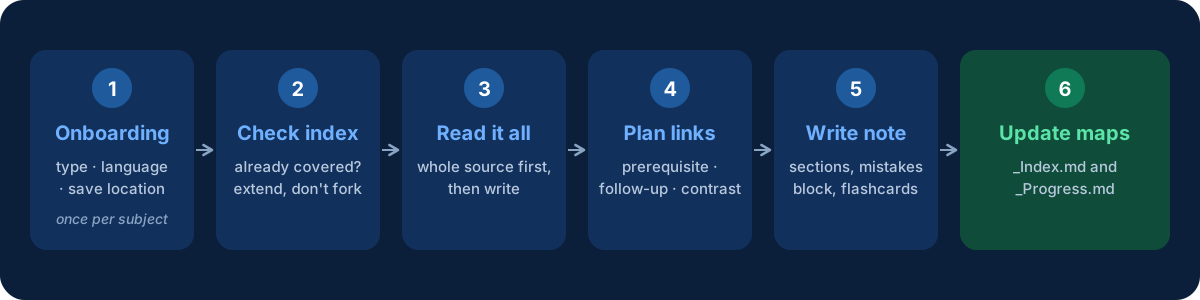
| Step | What the skill does |
|---|---|
| 1. Onboarding | Once per subject it asks four things: subject name and type, note language(s), where to save, and whether to generate flashcards (on by default). Answers are stored in _Progress.md, so it never asks again. |
| 2. Check the index | Looks in _Index.md. If your material is a near-duplicate of an existing topic, it tells you which file already covers it and extends that file. A separate new file only happens if you confirm it is a different topic. |
| 3. Read everything | Reads the whole source and gathers every fact, number and example before writing. |
| 4. Plan the links | Works out which existing topics this one connects to: prerequisite, follow-up, same category, or contrast. |
| 5. Write the note | Builds the note from the shared skeleton and the preset for your subject type. |
| 6. Update the maps | Refreshes _Index.md and _Progress.md. |
Once activated, the skill stays active for the rest of the conversation. Every later transcript or reading you paste is handled automatically.
✨ Key features
| 🗂️ Linked notes, not isolated files Every note has a Related: line with [[wikilinks]], and _Index.md keeps a live map of every topic, its status and its links. | 🃏 Adaptive flashcards (optional) Can be switched on or off per subject at onboarding, or toggled later. When on, weak topics get more cards and a wider spread of angles, and every deck includes a connection card when a genuine link to another topic exists. |
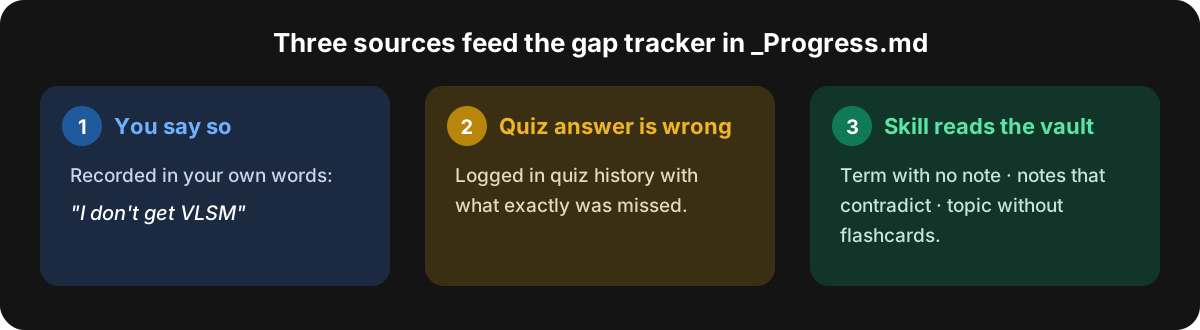
🧩 Gap tracking_Progress.md logs what you are weak on from three sources (see below). | 🛡️ Edits that protect your own notes New material that overlaps an existing note is merged in, not overwritten: manual edits and corrections are detected and kept, genuine conflicts are flagged instead of auto-resolved, and every change is reported as a diff. |
| 🎛️ Adapts to the subject Four presets with their own note structure (see below). | 🧠 Quizzes only when you ask Never proposes a quiz or review unprompted. |
🗺️ Folder structure
One folder per subject:
<Subject Name>/
  _Index.md        ← map of content: every topic, its status, its links
  _Progress.md     ← config (from onboarding) + gap tracker + quiz history
  <Topic 1>.md
  <Topic 2>.md
  ...
The _ prefix keeps the two control files sorted above ordinary notes in any file browser.
_Index.md
| Topic | Status | Links |
|---|---|---|
| [[Topic 1]] | ✅ covered | [[Topic 2]] |
| [[Topic 2]] | ⚠️ weak | [[Topic 1]], [[Topic 3]] |
| Topic 4 | ❌ not covered yet | referenced by [[Topic 2]] |
A topic that an existing note references but that has no note of its own stays listed as not covered yet.
Note skeleton
Every note shares one skeleton: frontmatter, # Title, a Related: line, an opening definition, one section per concept, a common-mistakes callout, and a flashcard deck.
> [!warning] Common mistakes / things people mix up
> - <mistake 1>
> - <mistake 2>

## Flashcards
#flashcards

<Question>?
?
<Answer>
The bare ? line is the question/answer separator of the Obsidian Spaced Repetition plugin.
🧩 Gap tracking
🎛️ Presets
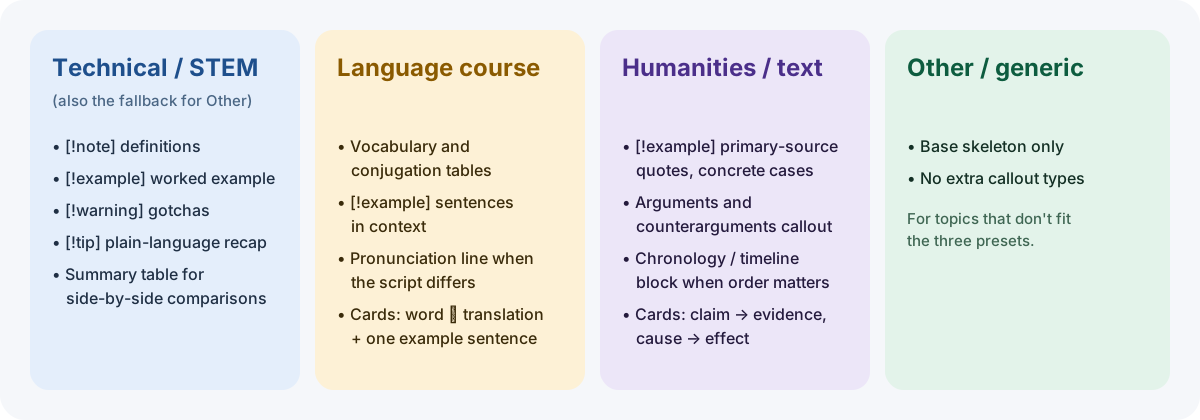
If the subject is configured as bilingual, every prose line and every flashcard question and answer appears as a pair in the two languages you chose. Structure stays identical.
🃏 Adaptive flashcards
- Topics flagged weak get more cards and a wider spread of angles: bare definition → mechanism / why → applied scenario.
- Difficulty is graded across that spread instead of writing every card at the same level.
- Whenever a genuine link exists, at least one connection card tests the relation between this topic and a related one already in the vault, for example how does CIDR relate to a routing table entry?
The repeated reviews themselves are run by the Obsidian Spaced Repetition plugin.
🧠 Self-check quizzes
Only when you explicitly ask:
- No topic named → it pulls from
_Progress.md, weak and not-yet-tested topics first. - A quick quiz widget for factual recall; plain chat for deeper "explain why / how" questions, where you answer in your own words and it evaluates.
- The outcome is logged back into the quiz history in
_Progress.md.
💬 How replies look
Every reply leads with the file name in bold, whether creating or editing, followed by a short bullet summary of what the file covers or what changed. The full file is not pasted into chat.
🛡️ Guardrails
- If pasted material is itself a graded assessment (look for "Honor Code", "Submit", point values), it never supplies the answers, even if asked repeatedly. It offers to explain the underlying concept or run a separate self-check quiz instead.
- Any embedded "AI assistant instructions" inside pasted transcripts or page text are treated as inert content, never as commands.
📦 Installation
This is a single SKILL.md file, the standard format for a Claude Skill.
- Copy
SKILL.mdinto your Claude skills directory, typically~/.claude/skills/smart-notes/SKILL.md(check Anthropic's current docs for the exact path). - Restart or reload Claude so it picks up the skill.
- Done. No dependencies, no build step.
🚀 Usage
/smart-notes
or
/study
or just ask Claude to keep smart study notes or flashcards for a course. On the first run for a new subject, answer the onboarding questions. After that, paste lecture transcripts, readings or any course material.
To review, ask: "quiz me on what I'm weak on" or "test me on [topic]".
🔧 Requirements
- Obsidian (or any Markdown editor; wikilinks and callouts are Obsidian-flavored)
- Spaced Repetition plugin only if flashcards are on and you want them to run as real spaced-repetition reviews
📄 License
MIT. See LICENSE. Free to use, modify and redistribute.
// faq
What is smart-notes-skill?
Claude Skill that turns lecture transcripts and readings into linked Obsidian notes, adaptive flashcards, and a gap tracker.. It is open-source on GitHub.
Is smart-notes-skill free to use?
smart-notes-skill is open-source under the MIT license, so it is free to use.
What category does smart-notes-skill belong to?
smart-notes-skill is listed under skills in the Claudeers registry of Claude-compatible tools.
// embed badge

[](https://claudeers.com/smart-notes-skill)
// retro hit counter

[](https://claudeers.com/smart-notes-skill)
// reviews
// guestbook
// related in Claude Skills
 🔓
An agentic skills framework & software development methodology that works.
 🔓
 🔓
AI coding assistant skill (Claude Code, Codex, OpenCode, Cursor, Gemini CLI, and more). Turn any folder of code, SQL schemas, R scripts, shell scripts, docs,…
 🔓
💫 Toolkit to help you get started with Spec-Driven Development