
skills-hub
See which of your AI agent skills actually get used — one local library for Claude Code / Codex / OpenCode skills, with real trigger counts read from each ag…
Install with your AI
Paste into Claude Code, Cursor, or any agent — it reads the repo and wires the tool into your project.
Install and set up skills-hub (git-clone project) into my current project.
Found on https://claudeers.com/skills-hub-2
Repo: https://github.com/Liang-HZ/skills-hub
Homepage/docs: https://skills.liangai.org
Detected install method: git-clone → git clone https://github.com/Liang-HZ/skills-hub
Category: skills. Platforms: cli, api, desktop, web.
Read the repo's README for exact setup and env vars, then install it and wire it into my project.

Claudeers Health Verdict:
slowing; community-verified: false. Confirm the source before running anything.
git clone https://github.com/Liang-HZ/skills-hub
// compatibility
| Platforms | cli, api, desktop, web |
|---|---|
| Operating systems | — |
| AI compatibility | claude |
| License | MIT |
| Pricing | open-source |
| Language | Python |
Skills Hub
You've installed a pile of agent skills. Which ones actually fire?
Skills Hub keeps every AI agent skill on your machine in one local library — and answers that question with real numbers, by reading Claude Code's, Codex's and OpenCode's own session logs to count how often each skill was actually triggered. Manage, toggle, group and update all of them from a single local web UI.
Try the interactive demo → · 中文文档 →
Every skill (a folder with a SKILL.md) has a single source of truth in a local library/, linked into wherever your agents look for skills — Claude Code (~/.claude/skills), Codex (~/.codex/skills), generic Agents (~/.agents/skills), or any project directory. Edit once, effective everywhere; flip a toggle off and the skill stays safe in the library.
- Real trigger counts, not guesses — per-skill usage across today / 7d / 30d / all time, split by agent, read straight from each agent's own local logs. The skills you never actually use sort themselves to the bottom.
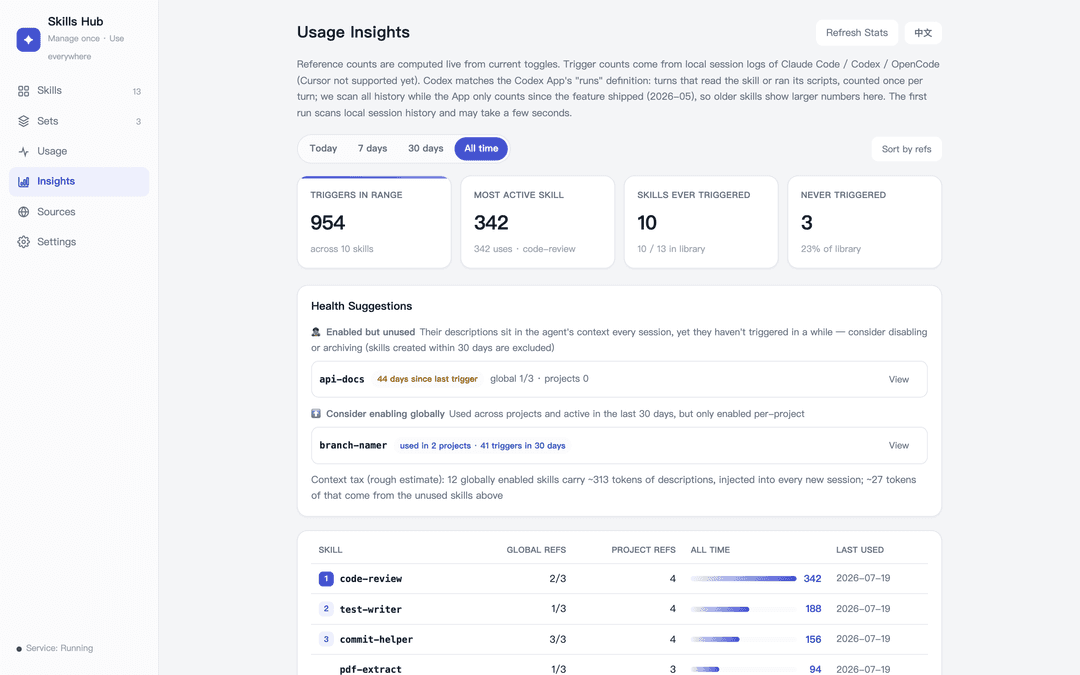
- Health suggestions — zombie skills (enabled everywhere, firing nowhere), promote-to-global candidates, and a context-tax estimate of what those always-injected skill descriptions cost you per session.
- Private backup & multi-machine sync — your hub is a git repo with every change auto-committed; bind your own private repo and one click pulls the other machine's changes and pushes yours.
- One library, every agent — Claude Code, Codex, OpenCode, or anything else that reads a skills directory. Globally or per project.
- Single-file, no npm/pip install — Python 3.9+ and Git are the only requirements. One file, one command.
- Local-first — a loopback-only HTTP server (
127.0.0.1:7799). Nothing is uploaded; every data source is read-only. - Everything is undoable — every change is committed to a local git history; deletes go to a trash folder, never
rm -rf. - Cross-platform, bilingual UI — macOS / Linux (symlinks), Windows (symlink → junction → copy fallback); auto-detects Chinese/English.
Quick start
git clone https://github.com/Liang-HZ/skills-hub.git
cd skills-hub
python3 webui.py          # opens http://127.0.0.1:7799
Windows: double-click start-windows.bat (or py webui.py) — it probes py/python for you, and offers optional login autostart (revocable anytime with py webui.py --uninstall-autostart).
Optional native desktop window: pip install pywebview && python3 desktop.py.
The UI needs three sentences to understand:
- All your skills live in this machine's library — deleting a toggle never deletes the skill, edits apply everywhere.
- Each skill has a row of toggles: green = usable there (Claude global / Codex global / a specific project).
- Nothing touches the network unless you click a button that says so.
What it does
| Tab | What you do there |
|---|---|
| Skills | Create, edit, import, adopt stray skills found on your machine (native directory picker or type a path); toggle where each one is enabled; run an integrity check (missing frontmatter, dead links, unrecorded local edits — structural facts only) |
| Sets | Group skills you always use together; enable/disable a whole set in one click |
| Usage | See what's enabled where (global roots and every project), clean up dead projects |
| Insights | Rank skills by references and by how often they were actually triggered, over today / 7d / 30d / all time; health suggestions call out zombie skills, promote-to-global candidates, and your context tax |
| Sources | Clone third-party skill repos into an isolated vendor/ area, cherry-pick skills as snapshots, and update them manually |
| Settings | Behavior options; tag-versioned software updates; private-repo backup & multi-machine sync |
Usage stats: where the numbers come from
Two independent measures, both computed locally — nothing is uploaded, and every data source is read-only:
- References — how many places currently have the skill switched on (global roots + per-project). Derived live from the toggles; nothing extra is stored.
- Triggers — how often a skill was actually invoked, by incrementally scanning each agent's own local session logs into
.state/usage.sqlite3(Python's stdlibsqlite3; no new dependency). Signal quality differs per agent, so the source is stated rather than blurred together:
| Agent | Source | Signal |
|---|---|---|
| Claude Code | ~/.claude/projects/**/*.jsonl (CLI and desktop app share this store) | Exact — a structured Skill tool call per invocation, deduplicated by call id so resumed/forked sessions never double-count |
| OpenCode | opencode.db (XDG path, $XDG_DATA_HOME → ~/.local/share/opencode) | Exact — the built-in skill tool call |
| Codex | ~/.codex/sessions/**/*.jsonl (CLI and the Codex App share this store) | Same definition as the Codex App's "runs" — turns whose commands read the skill's SKILL.md or ran its scripts/, counted once per turn. Measured 93–100% agreement with the App on real data; we scan all history while the App only counts since the feature shipped (2026-05), so older skills show more here |
| Cursor | — | Not supported yet: its local store is an unofficial, reverse-engineered state.vscdb format that could break silently on upgrade |
Scanning is incremental (byte offsets for log files, a rowid high-water mark for OpenCode), so nothing is double-counted and a half-written record is never parsed. The first run walks your existing history and may take a few seconds; after that it's instant.
The sovereignty model for third-party skills
Third-party repos are cloned into vendor/<source>/ — an inert inbox that is never live. Importing a skill copies a snapshot of it into your library. Updating is two separate, explicit authorizations:
- Check — only now does a
git fetchhappen. You see the new commits and exactly which files of which imported skills changed. The check issues a one-time, short-lived token bound to that source at that commit. - Update — consumes the token and fast-forwards to exactly the commit you reviewed. It cannot re-resolve "latest" behind your back.
All git commands the manager runs use an isolated empty core.hooksPath, so no repository or global git hook can turn a management action into code execution.
Updating the app · syncing between machines
- Software update (Settings): the installed release shows as a git tag (
vX.Y.Z). "Check for Updates" fetches only when clicked; applying is non-destructive — refused while you have uncommitted changes, and merge conflicts roll back automatically, touching nothing. Your skill edits and app updates never fight: your commits live inlibrary/, releases only touch code. - Backup · multi-machine sync (Settings): bind your own private repo, then "Sync Now" pulls the other machine's commits and pushes yours — one library, one history, nothing extra to maintain. Toggle states are snapshotted into the repo on every sync and restored on the other machine with one click. Sync only ever pushes to your private remote; the public repo is fetch-only (there is no code path that pushes to it, and regression tests pin that).
- On the other computer,
git clone <your private repo>is the full install — the app and all your skills come with it.
What it deliberately does NOT do
Skills Hub is a manager, not a security scanner:
- It does not judge whether a skill is safe, and never runs a skill's own scripts, installers, or examples.
- It does not auto-download anything — sources, updates, dependencies, models. Every network action is behind an explicit button labeled as such.
- It shows you diffs and provenance so you can decide. Read third-party skills before enabling them.
Write APIs are protected server-side (loopback host + same-origin + JSON content-type + per-session CSRF token), so a malicious web page can't drive your manager.
Data layout
library/               your skills (the single source of truth)
library/.origins.json  provenance of each skill (own / tracking upstream / detached copy)
sets/                  skill groups, one name per line
vendor/                isolated clones of third-party repos (never live)
targets.txt            registry of project dirs that use skills
attic/trash/           where "deleted" skills actually go
usage_log.py           trigger-count scanner (reads agent session logs, aggregates into .state/)
.state/                local derived data (usage stats cache) — gitignored, rebuildable
site/                  the browser demo published at skills.liangai.org (built, not hand-written)
tools/build_demo.py    compiles webui.py's real UI into that static demo (fake in-memory backend)
Your skills and sets are auto-committed to the local git history (only library/ and sets/), which is your undo path. To keep your data outside the code checkout, set SKILLS_HUB_ROOT=/path/to/data — the app will initialize a separate data repo there and git pull upgrades stay trivial.
Run it at login
See docs/autostart.md for launchd (macOS), systemd (Linux), and Task Scheduler (Windows) recipes.
CLI (macOS/Linux)
skillctl is a bash equivalent of the toggles: skillctl list | sets | status | enable <target> <skill|@set> | disable | add | new.
Tests
python3 -m unittest discover -s tests
The regression suite pins the product boundary: no code execution paths, no network without an explicit click, token-gated updates, CSRF enforcement.
License
// faq
What is skills-hub?
See which of your AI agent skills actually get used — one local library for Claude Code / Codex / OpenCode skills, with real trigger counts read from each agent's own session logs. Zero-dependency local web UI.. It is open-source on GitHub.
Is skills-hub free to use?
skills-hub is open-source under the MIT license, so it is free to use.
What category does skills-hub belong to?
skills-hub is listed under skills in the Claudeers registry of Claude-compatible tools.
// embed badge

[](https://claudeers.com/skills-hub-2)
// retro hit counter

[](https://claudeers.com/skills-hub-2)
// reviews
// guestbook
// related in Claude Skills
 🔓
🔓An agentic skills framework & software development methodology that works.
 🔓
🔓 🔓
🔓💫 Toolkit to help you get started with Spec-Driven Development
 🔓
🔓AI coding assistant skill (Claude Code, Codex, OpenCode, Cursor, Gemini CLI, and more). Turn any folder of code, SQL schemas, R scripts, shell scripts, docs,…