
session-lens
A /session-lens pane for Claude Code: what fills the context window, what each turn cost, and every tool, MCP server and skill each agent used.
Install with your AI
Paste into Claude Code, Cursor, or any agent — it reads the repo and wires the tool into your project.
Install and set up session-lens (claude-plugin project) into my current project.
Found on https://claudeers.com/session-lens
Repo: https://github.com/neokn/session-lens
Homepage/docs: —
Detected install method: claude-plugin → /plugin install session-lens@neokn/session-lens
Category: mcp-servers. Platforms: cli, api, web.
Read the repo's README for exact setup and env vars, then install it and wire it into my project.

Claudeers Health Verdict:
unknown; community-verified: false. Confirm the source before running anything.
⚠ Unverified / not recently updated — review before pasting a run-this config.
/plugin marketplace add neokn/session-lens
/plugin install session-lens@neokn/session-lens
git clone https://github.com/neokn/session-lens
// compatibility
| Platforms | cli, api, web |
|---|---|
| Operating systems | — |
| AI compatibility | claude |
| License | MIT |
| Pricing | open-source |
| Language | TypeScript |
session-lens
A Claude Code mod that opens a pane with /session-lens. It shows where the context window and the session's tokens went, for the main agent and every subagent it launched, while the session runs.
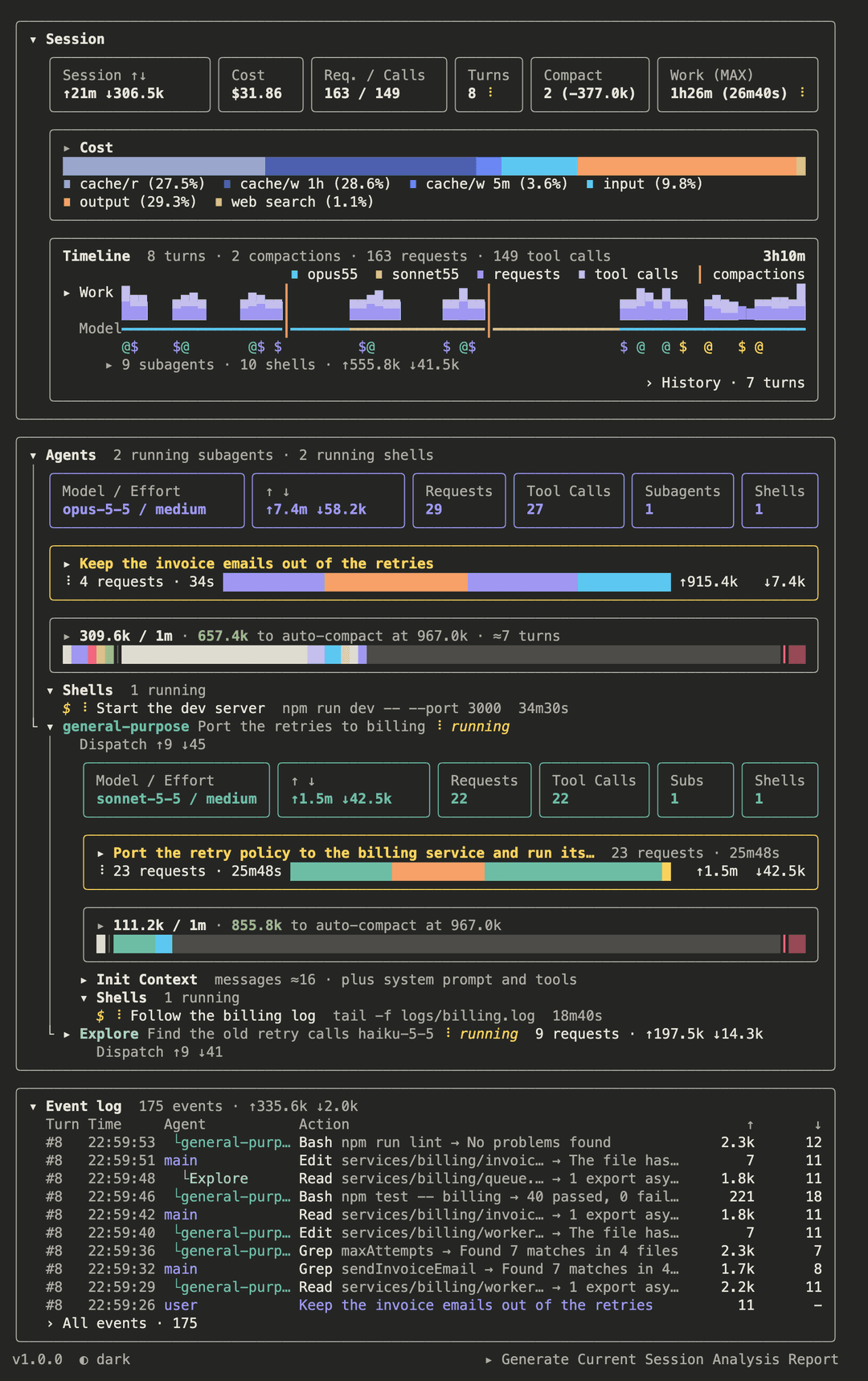
The session in this picture is made up, and so are its figures.
Install
At the prompt of a Claude Code terminal session:
/plugin install session-lens --marketplace neokn/session-lens
Answer y to add the marketplace, then pick a scope. From a shell:
claude plugin install session-lens --marketplace neokn/session-lens
This also installs Anthropic's session-report plugin, which the pane's report line runs. It comes from the official marketplace, which Claude Code adds at your first interactive session. On a machine that has not had one, as in a script, add it first, or the pane will not load:
claude plugin marketplace add anthropics/claude-plugins-official
Requirements
- Claude Code 2.1.308 or later.
/usr/bin/python3withselect.kqueue(macOS) to watch forclaude -pchild sessions as they start. Without it the lens lists~/.claude/sessions/while a Bash call runs instead.jqon thePATH. The pane reads the session's own record under~/.claude/projects/with it. Withoutjqthe pane says so and shows only what/contextknows.- macOS:
brew install jq - Linux:
sudo apt install jq - Windows:
winget install jqlang.jq
- macOS:
What the pane shows
The pane draws with semantic design tokens (hooks/views/palette.ts), never a raw colour. Colour answers three questions, each on a channel of its own, so one never hides another. The hue family says who: the main agent plum, a subagent mineral, an agent a subagent started a fainter tone of its parent. Distinct hues inside one whole say which kind: every kind of token in a cost bar has its own hue (input sky, the cache writes cobalt, the hour-long one darker, cache reads haze, output afternoon orange), as every part of a window has, and no agent shares a hue with them. Warmth and light say when and which way: what still runs is sunlight, always a hue and never a grey (a spinner, Loading…, the working row's label, a running status, a live idle count); warm is what the model wrote and the longest request, cool what was sent and the shortest, haze what the cache gave back and what has ended well. What needs the eye is rose and bold, a hue of its own. What came from outside (MCP, a skill, a hook) is sand, in tones. Text left uncoloured is the terminal's own. The terminal has one font size, so weight and slant carry the rest: bold names a thing or a key figure, italic is what is still changing or only estimated. Glyphs are tokens too, one meaning each: ▸/▾ a fold shut or open, › a page of its own, ‹ back, +/− more or fewer rows, ✓/✗ done or failed. Space is counted in cells, one token each: 1 inside a border, 2 for each level down, a blank row between sections, 2 between controls side by side. The colours /context names from the theme are drawn as their nearest place in the palette. Press the version at the bottom left to open a page of two tabs. Design tokens explains the three channels first, then lists every token with what it means, and draws the atoms. UI components draws every molecule and organism with sample figures. A sample that can move or be pressed plays through its states by itself, a beat each, and its height stays put as it does: while either tab is open the pane's clock runs, with the session idle too.
The tokens come in two themes, the same names and meanings: the brand's palette on a light terminal, each hue brought down in lightness only as far as it takes to hold on a light grey, and the same lifted to read on a dark one. The pane follows Claude Code's own theme: a light… theme draws it light, any other named theme dark, a custom theme included. Claude Code settles auto by asking the terminal for its background, an answer a mod does not get, so here auto reads COLORFGBG and is dark if it says nothing. Many terminals do not set it, so auto can read wrongly: the button at the foot of the pane names the theme drawn and switches to the other, for this session. Each session starts from Claude Code's theme again, and the Theme row of /config changing draws what it comes to.
Run /session-lens. Until it has read /context and the session record, the pane shows a skeleton of its blocks under a line naming what it reads, over a light that sweeps the width of the pane, the one a slow reading again draws. The pane has three blocks, top to bottom.
Session. The whole session, the main agent and every subagent added together. Cost is shown here and nowhere else: the total in its tile, the rest in the Cost box. Everything under the block's title starts level with it: the tiles, then two boxes as wide as the tiles, each folding as one and showing its key figure and its picture while folded.
- Six tiles, in this order: session ↑ ↓;
Cost, the session's total,$X ± $Y;Req. / Calls, every request of the session, main's and subagents' alike, then every tool, skill and MCP call the Timeline holds (84 / 120); turns; compactions with what they dropped; andAway p50 (MAX), how long the agent ran with nobody needed: the median stretch and, in brackets, the longest (6m12s (48m03s)). A stretch runs from a prompt to the next time the person came in: their next prompt, or a message they sent while it ran. What woke the agent without them is no prompt (a background shell or subagent that ended and queued its notice, another session's message, a plugin), so the stretch runs on through the wait; the record names who sent each message (origin.kind), and onlyhumancuts. A shell still running, killed, or left when its agent ended woke nothing, so a dev server left running does not keep the stretch going. A new model mid-turn starts a turn of its own but no stretch. A turn still going counts to now, and may yet grow once a subagent's end wakes main, so the figure is read again as the record grows. A row too narrow for every name takes the short ones (↑↓,Req. / Calls,Away); narrower still, it keeps every figure whole and cuts the names. Inside its border each tile keeps the one-cell inset every box keeps, until even the short names do not fit with it. - Cost: a box whose head says only what went unpriced, as the total is the
Costtile's; under it a bar by kind of token (input, cache read, cache write, output, web search) and each kind's share of the bar. Pressed, the head opens the Detail tables. The bar and its shares are priced from the record at list prices; the total is the harness's own count where there is one (snapshot) and an estimate calibrated against it elsewhere (estimate), so the two need not agree.± $Yis the estimate's uncertainty and is left out when every process was measured;+N unpriced (a, b, …)counts requests at a model with no known price and names up to two of the models. The harness's count runs from the session's launch or the last/login. A resume carries the count on from where the last process left it, so each reading spent what it reached less the reading before it. The readings are thecost-statelines the harness writes as a process exits and the/costfigure the lens keeps in its store for each process as it changes (the running process uses the live figure); the lens's own reading gives way to an exit line written after it, unless another process started in between.estimateprices the requests in no measured process from the record, then scales each model by how far the record fell short of the measure where both are known: a model's own ratio when thecost-stateline names it, the whole's otherwise (marked(overall)); the advisor's requests count under the advisor's model, as the harness counts them; a model the record never priced there (the side requests behind titles, summaries and compactions) is spread over the record as a share of it. The estimate is the midpoint between the record's price and the scaled one, give or take half the gap. The bar, the Detail fold and each turn's $ are priced from the record at list prices: cache reads at each model's own read rate, cache writes at 1.25× input for the five-minute cache and 2× for the hour-long one. A Detail fold lists the cost by model, one row per model and form of agent (opus-5-5 · main,fable-5-1 · advisor,haiku-5-5 · subagent ×3), the model in its family's colour and the form in its own, and by agent. The advisor tool runs a stronger model inside a request: its requests are priced at that model, shown under their agent asAdvisor (<model>), and counted in the cost but not in the window or the request count. A web search a tool runs is billed apart from its tokens, $0.01 each: it has a segment of the bar and aweb search · N searchesrow under its agent. The record does not say whether a search failed, so every one is counted, and it holds no tokens for the search itself. An agent that changed model has a row under it for each run of one model, with its span, andincl. cache rewritefor what the new model paid to write the cache the old one had. - The live turn: drawn under the main agent, in the Agents block (see there); the earlier turns open as a page of their own from the Timeline box. The live turn has a waterfall of main's own requests (a bar runs from a request's send to the next send, tool time included; four colours: the longest, the shortest and the one still working each in its rank's colour (the one still working in the live hue), the rest the agent's own, and a working one that has become the longest or the shortest takes that colour; the header's ↑ ↓ are the live turn's totals), the request still waiting for its reply drawn as a turning
workingrow. A turn's waterfall draws only what holds the turn up: main's own requests. A subagent and a background shell do not, as the next prompt can be sent while they run, so neither has a row there; they are drawn under their agent in the Agents block. The earlier turns open as a page of their own, each with what it cost (the main agent's requests, the advisor's inside them, its web searches and every subagent it launched); folded, each keeps its requests on one lane under it, in the colours its waterfall has, and unfolds into what it did and that waterfall. A switch of model or effort takes effect on the next request, mid-turn too: a new model starts a turn of its own, titled by what its first request was sent with (the latest tool result,<tool> → <first line>, or message), a new effort does not (a turn runs at its first request's effort). The live turn always has main'sworkingrow: from the moment the turn starts, before its first request, and while a tool runs, from its last request on. The live turn's box keeps one height from turn to turn, room for a status line, ten requests and theShow morerow, so the page below it does not move; between turns it stays, titledStarting the turn…orNo turn yet. A turn at another setting than the one before is tagged⇄ <model>/<effort>. - Timeline: a box headed by how many turns, how many compactions, and every request and tool, skill and MCP call the chart holds (subagents' too), with how long the session has run, from its first prompt to now, on its right edge, counting up while nothing runs. Its x-axis is time, from the first prompt to now, so it keeps growing while nothing runs, cut into as many equal stretches as the box is wide; idle stretches hold no work. Under the head, on the right, a key of the models at their tightest (
opus55), then■ requests,■ tool callsand┃ compactions. Two rows open on their own, beneath them.Workis a stacked histogram two rows tall (square-root scaled): every request sent to a model, main's and every subagent's, at the foot in main's hue, and their tool, skill and MCP calls above in main's echo: a turn's spread evenly over the stretch it ran, a subagent's requests over the stretch from its start to its last event (to now while it runs) and its calls at the time each was made; it opensCompactions: every compaction, auto or manual, with the context before and after, each opening a page of what the window restarted from: what every compaction attaches again, by name and size, the size of the system prompt and the tools the next request was sent with, by name and size, and what this one chose, in full (the summary by section and the messages it kept), with the files and skills it carried by name; thenBy model / effort: every model / effort the session ran at, main and every subagent together, in the same table as each agent's window box below, by model, then effort, and under it, on the right,› Effort vs. Tool Calls.Modelis a line under it in the colour of the model main ran at (its effort is the table's), which an idle stretch keeps, as the next request would be sent with it; the models take hues that are neither main's plum nor a subagent's mineral. A compaction is a┃through both. The row under them marks when each subagent andclaude -pchild started (@, in the hue of its depth) and each background shell ($, in the hue of who started it), one still running in live light; a column holds one mark, the kind of start there are most of in it (a kind is the glyph and its hue), on a tie the kind there are fewest of in the whole timeline, and it is live while any start of that kind in the column still runs; every start is counted in the line under it, with what the finished subagents read and wrote (their requests are the Work row's); that line, its▸just before the count, opens the failed dispatches, the finished subagents' trees inside the box, each with every shell it started under its ownShellsfold, ended ones too, each box and tile row ending on its right edge, and then main's shells, oldest first ($, what it is, its command and how long it ran; the running ones are also under main). Under them, on the right,› History. - Effort vs. Tool Calls: a page that asks whether more effort makes the main agent call more tools, as the documentation says. Each run of one effort in one of main's turns is a sample, its tool, skill and MCP calls and its requests; subagents are left out, as their effort is set for them and their work is of another kind. The lens keeps each session's samples in its store (
effort:<session id>), so the page draws every session it has seen, or this one alone. For each model, its efforts from least to most on one scale: the middle half of the turns' calls├──┤, the median┼, then the median, calls a request and how many turns. An effort with fewer than 5 turns is dim. The verdict compares the least effort and the most with enough turns: their middle halves apart says↑ more effort, more calls(or↓ … fewer), overlapping says≈ no clear difference. Turns differ by the work asked of them more than by effort, so read it over many sessions. - Finished subagents: every subagent that has finished, newest first, each with the tree it started, as in the Agents block. An Agent call that started no subagent (an unknown agent type, say) leaves the Agents block at once: the fold keeps one line for each reason it failed, quoted names left out, with how many and the tokens they took (
(failed) Agent type not found · 7 dispatches · ↑≈329 ↓≈812). It draws 10 at first, astaildoes, with a+ Show 30 more · N not shownline under them that adds a page of 30 at each press, asghandglablist. Once more than 10 show, however many pages are open, a− Show first 10 onlybutton folds the list back to its first 10 in one press. Every list that unfolds is paged the same way, a list inside a list too: the History turns and the requests of each, the event log's turns and the events of each, the live turn's requests (the row that shows more draws the hidden bars on one lane), a subagent's running children, Cost by agent, the Details tables, the Init Context's parts, the lists of main's Init pages and the compactions. So a session of hundreds of agents stays quick to draw. When the pane holds a reading from before (after a reload, or when/session-lensreads the record again) and the new reading takes longer than a moment, a line at the top saysRe-reading the session transcript · what is shown is from before, over a light that sweeps the width of the pane left to right, again and again, its trail running through the palette. - The version of the lens that runs, dim, at the bottom left of the pane (
v1.0.1), read from its ownplugin.jsonat each start, so a reload of another copy shows which one runs. Pressed, it opens the tabs of design tokens and UI components. Beside it, the theme drawn (◐ dark); pressed, the other. - Auto Compact Tuning: a dim line left of the next, which runs
/autocompact-tuning, with no turn of the model's. - Generate Current Session Analysis Report: a dim line at the bottom right of the pane, under the event log and apart from every block. It runs Anthropic's
session-reportplugin, looked for again each time the line is pressed: without it, the line opens to say the plugin is not installed, with the commands that install it:/plugin marketplace add anthropics/claude-plugins-officialfirst when no marketplace inknown_marketplaces.jsonis that repository, then/plugin install session-report@<the name it was added under>, then/reload-plugins(or a restart) and a press again, and aClosebutton. With it, pressed, it scrolls the pane to its end and asks once more, withGenerateandCanceldrawn as buttons, before it runs, as the report is a turn of the model's and uses tokens. Then it hard-links this session's transcript and its whole folder (subagents, workflows, tool results) into~/.claude/session-reports/.root/<session>/, a projects folder of its own on the same volume, and runs/session-report:session-reportwith--dirat it and no--since: the report covers this session alone, made by session-report's own skill and template, whatever version is installed, and is written to~/.claude/session-reports/, not into the repository.
Agents. Its heading counts the subagents still running, and the background shells still running (1 running shell). A workflow's agents count as subagents: their records sit in subagents/workflows/<run>/, and one runs until the run's journal.jsonl has its result or failed, or a resume starts its step again under a new agent, or the run's own file (workflows/<run>.json, written after the journal's last line) says the run is no longer running. A reply from <synthetic>, the notice a session limit leaves, is no request and is not counted. Under it is the main agent, always there and so with no head of its own, its tiles and over its window the live turn's box (the live turn item of the Session block), then every subagent still running (with the ones it started), one node each. Under each agent, a Shells fold, open at first, holds the background shells it left running and may wait on (N running), one line each, $ <description> <command> <time running>, and is paged as every list; a shell leaves the list when the record says it ended (the harness queues that notice in main's record, a subagent's shell too). A subagent that stopped to wait for its own shell still runs, as it goes on when the shell ends. A subagent's open node has, under its tiles, its own timeline in a box drawn as main's live turn: titled by the prompt its parent handed it (the first message of its record) with its requests and how long it has run, ✓ Done once it has finished, and its own requests newest first on its own clock, from when it started to its last reply, or to now while it runs, and on top, until it has finished, a turning working row from its last request on: it is still timed while it waits for a reply, a tool, or the shells and subagents it started. Main's live turn starts folded, as a subagent's does. After a compaction that came when the newest turn had ended, main's live box is empty (No turn yet) until a new prompt starts a turn; the turn stays in History; a compaction is seen while the pane idles, by the conversation getting shorter (looked at every few seconds), and the record is read again, as no turn or request follows it to do so. Folded, the box keeps one lane: every request laid over it in the colours they have open, headed by how many requests and how long, a turning spinner while it runs; main's live turn folds to the same lane; a box folded to its lane starts the lane where its head ends, as no row lines up under it. A subagent keeps running after the turn that launched it ends, so its timeline does not end with the turn. Open, a subagent's head keeps only its name and status; closed, it also shows the model (the one its requests ran at, the one it was dispatched with before its first), requests and ↑ ↓. The main agent and every open node show their own tiles, in this order: Model / Effort; ↑ ↓, Requests and Tool Calls (its tool, skill, MCP and Agent calls), each the agent's own work alone, not what the subagents it started did (main's start again at its last compaction: until its first request after it, Model / Effort keeps the setting it ran at and ↓ is the window it restarted from, what the model wrote, and ↑ is 0); then Subagents and Shells, how many of the subagents it started and of its background shells are running now, the ones its node opens to. Each tile is as wide as its figure and title need, and the room left is shared; a row too narrow for every title takes the short ones (Model, Reqs, Calls, Subs); narrower still, it cuts them. Inside its border each tile keeps the one-cell inset every box keeps; a row too narrow shortens the setting and the titles first, and gives the inset up only after that, before a figure is cut. What the agent was loaded with before its first reply is the Init heading of the Breakdown grid below; a subagent that never sent a request shows there the prompt it was handed, as an estimate. An agent that switched titles its first tile Model / Effort · N switches and lists every setting it ran at, in order, naming the model only when it changes (opus-5-5/medium → max → medium); when the title and the sequence do not both fit, the title shrinks to ⇄N Model / Effort; for the main agent, as its other figures, the sequence and the table by setting below start again at the last compaction (a turn the compaction fell inside counts from it on), while the event log keeps every switch; when the sequence does not fit either, the tile shows the current setting under that title. Then comes the agent's window, one box with a border like the tiles': one line, the window in use over the window auto-compact measures against (autoCompactWindow, else the model's), how far auto-compact is and where it triggers (134.3k / 243.0k · 75.7k to auto-compact at 210.0k · ≈8 turns), over a bar of that whole window: what is in use by part, in the Breakdown's order and colours, a │ between what the agent opened with and what came in since (a window past the auto-compact window fills the bar instead of running off the line), the room left to the threshold ┃, and the buffer auto-compact keeps up to the end of the window. The box opens and closes as one: press its line or its bar. Open, it shows the Breakdown grid of squares like /context's, then the agent's usage tables; there is no Breakdown or Details fold of its own. The grid spans the model's whole window (1M for a 1M model): what is in use (what the agent opened with as ⛁, what came in since as ⛀), Free space up to the trigger, the Autocompact buffer from the trigger to the end of the auto-compact window, and, drawn apart as ·, the part of the model's window beyond it that the session never reaches. Free space, the buffer and that part are shares of the whole window; the Init and Conversation headings (a subagent's is Context) stay shares of the auto-compact window, as the tile. Under main's Init, each part /context names that the lens can show, marked ›, opens a page of its own, with ‹ Back to the main view: Skills by where each was loaded from (its plugin too), MCP tools by server, each loaded or deferred, Custom agents with where each is defined, Memory files with where /context says each was loaded from (Project, User), each folding open to its text, read when it first opens; an index such as auto-memory's MEMORY.md links each entry as - [Title](https://github.com/neokn/session-lens/blob/HEAD/file.md) — hook, and the entry folds open to the file it links, read as it first opens, and so on down, never into a file already open above it, nor out of the folder of the file /context listed: the link's path is normalised, so sub/../file.md opens, and one that leaves the folder (../file.md, an absolute path elsewhere) stays a plain line and is not read, as a web link does; and the System prompt, the System tools (every tool not an MCP server's) and the MCP server instructions (each server's, a fold each, from the mcp_instructions_delta attachments the record holds, a server added with its block and removed by name, read again each time the page opens; a record with none falls back to the system prompt's section under that heading); the system prompt and tools are read from the request main sent after its last compaction, or its first. Each list is the largest first. A part the lens has no page for stays a row. Under main's Conversation, each kind read from the transcript, marked ›, opens a page of what it holds since the last compaction, the largest first, with how many and its estimated size: Assistant messages and User messages by how each starts, Tool calls & results by tool (a call's result counted under the tool called), Injected by what it is (a skill's expansion as Skill: <name>, the skill its Skill call loaded; anything else by its opening tag, such as <system-reminder>), Attachments by attachment type, Notifications by who sent each and how it starts, and Deferred tool definitions by tool. The sizes are the transcript's estimates, before the kinds are scaled to what the window holds. Thinking and what is left unaccounted are figures alone and open nothing. The estimate of turns left fits a Theil–Sen line (the median of the slope between every two turns, so a few turns far off it do not pull it) through the window at the end of every main turn since the last compaction (no model or effort enters it), or with fewer than three such turns averages each turn's growth. Different work grows the window differently, so read it as a guide. Under the grid, for an agent that ran at two settings or more, the box shows a table by model, then effort, of requests, tools, skills, MCP calls, all calls and thinking tokens per turn (only a new model starts a turn: an effort switched mid-turn takes the share of the turn its requests made, and each run of a subagent counts as one turn); then Tools, MCP, Skills and Hooks, each grouped by where it comes from (hooks by event), with the count, the tokens that went in and the tokens that came out. A skill run as a forked subagent is the main agent's: what main handed it and the result it got back. A server tool such as the advisor (a server_tool_use block) is grouped apart from the built-in tools; what it hands back is redacted, so its size is unknown. A subagent's node, and a claude -p child's, also has an Init Context fold: what it was loaded with before its first reply, read when the fold opens. Inside, each part folds on its own, as a compaction's, named by what it is with its size: System prompt (in full), Tools N (by name and size, the largest first), then each message it was handed, as /<skill> prompt (a forked skill's prompt), Task or Injected (a reminder beside the task), with its line count and first line. An open part is paged as every list.
Event log. A fold, open at first: the newest actions of every agent, with what went in and what came out; All events opens every action of the session as a page, grouped by turn. Filter by who (all, main, subagents) and by kind (all, tool, agent, talk, hook, compact). A claude -p a Bash call starts is an agent row, Agent → claude -p, under the agent whose Bash call started it, main or a subagent, as the Agent call that starts a subagent is; a guessed child's reads Agent → claude -p (≈). Hook rows are left out of the main page and of all on the All-events page; pick the hook kind to see them. A compaction's row opens its page. A switch of model or effort is a row of its own, ⇄ <model> / <effort> → <model> / <effort>, or ⇄ <model> / <effort> → <effort> when only the effort changed, with no figures; one the safeguard made is marked (safeguard fallback).
Child sessions. A claude -p that a Bash call starts, directly or through anything the command runs, is drawn as an agent named claude -p under the agent whose Bash call started it, with its first prompt as its description, and what it spent counts in the session's totals. Its own /cost reading is another process's and stays out of the session's. The record of a claude -p names neither its parent nor the call, so the lens watches for it: every running Claude writes a pid file to ~/.claude/sessions/, and from the first Bash call on the lens reads each new one, keeps a pid whose process descends from this Claude through a Bash call's shell (one ps of the process tree), and matches the command that shell runs to the Bash call that ran it (with one call running, that call). Each child found is written to ~/.claude/session-lens/children/<session>.jsonl, so a restart and --resume draw it again. A child runs while its pid file is there; one that ended without a reply is drawn ✗ interrupted, and usage unknown when it sent no request the record priced. On macOS a python3 kqueue watcher wakes on each new file and costs nothing while idle; without one, the lens lists the folder every 200 ms while a Bash call runs. A Bash call no watch covered (one run before the lens was loaded, or before this version) is looked through once per process: a top-level record in ~/.claude/projects/ whose first rows name the sdk-cli entrypoint, whose first row falls between the call and its result, and that no session's children file links, is drawn as claude -p (≈), a guess, as another session's child could begin at the same time. A guess is kept in memory only and is taken as ended.
The context breakdown counts the definitions of deferred tools once loaded, which the harness sends in the conversation, and takes thinking from the API's own count when the record has it, estimating it otherwise as thinking (est.).
The pane reads the session record in slices from where the last read ended, so a long session costs one pass over the new lines, not the whole file (a shrunk record is read again from the start, and a failed slice falls back to a whole-file read). Whether the main agent is working is kept in the mod's state, so a reload of the mod does not forget a turn in progress; the animation frame stays in memory and costs one frame.
What the pane reads from the record and from files can hold colours, terminal titles and other control characters, and the engine refuses a whole drawing for one of them, so they are taken out as the text comes in: an escape sequence with its parameters, then any other control character but a newline and a tab. Where a width is reckoned a tab counts as four spaces, and comes out as them.
Figures marked ≈ are estimated from the record's characters. Figures without it come from the API or /context. ↑ is what went into a request (input and cache), ↓ what came out. A subagent's window size and auto-compact trigger follow the main agent's.
Choosing an auto-compact setting
The pane shows where the window stands against auto-compact; /autocompact-tuning says where that trigger should be, from your own usage over the last 30 days. It computes the setting by a formula and asks in a dialog what to write: the global setting with a setting for each model above it, every other model then following the global; the global alone; or what you type yourself. Each figure is given with what the formula computed before it was rounded to 10K. Esc changes nothing. How far it has got shows on the button and in the status line. It takes no turn of the model's and leaves nothing in its context: the outcome is a toast. It needs bash and jq. Auto Compact Tuning at the foot of the pane runs the same thing. It reads only what your sessions added since the last run, and with nothing added it gives the last answer; /autocompact-tuning --fresh reads everything again.
It reads your session logs under ~/.claude/projects/ and changes ~/.claude/settings.json only with your answer. It covers the last 30 days, the nearer days counting more, and needs no compaction on record. The formula and where each of its figures comes from are in autocompact-tuning/.
Develop
claude plugin validate .
claude plugin test .
scripts/mutate
scripts/boundaries
npx -y -p [email protected] tsc -p .
tsc needs the types the engine writes to .claude-plugin/types/ when it loads the mod, and git ignores that folder. In a fresh clone, start an interactive session once with claude --plugin-dir . to lay them. claude -p does not write them.
scripts/mutate breaks one behaviour at a time (hooks in the log, unpriced names, the forecast's wording, the bar drawn as the Breakdown) and expects the tests to fail on each; a line that says SURVIVED or STALE means the tests no longer pin that behaviour or the pattern moved.
scripts/boundaries checks that each folder of hooks/ imports only the folders inward of it, that the strata of views/ import only downward, that no file in views/ reads or updates an atom, that the version's tabs draw every component, and that every file declaring one atom gives it the same default. scripts/mutate runs it before its baseline.
Layout
The mod follows Explicit Architecture: the rules in the middle, the engine at the edge, the page between them.
| Path | Role |
|---|---|
hooks/digest/ | The core. Pure rules over records already read: text read from outside made fit to draw, cost, forecast, turns, the agent tree, the context window's parts, tool, skill and hook use, events, the session's digest. It imports no other folder and nothing of the engine. |
hooks/record/ | The adapters. They read transcripts and child processes through the engine. They never import views/. |
hooks/refresh.ts | The read cycle: when to read again, and what it stores. |
hooks/state.ts | The shapes the store keeps. |
hooks/views/ | The UI. layout.ts formats figures, palette.ts holds the design tokens: colour, type and glyph intents over the primitive hues of each theme, ui.ts types the engine's elements. |
hooks/views/atoms/ | One element with one job: Fold, Chip, Tile. |
hooks/views/molecules/ | A few atoms that do one thing together: Tabs, TileRow, MoreRow, KindBar, CostRow, EventLine, ContextLine, ContextBar, Timeline (StackChart, SettingLine, MarkLane), EffortChart. |
hooks/views/organisms/ | A section of the pane: Waterfall, Compactions, CostTable, ComboTable, UseTable, EventLog, ContextGrid, TurnBox, TurnEntry, AgentNode. |
hooks/views/templates/ | A whole screen's frame, its slots filled by the page: HistoryScreen, EffortScreen, TokenScreen, ComponentScreen. |
hooks/register.tsx | The page, and the only container. It reads every atom of the store, computes the figures, and passes them down. |
autocompact-tuning/ | The scripts behind /autocompact-tuning and the pane's Auto Compact Tuning button, and the formula they compute. Nothing in hooks/ imports them: hooks/record/autocompact.ts runs them by their path. |
Components
- A component is a function declaration that takes
{ ui, ...figures, ...intents, key? }.uiholdsBox,TextandButton, resolved once by the page. - A component gets figures that are already computed and callbacks (
onPress,onToggle) for what a press does. It never reads the store, the record or the clock. - Declare
keyin the props and pass it on. The engine passeskeythrough to the component. - The mod scanner allows
$only as an argument of a function declaration. It requires an atom read or updated in a file to be a const of that file. It rejects dynamicimport(), also in tests.
// faq
What is session-lens?
A /session-lens pane for Claude Code: what fills the context window, what each turn cost, and every tool, MCP server and skill each agent used.. It is open-source on GitHub.
Is session-lens free to use?
session-lens is open-source under the MIT license, so it is free to use.
What category does session-lens belong to?
session-lens is listed under mcp-servers in the Claudeers registry of Claude-compatible tools.
// embed badge

[](https://claudeers.com/session-lens)
// retro hit counter

[](https://claudeers.com/session-lens)
// reviews
// guestbook
// related in MCP Servers
 🔓
f.k.a. Awesome ChatGPT Prompts. Share, discover, and collect prompts from the community. Free and open source — self-host for your organization with complete…
 🔓
A cross-platform desktop All-in-One assistant for Claude Code, Codex, OpenCode, OpenClaw, Gemini CLI & Hermes Agent. Only official website: ccswitch.io
 🔓
🪨 why use many token when few token do trick — Claude Code skill that cuts 65% of tokens by talking like caveman
 🔓
An open-source AI agent that brings the power of Gemini directly into your terminal.