
safeclaw
The easiest way to run multiple Claude Code sessions, each in its own container, with a dashboard to manage them all. Quick setup with battle-tested sensible…
Install with your AI
Paste into Claude Code, Cursor, or any agent — it reads the repo and wires the tool into your project.
Install and set up safeclaw (git-clone project) into my current project.
Found on https://claudeers.com/safeclaw
Repo: https://github.com/ykdojo/safeclaw
Homepage/docs: —
Detected install method: git-clone → git clone https://github.com/ykdojo/safeclaw
Category: devtools. Platforms: cli, api, web.
Read the repo's README for exact setup and env vars, then install it and wire it into my project.

Claudeers Health Verdict:
active; community-verified: false. Confirm the source before running anything.
git clone https://github.com/ykdojo/safeclaw
// compatibility
| Platforms | cli, api, web |
|---|---|
| Operating systems | — |
| AI compatibility | claude |
| License | MIT |
| Pricing | open-source |
| Language | HTML |
SafeClaw
The easiest way to run multiple Claude Code sessions, each in its own container, with a dashboard to manage them all. Quick setup with battle-tested sensible defaults and skills.
https://github.com/user-attachments/assets/e282ed8f-3ec9-4a9e-aa9e-4bc84f9281e9
See architecture.md for design details.
Why a container?
- Isolated - Claude Code runs with bypass permissions, but can't touch your host machine.
- Lightweight - Spin up, stop, or delete sessions in seconds. Much faster than a full VM.
- Portable - Works on any machine with Docker. Same environment everywhere.
This lets you run Claude Code with --dangerously-skip-permissions safely and fast.
One session per container
Each Claude Code session runs in its own container. Spin up as many as you need - they're isolated from each other and start in seconds. Run different research tasks, projects, or experiments in parallel without interference. Conversation history is automatically stored on your host machine via a volume mount.
Quickstart
# Build image (once, or after changes)
./scripts/build.sh

# Start container and web terminal
./scripts/run.sh

# To mount a local project (host_path:container_path)
./scripts/run.sh -v ~/myproject:/home/sclaw/myproject

# Run multiple sessions with -s
./scripts/run.sh -s work        # safeclaw-work on next available port
./scripts/run.sh -s research    # safeclaw-research on next available port
On first run, run.sh will prompt you to set up authentication tokens. It then starts a web terminal at http://localhost:7681 and opens it in your browser.
Dashboard
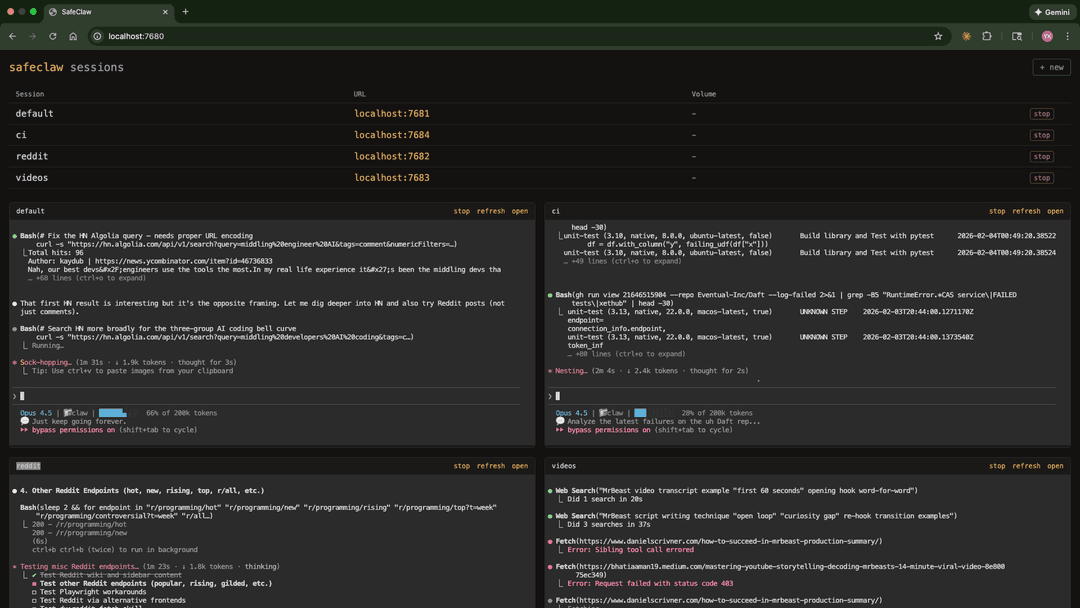
Manage all sessions from a web dashboard:
node dashboard/server.js
Opens at http://localhost:7680 with:
- Create new sessions with volume mounts and initial queries
- All sessions listed with start/stop/delete controls
- Live iframe views of active sessions
Optional integrations
./scripts/setup-slack.sh- Add Slack read access
What's included
- Ubuntu 24.04
- Node.js 24 (LTS)
- Claude Code 2.1.185
- GitHub CLI with auto-configured git user
- Playwright MCP with Chromium
- Slack read-only skill and tool (optional - requires token)
- DX plugin, custom status line, shell aliases
- ttyd web terminal + tmux
Sensible defaults
- Claude Code version pinned (currently 2.1.185)
autoCompactEnabled: false- prevents automatic context compactionpromptSuggestionEnabled: false- disables prompt suggestions--dangerously-skip-permissionsenabled (because it's containerized)
Conversation history and memory
Each session's data persists locally at:
~/.config/safeclaw/sessions/<session-name>/
This maps to /home/sclaw/.claude/projects/ inside the container and includes:
- Conversations - JSONL files (one per conversation)
- Memory - Auto memory at
-home-sclaw/memory/MEMORY.md, loaded into the system prompt each conversation
Rebuilding containers or restarting sessions won't affect your history or memory.
Authentication
Tokens are stored in ~/.config/safeclaw/.secrets/ and injected as env vars on each run. The filename becomes the env var name.
| File | How to generate |
|---|---|
CLAUDE_CODE_OAUTH_TOKEN | claude setup-token (valid 1 year) |
GH_TOKEN | gh auth token or create a PAT at github.com/settings/tokens |
SLACK_TOKEN | Optional - ./scripts/setup-slack.sh |
You can add any additional secrets by creating files in the .secrets/ directory.
Scripts
| Script | Description |
|---|---|
scripts/build.sh | Build the Docker image and remove old container |
scripts/run.sh | Start/reuse container, inject auth, start ttyd. Use -s name for named sessions, -v for volumes, -n to skip opening browser, -q "question" to start with a query. |
scripts/setup-slack.sh | Set up Slack integration (optional) |
scripts/manage-env.js | Manage environment variables (list, add, delete) |
dashboard/server.js | Web dashboard for managing multiple sessions |
Aliases
Inside each container, these aliases are available:
| Alias | Command |
|---|---|
c | claude |
cs | claude --dangerously-skip-permissions |
npm scripts
| Command | Runs |
|---|---|
npm run build | ./scripts/build.sh |
npm start | ./scripts/run.sh |
npm run dashboard | node dashboard/server.js |
npm run dashboard:dev | nodemon dashboard/server.js |
npm run setup-slack | ./scripts/setup-slack.sh |
npm run manage-env | node scripts/manage-env.js |
Skills
Defined in setup/skills/.
| Skill | Description | Requires |
|---|---|---|
| slack | Read Slack messages, channels, DMs, and search (read-only) | SLACK_TOKEN |
| yt-dlp | Download YouTube videos, audio, and subtitles/transcripts | - |
| gdoc | Read publicly shared Google Docs | - |
Featured in
// faq
What is safeclaw?
The easiest way to run multiple Claude Code sessions, each in its own container, with a dashboard to manage them all. Quick setup with battle-tested sensible defaults and skills.. It is open-source on GitHub.
Is safeclaw free to use?
safeclaw is open-source under the MIT license, so it is free to use.
What category does safeclaw belong to?
safeclaw is listed under devtools in the Claudeers registry of Claude-compatible tools.
// embed badge

[](https://claudeers.com/safeclaw)
// retro hit counter

[](https://claudeers.com/safeclaw)
// reviews
// guestbook
// related in Developer Tools
 🔓
🔓The agent harness performance optimization system. Skills, instincts, memory, security, and research-first development for Claude Code, Codex, Opencode, Curs…
 🔓
🔓Makes your AI agent think like the laziest senior dev in the room. The best code is the code you never wrote.
 🔓
🔓Use Garry Tan's exact Claude Code setup: 23 opinionated tools that serve as CEO, Designer, Eng Manager, Release Manager, Doc Engineer, and QA
 🔓
🔓AI coding assistant skill (Claude Code, Codex, OpenCode, Cursor, Gemini CLI, and more). Turn any folder of code, SQL schemas, R scripts, shell scripts, docs,…