
RunoutBar
macOS menu bar app for Claude and Codex usage through TeamClaude: level bars, pace charts, banked resets, routing and one-click updates
Install with your AI
Paste into Claude Code, Cursor, or any agent — it reads the repo and wires the tool into your project.
Install and set up RunoutBar (release-binary project) into my current project.
Found on https://claudeers.com/runoutbar
Repo: https://github.com/RobinVivant/RunoutBar
Homepage/docs: https://github.com/RobinVivant/runout-bar/releases/latest
Detected install method: release-binary → inspect the README
Category: security. Platforms: cli, api, web.
Read the repo's README for exact setup and env vars, then install it and wire it into my project.

Claudeers Health Verdict:
unknown; community-verified: false. Confirm the source before running anything.
Grab the latest release asset from GitHub.
# download a build from https://github.com/RobinVivant/RunoutBar/releases
git clone https://github.com/RobinVivant/RunoutBar
// compatibility
| Platforms | cli, api, web |
|---|---|
| Operating systems | — |
| AI compatibility | claude |
| License | MIT |
| Pricing | open-source |
| Language | Swift |
Runout Bar is a macOS menu bar app that shows Claude subscription usage from a local TeamClaude proxy alongside direct Codex rate limits and Google AI subscription quotas as grouped level bars, with work-week runway per capacity lane, a pace dashboard, Claude routing controls, banked resets and one-click TeamClaude updates.
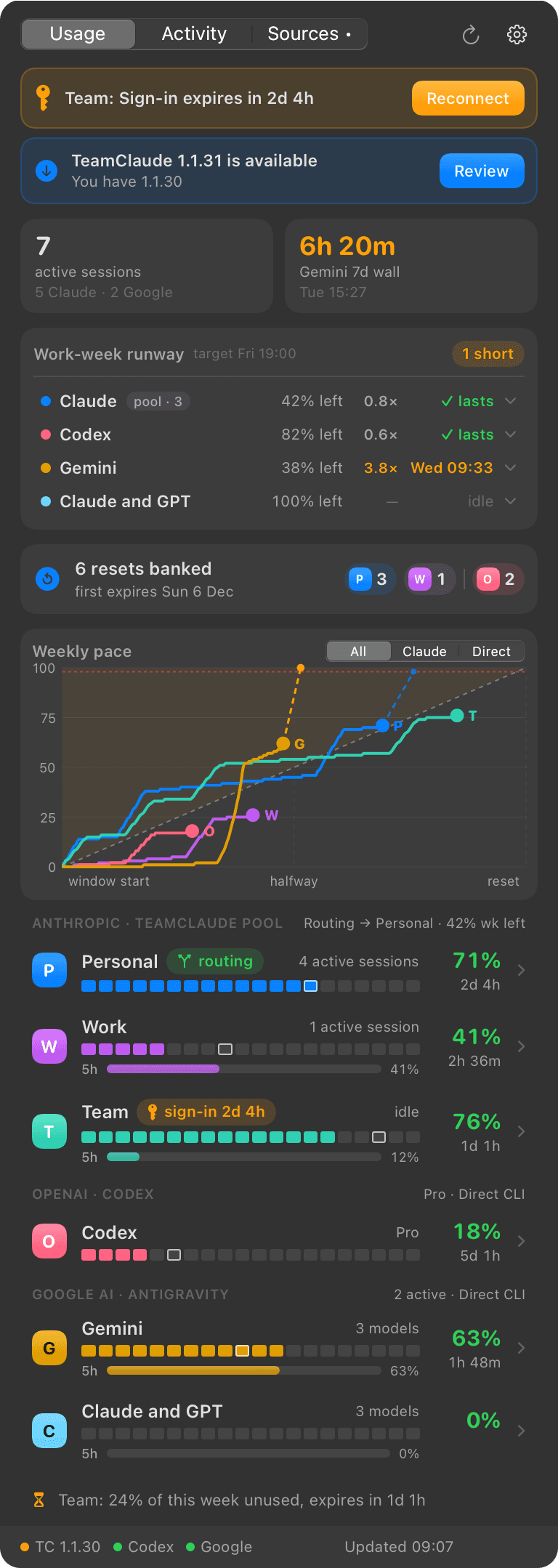
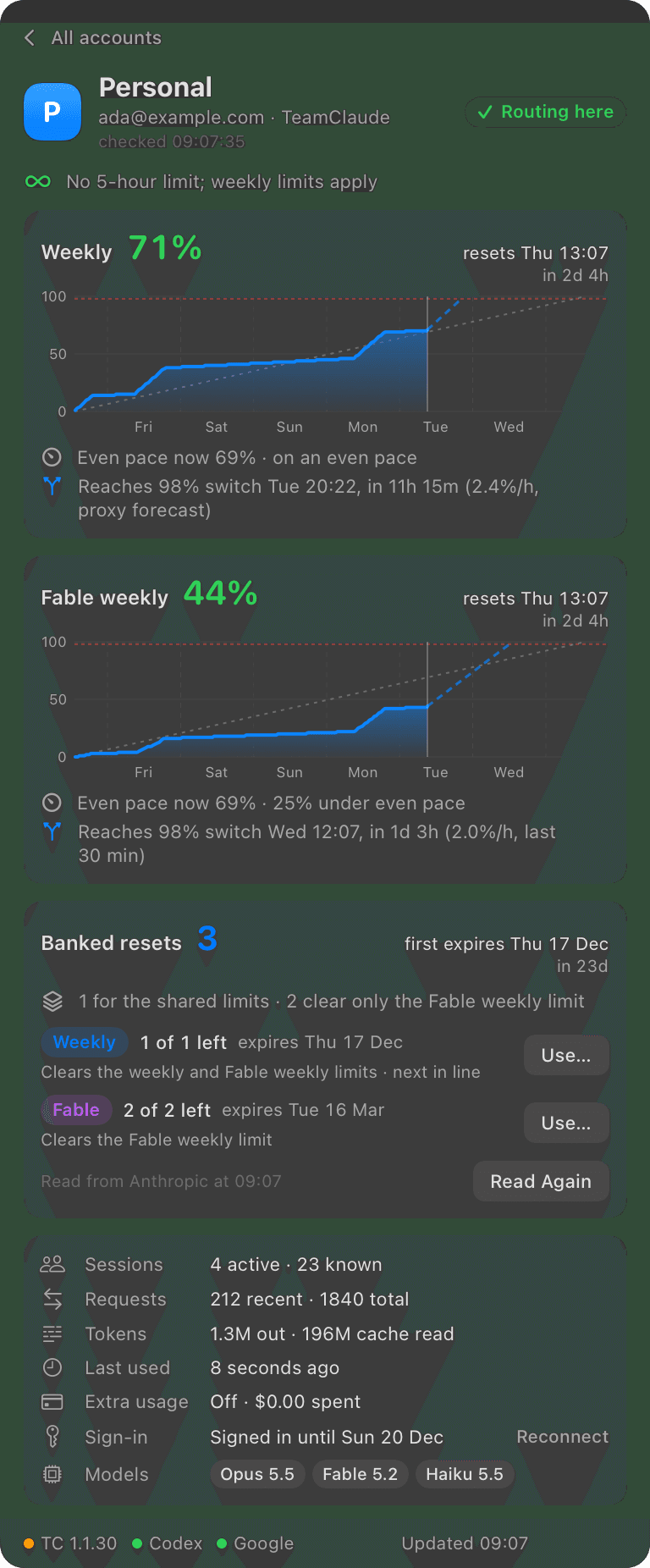
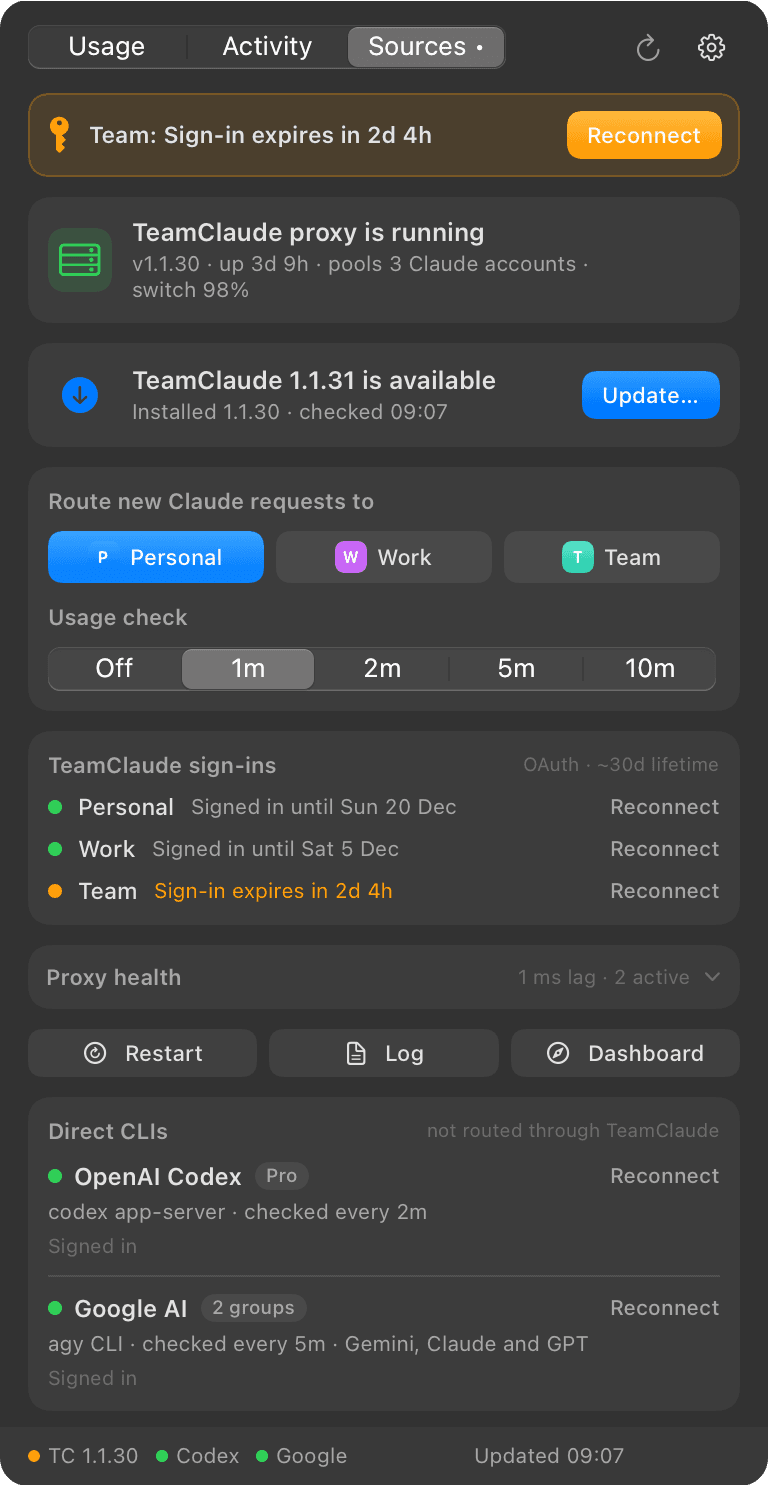
The screenshots show the made-up accounts of demo mode.
Quickstart
You need macOS 15 or later on Apple silicon. On a Mac without
TeamClaude, the app installs it on its first launch
to pool Claude accounts, which needs Node.js 20 or later (brew install node); a TeamClaude you
already have is used as it is, or set "teamclaude": "" in ~/.config/runout-bar/config.json to
disable TeamClaude when only tracking Codex or Google AI. The Codex and
Antigravity (agy) CLIs are optional.
curl -fsSL https://raw.githubusercontent.com/RobinVivant/runout-bar/main/scripts/get.sh | bash
The script downloads the latest release, checks it against its SHA-256 file and
its signature, copies Runout Bar.app to ~/Applications and opens it. Grouped level bars appear
in the menu bar; click them for the dashboard. The first launch from an Applications folder
turns on Open at Login. Run the same line again to update.
After a first TeamClaude install the popover shows Add Account, which opens claude.ai to sign
in. The proxy starts once it has that account, and again at every login. Claude Code then runs
through it with ~/.local/bin/teamclaude run.
Version 1.0 was called Usage Bar. The same line updates it: it removes Usage Bar.app, and the
first launch of Runout Bar moves your config, history and settings to the new names.
Download by hand
-
Download
Runout-Bar-<version>-arm64.zipfrom the latest release and unzip it. -
Move
Runout Bar.appto/Applicationsor~/Applications. -
Open it. macOS blocks the first launch of a copy downloaded with a browser, because the build is not notarized by Apple: choose Done, open System Settings > Privacy & Security, scroll to the message about Runout Bar and choose Open Anyway. From a terminal, this does the same:
xattr -dr com.apple.quarantine "/Applications/Runout Bar.app"
If you update from Usage Bar 1.0 by hand, delete Usage Bar.app yourself.
The install script does not hit this block: curl does not mark its downloads as coming from
the internet, so macOS has nothing to check.
Build from source
With a Swift 6 toolchain (Xcode or the Command Line Tools), this builds Runout Bar.app, copies
it to ~/Applications and opens it. A build made on your own Mac opens without the block.
git clone https://github.com/RobinVivant/runout-bar.git
cd runout-bar
scripts/install.sh
Try it without an account
Demo mode runs the app on made-up accounts, without TeamClaude, Codex or Google AI. It reads none of them, saves no history, sends no notifications, and every action answers "Demo data: nothing was changed".
swift run RunoutBar --demo
What it shows
- Menu bar
 :
one level bar per account grouped by source (with a pool rail under multi-account TeamClaude bars),
or a single bar per capacity lane in Per lane (compact) mode. Bars turn orange at 90%, red at
the account's limit (
98%for pooled Claude accounts,100%for direct Codex and Google AI CLIs), and grey when stale. A dot marks the account that TeamClaude routes new Claude requests to, and a warning triangle means an active source failed or a sign-in lapsed. Beside the bars, Menu bar run-out shows the earliest active lane projected to run short (such asG Wed 09:33) or a green✓when every active lane lasts past the work week (Earliest active lane,Claude pool only, orOffin settings). Right click for Refresh, Open Dashboard and Quit. - Usage tab: active sessions across TeamClaude and Google AI, the next real limit wall (keeping
routine TeamClaude rotations separate from hard walls), and the Work-week runway card
comparing every capacity lane (
Claudepool,Codex,Gemini,Claude and GPT) against Friday 19:00 with weekly headroom and pace ratio (0.6×,1.2×). Click any lane row for its pace, budget and account breakdown. Below sit banked resets, a Weekly pace chart (All | Claude | Direct) where pooled handoffs stay calm while real walls highlight in amber, and account rows grouped by source (Anthropic · TeamClaude Pool,OpenAI · Codex,Google AI · Antigravity). Click any row for its window timelines, work-week runway, banked resets, models and details. - Activity tab: weekly usage over 6 hours, 24 hours or 7 days (
All | Claude | Direct), burn totals (+X% in 24 h) on every account card, and TeamClaude proxy token breakdown. - Pointer: point at a chart for the reading at that time, and at a figure for what it is made of. Whatever lights up under the pointer acts on a click: a line in the pace chart, a stat tile, a legend entry or an activity card opens its account or tab, and the footer opens the Sources tab.
- Sources tab: TeamClaude proxy status, updates, Claude routing (
teamclaude switch), usage check interval (teamclaude probe), ~30-day Claude OAuth sign-ins and proxy health, followed by Direct CLIs (OpenAI CodexandGoogle AI) with their polling cadences and sign-ins. - Sign-ins: a banner with a Reconnect (or Sign In) button from 5 days before a Claude account's sign-in ends, and when a provider refuses a Claude, Codex or Google AI sign-in. The account's row and detail view say how long it has left.
- Notifications: an account passes 90%, reaches its limit or comes back; every Claude account is full; a sign-in is 5 days or 24 hours from its end, has expired or was refused; the proxy stops responding (two failed reads in a row) or recovers; a new TeamClaude release is out (once per version). Restarts started from the app do not notify. Click a sign-in notification to open that sign-in in the popover.
Pace uses the proxy's own forecast when it has one, then the rate measured over the last 30 minutes, then the average since the window began.
How it works
- Work-week runway: projects when each capacity lane reaches its limit (
98%switch threshold for the pooled Claude accounts,100%for direct Codex and Google AI buckets) over work hours only, using recency-weighted pace over the last two workdays so mid-week switches between models show promptly. See docs/pool-run-out.md. - Banked resets: a banked reset clears an account's limits before their own reset. The app lists them for Claude and Codex accounts and spends one when you confirm; a spend cannot be undone. Its calls to Anthropic go through one queue that waits out rate limits and shows the wait. See docs/banked-resets.md.
- Sign-ins: a Claude sign-in ends a fixed time after its login, about 30 days, and the
account then leaves rotation and its readings stop. TeamClaude reports the end date, and the
app reads a refused Codex or Google AI CLI login from the error of its limits read. Reconnect
(or Sign In) runs
teamclaude login --oauth,teamclaude login --codex,codex loginoragy acp --stdio(authenticate), which opens the browser with a local callback so no code has to be pasted back; the running proxy takes a renewed TeamClaude sign-in without a restart. The login renews the account the browser is signed in to, so sign in to claude.ai, chatgpt.com or accounts.google.com as that account first; the app says so when another account was renewed instead. A long-lived token is renewed in a terminal, and the app copies its command. - TeamClaude install: when the app finds no TeamClaude CLI, no LaunchAgent, no TeamClaude
config and nothing listening on the proxy's port, it installs the latest release without asking:
the package with npm and a link to its CLI. It does this once per Mac, and never again after it
has seen a TeamClaude there. A proxy without an account exits as it starts, so the LaunchAgent
that
teamclaude service installwrites comes after Add Account. With traces of another copy, or after a removal, the app shows an Install button instead; after a failed attempt, Try Again. See docs/teamclaude-updates.md. - TeamClaude updates: the app asks the npm registry for the latest release every 6 hours. Update… asks for confirmation, installs the release with npm and restarts the proxy. See docs/teamclaude-updates.md.
Configuration
Everything works without a config file. To name, color and order accounts, create
~/.config/runout-bar/config.json, or choose Edit Accounts… in the settings menu to write a
starter file from the current accounts:
{
  "accounts": {
    "[email protected]": { "letter": "P", "label": "Personal", "color": "#0a84ff", "noFiveHourLimit": true },
    "[email protected]": { "letter": "W", "label": "Work", "color": "#bf5af2" },
    "openai": { "letter": "O", "label": "Codex", "color": "#ff6482" },
    "google.gemini": { "letter": "G", "label": "Gemini", "color": "#e09f00" },
    "google.claude-and-gpt": { "letter": "C", "label": "Claude and GPT", "color": "#64d2ff" }
  },
  "order": ["[email protected]", "[email protected]", "openai", "google.gemini", "google.claude-and-gpt"]
}
Account keys are TeamClaude account names; openai is the Codex login, and google.<group> is a
Google AI quota group (such as google.gemini and google.claude-and-gpt). Choose Reload
Accounts after editing.
| Key | Default | Meaning |
|---|---|---|
accounts.<name>.letter, label, color, symbol | From the name and a palette | Badge letter, display name, #rrggbb color, SF Symbol |
accounts.<name>.noFiveHourLimit | false | The account has no 5-hour session window, for example a verified subscription |
order | Proxy order, followed by Codex and Google AI | Display order of account keys |
teamclaude | ~/.local/bin/teamclaude | TeamClaude CLI; also looked for in /opt/homebrew/bin, /usr/local/bin, where the LaunchAgent runs it from, and in the Volta, Bun, pnpm, npm and nvm folders. Set to "" to disable TeamClaude |
teamclaudeInstallDir | ~/.local/share/teamclaude | npm prefix that holds the proxy |
npm | /opt/homebrew/bin/npm | npm used for the install and for updates |
node | /opt/homebrew/bin/node | Node used to list and spend Claude resets and to count TeamClaude's accounts, and checked before an install. Its folder comes first on the PATH of the TeamClaude commands the app runs |
proxyService | com.karpeleslab.teamclaude | LaunchAgent label to restart |
proxyLog | ~/Library/Logs/teamclaude.log | Log opened by the Log button |
dashboard | http://127.0.0.1:3456/teamclaude/dashboard | Page opened by Dashboard |
codex | Searched in ~/.local/bin, /opt/homebrew/bin, /usr/local/bin | Codex CLI; "" hides the Codex row |
agy | Searched in ~/.local/bin, /opt/homebrew/bin, /usr/local/bin | Antigravity CLI; "" hides the Google AI rows |
workWeek | {"days": ["Mon", "Tue", "Wed", "Thu", "Fri"], "start": "09:00", "end": "19:00"} | Work days and hours for the work-week runway; the last day's end is the target |
Without noFiveHourLimit, an account whose 5-hour reading stops updating while its weekly
reading stays fresh drops the old 5-hour value and says "No 5-hour window reported since" in its
detail view.
The settings menu also sets what the menu bar shows (level bars, level bars and percent, or letters and numbers), bar grouping (per account grouped, or per lane compact), whether numbers count used or remaining capacity, which work-week run-out time appears in the menu bar, notifications, and Open at Login.
What it reads and sends
teamclaude status --jsonevery 60 seconds. The CLI adds the proxy key itself.codex app-server(account/rateLimits/read) about every 2 minutes, andaccount/rateLimitResetCredit/consumewhen you spend a Codex reset.agy -p "/usage" --output-format jsonabout every 5 minutes when the Antigravity CLI is installed. It is a read-only command: no model runs, the CLI holds the Google sign-in, and this app never sees a credential. It also reads Antigravity's localconversation_summaries.dbstores (read-only run status and timestamps only) for Google AI session counts.teamclaude login,codex loginoragy acp --stdio(authenticate), only when you choose Sign In or Reconnect. The command opens the provider's sign-in page in the browser and saves the new sign-in itself; the app reads neither the page nor the tokens.npm install, once, on a Mac that has no TeamClaude, and when you choose Install.teamclaude service installfollows once TeamClaude has an account, when no LaunchAgent starts it yet.- The npm registry, for the latest TeamClaude version. This is the app's only network call of its own.
- Anthropic's usage and reset endpoints, only when you list or spend a Claude reset. A short Node script reads one account's token through TeamClaude's config loader and keeps it in its own process; the app itself never reads TeamClaude's config or credentials.
- TeamClaude's account count, while its proxy does not answer, and the proxy's reload endpoint after a Codex login in TeamClaude. A second Node script does both through the same loader and prints a count or a yes or no, nothing from the config.
~/Library/Application Support/RunoutBar/history.json: 8 days of samples for the charts and pace.~/Library/Application Support/RunoutBar/alerts.json: what was last notified.
There is no telemetry. SECURITY.md says how to report a vulnerability.
To remove the app, choose Quit in its right-click menu, then delete
~/Applications/Runout Bar.app, ~/Library/Application Support/RunoutBar and
~/.config/runout-bar. To remove a TeamClaude that the app installed, run
~/.local/bin/teamclaude service uninstall, then delete ~/.local/share/teamclaude and
~/.local/bin/teamclaude. Its accounts are in ~/.config/teamclaude.json.
Development
swift test                                            # the RunoutCore test suite
swift run RunoutBar --demo                            # the app on made-up accounts
swift run RunoutBar --snapshot /tmp/runout-bar --demo # every screen in dark and light, as PNG files
scripts/build-app.sh                                  # the release app bundle in build/
Sources/RunoutCore: status, Codex and Google AI parsing, pace and run-out models, Claude resets and the API queue, history, alerts, update logic and process helpers. Covered byTests/RunoutCoreTests.Sources/RunoutBar: the status item, popover and SwiftUI views.scripts/: build, install, icon and brand image scripts.docs/: how the projection, the resets and the updates work.
Without --demo, swift run RunoutBar reads your real TeamClaude, Codex and Google AI, and
--snapshot renders your real accounts.
Contributing
Bug reports and pull requests are welcome. CONTRIBUTING.md covers the setup, the checks and the guidelines, and the Code of Conduct applies to every project space.
License
MIT.
Runout Bar is an independent project. It is not affiliated with or endorsed by Anthropic, OpenAI, Google or the TeamClaude authors.
// faq
What is RunoutBar?
macOS menu bar app for Claude and Codex usage through TeamClaude: level bars, pace charts, banked resets, routing and one-click updates. It is open-source on GitHub.
Is RunoutBar free to use?
RunoutBar is open-source under the MIT license, so it is free to use.
What category does RunoutBar belong to?
RunoutBar is listed under security in the Claudeers registry of Claude-compatible tools.
// embed badge

[](https://claudeers.com/runoutbar)
// retro hit counter

[](https://claudeers.com/runoutbar)
// reviews
// guestbook
// related in Security & Compliance
 🔓
A complete AI agency at your fingertips - From frontend wizards to Reddit community ninjas, from whimsy injectors to reality checkers. Each agent is a specia…
 🔓
π RuView turns commodity WiFi signals into real-time spatial intelligence, vital sign monitoring, and presence detection — all without a single pixel of video.
 🔓
Prowler is the world’s most widely used open-source cloud security platform that automates security and compliance across any cloud environment.
 🔓
🐶 A curated list of Web Security materials and resources.