
resume-versioning
A Claude Code skill for LaTeX resume repos: one set of wording renders as many resumes (identities x roles x templates), with verification that a restructure…
Install with your AI
Paste into Claude Code, Cursor, or any agent — it reads the repo and wires the tool into your project.
Install and set up resume-versioning (claude-skill project) into my current project.
Found on https://claudeers.com/resume-versioning
Repo: https://github.com/RuokeZhang/resume-versioning
Homepage/docs: —
Detected install method: claude-skill → # copy this skill into .claude/skills/resume-versioning/
Category: content. Platforms: api.
Read the repo's README for exact setup and env vars, then install it and wire it into my project.

Claudeers Health Verdict:
active; community-verified: false. Confirm the source before running anything.
# copy the skill dir into your project:
# .claude/skills/resume-versioning/   (or ~/.claude/skills/resume-versioning/ for all projects)
git clone https://github.com/RuokeZhang/resume-versioning
// compatibility
| Platforms | api |
|---|---|
| Operating systems | — |
| AI compatibility | claude |
| License | NOASSERTION |
| Pricing | open-source |
| Language | Shell |
resume-versioning
English · 简体中文
A Claude Code skill for LaTeX resume repos where one set of wording has to become several documents.
The problem
You have one resume. Then you need it under a different name for a different email account. Then a version aimed at one kind of role and a version aimed at another. Then someone tells you a different visual template performs better, and you want that layout for one of them.
The obvious move is to copy the file and edit. Do that twice and you have four documents that share 90% of their text, and no way to tell which copy has the current wording. They drift. A metric gets updated in one and not the others. An old inflated number survives in a file you forgot about.
This skill keeps the wording in exactly one place.
What it looks like
The same target composition, rendered two ways. Nothing below differs in wording — only the template and the typeface.
classic + sourcesans | engineering + caladea |
|---|---|
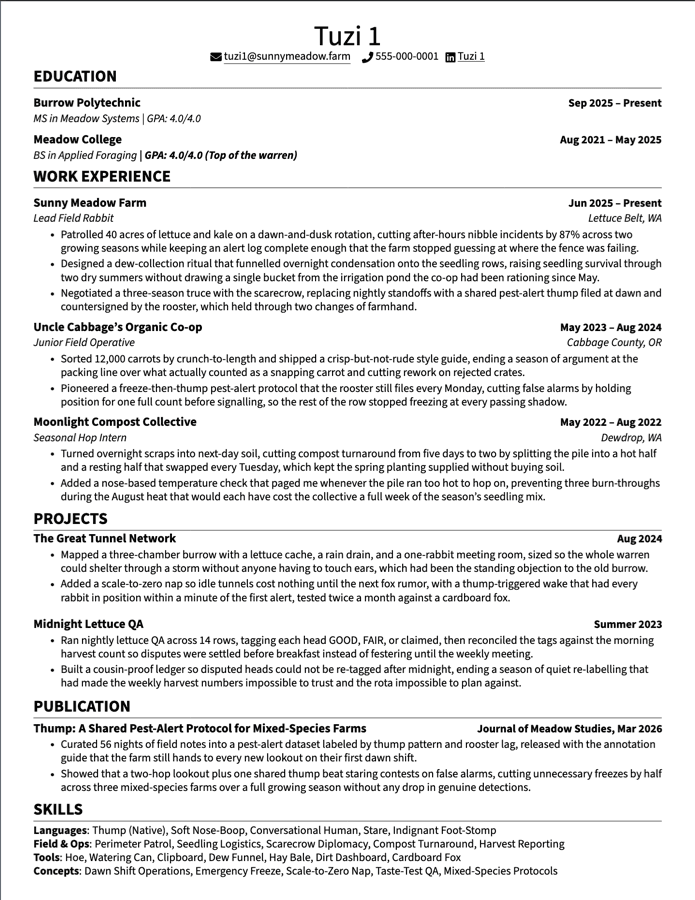 | 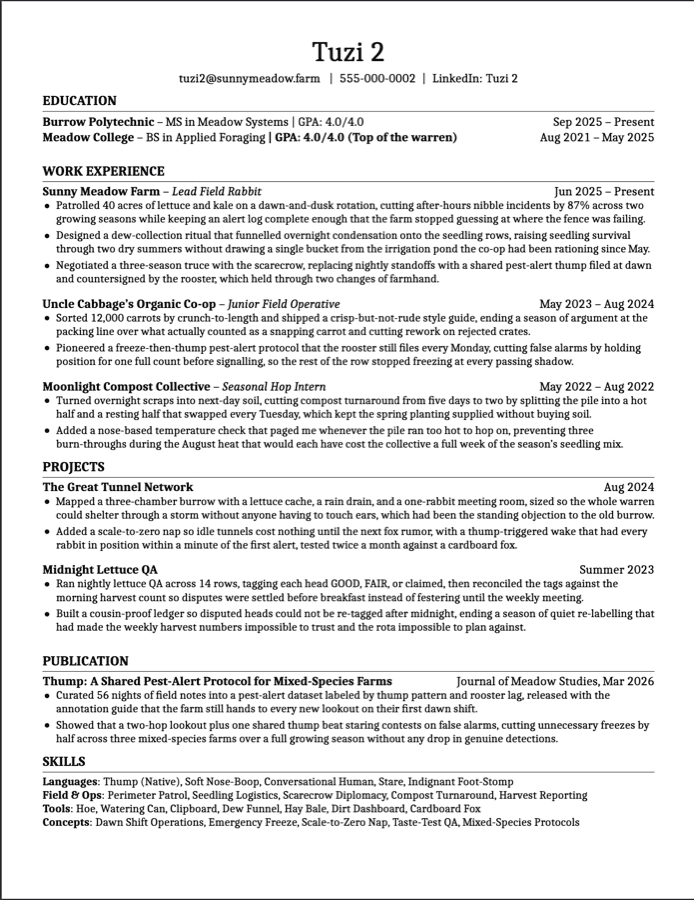 |
Swapping either one is a line in the driver. The wording exists once.
Rendered on Overleaf. Content is fictional.
The structure
Every resume is a selection, never a copy:
profiles/<person>.tex  ×  templates/<layout>.tex  ×  content/<target>.tex
                       ×  \ResumeFont
| Directory | Holds | One file per |
|---|---|---|
profiles/ | name, email, phone, links | identity |
templates/ | all layout, implementing a shared command interface | visual style |
content/ | target compositions, reusable experience entries, grouped project sets | target or reusable entry |
fonts/ | typeface selection; optional | face |
| drivers | a selection of the above, plus switches | finished resume |
CONTENT_LIBRARY/ | archived and candidate wording, in Markdown | topic |
A driver is about twelve lines:
\documentclass[letterpaper,11pt]{article}

\newcommand{\ResumeFont}{carlito}

\input{profiles/example.tex}
\input{templates/classic.tex}

\begin{document}
\ResumeHeader
\input{content/example-role.tex}
\end{document}
Inside content/, the target file is a small composition rather than a copy of
every entry:
content/
├── example-role.tex
├── experience/
│   ├── example-company.tex
│   └── earlier-company.tex
└── projects/
    └── example-role.tex
example-role.tex selects experience entries with \input{...} and includes
one project-set file for the target. Work experience is split by entry because
the same internship is commonly reused across several targets. Projects stay
grouped by target because they are usually selected and reordered as a set;
making every project a separate file adds navigation without enabling a real
reuse case or addressing a demonstrated drift risk.
This granularity is intentional. profiles/ remains a separate, useful axis:
it lets the same resume content render for different names and contact details
without duplicating either content or templates.
Adding a person is one profile. Adding a target is one composition plus its grouped project set, reusing the relevant experience entries. Adding a visual template means implementing the command interface in references/INTERFACE.md — after which every existing resume can render in it.
Install
git clone <this repo> ~/.claude/skills/resume-versioning
Claude Code picks it up automatically. Ask it to set up a resume repo, add a variant, or change a bullet, and it will follow the conventions here.
To scaffold a repo without Claude:
~/.claude/skills/resume-versioning/scripts/init.sh ~/my-resume
Optional: log-app companion skill
log-app/ is a second, self-contained skill for recording which rendered
resume you sent to which job. Install it alongside the main skill:
ln -s ~/.claude/skills/resume-versioning/log-app ~/.claude/skills/log-app
Then invoke with /log-app <sha> <driver> "<job title>". It appends one row to
a local CSV (default ~/Documents/RESUME/applications.csv, overridable via
RESUME_APPLICATIONS_CSV) after verifying the SHA and driver exist in your
resume repo (default ~/Documents/RESUME/overleaf, overridable via
RESUME_OVERLEAF_DIR). The CSV is private — the repo's .gitignore blocks
applications.csv from being committed here or anywhere this repo is cloned.
See log-app/SKILL.md for the full spec.
Verification
The reason this is a skill and not a blog post: restructuring a resume repo should not change what any resume looks like, and that is checkable.
./scripts/verify.sh
renders every driver at git HEAD and again in the working tree, then compares the decompressed PDF content streams:
NAME                  HEAD              WORKING           STATUS
Example_Resume        97080675e88112c4  97080675e88112c4  IDENTICAL
Second_Resume         5cfb6ff174e44187  cc42fc296a5e29eb  CHANGED
Anything CHANGED is either an edit you meant or a regression. There is no
third case.
./scripts/preview.sh          # render everything to build/
./scripts/preview.sh Example_Resume.tex
Requirements
tectonicfor local rendering (brew install tectonic, or see tectonic-typesetting.github.io)python3for the PDF fingerprintgit
Local rendering is optional. If the repo lives in Overleaf, Overleaf compiles it and none of the above is needed — the scripts exist so you can see a change without pushing first.
Overleaf
Overleaf projects are git remotes, so the repo can live there and be edited
locally. Two things to know, both handled by preview.sh:
- Overleaf resolves
\input{dir/file.tex}from the project root;tectonicresolves it from the main file's directory. - Overleaf runs pdfLaTeX;
tectonicruns XeTeX, which lacks the pdfTeX primitivesglyphtounicodeneeds.
Because of the second point, a local render is a good check but not proof of Overleaf output. See references/overleaf.md.
Fonts
Nine faces ship in fonts/. Pick one by name in the driver:
\newcommand{\ResumeFont}{carlito}
Sans





Serif




carlito and caladea are metric-compatible with Calibri and Cambria —
same widths, so a layout tuned for those keeps its line breaks. Calibri and
Cambria are proprietary Microsoft fonts and cannot be bundled, which is why the
clones exist.
Changing the face changes line breaks. Re-run scripts/verify.sh and look at
the render afterwards.
Provenance
The two bundled templates are adaptations of existing community resume
templates, not original designs. In both cases the visual settings come from
upstream; the \resume* command definitions are this project's own
implementation of its interface.
assets/templates/classic.tex— from Jake Gutierrez's resume (MIT), itself based on sb2nov/resumeassets/templates/engineering.tex— adapted from the r/EngineeringResumes community wiki template
See NOTICE for full attribution and license terms.
License
MIT — see LICENSE.
// faq
What is resume-versioning?
A Claude Code skill for LaTeX resume repos: one set of wording renders as many resumes (identities x roles x templates), with verification that a restructure changed no rendered PDF.. It is open-source on GitHub.
Is resume-versioning free to use?
resume-versioning is open-source under the NOASSERTION license, so it is free to use.
What category does resume-versioning belong to?
resume-versioning is listed under content in the Claudeers registry of Claude-compatible tools.
// embed badge

[](https://claudeers.com/resume-versioning)
// retro hit counter

[](https://claudeers.com/resume-versioning)
// reviews
// guestbook
// related in Content & Creative
 🔓
🔓Universal SEO skill for Claude Code. 25 sub-skills + 18 sub-agents covering technical SEO, E-E-A-T, schema, GEO/AEO, backlinks, local SEO, maps intelligence,…
 🔓
🔓A curated list of modern Generative Artificial Intelligence projects and services
 🔓
🔓一键同步文章到多个内容平台,支持今日头条、WordPress、知乎、简书、掘金、CSDN、typecho各大平台,一次发布,多平台同步发布。解放个人生产力
 🔓
🔓AI Marketing Suite for Claude Code. 15 marketing skills with parallel subagents — audit any website, generate copy, email sequences, ad campaigns, content ca…