
remodeck
RemoDeck — Self-hosted desktop & mobile remote console & 3D dashboard for Codex, Claude Code, Antigravity, Grok & Qoder | RemoDeck(原 Agent Control)多 AI 编程 Ag…
Install with your AI
Paste into Claude Code, Cursor, or any agent — it reads the repo and wires the tool into your project.
Install and set up remodeck (git-clone project) into my current project.
Found on https://claudeers.com/remodeck
Repo: https://github.com/guuguo/remodeck
Homepage/docs: https://hub.guuguo.top/agent-control
Detected install method: git-clone → git clone https://github.com/guuguo/remodeck
Category: devtools. Platforms: cli, api, desktop, web, mobile.
Read the repo's README for exact setup and env vars, then install it and wire it into my project.

Claudeers Health Verdict:
unknown; community-verified: false. Confirm the source before running anything.
git clone https://github.com/guuguo/remodeck
// compatibility
| Platforms | cli, api, desktop, web, mobile |
|---|---|
| Operating systems | — |
| AI compatibility | claude |
| License | MIT |
| Pricing | open-source |
| Language | JavaScript |
简体中文 · English · 日本語 · 한국어 · 繁體中文
RemoDeck
把 Codex、Claude Code、Antigravity、Grok 和 Qoder 收进一个桌面 + 手机遥控台(原 Agent Control)
出门扫码实时看进度、批权限、打断纠偏、排队派活,不改动原工具的任何配置与数据库。
如果这个工具帮到了你,欢迎点击右上角 Star ⭐️ 支持一下。
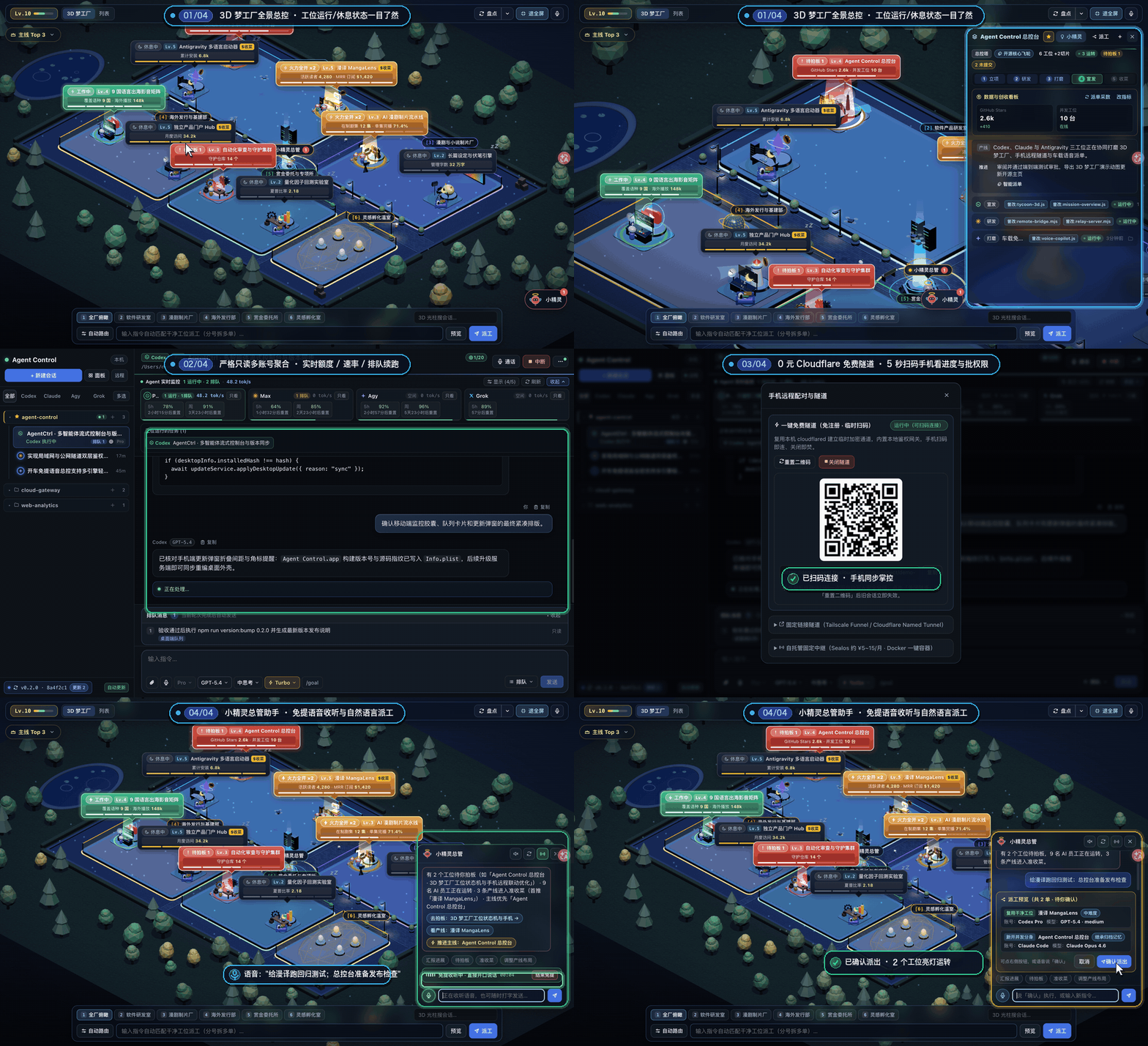
14 秒总览:3D 梦工厂 · 多账号只读看板 · 5 秒扫码手机操控 · 开车免提语音审批
[!IMPORTANT] 安全与隐私保证(安装前必看)
- 严格只读解析上游记录:只读解析
~/.codex、~/.claude、~/.gemini,自定义标题、置顶与归档保存在 RemoDeck(Agent Control)独立数据目录,绝不修改上游工具的任何配置或数据库。- 零云端代码与对话存储:你的代码、Prompt 与对话只留在本机。手机远程通过你自选的隧道或自托管中继直连,配合一次性配对码与 HttpOnly Cookie 鉴权。
- 零凭证抓取:多账号自动发现仅读取显式环境变量、公开路径与展示标签/邮箱,不读取或转发任何 Token / API Key。
🔄 为什么用 RemoDeck?
| 日常方案 | 多引擎支持 | 多账号 Codex 额度 | 手机远程与语音控制 | 上手与桌面体验 |
|---|---|---|---|---|
| 多开 IDE / 终端窗口 | ❌ 各自独立窗口 | ❌ 靠终端盲猜 | ❌ 人离开电脑就断联 | 内存占用高 |
| 单引擎 Bot / 网页桥接 | ❌ 通常仅单一模型 | ❌ | ⚠️ 需手动配 Bot / Tailscale | ❌ 仅网页或无头服务 |
| RemoDeck | ✅ Codex + Claude + Antigravity + Grok + Qoder | ✅ 自动识别并标注账号归属 | ✅ 5 秒扫码手机端 + 开车免提语音审批 | ✅ 3D 梦工厂 + macOS / Linux / Windows 客户端 |
⚡ 一行命令快速安装
只需要本机有 Node.js 22+ 和 Git(如未安装,脚本会自动提示安装命令)。
macOS / Linux(打开「终端」粘贴回车):
curl -fsSL https://raw.githubusercontent.com/guuguo/remodeck/main/install.sh | bash
Linux 支持 GTK/WebKitGTK 原生桌面壳和 systemd 用户服务;桌面依赖安装及无桌面、SSH、容器、WSL 的运行方式见 Linux 安装与运行。
Windows(打开 PowerShell 粘贴回车):
(irm https://raw.githubusercontent.com/guuguo/remodeck/main/install.ps1).TrimStart([char]0xFEFF) | iex
更喜欢先看源码再手动启动?
git clone https://github.com/guuguo/remodeck.git
cd remodeck
npm install
npm start
📸 核心界面与场景
1. 3D 梦工厂总控台(全局实时看板 + 自然语言重排)
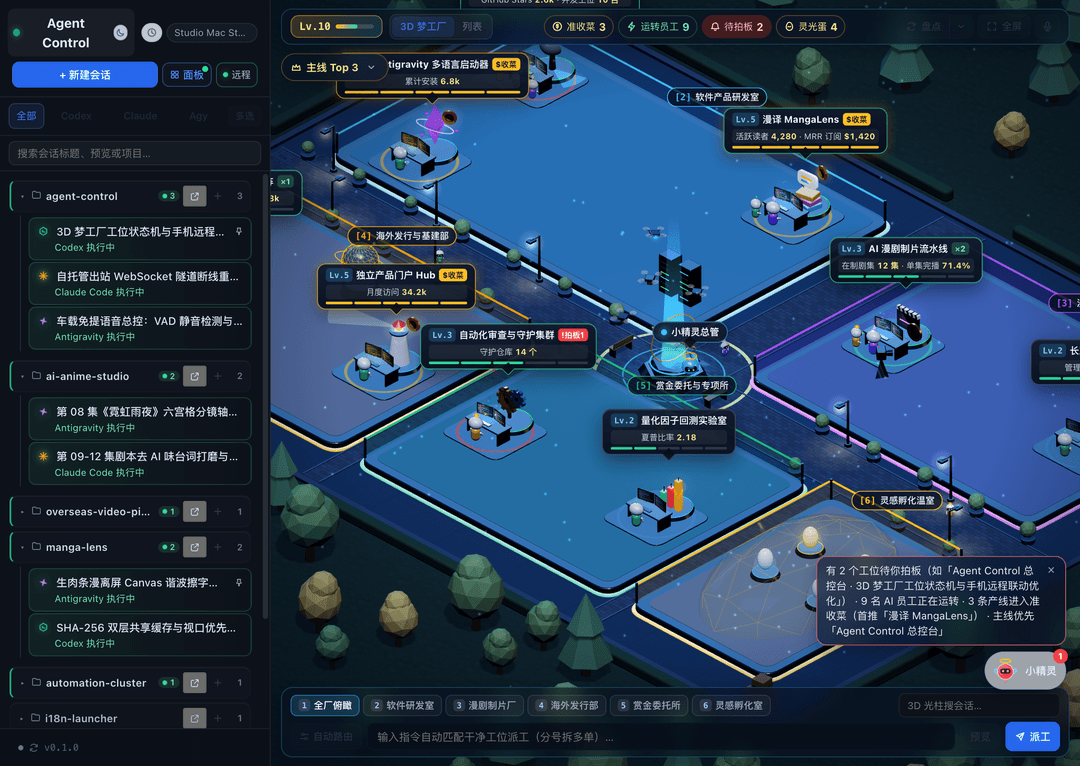
2. 桌面端主控制台(多引擎、多账号额度与实时监控)
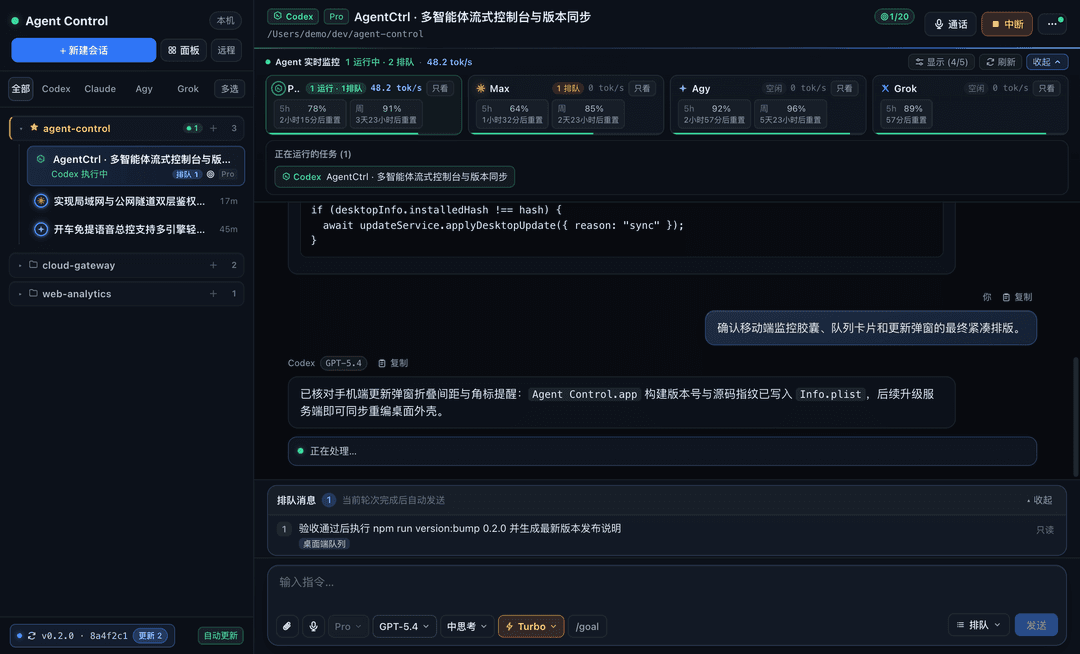
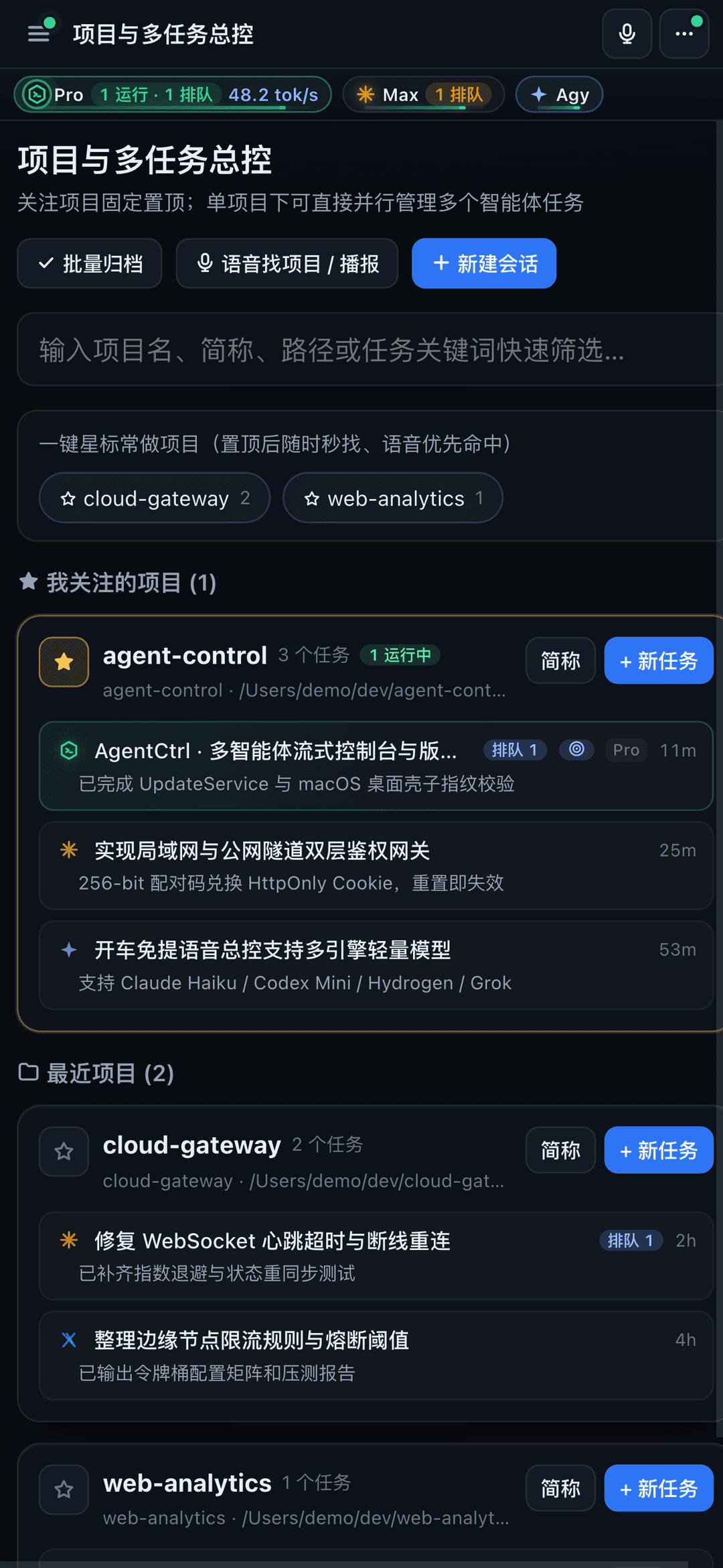
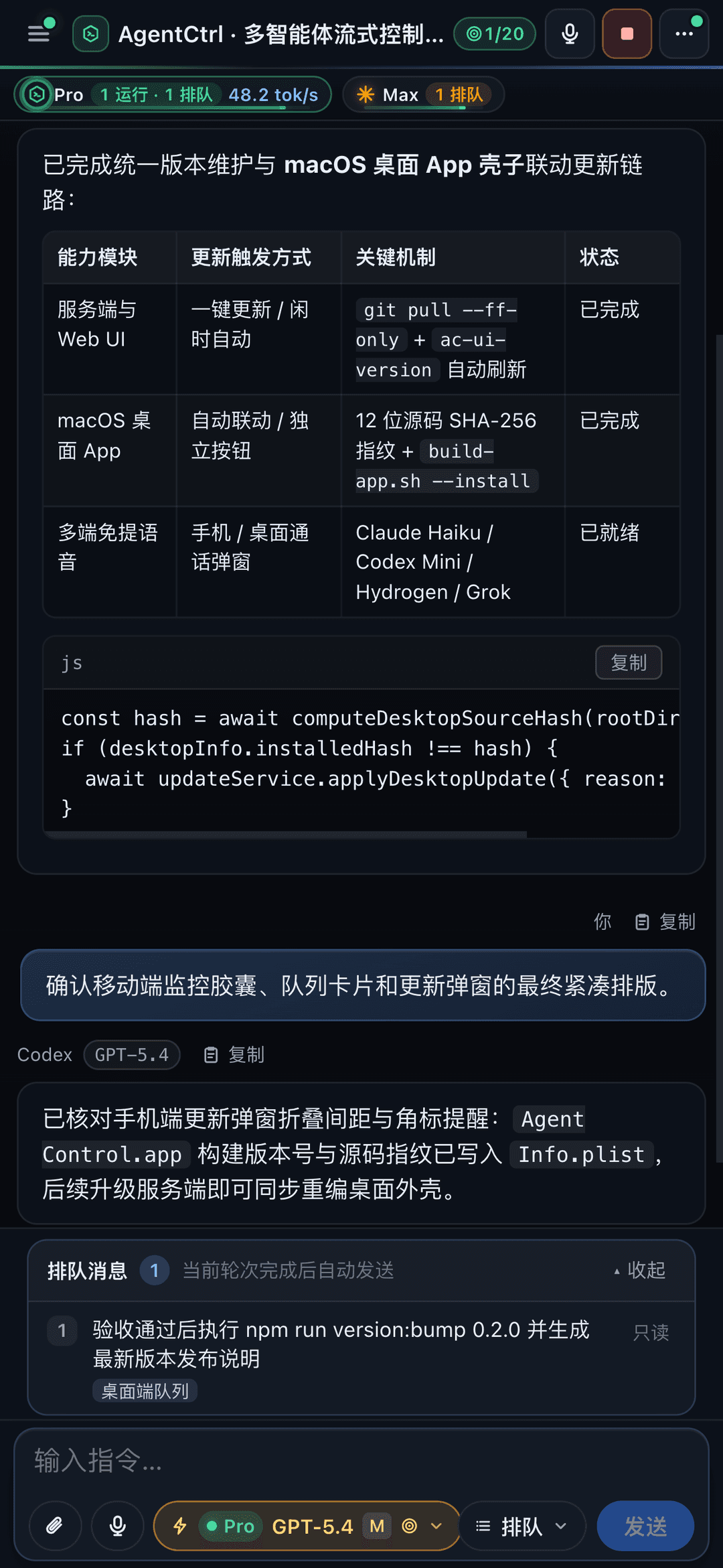
3. 手机端远程监控、代码 Diff 与排队派活
| 手机端 · 项目总控与多端实时监控 | 手机端 · 富文本对话、代码块与排队控制 |
 |  |
更多界面与深度能力(免提语音总控 · 手机扫码隧道 · 执行统计与自动更新)
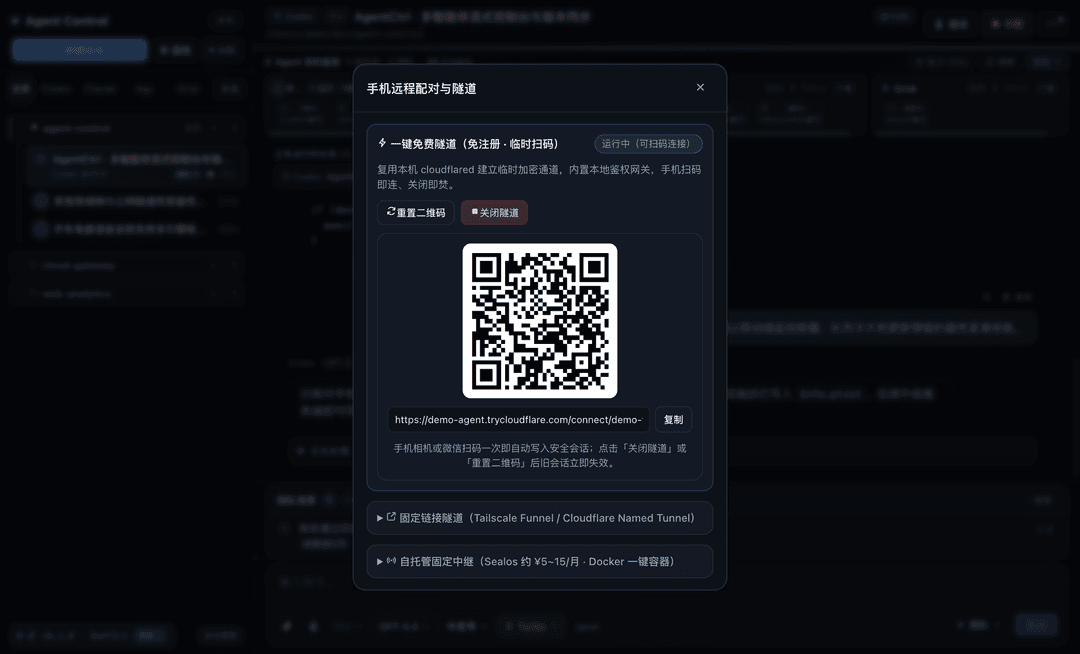
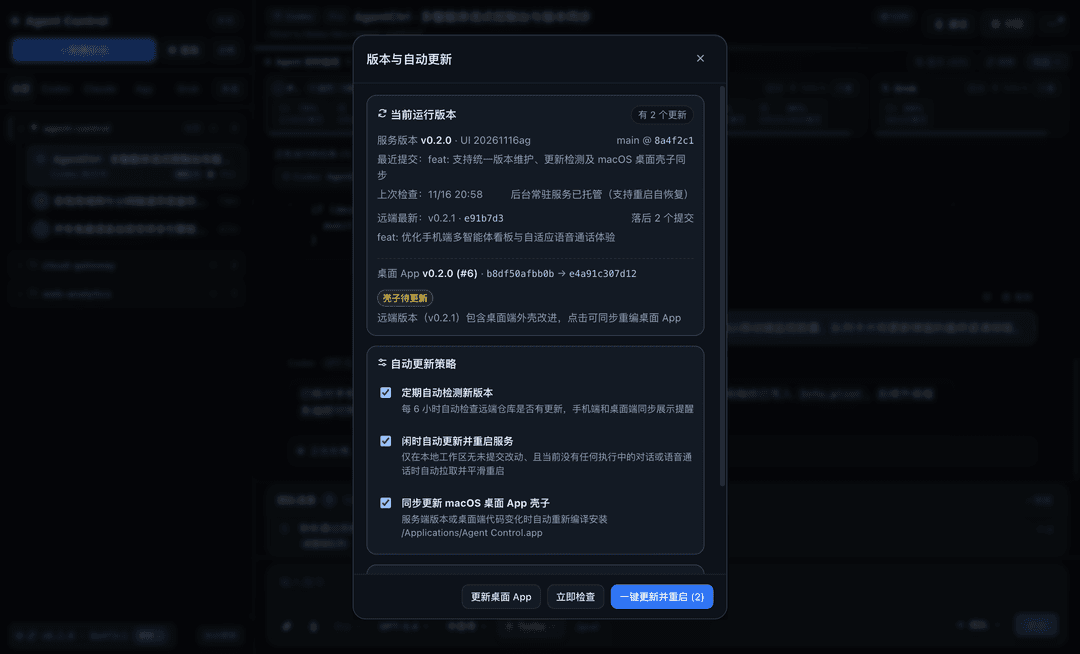
| 🚗 开车 / 免提语音总控 | 📱 一键免费隧道与固定链接 | 🔄 一键更新与桌面 App 同步 |
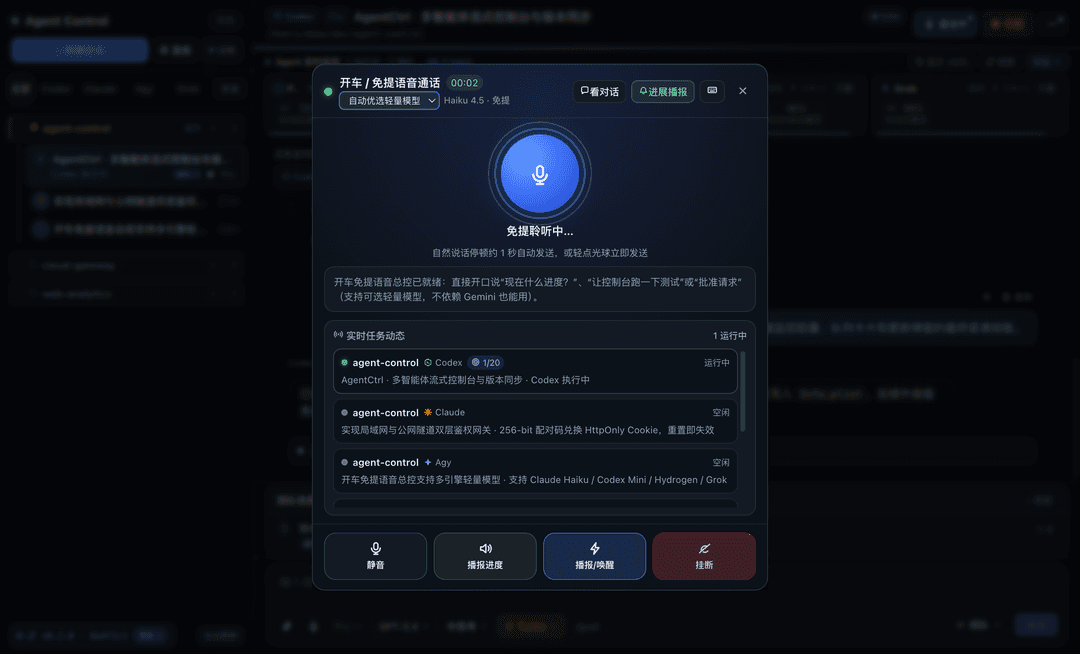 |  |  |
- 可选低延迟语音路由模型:不是所有人都有 Gemini / Antigravity,语音弹窗顶部支持直接切换后端模型——自动优选或手动选用 Claude Sonnet(低思考)、GPT-6.1 Terra(低思考)、Antigravity Hydrogen / Flash、Grok。所有非空语音内容均交由所选模型理解意图、定位目标并决定操作;模型不可用时明确报错,不回退到关键词规则。
- 跨平台语音收发:macOS 优先使用本地
mlx-whisper离线识别与edge-tts/say播报;未装本地 Whisper 时可回退为浏览器语音识别。播放只使用服务端生成的音频,不再调用手机或浏览器本机 TTS;没有可播放音频时保留文字并标记未播报(也可随时点击键盘图标打字调度)。 - Agent 实时监控与执行统计(
execution-stats.json):展开 Agent 实时监控 可按 Agent、模型、思考强度汇总成功轮次的中位/P90耗时、首输出、协议 Token 均值和工具次数,并查看最近 30 轮明细。支持 24 小时、7 天、30 天及全部记录筛选。数据从启用后的新轮次开始记录,最多保留 5000 轮,独立保存在数据目录的execution-stats.json,不保存指令或回复正文。耗时含工具和审批等待,不含排队;/goal续跑按轮记录。估算、部分上报、未上报分别标注,不混入协议 Token 均值;跨服务重启未收到终态的轮次标为“结束状态未记录”,不计入成功耗时。
✨ 装完怎么用?
- 打开即用:安装完成后自动打开控制台(macOS 会在「应用程序」生成 Agent Control 独立桌面应用,也可浏览器访问
http://127.0.0.1:43310)。 - 电脑端统一管理:左侧按项目查看所有运行中或历史会话,点进去即可续发消息、切换模型、设置
/goal自动推进或批量归档;多账号(如多个 Codex 账号)自动标注归属与额度。 - 5 秒手机扫码远程看:点页面右上角 「手机远程」 生成二维码,手机扫码即可随时看输出、批权限、打断或排队派活。👉 查看手机扫码图文教程 · 固定链接与容器部署全指南
- 🚗 开车 / 免提语音总控:点击顶部 「通话」 按钮开启免提语音(支持屏幕常亮、VAD 自动断句、说话打断、后台任务完成/待审批自动语音提醒与口头批准/拒绝)。
- 🔄 自动检测与跨端一键更新:支持定期检查远端提交、闲时自动平滑重启,并在更新时按源码指纹联动更新 macOS / Windows / Linux 桌面 App 壳子(也可执行
npm run version:bump统一维护服务与 UI 版本)。
手机远程方案怎么选?(装完随时可换)
安装时默认推荐 Cloudflare 免费临时隧道,同时支持以下固定链接与一键容器方案(在弹窗或命令行随时切换,不用重装):
| 方案 | 费用 | 域名是否固定 | 适合谁 | 特点 |
|---|---|---|---|---|
| Cloudflare 免费临时隧道(默认) | 0 元 | 临时随机 | 大多数人、零门槛体验 | 免服务器、免注册账号,5 秒出二维码、关闭即焚 |
| Tailscale Funnel | 0 元 | 永久固定(*.ts.net) | 想长期收藏到手机、不买域名/服务器 | 免费个人版即送固定 HTTPS 域名,支持在面板一键开启 |
| Cloudflare Named Tunnel | 0 元隧道 | 永久固定(自定义域名) | 手头已有 Cloudflare 托管域名 | 隧道永久免费不限时,服务常驻本机 |
| Sealos / Docker 一键中继 | Sealos 约 ¥5~15/月 | 永久固定 | 高频日用、多设备中继、不暴露本机端口 | 断网/重启自动重连,提供一键容器脚本与 Sealos 模板 |
| 仅本机使用 | 0 元 | — | 只在电脑上使用 | 不装任何隧道组件,后续随时可切换 |
🗑️ 一行命令卸载
macOS / Linux:
curl -fsSL https://raw.githubusercontent.com/guuguo/remodeck/main/uninstall.sh | bash
Windows (PowerShell):
(irm https://raw.githubusercontent.com/guuguo/remodeck/main/uninstall.ps1).TrimStart([char]0xFEFF) | iex
进阶用法、命令行切换、自托管部署与开发者说明(按需展开)
1. 命令行快捷管理(macOS / Linux,同时兼容旧命令 agent-control)
remodeck open                # 打开桌面应用或控制台
remodeck status              # 查看服务状态
remodeck logs                # 查看服务日志
remodeck restart             # 重启后台服务
remodeck remote status       # 查看当前隧道/中继/固定链接状态
remodeck remote cloudflare   # 切换或补装 Cloudflare 免费隧道
remodeck remote tailscale    # 开启 Tailscale Funnel(0 元永久 *.ts.net)
remodeck remote relay        # 切换并绑定自托管固定中继
remodeck update              # 拉取最新版本并更新桌面端
2. 非交互指定安装参数
# 默认:Cloudflare 免费临时隧道
curl -fsSL https://raw.githubusercontent.com/guuguo/remodeck/main/install.sh | bash -s -- --remote cloudflare

# Tailscale Funnel(0 元免域名固定链接)
curl -fsSL https://raw.githubusercontent.com/guuguo/remodeck/main/install.sh | bash -s -- --remote tailscale

# 直接连接自己的中继服务器
curl -fsSL https://raw.githubusercontent.com/guuguo/remodeck/main/install.sh | bash -s -- --remote relay --relay-url https://relay.example.com --invite 你的邀请码

# 仅本机使用
curl -fsSL https://raw.githubusercontent.com/guuguo/remodeck/main/install.sh | bash -s -- --remote local
3. 一键容器部署固定中继(Sealos 约 ¥5~15/月 · Docker)
- 任意带 Docker 的服务器(一行容器脚本):
git clone https://github.com/guuguo/remodeck.git && cd remodeck
./deploy/one-click.sh --url https://relay.example.com
# 如无公网 80/443 入站,可加 --cf-token <CloudflareTunnelToken> 自动打通 HTTPS
- Sealos 容器云(实测约 ¥5~15/月):
- 图形界面 App Launchpad 直接填镜像
ghcr.io/guuguo/agent-control-relay:latest(端口8080、挂128Mi存储到/data); - 或用一键脚本
KUBECONFIG=~/.kube/sealos.yaml ./deploy/sealos/deploy.sh --host xxxx.cloud.sealos.run。 - 👉 完整图文步骤与环境变量说明见 docs/remote-deploy.md。
- 图形界面 App Launchpad 直接填镜像
- 签发一次性配对邀请码并在控制台「手机远程」或
remodeck remote relay中绑定:
RELAY_PUBLIC_URL=https://relay.example.com RELAY_KEY=你的密钥 npm run invite -- "My Mac"
4. 常用环境变量与数据目录
- 所有会话通过
<provider>:<profileId>:<rawId>复合 ID 只读索引,重命名/归档/置顶持久化于独立数据目录(macOS:~/Library/Application Support/Agent Control;Windows:%APPDATA%\Agent Control;Linux:~/.local/share/agent-control),不会修改原工具数据库。 - 常用环境变量:
PORT(默认43310)、HOST(默认127.0.0.1)、AGENT_CONTROL_DATA_DIR、AGENT_CONTROL_DISABLE_RELAY、AGENT_CONTROL_TITLE_RULES_FILE、AGENT_CONTROL_CODEX_HOMES、AGENT_CONTROL_CLAUDE_CONFIG_DIRS、AGENT_CONTROL_AGY_APP_DATA_DIRS、CODEX_BIN、CLAUDE_BIN、AGY_BIN。
Qoder CLI
按 Qoder 官方安装说明 安装 CLI,并在服务运行用户下执行 qoder login(旧命令名为 qodercli login,控制台同时支持发现两者)。RemoDeck 使用官方 ACP 接口及本机登录状态,不读取登录凭证。
在底部 Agent 选择器选择 Qoder,可使用 Auto、Lite、Performance 模型档位,设置思考强度和权限,发送图片、查看流式回复与工具执行、处理审批、中断任务或加入控制端队列。切换模型、思考或权限后,下一轮重新加载原会话。
规划模式通过规划指令和控制端只读约束执行:拒绝文件写入、终端执行及工具授权请求;不会向不支持 --permission-mode plan 的 CLI 传入该值。
本次接入管理从 RemoDeck 创建的 Qoder 会话,历史副本保存在数据目录下的 qoder-threads.json;不会扫描或修改 Qoder 的外部历史。重启服务后仍通过原 session ID 续接。未提供积分余额查询;赠送额度、模型可用性和费用以对应 Qoder 账号为准。
可通过 QODER_BIN 指定 CLI 路径,AGENT_CONTROL_QODER_CONFIG_DIR 指定 Qoder 配置目录(默认 ~/.qoder)。侧边栏智能体筛选栏右侧的设置按钮可隐藏不常用的入口,显示偏好保存在当前浏览器中;隐藏后会话仍在“全部”中。
5. 本地开发与零消耗测试
git clone https://github.com/guuguo/remodeck.git
cd remodeck
npm install
npm run check
npm test
npm run desktop:install   # macOS 构建安装 /Applications/Agent Control.app
全部自动测试均使用 Mock CLI 模拟智能体进程,不消耗任何真实模型 Token。
🔗 同系列配套工具
- antigravity-zh-launcher — Google Antigravity 9 国语言无损双入口启动器(不改
app.asar、保留官方签名、支持 AI 思考链路本地化) - hub.guuguo.top — guuguo 独立开发者工具矩阵主页
License
致谢与社区认可
- 感谢 LINUX DO 社区佬友们的交流与反馈
// faq
What is remodeck?
RemoDeck — Self-hosted desktop & mobile remote console & 3D dashboard for Codex, Claude Code, Antigravity, Grok & Qoder | RemoDeck(原 Agent Control)多 AI 编程 Agent 手机远程控制与 3D 桌面控制台. It is open-source on GitHub.
Is remodeck free to use?
remodeck is open-source under the MIT license, so it is free to use.
What category does remodeck belong to?
remodeck is listed under devtools in the Claudeers registry of Claude-compatible tools.
// embed badge

[](https://claudeers.com/remodeck)
// retro hit counter

[](https://claudeers.com/remodeck)
// reviews
// guestbook
// related in Developer Tools
 🔓
The agent harness performance optimization system. Skills, instincts, memory, security, and research-first development for Claude Code, Codex, Opencode, Curs…
 🔓
Makes your AI agent think like the laziest senior dev in the room. The best code is the code you never wrote.
 🔓
AI coding assistant skill (Claude Code, Codex, OpenCode, Cursor, Gemini CLI, and more). Turn any folder of code, SQL schemas, R scripts, shell scripts, docs,…
 🔓
Orca is the ADE for working with a fleet of parallel agents. Run any coding agent with your own subscription. Available on desktop and mobile.