
rappi-plugin-claude-openclaw
Order anything from Rappi through AI conversation — restaurants, groceries, pharmacies, liquor. Works on Claude Code, Desktop, Cowork, and OpenClaw.
Install with your AI
Paste into Claude Code, Cursor, or any agent — it reads the repo and wires the tool into your project.
Install and set up rappi-plugin-claude-openclaw (claude-plugin project) into my current project.
Found on https://claudeers.com/rappi-plugin-claude-openclaw
Repo: https://github.com/garavitgabriel/rappi-plugin-claude-openclaw
Homepage/docs: —
Detected install method: claude-plugin → /plugin install rappi-plugin-claude-openclaw@garavitgabriel/rappi-plugin-claude-openclaw
Category: mcp-servers. Platforms: cli, api, desktop, web.
Read the repo's README for exact setup and env vars, then install it and wire it into my project.

Claudeers Health Verdict:
unknown; community-verified: false. Confirm the source before running anything.
⚠ Unverified / not recently updated — review before pasting a run-this config.
/plugin marketplace add garavitgabriel/rappi-plugin-claude-openclaw
/plugin install rappi-plugin-claude-openclaw@garavitgabriel/rappi-plugin-claude-openclaw
git clone https://github.com/garavitgabriel/rappi-plugin-claude-openclaw
// compatibility
| Platforms | cli, api, desktop, web |
|---|---|
| Operating systems | — |
| AI compatibility | claude |
| License | MIT |
| Pricing | open-source |
| Language | Python |
Rappi Plugin — Claude & OpenClaw
Order anything from Rappi through conversation. Restaurants, groceries, convenience stores, pharmacies, liquor — if it's on Rappi, you can order it by talking to your AI assistant. The plugin handles searching, browsing, cart management, checkout, and delivery tracking. It learns your preferences over time and gets smarter with every order.
Works on Claude Code, Claude Desktop, Claude Cowork (web), and OpenClaw.
Supports Colombia and Mexico.
| Claude Code | OpenClaw |
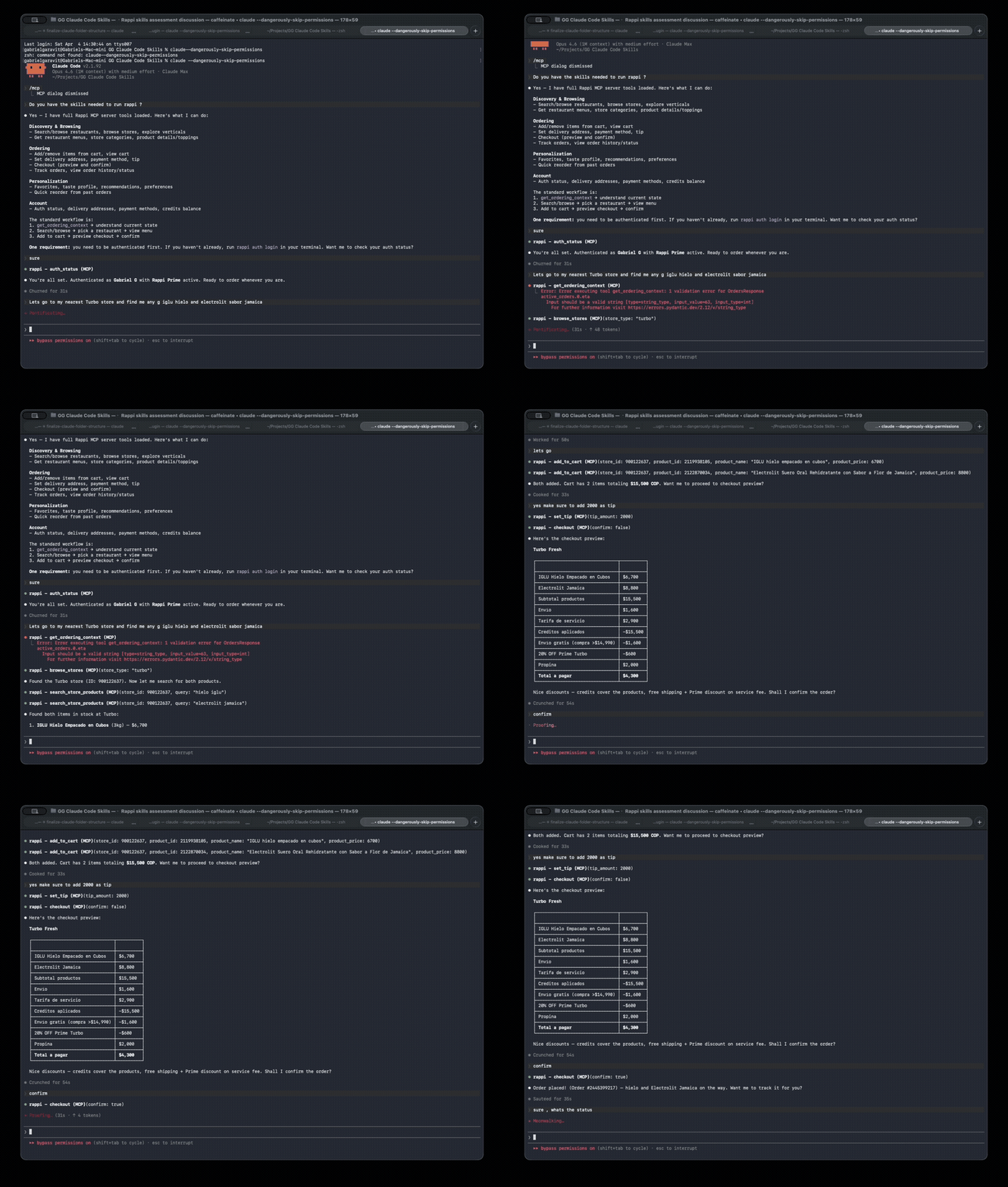 | 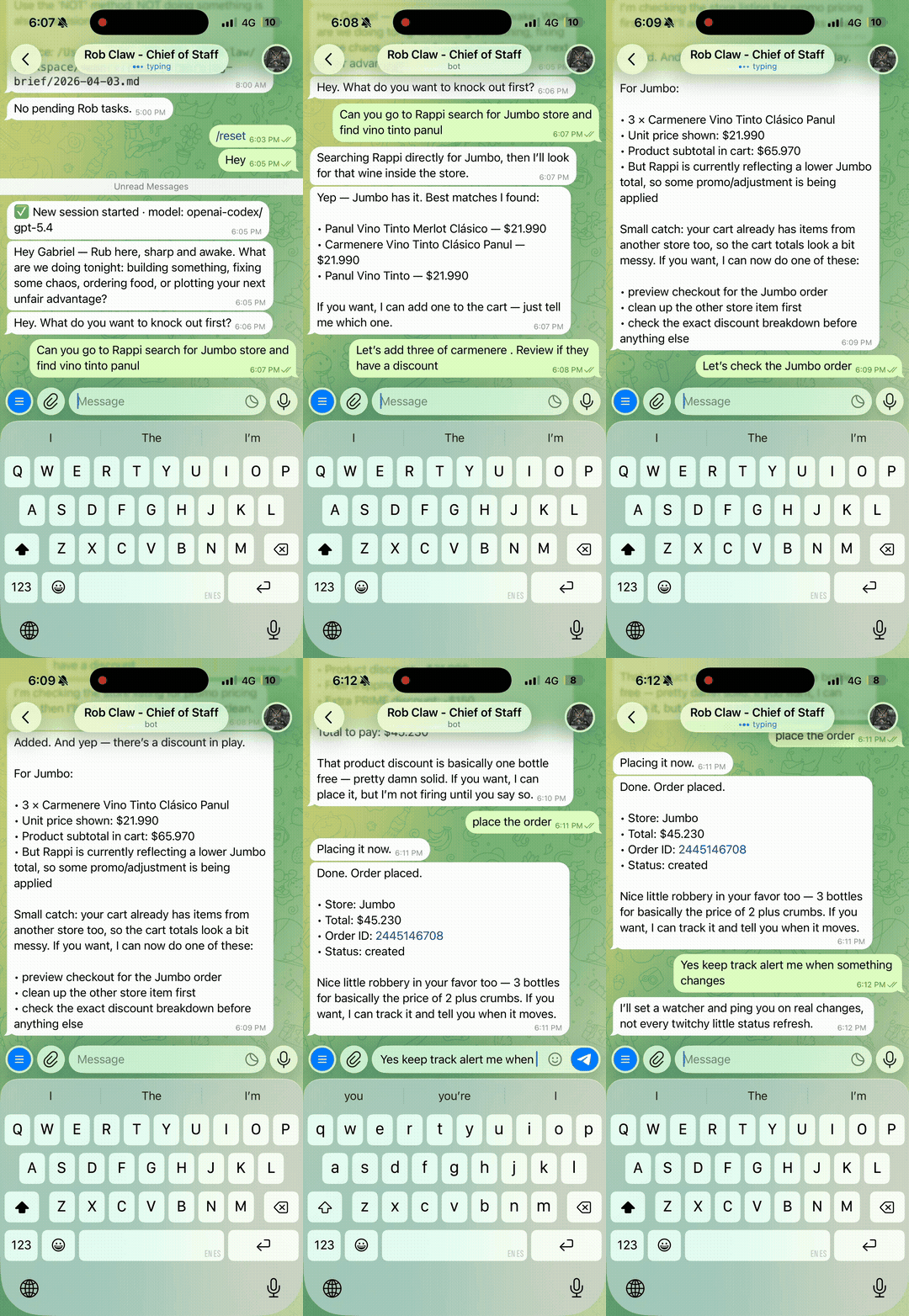 |
What You Can Do
You: "I'm hungry, order me something from that burger place I liked"

Claude: *checks your order history, finds El Corral*
        *suggests items you've ordered before, scored by taste match*
        *adds to cart with your usual toppings*
        *shows checkout summary with suggested tip*

You: "Looks good, place it"

Claude: *places the order, tracks delivery with real-time ETA*
You: "Find Michelob beer — check Exito and Turbo, whoever has it cheaper"

Claude: *searches both store types, compares prices*
        *Exito: $12,760 for 6-pack | Turbo: $15,480*
        *"Exito has it cheaper — want me to add it to cart?"*
You: "Get me Tylenol from Farmatodo and a bottle of wine from Carulla"

Claude: *searches both stores in parallel*
        *adds Tylenol PM ($32,900) and Casillero del Diablo ($45,000)*
        *shows combined checkout with delivery fees*
The plugin gives your AI assistant 41 tools across all Rappi store types, 4 workflow skills, a specialized ordering agent, and a local memory system that builds a taste profile from your order history.
Store Types
Not just restaurants. The plugin works with every store type on Rappi — cart, checkout, and order tracking automatically detect the correct store type.
| Type | Examples | What You Can Do |
|---|---|---|
| Restaurants | El Corral, McDonald's, local places | Browse menus, customize toppings, reorder favorites |
| Turbo | Turbo convenience stores | Quick snacks, drinks, essentials — delivered in ~10 min |
| Supermarkets | Carulla, Exito, Jumbo, Olimpica | Weekly groceries, compare prices across stores |
| Pharmacies | La Rebaja, Farmatodo | Medicines, personal care products |
| Liquor Stores | Cervesia, Exito Licores | Beer, wine, spirits with age verification |
Install
Prerequisites
- Python 3.12+
- uv
- A Rappi account (Colombia or Mexico)
Setup
git clone https://github.com/garavitgabriel/rappi-plugin-claude-openclaw.git
cd rappi-plugin-claude-openclaw
uv sync
uv run playwright install chromium
Authenticate
# Colombia (default)
uv run rappi auth login

# Mexico
uv run rappi auth login --country mx

# Headless servers (no browser — SSH, VPS, etc.)
uv run rappi auth token <RAPPI_TOKEN> <DEVICE_ID>
uv run rappi auth token <RAPPI_TOKEN> <DEVICE_ID> --country mx
Your token is saved locally at ~/.rappi/config.json (mode 0600; override the directory with RAPPI_CONFIG_DIR). It never leaves your machine unless you run rappi auth push-railway.
Browser login also captures Rappi's refresh token, so the 7-day access token renews itself automatically — see Auth runbook.
Connect to Your AI Platform
Claude Code (auto-discovers everything)
cd rappi-claude-plugin
claude   # MCP server auto-registers from .mcp.json
Claude Desktop
Add to ~/Library/Application Support/Claude/claude_desktop_config.json:
{
  "mcpServers": {
    "rappi": {
      "command": "uv",
      "args": ["run", "--project", "/path/to/rappi-claude-plugin", "rappi-mcp"]
    }
  }
}
Claude Cowork (web — requires remote MCP server)
- Deploy the MCP server (see Deployment)
- Generate plugin zip:
uv run rappi build-plugin build --url https://your-server.up.railway.app/sse - Upload the zip via Cowork > Customize > Plugins
- Add the SSE URL as a remote MCP connector
OpenClaw (one-command install)
cd rappi-claude-plugin
./install-openclaw.sh       # Handles uv, deps, MCP registration, skills
uv run rappi auth login     # Or: rappi auth token <TOKEN> <DEVICE_ID> (headless)
openclaw gateway restart
For remote MCP:
uv run rappi build-plugin build --target openclaw --url https://your-server.up.railway.app/sse
openclaw plugins install ~/Desktop/rappi-openclaw-plugin.zip
openclaw gateway restart
See docs/openclaw-setup.md for the full OpenClaw guide.
Skills
Just talk naturally. The plugin auto-triggers when you mention food, ordering, stores, or Rappi.
| Skill | Trigger | What It Does |
|---|---|---|
/order-food | "Order me food", "get me a burger", "find beer at Turbo" | Full workflow: search → browse → cart → checkout → track |
/rappi-search | "What's available?", "find pizza", "search Exito for wine" | Searches all store types, compares prices |
/rappi-reorder | "Order the same as last time" | Re-adds past order items to cart |
/rappi-suggest | "What should I eat?", "suggest something" | Analyzes your taste profile, suggests based on habits and time of day |
Intelligence & Memory
The plugin stores everything locally in SQLite (~/.rappi/rappi.db) and computes a taste profile that gets smarter with every order. All data stays on your machine.
What It Learns
| Data | How It's Used |
|---|---|
| Order history | "The usual" per store, reorder patterns, spending trends |
| Product cache | Category preferences (Hamburguesas 40%, Bebidas 25%), favorite items |
| Time patterns | "You usually order lunch at 12:30 on weekdays" |
| Topping choices | "Always adds extra cheese, never onions" |
| Price patterns | Average spend, price sensitivity, tip habits |
| Dietary preferences | Filters recommendations (allergies, restrictions) |
How It Works Without Embeddings (Default)
Everything runs on pure SQL — no external APIs, no cost, no setup:
- "The usual" — Products you've ordered 3+ times from a store
- Time-based suggestions — Stores you order from at this time of day
- New store discovery — Stores matching your preferred type that you haven't tried
- Menu scoring — Ranks items by how often you've ordered them
- Smart search — SQL LIKE matching across all cached products
- Taste profile — Full breakdown of categories, stores, spending, time patterns
How Embeddings Add Semantic Intelligence (Optional)
Enable OpenAI embeddings to unlock meaning-based features on top of the SQL foundation:
export OPENAI_API_KEY="sk-..."
uv run rappi prefs set embeddings.enabled true
| Feature | Without Embeddings | With Embeddings |
|---|---|---|
| Product search | Keyword matching ("pizza" finds "Pizza Margherita") | Semantic matching ("something refreshing" finds "Sprite", "Limonada") |
| Menu scoring | Frequency-based (items you've ordered before rank higher) | Taste-vector similarity (items like what you usually order rank higher) |
| Recommendations | Frequency + time patterns | + "similar products" you haven't tried yet |
| Taste profile | Category %, stores, spending, time patterns | + taste vector (average embedding of all ordered products) |
How it works: Each product gets a 1536-dimension vector (text-embedding-3-small). Your taste profile is the average of all products you've ordered. Menu scoring = cosine similarity between each item and your taste vector. All vectors stored as BLOBs in SQLite — no external vector database needed.
Cost: ~$0.02 per 1M tokens. A typical menu generates ~100 embeddings. Negligible cost for personal use.
MCP Tools Reference
All 41 tools
Discovery & Browsing
explore_verticals— all available store types in area (Restaurants, Turbo, Markets, Farmacia, Licores)search_restaurants(query)— search products/stores by keyword (all store types)browse_restaurants(offset, limit)— nearby restaurantsbrowse_stores(store_type, query)— find stores by type (turbo, exito, carulla, olimpica, etc.)get_store_categories(store_id)— browse store aisles/categoriesget_aisle_products(store_id, aisle_id)— products in a categoryget_store_info(store_id)— hours, charges, addresssearch_store_products(store_id, query)— CPG product search with brand infosearch_in_store(store_id, query)— search within any store
Menu & Products
get_restaurant_menu(store_id)— full menu by categoryget_product_toppings(store_id, product_id)— customization options
Cart & Checkout
add_to_cart(store_id, product_id, quantity, topping_ids, product_name, product_price)— add itemview_cart/remove_from_cart(store_id, product_id)get_tip_suggestions— suggested tip amounts for current cartset_tip(tip_amount)— set delivery tip in COP (persists until order is placed)checkout(confirm)— preview then place. Use set_tip before, not during checkout.get_payment_methods— available payment methods and cards
Order Tracking
get_active_orders— currently active orderstrack_order(order_id)— real-time state, ETA, driver positionget_order_detail(order_id)— full order summaryget_order_breakdown(order_id)— detailed costs, fees, discountsget_order_status— active and cancelled ordersget_order_history(limit, refresh?, since?, until?)— completed orders pulled live from the Rappi API (paginated, newest-first), cached to local memory; supportssince/untilISO date filtersget_spending_summary(since?, until?)— total spend and order count broken down by store type over a date window
Account
get_ordering_context— full state snapshot (user, address, cart, memory)auth_status— profile, Prime status,token_expires_atandauto_refresh(no token values)list_delivery_addresses/set_delivery_address(address_id)get_credits_balance— Rappi credits/wallet balanceget_rappi_favorites— favorite stores from Rappiget_favorites/add_favorite/remove_favorite— local favorites
Intelligence & Memory
get_taste_profile— computed taste profile (categories, time patterns, spending)get_recommendations(context?)— smart suggestions based on habitsscore_menu(store_id)— rank menu items by taste matchquick_reorder(order_id)— re-add past order to cartget_preferences/set_preference(key, value)smart_search(query)— semantic search across cached products
Terminal (CLI)
uv run rappi go                    # Interactive guided ordering
uv run rappi search "hamburguesa"  # Quick search
uv run rappi store detail 900004   # View a store menu
uv run rappi cart show             # View cart
uv run rappi order checkout        # Place order
uv run rappi history               # Past orders
uv run rappi favorites             # Saved stores
uv run rappi prefs                 # Your preferences
Full CLI command reference
| Command | Description |
|---|---|
rappi go | Interactive ordering session |
rappi auth login | Authenticate (browser, or --token [+ --refresh-token]) |
rappi auth token <token> <device_id> | Set credentials directly (headless, no auto-refresh) |
rappi auth status | Show profile, Prime status, token expiry and auto-refresh |
rappi auth refresh | Force one token refresh (prints ok, expires … or the error code) |
rappi auth push-railway | Push the saved token set to the linked Railway service |
rappi auth logout | Clear saved tokens |
rappi address list | List delivery addresses |
rappi address set <id> | Switch active address |
rappi search <query> | Search restaurants and products |
rappi store browse | Browse nearby restaurants |
rappi store detail <id> | View store info and menu |
rappi store toppings <store> <product> | View product customizations |
rappi cart show | View cart contents |
rappi cart add <store> <product> | Add item with interactive toppings |
rappi cart remove <store> <product> | Remove item from cart |
rappi order checkout | Review and place order |
rappi order list | View active and past orders |
rappi order track | Live order tracking |
rappi history | View order history from memory |
rappi favorites | List favorite stores |
rappi prefs | View preferences |
rappi prefs set tip 5000 | Set default tip |
Deployment
The MCP server supports two modes:
- Local (stdio): For Claude Code, Claude Desktop, and OpenClaw — runs as a subprocess
- Remote (SSE over HTTP): For Claude Cowork and OpenClaw — deployed to Railway
Railway Deployment
Or deploy manually:
- Fork this repo to your GitHub account
- Connect it to Railway (New Project → Deploy from GitHub)
- Set environment variables in Railway dashboard:
| Variable | Value | Purpose |
|---|---|---|
RAPPI_TOKEN | ft.xxxxx | Access token seed (set by rappi auth push-railway) |
RAPPI_REFRESH_TOKEN | ft.xxxxx | Refresh token seed — enables auto-refresh (set by push-railway) |
RAPPI_DEVICE_ID | UUID | Device ID (set by push-railway) |
RAPPI_CONFIG_DIR | /data/rappi | Where refreshed tokens persist — point at a mounted volume |
MCP_TRANSPORT | sse | Enables HTTP transport |
RAPPI_COUNTRY | co | Country code: co (Colombia) or mx (Mexico) |
- Railway auto-assigns a URL like
https://your-app.up.railway.app - Verify:
curl https://your-app.up.railway.app/healthshould returnok
Coordinates are auto-synced from your Rappi active address — no need to set lat/lng.
Set the tokens: follow the Auth runbook. rappi auth push-railway sets all three token variables and never prints them.
Auth runbook
How auto-refresh works. Rappi access tokens expire after exactly 7 days. Each login also returns a refresh token, which the plugin saves next to the access token. The client refreshes the token before any request when expiry is less than 48 h away or unknown. It also refreshes when an API call returns 401, then retries that call once. On Railway, a keep-alive task checks every 6 h, so the token renews even when nobody is ordering. The refreshed tokens are written atomically to $RAPPI_CONFIG_DIR/config.json and survive restarts because that directory lives on a volume.
Env seed vs. volume. RAPPI_TOKEN and RAPPI_REFRESH_TOKEN are only seeds. The volume file records a fingerprint of the seed it came from. If the seed is unchanged, the file wins, since it holds the newer refreshed tokens. If push-railway pushed a new seed, the env wins and re-seeds the file. With only the legacy RAPPI_TOKEN set, behavior is unchanged and there is no auto-refresh.
One-time Railway setup (service rappi-claude-plugin):
- Attach a volume to
rappi-claude-pluginmounted at/data. - Set
RAPPI_CONFIG_DIR=/data/rappi. - Locally, in
~/Projects/"Rappi Claude Plugin", runuv run rappi auth login(phone + OTP), thenuv run rappi auth push-railway. The second command needs the Railway CLI linked to this project. - Confirm that the MCP
auth_statustool showsauto_refresh: trueand atoken_expires_atabout 7 days out.
After push-railway, Railway owns the session. If Rappi rotates refresh tokens, the server's first refresh cancels the laptop's copy, so run uv run rappi auth login again locally if you need the CLI.
If RAPPI_REFRESH_TOKEN is set without RAPPI_CONFIG_DIR, the server logs a startup WARNING: refreshed tokens would be lost on every restart, so mount the volume (steps 1–2).
When a tool still says "Token expired…", the refresh itself failed. Re-run step 3 (uv run rappi auth login, then uv run rappi auth push-railway). Locally, uv run rappi auth refresh shows the refresh error code, and uv run rappi auth status shows Expires and Auto-refresh.
What still needs a human: the refresh token eventually expires too. Its lifetime is unknown, likely at least 3 months. Rappi can also revoke it at any time, for example after a password change, a logout on all devices, or a security reset. When that happens, repeat step 3.
Plugin Builds
After deploying to Railway:
# Claude Cowork plugin
uv run rappi build-plugin build --url https://your-app.up.railway.app/sse

# OpenClaw bundle
uv run rappi build-plugin build --target openclaw --url https://your-app.up.railway.app/sse
For Cowork: upload the zip via Cowork > Customize > Plugins, then add the SSE URL as a remote MCP connector.
For OpenClaw: openclaw plugins install ~/Desktop/rappi-openclaw-plugin.zip && openclaw gateway restart.
Security
This plugin can place real orders and spend real money. The Rappi auth token grants full access to your account — searching, ordering, and paying. Understand what you're enabling:
- Orders require explicit confirmation — the AI always previews first and asks before placing
- Spending limit — orders over $500,000 COP are blocked by default. Change with
rappi prefs set max_order_amount 1000000 - Token storage — access and refresh tokens are saved locally at
~/.rappi/config.jsonwith mode0600, and never committed to git. Tokens are never printed or logged:auth status,auth refreshandpush-railwayshow only expiry and success/failure - Railway deployment — the token seeds live in Railway's env vars and the refreshed tokens live on the service volume. Use Railway's secrets management
- No password access — the plugin only captures the Bearer token, not your Rappi password
How the API Was Mapped
The Rappi API is undocumented. All 40+ endpoints were reverse-engineered by capturing browser network traffic from rappi.com.co using Chrome DevTools, assisted by reverse-api-engineer — a tool that automatically generates API clients from captured HAR traffic using AI analysis. The full API map is in API_ENDPOINTS.md.
Updating the app-version Header
Rappi deploys new versions regularly. If API calls start returning 403 errors:
- Open your country's Rappi website in Chrome DevTools (Network tab)
- Look at any API request's
app-versionheader - Update
APP_VERSIONinsrc/rappi/constants.py - Also update
WEB_VERSIONif store browsing breaks
Development
uv sync --group dev            # Install dev dependencies
uv run rappi --help            # Test CLI
uv run pytest                  # Run tests
npx @modelcontextprotocol/inspector uv run rappi-mcp  # Test MCP in browser
See CLAUDE.md for the developer reference, API_ENDPOINTS.md for the full Rappi API map, and TESTING.md for the manual testing checklist.
Author
Gabriel Garavit — GitHub
Built with Claude Code. API reverse-engineered from Rappi's web app using browser DevTools and reverse-api-engineer.
License
MIT
// faq
What is rappi-plugin-claude-openclaw?
Order anything from Rappi through AI conversation — restaurants, groceries, pharmacies, liquor. Works on Claude Code, Desktop, Cowork, and OpenClaw.. It is open-source on GitHub.
Is rappi-plugin-claude-openclaw free to use?
rappi-plugin-claude-openclaw is open-source under the MIT license, so it is free to use.
What category does rappi-plugin-claude-openclaw belong to?
rappi-plugin-claude-openclaw is listed under mcp-servers in the Claudeers registry of Claude-compatible tools.
// embed badge

[](https://claudeers.com/rappi-plugin-claude-openclaw)
// retro hit counter

[](https://claudeers.com/rappi-plugin-claude-openclaw)
// reviews
// guestbook
// related in MCP Servers
 🔓
f.k.a. Awesome ChatGPT Prompts. Share, discover, and collect prompts from the community. Free and open source — self-host for your organization with complete…
 🔓
A cross-platform desktop All-in-One assistant for Claude Code, Codex, OpenCode, OpenClaw, Gemini CLI & Hermes Agent. Only official website: ccswitch.io
 🔓
🪨 why use many token when few token do trick — Claude Code skill that cuts 65% of tokens by talking like caveman
 🔓
An open-source AI agent that brings the power of Gemini directly into your terminal.