
Pygg
Run your coding agents on cheaper models without losing the answers. A local gateway for Claude Code, Codex and OpenCode that routes each request to a model…
Install with your AI
Paste into Claude Code, Cursor, or any agent — it reads the repo and wires the tool into your project.
Install and set up Pygg (claude-plugin project) into my current project.
Found on https://claudeers.com/pygg
Repo: https://github.com/nambean/Pygg
Homepage/docs: http://inviv.vn
Detected install method: claude-plugin → /plugin install pygg@nambean/Pygg
Category: devtools. Platforms: cli, api, desktop, web.
Read the repo's README for exact setup and env vars, then install it and wire it into my project.

Claudeers Health Verdict:
unknown; community-verified: false. Confirm the source before running anything.
⚠ Unverified / not recently updated — review before pasting a run-this config.
/plugin marketplace add nambean/Pygg
/plugin install pygg@nambean/Pygg
git clone https://github.com/nambean/Pygg
// compatibility
| Platforms | cli, api, desktop, web |
|---|---|
| Operating systems | — |
| AI compatibility | claude |
| License | MIT |
| Pricing | open-source |
| Language | Rust |

Run your coding agents on cheaper models without losing the answers.
Pygg is a local gateway that routes each request to a model you connected, and measures what it saved.
Our own first runs: 88% less per solved task on 12 small coding tasks, about 40% on a real repository.
A small sample: help benchmark it on your work.
https://github.com/user-attachments/assets/85708783-8be3-4292-955c-783cc066bbd1

Pygg runs on your computer. Connect your providers once (API keys, coding plans, a local Ollama, even an AI website without an API), point Claude Code, Codex, OpenCode, an editor or an SDK at 127.0.0.1:8741, and choose the model auto. Each request goes to an eligible model you connected, free and cheap ones first where they qualify, within the limits you set; when a provider says no, the next one answers. Every attempt lands in a ledger with what it cost and where that figure came from.
Since the router sees every model you connected and what each one did on your own work, it can also be the brain: name the model pygg/brain and type a requirement, and Pygg has a planner split it into cards with a role each (plan, code, test, review), picks a model per card by rule from public benchmark facts and your own kept results, and shows the proposal in the app, where you approve it into a Kanban board run one card at a time under limits you set.
[!NOTE] Developer preview (2026-11-19). The gateway and the Windows desktop app are built and verified live, from first launch to "my coding tool uses
auto". The Windows installer is the prereleasev0.1.0-dev.2of 2026-11-19, not code-signed, so Windows SmartScreen warns before it runs. Thepyggcommand line is on npm for Windows, macOS and Linux. Spending limits rest on prices and token estimates, and clean-machine installs and long-running behaviour still need validation, so Pygg is not yet for unattended or financially critical use. What is built and how each part was verified: Implementation Status.
Why Pygg
autothat you can read. Rules over the models you connected, not a classifier: the lowest eligible tier at or above your key's minimum, at most five models in a route and at most two from one connection, so one empty account cannot end a request. Every response says why it chose what it chose, and How auto chooses simulates a route before you send anything.- Cost you can trace. Each attempt is recorded with its cost and that cost's source: actual (the provider said), estimated (a price you or a catalog set) or unknown, never shown as $0. Estimated savings compare the same tokens at a model you choose, and say what they left out.
- Fallback that does not double-bill. A 429, 402 or rejected key moves on to the next key or target, only before the agent got its first byte. A timeout stops instead, since the provider may already have billed it. Each attempt is written to disk before it is sent.
- The provider's cache keeps working. Anthropic requests from Claude Code pass through unchanged; for OpenAI-format agents such as Codex, Pygg turns on Anthropic's prompt cache. Measured: 30% less in all, 68% less on input (below).
- Limits that stop a session, not only a month. Each Pygg API key can have a monthly limit and, per routing session and per UTC day, a limit that refuses the next request with 402 once reached. A request already running is never cut, and concurrent requests cannot pass a strict limit together.
- A receipt for every launch. When a tool started by
pygg runexits, Pygg prints what that launch cost, how much came from the cache, which models answered, and what changed in the Git repository it ran in.pygg launches --by-reposums it per repository and week. For Claude Code, cost is split by kind of request (main, subagent, compaction…). - Several accounts, used in turn. A key ring holds API keys of separate accounts on one connection (in order, round robin, least used or quota aware); a pool groups connections of one provider. Each key cools down on its own.
- AI websites as providers, carefully. Web sessions (Muse, ChatGPT, Perplexity, DeepSeek, Grok, Gemini) are opt-in and unofficial, signed in by you in Pygg's own window, and held behind a per-site guard: one request at a time, rests between them, a daily cap, longer rests after the site's own warnings. Pictures, videos and files a site makes come back with the reply.
- Local, with your own accounts. The gateway listens on 127.0.0.1 only and needs a Pygg API key; provider keys stay in the OS credential store. Each tool's setup is backed up first, and Remove puts it back.
- The router as the brain, with a board. A requirement typed into your own coding agent becomes a proposal: cards with a role, a done criterion and dependencies, each on the model that measured best for that role (Terminal-Bench, SWE-bench Verified, the Arena dataset, in a weekly signed feed) and, from ten of your own runs on, on the model your kept results favour. You pick, change or drop, then approve; the board pulls cards into Running under a WIP limit, holds a finished run while Checking is full, blocks a card that waits for your approval or an answer, and measures cycle time and money per kept result. No step that costs money starts without your click (BRAIN.md, ADR-040 to ADR-042).
A look at the app

| Providers | Usage | CLI Tools |
|---|---|---|
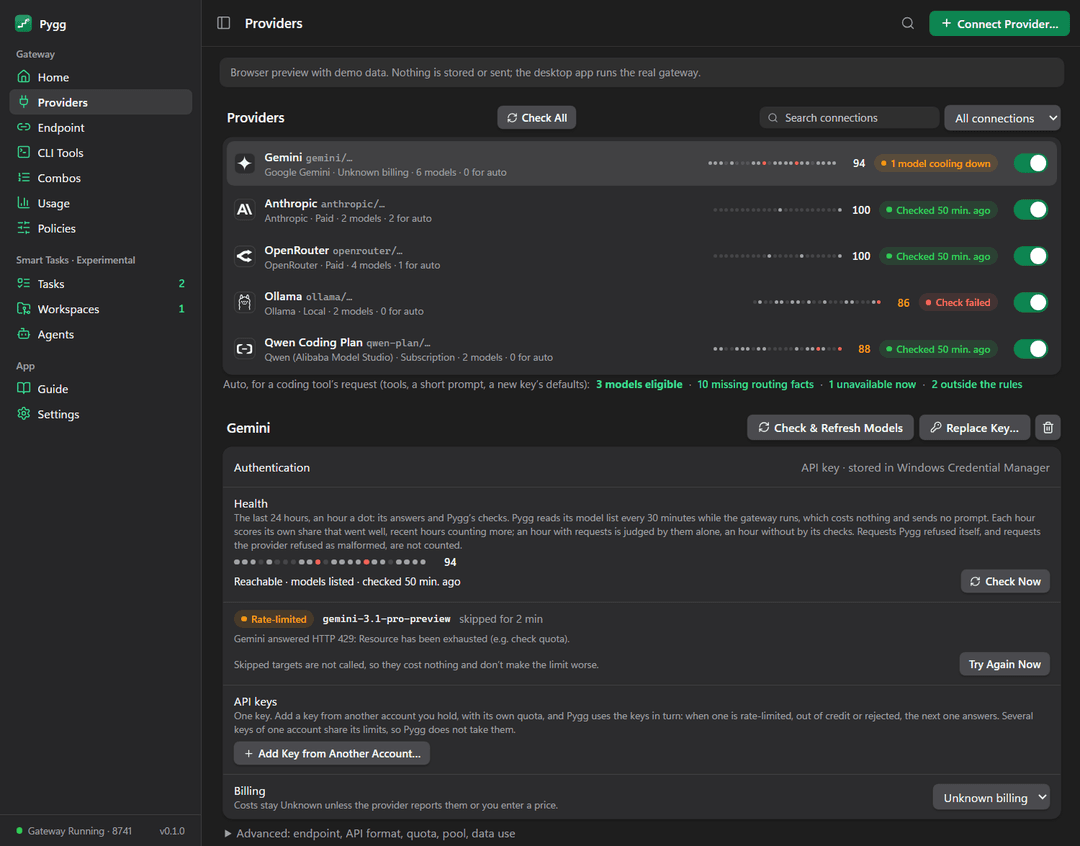 | 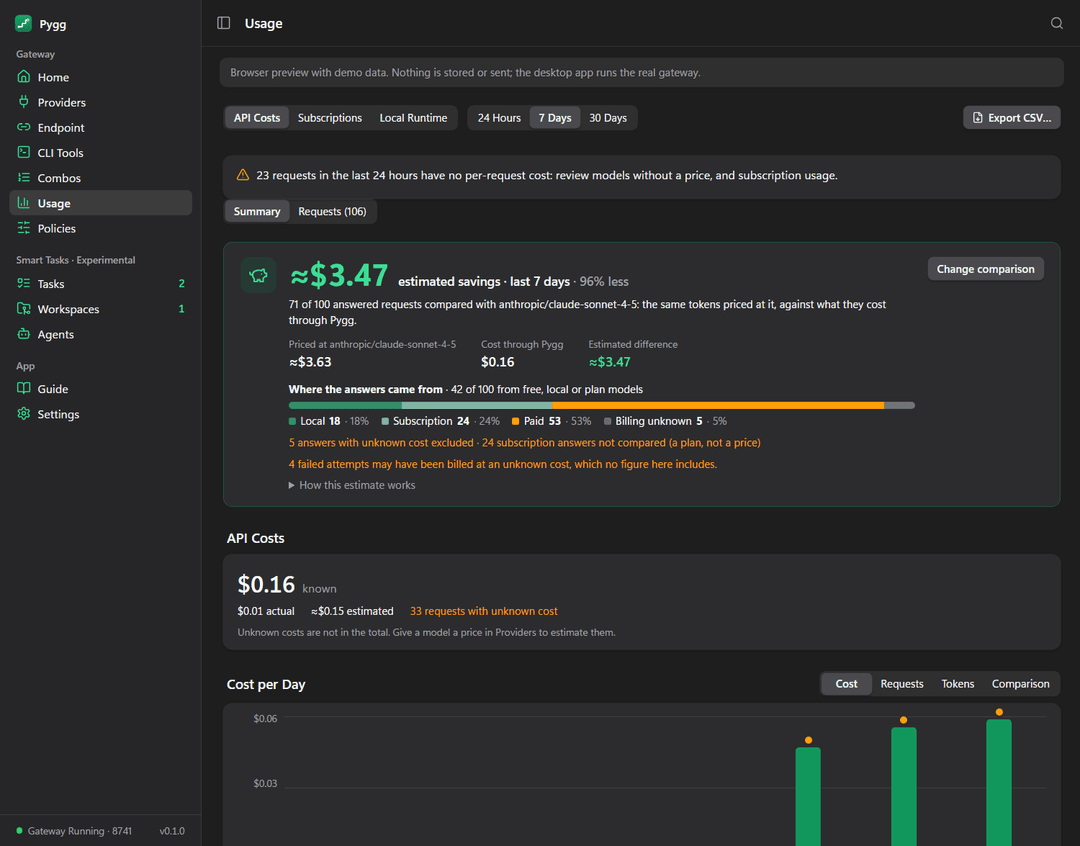 | 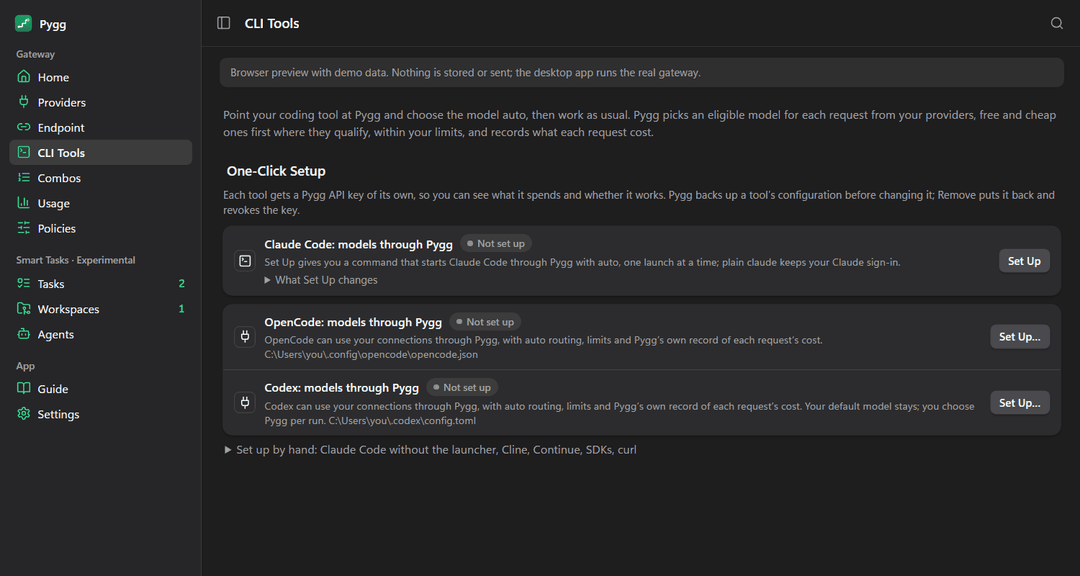 |
The browser preview with demo data (pnpm dev).
| The board | Its measures | Brain Storming |
|---|---|---|
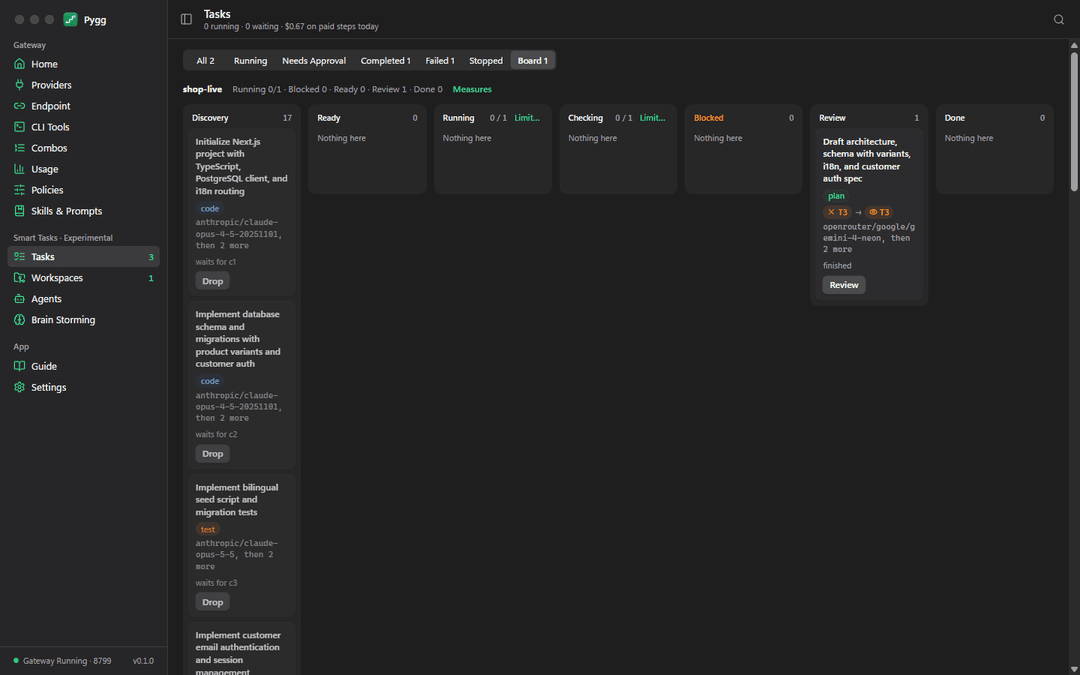 | 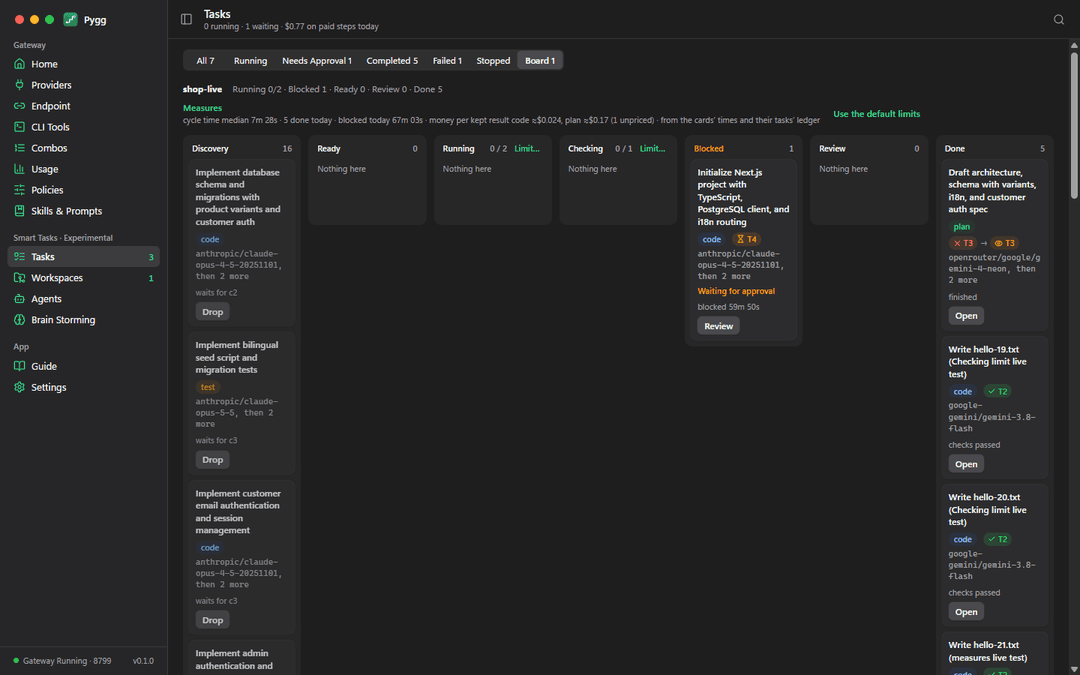 | 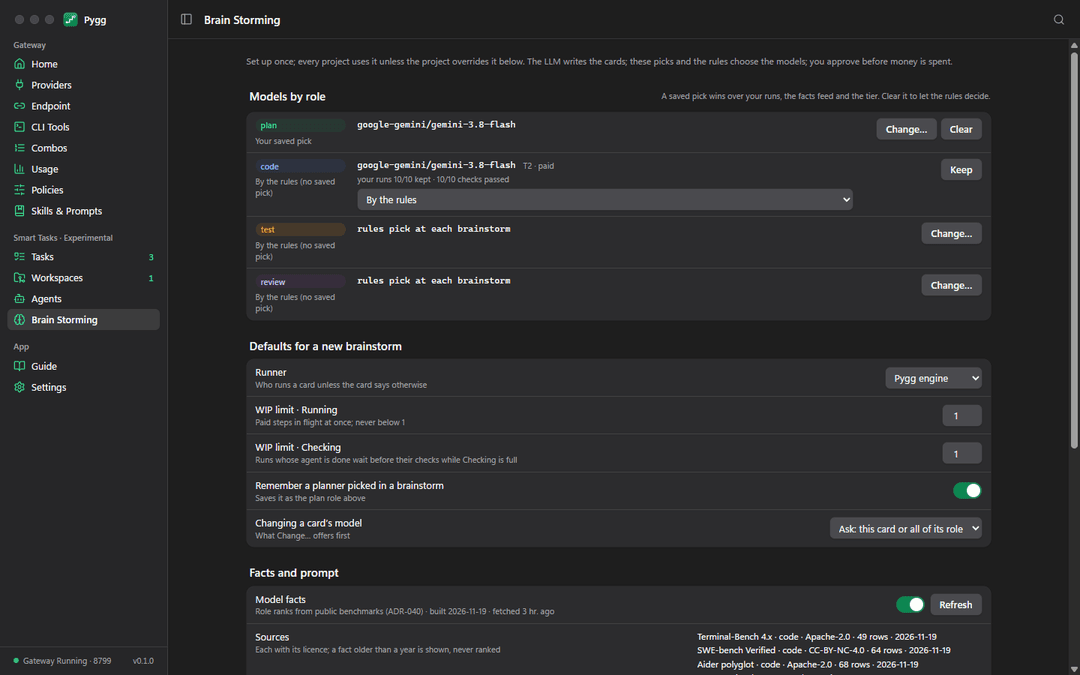 |
The desktop app on a copy of the maintainer's store, as it ran on 2026-11-19 (about $0.5 of real requests in all).
How a request flows

- Gateway. The agent calls
127.0.0.1:8741with its own Pygg API key, in OpenAI Chat Completions, OpenAI Responses (Codex) or Anthropic Messages, streamed, with tool calls. - Route. The model name is
autoorauto/cheap, a role alias (auto/plan,auto/code,auto/test,auto/review, ranked by your own kept results, then public benchmark facts, then the tier table), a combo (a name for an ordered list, or cheapest first per request), a pool,<connection>/<model>, orpygg/brain, which answers with a proposal instead of running the request. - Policy and budget. The key's allowed connections, health and cooldowns, quota-group holds; a key with a monthly limit holds the attempt's estimated cost first, so concurrent requests cannot pass the limit together.
- Journal. The attempt is written to disk before it is sent, and settled with its ledger entry in one transaction.
- Send and fall back. Same format passes through untouched; other pairs are translated and say what they dropped. A 429 or 402 cools that key or model down for as long as the provider says, a rejected key (401) waits until you replace it, and the next key or target is tried.
The diagrams are generated by scripts/readme-diagrams.mjs and checked against apps/desktop/src-tauri/src/gateway/. More in Architecture.
Install
Desktop app (Windows 10/11 x64). It runs the gateway, holds your connections and shows usage. Download Pygg_0.1.0_x64-setup.exe (or the MSI) and SHA256SUMS.txt from the v0.1.0-dev.2 prerelease, then check the download before running it:
Get-FileHash .\Pygg_0.1.0_x64-setup.exe -Algorithm SHA256 # compare with the line in SHA256SUMS.txt
The installer is not code-signed, so SmartScreen says "Windows protected your PC": choose More info → Run anyway. It installs for the current user, with pygg-cli.exe next to the app. To build it yourself instead, see Development.
Command line (pygg), from npm (@pygg/cli):
npm install -g @pygg/cli@dev
Published under the tag dev (the npm badge above shows the version) for Windows x64, macOS (Apple silicon and Intel) and Linux x64 (glibc). On Windows the CLI uses the desktop app's store and gateway; on macOS and Linux, where there is no app yet, pygg gateway serve runs the gateway in a terminal of its own.
Quick start
Open Pygg, then Providers → Connect Provider and paste a key (Gemini, OpenRouter and Groq have free tiers; Ollama is local). Without the app, pygg gateway add-connection --preset gemini --key-env GEMINI_API_KEY reads the key from an environment variable. Then point your tool at Pygg:
Claude Code keeps your Claude sign-in; Pygg starts it through the gateway one launch at a time.
pygg setup claude          # a Pygg key of its own, kept in the credential store; no file changes
pygg run claude            # this launch through Pygg, model auto; a receipt when it exits
pygg run --statusline claude   # the same, with the launch's cost in Claude Code's status line
Codex CLI gets a pygg provider and profile, after a backup; its default model is not changed.
pygg setup codex
pygg run codex             # or: codex --profile pygg -m auto/cheap
OpenCode gets a Pygg provider listing the auto aliases and your enabled models, kept current.
pygg setup opencode
pygg run opencode          # then /models → Pygg → auto
Chat in the terminal with any connected model, through the same router, fallbacks and ledger:
pygg chat --model muse/muse                 # a conversation; /model, /new, /cost, /exit; nothing is kept
pygg ask --model auto/cheap "Explain git worktree in two sentences"
Editors and SDKs (Cline, Continue, Roo Code, the OpenAI or Anthropic SDKs): base URL http://127.0.0.1:8741/v1, a key from Endpoint → API Keys, model auto.
Keep spending in bounds and see where it went:
pygg gateway client --name "Claude Code (launcher)" --session-usd 5 --day-usd 20   # or Endpoint → API Keys → Limits…
pygg launches --by-repo    # cost, commits and cost per commit, per repository and week
pygg usage --days 7        # requests, known and unknown cost, by client, model and kind of request
Each setup takes --dry-run to show what would change and --remove to undo it. The same set-up is one click in CLI Tools. Step by step, with troubleshooting: Getting started.
Measured, not claimed
Every run below is the maintainer's own check: real agents, real models, checks the agent cannot edit, about $16.7 of a $20 budget in all. Each report gives its method, raw results and what it does not show; read it before quoting a number. Summary: BENCHMARKS.md.
| What was measured | Result | Report |
|---|---|---|
| OpenCode on 12 small Node tasks × 3 (3 bug fixes, 8 features, 1 three-file refactor; 20 to 211 lines each), through Pygg to Claude Haiku 5.5 instead of Sonnet 5.5 | 88% less per solved task (95% CI 87–90%); one attempt per run, no retry: 36/36 passed against 34/36 | N2 |
| Claude Code on the same tasks, Haiku 5.5 instead of Sonnet 5.5 | 79% less per solved task (95% CI 74–84%); auto/cheap with OpenCode: 34/36 at $0.0129 per solved task | P0 |
| Claude Code on six tasks from a real production repository (Express + Prisma API, features across API, reports and Excel export, 124-check end-to-end suite) | Haiku 5.5: 6/6 for $1.50, one attempt each; Sonnet 5.5: 4/5 for $1.19; on the 4 both solved, Haiku cost about 40% less, in 2 to 3 times the requests. OpenCode with auto/cheap: 2/6 for $0.35 | CCHT |
| Codex on Claude Haiku 5.5, Pygg's prompt caching off vs on | 16/16 either way; 30% less in all, 68% less on input | Prompt cache |
| An OpenAI-format agent on Claude Haiku 5.5 through OpenRouter, with Pygg's cache marker | After each session's first turn, 99.7% of every prompt read from cache; $0.0066 in all | OpenRouter cache |
| The gateway's own overhead, against a local fake provider | About 4 ms per short request, 5 ms per 400 kB prompt; about 230 requests/s with 16 clients | Overhead |
| Web sessions on five sites, 48 short tasks | 47/48 correct, about 18 s each, $0 | Web sessions |
Not claimed: a quality ranking of models (a handful of tasks each), a provider's bill (costs are the ledger at list prices), "60–95% fewer tokens", or savings on large refactors, database migrations or other languages, which no run has measured yet. The 88% is the whole session pinned to a cheaper model on small tasks; on the real repository the saving narrowed to about 40%, and a cost-first auto/cheap over free models solved 2 of 6. A longer web-session run on coding tasks got the owner's DeepSeek account suspended for three days (report); the guard has been stricter since.
Next to LiteLLM, measured with the same fake provider and requests (LiteLLM 1.106.2, defaults plus fallbacks; other projects compared from their docs in BENCHMARKS.md):
| When the primary provider… | Pygg | LiteLLM proxy |
|---|---|---|
| is rate-limited, out of credit or unreachable | 100% served, 1.04 provider requests each, ~70 ms | 100% served, 4 provider requests each, ~4.6 s (88 s with Retry-After: 30) |
| fails with 500 or drops the connection | 96% / 0% served: never re-sent unless you allow it (100% for a 500 with one retry allowed) | 100% served, after 3 attempts at the failing provider each |
| is Claude, reached by an OpenAI-format agent | 89.5% of the prompt read from cache, automatically | 0% by default; 89.5% (Chat Completions) or 39.7% (Codex's Responses API) with injection points configured |
| sits behind a key ring of several accounts | sessions stay on one key: 60 / 60 | 0 / 60 by default, 60 / 60 with affinity on |
Where Pygg is worse: about 230 requests/s on one PC (LiteLLM publishes 1,170 on four instances), no timeout fallback for a hung provider, and a 5xx or dropped connection reaches your agent as an error by default. Reports: resilience, tokens and cost, web guard.
Benchmark it on your work
One person's runs on a few dozen tasks are a start, not proof. The benchmark needs the community: run the harness on the cases here or on your own repositories (they can stay private; only the result lines are published, as in CCHT), add cases the runs above lack, such as large refactors, database migrations and other languages, and open a pull request with the report and its raw results (how). A run where the cheaper model loses is as welcome as one where it wins.
What's inside
Coding agents ──HTTP──► Gateway 127.0.0.1:8741 (axum) ──► OpenAI- and Anthropic-compatible APIs, coding plans,
  Claude Code, Codex,     auth · route · policy · journal       local runtimes (Ollama …), web sessions (WebView2
  OpenCode, SDKs          translate · fall back · settle         windows behind the guard)
                                   │
       React UI ◄── Tauri ──► Rust core ──► SQLite store (ledger, journal, connections) · OS credential store
       pygg CLI ──────────────┘
- One Rust crate (Tauri 2): the gateway (axum), the SQLite store, the OS credential store, web-session windows, and the headless programs (
pygg-cli,gateway,pygg-mcp) built from the same library. - Interface: React 19, Vite and TypeScript, with a layout check over every screen in CI (
pnpm ui-check). - Skills & Prompts: one library of skills in the Agent Skills format, installed into Claude Code's, Codex's and OpenCode's own skills folders, and a count of what each agent sends with every request from its global files (ADR-039).
@pygg/clion npm: a Node launcher with one optional package per platform (ADR-037).- Smart tasks (experimental): IDE agents hand subtasks to Pygg over MCP, or send a requirement to
pygg/brain; agent CLIs run the tasks in Git worktrees against the repository's approved checks, paid steps wait for your approval, and the board (ADR-042) runs an approved brainstorm's cards under WIP limits with the Brain Storming screen holding the picks and defaults for every project (AGENTS.md, BRAIN.md). The model facts feed behind the role ranks is built weekly byscripts/model-facts.pyfrom sources with open licences, signed, and verified by the app before use (ADR-040). Each part has run live once on the maintainer's store, not under the benchmark harness.
Is Pygg a fork of 9router?
No. Pygg is the same kind of tool as 9router: a local router that points your coding agents at the providers you already have. 9router was one of the inspirations for building the gateway first (ADR-016). Pygg's code is written from scratch in Rust; the one part that follows 9router is the Muse web-session recipe, credited under MIT in THIRD_PARTY_NOTICES.
Where they differ, read from 9router's documentation and source (not run here):
- Re-sending. 9router moves to the next model on a 5xx or a timeout; Pygg does not re-send a request the provider may already have run, unless you allow one retry.
Retry-After. 9router uses fixed cooldowns; Pygg waits as long as the provider says.- Prompt cache. Pygg keeps each session on one key by default (9router with its
smartstrategy) and adds Anthropic's cache marker for OpenAI-format agents such as Codex. - Cost. 9router's cost is "for tracking only"; Pygg records every attempt, fallbacks included, with where its cost came from.
- Web sessions. Both drive AI websites; Pygg holds each site behind a guard (one request at a time, rests, a daily cap) that cannot be switched off.
The full table, with LiteLLM, OpenRouter, OmniRoute and claude-code-router: BENCHMARKS.md.
Documentation
| Use | Getting started · Providers · Benchmarks · Security |
| Understand | Architecture · Decisions (ADR-001 to ADR-042) · The brain, the facts feed and the board · Schema · Screens · Command line |
| Track | Implementation status · Roadmap · Benchmark reports |
| Contribute | Contributing · Code of conduct · Every document, indexed |
Only the app's data folder (app.smarttaskrouter.desktop) and its credential service name keep the engineering name SmartTaskRouter, so existing data stays readable. Brand assets are in branding.
Development
Requirements: Node.js LTS with pnpm 9 (corepack enable), stable Rust through rustup, and on Windows the Visual Studio C++ Build Tools and WebView2 (built into Windows 11).
pnpm install
pnpm dev                                              # the interface at http://127.0.0.1:1431 with demo data (?empty for a first run)
pnpm --filter @pygg/desktop tauri:dev     # the desktop app with the real gateway
pnpm typecheck
pnpm --filter @pygg/desktop tauri:build   # the installers, under apps/desktop/src-tauri/target/release/bundle
pnpm ui-check                                         # every screen at several window sizes, nothing overflowing
cd apps/desktop/src-tauri; cargo test --lib --tests   # core, gateway, web-session and task engine tests
node scripts/readme-diagrams.mjs                      # regenerate the README's animated diagrams
python scripts/model-facts.py selftest                # the model facts builder on its fixtures (build, sign, verify: see the script)
PYGG_DATA_DIR points the app at another store, for trying it without touching your own; that app runs beside the installed one, with its own window profile, and needs a gateway port of its own (Endpoint → Configure…).
Licence
MIT, see LICENSE. Third-party code and data are listed in THIRD_PARTY_NOTICES.md.
// faq
What is Pygg?
Run your coding agents on cheaper models without losing the answers. A local gateway for Claude Code, Codex and OpenCode that routes each request to a model you connected and measures what it saved.. It is open-source on GitHub.
Is Pygg free to use?
Pygg is open-source under the MIT license, so it is free to use.
What category does Pygg belong to?
Pygg is listed under devtools in the Claudeers registry of Claude-compatible tools.
// embed badge

[](https://claudeers.com/pygg)
// retro hit counter

[](https://claudeers.com/pygg)
// reviews
// guestbook
// related in Developer Tools
 🔓
The agent harness performance optimization system. Skills, instincts, memory, security, and research-first development for Claude Code, Codex, Opencode, Curs…
 🔓
Makes your AI agent think like the laziest senior dev in the room. The best code is the code you never wrote.
 🔓
AI coding assistant skill (Claude Code, Codex, OpenCode, Cursor, Gemini CLI, and more). Turn any folder of code, SQL schemas, R scripts, shell scripts, docs,…
 🔓
Use Garry Tan's exact Claude Code setup: 23 opinionated tools that serve as CEO, Designer, Eng Manager, Release Manager, Doc Engineer, and QA