
promptfilm
One sentence in, a researched 3D motion graphic out — a Claude Code skill that makes looping real-time HTML films (Three.js) and frame-exact MP4s
Install with your AI
Paste into Claude Code, Cursor, or any agent — it reads the repo and wires the tool into your project.
Install and set up promptfilm (claude-plugin project) into my current project.
Found on https://claudeers.com/promptfilm
Repo: https://github.com/Seokwoooo/promptfilm
Homepage/docs: —
Detected install method: claude-plugin → /plugin install promptfilm@Seokwoooo/promptfilm
Category: plugins. Platforms: api, web.
Read the repo's README for exact setup and env vars, then install it and wire it into my project.

Claudeers Health Verdict:
unknown; community-verified: false. Confirm the source before running anything.
⚠ Unverified / not recently updated — review before pasting a run-this config.
/plugin marketplace add Seokwoooo/promptfilm
/plugin install promptfilm@Seokwoooo/promptfilm
git clone https://github.com/Seokwoooo/promptfilm
// compatibility
| Platforms | api, web |
|---|---|
| Operating systems | — |
| AI compatibility | claude |
| License | MIT |
| Pricing | open-source |
| Language | JavaScript |
Promptfilm
One sentence in. A researched 3D motion graphic out.
A Claude Code skill that turns a request into a real-time 3D film —
one self-contained HTML file that loops seamlessly and exports to a frame-exact MP4.
English · 한국어

"Zoom from a Blackwell graphics card down to single atoms" — one full loop of a reference film, played at about 2.5×
Quick start
In Claude Code:
/plugin marketplace add Seokwoooo/promptfilm
/plugin install promptfilm@promptfilm
Restart Claude Code (or run /reload-plugins). The only thing to install yourself is Node.js 20 or newer: the
first run checks for everything else and installs what's missing (see Requirements).
Then type /promptfilm and what you want. One line is enough:
A journey through scale
/promptfilm Zoom out from Earth to the edge of the observable universe
How something works
/promptfilm Show how a mechanical watch works, from the mainspring to the hands
A product ad
/promptfilm An ad-style film for AirPods Pro 3
What you get
- A real film, not a slideshow — real-time Three.js in one HTML file: studio light, physically based materials, one continuous camera, a seamless loop.
- Researched, not guessed — facts, photos and footage from the web. Every number on screen has a source, and anything that isn't public is marked as illustrative.
- Paced to be watched — the camera stops at everything a caption names, holds while you read, then moves on gently.
- Any subject, any format — journeys through scale, product ads, app and game demos, explainers, recreations of famous scenes, logo stings, data stories. 9:16 for Shorts, Reels and TikTok, or 16:9, 1:1, 4:5. Captions in one or two languages.
- Checked before it's called done — automated QA, a visual review by a separate agent that didn't build the film, and a final delivery check.
- A Studio to review it — scrub the film, comment on the frame, change the pace, export the MP4.
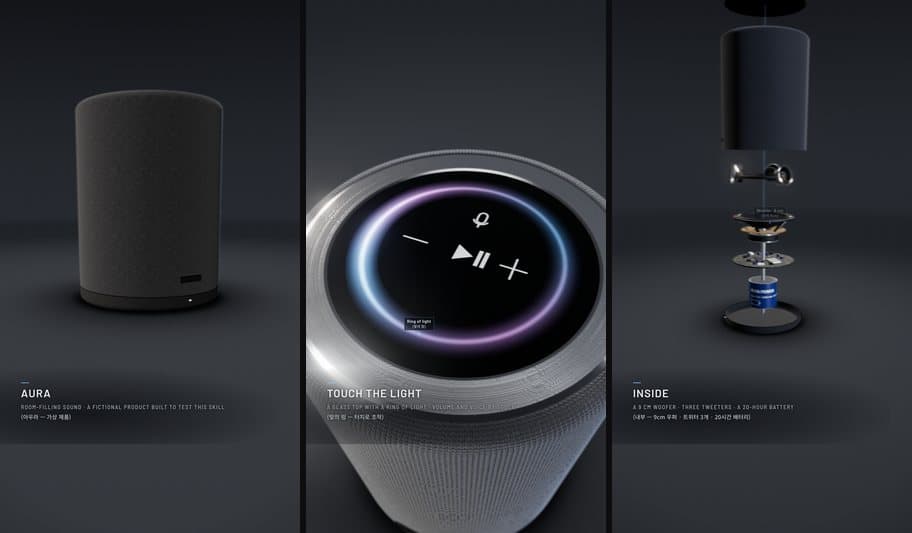
A 9:16 product film from the engine's test set (a fictional speaker)
How it works
| Step | What happens | |
|---|---|---|
| 1 | Ask | One kickoff question: research depth, aspect, loop length, caption languages. Then it works on its own. |
| 2 | Research | Sourced facts, reference photos, frames from reference videos. |
| 3 | Storyboard | Scene cards with a time budget, opened in the Studio for your approval. |
| 4 | Build | Claude writes the film on the bundled engine. |
| 5 | Check | Automated QA, a fresh-eyes review and a final gate. It fixes and re-checks until the gate says READY. |
| 6 | Deliver | The HTML (every version kept) and, when you want it, a 1080p 60 fps MP4. |
[!NOTE] A film takes hours of agent work and a lot of tokens: research, building and several rounds of checks.
The Studio
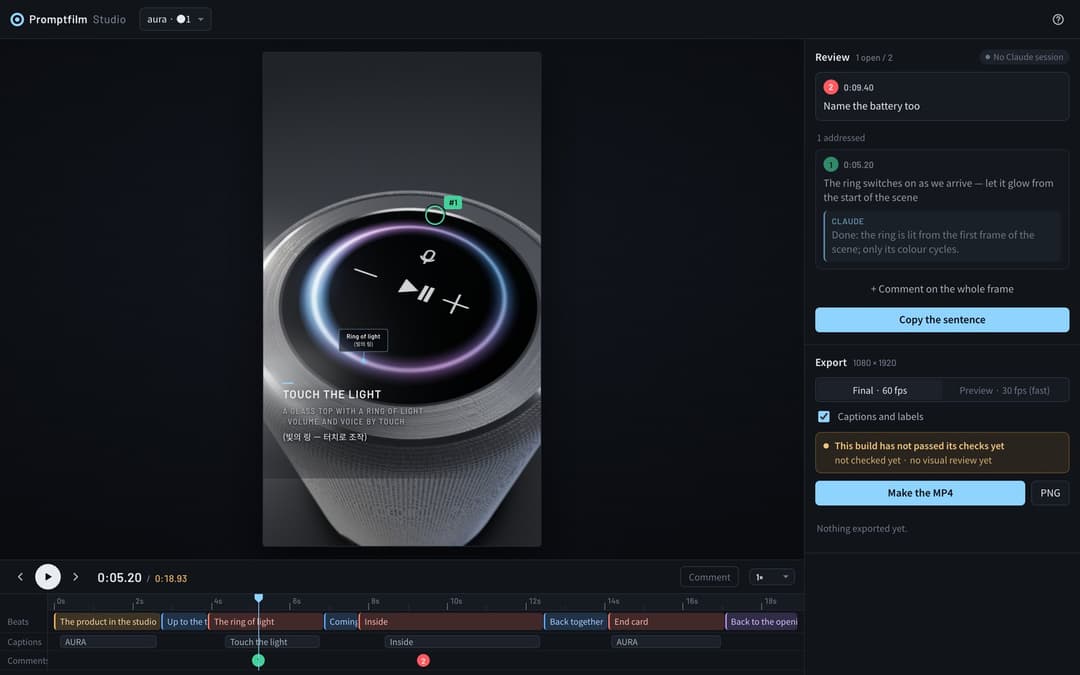
A local page that opens by itself while a film is being made:
- Play and scrub on a timeline of beats, captions and comments.
- Comment on the frame — click where something is wrong; Claude gets your note with a snapshot, fixes it and replies.
- Change the pace of any section; your edits are kept when the film is rebuilt.
- Approve the storyboard before anything is built.
- Export a frame-exact MP4 or a PNG still. A build that hasn't passed its checks is marked as such.
Everything stays on your machine: the Studio listens on 127.0.0.1 only.
Requirements
| What | How you get it |
|---|---|
| Claude Code | Recommended: Claude Opus 5.5, Sonnet 5.5 or Fable 5.1 (or newer), effort medium or above. Elsewhere it still runs and says once that quality can't be guaranteed. |
| Node.js 20+ | Install it yourself from nodejs.org. If it's missing and you have Homebrew, the first run installs it. |
| The scripts' packages | Installed with the plugin, or by the first run |
| A headless Chrome | Your Chrome, if it runs headless; otherwise the first run installs Playwright's Chromium (~150 MB) |
| ffmpeg | Yours, if it's on your PATH; otherwise the first run downloads a copy just for the skill (~45 MB) |
| yt-dlp (optional) | Frames from reference videos: brew install yt-dlp or pipx install yt-dlp |
The first run's setup needs no admin rights and removes nothing; after that, the check takes about a second. A GPU helps: without one, Chrome falls back to software rendering, which is slow. Developed and tested on macOS (Apple Silicon). Linux should work; Windows is untested (WSL is the safer route).
Memory: 8 GB is enough. Checking a film runs one headless browser (about 1.4 GB; 2.6 GB for a data-heavy film). The MP4 export opens as many as fit in half the memory, up to four: on an 8 GB Mac two for most films (about 3.5 GB with the encoder) and one for a data-heavy film, four on a 16 GB M2 Pro (about 5 GB). On 8 GB, close other heavy apps while it exports.
Install
As a plugin (recommended)
/plugin marketplace add Seokwoooo/promptfilm
/plugin install promptfilm@promptfilm
Claude Code installs the scripts' packages for you. Start the skill with /promptfilm (its full name is /promptfilm:promptfilm); it
also starts by itself when you ask for a motion graphic.
Updates are automatic. Each time a film starts, promptfilm asks this repository for its newest version (about half a second; skipped
when offline) and, when there is one, installs it with Claude Code's own claude plugin update and carries on with it in the same
session. To turn this off, set PROMPTFILM_NO_UPDATE=1. Claude Code's own background updates can be on as well: /plugin →
Marketplaces → promptfilm → Enable auto-update. If your copy is older than October 2, 2026, it doesn't update itself yet;
update it once from a shell:
claude plugin marketplace update promptfilm && claude plugin update promptfilm@promptfilm
As a personal skill
git clone https://github.com/Seokwoooo/promptfilm.git
cp -R promptfilm/skills/promptfilm ~/.claude/skills/
The skill is then /promptfilm, and its first run installs the packages.
Check your setup
Ask Claude Code to "run the promptfilm selftest". It takes about 5 minutes: it builds the engine's test films in a temporary folder and runs every check, including checks that must catch planted faults.
Usage
After /promptfilm, ask in your own words, in any language:
/promptfilm A 30-second 16:9 explainer of how a jet engine works, captions in English only
/promptfilm An ad-style product film for our app, 9:16
/promptfilm 사람 몸에서 세포, DNA, 원자까지 확대해 들어가는 쇼츠 영상 만들어줘
In the same session, follow-ups work in plain words: "open the Studio", "apply my review comments", "render the MP4".
Films are made in your working folder, one folder each (./<film-name>/). Your answers to the kickoff question are remembered in
./.promptfilm/settings.json and offered first next time.
Make it yours
The default taste profile, skills/promptfilm/taste.md, belongs to a creator making Shorts for a general
audience: nothing pops in, subjects look real, every step is shown up close, the camera moves gently, and nothing drags. Copy it to
./.promptfilm/taste.md (one project) or ~/.promptfilm/taste.md (all projects) and change the format defaults, the pace, the look,
the report labels, or the list of things that must never happen.
Troubleshooting
| Message | Fix |
|---|---|
SETUP MISSING node | Install Node.js 20+ from nodejs.org, then run /promptfilm again |
SETUP MISSING … (anything else) | The line says what failed and the command that fixes it; usually the network. Run /promptfilm again afterwards |
Chrome not found, Cannot find package … | Something was removed after the first run: run /promptfilm again and the setup reinstalls it |
| Using your own tools | Set CHROME=/path/to/chrome or FFMPEG=/path/to/ffmpeg |
| QA or rendering is very slow | no GPU: Chrome falls back to software rendering — it works, just slower |
| ⚠️ Not the recommended setup | shown once when the host, model or effort differs; the skill carries on |
Repository layout
.claude-plugin/          plugin and marketplace manifests
skills/promptfilm/
├── SKILL.md             the workflow
├── taste.md             the default taste profile
├── references/          principles, pacing, layout, engine API, techniques, QA, review, Studio
├── engine/              the film engine: core, a new-film template, two test films
├── scripts/             setup, new film, build, QA, time budget, render, review, gate, selftest
├── studio/              the local Studio
├── examples/            code from the two reference films (patterns, not templates)
└── evals/               test prompts with the expected behaviour
License
MIT. Third-party components, imagery credits and trademarks: THIRD_PARTY_NOTICES.md. Promptfilm is an independent project, not affiliated with or endorsed by Anthropic.
// faq
What is promptfilm?
One sentence in, a researched 3D motion graphic out — a Claude Code skill that makes looping real-time HTML films (Three.js) and frame-exact MP4s. It is open-source on GitHub.
Is promptfilm free to use?
promptfilm is open-source under the MIT license, so it is free to use.
What category does promptfilm belong to?
promptfilm is listed under plugins in the Claudeers registry of Claude-compatible tools.
// embed badge

[](https://claudeers.com/promptfilm)
// retro hit counter

[](https://claudeers.com/promptfilm)
// reviews
// guestbook
// related in Claude Plugins
 🔓
🔓A single CLAUDE.md file to improve Claude Code behavior, derived from Andrej Karpathy's observations on LLM coding pitfalls.
 🔓
🔓Claude Code is an agentic coding tool that lives in your terminal, understands your codebase, and helps you code faster by executing routine tasks, explainin…
 🔓
🔓"CLI-Anything: Making ALL Software Agent-Native" -- CLI-Hub: https://clianything.cc/
🔓financial-services — a Claude ecosystem project on GitHub.