
project-sentinel
Mission control for long Claude Code runs: context and run progress at a glance, Autopilot handoffs, guardrails and a calm activity view, in the terminal and…
Install with your AI
Paste into Claude Code, Cursor, or any agent — it reads the repo and wires the tool into your project.
Install and set up project-sentinel (claude-plugin project) into my current project.
Found on https://claudeers.com/project-sentinel
Repo: https://github.com/Arjun0014/project-sentinel
Homepage/docs: —
Detected install method: claude-plugin → /plugin install project-sentinel@Arjun0014/project-sentinel
Category: plugins. Platforms: cli, api, desktop, web, mobile.
Read the repo's README for exact setup and env vars, then install it and wire it into my project.

Claudeers Health Verdict:
active; community-verified: false. Confirm the source before running anything.
/plugin marketplace add Arjun0014/project-sentinel
/plugin install project-sentinel@Arjun0014/project-sentinel
git clone https://github.com/Arjun0014/project-sentinel
// compatibility
| Platforms | cli, api, desktop, web, mobile |
|---|---|
| Operating systems | — |
| AI compatibility | claude |
| License | MIT |
| Pricing | open-source |
| Language | TypeScript |
Project Sentinel
Mission control for long Claude Code runs: context, run progress and the prompt cache at a glance, Autopilot handoffs before the context fills up, guardrails, and a calm view of what Claude did. For the terminal CLI and for local sessions in Claude Desktop's Code tab.
Project Sentinel was called Control Room until 1.4.0; its panel still is, and /cr still
opens it. An existing install moves over by itself (see Coming from Control Room).
One plugin gives you:
- a calm status bar above the prompt, a mission HUD: what the run is doing or waiting for, in words, and only what needs a look; below it the run's instruments (work, context, the prompt cache, cost), each its own shape
- the Control Room panel, docked beside the conversation
- Autopilot (Context Autopilot): Claude writes handoff notes, the context is cleared, and Claude carries on in a fresh one, before this one fills up; then Project Sentinel checks what the handoff left and what the fresh context picked up
- Cache Guardian: the prompt cache in view, why each rebuild happened and how to avoid the next, model switches confirmed before they throw a large cache away, and Keep warm, which holds the cache while you are away
- run progress that survives those handoffs, and an Activity view that leads with what needs a look
- Operations, the run over time: work you queue for Claude for later, decisions Claude leaves for you instead of stopping, watchers that park the run until a result is due and then wake it, a Cold Resume Guard that asks before a large conversation whose cache has lapsed is re-read, the agents actually running, and an optional run budget
- answer styles: brief, Simplified Technical English, mission-control status calls, or a quest log with XP for verified progress
- policies for effort, finishing the job, models, subagents, machine load and risky actions, with profiles that set everything at once
- Kit, if you like: a small Claude-orange creature above the status bar that shows what Claude is doing, and answers a click
Status: 1.6.3. Project Sentinel is built on Claude Code's function-hooks plugin API ("mods"), which is still early access and may change between Claude Code releases. It is verified on Claude Code 2.1.289, 2.1.293 (the engine Claude Desktop runs now) and 2.1.295 (the CLI) on Windows 11. See Compatibility.

Contents
- Screenshots
- Features
- Requirements
- Install
- Using Project Sentinel
- Profiles
- How the systems interact
- Security and privacy
- Compatibility
- Limitations
- Development
- License
Further reading: Configuration · Troubleshooting · Design · Architecture · Security · Changelog · Contributing
Screenshots
In the terminal
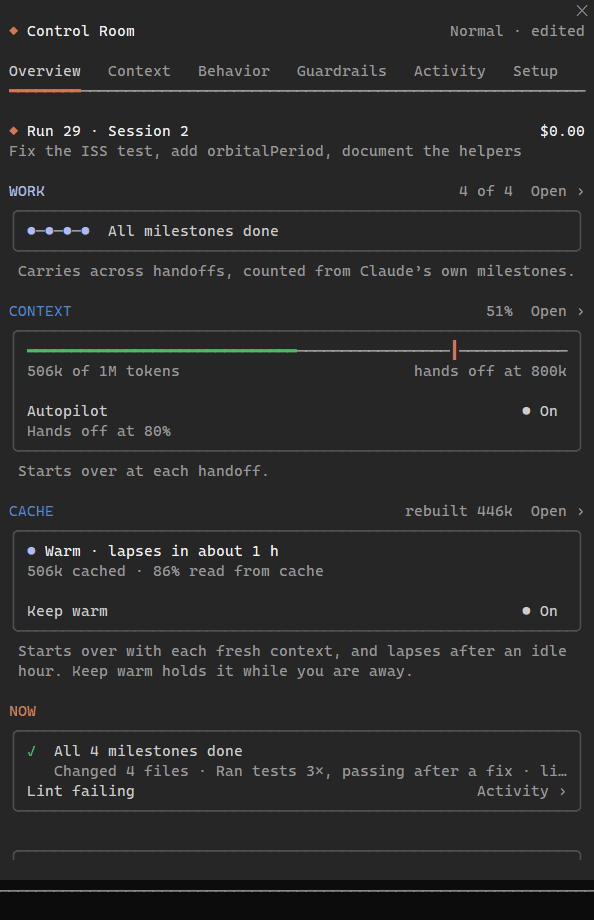 | 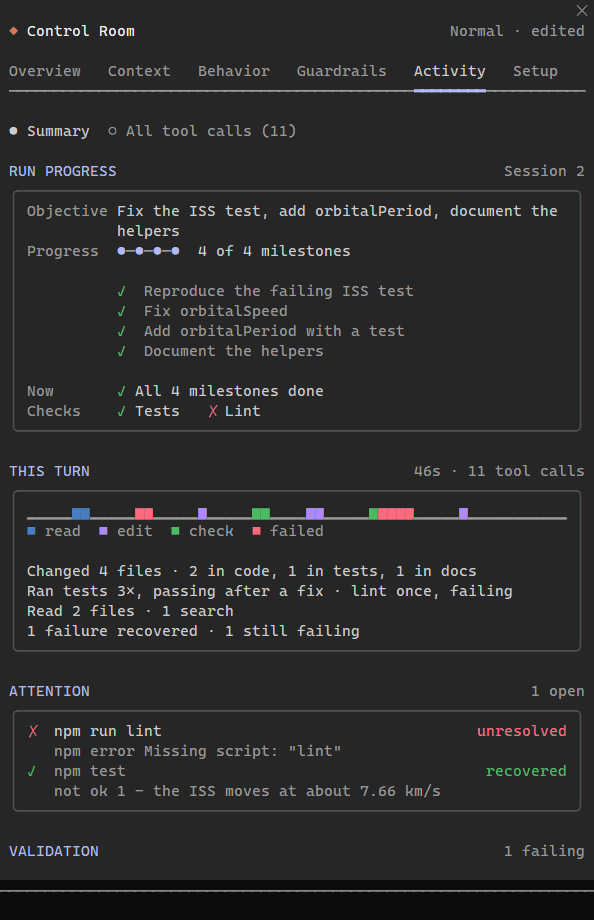 |
| Overview: the run, then its three lifecycles (work, context and the prompt cache), each with how it starts over. | Activity leads with the run: its milestones, where the turn's time went, and what needs a look, with the line of output that says why. |
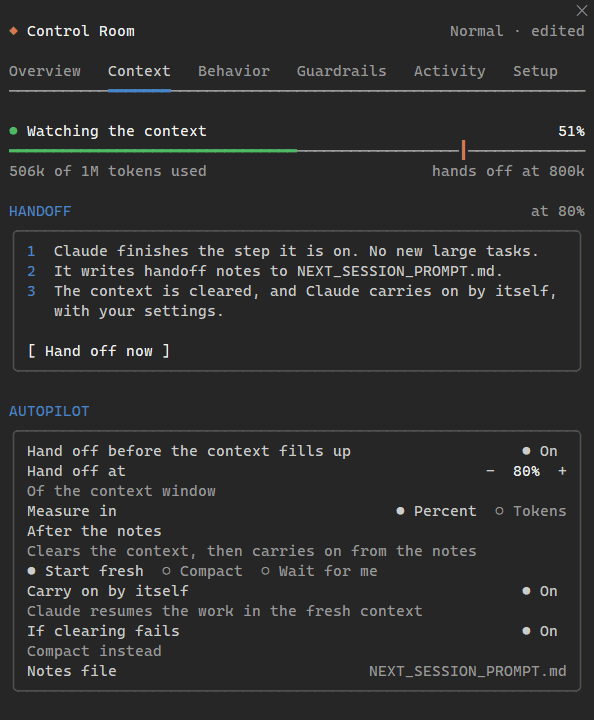 | 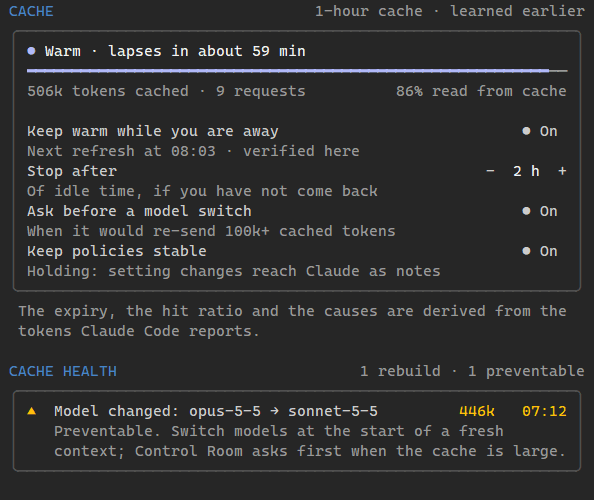 |
| Context: when Claude hands off, and what happens when it does. | Further down Context, the prompt cache: what it holds and for how long, Keep warm, and each rebuild with what would have avoided it. |
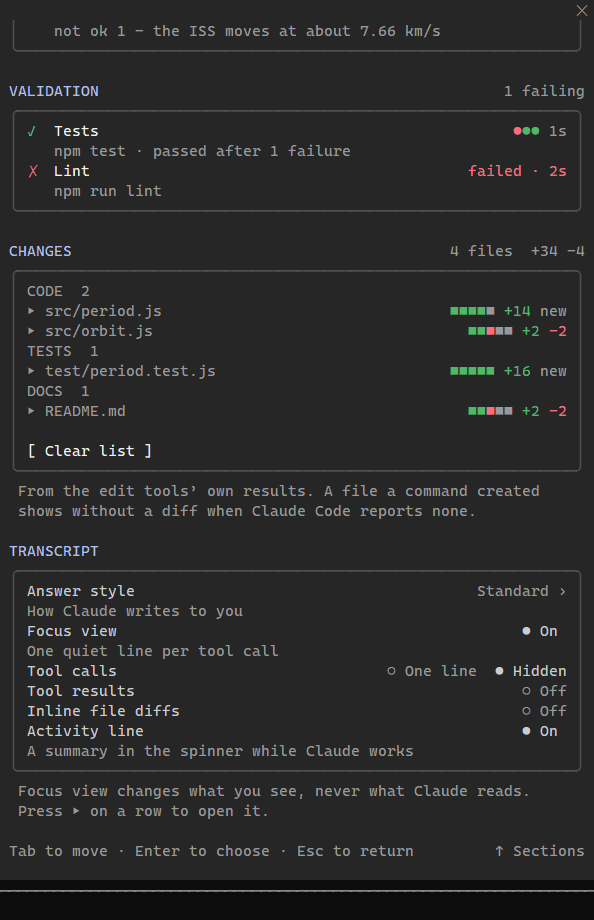 | 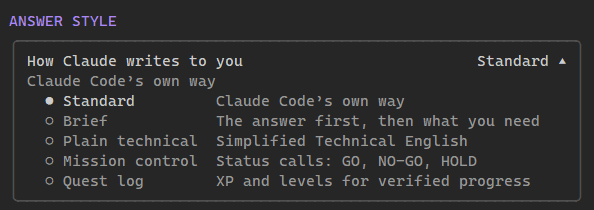 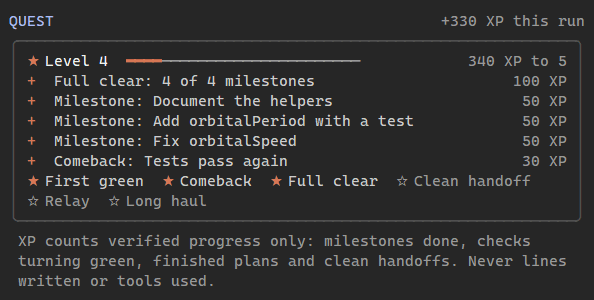 |
| Further down Activity: each check's runs as dots, and every changed file by kind with its diffstat, each opening its diff in place. | Answer styles: how Claude writes to you, each with a line on what it means. The Quest log: XP only for progress Project Sentinel can count, never for lines or tool calls. |

Control Room 1.3.0 in a 150-column Windows console (Claude Code 2.1.293), with the panel
docked beside the conversation (the Answer style and Quest cards are from 1.1.0; they did not
change). The work is a scripted turn played by the development-only
demo driver: Claude Code ran every tool call in it for real (a test that
fails and is fixed, new code with its test, a lint script that does not exist), but no model wrote
the words, and the token counts are scripted, a model switch halfway through included. Claude
Code reports no cost for them, so the cost reads $0.00 (with a + after a cleared session whose
cost was not reported).
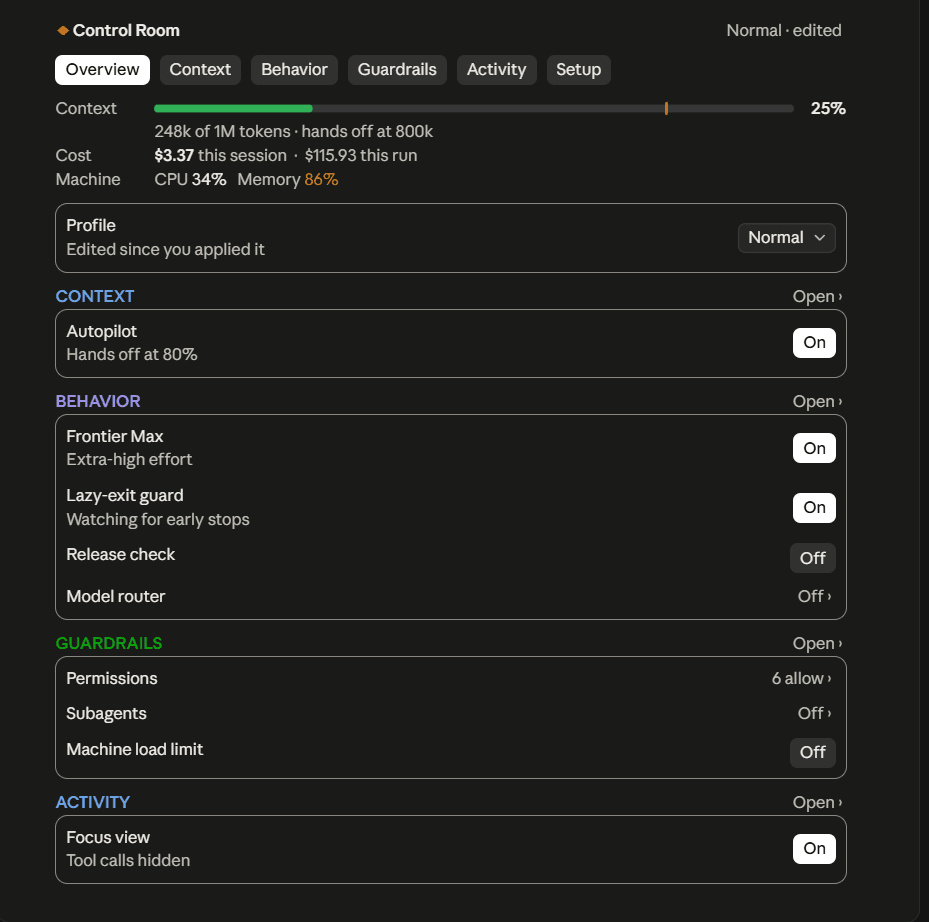
In Claude Desktop
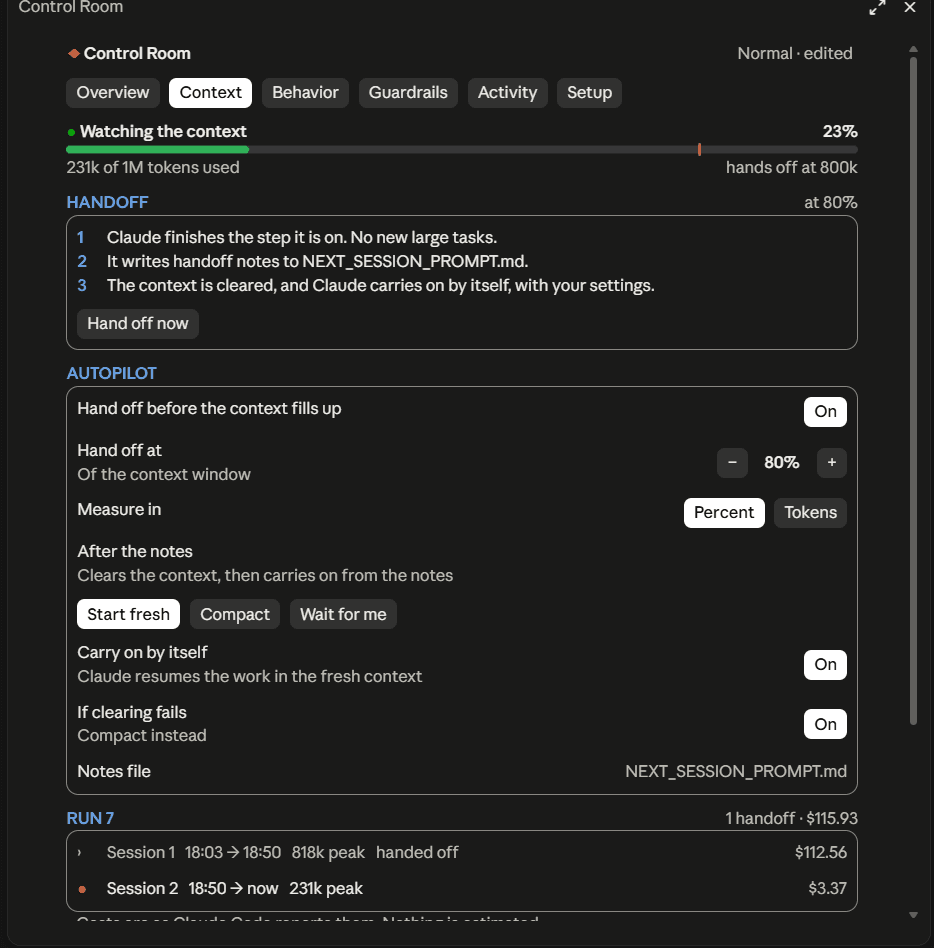 | 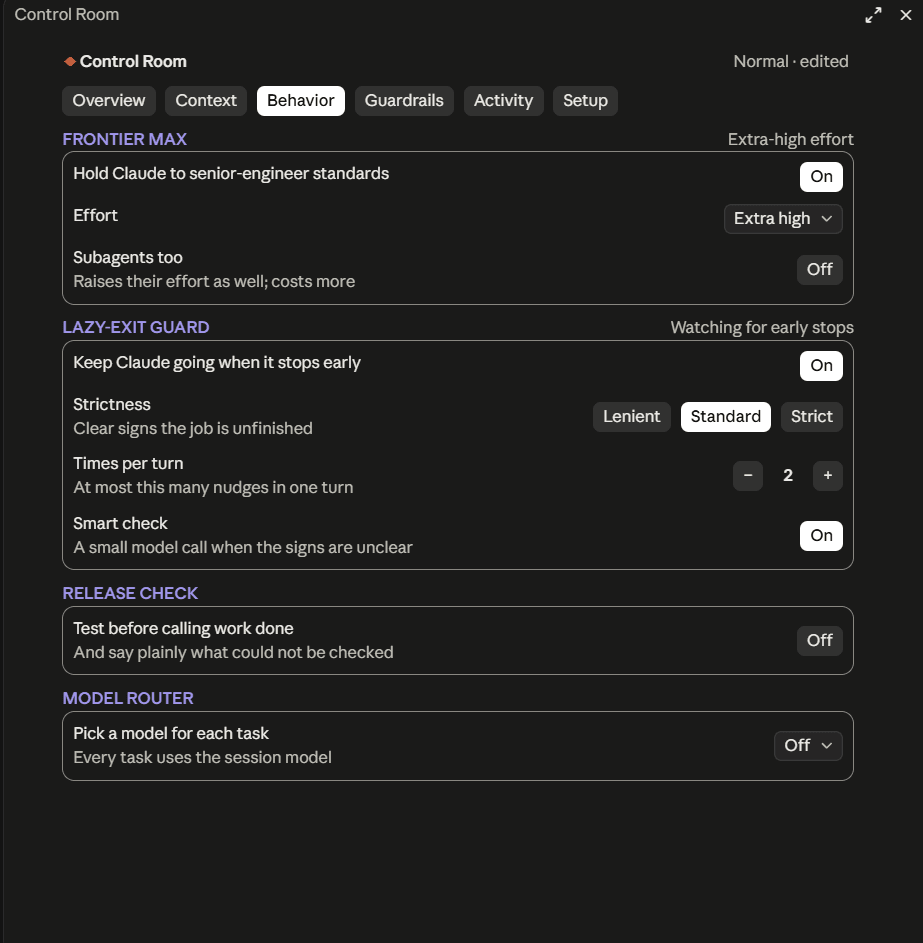 | 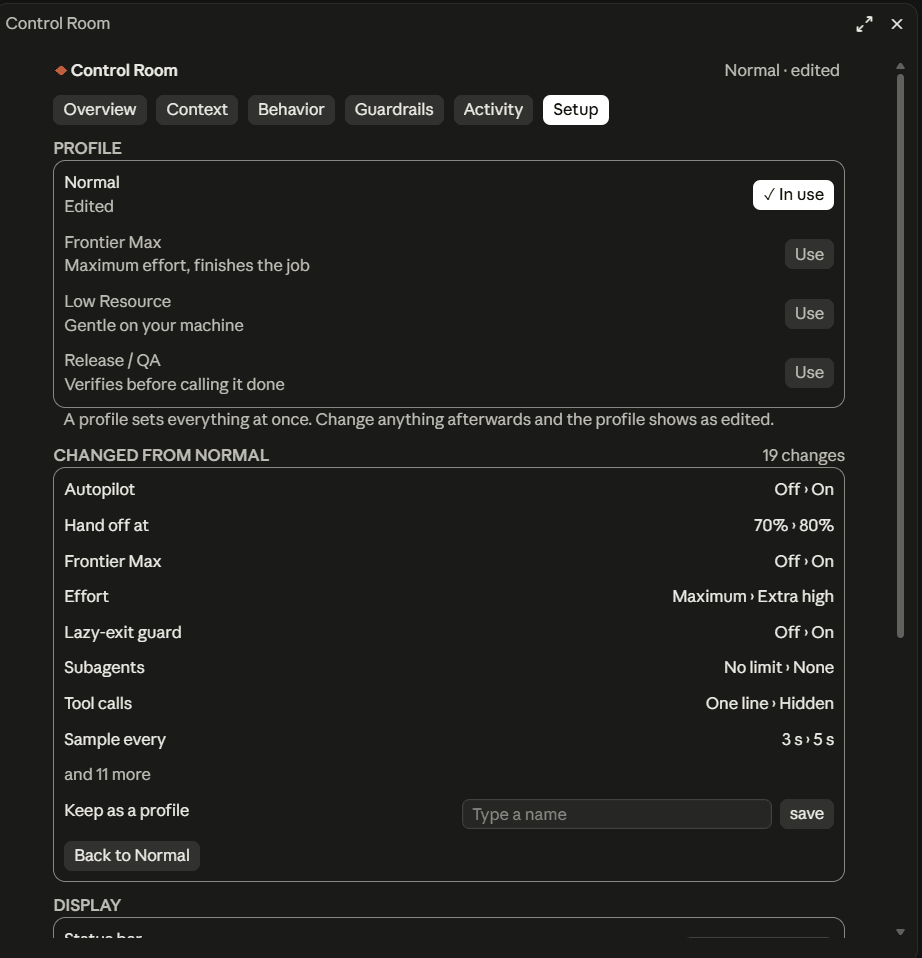 |
| Context, mid-run: one handoff behind it, $115.93 so far. | Behavior: each system on its own card. | Setup: exactly what changed since the profile. |
Control Room 1.0.1 in Claude Desktop's Code tab, from real sessions. On Desktop the controls are native buttons and popups and the meters are drawn as graphics. What came after (the two-line status bar, Activity's charts, the answer styles, the Cache card and Kit) has not been photographed on Desktop yet.
Operations
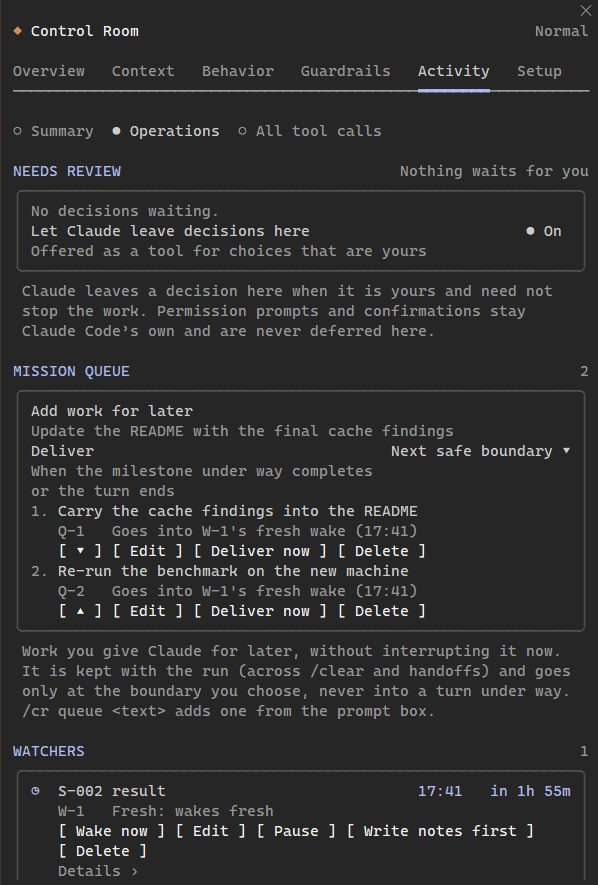 | 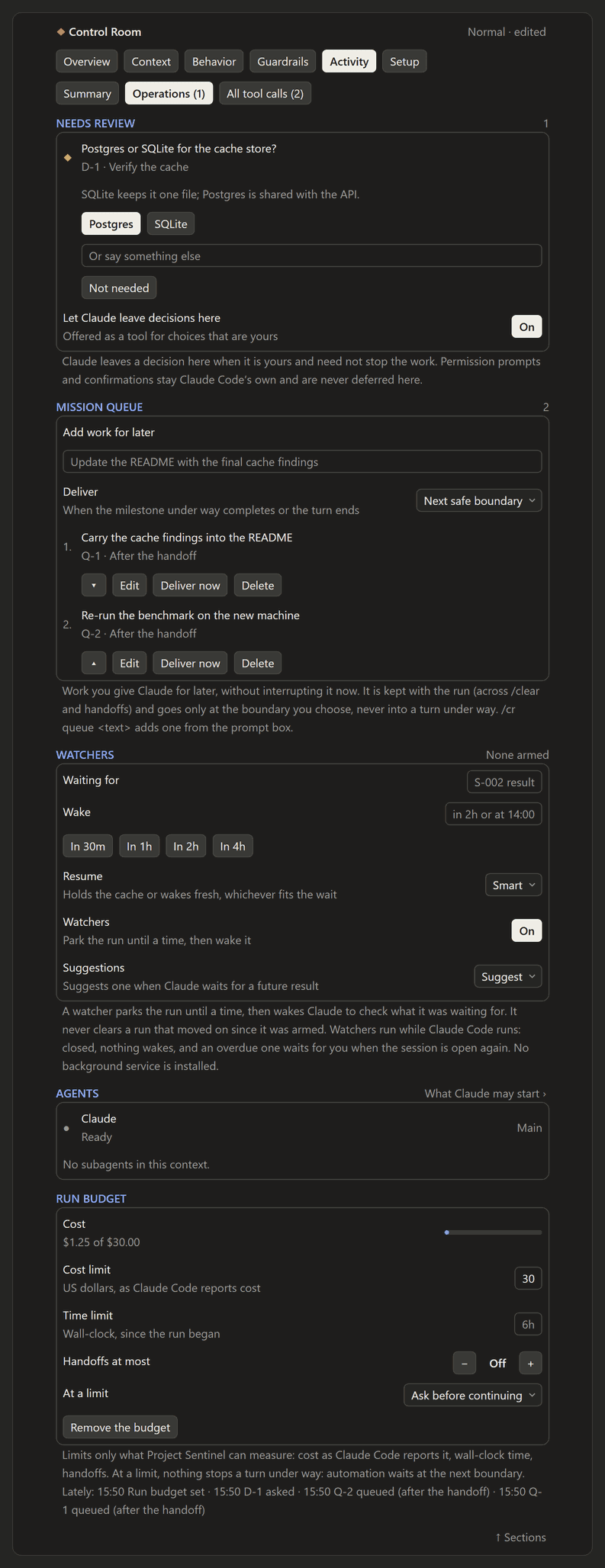 |
| In the terminal: two items queued for the fresh context that watcher W-1 will start when it wakes the run at 17:41. | On Desktop, in the preview: a decision Claude left for you, a button per option and a field for your own words; below it the queue, the watcher form, the agents and a run budget. |
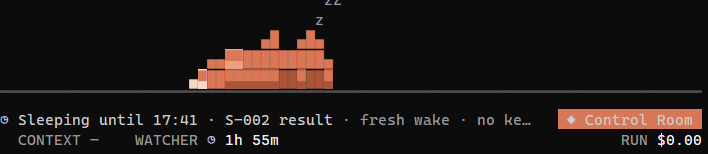


Project Sentinel 1.6.0. The terminal images are captures of Claude Code 2.1.295 in a 150-column
Windows console, set up with /cr commands alone (/cr queue --handoff, /cr watch in 2h … --fresh,
/cr budget $30), so no model turn ran. The Desktop images are drawn by
tools/desktop-preview from the trees the plugin draws on the
desktop surface, with the app's own layout rules; its font and colors are close guesses, and
Operations has not been photographed in the app yet.
Features
| System | What it does | Default |
|---|---|---|
| Status bar | A mission HUD above the prompt. The headline says what the run is doing in words, with a mark for its state: working, thinking, running a check, waiting for you, waiting for a result that comes by itself (a background job, a scheduled wake-up), blocked, handing off, done. On its right, only what needs a look (a failing check, issues, a busy machine, agents), then the Control Room button. Below, the instruments, each its own shape: Work (a track of milestones), Context (a bar with Autopilot's handoff notch), Cache (a clock face, only while it matters) and the run's cost. A handoff that needs you takes a line of its own above, with its buttons. On Desktop the four readings sit in a grid of equal cells and always keep their places. | On |
| Control Room panel | Six sections: Overview, Context, Behavior, Guardrails, Activity, Setup. In the terminal: switches, segmented choices, choices that open in place, and − / + steppers. Every control works with a click or with Tab and Enter, and there are no popups to get stuck in. On Desktop: native buttons and popups, plus graphical meters. | /cr opens it |
| Autopilot (Context Autopilot) | At a threshold (a % of the window, or tokens), Claude finishes the step it is on. Then it runs a handoff: it records the run's milestones, updates the project's docs, keeps CLAUDE.md for durable instructions only, runs a minimal validation and writes NEXT_SESSION_PROMPT.md in its own words. Project Sentinel then runs /clear, seeds the fresh context with the run's milestones and objective, and Claude continues on its own. Every step moves on when its turn starts or ends, never on a timer. A handoff turn that ends while background work it started still runs (a render, a test run) waits for that work as Claude Code reports it, takes its result into the notes, then clears and continues by itself. A fresh context that starts close to the threshold gets room to work before it may hand off again. Compaction is a choice, or the fallback when clearing is refused (in Desktop and other SDK sessions it runs as /compact). A reload of the plugin mid-handoff carries the handoff on; it never starts a second one. | Off |
| Handoff Health and Continuity | After each handoff, Context → Last handoff shows what it left for the fresh context (run state saved, the milestone under way, the notes, docs updated, validation recorded) and, once the fresh context's first turn ends, what it picked up (notes read, run state restored, milestone picked up, docs read, work resumed). Counted from tool calls, never from what Claude says. | With Autopilot |
| Run progress | The run's objective and milestones, done of total, counted from Claude's own task list and carried across handoffs, so the work meter keeps climbing while the context meter starts over. A milestone may also be verifying (with its evidence) or blocked (with what it waits for). Where Claude Code offers no task list (its task tools are off by default in 2.1.29x), Project Sentinel gives Claude a small milestones tool to keep one. | On |
| Cache Guardian | The main conversation's prompt cache, from the token counts Claude Code reports for each request: how much is cached, how long it stays warm (the cache's lifetime is learned), the share read from the cache, and why each rebuild happened (a model or effort switch, the model router, changed policies, a new tool, compaction, idling past the lifetime), with what would avoid the next. A model switch that would re-send 100k+ warm tokens is confirmed first; the model router no longer downgrades a conversation whose cache is warm (from 20k tokens); while it is warm, setting changes reach Claude as notes instead of rewriting the cached system prompt. | On |
| Keep warm | Refreshes the prompt cache shortly before it lapses while you are away, by re-sending the last request once (the transcript never sees it), for up to an idle limit you set. Each refresh costs tokens, mostly cheap cache reads. The refreshes are then checked against the conversation's own next request: VERIFIED when it read the cache after an expiry they replaced, FAILED (and Keep warm pauses) when it rebuilt with nothing changed. A refresh Claude Code had to retry through a network blip, answered only after the expiry, is not counted against it. /cr cache lists them. | Off |
| Mission Queue | Work you give Claude for later without interrupting it: from Activity → Operations (Add work for later, with when it goes) or /cr queue <text>. Each item goes only at a boundary: the next safe one (the milestone under way completes or the turn ends), after this turn, after the current milestone, or into the next fresh context. Never into a turn's reasoning: an item due mid-turn goes with the next batch of tool results, otherwise as a prompt of its own when the turn ends. Edit, reorder, deliver now or delete; kept with the run across /clear, handoffs, reloads and resumed sessions, delivered once. | On |
| Decision Inbox | Claude is offered one tool, decision_request, for a choice that is yours and need not stop the work (which approach, whether to delete generated files, whether to publish once CI passes). It waits in Activity → Operations → Needs review with its options and a field for your own words; /cr decisions lists them, /cr decide D-2 asks in Claude Code's own dialog. The answer reaches Claude with its next tool results while it works, as a prompt of its own when the run waits on it, else with your next message. Claude Code's permission prompts and confirmations are never deferred here. | On |
| Watchers | Park the run until a time, then wake Claude to check what it was waiting for: Operations → Watchers or /cr watch in 2h S-002 result (at 14:00, tomorrow at 9am; an ambiguous at 2:30 is asked, never guessed). Keep warm holds the conversation's cache to the wake, Fresh spends nothing and wakes in a fresh context from the handoff notes, Smart chooses and says why. A watcher never clears a run that moved since it was armed: it says Watcher due and offers Check now, Reschedule or Dismiss. A fresh wake needs healthy resume state. Watchers run while Claude Code runs (no daemon is installed); one due while it was closed waits for you when the session is open again. The Scout suggests one when Claude says it will check back at a time (Off, Suggest, or Arm explicit waits). | On (Scout: Suggest) |
| Cold Resume Guard | Before a message is sent into a large context (100k tokens by default) whose prompt cache has surely lapsed, Claude Code's own dialog asks first: Continue full session, Start fresh from resume state (only when Context → Ready to resume is ready), Compact first (it reads the context once more, then sends the message into the compacted one), or Cancel (the message comes back to the prompt box). It says why the cache lapsed and how many tokens would be reprocessed; a price only as Claude Code's own estimate for the model, as a floor (at least ~$0.46). It uses the cache lifetime Claude Code is configured for, and counts Claude Code's own requests while you are away (its away summary) as keeping the cache warm. The message goes once: the copy Claude Code puts back in the prompt box is cleared. | On |
| Agent Command Center | What Claude Code reports about the session's agents, and nothing else: status, type, elapsed time, what each is doing, model, result or failure, parent. Stop and Message are Claude Code's own TaskStop and SendMessage, offered only for agents that take them. Guardrails says what Claude may start; Operations shows what runs. | Always |
| Run Budget | Optional limits on the run's cost (as Claude Code reports it), wall-clock time and handoffs. Said once at 80%; at a limit: notify only, ask before Project Sentinel starts more work by itself, or have Claude finish the milestone and pause. Nothing stops a tool call or a turn under way. | Off |
| Activity | The run's milestones, then where this turn's time went (a strip colored by reading, editing, running and checking) and a few counted lines. What needs a look comes next: failures nothing has fixed (with the line of output that says why), refusals, slow calls. Then the checks (tests, build, type-check, lint), each run a dot, and every changed file grouped as code, tests, docs and config, each with its diffstat and its diff. Every tool call is the secondary view. | /cr, Activity |
| Session chain | Follows a run across context resets: sessions, times, peak context, cost per session as Claude Code reports it, total cost, handoffs. | On |
| Frontier Max | Senior-engineer standards in the system prompt (verify, finish, report honestly), plus the strongest reasoning effort the model supports. Models without an effort setting get none, never a fake one. It is in the first request of a session, after a /clear or a compaction, and when turned on mid-session (a note while the cached system prompt is held). Behavior → Frontier Max says how it reached Claude and at what effort; /cr diagnostics shows it request by request (fingerprints only). | Off |
| Lazy-exit guard (No-Lazy-Exit Guard) | Continues the turn when Claude stops before the job is done: work handed back to you, "next steps" it could have taken, unverified claims. It leaves genuinely finished work, real blockers, your decisions and optional ideas alone. It has per-turn and per-session caps and stands down during a handoff. | Off |
| Release check | A verification-first policy: test before calling work done, and say plainly what was not checked. | Off |
| Answer styles | How Claude writes its messages to you: Standard; Brief (the answer first); Plain technical (Simplified Technical English, after the writing rules of ASD-STE100); Mission control (GO, NO-GO and HOLD calls, GO only for what was verified); Quest log. Never code, files or commit messages. A Claude Code output style you chose outranks them. | Standard |
| Quest log | A light game layer for the Quest log style: XP only for outcomes Project Sentinel counts (milestones done, checks turning green, finished plans, verified handoffs), never for lines or tool calls, with levels, achievements and the level in the status bar. Claude is told never to state points itself. | With the style |
| Model router | Balanced, Performance, Economy or Custom model choices, for subagents and per turn for the main conversation. It never downgrades under Frontier Max, and no model ids are hard-coded. | Off |
| Subagents | No limit, up to N at once, ask each time, or off. Live counts are shown. | No limit |
| Focus view | Presentation only. Tool calls become one compact line each, results and inline diffs are hidden, and the spinner reads Working · 27 tools · 6 files changed · tests running. Activity keeps every call and every diff. Claude still reads everything. | On |
| Machine load (Resource Governor) | Advisory CPU and memory ceilings (Low, Medium, High or Custom), from a lightweight machine-wide sampler. Claude is told about pressure mid-task, extra heavy jobs can be held back, and only Claude-started background jobs can be stopped. It is not an OS quota. | Off |
| Permissions (Permission Policy) | Default, Ask or Deny per category: package installs, network, downloads, project edits, edits outside the project, deleting files, commits, push, force push and resets, deploy and publish, and dangerous commands. Ask always asks you first, in Claude Code's own dialogs, even in a permission mode that would not ask; Deny refuses. It never answers a permission prompt for you, and never loosens a deny, plan mode or your organisation's settings. | Safe defaults |
| Profiles | Normal, Frontier Max, Low Resource, Release / QA and your own. Setup shows exactly what changed since you applied one. | Normal |
| Kit (the companion) | A small Claude-orange creature in a lane above the status bar, in the terminal and on Desktop, that shows what Claude is doing: pacing while it thinks, typing while it works, reading in round glasses while it searches, watching a check, a dance with confetti at a green finish, a facepalm at a failure, a question mark when the run needs you, fanning itself on a busy processor, tending a small fire while Keep warm holds the cache (or a watcher holds it to its wake), curled up asleep while a watcher parks the run, dozing as the cache nears its expiry, carrying the notes off at a handoff and walking back in, curled up asleep when nothing happens. What it does comes in short episodes picked at random per mood, never the same twice running, and it walks to where it has not been lately, so it uses the whole status bar. A touch reacts by where it lands: a pat on the head, a boop on the nose, a tail flick, a pet on its body (a purr, a roll for a belly rub, a blush…); a few in a row make it giggle, then dizzy. It never jumps: it walks, turns and sits down. Calm by design; Reduce motion holds it still. | Off |
| Git (terminal) | The branch, how far it is ahead of or behind its upstream, and the uncommitted files, in Overview and /cr status, from one read-only git status after a turn. Desktop's Git strip is the app's own; plugins cannot draw, hide or move it. | In a repository |
Cost is shown only as Claude Code reports it, and "—" means it was not reported. Progress is milestones done of the total Claude listed. The cache's expiry, hit ratio and causes are derived from the token counts Claude Code reports, and the panel says so. Nothing is estimated.
Requirements
- Claude Code 2.1.289 or newer with function-hooks plugins (mods). Check with
claude --version. - The terminal CLI, or Claude Desktop's Code tab for local sessions.
- Nothing else. Project Sentinel has no runtime dependencies and no build step, because Claude Code loads its TypeScript directly.
Install
Install it (terminal and Desktop)
Add the repository as a marketplace, then install:
claude plugin marketplace add Arjun0014/project-sentinel
claude plugin install project-sentinel@control-room
The marketplace keeps its name, control-room; the plugin in it is project-sentinel. Or do
both from inside a session (Claude Code 2.1.275 or newer):
/plugin install project-sentinel --marketplace Arjun0014/project-sentinel.
A local clone works too: claude plugin marketplace add /path/to/project-sentinel. The terminal
reads an installed folder marketplace straight from the folder, so after you pull changes, run
/reload-plugins in a session. Desktop's Code tab may load the copy Claude Code made when you
installed, so it needs claude plugin update project-sentinel@control-room after a new version,
then a new session.
Coming from Control Room
Installed as control-room@control-room before 1.4.0? Update the marketplace:
claude plugin marketplace update control-room
The marketplace maps the old name to the new one, so the update moves your install to
project-sentinel@control-room (your enabledPlugins entry included), and the next session
loads Project Sentinel. When it first loads it reads the store it kept as Control Room once (the
one written last, where Claude Code kept more than one) and copies your settings, runs, Quest log
and what it learned about the prompt cache into its own store; the old file is left as it was.
Sessions that were open during the update keep Control Room until they restart; Project Sentinel
stands by in them, so the two never act at once. Two things changed in behaviour: the Allow permission
state is gone (a saved Allow reads as Default: in Bypass permissions mode nothing changes,
otherwise prompts it answered come back unless your Claude Code allow rules cover them), and a
click on Kit no longer opens the panel (the status bar's button does).
Update
Each release raises the version, and Claude Code installs it when you ask:
claude plugin update project-sentinel@control-room
To get releases automatically, open Marketplaces in /plugin, select control-room and
choose Enable auto-update. It is off by default for marketplaces you add yourself.
Try it for one session
claude --plugin-dir /path/to/project-sentinel/plugins/project-sentinel
Nothing is installed. The plugin loads from that folder for that session, and edits to it reload live.
Claude Desktop (Code tab)
Desktop's local sessions run the same Claude Code engine and load the plugins installed above.
To load a working copy without installing it, name the folder in the env block of
~/.claude/settings.json. Claude Code reads CLAUDE_CODE_PLUGIN_DIRS there for sessions that
the Desktop app starts:
{
  "env": { "CLAUDE_CODE_PLUGIN_DIRS": "/path/to/project-sentinel/plugins/project-sentinel" }
}
Use your platform's path-list separator (; on Windows, : elsewhere) for several folders.
Remote (cloud) sessions have not been tested.
Uninstall
claude plugin uninstall project-sentinel@control-room
Settings and run history live in Claude Code's per-plugin store (see Configuration).
Use /cr reset confirm first if you also want the settings cleared.
Using Project Sentinel
The status bar
A mission HUD above the prompt: what is happening on top, the run's instruments below. Settings live in the panel.
◎ Linting · step 3 of 4                                                ▲ RAM 83%    ◆ Control Room
  WORK ●━●━◎─○ 2/4    CONTEXT ▇▇▇▇▇▇▇▇▇▇▇▇▇▇▇▇▇▇█▇▇▇▇▇ 47% · hands off 80%    CACHE ● rebuilt 446k      RUN $4.18
| Item | Meaning |
|---|---|
◎ Linting · step 3 of 4 | The headline: what the run is doing, with a mark for its state. While a turn runs: the milestone under way in Claude's words, else the running call, else Thinking; a check running or a milestone being verified is ◎; a call past 20 seconds adds its time; ◆ Waiting for you to approve: git push while a call set to Ask waits for your answer. Between turns, what the run waits for comes first: ◷ Waiting for the test run (a background job), ◷ Waiting to check back · wakes at 06:12 (a scheduled wake-up), ⊘ Blocked: … (something only you can give), ◆ Waiting for your answer (Claude asked you something). ◆ Needs you · 1 decision (a decision Claude left blocks the run), ◆ Watcher due: S-002 result (a watcher waits for you), ◷ Sleeping until 14:00 · S-002 result (a watcher parks the run, with whether the cache is held warm or the wake is fresh). Otherwise what the last turn did in counted words (✓ Changed 4 files · Ran tests 3×, passing after a fix), ✓ All 6 milestones done, or before the first turn the run's objective (○ Ready without one). A handoff under way reads ↻ Writing the handoff notes; one whose turn ended while background work still runs reads ↻ Handoff written · waiting for background work with the task and that it runs (Render the 16:9 master · running), then Handoff complete · checking the notes and Handoff complete · starting the fresh context. |
▲ RAM 83% | Chips: only what needs a look, the most pressing first. ✗ Lint failing (a check failing, by name), ▲ 2 issues (calls that need a look), Kept going ×1 (the lazy-exit guard continued the turn), ▲ CPU 91% or ▲ RAM 92% near or over a ceiling (the terminal; Desktop has a Machine cell), 2 agents, ★ Lv 4 with the Quest log style. The orchestration layer's chips are buttons that open Activity → Operations at their own card, the mark in its color: ▲ Review 2 (an amber mark: decisions waiting for you), ◷ Watcher 1h 42m (a watcher armed while the run is not asleep), ● Queued 3 (queued work due when the turn ends), ▲ Cost $25.00 of $30 (the run budget near or at a limit). None shows while there is nothing to say. |
◆ Control Room | Opens or closes the panel: a filled button, in Claude orange while the panel is open (◆ Open or ◆ Close when the bar is narrow). |
WORK ●━●━◎─○ 2/4 | The run's milestones, done of total, from Claude's own task list: ● done, ◉ under way, ◎ being verified, ◌ waiting or blocked (amber), ○ to come. It carries across handoffs, so it keeps climbing while Context starts over. |
CONTEXT ▇▇▇▇█▇▇ 47% · hands off 80% | How much of the context window is in use: a solid bar, green, amber near the handoff point and red past it (with Autopilot off, against 90% of the window), and the handoff point as an orange notch. It starts over after a handoff, and a handoff under way says so beside it (Handoff soon, Writing the handoff, Waiting for background work, Checking the notes, Starting fresh, Resuming, Waiting for you). |
CACHE ● rebuilt 446k | The prompt cache, only while it can matter: when you are away, a clock face emptying as its lifetime runs out and the time left (◕ 42m left; lapsed? when it may have lapsed), amber near the expiry with no refresh coming; and for a few minutes after a costly rebuild, rebuilt 446k. While Claude works its requests keep the cache warm, so the terminal leaves it out (Desktop keeps its cell: warm · 345k), and it never reads lapsed? during a turn. |
RUN $4.18 | The whole run's cost as Claude Code reports it, across handoffs (+ when some session's cost was not reported). This session's own cost is in the panel. |
WATCHER ◷ 1h 42m | Only while a watcher parks the run: the time to its wake. On Desktop it takes the Machine cell's place (nothing runs, so the machine is not the story). |
Width decides the detail. The names (WORK, CONTEXT, RUN) show from 72 columns, docked
beside the panel included; the meter and the track shorten before the least important reading
drops. The empty part of the meter and the HUD's top edge are drawn in the theme's quietest gray,
the same in every terminal.
On Desktop the same readings sit in a row of five cells: Work, Context, Cache, Machine (CPU and
memory as slim level bars with their percentages, amber near a ceiling and red at it) and the
run's cost at the right edge, each a quiet caption over its graphic and value, the button native.
The columns are weighted by what they hold (Work and Context wider), and the five always keep
their places, a dim word standing in for one with nothing yet (No milestones yet, —). Width
decides the detail: the labels and what the cache holds in a wide band, CPU · RAM in a narrower
one, the bars alone in a compact one. The graphics (the state's mark, the track, the meter, the
level bars, the clock, Kit) are drawn as images.
(▸) Running tests · step 3 of 10                                           ✗ Lint failing   [ ◆ Control Room ]
Work                       Context · hands off at 70%    Cache              Machine                   Run
●━●━◉─○─○─○  2 of 10       ▬▬▬▬▬▬▬▬▬┃▬▬▬  24%             ◔ warm · 345k      CPU ▮ 34%  RAM ▮ 85%      $43.00
When a handoff is about to happen, a line above offers Hand off now and Later; if a
handoff ever waits for you, it offers Start fresh. The same line asks about a watcher that waits
for you (Check now, Start fresh when that is safe, In 30m, Dismiss), a message the
Cold Resume Guard kept (Put back, Send now, Discard), the run budget holding automation
(Continue anyway, Budget ›), and the Scout's suggestion (Claude seems to be waiting for a
future result. Check the leaderboard again in two hours? Create watcher, Change time,
Ignore). With the companion on (Setup →
Companion, /cr companion on), Kit lives in a lane above the headline: in the terminal it
stands on the status bar's top edge, on Desktop it is drawn in finer pixels. Give it a click.
Claude Desktop's Git strip is the app's own: plugins can neither draw, hide nor move it, so
Project Sentinel shows no Git UI on Desktop. In the terminal, Overview and /cr status carry the
branch and the uncommitted files.
The Control Room panel
/cr (or /control-room) opens or closes it, and so does the status bar's button. In the
fullscreen terminal from 110 columns it docks beside the conversation; otherwise it opens in a
frame above the prompt. A wide frame (a wide terminal, or a Desktop pane at full size) keeps the
page to 80 columns, centred. Opened by you, it seats at any width. If it opens on its own (Open
at session start), it waits for 144 columns.
Click anything, or move with Tab, choose with Enter, and return to the prompt with Esc. Choosing a section starts its page at the top, and every page ends with ↑ Sections.
| Section | Answers |
|---|---|
| Overview | How is this run doing? The run (its number, the session, its cost and objective; in the terminal, the Git branch), then its three lifecycles as cards, Work, Context and Cache, each with how it starts over, then what is happening now and the machine. An Operations card only while something is in it (Review 2 · Watcher · wakes in 1h 42m · Queued 3 · Agents 2 active · Budget). Then the profile, and one card per section with its systems, each with its switch and one line of state. Anything that needs you sits on top. |
| Context | When does Claude hand off, and what does the cache hold? The Autopilot's state, meter and settings; the prompt cache (Cache, then Cache health with the recent rebuilds); the Cold Resume Guard (its switch, the size it asks above, whether it would ask now and why); Ready to resume (what a fresh context would get: the run, its milestones, what it reads, what it carries, the next action, or why a fresh start is not offered); the last handoff (what it left, what the fresh context picked up); then the run's sessions and earlier runs. |
| Behavior | How does Claude work? The answer style (with a line written in it), Frontier Max, Release check, the lazy-exit guard, the model router and run progress. Finer settings appear only while a system is on. |
| Guardrails | What may Claude do, and how hard may it push the machine? Permissions, subagents, machine load with live meters, and Claude's background jobs. |
| Activity | How far is the run, and what needs a look? Summary: the Quest card with the Quest log style, run progress (objective, milestones, now and next, checks), this turn as a time strip and a few counted lines, Attention, Validation with each check's runs, and the changed files by kind, each with its diffstat and diff. Operations: Needs review, Mission Queue, Watchers, Agents and Run budget (see Features). All tool calls: every call, and Focus view's switches. |
| Setup | Profiles (with exactly what changed), display (the status bar, live CPU and memory, notifications, the companion, reduce motion, open at start), and about. |
Commands
Every control is also a command. This is handy over Remote Control, for muscle memory, and on surfaces without the panel.
| Command | Effect |
|---|---|
/cr | Open or close Control Room |
/cr status | Everything at a glance |
/cr help | Command list |
/cr profile [name] | List profiles, or switch (normal, frontier, low-resource, release-qa, or a custom name) |
/cr autopilot on|off|70%|700k | Turn Autopilot on or off, or set its threshold (% of the window, or tokens with k/m) |
/cr handoff | Hand off now: notes and NEXT_SESSION_PROMPT.md, then continue in a fresh context. During a handoff it says what the handoff is doing instead (writing, waiting for named background work, checking the notes, starting fresh) |
/cr fresh | Start the fresh context of a written handoff: waiting for you, or one no event moves on. It checks first that nothing runs in the background and that NEXT_SESSION_PROMPT.md was written for this handoff, and says why when it keeps the context |
/cr frontier on|off | Frontier Max (turning it on also turns on the guard) |
/cr guard on|off · /cr qa on|off · /cr focus on|off | Lazy-exit guard, Release check, Focus view |
/cr style standard|brief|ste|mission|quest | How Claude writes to you (no argument lists them) |
/cr resources off|low|medium|high|<cpu>/<ram> | Machine load level, or custom ceilings such as 60/80 |
/cr agents | What is running now (Activity → Operations → Agents) |
/cr agents unlimited|off|ask|<n> | What Claude may start: subagents |
/cr queue <text> | Work for later, at the next safe boundary; --turn, --milestone or --handoff first chooses another. Typed while Claude works, it runs when the turn ends and never enters it |
/cr queue · /cr queue list · /cr queue now|cancel <id> | Open the queue to type in · list it · deliver one now or delete it |
/cr watch in 2h <what> · /cr watch at 14:00 <what> | Park the run until then and wake Claude to check (--warm or --fresh; Smart by default). An ambiguous time is asked |
/cr watchers · /cr watch now|pause|resume|cancel <id> | The watchers, and each one's controls |
/cr decisions · /cr decide <id> [answer] | What Claude left for you to decide; answer one (in Claude Code's dialog when no answer is typed; an option's number or words pick it) |
/cr budget [$30] [6h] [handoffs 5] [notify|ask|finish] · /cr budget off|continue | The run budget: set, show, remove, or let the run go on past a limit |
/cr resume | What a fresh context would get now, and whether a fresh start is offered |
/cr router off|balanced|performance|economy|custom | Model router |
/cr cache | The prompt cache in words: its state and lifetime, what it holds, Keep warm, and the recent rebuilds with what would have avoided them |
/cr cache keep on|off · /cr cache idle 2h | Keep warm, and how long it holds the cache while you are idle (45m, 2h) |
/cr cache guard on|off · /cr cache stable on|off | Ask before a model switch; Keep policies stable |
/cr diagnostics | Evidence that the settings reached Claude: each request of this context (the policy section's fingerprint, whether Frontier Max was in it and how it travelled, model and effort), the notes delivered, Keep warm's refreshes and their checks. Fingerprints and counts only, never prompt text |
/cr hud band|status|both|off | Where the status bar draws: above the prompt, in Claude Code's status line, both, or neither |
/cr companion on|off · /cr motion on|off | Kit, the companion; animation (off is Reduce motion) |
/cr reset confirm | All settings back to Normal (custom profiles are kept) |
/cr is registered only if no other command already uses the name. /control-room always works.
Profiles
| Profile | Changes from Normal |
|---|---|
| Normal | Claude Code as usual, with Focus view's quieter transcript and the safe permission defaults. |
| Frontier Max | Frontier Max on (maximum effort), guard on (standard), Autopilot at 70%, machine load Medium. |
| Low Resource | Machine load Low (CPU 50%, memory 75%, hold all heavy jobs), at most 1 subagent. |
| Release / QA | Release check on, strict guard (3 continuations per turn), Autopilot at 70%, at most 2 subagents, inline diffs shown, machine load Medium, commits set to Ask. |
A profile sets everything at once. Change anything afterwards and the profile reads
Normal · edited, and Setup lists each change (Machine load Off › Medium). Save any setup as
a profile of your own, or go back to the profile in one click.
How the systems interact
Conflicts are resolved in a fixed order (higher wins):
- Organisation and engine safety: managed settings, deny rules, plan mode. Never loosened.
- Permissions: apply to everything, including work the Autopilot or the guard asked for.
- Your live actions: an interrupt cancels pending automation. A prompt you type while a handoff is pending is honoured, with a reminder.
- Autopilot: once a handoff is pending, the guard stands down, and no new large work is encouraged. Keep warm stands down too when the handoff will clear the context. Queued work, answers and watcher wakes wait until the handoff is done (work queued for after the handoff rides the fresh context's first message).
- Operations: Project Sentinel starts a turn of its own (queued work, an answer, a watcher's wake) only at a boundary, one at a time, and never while a turn runs, a handoff is under way, a question is open or background work will bring the turn back. A watcher never clears a run that moved since it was armed. At a run budget limit set to Ask or Finish, none of this (nor Autopilot's continuation) starts without your yes.
- Machine load: constrains how (parallelism, heavy jobs), never whether. It applies under Frontier Max too.
- Subagents: hard limits that Frontier Max and the router cannot exceed.
- Frontier Max: vetoes router downgrades of the main conversation (unless the router is Custom).
- Lazy-exit guard: subordinate to everything above and to its own caps.
- Model router: acts only where nothing above constrains it, and never downgrades the main conversation while a prompt cache of 20k tokens or more is warm.
- Focus view: presentation only. It never changes what Claude reads.
Overview shows each system's effective state, for example "Lazy-exit guard ● On Paused during the handoff".
Security and privacy
Project Sentinel runs entirely inside Claude Code. It makes no network requests of its own,
sends no telemetry, and nothing leaves your machine through it. It observes session figures
(context, cost, each request's token counts), tool calls as they happen, and machine-wide CPU and
memory totals (while the status bar shows them or a machine-load limit is on). In the terminal it
runs one read-only git status after a turn and keeps only the branch and counts. It writes only
its own plugin store, and once, after the rename, reads the store it kept as Control Room to
carry your settings over (it reads CLAUDE_CONFIG_DIR, USERPROFILE and HOME only to find it). Claude, not the plugin, writes the handoff file. Where Claude Code has
no task list of its own, Project Sentinel offers Claude one small tool, milestones, whose answer
only records the list for run progress; with the Decision Inbox on (the default) it offers
decision_request, whose answer only records the question for you. It never answers a permission
prompt for you.
The orchestration layer keeps what you give it with the run, in the same store: queued work in your
words, Claude's decision questions and your answers, watcher labels and times, the run budget, and
Claude Code's own cache-write price per model (for the Cold Resume Guard's figure). It submits
prompts only of fixed kinds, at a boundary: your queued words, your answers, a watcher's wake, the
first prompt of a fresh context it started. When you press them, Stop and Message on an agent
use Claude Code's own TaskStop and SendMessage, and the Cold Resume Guard's Cancel puts your
message back in the prompt box (Claude Code's $.prompt.fill); a message it could not put back is
kept in memory only, never stored.
Two features send requests to your configured model through Claude Code's own client, as every turn does: the guard's optional smart check (the last request and answer), and Keep warm, which is off by default and, when you turn it on, re-sends the conversation's last request with a one-word reply asked for, so the prompt cache stays warm. Each refresh costs tokens, mostly cache reads at a tenth of the input price.
What it observes, what it can change and what it never does is listed in SECURITY.md; the plugin folder's README says it in brief, as Anthropic's directory shows it.
Compatibility
| Status |
|---|
// faq
What is project-sentinel?
Mission control for long Claude Code runs: context and run progress at a glance, Autopilot handoffs, guardrails and a calm activity view, in the terminal and Claude Desktop.. It is open-source on GitHub.
Is project-sentinel free to use?
project-sentinel is open-source under the MIT license, so it is free to use.
What category does project-sentinel belong to?
project-sentinel is listed under plugins in the Claudeers registry of Claude-compatible tools.
// embed badge

[](https://claudeers.com/project-sentinel)
// retro hit counter

[](https://claudeers.com/project-sentinel)
// reviews
// guestbook
// related in Claude Plugins
 🔓
A single CLAUDE.md file to improve Claude Code behavior, derived from Andrej Karpathy's observations on LLM coding pitfalls.
 🔓
Claude Code is an agentic coding tool that lives in your terminal, understands your codebase, and helps you code faster by executing routine tasks, explainin…
 🔓
"CLI-Anything: Making ALL Software Agent-Native" -- CLI-Hub: https://clianything.cc/
🔓financial-services — a Claude ecosystem project on GitHub.