
prod-readiness
Claude Code production-readiness audit plugin with 7 parallel AI agents for security, reliability, tests, DevOps, and launch blockers.
Install with your AI
Paste into Claude Code, Cursor, or any agent — it reads the repo and wires the tool into your project.
Install and set up prod-readiness (claude-plugin project) into my current project.
Found on https://claudeers.com/prod-readiness
Repo: https://github.com/Taimoorkhan1122/prod-readiness
Homepage/docs: —
Detected install method: claude-plugin → /plugin install prod-readiness@Taimoorkhan1122/prod-readiness
Category: plugins. Platforms: cli, api, web.
Read the repo's README for exact setup and env vars, then install it and wire it into my project.

Claudeers Health Verdict:
active; community-verified: false. Confirm the source before running anything.
/plugin marketplace add Taimoorkhan1122/prod-readiness
/plugin install prod-readiness@Taimoorkhan1122/prod-readiness
git clone https://github.com/Taimoorkhan1122/prod-readiness
// compatibility
| Platforms | cli, api, web |
|---|---|
| Operating systems | — |
| AI compatibility | claude |
| License | — |
| Pricing | open-source |
| Language | Python |
prod-readiness

Production readiness and adversarial code-review skill for Claude Code and AI-generated apps. Audit security, tests, reliability, deployment risks, and launch blockers before you ship.
prod-readiness is a read-only, whole-repository audit for the question that
matters after a prototype works: is this safe to launch? It produces an
evidence-backed go/no-go report across security, backend, database, DevOps, QA,
frontend, and AI-security concerns.
It is for a production-readiness review, not a quick PR review or a code-style pass. The skill looks for the systems that commonly fail after launch: missing controls, untested recovery paths, unsafe trust boundaries, weak test coverage, and operational blind spots.
What you get
- A production readiness checklist tailored to the repository and its context.
- One shared evidence pass, reused by up to seven specialist review lenses.
- An absence ledger that distinguishes confirmed, not found, and unverified controls.
- A validated, CTO-readable verdict: SHIP, FIX THEN SHIP, or HOLD - DO NOT DEPLOY.
- A persistent audit trail under
.readiness-audit/, safe to resume after a cleared session or interruption.
Set it up once
You only need Claude Code installed on your computer. You do not need to download, clone, or keep a copy of this repository.
First-time setup
-
Open Claude Code.
If you normally use Terminal, open it and type:
claude -
Add this GitHub marketplace. Copy this line into Claude Code and press Enter:
/plugin marketplace add Taimoorkhan1122/prod-readinessClaude Code downloads the marketplace directly from GitHub.
-
Install the plugin by copying this line into Claude Code and pressing Enter:
/plugin install prod-readiness@prod-readiness-marketplace -
Turn it on now by copying this line into Claude Code and pressing Enter:
/reload-plugins
That is it. You only need to do these four steps once. The plugin will be available in future Claude Code sessions.
If Claude starts a generic review instead
Run the audit directly with this command. It is the guaranteed way to start the staged production-readiness workflow:
/prod-readiness:production-readiness-audit
You should see Claude create a .readiness-audit/ folder before it begins the
review. If you do not see that folder, stop the run and use the command above.
Choose how the agents run
By default, the audit runs its independent specialist agents in parallel: security, backend, and database run together first; after their findings are checked, the remaining relevant lenses run together. This is the fastest mode.
To run one agent at a time instead, use:
/prod-readiness:production-readiness-audit sequential
You can also ask: “Run the production-readiness audit sequentially.” Sequential mode is useful when your computer has limited resources or you want to follow each specialist's work one step at a time.
Watch an audit in your browser (optional)
After Claude successfully initializes a new audit or confirms a resume, it
automatically starts a read-only dashboard in the background and continues the
audit. The dashboard is local-only and listens on 127.0.0.1; if it cannot
start, the audit proceeds normally.
To start it manually, run this in Claude Code:
/prod-readiness:production-readiness-dashboard
The dashboard prints an address such as http://127.0.0.1:<port>/. Open that
URL if your browser does not open automatically. Press Ctrl-C to stop a
manually launched dashboard.
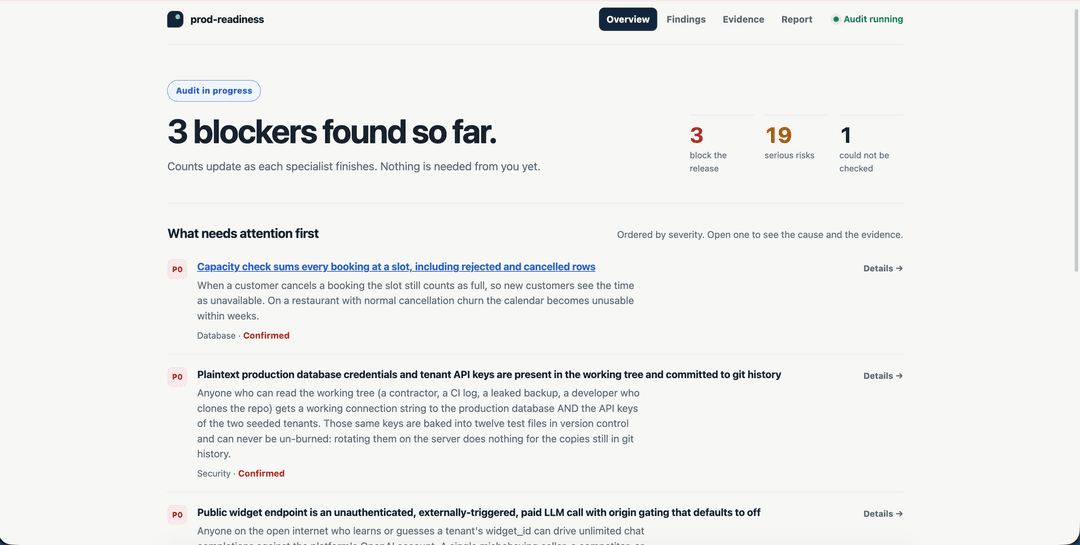
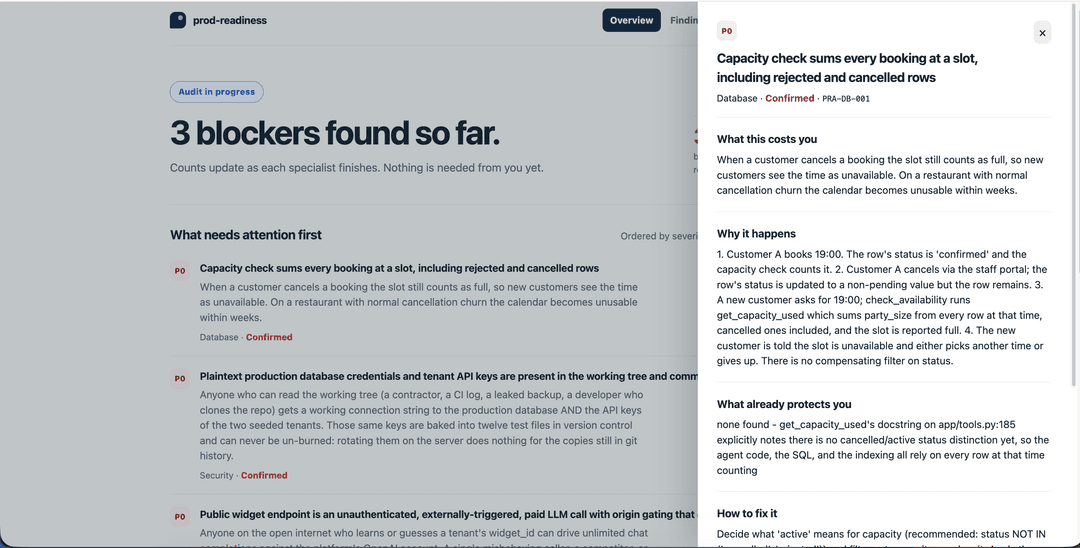
It opens on the decision, not the evidence: the verdict, how many findings block the release, and the handful that need attention first. Each finding leads with what it costs you in plain language — the file paths, the cause, and the fix are one click away, not in your face.
Open any finding for the cause, the evidence, and the fix:
Update or fix the installation
The marketplace and the plugin are separate. Adding the marketplace
does not install the plugin. To install or refresh prod-readiness for all of
your projects, run these commands in Terminal:
claude plugin marketplace update prod-readiness-marketplace
claude plugin install prod-readiness@prod-readiness-marketplace --scope user
Then restart Claude Code or run /reload-plugins inside Claude Code.
If claude plugin update says the plugin is not installed at user scope, it
was either never installed or was installed for one project only. Install it at
user scope with the commands above, or update the scope where it already lives:
claude plugin update prod-readiness@prod-readiness-marketplace --scope local
# or
claude plugin update prod-readiness@prod-readiness-marketplace --scope project
To check where the plugin is installed and whether it is enabled:
claude plugin list --json
Use @ directly in these commands. You do not need to type \@.
Use it on a project
-
Open Claude Code in the folder for the app or website you want to check.
-
Ask a plain-English question, such as:
Is this ready for production?
What needs fixing before I launch this app?
Is this AI-generated app safe to put in front of real users?
-
Answer the audit's questions about your app. It will then review the project and give you a go/no-go report.
The audit only reads your project. It does not change your source code or publish anything.
Use it with other AI coding agents
The one-command marketplace installation above is for Claude Code. The audit itself is portable: its workflow, seven specialist lenses, and Python validation scripts live in this repository and can be used by other coding agents too.
For Codex, OpenCode, Pi, Antigravity, or another coding agent, use the following simple route.
1. Download the audit once
Open Terminal and copy this command:
git clone https://github.com/Taimoorkhan1122/prod-readiness.git ~/prod-readiness
This creates a reusable copy in a folder named prod-readiness in your home
folder. You need Python 3 installed. The audit writes its results only in the
project being checked, under .readiness-audit/.
2. Open the project you want to check
Open your app's folder in your preferred AI coding agent. Do not open the
prod-readiness folder unless you are changing the audit itself.
3. Give the agent this prompt
Paste the following into your agent. Replace /Users/you/prod-readiness with
the location created in step 1. On Windows, use a path such as
C:\\Users\\you\\prod-readiness.
Read /Users/you/prod-readiness/skills/production-readiness-audit/SKILL.md and
run it against the project currently open. Treat /Users/you/prod-readiness as
the plugin root: whenever the skill says ${CLAUDE_PLUGIN_ROOT}, substitute that
exact path. Keep the audit read-only except for .readiness-audit/ in this
project. Run independent lens agents in parallel by default; use sequential
mode only if I explicitly ask for it or this agent cannot run parallel agents.
The first time, the agent may ask about the app's criticality, recovery goals, scale, and threat model. Answer those questions before it starts the evidence pass.
Codex
Open the project in Codex, then paste the shared prompt from step 3. Codex can use reusable skills, but this repository is not yet packaged as a native Codex plugin. The shared prompt is the reliable route because it tells Codex where the bundled Python scripts and lens instructions live.
OpenCode
Open the target project in OpenCode and paste the shared prompt from step 3. OpenCode supports skills, including Claude-compatible skill layouts, but this repository's Claude marketplace manifest and automatic prompt hook are Claude-specific. The shared prompt runs the portable audit workflow without depending on those features.
Pi
Open the target project in Pi and paste the shared prompt from step 3. Pi can
load Agent Skills, but the Claude marketplace wrapper and automatic prompt
routing do not transfer. The prompt explicitly loads this audit's SKILL.md
and gives Pi the correct root for its scripts.
Google Antigravity
Open the target project in Antigravity and paste the shared prompt from step 3. Antigravity supports skills and parallel subagents; when they are available, the audit uses its normal two-wave parallel review. The explicit prompt is needed because this repository does not yet ship an Antigravity-native plugin package.
Any other AI coding agent
If the agent can read local Markdown files, run Python 3, and inspect the open
project, use the shared prompt from step 3. If it cannot launch parallel
subagents, add sequential to the end of your prompt. The audit will still
produce the same evidence ledger and report; it will simply take longer.
Optional: use a local copy while developing
If you are changing this plugin yourself, you can run it from a local folder without installing it:
cd /path/to/project-you-want-to-check
claude --plugin-dir /absolute/path/to/prod-readiness
This temporary option ends when you close Claude Code.
Optional: manage the installation
To remove the plugin later, open Claude Code and enter:
/plugin uninstall prod-readiness@prod-readiness-marketplace
If you edit the plugin files yourself, enter /reload-plugins in Claude Code
to use the latest changes.
How the audit works
Stage 0  Preflight    Record the git ref, working-tree state, and resume point
Stage 1  Context      Set criticality, RTO/RPO, scale, threat model, and scope
Stage 2  Evidence     Scan the repository and create an absence ledger
Stage 3  Review       Run read-only specialist lenses in two coordinated waves
Stage 4  Validate     Reject findings that do not meet evidence rules
Stage 5  Report       Assemble the go/no-go report and remaining judgement
The seven lenses cover security, backend, database, DevOps, QA, frontend, and AI security. Lenses with no signal are explicitly skipped rather than inventing findings.
Evidence, not confident guesses
Production-readiness audits often confuse three different states:
| State | Meaning |
|---|---|
CONFIRMED | The control or risk was proven from evidence in scope. |
NOT FOUND | The repository was searched for the control and the audit can support its absence. |
UNVERIFIED | The control may exist outside the reviewed scope, so source silence proves nothing. |
absence_probe.py runs deterministic control probes and records the patterns,
hit counts, and paths in an absence ledger. validate_findings.py blocks the
report when a finding makes a claim its evidence cannot support.
This is especially important for deployment and operations concerns. A missing backup configuration in application code is normally unverified; the same silence in repository-owned infrastructure-as-code can become not found.
Design principles
One evidence pass, seven evaluations. The repository is scanned once. Every specialist lens works from that same evidence pack, reducing cost and avoiding contradictory claims.
Read-only audit. The skill does not alter source, configuration, tests, or
dependencies. It writes only the audit trail under .readiness-audit/.
Context controls severity. A missing rate limiter means something different for a public payments API than for an internal VPN-only tool. The audit captures criticality, scale, recovery expectations, and threat model before judging risk.
Audit, then stop. Findings are not silently fixed. Use a separate, approval-gated remediation workflow when you are ready to change the code.
Audit output
.readiness-audit/
├── context.md                    # criticality, RTO/RPO, scale, threat model
├── scope.md                      # reviewed and excluded systems
├── evidence/
│   ├── inventory.json            # discovered repository facts
│   ├── absence-ledger.{json,md}  # deterministic control probes
│   └── map.md                    # architecture and trust boundaries
├── findings/<lens>.md            # one file per specialist lens
├── deferred.md                   # controls not yet applicable
└── report.md                     # validated production-readiness verdict
Consider adding .readiness-audit/ to .gitignore unless you intentionally
want audit records checked into version control.
Tune the audit
Add a control by appending a C(...) entry to CONTROLS in
scripts/absence_probe.py. Add it to REQUIRES when it applies only if another
system exists. Every applicable lens receives the new control through the shared
ledger.
To pin a model for a lens, set model: haiku or model: sonnet in that agent's
frontmatter. The default is inherit.
Repository layout
.claude-plugin/plugin.json
agents/lens-{security,backend,frontend,devops,qa,database,ai-security}.md
skills/production-readiness-audit/
  SKILL.md
  references/{context-intake,lens-dispatch,finding-format,report-writing}.md
scripts/
  audit_state.py
  evidence_scan.py
  absence_probe.py
  validate_findings.py
  assemble_report.py
// faq
What is prod-readiness?
Claude Code production-readiness audit plugin with 7 parallel AI agents for security, reliability, tests, DevOps, and launch blockers.. It is open-source on GitHub.
Is prod-readiness free to use?
prod-readiness is open-source, so it is free to use.
What category does prod-readiness belong to?
prod-readiness is listed under plugins in the Claudeers registry of Claude-compatible tools.
// embed badge

[](https://claudeers.com/prod-readiness)
// retro hit counter

[](https://claudeers.com/prod-readiness)
// reviews
// guestbook
// related in Claude Plugins
 🔓
🔓A single CLAUDE.md file to improve Claude Code behavior, derived from Andrej Karpathy's observations on LLM coding pitfalls.
 🔓
🔓Claude Code is an agentic coding tool that lives in your terminal, understands your codebase, and helps you code faster by executing routine tasks, explainin…
 🔓
🔓"CLI-Anything: Making ALL Software Agent-Native" -- CLI-Hub: https://clianything.cc/
🔓financial-services — a Claude ecosystem project on GitHub.