
pop-agent
给你正在跑的 coding agent 配一个本地 Web 工作台:看过程、插话纠正、管模型与工具。支持 PI / Codex / Claude Code / opencode/DSH,会话就是引擎的落盘文件,不引数据库。
Install with your AI
Paste into Claude Code, Cursor, or any agent — it reads the repo and wires the tool into your project.
Install and set up pop-agent (npm project) into my current project.
Found on https://claudeers.com/pop-agent
Repo: https://github.com/duzhenxun/pop-agent
Homepage/docs: https://pop.xs25.cn
Detected install method: npm → npm install pop-agent
Category: devtools. Platforms: cli, api, desktop, web, mobile.
Read the repo's README for exact setup and env vars, then install it and wire it into my project.

Claudeers Health Verdict:
unknown; community-verified: false. Confirm the source before running anything.
npm install pop-agent
git clone https://github.com/duzhenxun/pop-agent
// compatibility
| Platforms | cli, api, desktop, web, mobile |
|---|---|
| Operating systems | — |
| AI compatibility | claude |
| License | MIT |
| Pricing | open-source |
| Language | TypeScript |
PopAgent
English · 中文 · Website · Gitee mirror

Download: the macOS app (.dmg) · See the UI: the website · Command line:
npm -g install pop-agent
What it is: a front end that lays an agent's process open — thinking blocks, tool calls, changed files, tokens and cost all sit in the conversation, and you can cut in mid-turn.
What it isn't: not another agent engine, and not a SaaS that moves your sessions to the cloud. It doesn't rewrite prompts or take over tool implementations — it gives the engines you already installed a readable UI, clickable buttons and a session list that stays on disk. Three hard rules:
| Rule | Meaning | |
|---|---|---|
| 01 | No database | Sessions are the engine's own JSONL / threads. The web UI reads them, renames them, deletes them when needed |
| 02 | No faking | Capabilities an engine lacks are hidden in the UI (capability matrix); a panel that can't get data says so instead of borrowing another engine's config |
| 03 | No overreach | Loopback only by default (127.0.0.1); remote access means an explicit -H 0.0.0.0 and a password set on the machine first |
Six things most agent front-ends never bother with
Voice, scheduling, computer control, canvas, push and remote access all live in the same process — not six bolted-on tools: they share the same sessions, the same workspace and the same approval rules.
① Live voice: speak and it types along; it reads its answer back

- Talk instead of typing: the mic in the composer starts listening on the first tap and text lands in the box word by word — not one blob at the end. Tap = keep listening (tap again to stop); hold = push-to-talk, release to send.
- It reads the answer back: TTS plays the final reply with adjustable speed and voice, plus pause / resume / stop; start / end / error / waiting-for-approval each have their own cue, previewable, with their own volume.
- Offline by default: recognition prefers macOS local (
SFSpeechRecognizer) and speech uses the system voice — nothing leaves the machine, no network, no cost. Want one consistent voice? Switch toedge(Microsoft) or your ownkokoro/qwen3.
② Scheduled tasks: say it once, it runs every morning

- A task = a prompt + a five-field cron expression + a timezone. A
text taskgoes straight to the model and never touches the repo; anagent taskruns a real turn in the workspace (reads files, runs commands, edits code). - You can create one in chat: say "check this repo every morning at 9" and the agent fills in the name, workspace and timezone itself.
- Unattended means unattended: nobody is there to click an approval box at 3am, so writes are denied by default unless you tick "allow file changes" on the task; past the watchdog limit the turn is interrupted and recorded as failed — a half answer is never reported as success.
③ Computer control: the agent actually drives your Mac
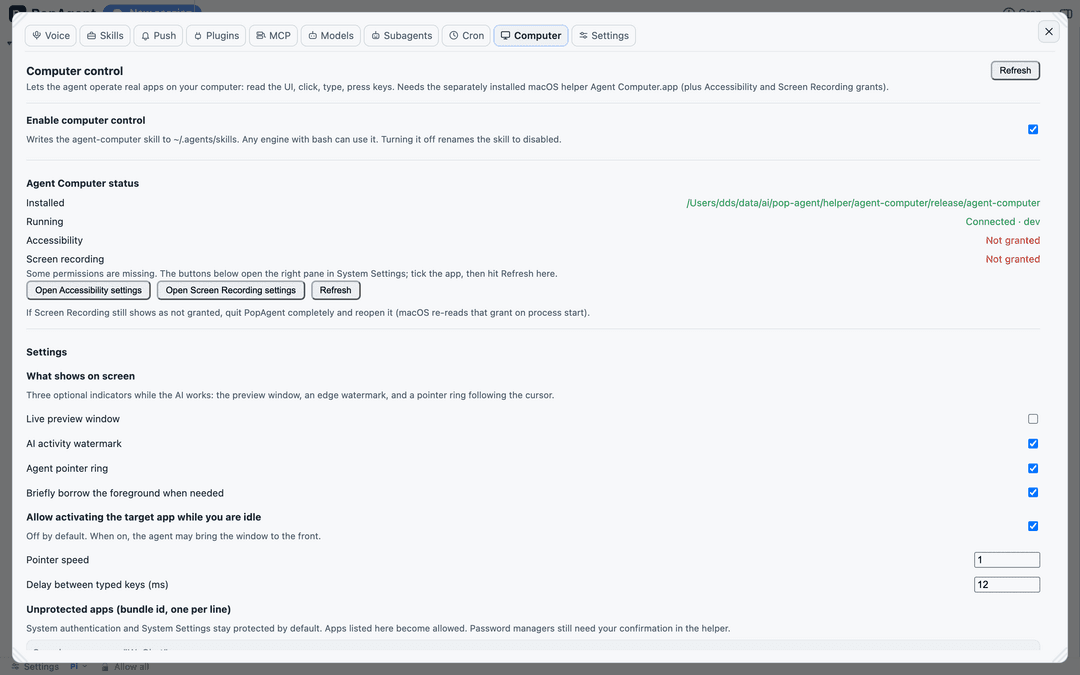
- Not screenshot-and-guess: it reads the macOS accessibility (AX) element tree and clicks by element id, so clicks land and the meaning is known.
- Click, type / set values / paste (long text goes through the clipboard and your previous clipboard is restored), send shortcuts, scroll, drag in steps, run menu paths — waiting for the UI to settle between steps.
- Password fields are never filled in for you; system authentication and apps protected by System Settings stay off-limits. The master switch is the skill itself, so any engine with bash can drive the Mac, not just pi.
④ Canvas: draw "what happens next" as a graph
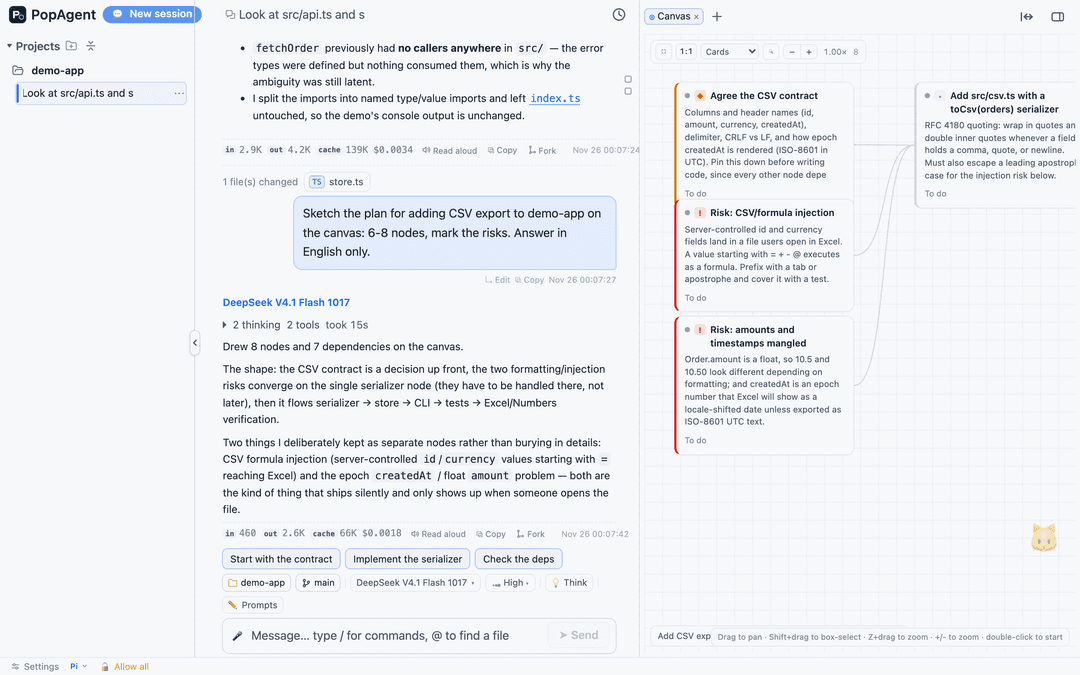
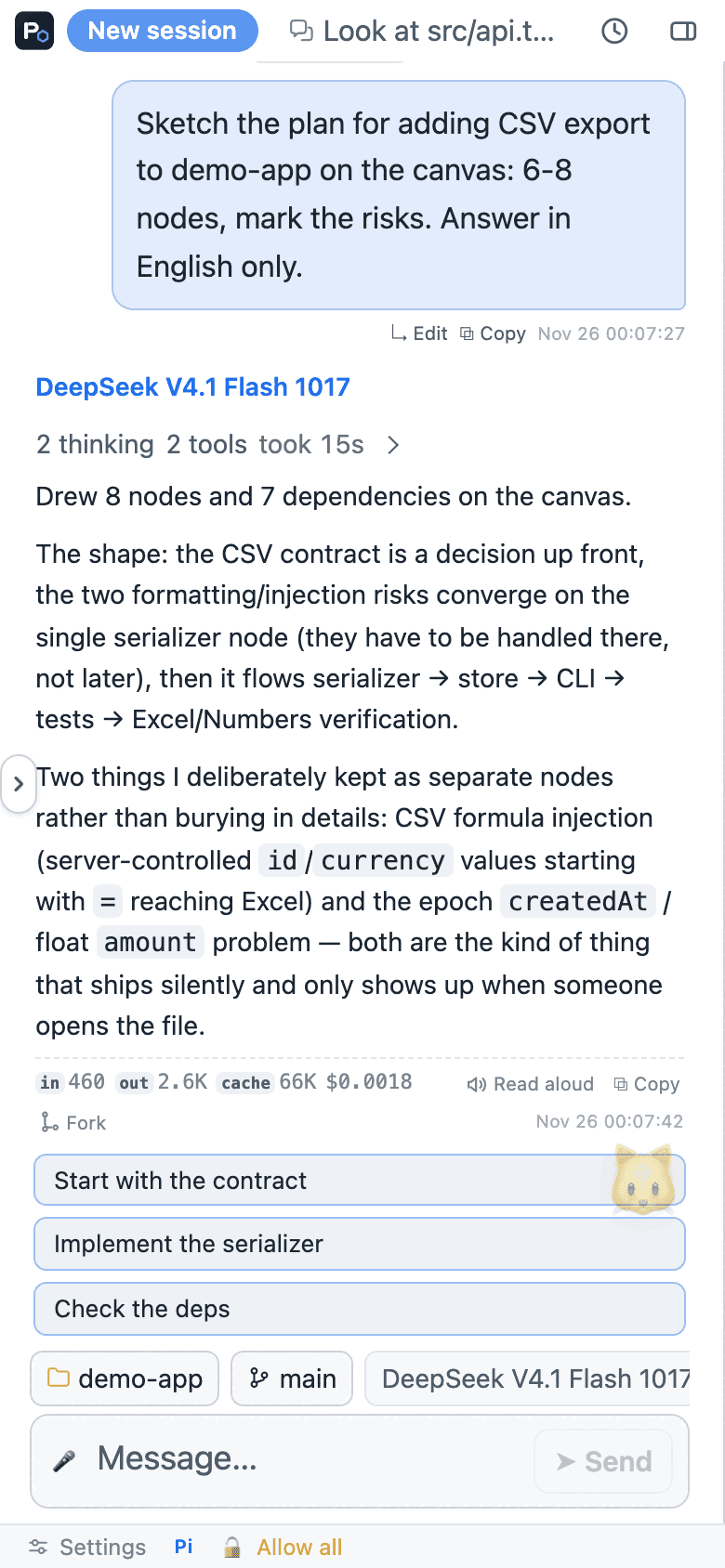
- Describe something that takes many steps and the agent lays it out as nodes plus dependency edges on the right; nodes carry kinds (task / milestone / risk / decision / doc), so it is obvious which step may blow up and which one needs your call.
- It is interactive: mark a step running when you start it, done when you finish — progress is drawn on the graph, not just in chat.
- It drills down: sub-plans absorb the detail and keep the main graph readable. Layout is computed by the host from the dependency graph, so the model never worries about coordinates.
⑤ Push to your phone: it buzzes when a turn ends
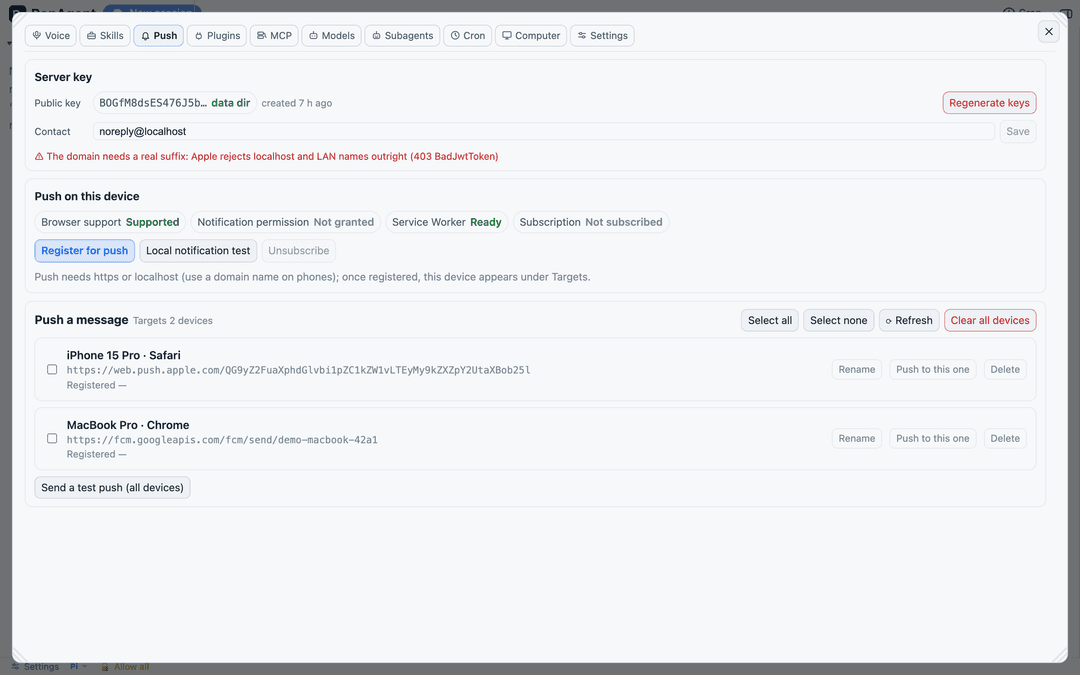
- One push per finished turn: the title is the project, the body is the session, failures get ❌ and interruptions ⏹.
- Web Push (VAPID) with no third-party service; keys are generated on first start. Multiple devices, test push, clear all.
- Add it to your phone's home screen and it behaves like an app (PWA); tapping the notification opens that session.
⑥ Remote access: keep working from your phone, elsewhere
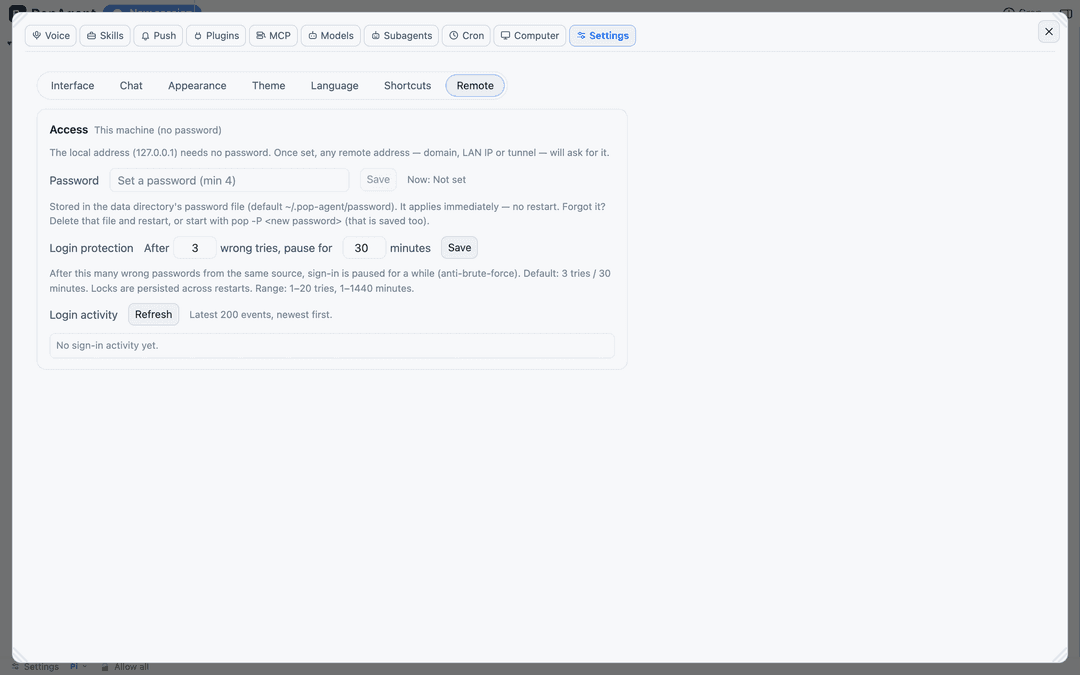
pop-agent -H 0.0.0.0and you can open it from a phone or another computer; the password must be set on the machine itself (remote clients may not create one — otherwise whoever finds the port first takes over).- Login protection: three wrong passwords from the same origin pause logins for 30 minutes (count and window are tunable); while paused the password is not even compared, and restarting the service does not unlock it.
- The phone really gets a phone layout: the sidebar becomes a drawer, the top bar keeps icons only, the composer goes to 18px so iOS does not zoom, the right pane becomes a full-screen second page.
Multiple engines: each runs its own native loop
An engine is not "the same prompt in a different skin": each is wired to its own official loop, and capability differences hide buttons in the UI.
| Engine | How it's wired | Notes |
|---|---|---|
| pi (default) | native SDK | full plugin / skill ecosystem, lazy tool loading, approval gate, subagents, native steering; models and providers are managed by this workbench |
| Codex | app-server (JSON-RPC) | its own loop and sandbox; sessions shared with Codex Desktop / CLI; approvals are command- and file-level |
| DeepSeek Harness | ACP | model and reasoning level switchable, permissions confirmed per call |
| opencode | ACP | brings its own tools / MCP / plugins, sessions shared with the opencode CLI / TUI; approvals follow opencode's own permission config |
| Claude Code | ACP (claude-code-acp adapter) | models switchable, tools confirmed per call, sessions shared with the claude CLI; this ACP surface exposes neither reasoning levels nor subagents |
Capability differences (server/engine/registry.ts; the UI hides buttons accordingly):
| Capability | pi | codex | dsh | opencode | claude |
|---|---|---|---|---|---|
| Approvals | ✅ | ✅ | ✅ | per config | ✅ |
| Model / reasoning level | ✅ | ✅ | ✅ | ✅ | model only / no levels |
| Resume past sessions | ✅ | ✅ | ✅ | ✅ | ✅ |
| Steering | ✅ native | ✅ stop-and-resend | ✅ stop-and-resend | ✅ stop-and-resend | ✅ stop-and-resend |
| Subagent panel | ✅ | — | — | — | — |
| Workbench-managed providers | ✅ | — | — | — | — |
| Side chat (in memory) | ✅ | — | — | — | — |
Models / plugins / MCP follow the current engine: switch to Codex and the panels read Codex's own things; claude reads ~/.claude.json and ~/.claude/settings.json; opencode reads opencode.json. A panel that isn't wired says so instead of borrowing pi's config. The engine is switched in the bottom status bar, and each session remembers its own engine, model and thinking level.
Install
macOS (Apple Silicon) → download the .dmg and drag it into Applications. No Node, no terminal: the runtime ships inside the app.
Other platforms / prefer a CLI → npm -g install pop-agent (needs Node ≥ 22.19). It exposes two equivalent commands: pop-agent and pop. On Linux the embedded terminal compiles node-pty in place, which needs make / g++ / python3.
Rather not touch the global npm (installs into ~/.pop-agent, no sudo):
# macOS / Linux
curl -fsSL https://raw.githubusercontent.com/duzhenxun/pop-agent/main/scripts/install.sh | sh

# Windows (PowerShell)
powershell -c "irm https://raw.githubusercontent.com/duzhenxun/pop-agent/main/scripts/install.ps1 | iex"
First launch blocked by macOS?
The packages only carry an ad-hoc signature added at build time, not an Apple Developer signature, so the two prompts map to two fixes:
-
"Cannot be opened because the developer cannot be verified" →
Right-click → Openonce; on macOS 15 and later you can also allow it under System Settings → Privacy & Security → "Open Anyway". -
"is damaged and can't be opened. You should move it to the Trash" → don't trash it, it isn't broken — the signature and the resources disagree. Run these two:
codesign --force --deep --sign - /Applications/PopAgent.app
xattr -dr com.apple.quarantine /Applications/PopAgent.app
Commands
| Command | What it does |
|---|---|
pop-agent | Start (default): runs in the foreground, opens the browser, Ctrl-C to quit; the default workspace is the current directory |
pop-agent start -d | Run detached (logs go to daemon.log) |
pop-agent status | pid / port / uptime / engine / session count / workspace |
pop-agent restart / stop | Stop then start (-d to detach) / stop the running instance |
pop-agent upgrade | Upgrade to the latest release |
pop-agent                              # foreground + open the page (the usual case)
pop-agent -d                           # detached, terminal comes right back
pop-agent -p 9191                      # different port
pop-agent -H 0.0.0.0                   # reachable on the LAN / internet (password first)
pop-agent -H 0.0.0.0 -P 'my-pass'      # start with the password included
POP_AGENT_CWD=~/code/my-proj pop-agent # pick the default workspace
Reaching it from a phone or another computer: set the password on that machine first (
Settings → Remote, or open/setup, or-Pat startup). After that, LAN IP, public IP and domain all work with the password — no allow-list needed. If no password is set, remote clients only see "set it on the machine first", because otherwise whoever scans the port first takes over.
Every flag and environment variable, plus each engine's escape hatches: see the reference · Flags.
More
The README stops here on purpose; everything else lives in the docs:
| Want to know | Where |
|---|---|
| Install details, every flag, every panel, shortcuts, architecture, where data lives, the security model, development and troubleshooting | Reference |
| The website (UI tour, a screenshot per capability) | https://pop.xs25.cn/ · 中文 |
| Screenshots (uncompressed originals) | docs/screenshots/ |
| Architecture decision records | docs/adr/ |
| Remote access and the security model | Reference · Security model |
MIT License
// faq
What is pop-agent?
给你正在跑的 coding agent 配一个本地 Web 工作台:看过程、插话纠正、管模型与工具。支持 PI / Codex / Claude Code / opencode/DSH,会话就是引擎的落盘文件,不引数据库。. It is open-source on GitHub.
Is pop-agent free to use?
pop-agent is open-source under the MIT license, so it is free to use.
What category does pop-agent belong to?
pop-agent is listed under devtools in the Claudeers registry of Claude-compatible tools.
// embed badge

[](https://claudeers.com/pop-agent)
// retro hit counter

[](https://claudeers.com/pop-agent)
// reviews
// guestbook
// related in Developer Tools
 🔓
The agent harness performance optimization system. Skills, instincts, memory, security, and research-first development for Claude Code, Codex, Opencode, Curs…
 🔓
Makes your AI agent think like the laziest senior dev in the room. The best code is the code you never wrote.
 🔓
AI coding assistant skill (Claude Code, Codex, OpenCode, Cursor, Gemini CLI, and more). Turn any folder of code, SQL schemas, R scripts, shell scripts, docs,…
 🔓
Orca is the ADE for working with a fleet of parallel agents. Run any coding agent with your own subscription. Available on desktop and mobile.