
playback-notes
Readable reports from anything you watch or listen to—with the evidence attached. A skill for Claude Code, Codex and pi.
Install with your AI
Paste into Claude Code, Cursor, or any agent — it reads the repo and wires the tool into your project.
Install and set up playback-notes (claude-skill project) into my current project.
Found on https://claudeers.com/playback-notes
Repo: https://github.com/AgwaB/playback-notes
Homepage/docs: —
Detected install method: claude-skill → # copy this skill into .claude/skills/playback-notes/
Category: devtools. Platforms: cli, api.
Read the repo's README for exact setup and env vars, then install it and wire it into my project.

Claudeers Health Verdict:
active; community-verified: false. Confirm the source before running anything.
# copy the skill dir into your project:
# .claude/skills/playback-notes/   (or ~/.claude/skills/playback-notes/ for all projects)
git clone https://github.com/AgwaB/playback-notes
// compatibility
| Platforms | cli, api |
|---|---|
| Operating systems | — |
| AI compatibility | claude |
| License | MIT |
| Pricing | open-source |
| Language | JavaScript |
Playback Notes
Readable reports from anything you watch or listen to—with the evidence attached.
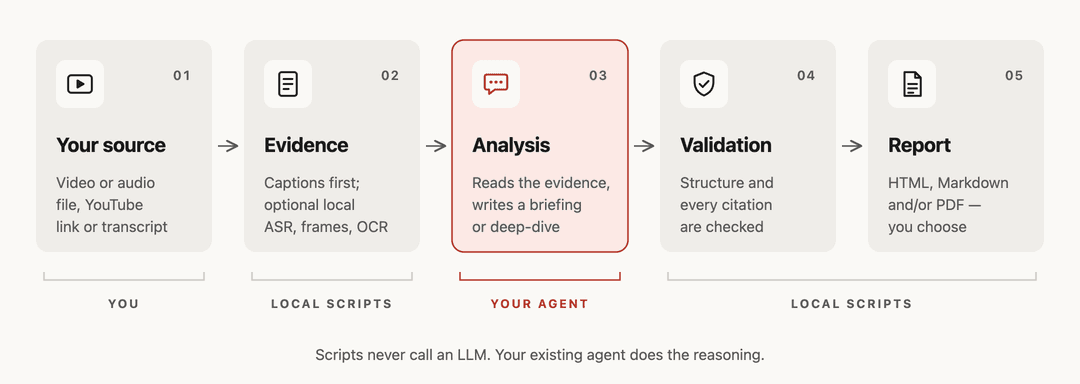
A skill for Claude Code, Codex and pi. No separate API key: the agent you already use writes the report,
every claim links to its moment in the recording, and the citations are checked before export.
Example output · How it works · Usage · Installation · Token usage
Example output
Andrej Karpathy's “[1hr Talk] Intro to Large Language Models”, summarized both ways with this skill:
Read the full reports: Briefing · Deep-dive (Markdown; each timestamp opens the video at that moment)
Unofficial summary, not affiliated with or endorsed by the creator. Written from the video's automatic captions; the transcript is not included. Video thumbnail © Andrej Karpathy.
How it works
Usage
Send your agent a YouTube or Apple Podcasts episode link, or an audio/video file or direct URL. You can also supply an SRT, VTT or TXT transcript.
- Briefing — key conclusions and why they hold.
- Deep-dive — detailed explanations, examples and caveats.
Give me a briefing on this video as HTML and Markdown: <url>
Analyze this recording in depth, in Spanish, and export a PDF: <path>
Choose HTML, Markdown, PDF, or any combination; the agent asks if you don't specify. Reports default to .playback-notes/reports/ in your working folder.
Ask follow-up questions about the same source for timestamp-cited answers. If a transcript is unavailable, the agent asks before local transcription.
Installation
Requires Node.js 24.15+ within the 24.x line, or 26+ (Node 25 is not supported).
npx skills add AgwaB/playback-notes -g
(cd ~/.agents/skills/playback-notes && npm ci)
Both lines are required. The first installs the skill with the skills CLI for the agents you pick, such as Claude Code, Codex and pi. The second installs its dependencies. In Windows PowerShell, use the PowerShell commands instead.
To update or remove it:
npx skills update playback-notes -g
(cd ~/.agents/skills/playback-notes && npm ci)  # updating removes the dependencies

npx skills remove playback-notes -g
Installed it as video-summarizer before the rename? Remove that copy with npx skills remove video-summarizer -g.
Alternative: manual install (read-only copy)
git clone https://github.com/AgwaB/playback-notes.git
cd playback-notes
npm ci
node scripts/install.mjs --link ~/.claude/skills/playback-notes
This installs a read-only copy in ~/.agents/skills/playback-notes, where Codex and pi find it. --link connects Claude Code; omit it if you don't use Claude Code. To update, pull this repository, run npm ci, then repeat the last command.
On Windows, follow the PowerShell setup; on WSL, the WSL guide.
Token usage
Same one-hour Karpathy talk · openai-codex/gpt-6.1-sol (medium) · English HTML + Markdown · automatic captions. Averages from 2 runs per mode; observed ranges in parentheses.
| Mode | Processed tokens (mean; range) | Cached input | Estimated cost |
|---|---|---|---|
| Briefing | 420k (307k–533k) | 349k | $0.212 |
| Deep-dive | 679k (526k–832k) | 599k | $0.294 |
Totals include cached context re-read across all turns, not the required context-window size. Costs are host estimates; actual usage and charges vary.
License
// faq
What is playback-notes?
Readable reports from anything you watch or listen to—with the evidence attached. A skill for Claude Code, Codex and pi.. It is open-source on GitHub.
Is playback-notes free to use?
playback-notes is open-source under the MIT license, so it is free to use.
What category does playback-notes belong to?
playback-notes is listed under devtools in the Claudeers registry of Claude-compatible tools.
// embed badge

[](https://claudeers.com/playback-notes)
// retro hit counter

[](https://claudeers.com/playback-notes)
// reviews
// guestbook
// related in Developer Tools
 🔓
The agent harness performance optimization system. Skills, instincts, memory, security, and research-first development for Claude Code, Codex, Opencode, Curs…
 🔓
Makes your AI agent think like the laziest senior dev in the room. The best code is the code you never wrote.
 🔓
AI coding assistant skill (Claude Code, Codex, OpenCode, Cursor, Gemini CLI, and more). Turn any folder of code, SQL schemas, R scripts, shell scripts, docs,…
 🔓
Use Garry Tan's exact Claude Code setup: 23 opinionated tools that serve as CEO, Designer, Eng Manager, Release Manager, Doc Engineer, and QA