
pii-guard
필요할 때만 켜는 Claude Code 입력 개인정보 가림 모드 (schift-ko-pii-v5, 로컬 검사)
Install with your AI
Paste into Claude Code, Cursor, or any agent — it reads the repo and wires the tool into your project.
Install and set up pii-guard (git-clone project) into my current project.
Found on https://claudeers.com/pii-guard
Repo: https://github.com/jkf87/pii-guard
Homepage/docs: —
Detected install method: git-clone → git clone https://github.com/jkf87/pii-guard
Category: plugins. Platforms: cli, api.
Read the repo's README for exact setup and env vars, then install it and wire it into my project.

Claudeers Health Verdict:
unknown; community-verified: false. Confirm the source before running anything.
git clone https://github.com/jkf87/pii-guard
// compatibility
| Platforms | cli, api |
|---|---|
| Operating systems | — |
| AI compatibility | claude |
| License | — |
| Pricing | open-source |
| Language | TypeScript |
pii-guard
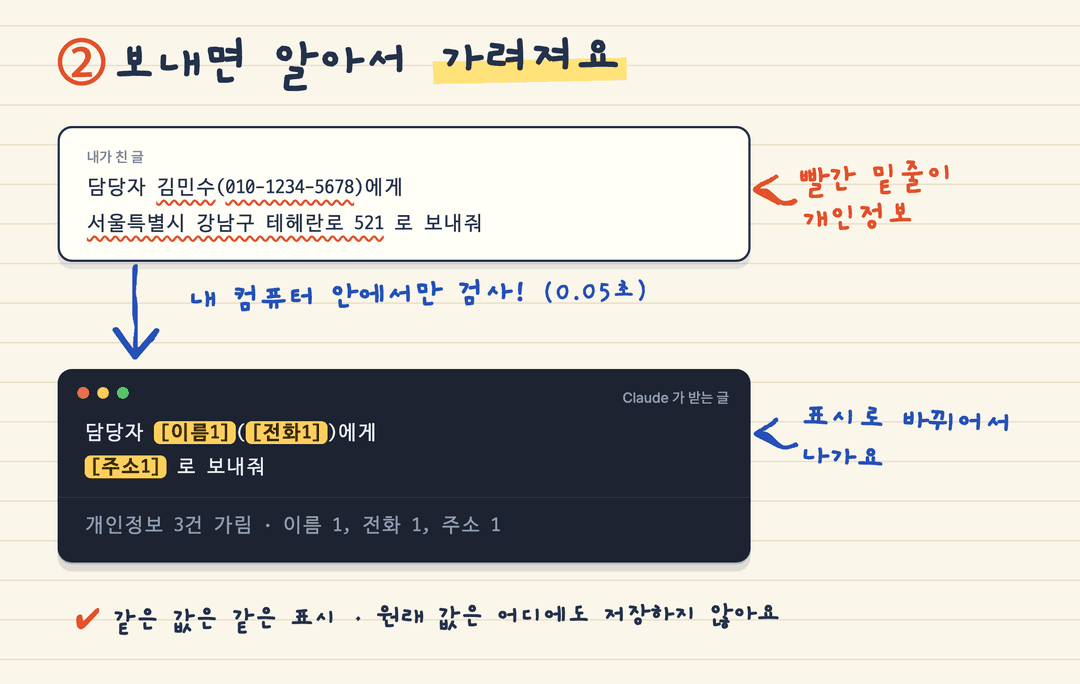
필요할 때만 켜는 Claude Code · pi 입력 개인정보 가림 모드입니다. /pii on 을 하면 그 세션에서 보내는 글의 이름·주소·전화번호·이메일·주민번호·계좌·카드번호·인증번호·API 키를 찾아 [이름1], [전화1] 같은 표시로 바꾼 뒤 모델에게 보냅니다. 검사는 전부 이 컴퓨터에서 돌고, 입력한 글은 검사를 위해 어디로도 나가지 않습니다. 같은 레포는 Codex·Antigravity CLI(agy)·Claude 채팅에 pii-mask 스킬로 설치합니다.
탐지는 schift-io/schift-ko-pii-v5 (34M, CPU) 가 합니다. 이름과 주소는 모델이, 번호류는 모델 저장소에 든 정규식 후처리가 찾습니다.
필요한 것
- uv (macOS
brew install uv, Windowswinget install astral-sh.uv). 파이썬과 torch 는 uv 가 알아서 준비합니다. - macOS 또는 Linux.
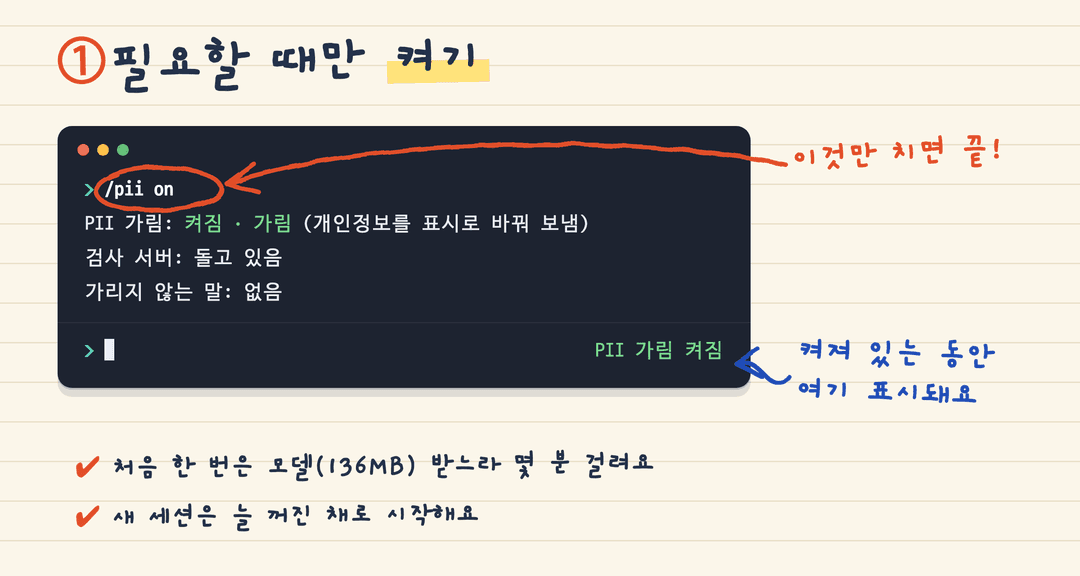
pii-mask스킬·명령은 Windows(한국어 로캘 포함)에서도 돕니다. - 처음 켤 때만 인터넷: torch 등 패키지와 모델 136 MB 를 받습니다(몇 분). 모델은
~/.cache/pii-guard/에 놓입니다.
어디서 쓰나
| 쓰는 곳 | 설치 | 가리는 때 |
|---|---|---|
| Claude Code (터미널·데스크톱 Code 탭) | 플러그인 (훅) | 보내기 전에 자동으로 |
pi (@earendil-works/pi-coding-agent) | pi 패키지 (익스텐션) | 보내기 전에 자동으로 |
| Codex | 플러그인 (스킬) | 올라온 글·파일을 가려 달라고 할 때 |
Antigravity CLI (agy) | 플러그인 (스킬) | 올라온 글·파일을 가려 달라고 할 때 |
| Claude (claude.ai 채팅·데스크톱 채팅) | 스킬 zip | 올라온 글·파일을 가려 달라고 할 때 |
| 어디든, 보내기 전에 직접 | pii-mask 명령 | 복사한 글을 붙여 넣기 전에 |
Codex·agy·Claude 채팅에는 이 레포가 보내는 글을 가로채는 훅을 넣지 않습니다. 그래서 스킬은 이미 올라온 글만 가릴 수 있고, 채팅에서 전송 전에 가리려면 아래 pii-mask 명령을 씁니다.
설치: Claude Code (플러그인)
Claude Code 터미널 세션의 프롬프트에서:
/plugin install pii-guard --marketplace jkf87/pii-guard
Add marketplace? 에 y, 이어서 범위(user)를 고르면 바로 켜집니다. 셸에서는:
claude plugin install pii-guard --marketplace jkf87/pii-guard
데스크톱 앱에서는 프롬프트 옆 + → Plugins → Add marketplace 에 jkf87/pii-guard 를 넣고 Add plugin 을 누릅니다.
설치: pi (패키지)
pi install https://github.com/jkf87/pii-guard
한 번만 써 보려면 pi -e https://github.com/jkf87/pii-guard 로 띄웁니다. 지우는 것은 pi remove https://github.com/jkf87/pii-guard.
설치하면 /pii 명령과 pii-mask 스킬이 들어옵니다. 명령은 아래 「쓰는 법」과 같습니다(/pii on, /pii on block, /pii off, /pii status, /pii test, /pii allow, /pii forget). pi 에서 다른 점:
- 켜져 있는 동안 아래 상태 줄에
PII 가림 켜짐이 보이고, 가린 건수는 알림으로 뜹니다. - 가리는 것은 사람이 친 입력(터미널, RPC)입니다.
/skill:이름 …, 프롬프트 템플릿 인자도 펼치기 전에 가립니다. 다른 익스텐션의/명령인자와 다른 익스텐션이 넣은 글은 보지 않습니다. - 막음 모드에서 막혔거나 검사를 못 해 보내지 않은 글은 입력창에 다시 넣어 둡니다.
allow목록은~/.pi/agent/pii-guard/allow.json에 남습니다.
개발: npm install 뒤 npm run check (타입 검사 + pi/*.spec.ts 테스트). Claude Code 쪽 테스트는 claude plugin test ..
설치: Codex (플러그인)
codex plugin marketplace add jkf87/pii-guard
codex plugin add pii-guard@pii-guard
pii-guard:pii-mask 스킬이 들어옵니다. "이 파일 개인정보 가려줘" 처럼 부탁하면 됩니다. 지우는 것은 codex plugin remove pii-guard@pii-guard.
플러그인 없이 스킬만 넣어도 됩니다. skills/pii-mask 폴더를 통째로 ~/.codex/skills/ 에 복사하면 됩니다. 워커(pii_worker.py)가 같은 폴더에 있어 따로 챙길 것이 없습니다.
git clone https://github.com/jkf87/pii-guard ~/pii-guard
cp -r ~/pii-guard/skills/pii-mask ~/.codex/skills/
설치: Antigravity CLI (플러그인)
agy plugin install https://github.com/jkf87/pii-guard
매니페스트는 .antigravity-plugin/plugin.json, 스킬은 skills/pii-mask 입니다. 예전에 Claude Code 플러그인으로 변환해 설치했다면(agy plugin list 에 Source: claude-code) agy plugin uninstall pii-guard 뒤 다시 설치합니다. agy plugin validate 가 hooks/hooks.json 을 읽지 않는다고 경고하는데, 그 파일은 Claude Code 전용이라 그대로 두면 됩니다.
설치: Claude (스킬)
- pii-mask-skill.zip 받기 (21KB). 릴리스 페이지의 Assets 에서 받아도 됩니다.
- Claude 의 설정 → 기능 → 스킬 업로드에 그 zip 을 올립니다.
- 채팅에서 "이 글 개인정보 가려줘" 처럼 부탁합니다.
레포 전체 zip 은 올라가지 않습니다. Code → Download ZIP 이나 릴리스의 Source code (zip) 으로 받은 pii-guard-main.zip 을 올리면 아래 에러가 납니다. 위 1번의 스킬 zip 을 쓰세요.
| 에러 | 까닭 |
|---|---|
A skill cannot contain a plugin manifest (.claude-plugin/plugin.json) | 레포에는 Claude Code 플러그인 매니페스트가 들어 있습니다 |
Zip must contain a SKILL.md file | 레포 맨 위에는 SKILL.md 가 없습니다 |
Zip cannot contain nested zip files | 레포 안에 dist/pii-mask-skill.zip 이 들어 있습니다 |
스킬 zip 은 sh scripts/build-skill.sh 로 다시 만듭니다.
Claude 의 실행 환경에서 모델을 받지 못하면 스킬은 번호류(전화·이메일·주민번호·카드·키)만 정규식으로 가리고, 이름과 주소는 Claude 가 읽어서 가립니다.
보내기 전에 직접 가리기: pii-mask
Claude 채팅처럼 훅이 없는 곳에 붙여 넣기 전에, 내 컴퓨터에서 먼저 가립니다.
git clone https://github.com/jkf87/pii-guard ~/pii-guard
ln -sf ~/pii-guard/skills/pii-mask/scripts/pii_mask.py ~/.local/bin/pii-mask
Windows (PowerShell) 에서는 python $HOME\pii-guard\skills\pii-mask\scripts\pii_mask.py 로 돌립니다.
보낼 글을 복사하고 pii-mask 를 실행하면 가린 글이 클립보드에 다시 들어갑니다. 그대로 붙여 넣으면 됩니다. 클립보드는 macOS, Windows, Linux(wl-clipboard 나 xclip) 를 씁니다. Windows 에서 파일을 줄 때는 UTF-8(BOM 있어도 됨)로 저장합니다.
| 명령 | 하는 일 |
|---|---|
pii-mask | 클립보드의 글을 가려 클립보드에 다시 넣기 |
pii-mask - | 표준입력을 가려 표준출력으로 |
pii-mask 파일 | 파일을 가려 파일.masked.확장자 로 쓰기 |
pii-mask --regex … | 모델 없이 번호류만 가리기 (이름·주소는 못 찾음) |
pii-mask allow <말> / forget <말> / list | 가리지 않을 말 관리 (~/.config/pii-mask/allow.txt) |
검사가 실패하면 클립보드는 바뀌지 않고 실패 메시지가 나옵니다. 그 글은 붙여 넣지 마세요.
쓰는 법 (Claude Code · pi)
1. 필요할 때 켭니다. 켜져 있는 동안 상태 줄에 PII 가림 켜짐 이 보입니다.
2. 평소처럼 보내면 됩니다. 개인정보는 내 컴퓨터에서 표시로 바뀐 뒤 나갑니다.
3. 그 밖의 명령.
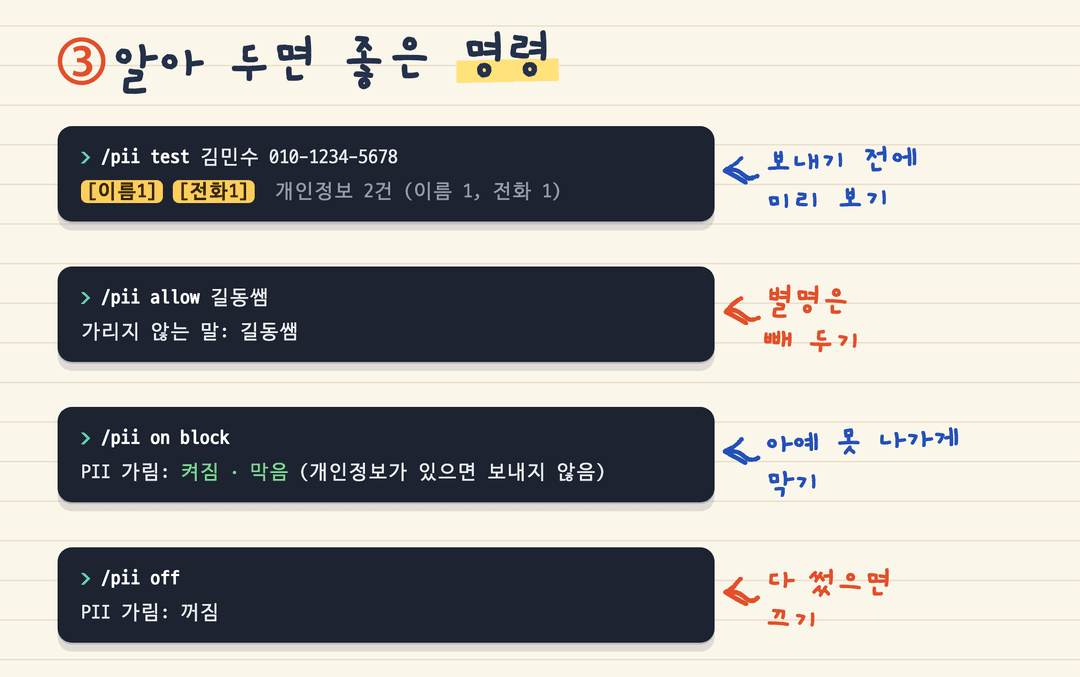
| 명령 | 하는 일 |
|---|---|
/pii on | 켜기. 개인정보를 표시로 바꿔 보냅니다 |
/pii on block | 켜기. 개인정보가 있으면 아예 보내지 않습니다 |
/pii off | 끄기 (검사 서버도 내립니다) |
/pii status | 지금 상태 |
/pii test <글> | 보내지 않고 어떻게 가려지는지 보기 |
/pii allow <말> | 가리지 않을 말 넣기 (별명, 공개된 이름) |
/pii forget <말> | 그 말을 다시 가리기 |
켜고 끄는 것은 세션마다입니다. 새 세션은 늘 꺼진 채로 시작합니다. allow 목록만 세션을 넘어 남습니다.
켜 둔 동안에는 모델을 올린 작은 서버가 127.0.0.1 에서 돌아 글 하나에 0.05초쯤 걸립니다. 처음 켤 때는 모델을 올리느라 4초쯤 걸립니다.
알아 둘 점
- 사람이 친 입력만 봅니다: 프롬프트, 그리고 다른 슬래시 명령의 인자. Claude 가 읽는 파일, 도구 결과, 붙인 이미지는 보지 않습니다.
- 켜져 있는데 검사가 실패하면 글을 보내지 않습니다.
/pii off로 끄면 그대로 나갑니다. - URL 과 날짜는 가리지 않습니다.
- 모델 점수는 F1 0.82 (모델 카드 기준) 입니다. 놓치는 것도, 잘못 가리는 것도 있습니다. 중요한 글은
/pii test로 먼저 보세요. - 가려진 원래 값은 어디에도 저장하지 않으므로, Claude 의 답에 나온 표시를 원래 값으로 되돌려 주지는 않습니다.
라이선스
이 모드의 코드는 MIT 입니다. 모델은 따로 받는 것이며 Schift License v2.0 을 따릅니다(연 매출 1천만 달러 이하 무료, 연구·교육·비영리는 항상 허용).
모델 저장소의 파이썬 코드를 실행하므로, 내용을 확인한 커밋 06fddf7a 에 고정해 받습니다.
// faq
What is pii-guard?
필요할 때만 켜는 Claude Code 입력 개인정보 가림 모드 (schift-ko-pii-v5, 로컬 검사). It is open-source on GitHub.
Is pii-guard free to use?
pii-guard is open-source, so it is free to use.
What category does pii-guard belong to?
pii-guard is listed under plugins in the Claudeers registry of Claude-compatible tools.
// embed badge

[](https://claudeers.com/pii-guard)
// retro hit counter

[](https://claudeers.com/pii-guard)
// reviews
// guestbook
// related in Claude Plugins
 🔓
A single CLAUDE.md file to improve Claude Code behavior, derived from Andrej Karpathy's observations on LLM coding pitfalls.
 🔓
Claude Code is an agentic coding tool that lives in your terminal, understands your codebase, and helps you code faster by executing routine tasks, explainin…
 🔓
"CLI-Anything: Making ALL Software Agent-Native" -- CLI-Hub: https://clianything.cc/
🔓financial-services — a Claude ecosystem project on GitHub.