
pi-session-hub
Cross-harness session hub for Pi: browse, search and continue sessions from Claude Code, Codex, OpenCode, Crush and JCode without leaving your chat.
Install with your AI
Paste into Claude Code, Cursor, or any agent — it reads the repo and wires the tool into your project.
Install and set up pi-session-hub (npm project) into my current project.
Found on https://claudeers.com/pi-session-hub
Repo: https://github.com/Gateton/pi-session-hub
Homepage/docs: —
Detected install method: npm → npm install pi-session-hub
Category: devtools. Platforms: cli, api, web.
Read the repo's README for exact setup and env vars, then install it and wire it into my project.

Claudeers Health Verdict:
active; community-verified: false. Confirm the source before running anything.
npm install pi-session-hub
git clone https://github.com/Gateton/pi-session-hub
// compatibility
| Platforms | cli, api, web |
|---|---|
| Operating systems | — |
| AI compatibility | claude |
| License | MIT |
| Pricing | open-source |
| Language | TypeScript |
pi-session-hub
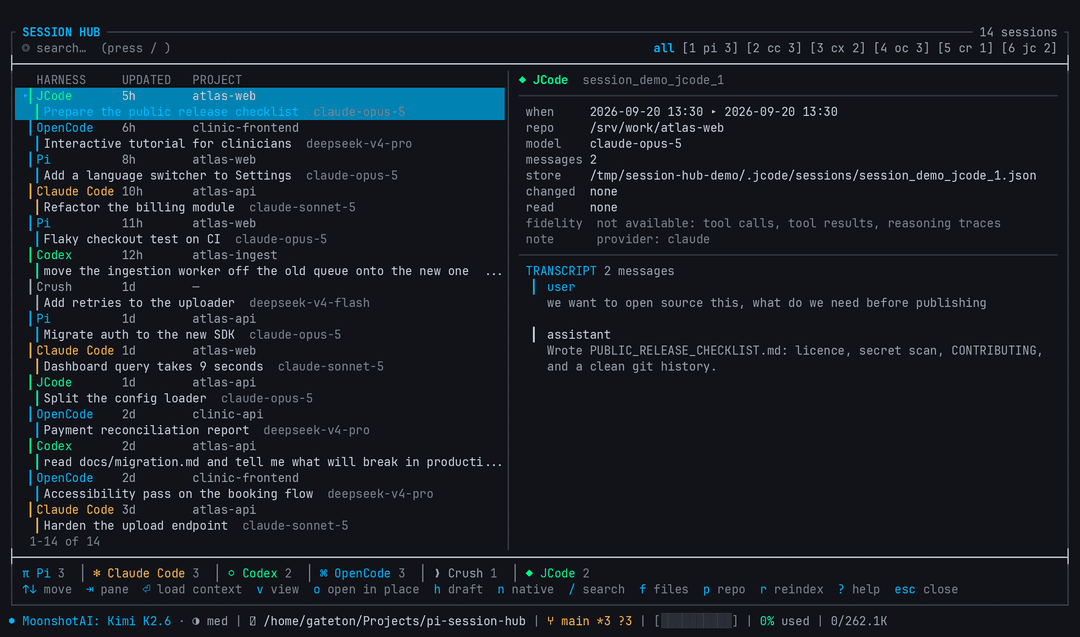
One list for every coding-agent session on your machine. Browse, search and continue sessions from Claude Code, Codex, OpenCode, Crush and JCode without leaving Pi.
pi-session-hub adds a cross-harness session browser to Pi:
- See every agent in one list: Pi, Claude Code, Codex, OpenCode, Crush and JCode sessions, each row labelled with its harness, project, model and recency.
- Continue work that started elsewhere: press
Enterand the selected session's conversation is loaded into the current chat as a tiered, budgeted context package, so the next thing you type already has it. - Read without spending tokens:
vopens the full recovered transcript in a read-only viewer for free. - Reopen the original tool when you want to:
nruns the session's own resume command, with the exact command and its verification basis shown before anything is launched. - Stay local and read-only: nothing outside
~/.pi/agent/pi-session-hub/is ever written, no transcript leaves the machine, and no external session is ever disguised as a Pi session.
Package facts
| Fact | Value |
|---|---|
| Package | pi-session-hub |
| Version | 0.1.0 |
| Node engine | >=22.5.0 |
| Runtime dependencies | none (uses the built-in node:sqlite with FTS5) |
| Pi entrypoints | ./extensions/session-hub.ts |
| Supported harnesses | 6 |
| Package image | assets/session-hub.png |
Public surfaces
| Surface kind | Count |
|---|---|
| command | 6 |
| tool | 2 |
| shortcut | 1 |
| skill | 1 |
| renderer | 1 |
Commands: /session-hub, /hub, /session-search, /session-open, /session-handoff, /session-native.
Tools: session_hub_search, session_hub_context.
Shortcut: alt+r.
Skill: session-hub, which tells the agent when to reach for session_hub_search on its own.
Why use it?
| You want to... | Use this package because... |
|---|---|
| Find the session where you solved something | /session-search <query> searches a local FTS5 index covering titles and a bounded excerpt of each conversation, including both the start and the end. |
| Pick up work that started in another tool | Enter loads that session's conversation into the current chat. Recent turns arrive verbatim, older ones condense to one line, tool output compresses to short previews, and anything omitted is counted rather than hidden. |
| Read an old conversation without paying for it | v opens the full transcript in a read-only viewer. Zero tokens, zero writes. |
| Resume in the tool that owns the session | n shows the exact command and where its verification comes from, then asks before launching anything. |
| Let the agent search your history itself | session_hub_search finds sessions; session_hub_context loads one session's context document so the agent can actually continue it. |
| Hand a session to a fresh Pi thread for review | h puts an Imported Session Handoff draft in the editor so you can read and edit it before sending. |
Install
# From npm
pi install npm:pi-session-hub

# Project-local
pi install npm:pi-session-hub -l

# From git
pi install git:github.com/Gateton/pi-session-hub

# Local checkout, run from this package directory
pi install .
Try it without installing:
pi -e /path/to/pi-session-hub
Quick start
-
Install the package and start Pi in any project.
-
Open the hub:
alt+rOr type
/session-hub, or/hub. The hub replaces Pi's UI area rather than floating over the chat. For a true alternate-screen takeover, set Pi's owntuiModeto"fullscreen"in~/.pi/agent/settings.json. -
The first run indexes your harnesses. On a machine with 430 sessions this takes about two seconds; later runs are incremental and skip unchanged files.
-
Pick a session and press
Enter. The conversation is loaded into the current chat:imported transcript ◆ JCode 102/804 messages · ~8,172 tokens source: ~/.jcode/sessions/session_sauropod_1789838887910_ee0399e551863ce9.json - Original objective: okay ahora lo que tenemos que hacer para prepararnos... expand this message to read the imported transcriptJust type what you want to do next. The cost is reported every time, and the message is collapsed until you expand it.
-
To ask the agent directly instead, just ask. It has the tools:
Where did I work on the language switcher?
Keyboard reference
Press ? inside the hub for this list.
| Key | Action |
|---|---|
↑ ↓, j k | Move the selection |
PageUp PageDown | Jump a page |
Home End | First or last session |
Tab | Switch between the list and the transcript pane |
Enter | Load this session's context into the current chat |
v | Read the full transcript (read-only, no tokens) |
o | Open in place: switch Pi to that Pi session |
h | Handoff draft in the editor, to review before sending |
n | Reopen the session in its original harness |
/ | Search titles, previews, projects and models |
f | Filter by a touched file path |
p | Cycle the project/repo filter |
0–6 | Filter by harness (0 clears) |
r | Reindex every harness |
? | Keyboard reference |
Esc, q | Close |
Harness markers are plain Unicode, not emoji: π Pi, ✻ Claude Code, ⬡ Codex, ⌘ OpenCode, ❯ Crush, ◆ JCode. Set PI_SESSION_HUB_ASCII=1 for plain ASCII markers on terminals whose font has no symbol coverage.
How much context Enter loads
Loading an entire conversation would be wasteful, and the cost would grow without bound as sessions get longer. The context is therefore tiered, with a hard budget:
| Tier | Contents | Cost |
|---|---|---|
| 1. Header | objective, repo, model, files changed and read, commands run, tool usage | ~1k characters, always included |
| 2. Recent tail | the last turns verbatim, because that is what you continue from | up to 26k characters |
| 3. Earlier | one line per older message, so the shape of the conversation survives | remainder |
| 4. Omitted | a count, never silence | 0 |
Measured on real sessions with the default 40k-character budget (~10k tokens):
| Session | Source messages | Verbatim | Condensed | Omitted | Cost |
|---|---|---|---|---|---|
| JCode, i18n work | 804 (102 with text) | 73 | 29 | 0 | ~8.2k tokens |
| Pi, a long refactor | 413 (291 with text) | 111 | 69 | 111 | ~9.8k tokens |
| Claude Code, a debug session | 49 (6 with text) | 6 | 0 | 0 | ~2.9k tokens |
Two decisions make that affordable:
- Tool output is compressed to a short preview in every tier. Measured here, tool output was 90% of the bytes in a 291-message session and is the least useful part for resuming work.
- The tail is protected, not the head. When the budget runs out, the oldest messages condense or drop, and the document says how many. Losing the tail is what would make continuation fail.
Tune the ceiling in ~/.pi/agent/settings.json:
{
  "sessionHub": {
    "contextChars": 40000
  }
}
It is a ceiling, not a target: a short session costs far less. For a zero-token look at any session, use v.
The two rules
Nothing outside the index is written
The only writable path is ~/.pi/agent/pi-session-hub/. Every harness store is opened read-only, including the SQLite databases. The acceptance suite fingerprints every external store before and after a full scan and fails if anything changed.
External sessions are never disguised as Pi sessions
A Claude, Codex, OpenCode, Crush or JCode conversation is never converted into a Pi session file that pretends Pi created it. There are exactly two paths:
- Native resume (
n): reopen the session in its own harness, using its own command. Every command states its verification basis in the confirmation dialog (cli-helpmeans the flag is documented in that tool's own--help). All six harnesses have one. The single exception is Claude sub-agent transcripts, whose idsclaude --resumedoes not accept, so the hub refuses rather than handing you a command that would fail. - Cross-harness handoff (
h, orEnterfor context loading): the conversation arrives in a new message explicitly labelled as imported, naming the source harness, session id and path.
Context loading is generated locally and deterministically. No LLM, no network, no uploading transcripts anywhere. Fields the source format cannot supply are written as not available rather than guessed.
Supported harnesses
| Harness | Store | Format | Native resume |
|---|---|---|---|
| Pi | ~/.pi/agent/sessions/--<cwd>--/*.jsonl | JSONL tree v3 | pi --session <path> |
| Claude Code | ~/.claude/projects/<slug>/*.jsonl | JSONL (undocumented) | claude --resume <uuid> |
| Codex | ~/.codex/sessions/YYYY/MM/DD/rollout-*.jsonl | JSONL (undocumented) | codex resume <id> |
| OpenCode | ~/.local/share/opencode/opencode.db | SQLite | opencode --session <id> |
| Crush | ~/.crush/crush.db | SQLite | crush --session <id> |
| JCode | ~/.jcode/sessions/*.json | JSON | jcode --resume <id> |
Each harness gets its own adapter. A missing, empty or unreadable store degrades to a specific message ("no store at ...", "cannot read ...") instead of an empty list, and one broken adapter never takes down the others.
Adding a harness means adding one file under src/adapters/ that implements SessionAdapter and registering it in src/adapters/registry.ts.
Search
/session-search <query> and the session_hub_search tool both use a local SQLite FTS5 index.
- bare terms use prefix matching, so
pliegomatchespliego-prod "exact phrase"matches phrases-termexcludes
The index stores each session's title, metadata and a bounded excerpt of the conversation (20k characters, sampled from both the start and the end). It is a second local copy of some conversation text: if you back up ~/.pi, the index goes with it. Delete ~/.pi/agent/pi-session-hub/index.sqlite to remove it; it is rebuilt on the next scan.
Failure behaviour
Two failure modes are explicitly designed against, because both are worse than a crash:
- A failed read is never reported as "no sessions". Reads throw, and the error is surfaced in the UI and in tool results. An unreadable index and an empty index are different messages.
- A failing adapter never deletes data. Sessions are only dropped from the index for harnesses that were actually read successfully this pass, so one transient failure cannot wipe that harness's history.
Both are covered by regression tests.
Privacy
- The index is local:
~/.pi/agent/pi-session-hub/index.sqlite. - Credential stores are never read.
auth.json,.credentials.json,.env,request_dump_*and similar are denied by name before any open is attempted. - Transcript text passes through a redactor (Bearer tokens,
sk-keys, JWTs,api_key=andpassword=patterns) before being stored or written into a handoff. - No network access, ever, for indexing or searching.
Architecture
extensions/session-hub.ts   command, shortcut, tool and renderer wiring
src/adapters/               one read-only adapter per harness
src/index/                  local SQLite + FTS5 index, incremental scan
src/context.ts              tiered, budgeted transcript context
src/handoff.ts              deterministic handoff document
src/native.ts               native resume resolve and launch
src/security.ts             path guards and secret redaction
src/tui/                    full-screen hub and transcript viewer
skills/session-hub/         agent-facing skill
Verified against the running binary rather than assumed:
| API | Visible in transcript | In LLM context |
|---|---|---|
pi.sendMessage | yes | yes |
pi.appendEntry | yes | no |
ctx.sessionManager.appendCustomMessageEntry | no | yes |
pi.sendMessage is the only one that does both, and it lives on the extension API rather than the command context, so it also works from a keyboard shortcut.
Development
node test/smoke.mjs        # exercise every adapter against real stores
node test/acceptance.mjs   # full requirement suite
The acceptance suite runs against real stores and against a synthetic foreign home, and asserts among other things: index counts equal detected counts, FTS rows equal session rows with no orphans, uids are unique, the context stays inside its budget regardless of session length, the handoff contains every required field, unavailable fields are reported honestly, all six adapters detect, index, search and read a home this project has never seen, and no external store file is modified.
test/tools/screen.py reconstructs a screen from a raw ANSI capture, and test/tools/png.py renders one to PNG with font fallback. Both exist because stripping escape codes from a full-screen TUI produces a misleading picture.
Publishing
The Pi package gallery indexes npm automatically: it lists every package tagged with the pi-package keyword. There is no submission form, no review, and no repository template to follow. Once published, the package has its own page at pi.dev/packages/pi-session-hub.
npm login
npm publish
npm login alone is not enough. npm requires a second factor to publish, and a web-login session cannot satisfy it, so the upload is rejected:
403 Forbidden - Two-factor authentication or granular access token with bypass 2fa
enabled is required to publish packages.
Create a granular access token at npmjs.com/settings/<user>/tokens with Bypass two-factor authentication checked (it is unchecked by default, which is the easy mistake) and Read and write (publish and stage) on all packages, then:
npm config set //registry.npmjs.org/:_authToken npm_...
npm publish
Or enable 2FA on the account and publish with npm publish --otp=<code>.
Two things worth knowing:
- A token can authenticate (
npm whoamiworks) and still be unable to publish, because the bypass flag is missing.npm token listlabels it a "Publish token" either way, so the label is not proof that the bypass is on. - npm is removing direct publish from bypass-2FA tokens in January 2027. After that, automated publishing has to move to trusted publishing (OIDC) or staged publishing.
The gallery's browsable list is a periodic snapshot sorted by download count, so a brand-new package appears in the list only after the next rebuild, while its detail page works immediately.
To ship a change, bump version and publish again. Before publishing, verify the artifact rather than the repo:
npm pack --dry-run
npm pack && tar xzf pi-session-hub-*.tgz && pi -e ./package
Limitations
- Claude Code and Codex formats are undocumented. Parsers are defensive and degrade to filename-derived metadata rather than throwing, but a format change may cost fields until the adapter is updated.
- Crush does not record a session working directory, so those sessions show no repo and cannot be filtered by project.
- Claude sub-agent transcripts are indexed (they contain real work) but marked as not resumable and carry their parent session id in the notes.
- Transcripts are capped at roughly 2000 messages per session by the reader's budget. When that happens the viewer says so rather than silently truncating.
- Search covers a bounded excerpt, not the entire history of a very long session. Phrases from beyond the sampled window will not match.
- The screenshot above is the real UI captured from a synthetic home directory so that every harness appears at once. It is illustrative data, not anyone's actual sessions.
Contributing
Keep user-facing claims tied to source. If you change adapters, the context budget, search behaviour or the TUI, update this README in the same change and run node test/acceptance.mjs.
Adding a harness: implement SessionAdapter in src/adapters/<name>.ts, register it in src/adapters/registry.ts, add a badge in src/tui/badges.ts, and extend the portability section of the acceptance suite with a fixture for that harness.
License
// faq
What is pi-session-hub?
Cross-harness session hub for Pi: browse, search and continue sessions from Claude Code, Codex, OpenCode, Crush and JCode without leaving your chat.. It is open-source on GitHub.
Is pi-session-hub free to use?
pi-session-hub is open-source under the MIT license, so it is free to use.
What category does pi-session-hub belong to?
pi-session-hub is listed under devtools in the Claudeers registry of Claude-compatible tools.
// embed badge

[](https://claudeers.com/pi-session-hub)
// retro hit counter

[](https://claudeers.com/pi-session-hub)
// reviews
// guestbook
// related in Developer Tools
 🔓
🔓The agent harness performance optimization system. Skills, instincts, memory, security, and research-first development for Claude Code, Codex, Opencode, Curs…
 🔓
🔓Makes your AI agent think like the laziest senior dev in the room. The best code is the code you never wrote.
 🔓
🔓Use Garry Tan's exact Claude Code setup: 23 opinionated tools that serve as CEO, Designer, Eng Manager, Release Manager, Doc Engineer, and QA
 🔓
🔓AI coding assistant skill (Claude Code, Codex, OpenCode, Cursor, Gemini CLI, and more). Turn any folder of code, SQL schemas, R scripts, shell scripts, docs,…