
pi-dynamic-workflows
Claude Code–style dynamic workflows for Pi: code-mode subagents with real model routing, journaled resume, git-worktree isolation, cost accounting, an intera…
Install with your AI
Paste into Claude Code, Cursor, or any agent — it reads the repo and wires the tool into your project.
Install and set up pi-dynamic-workflows (npm project) into my current project.
Found on https://claudeers.com/pi-dynamic-workflows
Repo: https://github.com/QuintinShaw/pi-dynamic-workflows
Homepage/docs: https://quintinshaw.github.io/pi-dynamic-workflows/
Detected install method: npm → npm install @quintinshaw/pi-dynamic-workflows
Category: devtools. Platforms: api, web.
Read the repo's README for exact setup and env vars, then install it and wire it into my project.

Claudeers Health Verdict:
active; community-verified: false. Confirm the source before running anything.
npm install @quintinshaw/pi-dynamic-workflows
git clone https://github.com/QuintinShaw/pi-dynamic-workflows
// compatibility
| Platforms | api, web |
|---|---|
| Operating systems | — |
| AI compatibility | claude |
| License | MIT |
| Pricing | open-source |
| Language | TypeScript |
pi-dynamic-workflows
Claude Code–style dynamic workflows for Pi. Turn one prompt into a fleet of subagents that fan out in parallel, cross-check each other, and hand back a single synthesized answer.
Website · npm · Pi package · GitHub
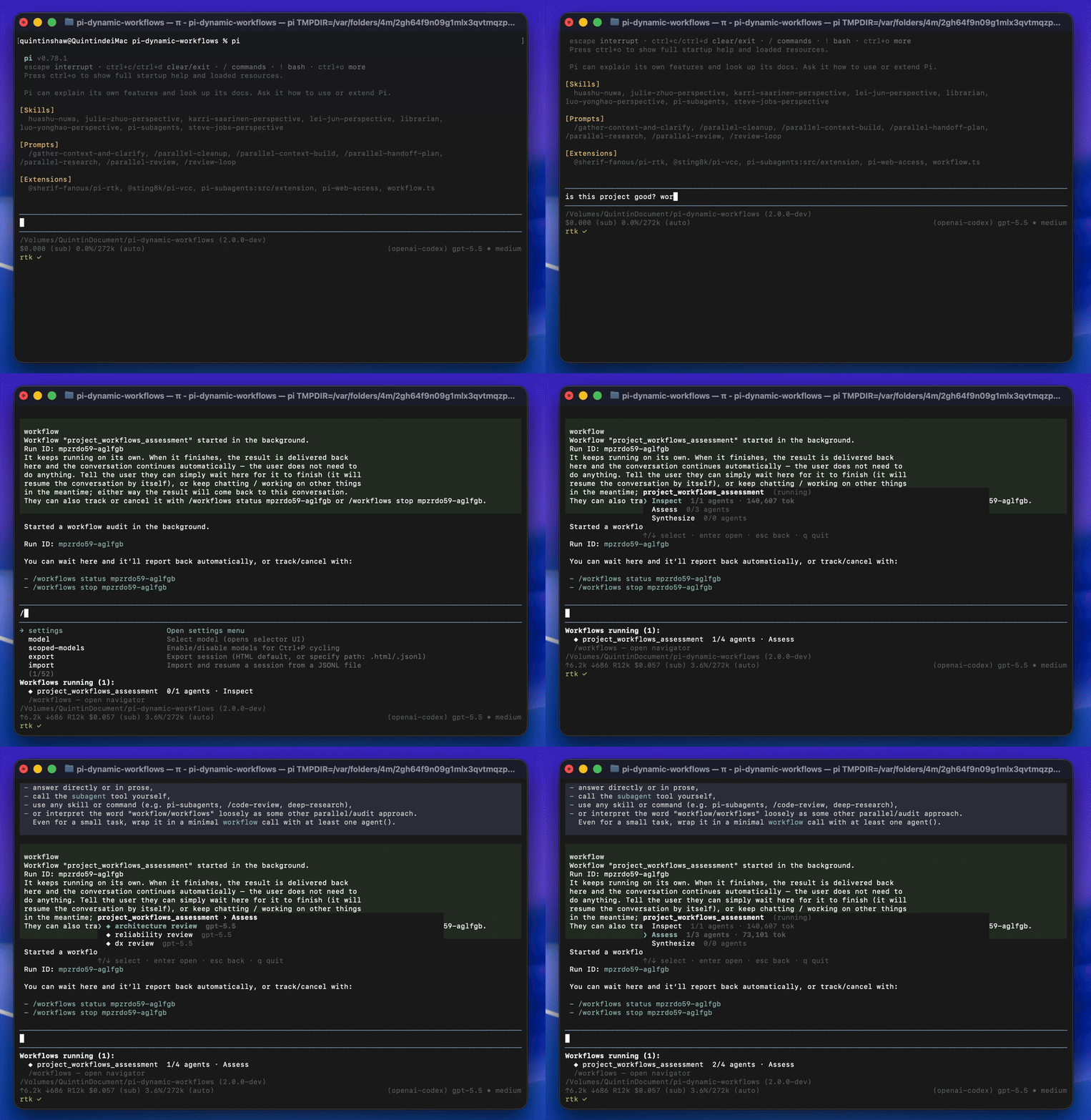
Instead of one model grinding a task step by step, Pi writes a small JavaScript orchestration script that spawns many subagents at once, keeps the intermediate work in script variables (not your chat context), and returns only the result. It's the "code mode for subagents" from Claude Code — on any model Pi can reach.
Built for codebase-wide audits, multi-perspective review, large refactors, and cross-checked research — anything one context window can't hold.
Install
pi install npm:@quintinshaw/pi-dynamic-workflows
Then /reload in Pi. You get the workflow tool plus the /workflows, /deep-research, and /adversarial-review commands.
Try it
Ask in plain language:
Run a workflow to audit every route under src/routes/ for missing auth checks.
Pi writes the script and runs it in the background — your turn ends immediately and a live panel tracks progress while you keep working. Or just type workflow or workflows in any message to force one. To force one explicitly — even with the keyword trigger off — run /workflows run <prompt>. If that causes false triggers, set a custom trigger such as pi-workflow with /workflows-trigger set pi-workflow or by adding { "keywordTriggerWord": "pi-workflow" } to ~/.pi/workflows/settings.json. With that setting, only pi-workflow auto-arms workflows mode. If you only want to discuss workflows without triggering one, run /workflows-trigger off; preferences are saved for new sessions. Check the current state with /workflows-trigger status, and turn it back on with /workflows-trigger on.
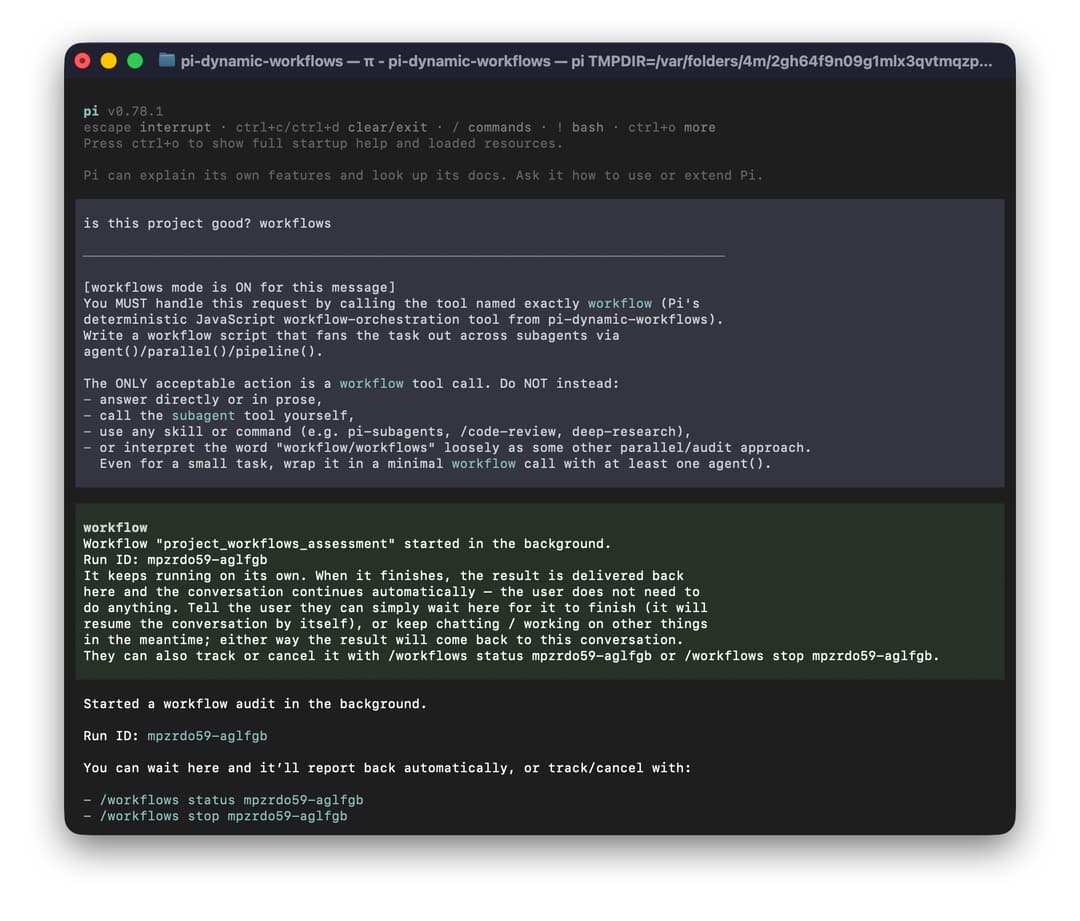
If another Pi extension has already installed a custom editor component, pi-dynamic-workflows leaves it in place and keeps the submit-time workflow trigger active. In that compatibility mode, the animated keyword highlight and Backspace one-shot disarm affordance are skipped because the existing editor remains responsible for rendering and input handling; use /workflows-trigger off or /workflows-trigger set <word> when you need to discuss workflow/workflows without auto-triggering, including in future sessions. Editor composition is load-order dependent: whichever extension installs a visual editor last owns the editor surface, while pi-dynamic-workflows still keeps its submit-time hook registered.
What a workflow looks like
Plain JavaScript. The first statement exports literal metadata; then you orchestrate:
export const meta = {
  name: 'auth_audit',
  description: 'Find routes missing auth checks and verify the findings',
  phases: [{ title: 'Scan' }, { title: 'Review' }, { title: 'Verify' }],
}

phase('Scan')
const files = await agent('List every route file under src/routes/.', { tier: 'small' })

phase('Review')
const findings = await parallel(
  files.split('\n').filter(Boolean).map((file) =>
    () => agent(`Audit ${file} for missing auth checks.`, { tier: 'medium', isolation: 'worktree' }),
  ),
)

phase('Verify')
return await agent('Synthesize and double-check these findings:\n' + findings.join('\n\n'), { tier: 'big' })
agent() spawns an isolated subagent, parallel() runs many at once, phase() groups them in the live view, and tier routes each one to the right model. That's the whole idea.
Highlights
- Fan-out orchestration —
agent(),parallel(),pipeline(),phase()in a sandboxed script. Up to 16 concurrent / 1000 total subagents; intermediate results stay in variables, not the chat. - Real model routing —
small/medium/bigtiers (or an exactmodel) per agent. It actually switches the subagent's model — cheap work on a light one, hard synthesis on a big one. - Journaled resume — an interrupted run replays finished agents from a journal (no re-run, no tokens) and runs only what's left or what you changed.
- Git worktree isolation —
isolation: "worktree"gives an agent its own branch, so parallel agents can edit the same files without clobbering each other. - Real token & cost accounting — read from each subagent's session, not estimated. Runs have no default token cap;
tokenBudget, phase budgets, andbudgetlet you add explicit gates when you want them. - Background by default — the turn ends right away, a live "Workflows running" panel tracks runs, and each result is delivered back so the conversation auto-continues when it finishes. The panel is compact by default;
/workflows-progress detailedexpands it inline to per-phase/per-agent rows with tokens, cost, and a live tok/s rate (so a stalled agent shows as 0 tok/s) — no need to open/workflows. - Interactive
/workflowsTUI — drill runs → phases → agents → detail; inspect per-agent failures and compact subagent history; pause, stop, restart, and save runs from the keyboard. - Quality patterns built in —
verify(),judgePanel(),loopUntilDry(), andcompletenessCheck()for adversarial review, best-of-N, and exhaustive discovery. - Ultracode —
/ultracodeis a standing opt-in that auto-arms an exhaustive multi-agent workflow for every substantive message, the way Claude Code's ultracode does./effort highis the lighter tier. - Bundled
/deep-research+/adversarial-review— real web search, source cross-checking, and cited reports. - Saved & nested workflows — turn any run into a
/<name>command, and compose saved workflows from inside other scripts.
How it maps to Claude Code dynamic workflows
The same model — on Pi, plus the production pieces a real run needs:
| Claude Code dynamic workflows | pi-dynamic-workflows (on Pi) |
|---|---|
| Code-mode orchestration — the model writes a script that drives subagents | A JS workflow tool running agent() / parallel() / pipeline() / phase() in a vm sandbox |
| Subagents with isolated context | Fresh in-memory Pi sessions; results held in script variables, not the chat |
| Structured outputs | JSON-Schema schema → a validated object, with bounded repair if the model misses |
| Background runs | Non-blocking by default, a live task panel, and auto-continue delivery |
| Resume | Journaled + replayable — survives restarts and replays the unchanged prefix |
| Model selection | Per-agent / per-phase routing across any provider Pi is authenticated for |
| Ultracode (standing maximal-effort opt-in) | /ultracode (or /effort ultra) — auto-arms an exhaustive workflow for every substantive message |
| — | Git worktree isolation, real cost accounting, /deep-research, and a quality-pattern stdlib |
Commands
/workflows                  open the interactive navigator (plain list in print mode)
/workflows status <id>      watch a run live; print its result when it finishes
/workflows save <name>      save the latest run's script as a reusable /<name> command
/workflows pause|resume|stop|rm <id>
/workflows-trigger off|on|status
                            persistently disable, restore, or inspect keyword triggering
/workflows-trigger set <word>|reset
                            customize or reset the keyword trigger word (default "workflow",
                            also matches "workflows"; custom words match exactly, case-insensitive)
/workflows run <prompt>     force a dynamic workflow from <prompt> on demand — the explicit
                            twin of the keyword trigger. Works even when the keyword trigger
                            is off (/workflows-trigger off); the run shows in the panel + /workflows.
/workflows-progress compact|detailed|status
                            switch the live panel between the compact one-liner and the detailed
                            per-phase/per-agent view (with tokens, cost, and a live tok/s rate)
/workflows-progress-max <N> cap agents shown per phase in detailed mode (1-1000, default 8)
/workflows-models           map the small / medium / big tiers to real models
/ultracode [off]            ultracode: auto-arm an exhaustive workflow for every substantive message
/effort off|high|ultra      finer control over the standing opt-in (high = thorough, ultra = ultracode)

/deep-research <question>   web-researched, source-cross-checked report
/adversarial-review <task>  findings vetted by skeptical reviewers
In the navigator: ↑/↓ select · enter/→ open · esc/← back · p pause · x stop · r restart · s save · q quit. Each agent shows the model it ran on; the detail view shows its prompt, result, error diagnostics, and compact message/tool history.
Storage
Workflow state is stored under ~/.pi/workflows so projects do not accumulate extension-owned .pi/workflows directories. Global settings and model tiers live at ~/.pi/workflows/settings.json and ~/.pi/workflows/model-tiers.json; project-scoped run history, resume journals, locks, and saved workflow overrides live under ~/.pi/workflows/projects/<project>/. Older project-local .pi/workflows/runs and .pi/workflows/saved data is still read as a fallback, but new writes go to the user-level workflow store.
To avoid accidental keyword triggers, configure a custom trigger word in ~/.pi/workflows/settings.json:
{
  "keywordTriggerWord": "pi-workflow"
}
The default "workflow" preserves the legacy behavior and also matches "workflows". Custom trigger words are literal, case-insensitive terms with no spaces and no leading slash; for example, "pi-workflow" does not match "workflow", "workflows", or "pi-workflows".
Reference
The full guide — every global, agent option, agentType definitions, structured output, and determinism — lives on the website. The essentials:
| Global | What it does |
|---|---|
agent(prompt, opts) | Spawn an isolated subagent. Returns its final text, or a validated object with opts.schema; recoverable failures return null with diagnostics in /workflows. |
parallel(thunks) | Run () => agent(...) thunks concurrently; results in input order. |
pipeline(items, ...stages) | Fan items through sequential stages (prev, original, index). |
phase(title, { budget? }) | Group agents in the live view; optional per-phase token sub-budget. |
verify / judgePanel / loopUntilDry / completenessCheck | Built-in quality patterns. |
workflow(name, args) | Run a saved workflow inline (shares the global caps). |
checkpoint(prompt, opts) | A journaled, replayable human approval gate. |
budget | { total, spent(), remaining() } real-token tracker. |
| Agent option | Description |
|---|---|
tier | "small" | "medium" | "big" — coarse model routing (configure via /workflows-models). |
model | Exact provider/modelId (always wins over tier). |
agentType | A named definition (.pi/agents/<name>.md) binding tools + model + role prompt. |
isolation: "worktree" | Run in a throwaway git worktree for conflict-free parallel edits. |
schema | JSON Schema → the subagent returns a validated object. |
label / phase / timeoutMs | Display label / phase override / optional per-agent hard timeout. Omit timeoutMs for no hard timeout. |
retries | Retry attempts after a recoverable failure (timeout, connection failure, empty output) for this agent. Overrides the run-level agentRetries. Default 0. |
By default, workflows do not set a run-wide token budget or per-agent hard timeout. Use the workflow tool's tokenBudget / agentTimeoutMs, per-phase budgets, or per-agent timeoutMs only when you want an explicit cap. A global fallback timeout can also be set in ~/.pi/workflows/settings.json as { "defaultAgentTimeoutMs": 600000 }; set it to null or omit it for no default hard timeout.
For larger or flakier fan-outs, the workflow tool also accepts concurrency (max agents running at once, clamped to the runtime maximum of 16) and agentRetries (retry attempts after a recoverable agent failure such as a timeout, connection failure, or empty output). Both can be defaulted in ~/.pi/workflows/settings.json as { "defaultConcurrency": 4, "defaultAgentRetries": 2 }; a per-run tool value overrides the default, and a per-agent retries overrides agentRetries. Retries default to 0 (off) unless configured or passed, and only recoverable failures retry — nonrecoverable errors still abort the run.
The live "Workflows running" panel is configured in the same ~/.pi/workflows/settings.json: "progressPanelMode" is "compact" (default, one line per run) or "detailed" (per-phase/per-agent rows with tokens, cost, and a live tok/s rate), and "progressPanelMaxAgents" (default 8, range 1–1000) caps how many agents each phase shows in detailed mode before a … N earlier agents line. Toggle them live with /workflows-progress compact|detailed and /workflows-progress-max <N> — changes take effect on the next render without a restart.
Workflows run in a Node vm sandbox; Date.now(), Math.random(), new Date(), and require/import/fs/network are unavailable, so runs stay reproducible — which is what makes resume reliable.
Development
npm install
npm test     # biome + tsc + unit tests
Every feature is also verified end-to-end against a real Pi subagent session before release.
Credits
The "code mode for subagents" idea comes from Michael Livs' original pi-dynamic-workflows and Anthropic's dynamic workflows in Claude Code. This project builds on it with real model routing, journaled resume, git-worktree isolation, cost accounting, an interactive TUI, and deep research.
License
MIT — see LICENSE.
// faq
What is pi-dynamic-workflows?
Claude Code–style dynamic workflows for Pi: code-mode subagents with real model routing, journaled resume, git-worktree isolation, cost accounting, an interactive /workflows TUI, an /ultracode standing opt-in, and deep research.. It is open-source on GitHub.
Is pi-dynamic-workflows free to use?
pi-dynamic-workflows is open-source under the MIT license, so it is free to use.
What category does pi-dynamic-workflows belong to?
pi-dynamic-workflows is listed under automation in the Claudeers registry of Claude-compatible tools.
// embed badge

[](https://claudeers.com/pi-dynamic-workflows)
// retro hit counter

[](https://claudeers.com/pi-dynamic-workflows)
// reviews
// guestbook
// related in Developer Tools
 🔓
🔓The agent harness performance optimization system. Skills, instincts, memory, security, and research-first development for Claude Code, Codex, Opencode, Curs…
 🔓
🔓Makes your AI agent think like the laziest senior dev in the room. The best code is the code you never wrote.
 🔓
🔓Use Garry Tan's exact Claude Code setup: 23 opinionated tools that serve as CEO, Designer, Eng Manager, Release Manager, Doc Engineer, and QA
 🔓
🔓AI coding assistant skill (Claude Code, Codex, OpenCode, Cursor, Gemini CLI, and more). Turn any folder of code, SQL schemas, R scripts, shell scripts, docs,…