
physics-clawd-pet
An interactive desktop pet with exaggerated cartoon physics & real-time AI coding agent integration (Claude Code, Codex, DeepSeek, Antigravity).
Install with your AI
Paste into Claude Code, Cursor, or any agent — it reads the repo and wires the tool into your project.
Install and set up physics-clawd-pet (git-clone project) into my current project.
Found on https://claudeers.com/physics-clawd-pet
Repo: https://github.com/Ramirez0291/physics-clawd-pet
Homepage/docs: —
Detected install method: git-clone → git clone https://github.com/Ramirez0291/physics-clawd-pet
Category: productivity. Platforms: cli, api, desktop, web.
Read the repo's README for exact setup and env vars, then install it and wire it into my project.

Claudeers Health Verdict:
unknown; community-verified: false. Confirm the source before running anything.
git clone https://github.com/Ramirez0291/physics-clawd-pet
// compatibility
| Platforms | cli, api, desktop, web |
|---|---|
| Operating systems | — |
| AI compatibility | claude |
| License | NOASSERTION |
| Pricing | open-source |
| Language | TypeScript |
Physics Clawd Pet
A desktop pet with exaggerated cartoon physics.
一只物理效果夸张到离谱的桌宠。
Grab it, fling it across your screen, and watch it tumble, superhero-land, or stick to the wall like Spider-Man.
It also keeps an eye on your AI agent: Claude Code, Codex, DeepSeek Harness or Antigravity.
把它拎起来甩出去:翻滚落地、超级英雄式砸地,或者像蜘蛛侠一样贴在屏幕边上。
它还会盯着你的 AI 干活:Claude Code、Codex、DeepSeek Harness、Antigravity 都行。
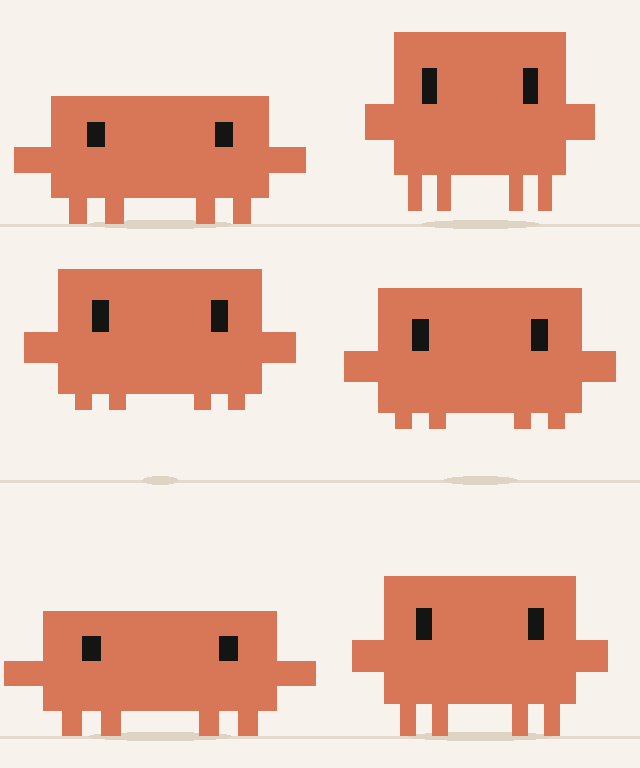 | 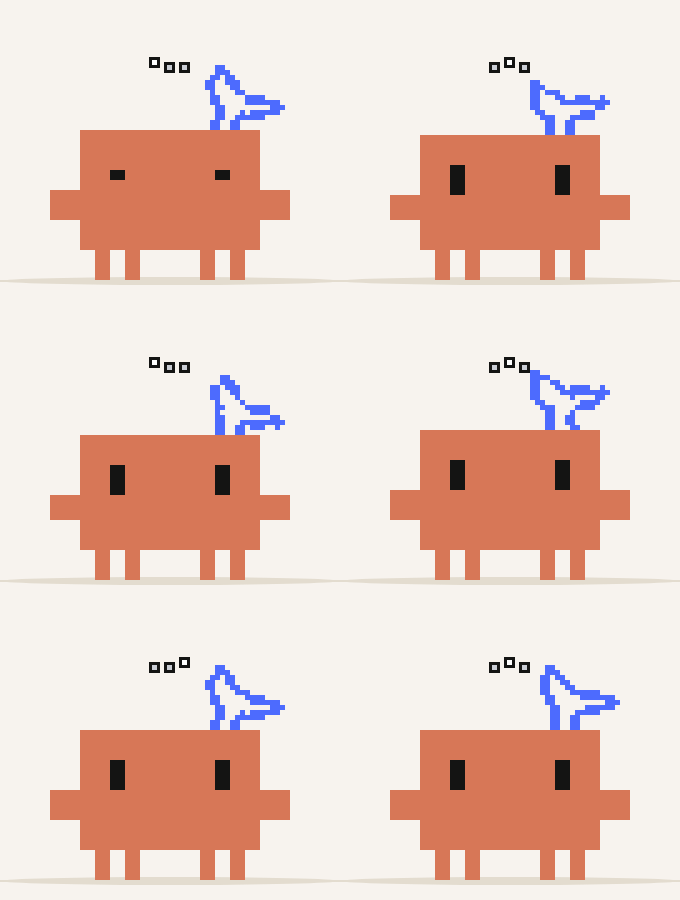 | 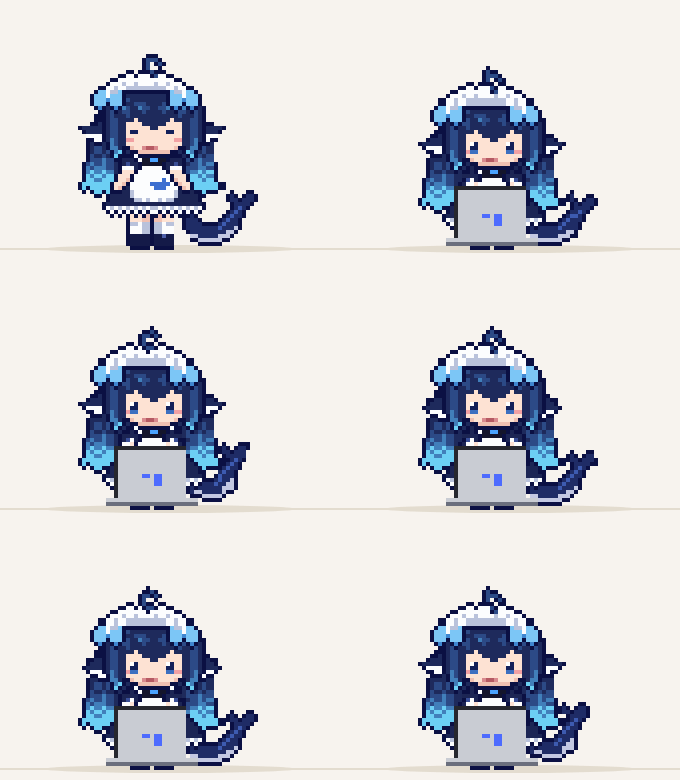 |  |
| Clawd jumping | Clawd? thinking | DeepSeek-chan at work | miss.claude head pats |
English
What it does
Throw it around
- Pick it up and fling it. It swings like a pendulum while you hold it. Grab it by a leg and it hangs upside down. Shake it too hard and it gets dizzy.
- Landings depend on how hard it hits: a soft landing, a bounce, a roll, a superhero landing, or a faceplant.
- Sticks to walls and the ceiling when it hits them fast enough, then crawls along the edge or backflips off.
- Satisfying impacts: hit-stop, squash and stretch, motion trails, dust clouds and impact lines.
- Faces that react. > < when it's zapped or flung, ^ ^ when you pet it, wide eyes when you pick it up, a smug look after a superhero landing, a tear when the stock market crashes.
It lives on your desktop
- Stands on your windows. It lands on title bars, hops between nearby windows and jumps off the edge. Drag a window gently and it rides along; stop suddenly and inertia flings it off; close the window and it falls.
- Has a life of its own. It walks along the taskbar (the Dock on macOS), climbs walls, hangs from the ceiling and follows your cursor with its eyes. Sometimes it plays on a laptop, trades stocks or eats token coins.
- Roams across all your monitors. Your screens form one world. A screen running a full-screen game, video or slides is off-limits; the others stay in play. On macOS the overlay follows the pet from display to display.
- Pet it by wiggling your cursor over its head.
- Stays out of your way. It walks away from the text box you're typing in, never steals focus, and every click that misses the pet goes straight through to the window below.
It keeps you on schedule
- Hourly chime, break reminders after 45 minutes of real keyboard and mouse use, calendar events from any iCal link or
.icsfile, and to-dos with due times. Reminders appear as a speech bubble and the pet waits until you answer.
It works with your AI agent (optional, off by default)
Turn it on from Assistant → Claude Code / Codex / DeepSeek / Antigravity. While the agent thinks, a "…" bubble appears; while it works, the pet types on a laptop; it sweeps while context is compacted, gets zapped by errors, drops a mini pet for every subagent, and cartwheels with confetti when a turn finishes. When the agent asks for permission, the pet runs to that window and stomps, and you can answer Allow / Deny right on its bubble.
| How it connects | Approve from the bubble | |
|---|---|---|
| Claude Code | Adds hooks to ~/.claude/settings.json | Yes; answer in the terminal and the bubble goes away |
| Codex | Adds hooks to $CODEX_HOME/hooks.json (default ~/.codex/hooks.json); trust them with /hooks in Codex | Yes, or reminders only |
| DeepSeek Harness | Installs a small plugin in ~/.dsh/clawd-pet/ and a marked block in ~/.dsh/cordis.patch.yml; loaded live, no restart | Yes; the bubble and DSH's own panel race, and the first answer wins |
Antigravity (app, IDE, agy CLI) | Adds a clawd-pet hook set to ~/.gemini/config/hooks.json plus clawd-pet-hook.cmd next to it; start a new conversation after enabling | Optional; Antigravity has no permission event, so every shell command waits for the bubble |
Your own hooks and settings are left alone, the first change backs the file up as *.clawd-backup, turning a link off removes only the pet's entries, and the Windows uninstaller cleans them all up. Each reaction can be turned off separately, and all four links can run at once. Cloud sessions and remote/WSL runtimes can't reach the pet's localhost bridge.
Characters
Switch from the tray's Character menu.
- Clawd: Claude Code's mascot, pixel art. It's rotated on a low-res grid and scaled with nearest-neighbor, so the pixels stay crisp mid-spin.
- Clawd?: some AI resellers pass DeepSeek off as "Claude". This Clawd grew a little blue DeepSeek tail, drawn after DeepSeek Harness's thinking animation, and it spins while the AI is thinking.
- DeepSeek-chan: a chibi whale maid in pixel art. Her arms swing from real shoulder joints, her tail, ears and ahoge sway, she sits down with the laptop on her lap to type, and her eyes and mouth change with every mood.
- Dots ×4: smooth, fluffy characters with procedurally generated fur: blue with a tilted beret, lime green with eyes on top, yellow with round glasses, and pink with headphones. They shake tufts of fur loose.
Download
Grab it from Releases.
- Windows: run the installer. Requires Windows 10 or 11 with WebView2 (already included in Windows 11).
- macOS: open the
.dmgand drag Clawd Pet into Applications. The app isn't notarized yet, so the first time go to System Settings → Privacy & Security and click Open Anyway. Dodging text boxes needs the Accessibility permission; turn it on from the tray menu.
How to use
| Action | How |
|---|---|
| Throw | Drag the pet and let go while moving the mouse |
| Pet | Wiggle the cursor back and forth over its head |
| To-dos, calendar, reminders, AI links | Tray icon → right-click → Assistant |
| Switch character / change size | Tray icon → right-click → Character / Size |
| Lost it? | Tray icon → right-click → Bring Clawd back |
| Hide / show | Tray icon → right-click → Hide Clawd |
| Tuning panel | Left-click the tray icon |
Menus, the Assistant window and what the pet says follow your system language: Chinese, Japanese (where Clawd speaks Osaka dialect; it's an Osaka crab now) or English. The tuning panel is in Chinese for now.
Tuning panel
The panel opens with just the everyday controls. Use Physics / Behavior / Appearance for the rest; parameter groups expand one at a time, and search looks across every category. Action menu opens a categorized popup for activities, window play, reminders and test throws. Detailed telemetry and JSON tools stay folded away until needed.
Everything about the feel is adjustable live: gravity, bounciness, landing thresholds, walking speed, size and 60+ other parameters, plus slow motion, pause and single-step, repeatable test throws and "replay last throw". Save writes tuning.json under %APPDATA%\com.physicsclawdpet.desktop\ (Windows) or ~/Library/Application Support/com.physicsclawdpet.desktop/ (macOS).
Build from source
Requirements: Node.js 20+ and Rust, plus Visual Studio C++ Build Tools and WebView2 on Windows, or the Xcode Command Line Tools on macOS.
npm install
npm run tauri dev     # run with the tuning panel open
npm run tauri build   # installer → src-tauri/target/release/bundle/
npm run dev           # physics only, in the browser: http://localhost:1420, press D for the tuning panel
npm test
Project layout
src/
  engine/     Physics, state machine, procedural animation and expressions. Pure logic, unit-tested.
  render/     Pixel-art rasterizer, smooth/fur renderer and effects
  overlay/    Main loop, input, AI-agent reactions, reminder bubbles
  assistant/  To-dos, iCal, reminder scheduler, Assistant window
  debug/      Tuning panel
  platform/   Tauri and browser implementations
  skin/       Skin format and loader
skins/        Built-in characters
scripts/      pixel-skin.mjs (layered ASCII → pixel skin) and skins/*.mjs
src-tauri/    Rust: overlay window, tray, window tracking, AI-agent bridge
  dsh/            The DeepSeek Harness plugin
  src/platform/   windows/ (Win32) and macos/ (AppKit, CoreGraphics)
tests/        Engine and integration tests
Custom skins
A skin is one JSON file: a grid size, a palette and a list of parts. Each part has one of four roles, body, eye, arm or leg, and all movement is generated from those roles, so a new character needs no animation frames. Drop it in its own folder under skins/ and it appears in the Character menu.
- Simple pixel art: parts are colored rectangles. See
skins/clawd/skin.json. - Detailed pixel characters: parts can be pixel images (
pixels+ a skin-levellegend). Give arms a shoulderpivotand every animation turns into arm rotation; addswayfor tails, ears and ahoge,anchoredfor parts that stay on the floor,closedeye frames, andfacesfor per-expression eyes and mouths (happy,surprised,wince,cry,smug,focus,eat,yawn)."laptop": "lap"makes the character sit down to type. Draw it as layered ASCII art and letscripts/pixel-skin.mjsbuild the JSON; seescripts/skins/deepseek.mjsandnpm run skin:deepseek. - Smooth and furry:
"render": "smooth"with shapes (ellipse,cloud,pear,onigiri,frog,bow,arch,eyelid),rot,outlineandfur(length,density,curl,light,shade). Seeskins/dots/skin.json. - Reference-art characters:
"render": "sprite"uses transparent PNG parts, source-image masks and shoulder pivots to retain the artwork's detail. See miss.claude andnpm run skin:miss-claude. - Humanoid motion category:
"category": "humanoid"separates human poses from creature gestures. A skin can supply amotionsatlas for walking, affection, reading, writing and physics reactions; human characters appear in their own Character submenu. - Window play: miss.claude can sit on title bars, walk to an edge and peek down, balance on dragged windows, stumble after a gentle stop, and crouch before jumping between windows. Strong inertia still flings her off; closing a window removes her support.
"actions"picks idle activities fromlaptop,stocks,coinandshake; eye parts can lower"gaze"to keep pupils inside big eyeballs.
npm run dev and http://localhost:1420/preview.html shows the Dots side by side at large and desktop sizes.
License
The engine code is released under the MIT License. The characters are fan art and are not covered by it:
- Clawd is the mascot of Anthropic's Claude Code. Not affiliated with or endorsed by Anthropic. See
skins/clawd/README.md. - Clawd? and DeepSeek-chan riff on Clawd and DeepSeek. Not affiliated with or endorsed by Anthropic or DeepSeek. See
skins/clawd-dsh/README.mdandskins/deepseek/README.md. - Dots is OpenAI's character. Not affiliated with or endorsed by OpenAI. See
skins/dots/README.md.
中文
能做什么
甩着玩
- 拎起来甩出去: 拎着的时候像钟摆一样晃,抓腿会倒挂,甩太猛会晕。
- 落地看冲击力: 普通落地、弹跳、翻滚、超级英雄落地,或者脸着地。
- 贴墙: 高速撞到屏幕边或天花板会贴住,然后沿着边爬,或者蹬墙后空翻跳下来。
- 打击感拉满: 顿帧、果冻形变、速度拉伸、残影、烟尘和冲击线。
- 有表情: 被电、被甩 > <,被摸 ^ ^,被拎起来瞪大眼,超级英雄落地一脸得意,炒股大跌掉眼泪。
住在你的桌面上
- 站在窗口上: 落在窗口顶上,在附近的窗口之间跳来跳去,走到边缘再跳下去。平稳拖动窗口会带着它走,急停会把它甩飞,窗口关掉它就掉下去。
- 自己会玩: 在任务栏(macOS 上是程序坞)上走、爬墙、倒挂天花板,眼睛跟着鼠标转;有时还会玩电脑、炒股、吃 TOKEN。
- 多块屏幕随便跑: 几块显示器拼成一个世界;某块屏幕在全屏玩游戏、看视频、放幻灯片时它不去,其他屏幕照常。macOS 上覆盖层会跟着它换屏幕。
- 可以摸摸它: 在它头上来回晃鼠标。
- 不碍事: 你在哪个输入框打字它就让开;不抢焦点,没点中它的点击都穿透到下面的窗口。
帮你守时间
- 整点报时、连续用电脑 45 分钟的休息提醒(按真实键鼠操作算)、订阅任意 iCal 链接或本地
.ics的日历、带截止时间的待办。提醒会在它头顶冒对话气泡,它会站着等你回应。
盯着你的 AI 干活(可选,默认关闭)
在 小助手 → Claude Code / Codex / DeepSeek / Antigravity 里开启。AI 思考时头顶冒"……",干活时敲电脑,压缩上下文时扫地,出错被电一下,每派一个子代理就掉下来一只迷你小人,一轮干完后空翻撒彩纸。AI 要权限时,它会跑到那个窗口上跺脚,气泡上直接点 允许 / 拒绝。
| 怎么接上的 | 能在气泡上批准吗 | |
|---|---|---|
| Claude Code | 往 ~/.claude/settings.json 里加 hooks | 能;在终端里答了,气泡自动收起 |
| Codex | 往 $CODEX_HOME/hooks.json(默认 ~/.codex/hooks.json)里加 hooks,需要在 Codex 里用 /hooks 信任 | 能,也可以只提醒 |
| DeepSeek Harness | 在 ~/.dsh/clawd-pet/ 装个小插件,并在 ~/.dsh/cordis.patch.yml 里加一段带标记的配置;自动加载,不用重启 | 能;气泡和 DSH 自己的审批面板哪边先答算哪边 |
Antigravity(App、IDE、agy CLI) | 往 ~/.gemini/config/hooks.json 里加一组 clawd-pet hooks,旁边放个 clawd-pet-hook.cmd;开启后新开一个对话 | 可选;Antigravity 没有权限事件,开了以后每条 shell 命令都先等气泡 |
不动你自己的 hooks 和配置,第一次修改前备份成 *.clawd-backup,关闭联动只删桌宠自己的条目,Windows 卸载时也会一并清理。每种反应都能单独关,四种联动可以同时开。云端会话和远程 / WSL 运行环境连不到本机的桥接服务。
形象
在托盘的 形象 菜单里切换。
- Clawd:Claude Code 的吉祥物,像素风。先在低分辨率网格里旋转再最近邻放大,翻滚时像素块也不会糊。
- Clawd?:有些 AI 中转站拿 DeepSeek 冒充 Claude 卖。于是这只 Clawd 长出了一条 DeepSeek 的蓝色小尾巴,照着 DeepSeek Harness 思考时的动画画的,AI 思考时甩得飞快。
- DeepSeek 娘:Q 版鲸鱼女仆像素小人。手臂有真正的肩关节,尾巴、耳朵、呆毛会自己晃,敲电脑时坐下来把电脑放在腿上,眼睛和嘴巴跟着心情变。
- Dots ×4:平滑画风、程序生成毛发的毛球:蓝色斜戴贝雷帽、青柠绿头顶大眼睛、黄色圆眼镜、粉色戴耳机,会抖毛。
下载
到 Releases 下载。
- Windows: 运行安装程序。需要 Windows 10 / 11 和 WebView2(Windows 11 自带)。
- macOS: 打开
.dmg,把 Clawd Pet 拖进"应用程序"。还没经过 Apple 公证,第一次打开到"系统设置 → 隐私与安全性"里点 仍要打开。躲输入框需要"辅助功能"权限,在托盘菜单里打开。
怎么玩
| 操作 | 方法 |
|---|---|
| 甩 | 按住拖动,边移动鼠标边松手 |
| 摸摸 | 在它头上来回晃鼠标 |
| 待办、日历、提醒、AI 联动 | 托盘图标右键 → 小助手 |
| 换形象 / 调大小 | 托盘图标右键 → 形象 / 大小 |
| 找不到它了 | 托盘图标右键 → 把 Clawd 叫回来 |
| 隐藏 / 显示 | 托盘图标右键 → 隐藏 Clawd |
| 调教面板 | 左键点托盘图标 |
菜单、小助手窗口和它说的话都跟随系统语言:中文、日文(日文版的 Clawd 是只大阪螃蟹,说关西腔)或英文。调教面板目前只有中文。
调教面板
首页只放常用调节,其他参数在 物理 / 行为 / 外观 分类中按组展开,搜索会查找全部分类。点 动作菜单,在分类弹框里选择日常互动、窗口玩耍、提醒或测试投掷,执行后菜单自动收起。详细状态、JSON 导入导出等工具也收起来了,需要时再打开。
手感全都能实时调:重力、弹性、落地分级阈值、走路速度、大小等 60 多个参数,还有慢动作、暂停和单步、可重复的测试投掷、"重放上次投掷"。点 保存 写进 tuning.json:Windows 在 %APPDATA%\com.physicsclawdpet.desktop\,macOS 在 ~/Library/Application Support/com.physicsclawdpet.desktop/。
从源码构建
需要 Node.js 20+ 和 Rust;Windows 上还要 Visual Studio C++ 生成工具和 WebView2,macOS 上还要 Xcode 命令行工具。
npm install
npm run tauri dev     # 开发模式,会同时打开调教面板
npm run tauri build   # 打包 → src-tauri/target/release/bundle/
npm run dev           # 只玩物理,浏览器打开 http://localhost:1420,按 D 打开调教面板
npm test
目录结构见上面英文部分的 Project layout。
自制皮肤
皮肤就是一个 JSON 文件:网格大小、调色板和一组部件。每个部件标一个角色:body、eye、arm 或 leg,所有动作都按角色程序化生成,所以做新角色不用画动画帧。在 skins/ 下新建目录放进去,就会出现在 形象 菜单里。
- 简单像素风: 部件就是纯色矩形,参考
skins/clawd/skin.json。 - 精细的像素角色: 部件可以是像素图(
pixels+ 皮肤的legend)。给手臂一个肩关节pivot,所有动作都会变成绕肩旋转;sway让尾巴、耳朵、呆毛自己晃,anchored让部件贴地不动,closed是闭眼图,faces给每种表情(happy、surprised、wince、cry、smug、focus、eat、yawn)画眼睛和嘴巴。"laptop": "lap"让角色坐下来敲电脑。用分层的 ASCII 像素图画,交给scripts/pixel-skin.mjs生成 JSON,参考scripts/skins/deepseek.mjs和npm run skin:deepseek。 - 平滑、毛茸茸:
"render": "smooth",配合各种形状(ellipse、cloud、pear、onigiri、frog、bow、arch、eyelid)、rot、outline和fur(length、density、curl、light、shade),参考skins/dots/skin.json。 - 保留原画细节:
"render": "sprite"使用透明 PNG 裁片、轮廓蒙版和肩关节,直接适配人物设定图。参考 miss.claude,用npm run skin:miss-claude重新生成配置。 - 拟人动作类别:
"category": "humanoid"将人物姿态与宠物动作分开;皮肤可通过motions提供行走、读写及物理反应图集。人物会出现在「形象 → 拟人角色」中。 - 窗口游乐场: miss.claude 会坐在标题栏上晃腿,走到边缘探头,拖窗时张手平衡,轻急停后踉跄,屈膝后跳到另一个窗口。猛急停仍会被惯性甩飞,脚下窗口消失仍会下落。
"actions"挑选小动作:laptop、stocks、coin、shake;眼睛部件可以调低"gaze",让瞳孔留在大眼球里。
运行 npm run dev,打开 http://localhost:1420/preview.html 可以并排检查几款 Dots 的放大效果和桌面大小。
许可
引擎代码以 MIT 许可 开源。各个形象都是同人作品,不在 MIT 许可范围内:
- Clawd 是 Anthropic 旗下 Claude Code 的吉祥物,与 Anthropic 无关,也不代表官方。详见
skins/clawd/README.md。 - Clawd? 和 DeepSeek 娘玩的是 Clawd 和 DeepSeek 的梗,与 Anthropic、DeepSeek 都无关,也不代表官方。详见
skins/clawd-dsh/README.md和skins/deepseek/README.md。 - Dots 是 OpenAI 的角色,与 OpenAI 无关,也不代表官方。详见
skins/dots/README.md。
// faq
What is physics-clawd-pet?
An interactive desktop pet with exaggerated cartoon physics & real-time AI coding agent integration (Claude Code, Codex, DeepSeek, Antigravity).. It is open-source on GitHub.
Is physics-clawd-pet free to use?
physics-clawd-pet is open-source under the NOASSERTION license, so it is free to use.
What category does physics-clawd-pet belong to?
physics-clawd-pet is listed under productivity in the Claudeers registry of Claude-compatible tools.
// embed badge

[](https://claudeers.com/physics-clawd-pet)
// retro hit counter

[](https://claudeers.com/physics-clawd-pet)
// reviews
// guestbook
// related in Productivity
 🔓
Agent skills for Obsidian. Teach your agent to use Obsidian CLI and open formats including Markdown, Bases, JSON Canvas.
 🔓
Open source repository of plugins primarily intended for knowledge workers to use in Claude Cowork
 🔓
Garry's Opinionated OpenClaw/Hermes Agent Brain
 🔓
An open-source alternative to Claude Cowork (powered by opencode)