
patch-cc
Interactive patcher for the Claude Code native binary. Live inline thinking, detailed tool calls, subagent model overrides, custom branding — and your ChatGP…
Install with your AI
Paste into Claude Code, Cursor, or any agent — it reads the repo and wires the tool into your project.
Install and set up patch-cc (pip project) into my current project.
Found on https://claudeers.com/patch-cc
Repo: https://github.com/anfreire/patch-cc
Homepage/docs: https://pypi.org/project/patch-cc/
Detected install method: pip → pip install patch-cc
Category: devtools. Platforms: cli, api.
Read the repo's README for exact setup and env vars, then install it and wire it into my project.

Claudeers Health Verdict:
active; community-verified: false. Confirm the source before running anything.
pip install patch-cc
git clone https://github.com/anfreire/patch-cc
// compatibility
| Platforms | cli, api |
|---|---|
| Operating systems | — |
| AI compatibility | claude |
| License | MIT |
| Pricing | open-source |
| Language | Python |
patch-cc
An interactive patcher for the Claude Code native binary. Pick the tweaks
you want — inline and live thinking, detailed tool calls, subagent model
overrides, your own startup name, your ChatGPT/Codex-plan GPT models as
native models — and apply them to your installed claude in one keystroke.
Fully reversible: a pristine backup is kept, patch-cc restore puts it back.
Pure Python; no Node, no Bun.
uvx patch-cc # fullscreen menu, no install needed
Requirements
- Linux or macOS
- Python 3.11+
- uv — how patch-cc is run and installed
below. Install it with
curl -LsSf https://astral.sh/uv/install.sh | sh. Not using uv?pipx install patch-cc(orpip install patch-cc) works too; it is an ordinary PyPI package. - macOS only: the Xcode command line tools, for
codesign— a patched binary has to be re-signed or macOS refuses to run it.
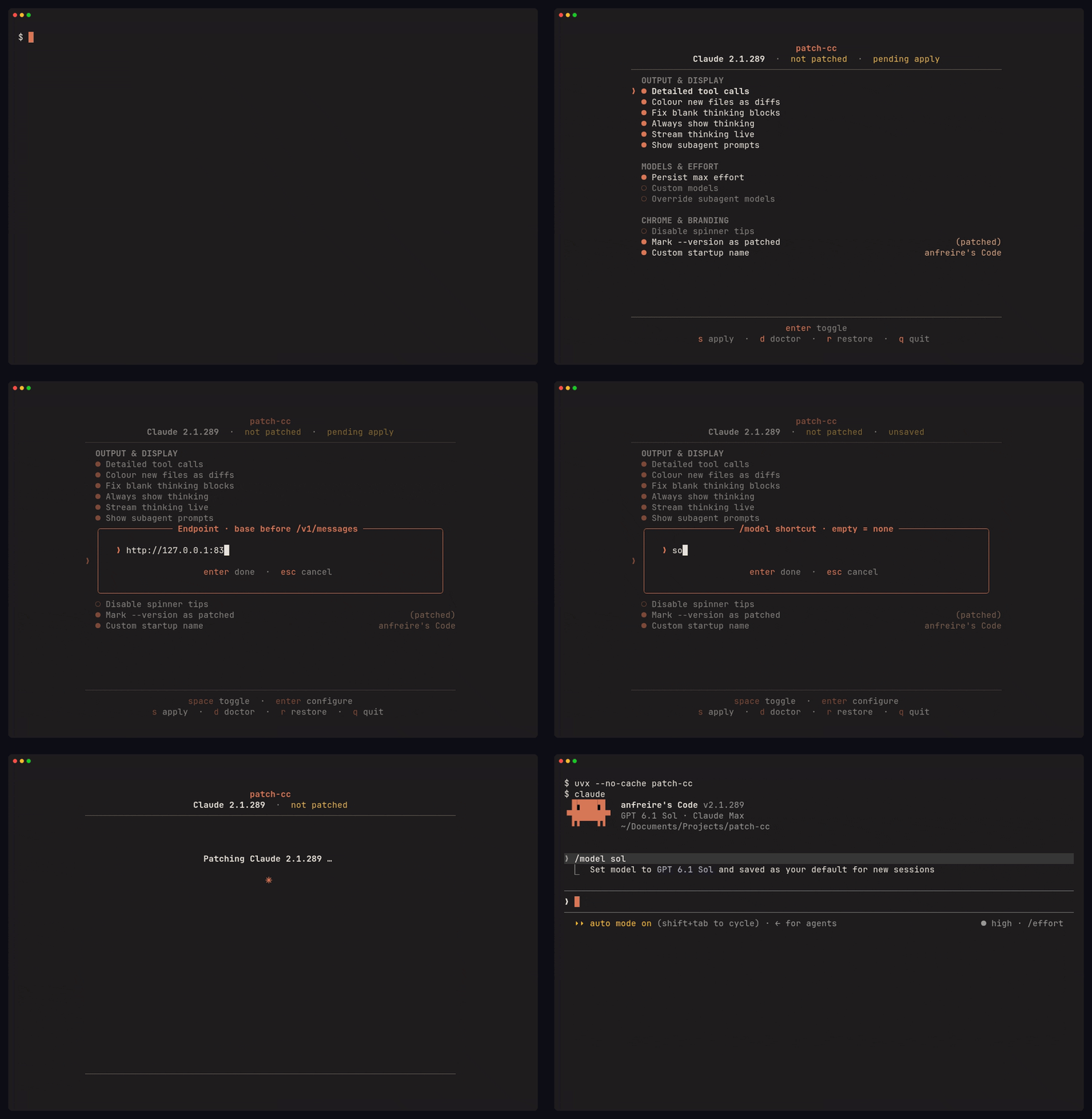
The menu is a single centered panel: move with ↑ ↓, toggle with space,
press s to save. Patches that carry a setting — subagent models, Codex models,
the startup name, the --version marker, the org/email label — open a centered
modal on enter, and the row then shows what you chose. Everything choosable
is a picker: the agent names and model aliases are discovered from your
binary itself (and the Codex ones from your plan), so the menu can never
offer something your build would reject. Typing exists only for the genuinely
free-text values.
A patched binary records what was applied inside itself, so the menu always
comes up showing the real current state, and patch-cc status answers
exactly.
Prefer it always available on your PATH? Install it:
uv tool install patch-cc
patch-cc                       # then just run it
What it can do
| Group | Patch | |
|---|---|---|
| Output & display | Detailed tool calls | Show full read/search calls, not collapsed summaries |
| Colour new files as diffs | Created files render with + lines and green | |
| Fix blank thinking blocks | Opt out of the server-side experiment that can empty every thinking block | |
| Always show thinking | Thinking blocks stay inline — no ctrl+o | |
| Stream thinking live | See reasoning as it is generated, inline and in order | |
| Show subagent prompts | Prompt blocks visible during normal use | |
| Models & effort | Persist max effort | /effort max saves as your default for new sessions, like the other levels |
| Codex models | Use OpenAI/Codex-plan models in Claude Code — see Codex models | |
| Override subagent models | Pick the model per built-in agent (discovered from your binary) | |
| Chrome & branding | Disable spinner tips | No rotating tips on the spinner |
Mark --version | Appends (patched) — or any marker you choose | |
| Custom startup name | Defaults to <your username>'s Code | |
| Startup org/email label | Replace the org/email on the welcome screen — or hide it |
Usage
Everything the menu does is also a non-interactive subcommand (shown with
uvx; drop it if you installed the tool):
uvx patch-cc apply                            # the default patch set
uvx patch-cc apply tool-calls live-thinking   # just these
uvx patch-cc apply --brand                    # + branding as <username>'s Code
uvx patch-cc apply --brand "Ada's Code"       # + branding, explicit name
uvx patch-cc apply --model Explore=haiku --model general-purpose=opus
uvx patch-cc apply --suffix "(mine)"          # custom --version marker
uvx patch-cc apply --org-label                # hide the welcome screen's org/email
uvx patch-cc apply --org-label "Ada's Lab"    # ...or show this instead
uvx patch-cc apply --codex gpt-5.6-sol        # + a Codex model (see below)
uvx patch-cc apply --from-cache               # replay your last remembered selection
uvx patch-cc status                           # exactly what is applied
uvx patch-cc doctor                           # do all patches match this build?
uvx patch-cc doctor path/to/claude            # ...or match some other binary
uvx patch-cc list                             # every patch, described
uvx patch-cc restore                          # put the original back
A flag that configures a patch also selects it — apply --help lists them
all. Agents and models are validated against what your installed binary
actually ships, and Codex model ids against what your plan offers.
Codex models
Bring your ChatGPT/Codex-plan models (GPT-5.x) into Claude Code and use them
alongside your Claude ones — in the /model picker, as a subagent override,
with /effort driving how hard they think. It is two halves: a patch that
teaches your binary to accept and route the models you pick, and a small
localhost gateway that translates between Claude Code and OpenAI. Only the
models you pick are diverted — every Anthropic request stays byte-identical,
so your Claude plan is untouched. Nothing extra to install: the gateway is pure
Python and ships with patch-cc; you just sign in to a ChatGPT or Codex plan.
uvx patch-cc codex login                 # sign in to your ChatGPT/Codex plan
uvx patch-cc                             # Codex models → pick models → save with `s`
uvx patch-cc codex serve                 # start the gateway; keep it running
Which models you want is a patch setting like the startup name, so the menu's Codex models row is where you pick them — it lists what your plan offers, live. Everything the menu does the command line does too:
uvx patch-cc apply --codex gpt-5.6-sol --codex gpt-5.5
uvx patch-cc apply --help                # lists the model ids your plan offers
uvx patch-cc apply --from-cache           # replay your last selection
Then pick a model like any other:
claude --model sol                       # shortcut → newest gpt-5.6-sol
claude --model gpt-5.6-sol               # the full id also works, as does /model
- Shortcuts (
sol,terra,luna, …) are the last word of the model id; the newest in a family wins, the wayopusmeans the latest Claude Opus. They are derived from the ids you picked — there is nothing to configure. - Your binary is the record. The models and the port live in the patched
binary, so
patch-cc statusnames exactly what is registered, andcodex servefinds the right port with nothing to tell it. - They read as native everywhere. A registered model is added to the
binary's own model table, so its real name shows in the status line and the
welcome banner, its plan-reported effort levels are declared, and
/advisor solworks like any other model. Ask for an effort the model doesn't run and the gateway quietly runs the closest lower one — the same clamping Claude Code documents for its own models. - The gateway has to be running. Every surface that names it says whether it
is — the apply report as soon as you bake,
patch-cc status, andcodex status— so you never learn it from a request that hangs instead. - The gateway holds your OpenAI token and listens only on localhost. No Anthropic-model request is ever diverted to it. The Codex ones that are still carry Claude Code's own auth header — the gateway ignores it and never forwards it, but treat the port as trusted: whatever binds it first sees it.
- After a Claude update, re-bake — the patch reverts with the binary — but the gateway is separate and keeps running. Until you do, a Codex model you had saved as your default reads as unavailable; the models live in the patch. Change the port and the gateway needs a restart to follow it.
After a Claude update
Claude auto-updates roughly daily and replaces the binary, which reverts the
patch. Re-run patch-cc — the menu remembers your last selection — replay it
without the menu via patch-cc apply --from-cache, or re-apply your set
explicitly:
uvx patch-cc apply --brand --model Explore=haiku
uvx patch-cc status tells you whether the current binary is patched, and the
startup name / --version marker are visible tells too.
Why native-only, and why it stays small
Claude Code now ships only as a Bun single-file executable; the npm package is a
wrapper that downloads it. patch-cc edits the JavaScript bundle embedded in the
binary's .bun section in place. It also drops the module's 154 MB of stale
precompiled bytecode — editing the source invalidates it anyway — so a patched
binary is smaller than the original (≈113 MB vs 267 MB), not larger.
See docs/INTERNALS.md for the container format and docs/PLAYBOOK.md for repairing a patch after an update. Changing anything here starts at docs/CONDUCT.md — how this is built, and what a patch has to prove before it ships.
Credits
The patch set is a Python port of a-connoisseur/patch-claude-code, with the subagent-model override idea from aleks-apostle/claude-code-patches. Registering Codex models inside the bundle follows clodex; the routing here is done in the bundle rather than with clodex's TLS interception.
License
MIT
More agent tooling — summon-cc: give your agent a crew of Claude Code workers · cc-oc: drive opencode from inside Claude Code · omoctl: manage oh-my-openagent profiles · wiki-spaces: a wiki your AI agent keeps
// faq
What is patch-cc?
Interactive patcher for the Claude Code native binary. Live inline thinking, detailed tool calls, subagent model overrides, custom branding — and your ChatGPT/Codex-plan GPT models as native models. Pure Python.. It is open-source on GitHub.
Is patch-cc free to use?
patch-cc is open-source under the MIT license, so it is free to use.
What category does patch-cc belong to?
patch-cc is listed under devtools in the Claudeers registry of Claude-compatible tools.
// embed badge

[](https://claudeers.com/patch-cc)
// retro hit counter

[](https://claudeers.com/patch-cc)
// reviews
// guestbook
// related in Developer Tools
 🔓
🔓The agent harness performance optimization system. Skills, instincts, memory, security, and research-first development for Claude Code, Codex, Opencode, Curs…
 🔓
🔓Makes your AI agent think like the laziest senior dev in the room. The best code is the code you never wrote.
 🔓
🔓Use Garry Tan's exact Claude Code setup: 23 opinionated tools that serve as CEO, Designer, Eng Manager, Release Manager, Doc Engineer, and QA
 🔓
🔓AI coding assistant skill (Claude Code, Codex, OpenCode, Cursor, Gemini CLI, and more). Turn any folder of code, SQL schemas, R scripts, shell scripts, docs,…