
padpilot
Drive Claude Code, Codex and the Claude desktop app with a PS5 DualSense controller
Install with your AI
Paste into Claude Code, Cursor, or any agent — it reads the repo and wires the tool into your project.
Install and set up padpilot (git-clone project) into my current project.
Found on https://claudeers.com/padpilot
Repo: https://github.com/XixianWasTaken/padpilot
Homepage/docs: —
Detected install method: git-clone → git clone https://github.com/XixianWasTaken/padpilot
Category: education. Platforms: cli, api, desktop, web.
Read the repo's README for exact setup and env vars, then install it and wire it into my project.

Claudeers Health Verdict:
unknown; community-verified: false. Confirm the source before running anything.
git clone https://github.com/XixianWasTaken/padpilot
// compatibility
| Platforms | cli, api, desktop, web |
|---|---|
| Operating systems | — |
| AI compatibility | claude |
| License | MIT |
| Pricing | open-source |
| Language | HTML |
English · 中文
Lean back and drive your coding agent from the couch. padpilot turns a PS5 DualSense controller into a wireless remote for Claude Code, OpenAI Codex CLI, and the Claude desktop app:
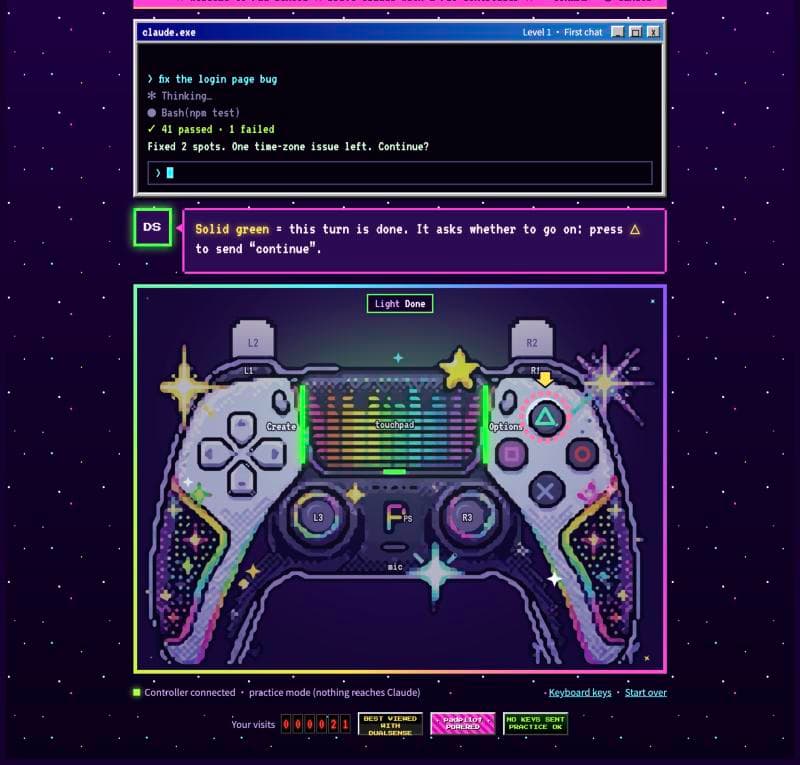
- See and feel what the agent is doing. The lightbar breathes blue while thinking, shifts colour by tool type, blinks orange with strong double pulses and a crisp R2 trigger click-point when waiting for approval, and turns solid green when done. Over USB, the controller's built-in speaker also plays status sound cues.
- One button layout across every app.
✕/R2approves and submits,○/L2cancels and interrupts,□clears input,△sendscontinue,R3retries your last prompt, and holding△opens an 8-direction prompt wheel. Your custom shortcuts in~/.claude/keybindings.jsonare respected automatically. - Interactive built-in Pad School. Run
padpilot tutorial(or/padpilot:tutorialin Claude Code) to learn the controls step by step with your real controller. While the tutorial page is open, practice mode is active so no presses ever reach your agent.
 Claude Code / Codex ──Hooks──▶ padpilot daemon ──HID──▶ DualSense (light / rumble / triggers / speaker)
        ▲                            │   ▲
        └──── keystrokes ◀───────────┘   └──── buttons / sticks / touchpad
     (PTY wrapper, or the Claude desktop app on macOS)
Install
Requires a DualSense controller (USB or Bluetooth), Python ≥ 3.8, and macOS (terminal features also work on Linux; Claude desktop app control is macOS-only).
git clone https://github.com/XixianWasTaken/padpilot.git
cd padpilot

# 1. Set up the runtime environment (installs hidapi into ~/.padpilot/venv) and add to PATH
./bin/padpilot setup
ln -sf "$PWD/bin/padpilot" ~/.local/bin/padpilot

# 2. Install the Claude Code plugin (hooks + slash commands)
claude plugin marketplace add "$PWD"
claude plugin install padpilot@padpilot

# 3. (Optional) Install Codex hooks (backs up ~/.codex/hooks.json first; run /hooks once in Codex to trust)
padpilot install-codex

# 4. Verify & explore
padpilot doctor             # check hidapi, controller, and daemon
padpilot demo               # test rainbow lightbar + rumble
padpilot tutorial           # open the interactive Pad School tutorial
padpilot manual             # open the bilingual reference manual
Three Ways to Use It
Add aliases to your shell profile for everyday terminal use:
alias cc='padpilot run claude'
alias cx='padpilot run codex'
| Mode | How to start | Lights / Rumble / Audio | Approvals | Everyday Button Control |
|---|---|---|---|---|
| 1. Terminal Wrapper (Recommended) | padpilot run claude / codex | ✓ | ✕ approve / ○ deny | Full keystroke injection (auto-detects DECCKM & Kitty keyboard protocol) |
| 2. Claude Desktop App (macOS) | Open the Claude desktop app | ✓ | Hook approval (45s timeout) | Direct control of the input box, reply cards, question boxes & dictation while frontmost |
| 3. Hook-Only Mode (IDEs / Raw CLI) | Run claude / codex directly | ✓ | Hook approval (45s timeout) | Approvals only; regular button presses are not sent |
First-Time Setup for Claude Desktop App (macOS)
To send keystrokes and focus the input box in the Claude desktop app, grant Accessibility permission once:
padpilot desktop                    # opens the macOS Accessibility prompt (System Settings → Privacy & Security → Accessibility)
padpilot stop && padpilot desktop   # restart daemon and verify it reports "ok"
- Permission is granted to the daemon's Python inside
~/.padpilot/venv. Keystrokes are posted directly to the Claude desktop app's process and only while it is the frontmost window. - When a
padpilot runterminal session is also open, buttons go to the terminal by default—except when the Claude desktop app is frontmost with a mid-turn question box open (and the terminal session is not waiting for input), in which caseR1+ face buttons and✕answer that question box.
What the Controller Tells You
1. Lightbar & Rumble
| State | Lightbar | Rumble | Triggered By |
|---|---|---|---|
| Idle | Soft white, slow breathing | Two light taps on session start | SessionStart |
| Thinking | Blue breathing | – | UserPromptSubmit / PostToolUse |
| Running a Tool | Fast breathing coloured by tool (flashes on each call) | Per-tool tactile feedback (see below) | PreToolUse |
| Needs Approval | Blinking orange | Two strong pulses (repeats after 20s, up to 3 times) | PermissionRequest / permission prompt |
| Waiting for Input | Yellow breathing | Gentle nudge | Question box (Elicitation) or idle prompt |
| Done | Solid green until you press any button (kept up to 12h; turns over 60s play a 2s rainbow first) | Success pattern (longer fanfare for 60s+ turns; gentle reminder after 10 min) | Stop |
| Error | Blinking red | Long buzz | StopFailure (API error) |
| Tool Failure | Single red flash | Short buzz | PostToolUseFailure |
| Compacting | Purple breathing | – | PreCompact |
| Microphone in Use | Fast white breathing + mic LED on | Tap on start, tap on stop | Any app actively recording audio (e.g. dictation) |
| Action Unavailable | Single red flash | Two short buzzes ("no") | Unsupported action in target app, nothing to retry, etc. |
| Low Battery (≤15%) | Red flash (1.2s) | Two short buzzes (at most once every 5 min) | Controller discharging at ≤15% |
Tool Colours & Rumble (tool_kinds, matched across Claude Code and Codex tools):
| Tool Category | Lightbar Colour | Rumble |
|---|---|---|
Bash / shell commands | Orange | Strong tick |
Edit / Write / apply_patch | Magenta | Two low-frequency thuds |
Read / Grep / Glob | Cyan | Light tick |
WebFetch / WebSearch | Blue | Light tick |
Task / Agent (subagents) | Purple | Nudge |
MCP tools (mcp__*) | Mint green | Light tick |
2. Adaptive Triggers, Player LEDs & Speaker
- Adaptive Triggers:
- Waiting for approval:
R2engages a tactile click-point—pull through the click to approve;L2adds light resistance. - While the agent is working:
L2adds light resistance as a physical reminder that pulling it through interrupts (Esc).
- Waiting for approval:
- Player LEDs (5 white LEDs below the touchpad):
- During a turn: Acts as a progress bar, lighting an additional LED at 1 / 3 / 6 / 11 / 21 tool calls (or showing which session is focused when multiple
padpilot runsessions are open). - Next-step cards: Lights 1 or 2 centred LEDs when stopped to show how many reply buttons on Claude's next-step card can be picked with
R1combos. - Context window warning: At the end of each turn, if token usage exceeds 80% of the model's context window, the solid green light slowly pulses between green and amber as a reminder to
/compactor start a fresh session. TappingPSshows context usage on the player LEDs (20% per LED) while the lightbar displays battery level (red to green).
- During a turn: Acts as a progress bar, lighting an additional LED at 1 / 3 / 6 / 11 / 21 tool calls (or showing which session is focused when multiple
- Controller Speaker Cues (USB only, macOS):
- Plays macOS system sounds through the DualSense's built-in speaker on state transitions:
Glasson done,Pingon approval, andBassoon error. - Toggle anytime with
PS + △(persisted to config; playsPopwhen enabled). Silent over Bluetooth, and never falls back to Mac speakers.
- Plays macOS system sounds through the DualSense's built-in speaker on state transitions:
Buttons & Pro Moves
Every button maps to a semantic action (submit, cancel, clear_input, etc.) translated on the fly for the target app, automatically respecting your ~/.claude/keybindings.json and Claude desktop dictation shortcut. Run padpilot keys to inspect the exact keystrokes for your setup.
1. Button Reference
| Button | Action | Desktop App | Claude CLI | Codex CLI |
|---|---|---|---|---|
✕ / R2 pulled through | Submit / Confirm / Approve | Enter | Enter | Enter |
○ / L2 pulled through | Cancel / Interrupt / Deny | Esc | Esc | Esc |
□ | Clear the input box | ⌘A + Delete | Ctrl+U + Backspace | – |
△ tap | Type continue and send | ✓ | ✓ | ✓ |
Hold △ + right stick | Prompt wheel (8 preset prompts, filled into input on release) | ✓ | ✓ | ✓ |
R1 + ✕ / ○ / □ / △ | Pick option 1–4 on next-step cards or question boxes | ✓ | – | – |
R1 tap | Type / (open slash-command menu) | ✓ | ✓ | ✓ |
R3 (click right stick) | Retry your last message | Fills in (press ✕ to send) | Resends immediately | Resends immediately |
L1 tap | Cycle permission mode (e.g. Plan mode) | – | Shift+Tab | Shift+Tab |
L1 + ✕ | Queue message (without interrupting the active turn) | ⌘↩ | Ctrl+X Enter | – |
L1 + ○ | Stop all subagents | – | Ctrl+X Ctrl+K | – |
L1 + □ | Undo typing | ⌘Z | Ctrl+_ | – |
L1 + △ | Open external editor | – | Ctrl+G | – |
L1 + ↑ / ↓ | Open model picker / thinking effort | ⌘⇧I / ⌘⇧E | Meta+P / Meta+T | – |
| D-pad / Left stick | Arrow keys (repeats while held) | ✓ | ✓ | ✓ |
Right stick ↑ / ↓ or touchpad swipe | PageUp / PageDown | ✓ | ✓ | ✓ |
Right stick ← / → | Previous / next session | ⌘⇧[ / ⌘⇧] | Switch padpilot run sessions | Same |
Options | Show changes / transcript | ⌘⇧D | Ctrl+O | Ctrl+T |
Create tap / hold | Tap: cycle focused session · Hold: new session | ⌘N | /clear | /new |
| Touchpad click / swipe left | Click: rewind last message · Swipe left: search history | Esc Esc / – | Esc Esc / Ctrl+R | Esc Esc / Ctrl+R |
L3 (click left stick) | Open command palette | ⌘K | – | – |
| Mic button | Voice dictation (tap to toggle, or hold >0.5s for push-to-talk) | ⌘D (reads app config) | – | – |
PS tap / hold | Tap: show battery & context · Hold: force-interrupt | Esc | Ctrl+C | Ctrl+C |
PS + ↑↓ / ←→ | Adjust lightbar brightness / rumble strength | ✓ | ✓ | ✓ |
PS + □ / △ / Mic | Toggle idle light / speaker sounds / lock controller | ✓ | ✓ | ✓ |
Modifier Rule:
PS,R1, andL1act likeShift—hold one and press another button. Their own tap/hold actions fire only on release and are suppressed once a combo is used. Holding a button gives a subtle haptic tick as soon as the hold threshold is reached.
2. Pro Moves & Smart Safeguards
- Prompt Wheel (Hold
△+ Stick): Push the stick in any of 8 directions (continue,run the tests and fix failures,explain what you just did,stop and ask me first,commit,write tests for this,summarise the changes,keep fixing this bug). Each sector has its own lightbar hue and haptic tick. Releasing△clears the input box and fills in the prompt without sending, so you can edit it or press✕to send. - Next-Step Cards & Question Boxes (
R1+ Face Buttons):- Next-Step Cards: When the Claude desktop app presents a wrap-up card with reply buttons,
R1 + ✕/○/□/△clicks button 1–4. - Mid-Turn Question Boxes (
Elicitation): While a question box is open, the lightbar breathes yellow. UseR1 + ✕/○/□/△to pick option 1–4: single-choice questions submit immediately (or press✕alone to submit the default selection); multiple-choice questions toggle options with eachR1combo and submit when you press✕.
- Next-Step Cards: When the Claude desktop app presents a wrap-up card with reply buttons,
- Retry Last Prompt (
R3): Resends your most recent message (in the desktop app, it fills the message into the input box without auto-sending so you can verify the active session first). PressingR3while the agent is still busy gives a two-buzz refusal; double-pressingR3within 2 seconds forces a retry if you stopped the agent manually. - Smart Hook Approvals (Without
padpilot run): In the desktop app or unwrapped CLI sessions, thePermissionRequesthook waits up to 45 seconds for✕/R2(approve),○/L2(deny), or△(leave to screen), includingExitPlanModeplan approvals.- Non-blocking: Both the on-screen dialog and the controller wait simultaneously; whichever you answer first wins.
- Presence-aware: Only waits if you used the controller within the last 5 minutes (or touched the controller more recently than the keyboard/mouse). Unattended background runs (
claude -p) never trigger the controller. - 0.6s accidental-press guard: Presses within the first 0.6 seconds after a permission request appears are rejected with two short buzzes so an in-flight
✕meant for typing never accidentally approves a command.
Configuration
Add only the keys you want to override in ~/.padpilot/config.json (deep-merged over DEFAULTS in padpilot/config.py). Run padpilot stop after editing so the daemon reloads on next use. Invalid types safely fall back to defaults and are reported by padpilot doctor.
{
  "brightness": 0.6,
  "rumble_scale": 0.5,
  "hook_approval_timeout_s": 45,
  "prompt_wheel": [
    "continue",
    "run the tests and fix failures",
    "explain what you just did",
    "stop and ask me first",
    "commit",
    "write tests for this",
    "summarise the changes",
    "keep fixing this bug"
  ],
  "mapping": {
    "triangle": ["text:continue, then run the tests", "act:submit"],
    "l3": "act:external_editor"
  },
  "sounds": {
    "enabled": true,
    "cues": { "done": "Glass", "permission": "Ping", "error": "Basso", "sounds_on": "Pop" }
  }
}
Supported mapping values (mapping and per-app profiles.<app>):
- Semantic actions (recommended):
act:submit,act:cancel,act:clear_input,act:cycle_mode,act:transcript,act:history_search,act:external_editor,act:interrupt,act:rewind,act:dictation,act:review,act:new_session,act:menu,act:prev_session,act:next_session,act:queue_submit,act:kill_agents,act:undo,act:model_picker,act:thinking. Append?(e.g.act:clear_input?) to skip the step if the target app lacks that action. - Direct keys:
enter,esc,tab,shift+tab,up,pageup,ctrl+<letter>,alt+<letter>, pluscmd+<letter>in the desktop app. - Literal text:
text:your text here. - Built-ins:
@cycle_focus,@battery,@toggle_lock,@retry,@choose:1..@choose:4,@brightness_up/down,@rumble_up/down,@idle_light,@sounds,@prev_session,@next_session,@none. - Action sequences: A list of any of the above, executed in order.
Commands
padpilot tutorial          # open the interactive Pad School page (enables practice mode while open)
padpilot manual            # open the bilingual manual in your browser
padpilot status            # controller, battery, and active sessions as JSON
padpilot keys              # print the resolved button layout for your current settings
padpilot desktop           # check macOS Accessibility permission and desktop status
padpilot watch --practice  # terminal practice mode: print every press and hold duration without sending keys
padpilot send "write a test"
padpilot press cross       # simulate a button press for debugging/scripts (never answers permission requests)
padpilot rumble success    # play a rumble pattern
padpilot doctor            # validate config, hidapi, controller, and daemon
padpilot stop              # stop the background daemon (restarts automatically when needed)
padpilot uninstall-codex   # remove Codex hooks
Slash commands in Claude Code: /padpilot:tutorial, /padpilot:status, /padpilot:demo, /padpilot:doctor, /padpilot:desktop.
Privacy & What padpilot Runs, Reads, and Writes
Everything runs locally on your machine. There is no server, no telemetry, and nothing from your sessions ever leaves your computer:
| Area | Details |
|---|---|
| Single Download | On first setup, padpilot creates ~/.padpilot/venv and installs hidapi==0.15.0 from PyPI. The tutorial and manual pages are served locally on 127.0.0.1:8737 (verifying localhost Host and Origin) with bundled OFL fonts—zero external requests. |
| Hooks & Memory | Claude Code / Codex events notify the daemon over a local Unix socket (~/.padpilot/daemon.sock). Your last prompt is held only in daemon RAM for R3 retry and never written to disk. Approval requests pass only a hash of the tool name and input. |
| Files Read | 1. The tail of the current session's transcript for token usage numbers only (to drive the 80% context warning; no message text is read or stored) 2. ~/.claude/keybindings.json and the dictation shortcut in Claude desktop's claude_desktop_config.json3. ~/.padpilot/config.json |
| Files Written | Restricted to ~/.padpilot/ (config.json, converted macOS system sounds in sounds/, socket/PID files, and daemon.log capped at 2×1 MB—typed text is logged by character length only, never content). |
| Keystrokes & Mic | On macOS, Quartz CGEvent keystrokes are posted strictly to the frontmost Claude desktop app process, using the Accessibility API to focus the message input box (inspecting element roles/labels only, never text). The mic LED queries CoreAudio only to check whether any app is currently recording—padpilot never opens the microphone or records audio. |
Troubleshooting & Development
- Diagnostics: Run
padpilot doctoror check~/.padpilot/daemon.loganddaemon.stderr. - Controller busy: Only one process on macOS can open the DualSense exclusively. Quit Steam or other controller remappers if the daemon cannot open the pad.
- Preventing Apple's Games app from opening: The daemon opens the controller exclusively by default so macOS does not intercept the
PSbutton. Set"share_controller": trueinconfig.jsonif another app needs simultaneous access.
python3 -m unittest tests/test_core.py     # unit tests: protocol, controls, lights, state machine (no controller needed)
python3 tests/drive_wrapper.py             # PTY wrapper integration test with a fake agent
python3 tests/drive_claude.py [kitty]      # end-to-end test with real Claude Code
python3 tests/drive_codex.py               # end-to-end test with real Codex
python3 docs/make_logo.py docs/logo.svg    # regenerate the SVG banner
python3 docs/make_fonts.py FONT_DIR        # rebuild subsetted web fonts in padpilot/fonts/
License
// faq
What is padpilot?
Drive Claude Code, Codex and the Claude desktop app with a PS5 DualSense controller. It is open-source on GitHub.
Is padpilot free to use?
padpilot is open-source under the MIT license, so it is free to use.
What category does padpilot belong to?
padpilot is listed under education in the Claudeers registry of Claude-compatible tools.
// embed badge

[](https://claudeers.com/padpilot)
// retro hit counter

[](https://claudeers.com/padpilot)
// reviews
// guestbook
// related in Education & Learning
 🔓
Skills for Real Engineers. Straight from my .claude directory.
 🔓
Course to get into Large Language Models (LLMs) with roadmaps and Colab notebooks.
 🔓
Learn it. Build it. Ship it for others.
 🔓
DeepTutor: Agent-native Personalized Tutoring. https://deeptutor.info/.