
OpenValet
OpenValet: talk to your computer. Open-source voice and WhatsApp agent on your own Claude login, with local wake word, speech recognition and voice. macOS to…
Install with your AI
Paste into Claude Code, Cursor, or any agent — it reads the repo and wires the tool into your project.
Install and set up OpenValet (release-binary project) into my current project.
Found on https://claudeers.com/openvalet
Repo: https://github.com/SamarthY06/OpenValet
Homepage/docs: —
Detected install method: release-binary → inspect the README
Category: automation. Platforms: cli, api, web.
Read the repo's README for exact setup and env vars, then install it and wire it into my project.

Claudeers Health Verdict:
unknown; community-verified: false. Confirm the source before running anything.
Grab the latest release asset from GitHub.
# download a build from https://github.com/SamarthY06/OpenValet/releases
git clone https://github.com/SamarthY06/OpenValet
// compatibility
| Platforms | cli, api, web |
|---|---|
| Operating systems | — |
| AI compatibility | claude |
| License | MIT |
| Pricing | open-source |
| Language | Python |
OpenValet
Talk to your Mac. It does the work, in your apps, and asks before anything leaves the machine.
Say "Hey Mac, find three trending repos, put them in a note and send the list to my team on WhatsApp" and it does it, across apps, while you sit back, and it asks before the send. The brain is Claude (the full Claude Code agent loop through the Claude Agent SDK) with your own Claude login; the wake word, speech recognition, end-of-turn detection and voice run locally on your Mac. It also answers in the WhatsApp groups you add, and a deterministic safety gate blocks anything irreversible until you say yes.
The project is OpenValet; the assistant answers to Mac.
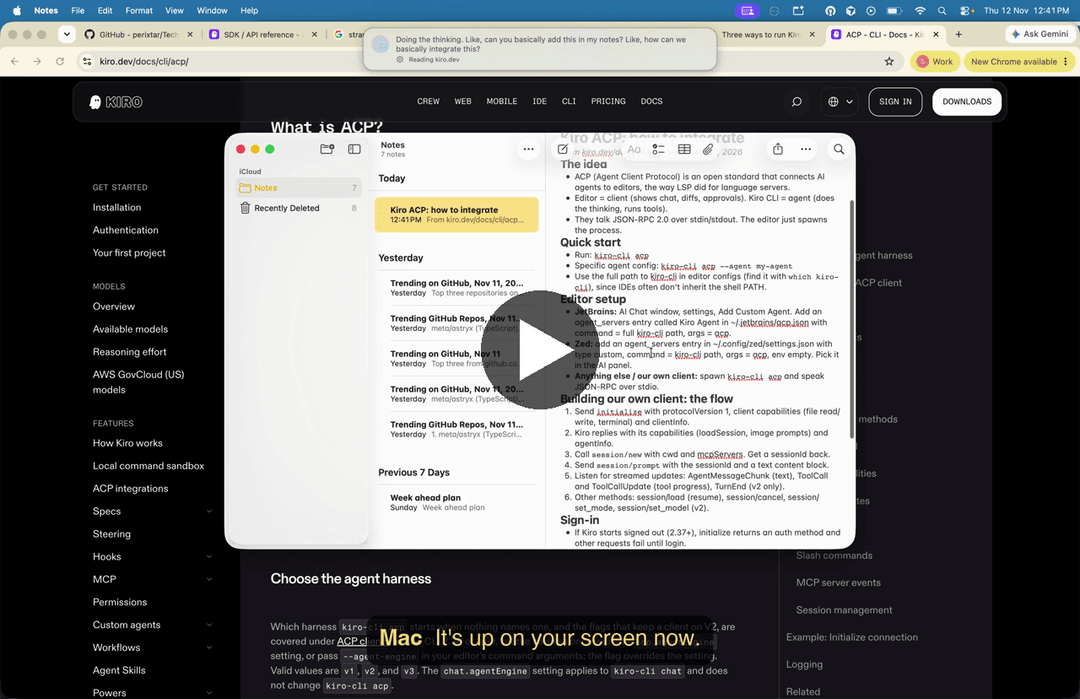
70-second demo, sound on: Mac reads the page you are on, writes it up in Notes, shows it and opens an app, and you talk over it whenever you like. The working stretches are sped up and the voices are re-voiced from the session log.
Quickstart
You need an Apple Silicon Mac on macOS 14 or newer, Claude Code
installed and signed in (claude, then /login), and the Xcode Command Line Tools
(xcode-select --install).
curl -fsSL https://raw.githubusercontent.com/SamarthY06/OpenValet/main/install.sh | bash
This clones the repo into ~/OpenValet, installs uv if needed, sets
up Python (about 600 MB), downloads the speech models (about 1 GB on disk), builds OpenValet.app
and opens it. If Claude Code is missing, the installer offers to install it and sign you in. The
Meet Mac window walks you through the permissions and Chrome pairing.
Then say: "Hey Mac, what can you do?"
Flags pass through as | bash -s -- --yes --no-open. If you would rather look first:
git clone https://github.com/SamarthY06/OpenValet.git ~/OpenValet && cd ~/OpenValet && ./install.sh.
What it can do
- Works across your apps: Chrome (your own logged-in browser), Mail, WhatsApp, Notes, Calendar, Reminders, Finder, Terminal. "Draft an email to Sam", "paste it in WhatsApp", "looks good, send it".
- Holds a conversation: talk over Mac and it pauses within a third of a second. A short "yeah" lets it continue; real words stop it and become your next request, and Mac knows which part of its answer you did and did not hear.
- Knows when you have finished a sentence: a thinking pause mid-sentence does not end your turn (Pipecat Smart Turn v3.2). You can keep talking during a task without the wake word.
- Works while you are away: "every weekday at 8, find 20 companies that fit my resume and save them" and Mac runs it on its own at that time, then reports back where you asked: in that WhatsApp group, or as a notification on the Mac. Reminders too. Each task keeps its own memory between runs, and Settings > Tasks shows and edits them all.
- Sees your screen: "what's this error?" and it looks. Works with the screen off; screenshots and clicks need the Mac unlocked.
- Talks like a person: short answers, one natural voice. 54 voices in 8 languages (US and UK English, Spanish, French, Hindi, Italian, Japanese, Portuguese, Mandarin), or clone your own voice locally. "Teach me consistent hashing" turns it into a tutor.
- Remembers you: your name, preferences and projects, in a plain
memory.mdyou can read. - Safe by design: anything irreversible (send, post, pay, delete, upload) is blocked by a hook until you say "yes" to a spoken summary of that exact action.
- Light: the app idles at about 1 % CPU; Claude starts on the wake word and shuts down after 10 quiet minutes. A real Off switch releases the microphone.
Voice
| Say | Mac does |
|---|---|
| "Hey Mac, what's on my calendar tomorrow?" | answers by voice |
| "Hey Mac, find 20 product managers in Bangalore on LinkedIn" | drives your Chrome, saves the list to ~/Documents/Mac/ |
| "Hey Mac, draft an email to Sam", then "send it" | the send waits for your spoken yes |
| "...and make it two sentences" (over Mac's voice) | pauses, drops the rest of its answer, takes the new request |
| "also check Friday" (during a task, no wake word) | hears it and folds it into the running task |
| "Hey Mac, give me one fun fact about... octopuses" | waits through the pause, answers once |
| "stop" | stops at once |
Menu bar: push-to-talk (⌥Space), Stop, Turn Off, Settings. Command line: macctl.
Mac links to your own WhatsApp as a linked device, like WhatsApp Web.
cd ~/OpenValet
scripts/mac whatsapp link          # scan the QR code with your phone, then pick groups
scripts/services.sh install        # run it in the background, at every login
scripts/mac chats add "Family"     # add another group later
In a group, only your own messages that start with "Mac" are requests ("Mac, find me 20 jobs").
"Mac, stop" stops the current task; "Mac, stop everything" also ends background work and starts a
fresh session.
Reply to any of Mac's messages and the prefix is not needed. It reads the group's last 50
messages (8,000 characters at most) so it can follow the conversation; those go to Claude as
context and are never treated as instructions. Each group has its own persona and permissions
(scripts/mac chats deny "Family" Chrome, the web, chats off, chats remove), and a
never-list of chats Mac will never read or write (never_chats in the chat config). Plain text
only: no polls, no buttons.
Safety
- Irreversible actions wait for your yes to a summary of that exact action. The model can only
ask. The token is minted when you say yes to the summary, is bound to that tool and
destination, and the model never sees it. Prefer the model's own judgement? Set
confirm_outward = falseunder[brain]: it then asks only when it thinks it should (once per batch), and the hook blocks only dangerous actions. - Secrets are never readable:
~/.ssh, keychains, browser profiles,~/.awsand similar. Tools can write only Mac's own workspace and memory under~/.mac-agent; settings, tokens and the WhatsApp link are never readable or writable. - In WhatsApp, only your own messages are requests. Everyone else's are context.
- The gate is a rule-based filter, not a sandbox. Add only groups whose members you trust, and deny writing files where you do not need it.
Updates
cd ~/OpenValet
git pull && ./install.sh           # the app and the Python environment (the one-liner also pulls)
scripts/services.sh update         # the background WhatsApp services
scripts/services.sh rollback       # back to the commit that ran before
scripts/mac status                 # what is running, and whether WhatsApp is connected
The services run a frozen copy of a commit, so editing the repo never changes what runs. A restart during a task is not a loss: the request is picked up again in the same session, with a note to Claude to continue rather than start over.
Your data
Everything lives on your Mac, never in git: settings, memory and the WhatsApp link in
~/.mac-agent/, secrets in the Keychain, logs in ~/Library/Logs/Mac/ (no message text).
Audio never leaves your Mac, unless you turn on the optional phone feature, which relays audio
through LiveKit. Your requests and what Mac reads for them go to Anthropic as part of your
Claude session.
Mac runs your installed claude with your own login. Anthropic's Agent SDK terms say
third-party products may not offer claude.ai login to their users without approval; Mac is an
open-source tool you install on your own machine with your own account, and if you distribute
a build to others, read those terms. An API key works too (auth = "api_key", see
docs/USAGE.md).
Uninstall
cd ~/OpenValet
scripts/services.sh uninstall      # stop the background services
./install.sh --uninstall           # remove the app, settings and (if you say so) data
Then delete ~/OpenValet. To unlink WhatsApp, remove this Mac under Settings, Linked devices in WhatsApp on your phone.
More
- docs/USAGE.md: every command, settings, Chrome, authentication, the services, memory, development.
- docs/FAQ.md: Intel Macs, Windows, Linux, older macOS, API keys, where audio goes.
- CONTRIBUTING.md: dev setup, where things live, review expectations.
- SECURITY.md: how to report a vulnerability, what is in scope.
- CHANGELOG.md.
License: MIT (LICENSE). The speech models carry their own licenses: sherpa-onnx Apache-2.0, Parakeet CC-BY-4.0, Kokoro Apache-2.0, Silero VAD MIT, Pipecat Smart Turn v3.2 BSD-2-Clause, Kyutai Pocket TTS weights CC-BY-4.0.
// faq
What is OpenValet?
OpenValet: talk to your computer. Open-source voice and WhatsApp agent on your own Claude login, with local wake word, speech recognition and voice. macOS today; built for more channels.. It is open-source on GitHub.
Is OpenValet free to use?
OpenValet is open-source under the MIT license, so it is free to use.
What category does OpenValet belong to?
OpenValet is listed under automation in the Claudeers registry of Claude-compatible tools.
// embed badge

[](https://claudeers.com/openvalet)
// retro hit counter

[](https://claudeers.com/openvalet)
// reviews
// guestbook
// related in Automation & Workflows
 🔓
 🔓
The API to search, scrape, and interact with the web at scale. 🔥
 🔓
🌐 Make websites accessible for AI agents. Automate tasks online with ease.
 🔓
Taste-Skill - gives your AI good taste. stops the AI from generating boring, generic slop