
opentikz
TikZ for paper diagrams, without hand-writing TikZ — copyable icons, editable templates, and a Claude Code skill
Install with your AI
Paste into Claude Code, Cursor, or any agent — it reads the repo and wires the tool into your project.
Install and set up opentikz (claude-plugin project) into my current project.
Found on https://claudeers.com/opentikz
Repo: https://github.com/opentikz/opentikz
Homepage/docs: https://opentikz.org/
Detected install method: claude-plugin → /plugin install opentikz@opentikz/opentikz
Category: skills. Platforms: cli, api, web.
Read the repo's README for exact setup and env vars, then install it and wire it into my project.

Claudeers Health Verdict:
slowing; community-verified: false. Confirm the source before running anything.
/plugin marketplace add opentikz/opentikz
/plugin install opentikz@opentikz/opentikz
git clone https://github.com/opentikz/opentikz
// compatibility
| Platforms | cli, api, web |
|---|---|
| Operating systems | — |
| AI compatibility | claude |
| License | NOASSERTION |
| Pricing | open-source |
| Language | Python |

Describe your figure. Get it, paper-ready.
More than an AI-agent skill for LaTeX TikZ figures.
Website · Browse · Templates · Icons · Examples · Quick start · Contributing
OpenTikZ is the "Flaticon for academic TikZ" — conceptual/overview figures (system block diagrams, neural-network architectures, pipelines, flowcharts) for your papers, made fast. Four ways to use it:
- Use icons — grab a single icon, no AI needed: copy its
.tex(or download SVG/PNG) and\inputit. - Edit a template — tell the agent the change; it edits the template and verifies it compiles.
- PNG → TikZ — hand the agent a figure image; get editable TikZ back.
- Describe → TikZ — describe a figure in words; the agent drafts it from the library.
Quick start
Use it with your AI agent (recommended). Install the Claude Code plugin — run these as two separate Claude Code messages:
/plugin marketplace add https://github.com/opentikz/opentikz
/plugin install opentikz@opentikz
Then describe the figure or edit you want
- "draw an encoder–decoder with a cross-attention block," or,
- pointing at a template, "add a hidden layer / recolor this blue / fit it to a CVPR column."
The skill finds the figure, copies it into your project, edits it via each template'sedit_contract, and compiles it before handing it back. Invoke it as/opentikz:using-opentikz.
Other agents (Codex, Cursor, Gemini CLI…). git clone this repo and tell the
agent to use skills/using-opentikz/SKILL.md, or just point a GitHub-reading agent
at the repo URL.
Prefer no AI? Browse the gallery, copy a figure's .tex, and paste
it in — every file is \documentclass{standalone} and compiles as-is.
Why TikZ, and why OpenTikZ
Why TikZ at all? A TikZ figure is source code, not an image:
- Vector quality — crisp at any zoom, sharp in print; no pixelated screenshots.
- Native to your paper — same fonts, math (
$\mathbf{W}x$), and\ref/\citeas the document, so the figure looks part of the paper. - Diffable — version it in git, tweak one number, recompile.
Why not just ask ChatGPT for TikZ directly? You can — but raw LLM TikZ tends to fight you. OpenTikZ anchors the edit to a real, parametric template:
| What you care about | Raw LLM TikZ | OpenTikZ + skill |
|---|---|---|
| Compiles first try | Often not | Yes, standalone |
| Packages / macros | Sometimes invented | Real, declared in requires |
| Colors | Random hex | Shared palette |
| Re-editing later | Re-describe everything | Stable node names |
| AI guidance | None | Each template ships an edit_contract |
Because every template is parametric, palette-correct, and carries an
edit_contract, an agent edits it accurately and fast instead of
hand-writing TikZ that may not compile.
A concrete edit
Starting from templates/encoder-decoder/, tell
Claude Code:
"add a cross-attention block and make it blue"
Guided by the template's edit_contract — using the shared palette and the
template's stable node names — it adds:
% cross-attention block (decoder attends to encoder)
\node[draw=otblue!80!black, fill=otblue!18, rounded corners=2pt,
  minimum width=\trapW cm, minimum height=0.7cm]
  (xattn) at (\xdC,\bh+0.9) {\sffamily\small Cross-Attn};
\draw[flow, draw=otblue] (enc) to[bend left=20] (xattn);
\draw[flow, draw=otblue] (xattn) -- (dec);
…and it compiles standalone, first try.
Gallery
A taste of the library below — every preview is rendered from the committed .tex
source (no mockups). The full, searchable catalog with copy-to-clipboard lives on
the website; or browse examples/,
templates/, and icons/ directly.
Examples — paper-grade figures combining icons + templates
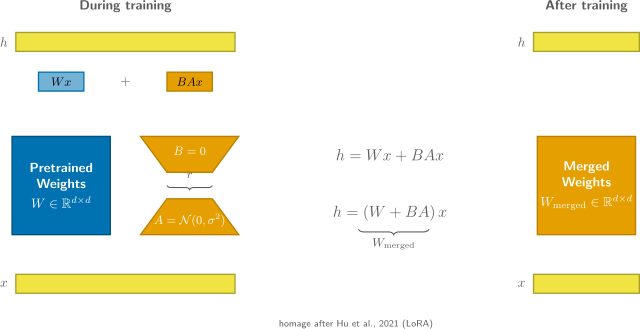 LoRA · low-rank adaptation | 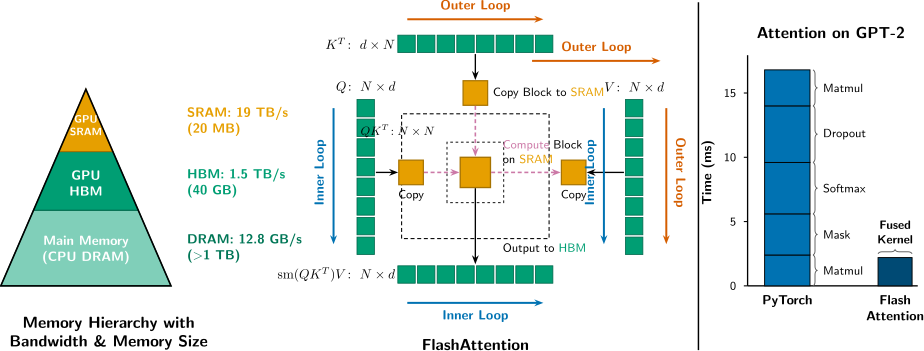 FlashAttention · tiled attention | 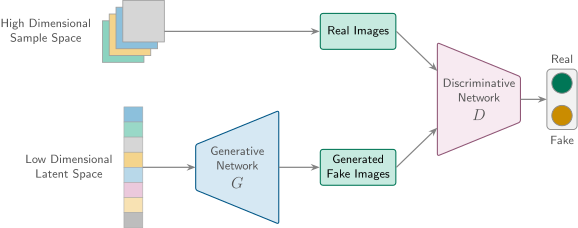 GAN · generator / discriminator |
Templates — editable, AI-modifiable (each ships an edit_contract)
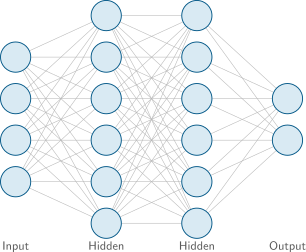 Feed-forward neural network | 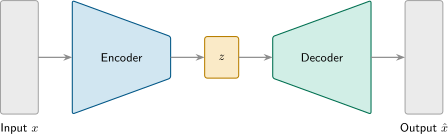 Encoder-decoder · bottleneck |  Training pipeline · loss/optimizer loop |
…and more — system block diagrams, flowcharts, ResNet blocks, distributed
training, inference serving. See templates/.
Icons — atomic, single-concept, independently copyable
 Server |  GPU |  Cloud | 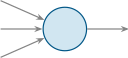 Neuron | 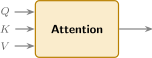 Attention |
…and many more across systems/ and ml/. Previews are
transparent SVGs and read best on a light background; the live
website renders them on paper-white tiles.
How it's organized
Three layers, plus the skill that ties them together:
icons/— atomic, single-concept TikZ elements; each compiles standalone and is independently copyable.templates/— complete, editable conceptual figures (the core value); each carries anedit_contractin itsmeta.jsondescribing how to edit it safely.examples/— paper-grade figures combining icons + templates.skills/using-opentikz/— the one repo-wide skill that takes an AI agent from a request to a finished figure (discover → edit → verify), backed by the per-templateedit_contracts and thereference/palette/layout material.
icons/<domain>/<name>/      <name>.tex + <name>.meta.json + <name>.svg
templates/<name>/           template.tex + template.meta.json (+ edit_contract) + preview.svg
examples/<name>/            paper-grade figures combining icons + templates
skills/using-opentikz/      the one repo-wide skill (SKILL.md)
reference/                  color-palettes/, annotations/, layout/
tools/                      build_catalog.py, render_preview.py, build_site.py, validate.py
Community
- 💬 Discussions — ask how to use a template or the skill (Q&A), request a new icon/template (Ideas), or show a figure you built (Show & tell).
- 🐛 Issues — report a bug or a figure that won't compile, or file a concrete task.
Rule of thumb: open-ended → Discussions, closeable → Issues.
Contributing & local build
Want to add a figure or fix one? See CONTRIBUTING.md for the
format rules and docs/DESIGN_GUIDE.md for the design
guide. The toolchain (all stdlib + an optional LaTeX backend):
python3 -m pip install -r requirements.txt   # installs jsonschema
python3 tools/validate.py                     # validate metadata + compile .tex
python3 tools/build_catalog.py                # regenerate catalog.json (never hand-edit it)
python3 tools/render_preview.py <item>        # render a trimmed .svg preview
python3 tools/build_site.py                   # build the static site/ locally
validate.py and render_preview.py need a LaTeX toolchain (latexmk) plus an
SVG backend (dvisvgm, or pdf2svg + pdfcrop); without LaTeX, validate.py
still checks metadata and skips the compile. The site (opentikz.org)
deploys automatically from catalog.json + committed previews on every push to
main via .github/workflows/pages.yml.
Citing OpenTikZ
Content is CC0, so a citation is never required — but if OpenTikZ saved you time,
it is appreciated. Use the "Cite this repository" button on GitHub (powered by
CITATION.cff), or the BibTeX below:
@misc{opentikz,
  title        = {{OpenTikZ}: a TikZ resource library for academic conceptual diagrams},
  author       = {{OpenTikZ contributors}},
  year         = {2026},
  howpublished = {\url{https://opentikz.org}},
  note         = {Content licensed CC0 1.0}
}
Licensing
- Code (scripts, build tooling): MIT — see
LICENSE-CODE. - Graphic content (
.texfigures and previews): CC0 1.0 — seeLICENSE-CONTENT.
By contributing graphic content you agree to release it under CC0 1.0.
⭐ Found OpenTikZ useful?
Star us on GitHub — it helps more researchers discover the library and find these figures faster.
// faq
What is opentikz?
TikZ for paper diagrams, without hand-writing TikZ — copyable icons, editable templates, and a Claude Code skill. It is open-source on GitHub.
Is opentikz free to use?
opentikz is open-source under the NOASSERTION license, so it is free to use.
What category does opentikz belong to?
opentikz is listed under skills in the Claudeers registry of Claude-compatible tools.
// embed badge

[](https://claudeers.com/opentikz)
// retro hit counter

[](https://claudeers.com/opentikz)
// reviews
// guestbook
// related in Claude Skills
 🔓
🔓An agentic skills framework & software development methodology that works.
 🔓
🔓 🔓
🔓💫 Toolkit to help you get started with Spec-Driven Development
 🔓
🔓AI coding assistant skill (Claude Code, Codex, OpenCode, Cursor, Gemini CLI, and more). Turn any folder of code, SQL schemas, R scripts, shell scripts, docs,…