
opencode-fusion
Main agent plans and reviews; cheaper sidekick edits. Devin Fusion pattern for coding agents (OpenCode first; Claude Code & Codex planned).
Install with your AI
This project is archived — not recommended for automated install, so we don't generate an auto-install prompt for it. Read the repo and decide for yourself.
// compatibility
| Platforms | cli, api, web |
|---|---|
| Operating systems | — |
| AI compatibility | claude |
| License | MIT |
| Pricing | open-source |
| Language | CSS |
opencode-fusion
A minimal, working implementation of the Devin Fusion "sidekick" pattern for opencode: a main agent that plans and reviews but cannot edit files, delegating every change to a cheaper, faster sidekick.
The main agent's file editing is mechanically denied - its only way to change a file is to hand a spec to the sidekick. That keeps frontier intelligence on the decisions that matter (the plan, the interpretation of ambiguity, the review) while a cheap model does the mechanical work. Cognition reports the pattern holds frontier-level quality at roughly 35–41% lower cost on their FrontierCode benchmark.
The main pair is backed by read-only helpers (explore, research) and optional specialists (design, reviewer, vision), each on a model you choose. See the full team.
Why it works
From Cognition's blog post:
the main agent should take minimal actions, and only read what is absolutely necessary. By default it should delegate and monitor, while making the significant decisions: the plan, the interpretation of ambiguity, the final review.
This repo turns that into a hard constraint: the main agent's edit, search, and freeform bash tools are denied at the permission layer, so delegating to the sidekick is its only way to change a file. Two payoffs fall out of the split:
Lower cost. Implementation mechanics are most of a session's tokens. A cheaper sidekick handles them at near-parity while the expensive main model spends its tokens only on judgment - the plan, the spec, the review. The main agent's prompt enforces this discipline: emit judgment not volume, keep context lean, reason once then hand off.
Cross-vendor review, for free. When the main agent and sidekick are different model families - for example Opus reviewing Grok - every diff gets an independent second-family read before it lands. Models from one family share blind spots; a reviewer from a different lineage catches what same-family review misses. You get this just by picking a main and sidekick from different vendors.
How it works
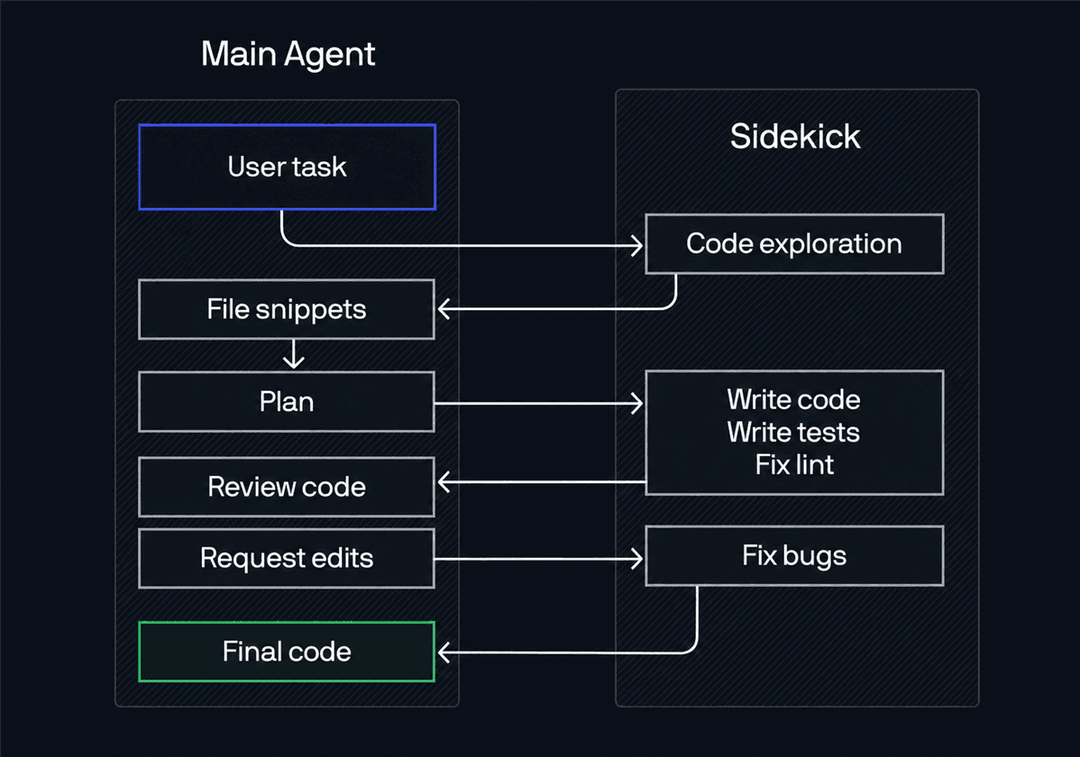
The diagram shows one delegation cycle: the main agent delegates exploration, plans from what comes back, hands the sidekick a spec, reviews the returned diff, loops until it passes, then delivers the result.
| Agent | Role | Config key | Required | Suggested model (2026) |
|---|---|---|---|---|
build | Main: plan, delegate, review | agent.build.model | core | claude-fable-5 |
plan | Plan mode: same brain as build, plans but does not execute | agent/plan.md (file) | core | reuses main model |
sidekick | Execute edits and commands | agent.sidekick.model | core | grok-4.5 |
explore | Fast read-only exploration | agent.explore.model | core | gemini-3.5-flash |
research | Read-only external research (web, docs) | agent.research.model | optional | claude-sonnet-5 |
design | Frontend/UI implementation | agent.design.model | optional | glm-5.2 |
reviewer | Audit a diff before commit | agent.reviewer.model | optional | gpt-5.6-sol |
vision | Transcribe images the main model cannot see | agent.vision.model | optional | gemini-3.5-flash |
Models move fast - treat these as 2026 starting points, not requirements. Use any provider you like; in config each model is written as provider/model-id (for example openai/gpt-5.6-sol), and the sidekick should stay cheaper and faster than the main agent. The mix above spans several vendors on purpose, so the main agent's review of each sidekick diff is cross-vendor.
Setup
Fusion lives entirely in your global opencode config at ~/.config/opencode/ (Windows: %USERPROFILE%\.config\opencode\). There is no build step and nothing to clone into your projects.
Recommended: let opencode set it up
This repo ships a skill, fusion-setup, that configures everything conversationally. Install it globally:
npx skills add mihneaptu/opencode-fusion --skill fusion-setup -g -a opencode -y
Or copy the fusion-setup folder from this repo's .opencode/skills/ into ~/.config/opencode/skills/. Restart opencode, then say:
set up fusion
It asks which model and provider you want for each role, writes ~/.config/opencode/opencode.json, installs the agent prompts under ~/.config/opencode/agent/, and tells you to restart. To change models later, say "reconfigure fusion" or edit the config directly (see Customize).
Manual setup (configure the JSON by hand)
Write ~/.config/opencode/opencode.json yourself. Pick your own models; the structure is what matters. The JSON only assigns each role its model - the mechanical core of Fusion (the build agent's edit: deny and bash allowlist) lives in the agent files you install below, and must not be loosened.
{
  "$schema": "https://opencode.ai/config.json",
  "model": "<main-provider>/<main-model-id>",
  "provider": {
    "<your provider blocks here>": {}
  },
  "agent": {
    "build": { "model": "<main-provider>/<main-model-id>" },
    "explore": { "model": "<explore-provider>/<explore-model-id>" },
    "sidekick": { "model": "<sidekick-provider>/<sidekick-model-id>" }
  }
}
The specialists are optional and a-la-carte. To add one, give it a model entry in the agent block alongside explore/sidekick, for example "reviewer": { "model": "<provider>/<model-id>" }, and install its prompt file. Their prompts and permissions live in agent/research.md, agent/design.md, agent/reviewer.md, and agent/vision.md. Add vision only if your main model cannot read images. Plan mode uses agent/plan.md and reuses the main model.
Then install the agent files. opencode auto-loads every markdown file in ~/.config/opencode/agent/ as an agent definition - the frontmatter carries the role's mode and permissions (this is where the edit denial is mechanically enforced), and the body is its prompt:
mkdir -p ~/.config/opencode/agent
cp agent/build.md agent/plan.md agent/sidekick.md ~/.config/opencode/agent/
Model references are always provider-id/model-id. If a model uses a provider opencode does not know yet, add a provider block for it (see the OpenAI-compatible template in the fusion-setup skill). Restart opencode after writing the config - it loads config once at startup, not mid-session.
Example provider: Grok as the sidekick via progrok
Any provider works, but if you want to use xAI's Grok Composer as the fast sidekick model, progrok turns a SuperGrok OAuth session into a local OpenAI-compatible endpoint:
npm install -g progrok
progrok login        # browser OAuth with your xAI account
progrok proxy        # leave this running in a terminal
The proxy serves at http://127.0.0.1:18645/v1. Point a provider block at that baseURL with any placeholder apiKey; progrok injects your real OAuth token before forwarding to xAI.
Verify it works
Open a project with some lint errors and ask:
fix the lint errors in this project
You should see the main agent delegate exploration, receive the findings, make a plan, then delegate execution to the sidekick via the task tool. The sidekick makes the edits, and the main agent verifies by running npm run lint itself before reporting back.
Along the way you may see the occasional command struck through with a permission error — for example the agent trying git ls-files. That is not a bug. The main and plan agents run bash deny-by-default, so anything outside their short allowlist is mechanically blocked, and the agent recovers on its own by reading the file or delegating the search. A denied command is the guardrail working, not the setup failing.
Customize
Swap models
All agent models live in one place: ~/.config/opencode/opencode.json under agent - one model value per agent (keys and suggested models are in the table above).
Change the value, add a provider block if the model uses a new provider, and restart opencode. For a persistent default main model, also update the top-level model field. Do not add a model: line to the agent .md files themselves - frontmatter overrides opencode.json on any key it sets, so a model baked in there would silently win over your config. The sidekick should stay cheaper and faster than the main agent when possible. You can also run /models in opencode to swap the active model for the current session only.
Adjust the bash allowlist
The main agent's bash is allowlisted to verification and git commands (npm run lint, npm test, git diff, git status, git log, git show, git add, git commit, git push). Edit agent/build.md to add or remove allowed commands in the permission.bash section. Keep "*": "deny" first so unlisted commands are blocked by default. Note that the allowlist matches each command individually - do not chain commands with &&, ||, ;, or |, because the chain will not match any single pattern and gets blocked.
Optional hardening
These documented opencode config keys make a local Fusion setup cheaper, more private, and more deterministic. All optional:
"small_model": "<provider>/<cheap-model>"(top level) - opencode runs background tasks like session-title generation on a small model; if you do not set this it can fall back to a remote default. Pin it to one of your own cheap local models to keep everything on your providers."enabled_providers": ["..."](top level) - allowlist the providers opencode loads, so a stray credential elsewhere cannot add models to the picker."compaction": { "prune": true }(top level) - drops stale tool outputs when compacting, cutting main-agent token cost in a delegation-heavy flow."limit": { "context": <n>, "output": <n> }(inside a custom model block) - lets opencode track remaining context for models not on models.dev, such as local gateways. Use the model's real window; do not guess.- Sidekick bash denylist - the sidekick has full
bash, but its prompt frontmatter denies force-push and blocks reading.env, and asks beforegit reset --hard,git clean, andrm -rf. Defense-in-depth on your least-careful, most-powerful agent.
Limitations
- No dynamic mid-session routing. Devin Fusion's second technique - swapping the active model mid-task during context compaction - needs Devin's closed product surface and is not possible in opencode. This repo implements the sidekick pattern only; model assignments are fixed per role at startup. It is an explicit non-goal, not a missing feature.
- Config loads at startup. opencode reads config once when it launches. Any change to
opencode.jsonor an agent prompt requires a full restart to take effect. - Loop protection is permission-based. This opencode version has no delegation budget or depth cap in its agent schema, so runaway nesting is bounded by the
taskpermission graph (the sidekick may spawn only read-only searchers), not by numeric limits.
Troubleshooting
Common issues
The main agent edits files directly
The config was not loaded. Fully quit and restart opencode - it loads config at startup, not mid-session. Then confirm edit: deny is set for the build agent (in agent/build.md or the opencode.json build permission block).
The sidekick is not being invoked
Check that task: allow is set for the build agent. If the task permission is missing or set to deny, the main agent cannot delegate.
A model returns 404 or 400
The model id may be wrong or changed. Confirm the exact provider-id/model-id against your provider, and that the provider block's baseURL/apiKey are correct. For progrok's Grok models, the composer coding models are callable but intentionally not listed in /v1/models, so a missing entry there does not mean the id is wrong.
A bash command gets blocked unexpectedly
First check whether the block is actually expected: commands outside the allowlist (searches like git ls-files, file writes, git checkout) are meant to be denied, and the agent recovers by reading or delegating — see Verify it works.
If an allowlisted command gets blocked, the usual cause is chaining: the allowlist matches whole commands against fixed patterns, so &&, ||, ;, |, or wrapping in echo breaks the match and blocks the line. Run each allowed command as its own separate call.
Slash command and audit plugin
Two optional extras
Two optional extras ship with the skill:
/fusion-setupcommand (commands/fusion-setup.md) - a discoverable slash command that launches the setup flow. Run/fusion-setupfor the full interview, or pass an argument like/fusion-setup reconfigure sidekickto jump straight to a targeted change. Install it to~/.config/opencode/commands/.fusion-auditplugin (plugins/fusion-audit.js) - logs the delegation tree (subagent spawns and edit/write/task tool calls) through opencode's logger, so you can audit that the main agent delegated instead of editing. It is observational only: opencode's tool hooks do not expose the calling agent, so enforcement stays with the permission layer - the plugin just makes the delegation visible. Install it to~/.config/opencode/plugins/.
Files
All files
| File | Purpose |
|---|---|
agent/build.md | Main agent: edit denied, search denied, bash allowlisted, task allowed, exploration + parallelization rules |
agent/plan.md | Plan-mode agent: read-only inspection plus delegation, cannot execute or commit |
agent/sidekick.md | Sidekick prompt (model set in opencode.json) |
agent/research.md | Optional research specialist: read-only, web + docs |
agent/design.md | Optional design specialist: frontend/UI, loads design skills |
agent/reviewer.md | Optional reviewer specialist: audits diffs, read-only plus lint/test |
agent/vision.md | Optional vision specialist: transcribes images when the main model has no image input |
.opencode/skills/fusion-setup/ | The fusion-setup skill: SKILL.md plus bundled agent prompts, command, and plugin |
.opencode/commands/fusion-setup.md | Optional /fusion-setup slash command that launches setup |
.opencode/plugins/fusion-audit.js | Optional read-only plugin that logs the delegation tree for auditing |
opencode.json | Reference config (gitignored): Opus main, Grok 4.5 sidekick and explore |
flow-diagram.png | Architecture diagram (Main Agent vs Sidekick swimlane) |
LICENSE | MIT license |
Built with opencode-fusion
This repo was configured using the Fusion pattern itself. The main agent planned the structure, reviewed every change, and verified against real command output. The sidekick wrote the files and ran the commands. Every change went through the flow above.
Disclaimer
This project is not affiliated with, endorsed by, or built by the opencode team. opencode is a separate project by Anomaly. This repo provides configuration that works with opencode but is not part of it.
Credit
Inspired by Devin Fusion by Cognition. The sidekick pattern and the principle that "the main agent should take minimal actions" come directly from their work.
License
MIT
// faq
What is opencode-fusion?
Main agent plans and reviews; cheaper sidekick edits. Devin Fusion pattern for coding agents (OpenCode first; Claude Code & Codex planned).. It is open-source on GitHub.
Is opencode-fusion free to use?
opencode-fusion is open-source under the MIT license, so it is free to use.
What category does opencode-fusion belong to?
opencode-fusion is listed under automation in the Claudeers registry of Claude-compatible tools.
// embed badge

[](https://claudeers.com/opencode-fusion)
// retro hit counter

[](https://claudeers.com/opencode-fusion)
// reviews
// guestbook
// related in Automation & Workflows
 🔓
🔓 🔓
🔓The API to search, scrape, and interact with the web at scale. 🔥
 🔓
🔓🌐 Make websites accessible for AI agents. Automate tasks online with ease.
 🔓
🔓Taste-Skill - gives your AI good taste. stops the AI from generating boring, generic slop