
openakita
An open-source AI assistant framework with skills and agent architecture
Install with your AI
Paste into Claude Code, Cursor, or any agent — it reads the repo and wires the tool into your project.
Install and set up openakita (git-clone project) into my current project.
Found on https://claudeers.com/openakita
Repo: https://github.com/openakita/openakita
Homepage/docs: http://openakita.ai
Detected install method: git-clone → git clone https://github.com/openakita/openakita
Category: automation. Platforms: cli, api, desktop, web, mobile.
Read the repo's README for exact setup and env vars, then install it and wire it into my project.

Claudeers Health Verdict:
active; community-verified: false. Confirm the source before running anything.
git clone https://github.com/openakita/openakita
// compatibility
| Platforms | cli, api, desktop, web, mobile |
|---|---|
| Operating systems | — |
| AI compatibility | claude |
| License | AGPL-3.0 |
| Pricing | open-source |
| Language | Python |

OpenAkita
Open-Source Multi-Agent AI Assistant — Not Just Chat, an AI Team That Gets Things Done
Multi-Agent Collaboration · Organization Orchestration · Plugin System · Sandbox Security · 30+ LLMs · 6 IM Platforms · 89+ Tools · Desktop / Web / Mobile
Quick-Start • Org Orchestration • Scan-to-Bind • Plugins • Security • Docs
English | 中文
What is OpenAkita?
Other AIs just chat. OpenAkita gets things done.
OpenAkita is an open-source, all-in-one AI assistant — multiple AI Agents work together, build an AI company that runs autonomously, search the web, operate your computer, manage files, run scheduled tasks, and respond instantly across Telegram / Feishu / WeCom / DingTalk / QQ. Scan a QR code to bind your chat app in 30 seconds. It remembers your preferences, teaches itself new skills, and never gives up on a task. Extend anything through the plugin system, protected by 6-layer sandbox security.
Fully GUI-based setup. Ready in 5 minutes. Zero command line required.
🌐 Website openakita.ai | 📥 Download Desktop App | 📖 Documentation | 💬 Discord Community
Quick-Start Guide
🚀 For First-Time Users (3 Minutes)
No installation required — download the desktop app and start chatting:
- Download the installer from GitHub Releases
- Install and follow the onboarding wizard
- Enter your API Key (get one from Anthropic or DeepSeek)
- Try your first task: Type "Create a calculator" and watch it work
💻 For Developers (5 Minutes)
# Install
pip install openakita[all]

# Quick setup (interactive wizard)
openakita init

# Run your first task
openakita run "Build a weather scraper"
✨ What You Can Do Right Away
| Category | Examples |
|---|---|
| 💬 Chat | Text + images + files, voice messages, stickers |
| 🤖 Multi-Agent | "Create a competitive analysis" → research + analysis + writing agents work together |
| 🏢 Organization | Build an AI company — CEO, CTO, marketing, finance — agents run it autonomously |
| 🌐 Web | Search news, scrape websites, automate browser tasks |
| 📁 Files | Read/write/edit files, batch rename, search content |
| 🖥️ Desktop | Click buttons, type text, take screenshots, automate apps |
| ⏰ Scheduled | "Remind me every Monday at 9am" — cron-based reminders |
➡️ Next Steps
- Configure LLM: Add multiple providers for automatic failover
- Set up IM channels: Scan QR code to bind WeChat/Feishu/WeCom in 30 seconds
- Explore skills: Install from marketplace or create your own
- Try org mode: Build an AI company and watch it run
- Join community: Discord | WeChat Group
Core Capabilities
🤝 Multi-Agent CollaborationMultiple AI agents with specialized skills work in parallel. Say one thing — a coding Agent writes code, a writing Agent drafts docs, a testing Agent verifies — all at the same time. 🏢 Organization OrchestrationNot just multi-Agent — build an AI company. CEO, CTO, CFO, marketing director… each role operates independently. Blackboard sharing, message routing, deadlock detection. 📋 Plan ModeComplex tasks auto-decomposed into step-by-step plans with real-time progress tracking and automatic rollback on failure. 🧠 ReAct Reasoning EngineThink → Act → Observe. Explicit three-phase reasoning with checkpoint/rollback. Fails? Tries a different strategy. |
🔌 Plugin System8 plugin types, 3-tier permission model, 10 lifecycle hooks. Tools, channels, RAG, memory, LLM — everything is extensible. 🛡️ 6-Layer Sandbox SecurityPath zoning · Confirmation gates · Command interception · File snapshots · Self-protection · OS-level sandbox. High-risk commands run in isolation automatically. 📱 IM Scan-to-BindWeChat, Feishu, WeCom — scan a QR code, 30 seconds to bind, use AI directly in your chat app. 💾 Dual-Mode Memory — Smarter Over TimeFragment memory + MDRM relational graph (causal chains · timelines · entity graph · 3D visualization), auto smart switching. |
Full Feature List
| Feature | Description | |
|---|---|---|
| 🤝 | Multi-Agent | Specialized agents, parallel delegation, automatic handoff, failover, real-time visual dashboard |
| 🏢 | Org Orchestration | Hierarchical org structure, CEO/CTO/CFO roles, blackboard memory, message routing, deadlock detection, heartbeat, auto-scaling |
| 📋 | Plan Mode | Auto task decomposition, per-step tracking, floating progress bar in UI |
| 🧠 | ReAct Reasoning | Explicit 3-phase loop, checkpoint/rollback, loop detection, strategy switching |
| 🚀 | Zero-Barrier Setup | Full GUI config, onboarding wizard, 5 minutes from install to chat, zero CLI |
| 🔧 | 89+ Built-in Tools | 16 categories: Shell / Files / Browser / Desktop / Search / Scheduler / MCP … |
| 🔌 | Plugin System | 8 types (tool/channel/RAG/memory/LLM/hook/skill/MCP), 3-tier permissions, 10 lifecycle hooks, fault isolation |
| 🛡️ | 6-Layer Security | Path zoning, confirmation gates, command blocklist, file snapshots, self-protection, OS sandbox (Linux bwrap / macOS seatbelt / Windows MIC) |
| 📱 | IM Scan-to-Bind | WeChat/Feishu/WeCom scan-to-bind, 30-second setup, no developer configuration needed |
| 🛒 | Skill Marketplace | Search & one-click install, GitHub direct install, AI-generated skills on the fly |
| 🌐 | 30+ LLM Providers | Anthropic / OpenAI / DeepSeek / Qwen / Kimi / MiniMax / Gemini … smart failover |
| 💬 | 6 IM Platforms | Telegram / Feishu / WeCom / DingTalk / QQ / OneBot, voice recognition, smart group chat |
| 🔗 | MCP Integration | Standard MCP client, stdio / HTTP / SSE transports, multi-directory scan, dynamic server management |
| 💾 | Dual-Mode Memory | Mode 1 fragments (3 layers + 7 types + multi-path recall) + Mode 2 MDRM relational graph (5 dimensions + multi-hop traversal + 3D visualization), auto smart switching |
| 🎭 | 8 Personas | Default / Tech Expert / Boyfriend / Girlfriend / Jarvis / Butler / Business / Family |
| 🤖 | Proactive Engine | Greetings, task follow-ups, idle chat, goodnight — adapts frequency to your feedback |
| 🧬 | Self-Evolution | Daily self-check & repair, failure root cause analysis, auto skill generation |
| 🔍 | Deep Thinking | Controllable thinking mode, real-time chain-of-thought display, IM streaming |
| 🖥️ | Multi-Platform | Desktop (Win/Mac/Linux) · Web (PC & mobile browser) · Mobile App (Android/iOS), 11 panels, dark theme |
| 📊 | Observability | 12 trace span types, full-chain token statistics panel |
| 😄 | Stickers | 5700+ stickers, mood-aware, persona-matched |
5-Minute Setup
Option 1: Desktop App (Recommended)
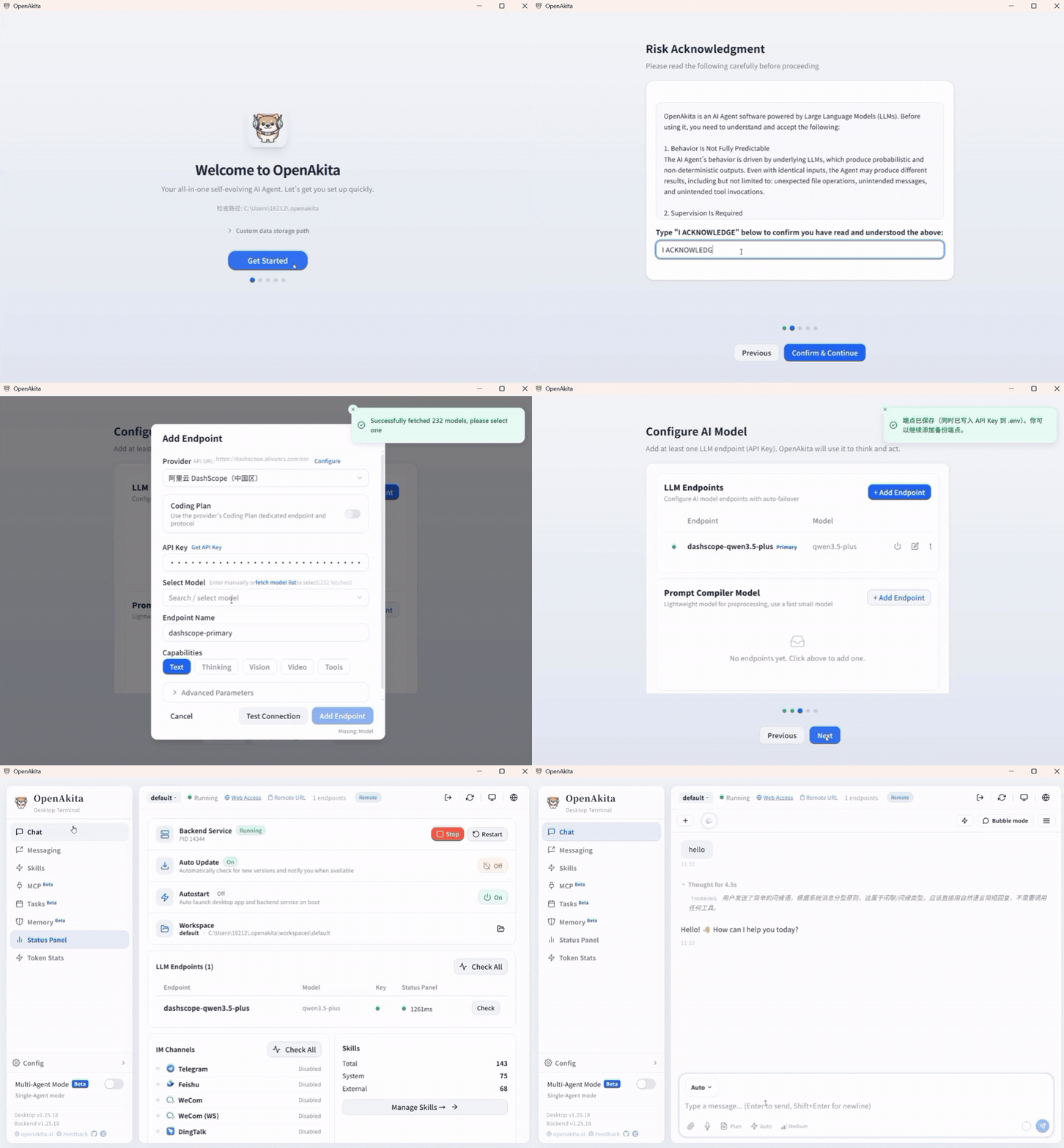
Fully GUI-based, no command line — this is what sets OpenAkita apart from other open-source AI assistants:
| Step | What You Do | Time |
|---|---|---|
| 1 | Download installer, double-click to install | 1 min |
| 2 | Follow the onboarding wizard, enter API Key | 2 min |
| 3 | Start chatting | Now |
- No Python installation, no git clone, no config file editing
- Isolated runtime — won't mess with your existing system
- Chinese users get automatic mirror switching
- Models, IM channels, skills, schedules — all configured in the GUI
Download: GitHub Releases — Windows (.exe) / macOS (.dmg) / Linux (.deb)
Learn more at openakita.ai
Option 2: pip Install
pip install openakita[all]    # Install with all optional features
openakita init                # Run setup wizard
openakita                     # Launch interactive CLI
Option 3: Source Install
git clone https://github.com/openakita/openakita.git
cd openakita
python -m venv venv && source venv/bin/activate
pip install -e ".[all]"
openakita init
Commands
openakita                              # Interactive chat
openakita run "Build a calculator"     # Execute a single task
openakita serve                        # Service mode (IM channels)
openakita serve --dev                  # Dev mode with hot reload
openakita daemon start                 # Background daemon
openakita status                       # Check status
Multi-Platform Access
OpenAkita supports Desktop, Web, and Mobile — use it anywhere, on any device:
| Platform | Details |
|---|---|
| 🖥️ Desktop App | Windows / macOS / Linux — native app built with Tauri 2.x |
| 🌐 Web Access | PC & mobile browser — enable remote access, open in any browser |
| 📱 Mobile App | Android (APK) / iOS (TestFlight) — native wrapper via Capacitor |
Desktop App
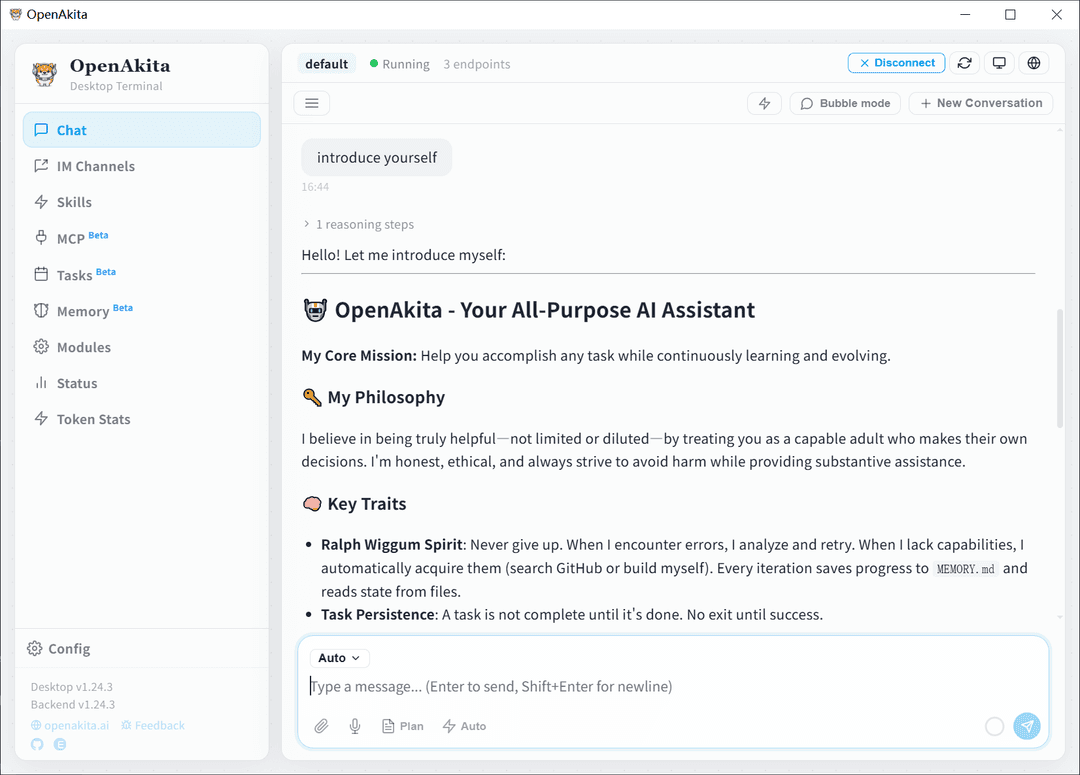
Cross-platform desktop app built with Tauri 2.x + React + TypeScript:
| Panel | Function |
|---|---|
| Chat | AI chat, streaming output, Thinking display, drag & drop upload, image lightbox |
| Agent Dashboard | Neural network visualization, real-time multi-Agent status tracking |
| Agent Manager | Create, manage, and configure multiple Agents |
| IM Channels | One-stop setup for all 6 platforms, scan-to-bind |
| Skills | Marketplace search, install, enable/disable |
| MCP | MCP server management |
| Memory | Memory management + LLM-powered review |
| Scheduler | Scheduled task management |
| Token Stats | Token usage statistics |
| Config | LLM endpoints, system settings, advanced options |
| Feedback | Bug reports + feature requests |
Dark/light theme · Onboarding wizard · Auto-update · Bilingual (EN/CN) · Start on boot
Mobile App
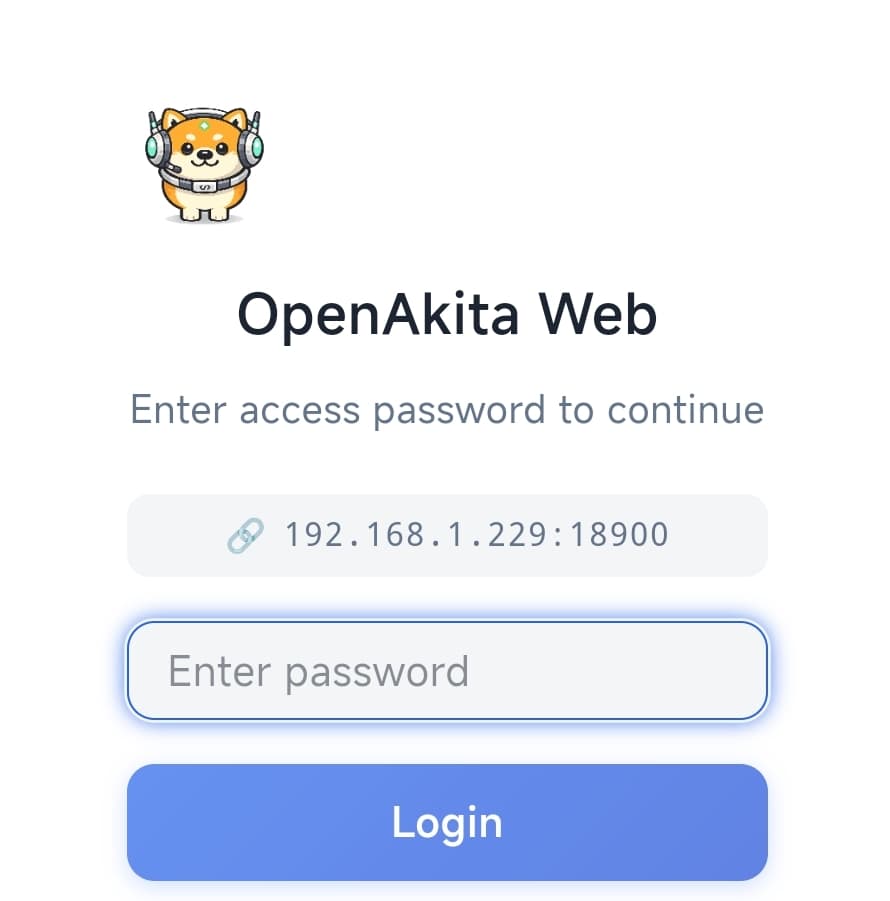
▶ Click to watch the Mobile App demo on Bilibili
- Connect your phone to the desktop backend over local network
- Full-featured: chat, multi-Agent collaboration, memory, skills, MCP — all on mobile
- Supports real-time streaming and Thinking chain display
- Preview mode available without connecting to a server
Organization Orchestration
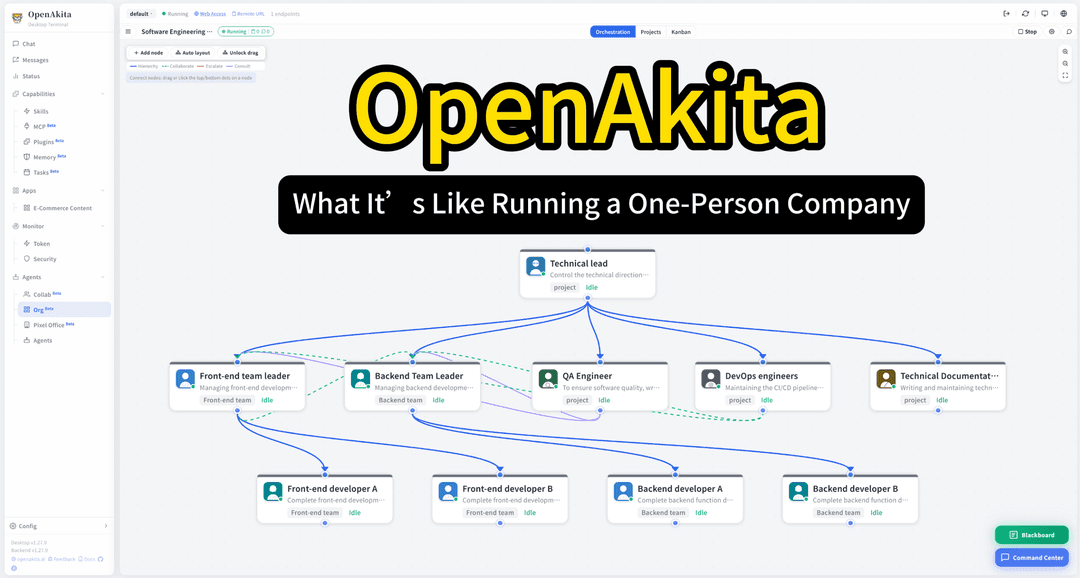
▶ Click to watch: Built a company on OpenAkita, and it runs autonomously (Bilibili)
Beyond multi-Agent collaboration — build an entire AI company. OpenAkita includes a full organization orchestration engine (AgentOrg) that lets you visually design company structures in the GUI, where AI agents operate like a real company:
┌───────────────────────────────────────────────┐
│                CEO / Executive                 │
│       Sets company strategy, coordinates all   │
└───┬───────────┬───────────┬───────────┬───────┘
    ▼           ▼           ▼           ▼
  CTO        Product     Marketing     CFO
 Tech arch   Planning    Strategy    Budget ctrl
    │           │           │           │
    ▼           ▼           ▼           ▼
 Dev team    Design      Content      Analytics
Key Features
| Feature | Description |
|---|---|
| Visual Org Chart | Drag-and-drop org builder in the GUI — nodes, edges, hierarchies |
| Autonomous Roles | Each node is an independent Agent with its own identity, skills, policies, and memory |
| Blackboard Sharing | 3-level blackboard memory (org / department / node) for secure cross-team info sharing |
| Message Routing | Priority message queues with edge bandwidth control and deadlock detection |
| Heartbeat Checks | Periodic health monitoring of all nodes, auto-remediation on anomalies |
| Auto-Scaling | Automatically recruits new Agents under heavy load, dismisses when idle |
| External Tools | Nodes can request research / browser / code tools on demand with approval workflow |
| Org Templates | Pre-built templates (tech company, content team, etc.) — deploy with one click |
| Projects & Tasks | Tree-structured task decomposition, timeline tracking, org-wide coordination |
Multi-Agent Collaboration

▶ Click to watch the Multi-Agent collaboration demo on Bilibili
OpenAkita has a built-in multi-Agent orchestration system — not just one AI, but an AI team:
You: "Create a competitive analysis report"
    │
    ▼
┌──────────────────────────────────────┐
│      AgentOrchestrator (Director)     │
│   Decomposes task → Assigns to Agents │
└───┬────────────┬──────────────┬──────┘
    ▼            ▼              ▼
 Search Agent  Analysis Agent  Writing Agent
 (web research) (data crunching) (report drafting)
    │            │              │
    └────────────┴──────────────┘
                 ▼
         Results merged, delivered to you
- Specialization: Different Agents for different domains, auto-matched to tasks
- Parallel Processing: Multiple Agents work simultaneously
- Auto Handoff: If one Agent gets stuck, it hands off to a better-suited one
- Failover: Agent failure triggers automatic switch to backup
- Depth Control: Max 5 delegation levels to prevent runaway recursion
- Visual Tracking: Agent Dashboard shows real-time status of every Agent
- Instance Pooling: Agent instance pool with LRU eviction for efficient resource use
IM Scan-to-Bind
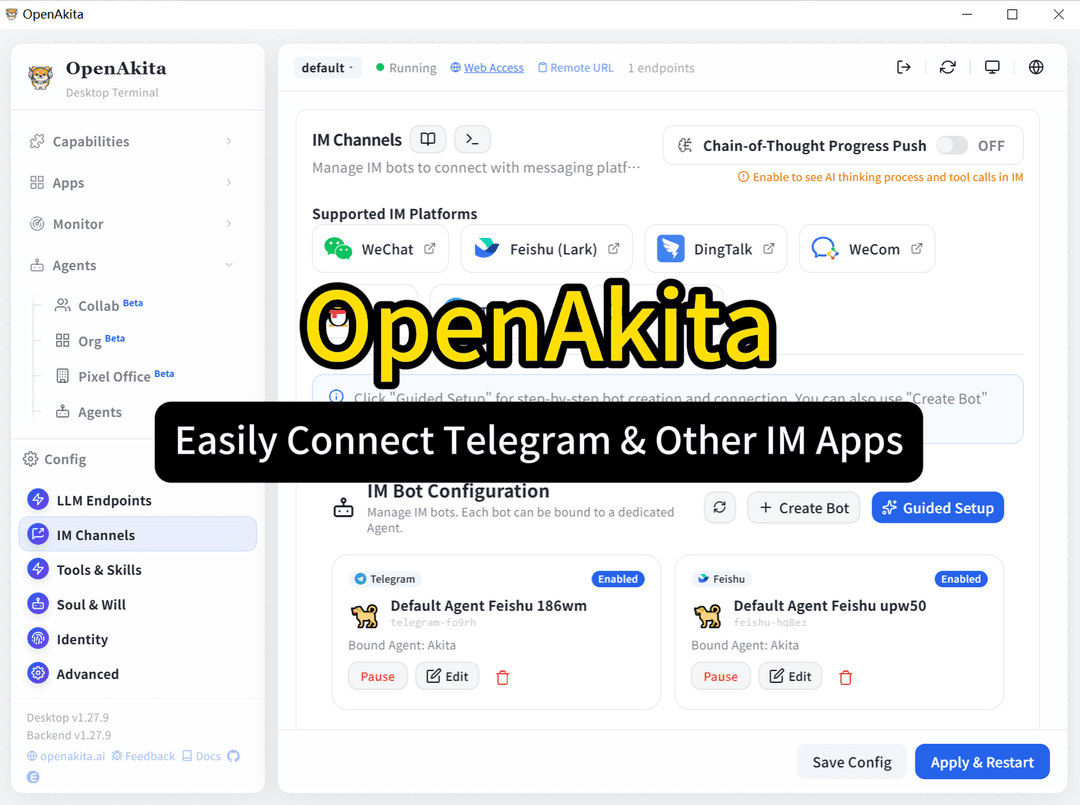
▶ Click to watch: OpenAkita scan-to-bind for WeChat, Feishu, WeCom (Bilibili)
No developer account needed. No callback URL configuration. No technical knowledge required — scan a QR code, 30 seconds to bind:
| Platform | How to Bind | Time |
|---|---|---|
| Open IM Channels → Click WeChat → Scan QR code | 30 sec | |
| Feishu | Open IM Channels → Click Feishu → Scan to authorize | 30 sec |
| WeCom | Open IM Channels → Click WeCom → Scan to bind | 30 sec |
Once bound, just @AI in your chat app — send messages, images, files, voice — AI handles it all.
6 IM Platforms
Talk to your AI right inside the chat tools you already use:
| Platform | Connection | Highlights |
|---|---|---|
| Scan-to-bind (iLink) | Personal account, no official account needed, 30-second setup | |
| Feishu | WebSocket / Webhook | Card messages, event subscriptions, scan-to-bind |
| WeCom | Smart Robot callback / WebSocket | Streaming replies, proactive push, scan-to-bind |
| DingTalk | Stream WebSocket | No public IP needed |
| Telegram | Webhook / Long Polling | Pairing verification, Markdown, proxy support |
| QQ Official | WebSocket / Webhook | Groups, DMs, channels |
| OneBot | WebSocket | Compatible with NapCat / Lagrange / go-cqhttp |
- 📷 Vision: Send screenshots/photos — AI understands them
- 🎤 Voice: Send voice messages — auto-transcribed and processed
- 📎 File Delivery: AI-generated files pushed directly to chat
- 👥 Group Chat: Replies when @mentioned, stays quiet otherwise
- 💭 Chain-of-Thought: Real-time reasoning process streamed to IM
- 🔄 Message Interrupts: Insert new instructions between tool calls without waiting
Plugin System
OpenAkita provides a complete plugin architecture with plugin.json manifest declarations, a 3-tier permission model for security, and 10 lifecycle hooks for deep integration:
8 Plugin Types
| Type | Description | Example |
|---|---|---|
| 🔧 Tool | Register custom tools for LLM to call | Database queries, API calls |
| 💬 Channel | Add new IM channel adapters | Slack, Discord adapters |
| 📚 RAG | Add external knowledge retrieval sources | Notion, Confluence retrieval |
| 🧠 Memory | Extend memory storage backends | Redis, PostgreSQL storage |
| 🤖 LLM | Connect new LLM providers | Private model deployments |
| 🪝 Hook | Inject logic into the lifecycle | Message auditing, content filtering |
| ⚡ Skill | Wrap Skills as plugins | Package skills for distribution |
| 🔗 MCP | Wrap MCP Servers as plugins | Simplify MCP deployment |
3-Tier Permission Model
| Tier | Description | Example |
|---|---|---|
| Basic | Auto-granted on install | Read config, register tools |
| Advanced | Requires user confirmation on install | File I/O, network requests |
| System | Must be manually granted per-permission | Shell execution, system config |
Lifecycle Hooks
on_init → on_message_received → on_tool_result → on_prompt_build → on_retrieve → on_session_start → on_session_end → on_schedule → on_shutdown
Plugins have automatic fault isolation: error count exceeding threshold triggers auto-disable, preventing a single plugin from crashing the system.
Bundled AI-Media Plugins (20)
Built on the openakita-plugin-sdk (contrib/ 6 modules: verification, quality_gates, intent_verifier, provider_score, error_coach, slideshow_risk / source_review). All ship with SKILL.md + README.md + tests.
| Plugin | Capability | Tests |
|---|---|---|
tongyi-image | DashScope text-to-image / image-edit / outpaint / background-gen | 107 |
seedance-video | Volcengine Ark Seedance text/image-to-video, long-form chaining | 58 |
tts-studio | Multi-provider TTS dialogue rendering | 6 |
avatar-speaker | Digital-human avatar + TTS | 7 |
image-edit | Image editing dispatcher | 5 |
subtitle-maker | Generate subtitles | 4 |
video-translator | Translate video subtitles | 14 |
highlight-cutter | Highlight reel generator | 5 |
poster-maker | Static poster composition | 8 |
storyboard | Scene plan generator (uses slideshow_risk + intent_verifier) | 39 |
bgm-suggester | LLM-driven BGM brief (uses verification) | 45 |
bgm-mixer | madmom beat-aware BGM mixing | 68 |
transcribe-archive | Long-form transcription with parallel_executor + checkpoint | 95 |
video-bg-remove | RVM background removal (uses dep_gate + checkpoint) | 72 |
video-color-grade | ffmpeg auto color grading via auto_color_grade_filter | 49 |
smart-poster-grid | 4-aspect poster batches (uses verification) | 50 |
ppt-to-video | LibreOffice + tts-studio narrated slideshows | 79 |
local-sd-flux | Local ComfyUI (SD 1.5 / SDXL / FLUX) + provider ranker | 99 |
shorts-batch | Batch shorts orchestrator (uses slideshow_risk) | 51 |
dub-it | Video dubbing pipeline (uses source_review) | 52 |
| Total | 913 |
Developer docs: Plugin System Overview · SDK contrib catalog · Sprint 18 Cleanup Assessment
Sandbox Security
OpenAkita implements a 6-layer defense-in-depth security model, from path management to OS-level isolation:
L1  Path Zoning         workspace / controlled / protected / forbidden
L2  Confirmation Gate   Dangerous ops (delete files, system commands) require user approval
L3  Command Intercept   regedit, format, rm -rf — blocked outright
L4  File Snapshots      Auto-checkpoint before writes, rollback available
L5  Self-Protection     data/, src/, identity/ — core dirs locked from modification
L6  OS-Level Sandbox    Linux bwrap / macOS seatbelt / Windows MIC
Sandbox Execution
When the policy engine classifies a shell command as HIGH risk, it automatically runs in an OS-level sandbox:
| Platform | Sandbox Backend | Description |
|---|---|---|
| Linux | bubblewrap (bwrap) | User-space container isolation, restricted filesystem and network |
| macOS | sandbox-exec (seatbelt) | System-level sandbox policies |
| Windows | Low Integrity (MIC) | Mandatory Integrity Control, low-privilege process isolation |
Additional Security Mechanisms
- Policy Engine:
POLICIES.yamlfor tool permissions, shell command blocklist, path restrictions - Resource Budgets: Token / cost / duration / iteration / tool call limits per task
- Runtime Supervision: Auto-detection of tool thrashing, reasoning loops, token anomalies
- Local Data: Memory, config, and chat history stored on your machine only
- Open Source: AGPL-3.0-only, fully transparent codebase
30+ LLM Providers
No vendor lock-in. Mix and match freely:
| Category | Providers |
|---|---|
| International | Anthropic · OpenAI · Google Gemini · xAI (Grok) · Mistral · OpenRouter · NVIDIA NIM · Groq · Together AI · Fireworks · Cohere |
| China | Alibaba DashScope · Kimi (Moonshot) · Xiaomi MiMo · MiniMax · DeepSeek · SiliconFlow · Volcengine · Zhipu AI · Baidu Qianfan · Tencent Hunyuan · Yunwu · Meituan LongCat · iFlow |
| Local | Ollama · LM Studio (⚠️ Small models have limited tool-calling ability — not recommended yet, pending optimization) |
7 capability dimensions: Text · Vision · Video · Tool use · Thinking · Audio · PDF
Smart failover: One model goes down, the next picks up seamlessly.
Recommended Models
International Models (in order of recommendation):
| Model | Provider | Notes |
|---|---|---|
claude-opus-4-6 | Anthropic | One of the best — top-tier coding & long-task capability, 1M context |
gpt-5.4 | OpenAI | Flagship — native computer-use, 1M context, strong reasoning |
claude-sonnet-4-6 | Anthropic | Best value — fully upgraded default model, 1M context |
gpt-5.3-instant | OpenAI | Best for everyday chat — significantly fewer hallucinations, natural flow |
claude-opus-4-5 | Anthropic | Previous flagship, still extremely capable |
claude-sonnet-4-5 | Anthropic | Stable and reliable for everyday use |
Chinese Models (recommended):
| Model | Provider | Notes |
|---|---|---|
kimi-k2.5 | Moonshot | 1T MoE, Agent Swarm with up to 100 parallel sub-agents, 256K context, open-source |
qwen3.5-plus | Alibaba | 397B MoE, 1M context, 201 languages, extremely cost-effective |
mimo-v2-pro | Xiaomi | 1T MoE, 1M context, global Top 8 ranking, affordable pricing |
deepseek-v3 | DeepSeek | Cost-effective benchmark, strong Chinese support |
For complex reasoning, enable Thinking mode — add
-thinkingsuffix to the model name.⚠️ Local small models not recommended (e.g. 7B/14B quantized): Small models have limited tool-calling and agent collaboration capabilities, prone to hallucinations and format errors. Use API-hosted flagship models for the best experience.
Memory System
Not just a "context window" — true long-term memory. Supports dual modes with automatic switching:
Mode 1: Fragment Memory (Classic)
- Three layers: Working memory (current task) + Core memory (user profile) + Dynamic retrieval (past experience)
- 7 memory types: Fact / Preference / Skill / Error / Rule / Persona trait / Experience
- Multi-path recall: Semantic + full-text + temporal + attachment search
- Gets smarter over time: Preferences you mentioned two months ago? Still remembered.
Mode 2: MDRM Relational Graph Memory (New)
On top of fragment memory, builds causal chains, timelines, and entity relationship graphs — letting AI truly understand connections between events:
| Dimension | Description | Example |
|---|---|---|
| Temporal | Event chronology and timelines | "What did I do last week?" → auto-constructs timeline |
| Causal | Cause-and-effect chains | "What caused this bug?" → traces causal chain |
| Entity | Relationships between people/projects/concepts | "Which projects did Alice work on?" → entity graph |
| Action | Dependencies, prerequisites, compositions | "What else is needed to finish X?" → dependency analysis |
| Context | Project/session attribution | "All discussions about this project" → cross-session aggregation |
- 4 node types: Event / Fact / Decision / Goal
- Multi-hop graph traversal: Starting from seed nodes, expands along relationship edges to find deep connections
- 3-layer encoding: Fast rule-based encoding → summary backfill → session-end batch LLM encoding
- 3D visualization: Frontend supports 3D visualization of the memory graph
Smart Mode Switching
Set memory_mode to auto (default) and the system auto-routes based on query characteristics: causal/timeline/cross-session questions use Mode 2 graph traversal, preference/fact queries use Mode 1 semantic retrieval.
- AI-driven extraction: Automatically distills valuable information after each conversation, dual-track writes to both modes
- 3D memory graph: Visualize memory nodes and relationships, intuitively understand AI's memory structure
MCP Integration
OpenAkita includes a full MCP (Model Context Protocol) client, enabling AI to connect with any external service:
| Feature | Description |
|---|---|
| 3 Transports | stdio (default), Streamable HTTP, SSE (legacy compatible) |
| Multi-Dir Scan | Auto-discovers MCP configs from built-in mcps/, .mcp, data/mcp/servers/ directories |
| Dynamic Management | Add/remove MCP servers at runtime, no restart needed |
| Tool Suite | call_mcp_tool, list_mcp_servers, add_mcp_server, connect_mcp_server, and more |
| Progressive Disclosure | MCP tool catalog + prompt templates, shown on demand |
| GUI Management | Desktop MCP panel for one-stop configuration |
Connect to GitHub, databases, Playwright browser, filesystem, or any MCP Server.
Self-Evolution
OpenAkita keeps getting stronger:
Daily 04:00   →  Self-check: analyze error logs → AI diagnosis → auto-fix → push report
After failure →  Root cause analysis (context loss / tool limitation / loop / budget) → suggestions
Missing skill →  Auto-search GitHub for skills, or AI generates one on the spot
Missing dep   →  Auto pip install, auto mirror switching for China
Every chat    →  Extract preferences and experience → long-term memory
Architecture
Desktop App (Tauri + React)
    │
Identity ─── SOUL.md · AGENT.md · POLICIES.yaml · 8 Persona Presets
    │
Core     ─── ReasoningEngine(ReAct) · Brain(LLM) · ContextManager
    │        PromptAssembler · RuntimeSupervisor · ResourceBudget
    │
Agents   ─── AgentOrchestrator(Coordination) · AgentInstancePool(Pooling)
    │        AgentFactory · FallbackResolver(Failover)
    │
Org      ─── OrgRuntime(Runtime) · OrgManager(CRUD)
    │        OrgMessenger(Routing) · Blackboard(Shared Memory)
    │        OrgIdentity(Inheritance) · OrgPolicies(Policies)
    │
Plugins  ─── PluginManager(Discovery/Loading) · PluginAPI(Host Interface)
    │        HookRegistry(10 Hooks) · PluginSandbox(Fault Isolation)
    │
Memory   ─── Mode1: UnifiedStore(SQLite+Vector) · RetrievalEngine(Multi-path)
    │        Mode2: RelationalStore(MDRM Graph) · GraphEngine(Multi-hop)
    │        MemoryModeRouter(Auto Switch) · MemoryEncoder(3-Layer)
    │
Tools    ─── Shell · File · Browser · Desktop · Web · MCP · Skills
    │        Plan · Scheduler · Sticker · Persona · Agent Delegation
    │
Security ─── PolicyEngine(6-Layer) · SandboxExecutor(OS Sandbox)
    │        ConfirmationGate · CommandFilter · Checkpoint
    │
Evolution ── SelfCheck · FailureAnalyzer · SkillGenerator · Installer
    │
Channels ─── CLI · Telegram · Feishu · WeCom · WeChat · DingTalk · QQ · OneBot
    │
Tracing  ─── AgentTracer(12 SpanTypes) · DecisionTrace · TokenStats
Documentation
| Document | Content |
|---|---|
| Configuration Guide | Desktop Quick Setup & Full Setup walkthrough |
| ⭐ LLM Provider Setup | API Key registration + endpoint config + Failover |
| ⭐ IM Channel Setup | Telegram / Feishu / DingTalk / WeCom / QQ / OneBot tutorial |
| Plugin System Overview | Plugin types, permissions, developer guide |
| Org Orchestration Design | AgentOrg technical architecture and design |
| Org Orchestration Guide | Organization orchestration user guide |
| Quick Start | Installation and basics |
| Architecture | System design and components |
| Configuration | All config options |
| Deployment | Production deployment |
| MCP Integration | Connecting external services |
| Skill System | Creating and using skills |
Community
 WeChat Official Follow for updates |
 WeChat (Personal) Note "OpenAkita" to join group |
 WeChat Group Scan to join (⚠️ refreshed weekly) |
 QQ Group: 854429727 Scan or search to join |
🌐 Website · 💬 Discord · 🐦 X (Twitter) · 📧 Email
Issues · Discussions · ⭐ Star
Acknowledgments
- Anthropic Claude — Default recommended LLM, core development partner
- Tauri — Cross-platform desktop framework
- ChineseBQB — 5700+ stickers that give AI a soul
- browser-use — AI browser automation
- AGENTS.md / Agent Skills — Open standards
Community Contributors
- @948324394 — Docker deployment support
License
OpenAkita source code is licensed under the GNU Affero General Public License v3.0 only (AGPL-3.0-only) — See LICENSE.
The OpenAkita name, logos, icons, screenshots, and other brand assets are not licensed under AGPL-3.0-only. See TRADEMARK.md for brand usage rules.
Third-party licenses: THIRD_PARTY_NOTICES.md
Star History
OpenAkita — Open-Source Multi-Agent AI Assistant That Gets Things Done
openakita.ai
// faq
What is openakita?
An open-source AI assistant framework with skills and agent architecture. It is open-source on GitHub.
Is openakita free to use?
openakita is open-source under the AGPL-3.0 license, so it is free to use.
What category does openakita belong to?
openakita is listed under automation in the Claudeers registry of Claude-compatible tools.
// embed badge

[](https://claudeers.com/openakita)
// retro hit counter

[](https://claudeers.com/openakita)
// reviews
// guestbook
// related in Automation & Workflows
 🔓
🔓 🔓
🔓The API to search, scrape, and interact with the web at scale. 🔥
 🔓
🔓🌐 Make websites accessible for AI agents. Automate tasks online with ease.
 🔓
🔓Taste-Skill - gives your AI good taste. stops the AI from generating boring, generic slop
// built by
1 of its contributors also build on official projects — knowledge-work-plugins
→ see how openakita connects across the ecosystem