
open-code-review
Open-source & free — Battle-tested at Alibaba's scale. Hybrid architecture code review tool: deterministic pipelines + LLM Agent, precise line-level comments…
Install with your AI
Paste into Claude Code, Cursor, or any agent — it reads the repo and wires the tool into your project.
Install and set up open-code-review (claude-plugin project) into my current project.
Found on https://claudeers.com/open-code-review-2
Repo: https://github.com/alibaba/open-code-review
Homepage/docs: https://alibaba.github.io/open-code-review/
Detected install method: claude-plugin → /plugin install open-code-review@alibaba/open-code-review
Category: devtools. Platforms: cli, api, web.
Read the repo's README for exact setup and env vars, then install it and wire it into my project.

Claudeers Health Verdict:
active; community-verified: false. Confirm the source before running anything.
/plugin marketplace add alibaba/open-code-review
/plugin install open-code-review@alibaba/open-code-review
git clone https://github.com/alibaba/open-code-review
// compatibility
| Platforms | cli, api, web |
|---|---|
| Operating systems | — |
| AI compatibility | claude |
| License | Apache-2.0 |
| Pricing | open-source |
| Language | Go |

OpenCodeReview
English | 简体中文 | 日本語 | 한국어 | Русский
What is Open Code Review?
Open Code Review is an AI-powered code review CLI tool. It originated as Alibaba Group's internal official AI code review assistant — over the past two years, it has served tens of thousands of developers and identified millions of code defects. After thorough validation at massive scale, we incubated it into an open source project for the community. Simply configure a model endpoint to get started.
It reads Git diffs, sends changed files to a configurable LLM via an agent with tool-use capabilities, and generates structured review comments with line-level precision. The agent can read full file contents, search the codebase, inspect other changed files for context, and produce deep reviews — not just surface-level diff feedback.

Benchmark
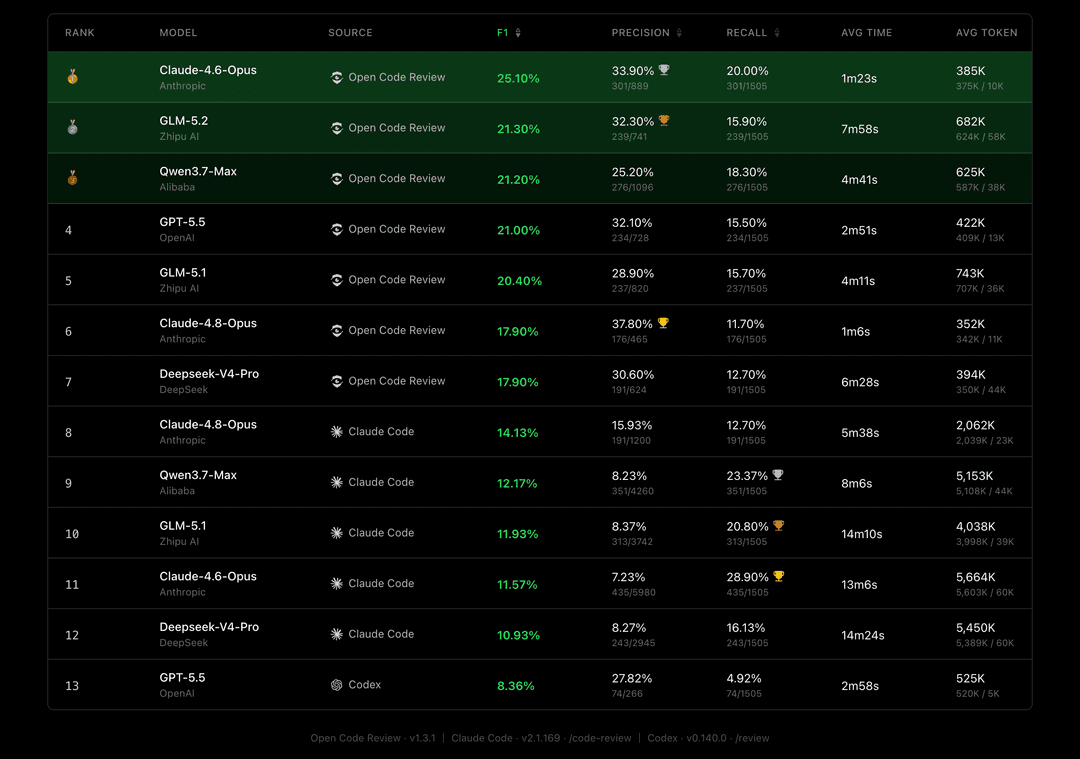
Compared to general-purpose agents (Claude Code), Open Code Review achieves significantly higher Precision and F1 with the same underlying model, while consuming only ~1/9 of the tokens and completing reviews faster. Note that its Recall is lower than general-purpose agents — a deliberate trade-off favoring precision over noise.
A real-world code review benchmark built from 50 popular open-source repositories, 200 real Pull Requests, and 10 programming languages — cross-validated by 80+ senior engineers (1,505 annotated ground-truth issues).
| Metric | What it measures | Why it matters |
|---|---|---|
| F1 | Harmonic mean of precision and recall | Best single number for overall review quality |
| Precision | Proportion of reported issues that are real defects | Higher = fewer false alarms to triage |
| Recall | Proportion of real defects that are found | Higher = fewer issues slip through review |
| Avg Time | Wall-clock time per review | Matters for CI pipeline latency |
| Avg Token | Total tokens consumed per review | Directly impacts API cost |
Why Open Code Review?
The Problem with General-Purpose Agents
If you've used general-purpose agents like Claude Code with Skills for code review, you've likely encountered these pain points:
- Incomplete coverage — On larger changesets, agents tend to "cut corners," selectively reviewing only some files and missing others.
- Position drift — Reported issues frequently don't match the actual code location, with line numbers or file references drifting off target.
- Unstable quality — Natural-language-driven Skills are hard to debug, and review quality fluctuates significantly with minor prompt variations.
The root cause: a purely language-driven architecture lacks hard constraints on the review process.
Core Design: Deterministic Engineering × Agent Hybrid
Open Code Review's core philosophy is to combine deterministic engineering with an agent, each handling what it does best.
Deterministic Engineering — Hard Constraints
For review steps that must not go wrong, engineering logic — not the language model — guarantees correctness:
- Precise file selection — Determines exactly which files need review and which should be filtered, ensuring no important change is missed.
- Smart file bundling — Groups related files into a single review unit (e.g.,
message_en.propertiesandmessage_zh.propertiesare bundled together). Each bundle runs as a sub-agent with isolated context — a divide-and-conquer strategy that stays stable on very large changesets and naturally supports concurrent review. - Fine-grained rule matching — Matches review rules to each file's characteristics, keeping the model's attention sharply focused and eliminating information noise at the source. Compared to purely language-driven rule guidance, template-engine-based rule matching is more stable and predictable.
- External positioning and reflection modules — Independent comment-positioning and comment-reflection modules systematically improve both the location accuracy and content accuracy of AI feedback.
Agent — Dynamic Decision-Making
The agent's strengths are concentrated where they matter most — dynamic decisions and dynamic context retrieval:
- Scenario-tuned prompts — Prompt templates deeply optimized for code review, improving effectiveness while reducing token consumption.
- Scenario-tuned toolset — Distilled from deep analysis of tool-call traces in large-scale production data — including call frequency distributions, per-tool repetition rates, and the impact of new tools on the overall call chain — resulting in a purpose-built toolset that is more stable and predictable for code review than a generic agent toolkit.
How to Use
CLI
Install
Via NPM (Recommended)
npm install -g @alibaba-group/open-code-review
After installation, the ocr command is available globally.
From GitHub Release
Install the latest binary for your OS/architecture with one command (macOS / Linux):
curl -fsSL https://raw.githubusercontent.com/alibaba/open-code-review/main/install.sh | sh
The script picks the right release binary, verifies its SHA-256 checksum, and installs it as ocr in /usr/local/bin. Override the target with OCR_INSTALL_DIR or pin a release with OCR_VERSION:
OCR_INSTALL_DIR="$HOME/.local/bin" OCR_VERSION=v1.3.13 \
  sh -c "$(curl -fsSL https://raw.githubusercontent.com/alibaba/open-code-review/main/install.sh)"
Manual download (all platforms, including Windows)
Download the binary for your platform from GitHub Releases:
# macOS (Apple Silicon)
curl -Lo ocr https://github.com/alibaba/open-code-review/releases/latest/download/opencodereview-darwin-arm64
chmod +x ocr && sudo mv ocr /usr/local/bin/ocr

# macOS (Intel)
curl -Lo ocr https://github.com/alibaba/open-code-review/releases/latest/download/opencodereview-darwin-amd64
chmod +x ocr && sudo mv ocr /usr/local/bin/ocr

# Linux (x86_64)
curl -Lo ocr https://github.com/alibaba/open-code-review/releases/latest/download/opencodereview-linux-amd64
chmod +x ocr && sudo mv ocr /usr/local/bin/ocr

# Linux (ARM64)
curl -Lo ocr https://github.com/alibaba/open-code-review/releases/latest/download/opencodereview-linux-arm64
chmod +x ocr && sudo mv ocr /usr/local/bin/ocr

# Windows (x86_64) — move ocr.exe to a directory in your PATH
curl -Lo ocr.exe https://github.com/alibaba/open-code-review/releases/latest/download/opencodereview-windows-amd64.exe

# Windows (ARM64) — move ocr.exe to a directory in your PATH
curl -Lo ocr.exe https://github.com/alibaba/open-code-review/releases/latest/download/opencodereview-windows-arm64.exe
From Source
git clone https://github.com/alibaba/open-code-review.git
cd open-code-review
make build
sudo cp dist/opencodereview /usr/local/bin/ocr
Quick Start
1. Configure LLM
You must configure an LLM before reviewing code.
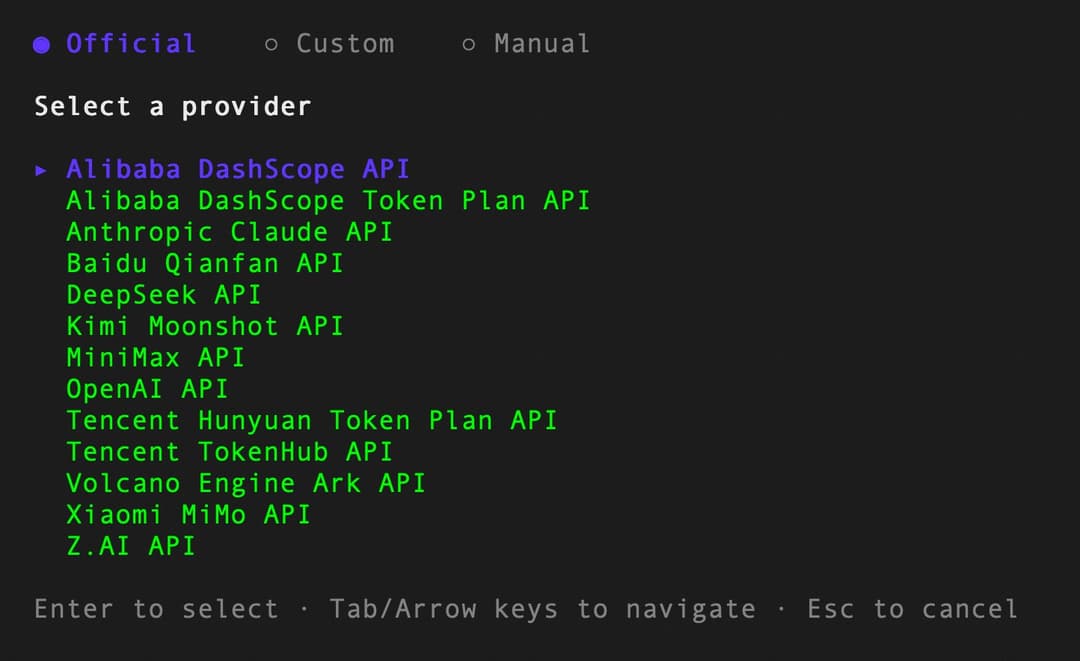
Option A: Interactive setup (Recommended)
ocr config provider          # Select a built-in provider or add a custom one
ocr config model             # Pick a model for the active provider
Option B: Manual config
ocr config set llm.url https://api.anthropic.com/v1/messages
ocr config set llm.auth_token your-api-key-here
ocr config set llm.model claude-opus-4-6
ocr config set llm.use_anthropic true
Config is stored in ~/.opencodereview/config.json.
auth_header (optional): Controls which HTTP header carries the API key when using Anthropic. Defaults to authorization (Bearer token) if omitted. If you use a standard sk-ant-* API key, you must set it to x-api-key:
ocr config set llm.auth_header x-api-key
Supported values: x-api-key, authorization (alias: bearer). Other values are rejected with an error.
Option C: Environment variables (highest priority)
export OCR_LLM_URL=https://api.anthropic.com/v1/messages
export OCR_LLM_TOKEN=your-api-key-here
export OCR_LLM_MODEL=claude-opus-4-6
export OCR_USE_ANTHROPIC=true
It is also compatible with Claude Code environment variables (ANTHROPIC_BASE_URL, ANTHROPIC_AUTH_TOKEN, ANTHROPIC_MODEL) and parses ~/.zshrc / ~/.bashrc for those exports.
Note for CC-Switch Users: If you are using CC-Switch with routing service enabled, you can point
llm.urlto the CC-Switch proxy address without additional configuration:
- For Claude provider: set
llm.urltohttp://127.0.0.1:15721- For Codex provider: set
llm.urltohttp://127.0.0.1:15721/v1- Set
llm.modelaccording to your provider settingsllm.auth_tokencan be any valueextra_bodysettings still apply
2. Test Connectivity
ocr llm test
3. Review
cd your-project

# Workspace mode — review all staged, unstaged, and untracked changes
ocr review

# Branch range — compare two refs
ocr review --from main --to feature-branch

# Single commit
ocr review --commit abc123
Integrate with Coding Agents
OCR can be seamlessly integrated into AI coding agents as a slash command, enabling code review directly within your agent workflow.
Option 1: Install as a Skill
Use npx to install the OCR skill into your project:
npx skills add alibaba/open-code-review --skill open-code-review
This installs the open-code-review skill from the skills registry, which teaches your coding agent how to invoke ocr for code review, classify issues by priority, and optionally apply fixes.
Option 2: Install as a Claude Code Plugin
For Claude Code, install the command plugin through the following command in Claude Code:
/plugin marketplace add alibaba/open-code-review
/plugin install open-code-review@open-code-review
This registers the /open-code-review:review slash command, which runs OCR and automatically filters and fixes issues.
Option 3: Install as a Codex Plugin
For local Codex, install the Open Code Review plugin from this repository:
codex plugin marketplace add alibaba/open-code-review
codex
/plugins
For a local checkout or fork:
codex plugin marketplace add .
codex
/plugins
Install and enable Open Code Review, then start a new Codex thread and invoke it explicitly:
@Open Code Review review my current changes
@Open Code Review review this branch against main
@Open Code Review review and fix high-confidence issues
This registers a Codex skill that runs the local OCR CLI:
ocr review --audience agent
This integration does not change OCR's internal LLM backend and does not require configuring an OpenAI Responses API endpoint for Codex. OCR itself still requires the ocr CLI to be installed and configured as described in the CLI setup section.
Korean guide: plugins/open-code-review/CODEX.ko-KR.md
Option 4: Copy the Command File Directly
For a quick setup without any package manager, simply copy the command file to use the /open-code-review slash command in Claude Code.
Project-level (shared with team via git):
mkdir -p .claude/commands
curl -o .claude/commands/open-code-review.md \
  https://raw.githubusercontent.com/alibaba/open-code-review/main/plugins/open-code-review/commands/review.md
User-level (personal global use across all projects):
mkdir -p ~/.claude/commands
curl -o ~/.claude/commands/open-code-review.md \
  https://raw.githubusercontent.com/alibaba/open-code-review/main/plugins/open-code-review/commands/review.md
Prerequisite: All integration methods require the
ocrCLI to be installed and an LLM configured. See Install and Configure LLM above.
CI/CD Integration
OCR can be integrated into CI/CD pipelines to automate code review on Merge Requests / Pull Requests.
The core command for CI integration:
ocr review \
  --from "origin/main" \
  --to "<commit_sha>" \
  --format json
The --from flag accepts a branch ref (e.g., origin/main) or commit SHA as the base, while --to accepts a commit SHA or branch ref as the head. In CI environments, using commit SHA for --to is recommended to correctly handle fork PRs/MRs where the source branch doesn't exist on the origin remote.
The --format json flag outputs machine-readable results suitable for parsing in CI scripts.
See the examples/ directory for integration examples:
github_actions/— GitHub Actions integration examplegitlab_ci/— GitLab CI integration example
Commands
| Command | Alias | Description |
|---|---|---|
ocr review | ocr r | Start a code review |
ocr rules check <file> | — | Preview which review rule applies to a file path |
ocr config provider | — | Interactive provider setup (built-in, custom, or manual) |
ocr config model | — | Interactive model selection for the active provider |
ocr config set <key> <value> | — | Set configuration values |
ocr config unset custom_providers.<name> | — | Delete a custom provider |
ocr llm test | — | Test LLM connectivity |
ocr llm providers | — | List built-in LLM providers |
ocr viewer | ocr v | Launch WebUI session viewer on localhost:5483 |
ocr version | — | Show version info |
ocr review Flags
| Flag | Shorthand | Default | Description |
|---|---|---|---|
--repo | — | current dir | Git repository root |
--from | — | — | Source ref (e.g., main) |
--to | — | — | Target ref (e.g., feature-branch) |
--commit | -c | — | Single commit to review |
--preview | -p | false | Preview which files will be reviewed without running the LLM |
--format | -f | text | Output format: text or json |
--concurrency | — | 8 | Max concurrent file reviews |
--timeout | — | 10 | Concurrent task timeout in minutes |
--audience | — | human | human (show progress) or agent (summary only) |
--background | -b | — | Optional requirement/business context for the review; auto-filled from commit message when using --commit |
--model | — | — | Select or override the LLM model for this review |
--rule | — | — | Path to custom JSON review rules |
--max-tools | — | built-in | Max tool call rounds per file; only takes effect when greater than template default |
--max-git-procs | — | built-in | Max concurrent git subprocesses |
--tools | — | — | Path to custom JSON tools config |
Examples
# Interactive provider and model setup
ocr config provider
ocr config model
ocr llm providers

# Delete a custom provider
ocr config unset custom_providers.my-gateway

# Preview which files will be reviewed (no LLM calls)
ocr review --preview
ocr review -c abc123 -p

# Review workspace changes with default settings
ocr review

# Review branch diff with higher concurrency
ocr review --from main --to my-feature --concurrency 4

# Review a specific commit with verbose JSON output
ocr review --commit abc123 --format json --audience agent

# Select or override model for this review
ocr review --model claude-opus-4-6
ocr review --commit abc123 --model claude-sonnet-4-6

# Provide requirement context for more targeted review
ocr review --background "Adding rate limiting to the login API"

# Use custom review rules
ocr review --rule /path/to/my-rules.json

# Preview which rule applies to a file
ocr rules check src/main/java/com/example/Foo.java
ocr rules check --rule custom.json src/main/resources/mapper/UserMapper.xml

# View review session history in browser
ocr viewer
ocr viewer --addr :3000
Viewer security
The viewer serves session JSONL contents (LLM request messages and responses) over HTTP. It enforces a Host-header allowlist on every request: loopback names (localhost, 127.0.0.0/8, ::1) and the concrete bind host are always allowed. Wildcard binds (--addr :3000, --addr 0.0.0.0:3000) and other non-loopback Hostnames must be added via the OCR_VIEWER_ALLOWED_HOSTS environment variable (comma-separated):
OCR_VIEWER_ALLOWED_HOSTS=review.internal,ocr.lan ocr viewer --addr :3000
This blocks DNS-rebinding attacks against the local viewer.
Review Rules
OCR resolves review rules using a four-layer priority chain. Each layer uses first-match-wins: if a file path matches a pattern, that rule is used; otherwise it falls through to the next layer.
| Priority | Source | Path | Description |
|---|---|---|---|
| 1 (highest) | --rule flag | User-specified path | CLI explicit override |
| 2 | Project config | <repoDir>/.opencodereview/rule.json | Per-project rules, can be committed to git |
| 3 | Global config | ~/.opencodereview/rule.json | User-wide personal preferences |
| 4 (lowest) | System default | Embedded system_rules.json | Built-in rules covering common languages and file types |
Rule File Format
Layers 1–3 share the same JSON format:
{
  "rules": [
    {
      "path": "force-api/**/*.java",
      "rule": "All new methods must validate required parameters for null values"
    },
    {
      "path": "**/*mapper*.xml",
      "rule": "Check SQL for injection risks, parameter errors, and missing closing tags"
    }
  ]
}
pathsupports**recursive matching and{java,kt}brace expansion.- Within each layer, rules are evaluated in declaration order — the first match wins.
- If a rule file does not exist, it is silently skipped.
Path Filtering
Rule files also support include and exclude fields to control which files enter the review scope:
{
  "rules": [
    {"path": "**/*.java", "rule": "Check for null safety"}
  ],
  "include": ["src/main/**/*.java", "lib/**/*.kt"],
  "exclude": ["**/generated/**", "vendor/**"]
}
Filter decision priority (highest to lowest):
| Step | Condition | Result |
|---|---|---|
| 1 | File is binary | Excluded |
| 2 | Path matches user exclude pattern | Excluded |
| 3 | File extension not in supported list | Excluded |
| 4 | include is configured and path matches | Reviewed (skips step 5) |
| 5 | Path matches built-in default exclude pattern (test files, etc.) | Excluded |
| 6 | None of the above | Reviewed |
How it works:
includeandexcludefollow the same priority chain as review rules (--rule> project config > global config). The highest-priority layer that has include/exclude configured takes effect as a whole — patterns are not merged across layers.excludealways wins overinclude— a file matching both is excluded.includeacts as a bypass for built-in default exclude patterns (e.g., test files), not as an exclusive allowlist — files not matching anyincludepattern still proceed through the default filter checks normally.- Pattern syntax: supports
**recursive matching,*single-segment matching, and{a,b}brace expansion. Matching is case-insensitive.
Built-in default exclude patterns (filters test files, etc. — can be overridden with include):
**/*_test.go, **/*Test.java, **/*Tests.java, **/*_test.rs,
**/*.test.{js,jsx,ts,tsx}, **/*.spec.{js,jsx,ts,tsx}, **/__tests__/**,
**/src/test/java/**/*.java, **/src/test/**/*.kt,
**/test/**/*_test.py, **/tests/**/*_test.py, **/*_test.py,
**/*_spec.rb, **/spec/**/*_spec.rb, **/oh_modules/**
Configuration Reference
Config file: ~/.opencodereview/config.json
| Key | Type | Example |
|---|---|---|
provider | string | anthropic | openai | dashscope | deepseek | z-ai |
providers.<name>.api_key | string | Provider-specific API key |
providers.<name>.url | string | Provider base URL override |
providers.<name>.protocol | string | anthropic | openai |
providers.<name>.model | string | Model name for the provider |
providers.<name>.models | array | Optional provider model list for interactive selection |
providers.<name>.auth_header | string | x-api-key | authorization |
custom_providers.<name>.* | — | Same fields as providers.<name>.*, including optional models |
llm.url | string | https://api.openai.com/v1/chat/completions |
llm.auth_token | string | sk-xxxxxxx |
llm.auth_header | string | Anthropic only: x-api-key | authorization |
llm.model | string | claude-opus-4-6 |
llm.use_anthropic | boolean | true | false |
language | string | Any language name, e.g. English, Chinese (default: English) |
telemetry.enabled | boolean | true | false |
telemetry.exporter | string | console | otlp |
telemetry.otlp_endpoint | string | OTLP collector address |
telemetry.content_logging | boolean | Include prompts in telemetry |
Environment variables take precedence over the config file.
Environment Variables
| Variable | Purpose |
|---|---|
OCR_LLM_URL | LLM API endpoint URL |
OCR_LLM_TOKEN | API key / auth token |
OCR_LLM_AUTH_HEADER | Anthropic auth header (x-api-key or authorization) |
OCR_LLM_MODEL | Model name |
OCR_USE_ANTHROPIC | true = Anthropic, false = OpenAI |
Telemetry
OpenTelemetry integration for observability (spans, metrics). Disabled by default.
ocr config set telemetry.enabled true
ocr config set telemetry.exporter otlp
ocr config set telemetry.otlp_endpoint localhost:4317
Set telemetry.content_logging to include LLM prompts and responses in exported data.
Contributing
See CONTRIBUTING.md for development setup, coding guidelines, and how to submit pull requests.
Star History
License
Apache-2.0 — Copyright 2026 Alibaba
// faq
What is open-code-review?
Open-source & free — Battle-tested at Alibaba's scale. Hybrid architecture code review tool: deterministic pipelines + LLM Agent, precise line-level comments, built-in fine-tuned ruleset (NPE, thread-safety, XSS, SQL injection), OpenAI & Anthropic compatible.. It is open-source on GitHub.
Is open-code-review free to use?
open-code-review is open-source under the Apache-2.0 license, so it is free to use.
What category does open-code-review belong to?
open-code-review is listed under automation in the Claudeers registry of Claude-compatible tools.
// embed badge

[](https://claudeers.com/open-code-review-2)
// retro hit counter

[](https://claudeers.com/open-code-review-2)
// reviews
// guestbook
// related in Developer Tools
 🔓
🔓The agent harness performance optimization system. Skills, instincts, memory, security, and research-first development for Claude Code, Codex, Opencode, Curs…
 🔓
🔓Makes your AI agent think like the laziest senior dev in the room. The best code is the code you never wrote.
 🔓
🔓Use Garry Tan's exact Claude Code setup: 23 opinionated tools that serve as CEO, Designer, Eng Manager, Release Manager, Doc Engineer, and QA
 🔓
🔓AI coding assistant skill (Claude Code, Codex, OpenCode, Cursor, Gemini CLI, and more). Turn any folder of code, SQL schemas, R scripts, shell scripts, docs,…
// built by
2 of its contributors also build on official projects — claude-agent-sdk-python, claude-cookbooks, claude-quickstarts
→ see how open-code-review connects across the ecosystem