
omarchy-rescue
The Omarchy ISO with a rescue mode: rescue tools plus Claude Code, Codex, and OpenCode in a live console
Install with your AI
Paste into Claude Code, Cursor, or any agent — it reads the repo and wires the tool into your project.
Install and set up omarchy-rescue (release-binary project) into my current project.
Found on https://claudeers.com/omarchy-rescue
Repo: https://github.com/crmne/omarchy-rescue
Homepage/docs: —
Detected install method: release-binary → inspect the README
Category: devops. Platforms: cli, api, desktop, web.
Read the repo's README for exact setup and env vars, then install it and wire it into my project.

Claudeers Health Verdict:
unknown; community-verified: false. Confirm the source before running anything.
Grab the latest release asset from GitHub.
# download a build from https://github.com/crmne/omarchy-rescue/releases
git clone https://github.com/crmne/omarchy-rescue
// compatibility
| Platforms | cli, api, desktop, web |
|---|---|
| Operating systems | — |
| AI compatibility | claude |
| License | MIT |
| Pricing | open-source |
| Language | Shell |
Omarchy Rescue
A rescue USB for Omarchy: a live Omarchy console with the rescue tools you'd reach for from SystemRescue, and Claude Code, Codex, and OpenCode ready to help diagnose and fix a machine that won't boot.
https://github.com/user-attachments/assets/3d764e1b-ad15-4686-975d-beed4420f63f
Music in the film: "Enthusiast" by Tours, CC BY 3.0.
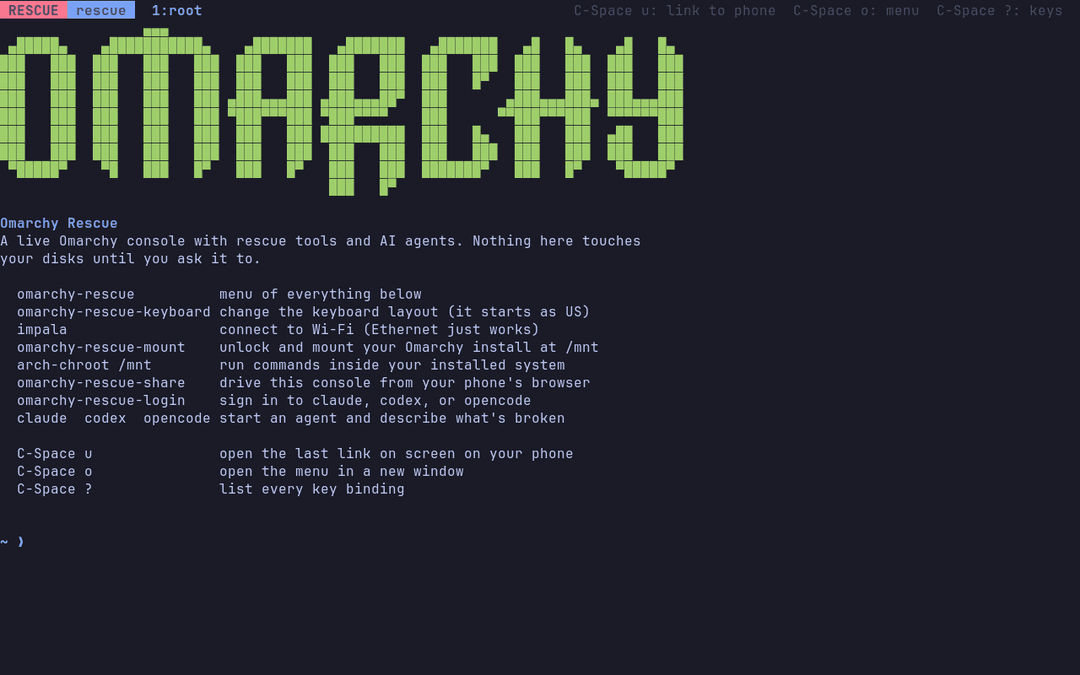
Download the ISO from Releases,
check it against its .sha256, and write it to a USB stick. It boots into:
- Omarchy Rescue (default): a kmscon console on tty1 with JetBrains Mono, truecolor, and the Tokyo Night palette, no desktop needed.
- Omarchy Rescue, basic console: the plain kernel console with
nomodeset, for GPUs kmscon can't drive.
It's built from the Omarchy ISO itself, so it boots the same kernel on the same hardware. It can also be built as the full Omarchy ISO with rescue added in front of the untouched installer; see Building.
Using it
Boot the rescue entry and you land in a tmux session running Omarchy's shell.
impala                  connect to Wi-Fi (Ethernet just works)
omarchy-rescue-login    sign in to claude, codex, or opencode
omarchy-rescue-mount    unlock and mount your Omarchy install at /mnt
arch-chroot /mnt        run commands inside it
claude                  describe what's broken
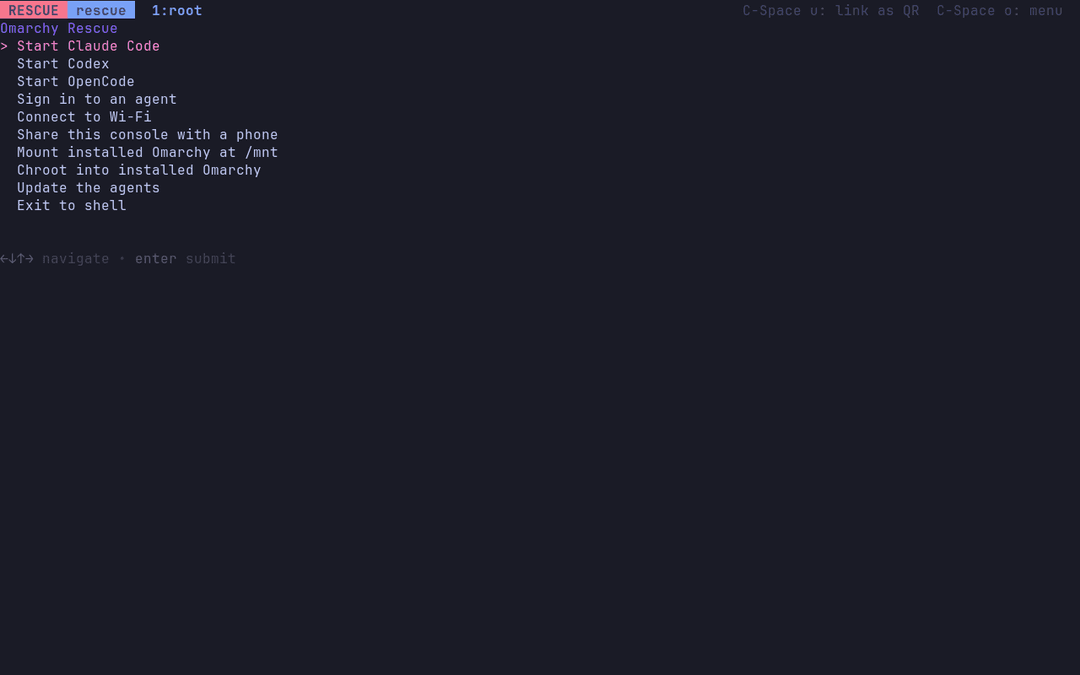
omarchy-rescue          a menu of all of the above
omarchy-rescue-mount asks for your disk passphrase and mounts the whole
install the way it mounts itself, from its own fstab:
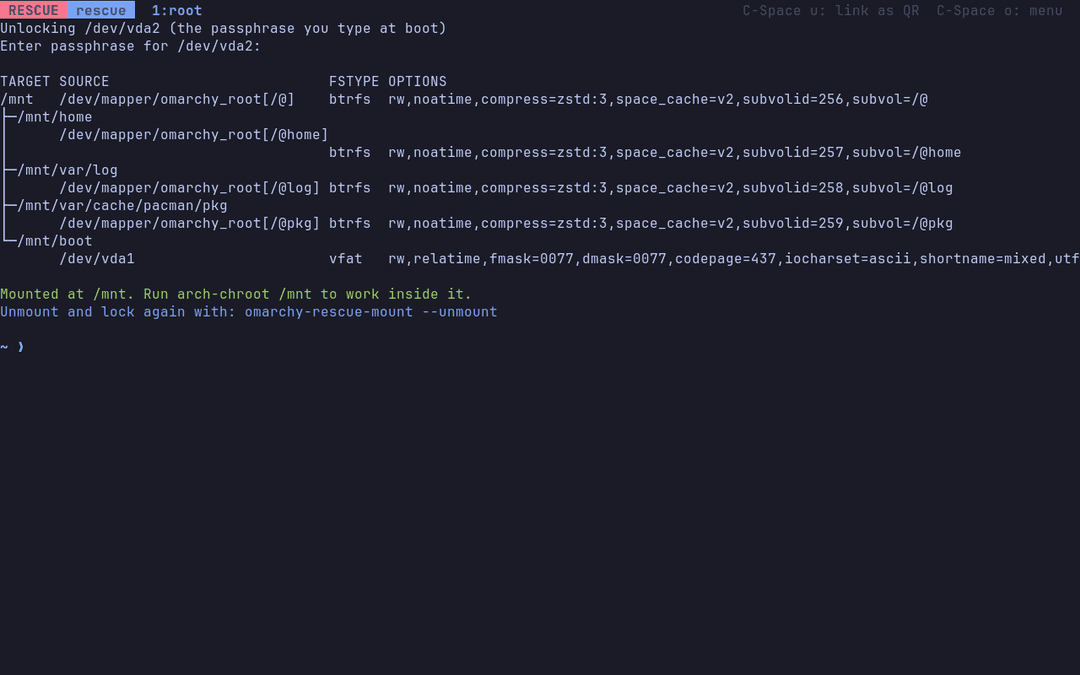
Signing in without a browser
Every agent signs in from the terminal by printing a link to open on another
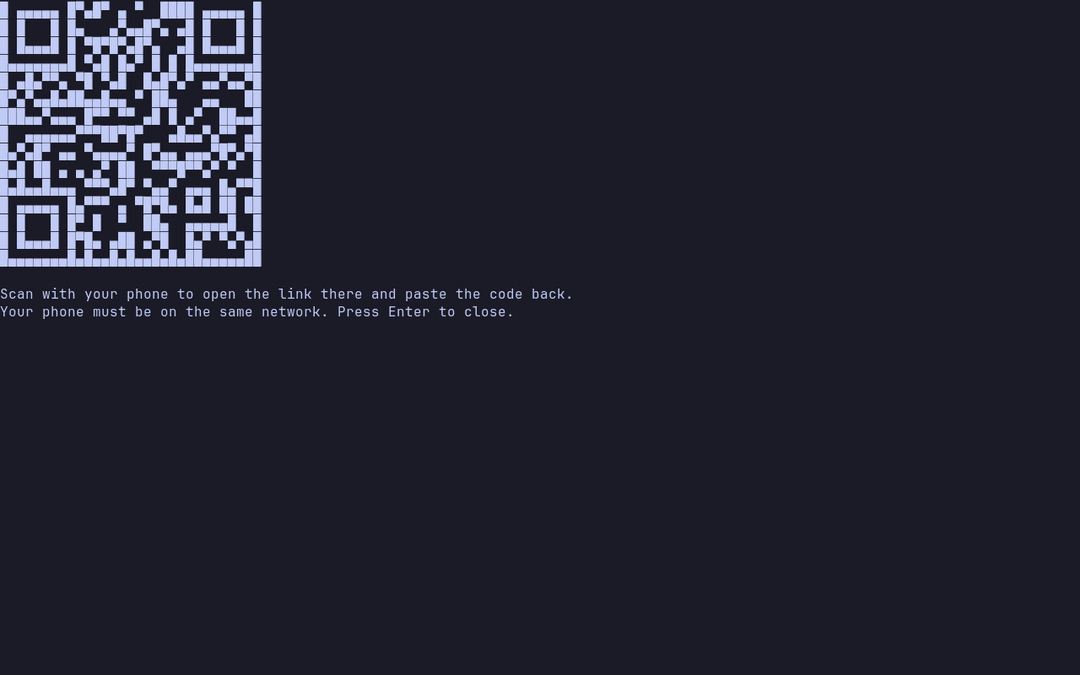
device. omarchy-rescue-login hands that link to your phone: as soon as the
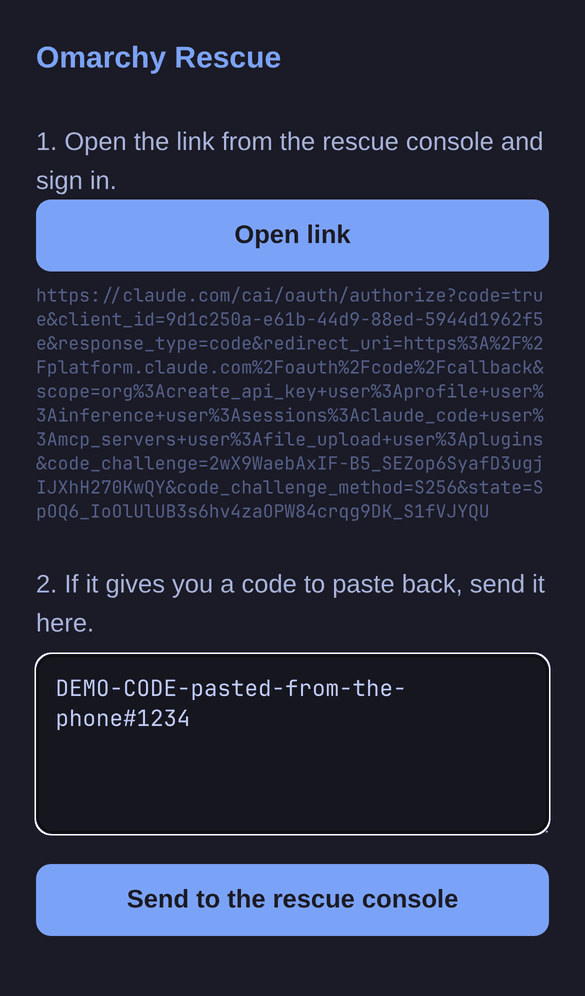
agent prints it, a QR code pops up. Scan it and you get a page that opens the
sign-in link. What happens next depends on the agent:
- Claude Code wants a long code pasted back. The phone page has a box for it: send it, and the code is typed into the console; press Enter there to use it.
- OpenCode needs nothing pasted: its link carries a short code, and the
page it opens shows it. The QR screen and the phone page show the same code,
so you can check they match before you approve. This is the sign-in for an
OpenCode account (Zen); for another provider's API key, run
opencode auth login. - Codex works the other way round: the console has a one-time code that you enter on the page the link opens. It is shown under the QR code and on the phone page. Your ChatGPT account has to allow this first: turn on device code sign-in for Codex in ChatGPT's security settings, or the sign-in page refuses the code.
For those two the QR code closes by itself once the agent is signed in.
The page lives on this machine, on the local network, behind a random address; it serves one paste and stops. Pasted text never includes a newline, so nothing runs until you press Enter. C-Space u does the same for any link on screen.
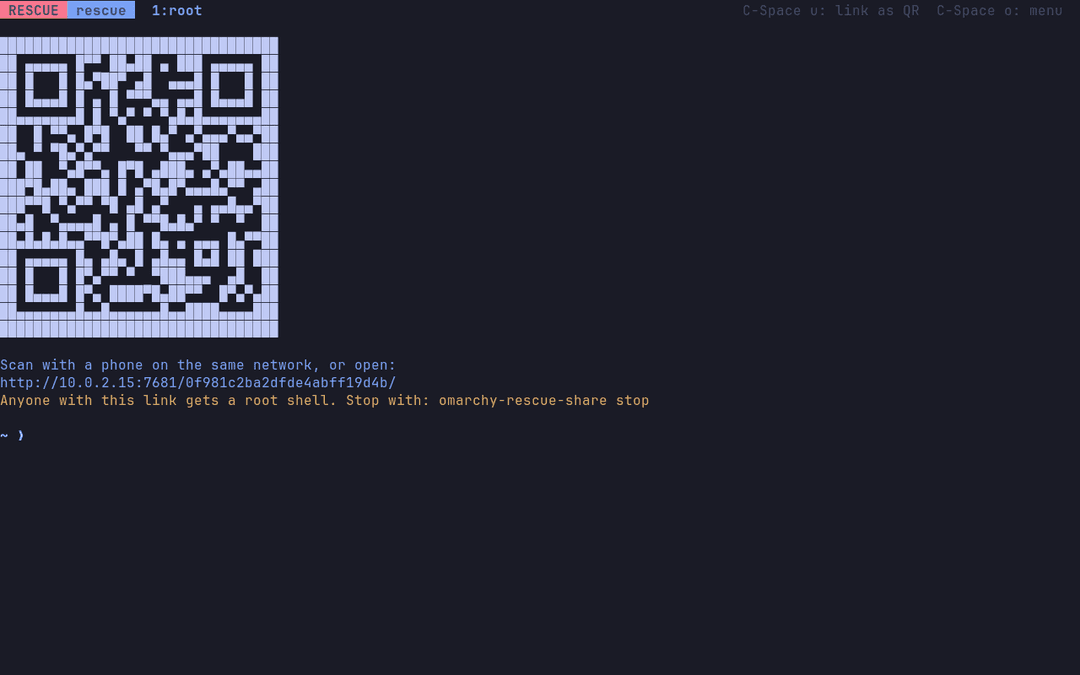
omarchy-rescue-share goes further and serves the whole tmux session to your
phone's browser with ttyd. It's a root shell behind a random address, so stop
it with omarchy-rescue-share stop when done.
| The QR code pops up by itself | The page it opens on your phone |
|---|---|
 |  |
omarchy-rescue-share | omarchy-rescue |
|---|---|
 |  |
What the agents know
Each agent reads /usr/share/omarchy-rescue/AGENTS.md (linked in as
~/.claude/CLAUDE.md, ~/.codex/AGENTS.md, and
~/.config/opencode/AGENTS.md). It tells them where they are, how an Omarchy
install is laid out (LUKS, Btrfs subvolumes, Limine, snapper), how to reach its
journal and chroot into it, and to diagnose read-only first and never run
anything destructive without a clear yes.
Building
bin/omarchy-rescue-make                   # rescue-only ISO (~1.8GB), stable channel
bin/omarchy-rescue-make --with-installer  # the full Omarchy ISO plus rescue (~6.6GB)
bin/omarchy-rescue-boot                   # boot the newest ISO in QEMU (needs qemu-desktop, edk2-ovmf; with passt, a phone can reach it)
--edge and --rc pick the channel. The ISO lands in release/.
Both builds clone the pinned omarchy-iso submodule into build/ and apply
the rescue layer with builder/apply-rescue.sh, in Docker. The rescue-only
build (builder/build-rescue-only.sh) makes the Omarchy ISO's live system
without the installer and its 4.8GB offline package mirror, installing from
the online repos instead. --with-installer runs omarchy-iso's own build with
the rescue entries added in front of the installer. Neither mounts the host's
pacman cache into the build, so neither needs sudo to wipe it the way upstream
does.
To release, commit hand-written notes as packaging/release-notes/vYYYY.MM.DD.md,
then push a matching v* tag. GitHub Actions builds the rescue-only ISO and
publishes it with its checksum and those notes; without a notes file it stops
before building.
To track a newer Omarchy ISO, bump the submodule. apply-rescue.sh checks
every edit it makes and fails the build if an upstream change moved one of its
anchors.
Layout
configs/rescue.packages      packages added to the live environment
configs/airootfs/            files added to the live root
  etc/systemd/system/        kmscon console, fallback getty, online pacman
  etc/profile.d/             lands every rescue login in the shared tmux session
  etc/kmscon/                font and palette
  usr/local/bin/             omarchy-rescue* helpers
  usr/share/omarchy-rescue/  AGENTS.md, tmux.conf, online pacman configs
builder/apply-rescue.sh      layers all of the above onto an omarchy-iso checkout
builder/build-rescue-only.sh builds the rescue-only ISO in the Arch container
How rescue mode works
The rescue entries boot the same kernel and initramfs as the Omarchy installer, adding
omarchy.rescue=kms (or =tty) and cow_spacesize=50% so the live overlay
has room for pacman and agent state. That flag:
- starts kmscon on tty1 in place of the autologin getty, falling back to the getty if kmscon fails,
- stops the installer wizard from starting on tty1,
- points pacman at the online repos, so tools can be installed and agents
updated (
omarchy-rescue update).
License
Omarchy Rescue is released under the MIT License, like Omarchy and omarchy-iso. The software on the ISO keeps its own licenses.
// faq
What is omarchy-rescue?
The Omarchy ISO with a rescue mode: rescue tools plus Claude Code, Codex, and OpenCode in a live console. It is open-source on GitHub.
Is omarchy-rescue free to use?
omarchy-rescue is open-source under the MIT license, so it is free to use.
What category does omarchy-rescue belong to?
omarchy-rescue is listed under devops in the Claudeers registry of Claude-compatible tools.
// embed badge

[](https://claudeers.com/omarchy-rescue)
// retro hit counter

[](https://claudeers.com/omarchy-rescue)
// reviews
// guestbook
// related in DevOps & CI/CD
 🔓
🔓⭐AI-driven public opinion & trend monitor with multi-platform aggregation, RSS, and smart alerts.🎯 告别信息过载,你的 AI 舆情监控助手与热点筛选工具!聚合多平台热点 + RSS 订阅,支持关键词精准筛选。AI…
 🔓
🔓Use Claude Code as the foundation for coding infrastructure, allowing you to decide how to interact with the model while enjoying updates from Anthropic.
 🔓
🔓Professional Antigravity Account Manager & Switcher. One-click seamless account switching for Antigravity Tools. Built with Tauri v2 + React (Rust).专业的 Antig…
 🔓
🔓Roadmap to becoming an ASP.NET Core developer in 2026