
old-phone-tailnet
把没有 root 的旧安卓手机接进 Tailscale 私网:Termux + 用户态 Tailscale + 只认公钥的 SSH + 本机无线 ADB + Chrome 调试口。附提示词和 Claude Code skill。
Install with your AI
Paste into Claude Code, Cursor, or any agent — it reads the repo and wires the tool into your project.
Install and set up old-phone-tailnet (git-clone project) into my current project.
Found on https://claudeers.com/old-phone-tailnet
Repo: https://github.com/ythx-101/old-phone-tailnet
Homepage/docs: —
Detected install method: git-clone → git clone https://github.com/ythx-101/old-phone-tailnet
Category: skills. Platforms: mobile.
Read the repo's README for exact setup and env vars, then install it and wire it into my project.

Claudeers Health Verdict:
active; community-verified: false. Confirm the source before running anything.
git clone https://github.com/ythx-101/old-phone-tailnet
// compatibility
| Platforms | mobile |
|---|---|
| Operating systems | — |
| AI compatibility | claude |
| License | MIT |
| Pricing | open-source |
| Language | Shell |
old-phone-tailnet · 旧手机接进私网
把一台没有 root 的旧安卓手机接进你自己的 Tailscale 私网:在电脑上 ssh 进手机,再通过 localhost:9222 用 CDP 访问手机上的 Chrome。
Termux + 用户态 Tailscale + 只认公钥的 SSH + 本机无线 ADB + Chrome 调试口
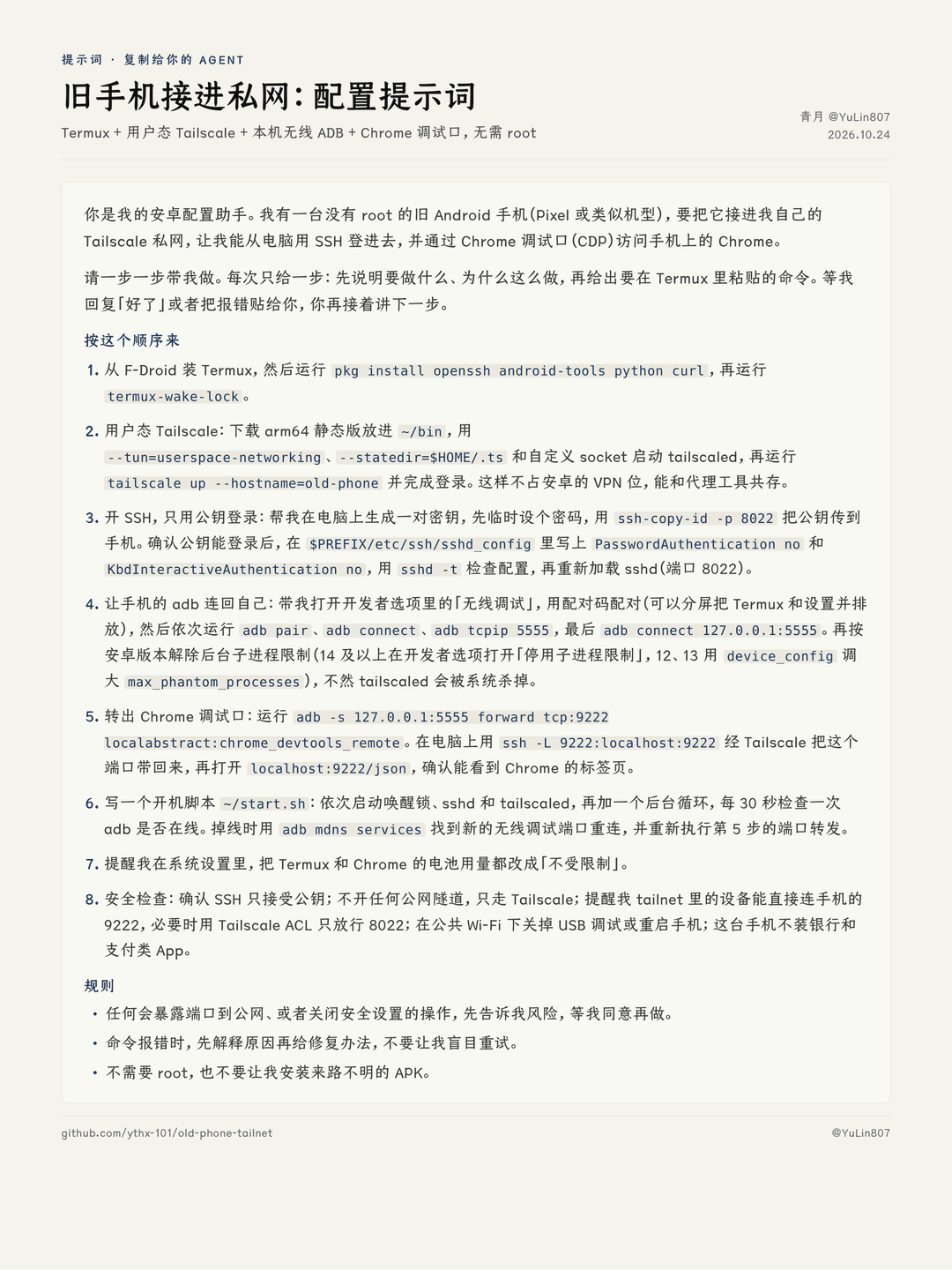
三种用法,挑一种
1. 复制提示词(最简单)
把 prompt.md 整段贴给任何一个 AI 助手(Claude、ChatGPT、DeepSeek、豆包都行),它会一步一步带你配完。
2. 装成 Claude Code skill
git clone https://github.com/ythx-101/old-phone-tailnet
mkdir -p ~/.claude/skills
cp -r old-phone-tailnet/skills/old-phone-tailnet ~/.claude/skills/
然后在 Claude Code 里说「帮我把旧手机接进私网」。SSH 打通之前它带你一步步在 Termux 里操作;打通以后,它可以直接替你跑自检。
3. 自己照着脚本做
| 脚本 | 在哪跑 | 做什么 |
|---|---|---|
install-tailscale.sh | 手机 Termux | 下载 Tailscale 官方最新静态版到 ~/bin |
harden-ssh.sh | 手机 Termux | 关闭密码登录,只认公钥(会先检查公钥已经放好) |
start.sh | 手机 Termux | 一键拉起唤醒锁、sshd、Tailscale,并启动 adb 掉线重连和 9222 转发 |
check.sh | 手机 Termux | 只读自检:SSH、Tailscale、adb、9222、公网隧道 |
pc-connect.sh | 电脑 | 经 Tailscale 把手机的 9222 转发到电脑本机 |
完整步骤见 SKILL.md。
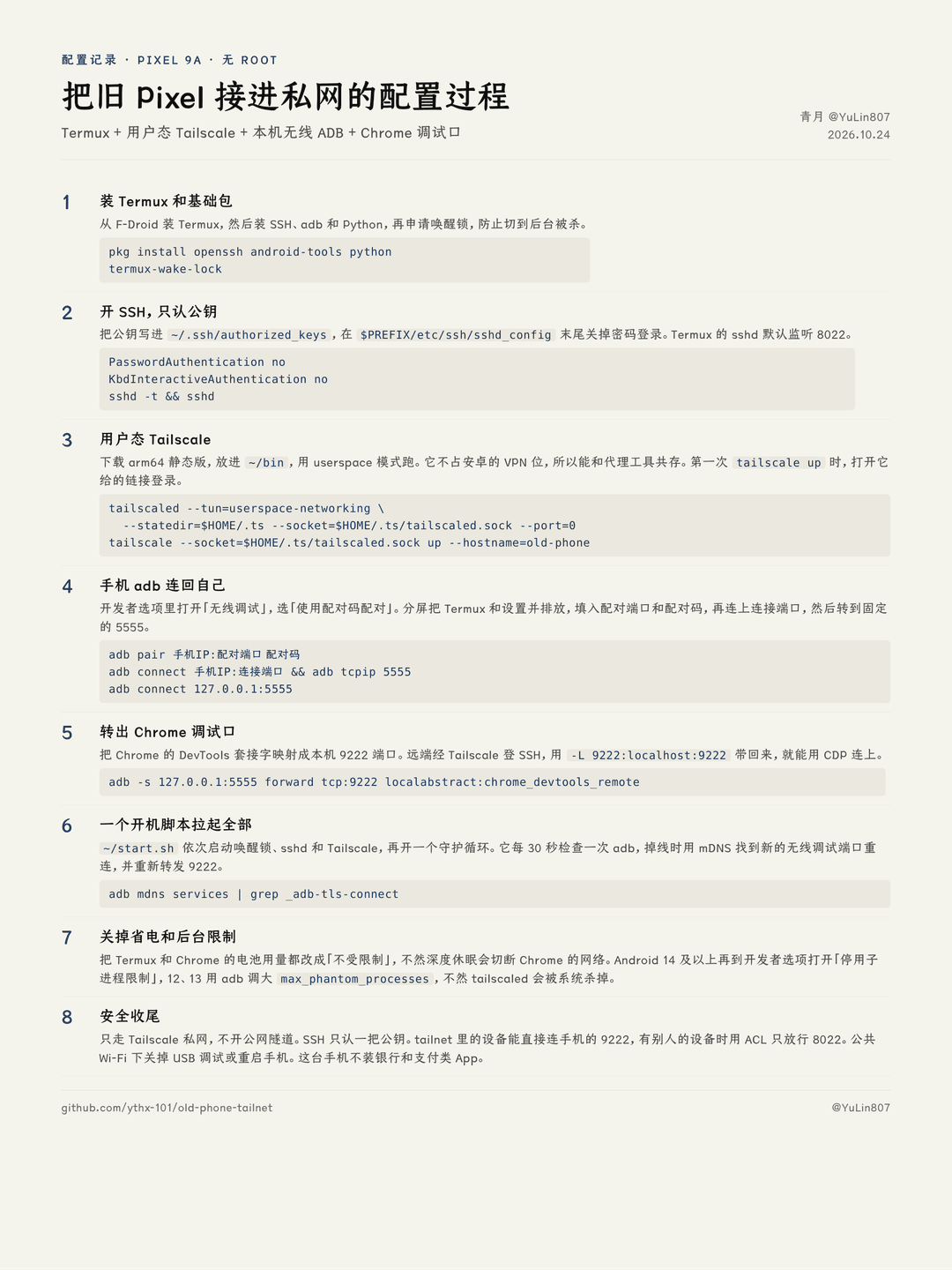
需要准备
- Android 11 或更新的手机(无线调试从 11 开始才有),连着 Wi-Fi
- 从 F-Droid 装的 Termux
- 一台装好 Tailscale 的电脑
为什么这么配
- 用户态 Tailscale:不占安卓唯一的 VPN 位,能和代理工具同时开。
- adb 连回自己:不用 root,也能在手机上用 adb,转发 Chrome 的调试套接字。
- 只走私网:SSH 和 9222 都不暴露到公网,只有你 Tailscale 里的设备能连。
安全
能 SSH 进这台手机的人,也能通过 adb 和 Chrome 调试口操作它,包括手机上已经登录的网页。所以:
- 私钥保管好,SSH 只认公钥;
- 不开公网隧道,只走 Tailscale;
- 注意:用户态 Tailscale 会把发到手机 100.x 的连接转给手机本机,tailnet 里的设备不用 SSH 就能直接连
100.x:9222。tailnet 里有别人的设备时,用 Tailscale ACL 只放行 8022(示例见 SKILL.md 第 8 步); adb tcpip 5555会在 Wi-Fi 上监听 5555,只关「无线调试」不一定关得掉。在公共 Wi-Fi 下请关掉「USB 调试」或重启手机;- 最好用一台专门的旧手机,不装银行和支付类 App。
已知限制
- 重启手机后「无线调试」会自动关掉,需要手动打开一次,再运行
bash start.sh <IP>:<端口>。 - userspace 模式下,手机上的其他 App 不能主动访问私网里的其他机器,但从外面连进手机不受影响。
- Android 12 起系统会杀 Termux 的后台子进程,要按 SKILL.md 第 4 步解除限制。
- 不同品牌的系统省电策略不一样。如果 Termux 老被杀,在系统设置里把它加进省电白名单,并在多任务界面锁住它。
License
MIT · 青月 @YuLin807
// faq
What is old-phone-tailnet?
把没有 root 的旧安卓手机接进 Tailscale 私网:Termux + 用户态 Tailscale + 只认公钥的 SSH + 本机无线 ADB + Chrome 调试口。附提示词和 Claude Code skill。. It is open-source on GitHub.
Is old-phone-tailnet free to use?
old-phone-tailnet is open-source under the MIT license, so it is free to use.
What category does old-phone-tailnet belong to?
old-phone-tailnet is listed under skills in the Claudeers registry of Claude-compatible tools.
// embed badge

[](https://claudeers.com/old-phone-tailnet)
// retro hit counter

[](https://claudeers.com/old-phone-tailnet)
// reviews
// guestbook
// related in Claude Skills
 🔓
An agentic skills framework & software development methodology that works.
 🔓
 🔓
AI coding assistant skill (Claude Code, Codex, OpenCode, Cursor, Gemini CLI, and more). Turn any folder of code, SQL schemas, R scripts, shell scripts, docs,…
 🔓
💫 Toolkit to help you get started with Spec-Driven Development