
oh-my-mermaid
Turn complex codebases into clear, navigable architecture diagrams with Claude Code.
Install with your AI
Paste into Claude Code, Cursor, or any agent — it reads the repo and wires the tool into your project.
⚠ Unverified source (community-unclaimed, low activity) — reveal the prompt
⚠ Unverified source (community-unclaimed, low activity). Inspect the repo before letting your agent install it.

Install and set up oh-my-mermaid (claude-plugin project) into my current project.
Found on https://claudeers.com/oh-my-mermaid
Repo: https://github.com/oh-my-mermaid/oh-my-mermaid
Homepage/docs: —
Detected install method: claude-plugin → /plugin install oh-my-mermaid@oh-my-mermaid/oh-my-mermaid
Category: devtools. Platforms: cli.
Read the repo's README for exact setup and env vars, then install it and wire it into my project.

Claudeers Health Verdict:
dormant; community-verified: false. Confirm the source before running anything.
⚠ Unverified / not recently updated — review before pasting a run-this config.
/plugin marketplace add oh-my-mermaid/oh-my-mermaid
/plugin install oh-my-mermaid@oh-my-mermaid/oh-my-mermaid
git clone https://github.com/oh-my-mermaid/oh-my-mermaid
// compatibility
| Platforms | cli |
|---|---|
| Operating systems | — |
| AI compatibility | claude |
| License | MIT |
| Pricing | open-source |
| Language | TypeScript |
English | Türkçe | 한국어 | 日本語 | 中文

Oh-my-mermaid
AI writes code in seconds. Humans understand it in hours.
But skip understanding, the codebase becomes a black box — even to you.
omm closes the gap — architecture docs, generated by AI, for humans.
Quick Start
Paste this in your terminal:
npm install -g oh-my-mermaid && omm setup
Then open your AI coding tool and use the /omm-scan skill:
/omm-scan
That's it. View the result:
omm view
Example
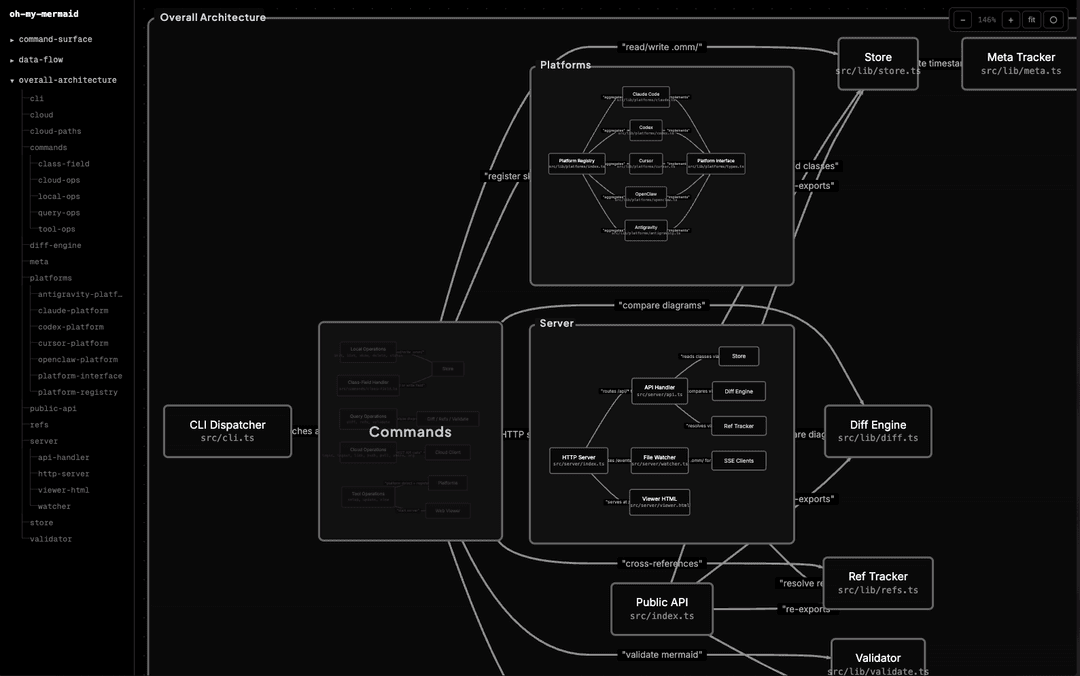
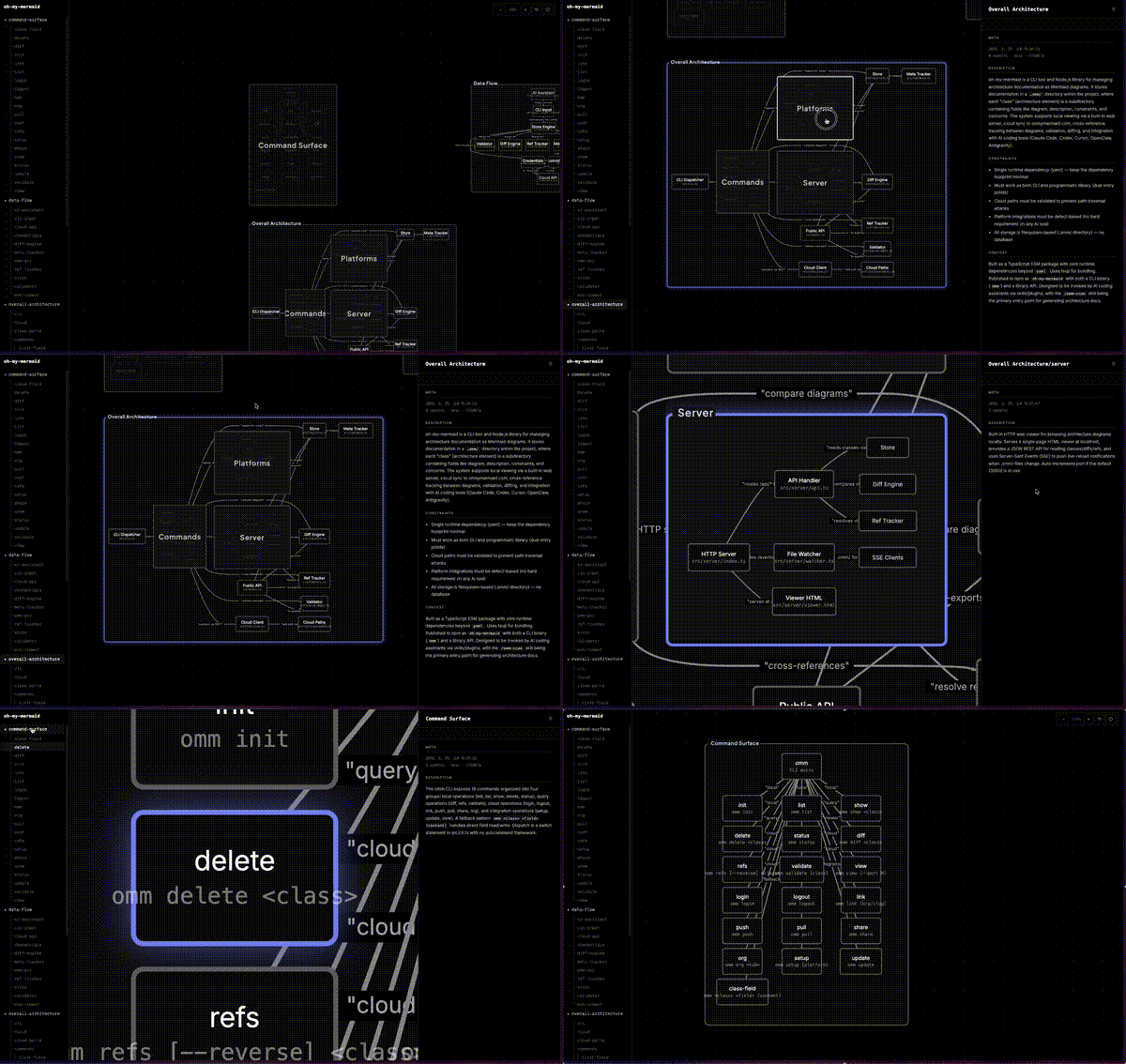
omm scanned itself. This is what it found.
 |  |
How It Works
Your AI analyzes the codebase and generates perspectives — different lenses on your architecture (structure, data flow, integrations...). Each perspective contains a Mermaid diagram and documentation fields.
Every node gets recursively analyzed. Complex nodes become nested child elements with their own diagrams. Simple ones stay as leaves. The filesystem reflects the tree:
.omm/
├── overall-architecture/           ← perspective
│   ├── description.md
│   ├── diagram.mmd
│   ├── context.md
│   ├── main-process/               ← nested element
│   │   ├── description.md
│   │   ├── diagram.mmd
│   │   └── auth-service/           ← deeper nesting
│   │       └── ...
│   └── renderer/
│       └── ...
├── data-flow/
└── external-integrations/
The viewer auto-detects nesting from the filesystem — elements with children render as expandable groups, others as nodes.
Each element carries up to 7 fields: description, diagram, context, constraint, concern, todo, note.
CLI
omm setup                          # Register skills with your AI tools
omm view                           # Open interactive viewer
omm config language ko             # Set content language
omm update                         # Update to latest version
Run omm help for the full command list.
Skills
Skills are commands you run inside your AI coding tool (not the terminal). They start with /.
| Skill | What it does |
|---|---|
/omm-scan | Analyze codebase → generate architecture docs |
/omm-push | Login + link + push to cloud in one step |
Cloud
You can store your architecture in the cloud via ohmymermaid.com.
omm login && omm link && omm push
It's private by default. Share with your team, or make it public like this example.
Supported AI Tools
| Platform | Setup |
|---|---|
| Claude Code | omm setup claude |
| Codex | omm setup codex |
| Cursor | omm setup cursor |
| OpenClaw | omm setup openclaw |
| Antigravity | omm setup antigravity |
Run omm setup to auto-detect and configure all installed tools.
Roadmap
See docs/ROADMAP.md.
Development & Contributing
git clone https://github.com/oh-my-mermaid/oh-my-mermaid.git
cd oh-my-mermaid
npm install && npm run build
npm test
Issues and PRs welcome. Use Conventional Commits.
License
// faq
What is oh-my-mermaid?
Turn complex codebases into clear, navigable architecture diagrams with Claude Code.. It is open-source on GitHub.
Is oh-my-mermaid free to use?
oh-my-mermaid is open-source under the MIT license, so it is free to use.
What category does oh-my-mermaid belong to?
oh-my-mermaid is listed under devtools in the Claudeers registry of Claude-compatible tools.
// embed badge

[](https://claudeers.com/oh-my-mermaid)
// retro hit counter

[](https://claudeers.com/oh-my-mermaid)
// reviews
// guestbook
// related in Developer Tools
 🔓
🔓The agent harness performance optimization system. Skills, instincts, memory, security, and research-first development for Claude Code, Codex, Opencode, Curs…
 🔓
🔓Makes your AI agent think like the laziest senior dev in the room. The best code is the code you never wrote.
 🔓
🔓Use Garry Tan's exact Claude Code setup: 23 opinionated tools that serve as CEO, Designer, Eng Manager, Release Manager, Doc Engineer, and QA
 🔓
🔓AI coding assistant skill (Claude Code, Codex, OpenCode, Cursor, Gemini CLI, and more). Turn any folder of code, SQL schemas, R scripts, shell scripts, docs,…