
neo-switch
Keep Claude Code. Switch your models. Use Gemini 4 Neon in Claude Code through a local Anthropic-compatible proxy.
Install with your AI
Paste into Claude Code, Cursor, or any agent — it reads the repo and wires the tool into your project.
Install and set up neo-switch (claude-plugin project) into my current project.
Found on https://claudeers.com/neo-switch
Repo: https://github.com/yldm-ai/neo-switch
Homepage/docs: https://neo-switch.yldm.ai/
Detected install method: claude-plugin → /plugin install neo-switch@yldm-ai/neo-switch
Category: plugins. Platforms: cli, api, desktop, web.
Read the repo's README for exact setup and env vars, then install it and wire it into my project.

Claudeers Health Verdict:
unknown; community-verified: false. Confirm the source before running anything.
⚠ Unverified / not recently updated — review before pasting a run-this config.
/plugin marketplace add yldm-ai/neo-switch
/plugin install neo-switch@yldm-ai/neo-switch
git clone https://github.com/yldm-ai/neo-switch
// compatibility
| Platforms | cli, api, desktop, web |
|---|---|
| Operating systems | — |
| AI compatibility | claude |
| License | MIT |
| Pricing | open-source |
| Language | Go |
NeoSwitch
English | 简体中文 | 繁體中文 | 日本語 | 한국어 | Español | Français | Deutsch | Português (Brasil) | Русский
NeoSwitch makes Claude Code answer with Google's Gemini 4 Neon model instead of Claude, while everything else in Claude Code stays the same.
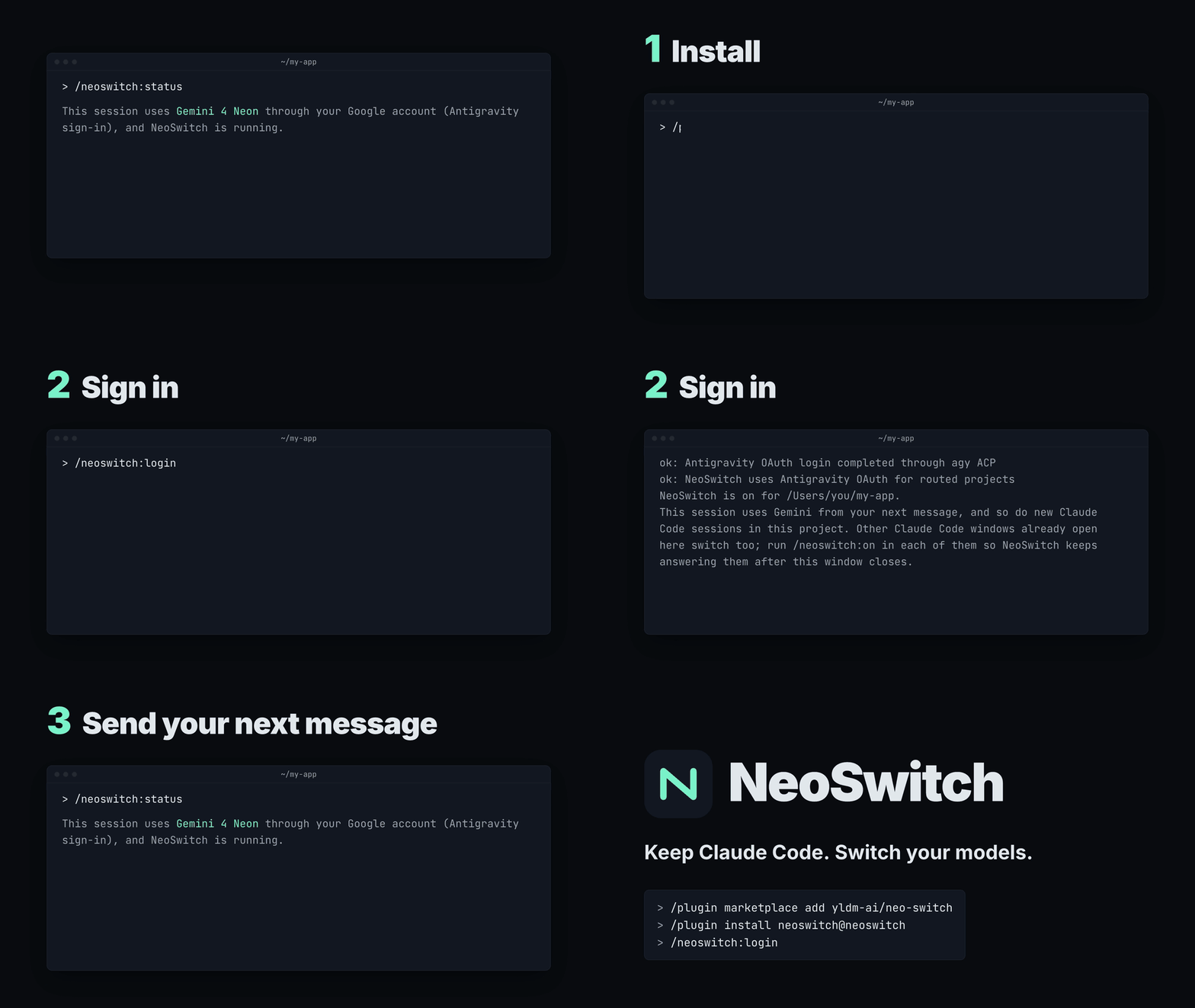
You switch one project at a time; your other projects keep using Claude. The plugin works on macOS and Linux. Windows is not supported yet.
How NeoSwitch compares
| NeoSwitch | Config managers & routers (e.g. CC Switch, Claude Code Router) | Standalone Antigravity proxies (e.g. antigravity-claude-proxy) | |
|---|---|---|---|
| Setup | Native Claude Code plugin — no desktop app or server to manage | Separate desktop app managing configs across many CLIs | Standalone Node.js proxy server + Web UI |
| Scope | One session at a time (/neoswitch:on, /neoswitch:off); other windows stay on Claude | Global provider switching or shared local router | Global ~/.claude/settings.json or shell environment |
| Claude Code features | Kept intact — no ANTHROPIC_AUTH_TOKEN set, so claude.ai connectors and auto mode checks keep working | Managed through external config or router | Sets ANTHROPIC_AUTH_TOKEN, which disables claude.ai connectors |
| Google sign-in | Uses your Google account through official agy — never reads, stores, or replays OAuth tokens; agy's own tools are blocked | Primarily API keys and third-party relays (no agy integration) | Stores or reads local OAuth tokens to call private endpoints directly |
| Best for | Keeping your normal Claude Code setup and switching individual sessions to Gemini 4 Neon | Managing many CLIs, API keys, relays, and MCPs in one place | Multi-account rotation, Windows, or running Claude models via Antigravity |
Get started
1. Install the plugin. In Claude Code, run these two lines one at a time. Copy each line whole: the first one says neo-switch, the second one neoswitch.
/plugin marketplace add yldm-ai/neo-switch
/plugin install neoswitch@neoswitch
Then turn on automatic updates, so fixes reach you when Google or Claude Code change something NeoSwitch depends on: run /plugin, open the Marketplaces tab, choose neoswitch and turn on auto-update. Claude Code leaves it off for marketplaces that do not come from Anthropic.
2. Sign in with your Google account. Open Claude Code in the project you want to switch and run:
/neoswitch:login
It shows Google's terms warning, opens Google sign-in in your browser through Google's Antigravity command-line tool (agy), and then switches the project on. If agy is not on this computer yet, the command first installs it into ~/.local/bin with Google's official installer (about 230 MB; the installer also adds that folder to your shell's PATH). If you are comfortable with a terminal, a Gemini API key also works: see docs/cli.md.
The command also shows a link, for when the browser it opens is not one you can use, such as on a computer you reach over SSH: open the link in a browser on any device and sign in. With Claude Code 2.1.326 or later, the link appears at once and a dialog asks for the code the page shows: paste it there. On an older Claude Code, and in WSL or the desktop app over SSH, Claude's reply shows the link instead: run /neoswitch:login followed by the code. Run /neoswitch:login again while signed in to switch to another Google account: it keeps the current one until you finish, and /neoswitch:login cancel keeps it for good.
[!WARNING] The Google Antigravity Terms of Service (section 6) forbid using Antigravity through other tools, and NeoSwitch is such a tool. Google may suspend or close the Antigravity accounts of people who do.
/neoswitch:loginrepeats this warning every time. Do not sign in unless you accept that risk.
3. Send your next message. The window where you ran the command uses Gemini 4 Neon from its next message. Other windows and new sessions keep using Claude, with your own Claude login and connectors: run /neoswitch:on in each session that should answer with Gemini 4 Neon. If the command's reply asks you to restart instead, because Claude Code was started through a gateway, start claude again without it in the same project.
What you will see
- Once NeoSwitch is set up, a new session that does not use it opens, at most once a day per project, with the note
NeoSwitch is set up: /neoswitch:on answers this session with Gemini 4 Neon, and /neoswitch:off returns it to Claude any time.It stays away from projects where you ran/neoswitch:off;NEOSWITCH_NO_HINT=1in your environment turns it off. - The header still shows a Claude model name, such as
claude-opus-5-5. It is only a label: Gemini 4 Neon answers. Choosing another model with/modeldoes not change that. - A reply can take 5 to 40 seconds before its first words appear. That is normal. If you signed in with
/neoswitch:login,/effort lowmakes replies start sooner. - The first NeoSwitch command after an install or update can take up to a minute while NeoSwitch gets ready.
/neoswitch:statustells you at any time whether this session uses Claude or Gemini 4 Neon, and what to do next.- Auto mode works out of the box in a session that uses Gemini 4 Neon: NeoSwitch runs its own fail-closed safety classifier (using
gemini-3.8-flashon Antigravity, or your configured backend model) with no restart and no Claude usage. SetNEOSWITCH_SAFEGUARD=offto turn NeoSwitch's check off, or start Claude Code withCLAUDE_CODE_AUTO_MODE_SERVER=0 claudeto have Claude check each action with your Claude login instead (uses some Claude usage, falling back to Gemini if Claude does not answer). - When a newer NeoSwitch is available, the session note says so and gives the update commands. With auto-update on, Claude Code installs it by itself, and the windows already open move to it as soon as a new Claude Code session starts. On Windows it applies once every Claude Code window has been closed and opened again.
If something goes wrong
| What you see | What to do |
|---|---|
| The session note says NeoSwitch is not set up yet | Run /neoswitch:login. Your next message uses Gemini 4 Neon. |
A message says agy is not installed | /neoswitch:login could not install it by itself. Run curl -fsSL https://antigravity.google/cli/install.sh | bash in a terminal, or install it from Google's download page, then run /neoswitch:login again. |
| Every message fails with a connection error, or the session note says this session cannot answer | Run /neoswitch:off: this session continues on Claude from its next message, even if the reply to the command itself fails. If messages keep failing, type /exit and start claude again: a new session uses Claude, and /neoswitch:status tells you what to fix. |
| The note says other Claude Code windows still share the earlier setup | Run /neoswitch:on in this session: every open window moves to its setup. On Windows, close every Claude Code window, open Claude Code again, then run /neoswitch:on. |
| A warning says claude.ai connectors are disabled because another auth source is set | NeoSwitch no longer causes it; an earlier version did. Update the plugin (see below). If it stays, another tool sets ANTHROPIC_AUTH_TOKEN or ANTHROPIC_API_KEY for Claude Code. |
| The note says another program is using the port NeoSwitch needs | Close that program and start Claude Code again, or run /neoswitch:off. |
| The note says NeoSwitch could not download its program | Check your internet connection and start Claude Code again. If NeoSwitch ran on this computer before, it keeps using that earlier version until the download works. |
/neoswitch:off itself says NeoSwitch could not run | It lists the entries to delete from the project's .claude/settings.local.json; delete them and start a new session. Step 1 of removing NeoSwitch lists the same entries. |
| Claude Code cannot connect in a project after NeoSwitch was removed | The project still points at NeoSwitch. Delete its entries from .claude/settings.local.json, as step 1 of removing NeoSwitch describes, and start a new session. |
/neoswitch:login is an unknown command | Update the plugin (see below), restart Claude Code, then run /reload-plugins. |
| A message says your Google account's Antigravity plan does not offer gemini-4-neon | Your plan does not include Gemini 4 Neon, so NeoSwitch cannot answer with it and leaves the project on Claude. Run /neoswitch:login again to sign in with an account whose plan has it, or run /neoswitch:off and start a new session to go back to Claude. |
Turn it off, update or remove
/neoswitch:offswitches this session back to Claude from its next message, with your own Claude login./neoswitch:onswitches it to Gemini 4 Neon again without setting anything up again. Closing a session ends its switch: every new session starts on Claude.
To update by hand, run these in a terminal, then open a new Claude Code session: the windows already open move to the update too (on Windows, close all Claude Code windows and open them again):
claude plugin marketplace update neoswitch
claude plugin update neoswitch@neoswitch
If you added the marketplace under its old name yldm-ai/NeoSwitch / yldm-ai/neon-switch, add it again with claude plugin marketplace add yldm-ai/neo-switch first.
To remove NeoSwitch:
- Run
/neoswitch:offin each project you switched on. A project left on keeps pointing at NeoSwitch and stops answering once NeoSwitch is gone. If you already removed the plugin, open.claude/settings.local.jsonin each such project and change itsenvobject: deleteANTHROPIC_BASE_URLwhen it starts withhttps://127.0.0.1:(from earlier versionshttp://127.0.0.1:, with theANTHROPIC_AUTH_TOKENnext to it); delete theX-NeoSwitch-Tokenline ofANTHROPIC_CUSTOM_HEADERS, and the whole entry when nothing else is left; deleteNODE_EXTRA_CA_CERTSwhen it namestls/bundle.pemin NeoSwitch's folder, or put back your own CA file if you had one there; and deleteCLAUDE_CODE_GATEWAY_HINT_HEADERSset to1andCLAUDE_CODE_USE_GATEWAYset to0, unless you set them yourself. - Close the Claude Code windows that use NeoSwitch, then run these in a terminal:
claude plugin uninstall neoswitch@neoswitch
claude plugin marketplace remove neoswitch
- Delete the files NeoSwitch keeps outside your projects:
| What | Where |
|---|---|
| The NeoSwitch program the plugin downloads or builds | $XDG_CACHE_HOME/neoswitch/, or ~/.cache/neoswitch/ when XDG_CACHE_HOME is unset |
Settings and log: proxy.json (address, access key and chosen route) and daemon.log | NEOSWITCH_STATE_DIR when set; otherwise ~/Library/Application Support/neoswitch/ on macOS and $XDG_CONFIG_HOME/neoswitch/ or ~/.config/neoswitch/ on Linux |
The Google sign-in is kept by agy, not by NeoSwitch, and stays in place; so does agy itself, even when /neoswitch:login installed it.
What NeoSwitch changes
While a session in a project uses Gemini 4 Neon, NeoSwitch adds four entries to the env object of that project's .claude/settings.local.json, and removes them once no session there uses it:
ANTHROPIC_BASE_URL,ANTHROPIC_CUSTOM_HEADERSandNODE_EXTRA_CA_CERTSsend the project's Claude Code requests to NeoSwitch on this computer, over an encrypted connection only NeoSwitch can answer. NeoSwitch answers the sessions you switched with Gemini 4 Neon and passes every other request on to Claude unchanged, with your own Claude login, which it neither keeps nor logs. The header holds a key that only opens NeoSwitch on this computer. If the file had aNODE_EXTRA_CA_CERTSorANTHROPIC_CUSTOM_HEADERSof your own, NeoSwitch keeps a copy and puts your value back when it removes its entries.CLAUDE_CODE_GATEWAY_HINT_HEADERS=1makes Claude Code say in a header whether a request comes from your conversation itself, a subagent, a compaction or a background task such as a prompt suggestion. NeoSwitch needs this to keep your conversation's Gemini session for your conversation. If you set this entry yourself, NeoSwitch leaves your value alone.
In a Git project, NeoSwitch also adds .claude/settings.local.json to the clone's own exclude list (.git/info/exclude), so the token stays out of commits; your .gitignore is not touched.
NeoSwitch runs only on this computer and accepts connections only from it. It logs no prompts, replies, keys or sign-in details, and no server of ours is involved. The Google sign-in stays inside agy; NeoSwitch never reads it.
More
What works and what does not, how NeoSwitch works, the standalone command-line tool, environment variables, the roadmap and development: docs/cli.md. Also: Antigravity sign-in details and the protocol contract.
See CONTRIBUTING.md to contribute, SECURITY.md to report a vulnerability privately, and CODE_OF_CONDUCT.md for the code of conduct.
MIT License
// faq
What is neo-switch?
Keep Claude Code. Switch your models. Use Gemini 4 Neon in Claude Code through a local Anthropic-compatible proxy.. It is open-source on GitHub.
Is neo-switch free to use?
neo-switch is open-source under the MIT license, so it is free to use.
What category does neo-switch belong to?
neo-switch is listed under plugins in the Claudeers registry of Claude-compatible tools.
// embed badge

[](https://claudeers.com/neo-switch)
// retro hit counter

[](https://claudeers.com/neo-switch)
// reviews
// guestbook
// related in Claude Plugins
 🔓
A single CLAUDE.md file to improve Claude Code behavior, derived from Andrej Karpathy's observations on LLM coding pitfalls.
 🔓
Claude Code is an agentic coding tool that lives in your terminal, understands your codebase, and helps you code faster by executing routine tasks, explainin…
 🔓
"CLI-Anything: Making ALL Software Agent-Native" -- CLI-Hub: https://clianything.cc/
🔓financial-services — a Claude ecosystem project on GitHub.