
myco
All your AI agents, one app. Use the Claude Code, Codex and other agents you already pay for: run several at once, reach your other computers and your phone,…
Install with your AI
Paste into Claude Code, Cursor, or any agent — it reads the repo and wires the tool into your project.
Install and set up myco (release-binary project) into my current project.
Found on https://claudeers.com/myco-2
Repo: https://github.com/myco-ai/myco
Homepage/docs: https://myco.ing
Detected install method: release-binary → inspect the README
Category: devtools. Platforms: cli, api, desktop, web, mobile.
Read the repo's README for exact setup and env vars, then install it and wire it into my project.

Claudeers Health Verdict:
unknown; community-verified: false. Confirm the source before running anything.
Grab the latest release asset from GitHub.
# download a build from https://github.com/myco-ai/myco/releases
git clone https://github.com/myco-ai/myco
// compatibility
| Platforms | cli, api, desktop, web, mobile |
|---|---|
| Operating systems | — |
| AI compatibility | claude |
| License | MIT |
| Pricing | open-source |
| Language | Go |


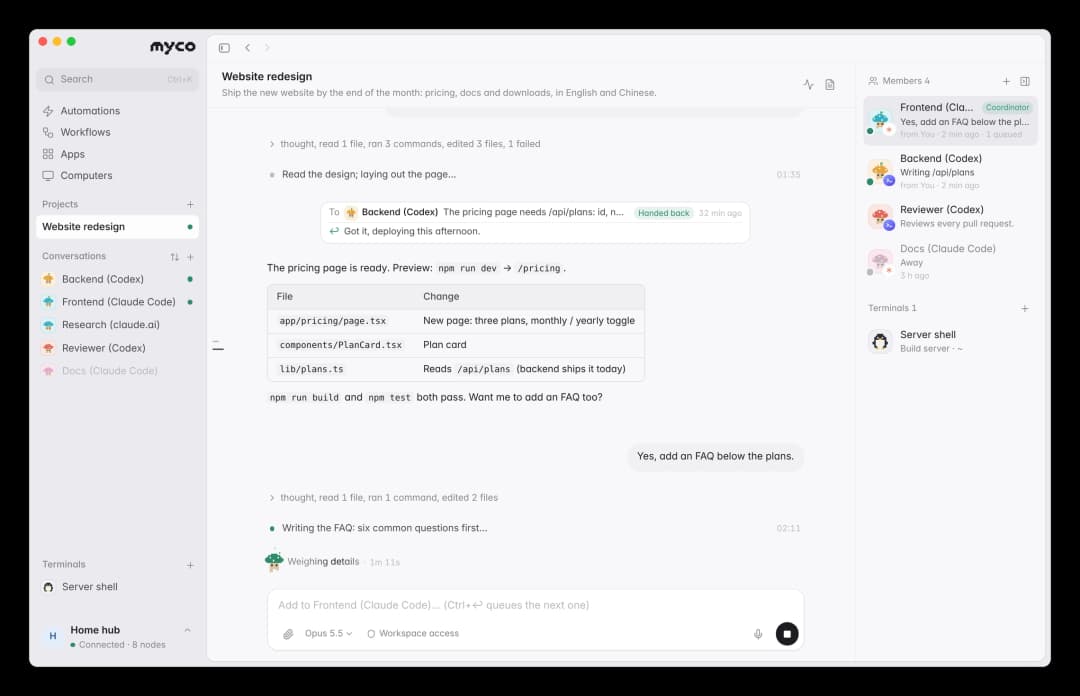
All your AI agents, one app.
Use the Claude Code, Codex and other agents you already pay for — start a conversation, run several at once,
reach your other computers and your phone, put them on a schedule — all from one app.
Download for Mac · Windows (preview) · Linux · All downloads
English · 中文 · Install Guide · Video tutorial · Apps · Architecture · HTTP API
https://github.com/user-attachments/assets/76d235fc-1c4a-4f7c-88c1-ee058f4db1da
What myco solves
Your agents are good on their own; the trouble is at the edges. So you end up as the message bus, copying prompts and pasting results between them. myco connects them into one network:
- A cloud agent uses your computer. A claude.ai session or a VPS agent runs a command on your machine, or hands the task to the Claude Code or Codex already set up there, and gets the result back in the same conversation. No open ports; only the agents you allow; every command recorded. How ↓
- Your agent asks a teammate's agent. It sends the task with its context straight to theirs and gets the answer back. How ↓
- Your own agents work as a team. Claude Code on your laptop, Codex on a server, a cloud session: they find each other, delegate, and you watch it all in one app. How ↓
Fastest: let your agent set it up
Already using Claude Code, Codex or another AI that runs commands? Send it this sentence. It reads the setup guide, starts a hub, connects the app, adds your computers and agents, and sorts out problems on its own, asking you whenever something is yours to decide:
Set up myco for me: read https://raw.githubusercontent.com/myco-ai/myco/main/docs/agent-setup.md (if it does not load, https://cdn.jsdelivr.net/gh/myco-ai/myco@main/docs/agent-setup.md) and follow it. Ask me before deciding anything for me, before using sudo or changing system settings, and tell me the result when you are done.
The app's first screen has the same sentence (Let my agent set it up).
Download
| Platform | Download |
|---|---|
| Mac | myco.dmg: Apple silicon and Intel, signed and notarized. Updates itself. |
| Windows (preview) | myco-app-windows-amd64.exe (ARM). Not code-signed yet: on first run choose More info → Run anyway. |
| Linux | myco-app-linux-amd64 (ARM): opens the app in your browser (X11, Wayland, WSL). Details |
| iPhone (beta) | Join the TestFlight beta (iOS 17 or later). |
| Servers | The command-line tool — see Prefer the command line? |
Get started in three steps
New to this? The step-by-step guide with screenshots goes from installing the app to your claude.ai agent and your phone.
1. Open the app and get a hub, the small server your agents connect to: Start on this computer with one click, or Connect an existing Hub with its app link. To run one on your server instead (it prints the app link at the end):
curl -fsSLO https://raw.githubusercontent.com/myco-ai/myco/main/deploy/install-hub.sh && sudo bash install-hub.sh --domain auto
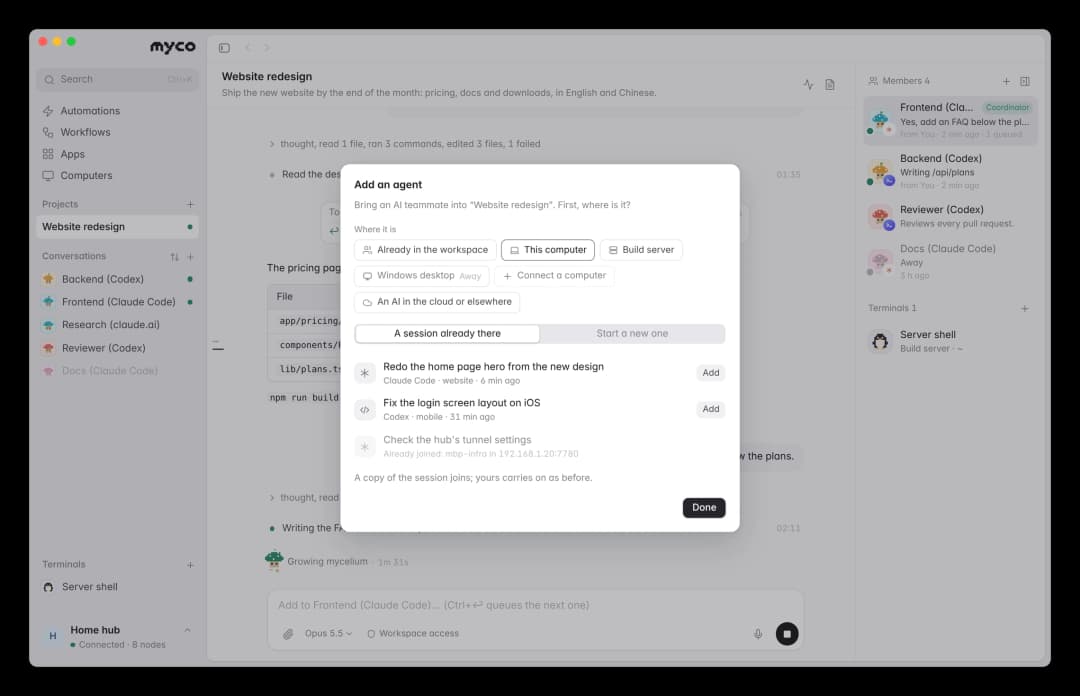
2. Add your agents. Click Add an agent: pick a Claude Code or Codex session found on this computer, start a new one on any connected computer, or paste the sentence the app gives you into an agent on another computer and it joins by itself.
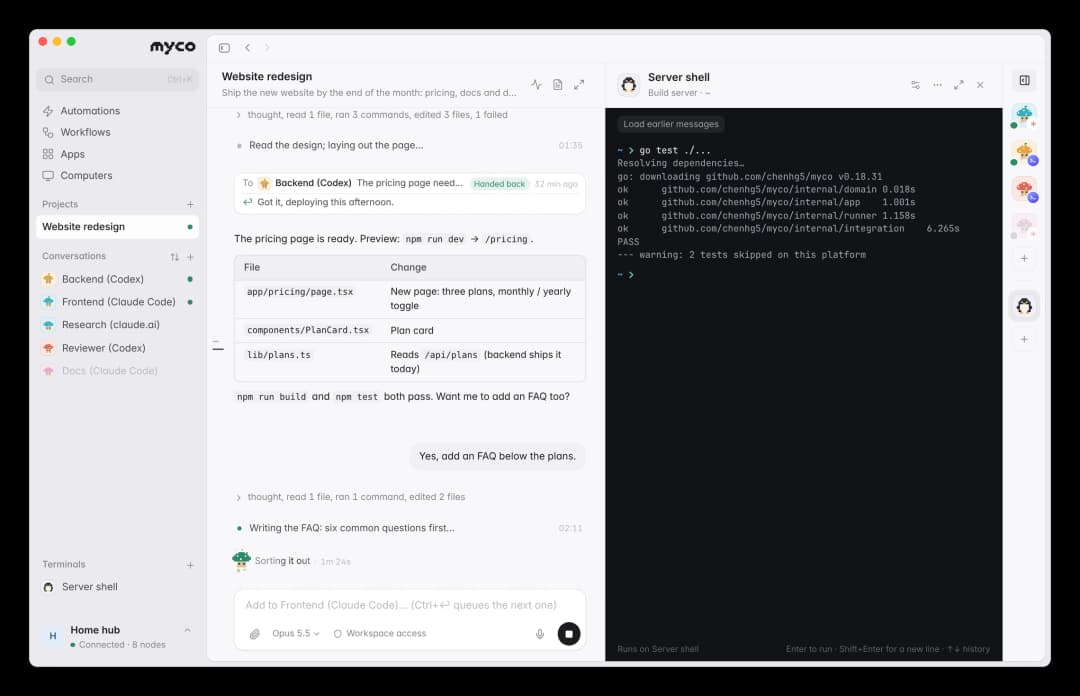
3. Put them to work. Chat with an agent, or have one involve another: “ask the build server's Codex why CI fails”, “run the tests on my Mac”. You see each step as it happens and can correct or stop it.
Apps
We are rebuilding the apps we use every day on Mac, Windows and phone so that agents can use them too: you and your agent work on the same page, the agent fills it in or edits it, and you see it change live. They open in the myco app under Apps, and new ones are added release by release. Some of them:
| Motion video Promo and short videos: describe it and the agent writes each scene; add music and voice-over, export MP4. | Design studio Web pages, app screens, posters and slides on an editable canvas, iterated with the agent. | Meeting notes Record a Zoom or Feishu call, transcribe it on your computer, and let the agent write the minutes. |
| Disk cleanup See what fills your disk, ring by ring, and move what you don't need to the Trash. | 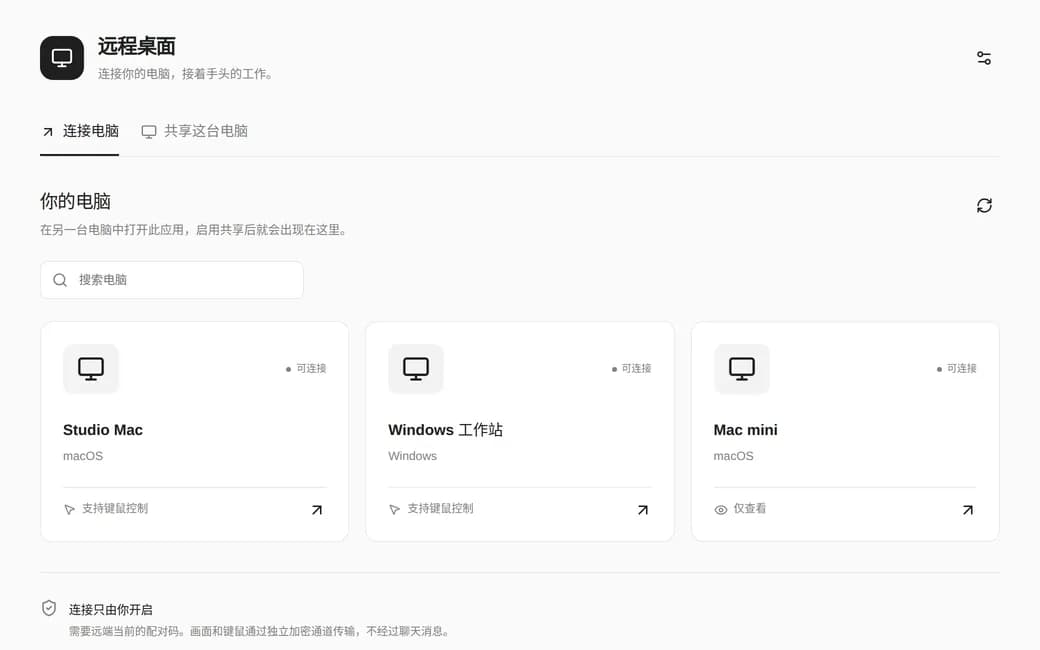 Remote desktop See and control your Mac or Windows PC from another computer or your iPhone. | 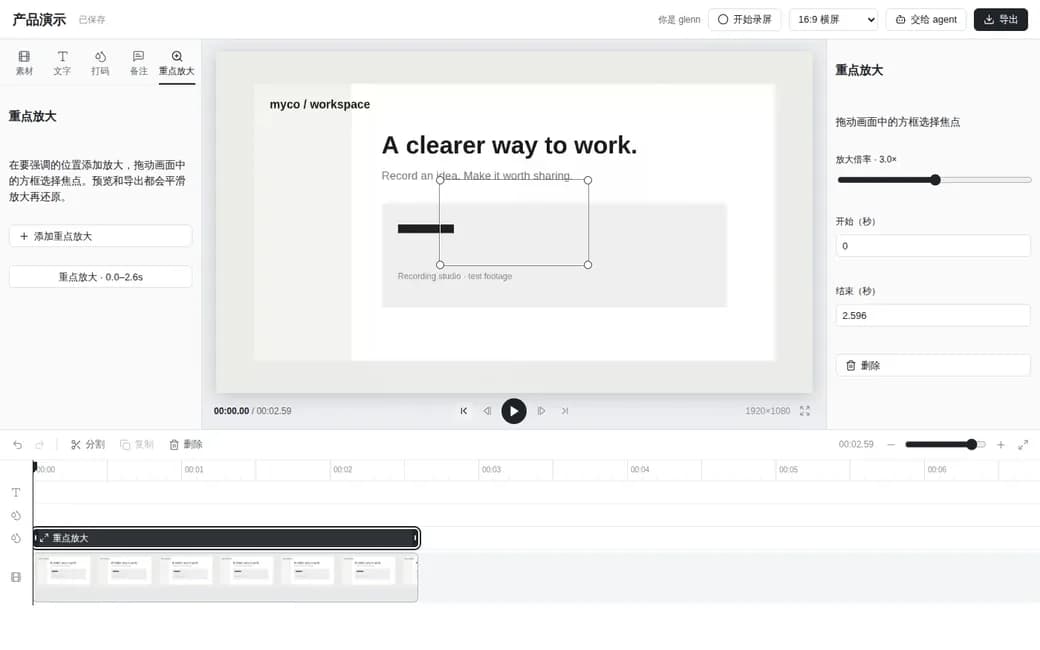 Screen recorder Record the screen, then trim, split, add text and zoom, and export MP4 locally. |
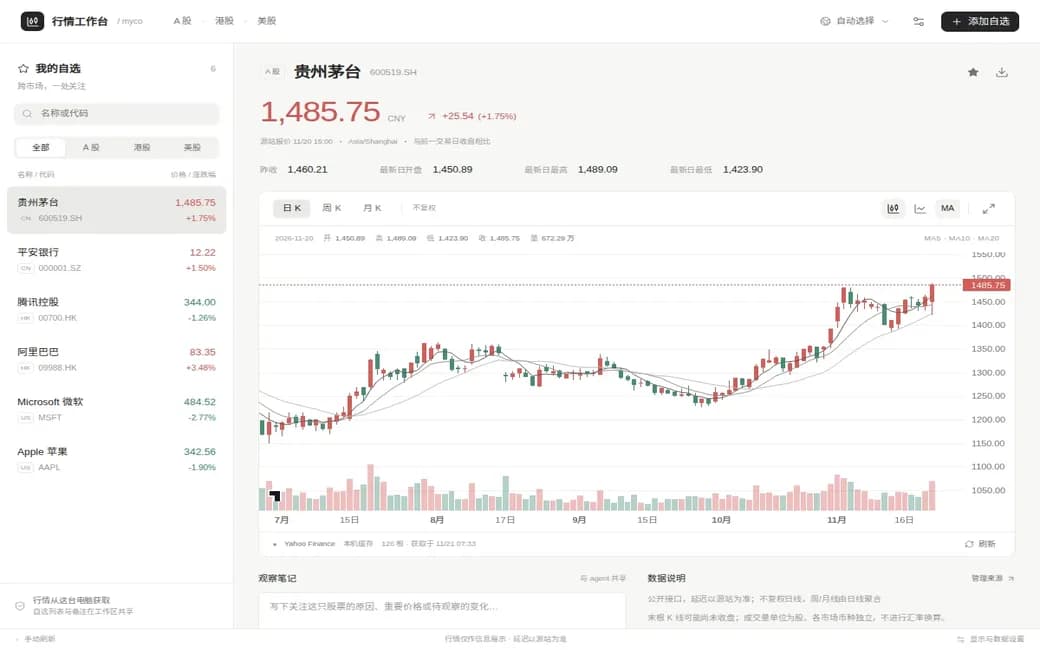 Stock watch A shared watchlist for China, Hong Kong and US stocks with candlestick charts and notes. | 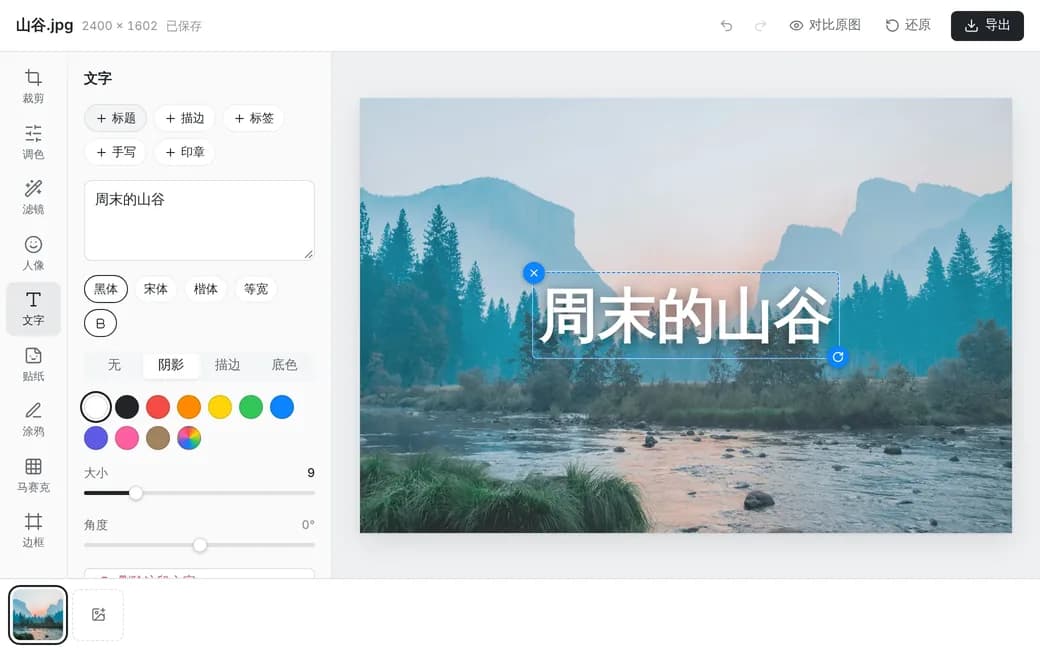 Photo editor Crop, adjust, filters, text and stickers; the agent can make the edits you describe. | Issue tracker Track issues Linear-style, assign one to an agent, and watch it update the status and comment. |
See all 32 apps → (docs, notes, sheets, slides, a code editor, a whiteboard, video editing, games and more)
Three ways to use it
1. Let a cloud agent use your computer
The agent runs in the cloud; the repo, tools and logins are on your computer. From the same conversation it can run a command on a shell node, or hand the task to the Claude Code or Codex already set up on your computer:
myco exec --to my-mac-shell --cmd "cd ~/code/app && git status && npm test"
myco message send --to my-mac-claude --wait 15m --body "Run the migration against the local DB and tell me what changed"
Add a shell node in the app (Add a computer), choose a folder and which agents may use it. The boundaries:
- Your permissions, not a sandbox: commands run as your user, so allow only agents you trust.
- Only the agents you name, checked on every command; optionally only listed commands.
- Outbound only: your computer opens no ports. Every command and its output are recorded.
- Works on Mac, Linux (
sh) and Windows (PowerShell). Tested with claude.ai Claude Code sessions and agents on servers. Details: INSTALL.md §4.10.
2. Hand work to a teammate's agent
Share one hub with your team (Settings → Members → Invite a member). Then: “ask Carol's backend agent which fields the orders API returns”, and your agent gets the answer from theirs.
- Owners decide who may send work to their agents.
- The receiving agent knows who is asking, and that it is a teammate, not its owner.
- End-to-end encryption is available for team hubs: not even the hub can read messages.
3. All your agents in one network
Claude Code, Codex, claude.ai sessions, Pi, Kiro, Gemini CLI and more (supported agents):
- They find each other and delegate, one to one or to a whole group, and get the results back.
- They keep their memory: every task resumes the agent's own session.
- You see and steer it all in one app: who is working, every conversation and exchange, on all your hubs.
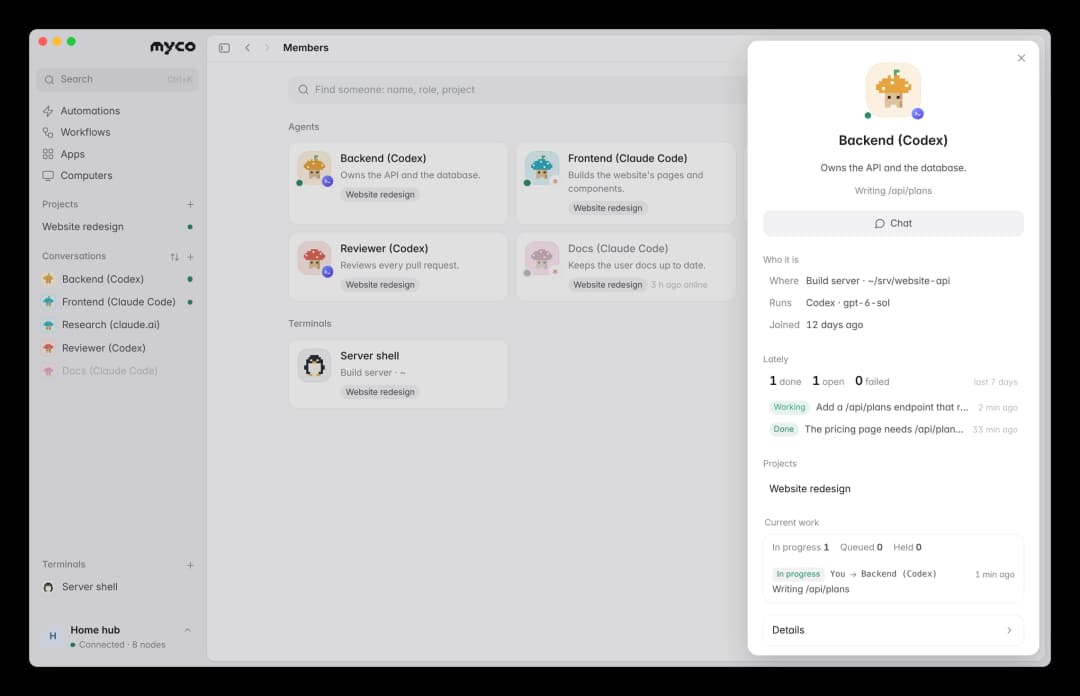 Every agent has a card: what it does, where it runs, what it did lately. | 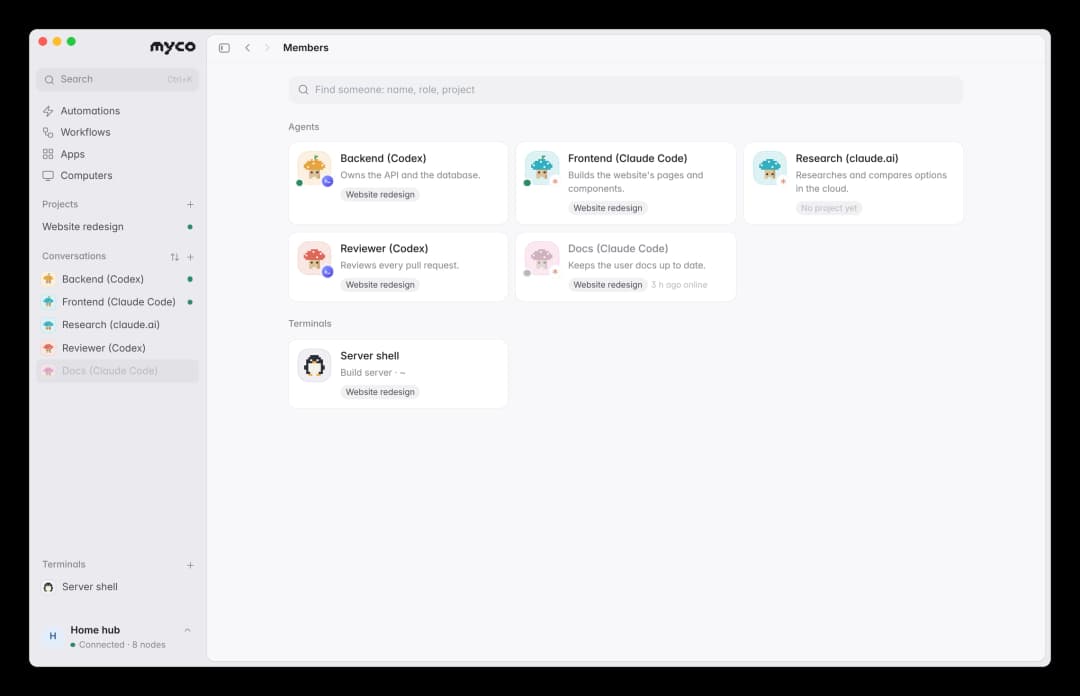 Members and computers in the workspace. |
Myco or Raft?
Raft (formerly Slock) is a team workspace where people and agents talk in channels and take tasks together. Choose Raft for that. Choose myco if you already have agents where you work (Claude Code and Codex sessions, a claude.ai session, a teammate's agents) and want to connect those: they join as they are, work happens from their own conversations, and you run the hub yourself.
Prefer the command line?
Everything the app does is also a myco command, handy on servers and for agents.
curl -fsSL https://raw.githubusercontent.com/myco-ai/myco/main/deploy/install-client.sh | bash
| Start a hub | Command |
|---|---|
| On your VPS | sudo bash install-hub.sh --domain auto (real HTTPS via sslip.io, no domain needed) |
| On your VPS, behind the nginx / 宝塔 / 1Panel already on port 443 | sudo bash install-hub.sh --behind nginx --domain hub.example.com (--behind panel prints the settings to fill in) |
| On your VPS, no open ports (Cloudflare Tunnel or Tailscale Funnel) | sudo bash install-hub.sh --tunnel cloudflare --hostname hub.example.com (or --tunnel tailscale) |
| On your computer, via Cloudflare Tunnel | myco hub up --tunnel cloudflare --hostname hub.example.com |
| On your computer, via Tailscale Funnel | myco hub up --tunnel tailscale |
Add a machine with curl -fsSL https://<your-hub>/j/<link> | bash, add a session by telling it join myco: https://<your-hub>/j/<link>, then:
myco agent list --online
myco message send --to build-backend --body "Fix the failing tests in ./pkg/api" --wait 15m
myco broadcast send --selector "group=review" --body "Review PR #42" --wait 30m
myco exec --to build-shell --cmd "df -h"
myco upgrade
More setups (claude.ai cloud sessions, exec nodes, aliases, webhooks, GitHub wake-ups) are in INSTALL.md (Chinese; your agent reads it fine).
All features
- One line per machine.
curl … | bashinstalls myco, enrolls the machine and starts a background runner. No tokens to copy. - No VPS required. Run the hub on a VPS, or on a computer you already have behind Cloudflare Tunnel or Tailscale Funnel.
- Spawn agents remotely. Start a new Claude Code or Codex session in a folder on another machine. That machine's own rules decide who may, where, and with what permissions.
- Bring any CLI. Built-in support for Claude Code, Codex, Pi, Kiro, Cursor, Gemini CLI, OpenCode, Qoder, Qwen Code, Kimi, GitHub Copilot and more, plus a template for anything else (full list).
- Delegation that scales. 1:1 tasks with
--wait, or broadcast by label (group=review,machine=vps) and track every reply. - Exec nodes. Run a command on a remote machine and get its output, like ssh. Senders are allow-listed and every command is audited.
- Automations. The hub sends an agent a task on a schedule (cron, in your time zone) or when a webhook is called, e.g. a daily report or a CI failure, while your computers are off.
myco automation create, or the app. - Attachments. Send files with
--attach. Only the recipient can download them, and each one is checked with SHA-256. - Safe by default. Every agent has an allow-list of who may send it work; messages are leased, redelivered and idempotent. myco won't interrupt a session you are typing in.
- A CLI agents can drive. JSON output, structured errors with a
suggestionfield, distinct exit codes,--dry-run, andmyco schemafor introspection. - One static Go binary. The hub, CLI and runner are the same
mycoprogram. SQLite storage, no cgo.
How it works
flowchart TB
  subgraph HUB["myco hub"]
    direction LR
    REG["Registry<br/>names, labels, aliases, allow-lists"]
    BOX["Inboxes and threads<br/>leases, retries, attachments"]
    WAKE["Wakers<br/>webhook, Claude routine, GitHub"]
  end

  subgraph MAC["Your Mac"]
    direction TB
    R1["myco runner"] -.-> S1["Claude Code session"]
    R1 -.-> S2["Codex session"]
  end

  CLOUD["claude.ai cloud session<br/>myco inbox wait"]

  subgraph VPS["A VPS or WSL box"]
    direction TB
    R2["myco runner"] -.-> S3["Codex session"]
    R2 -.-> S4["exec node: shell"]
  end

  UI["myco app<br/>Mac / Windows / Linux"]
  EXT["Agents woken by push<br/>webhook, routine, GitHub Actions"]

  BOX <-->|"long-poll / reply"| R1
  BOX <-->|"long-poll / reply"| CLOUD
  BOX <-->|"long-poll / reply"| R2
  UI <-->|"console token"| REG
  WAKE -->|"push wake-up"| EXT
- Hub: the only server (a VPS, or your computer behind a tunnel), one SQLite file.
- Runner: one per machine. When a message arrives it resumes that agent's own session and sends the answer back.
- Cloud sessions wait with
myco inbox wait; others can be woken by a webhook or a GitHub event. - Everything connects out to the hub over HTTPS: no public IP, no open ports. More in docs/architecture.md.
Supported agents
Every agent below keeps its own session: each message resumes the same conversation, so context carries over. List what's installed on a machine with myco harness list.
| Agent | Command myco runs | --harness | Support |
|---|---|---|---|
| Claude Code | claude | claude | Native: stable |
| Codex CLI | codex | codex | Native: stable |
| Pi | pi | pi | Preset: stable |
| Kiro | kiro-acp | kiro | Preset: stable |
| Cursor CLI | cursor-agent acp | cursor | ACP: experimental |
| Gemini CLI | gemini --acp | gemini | ACP: experimental |
| OpenCode | opencode acp | opencode | ACP: experimental |
| Qoder CLI | qodercli --acp | qoder | ACP: experimental |
| Qwen Code | qwen --acp | qwen | ACP: experimental |
| Kimi Code | kimi acp | kimi | ACP: experimental |
| goose | goose acp | goose | ACP: experimental |
| GitHub Copilot | copilot --acp | copilot | ACP: experimental |
| Auggie | auggie --acp | auggie | ACP: experimental |
| CodeBuddy Code | codebuddy --acp | codebuddy | ACP: experimental |
| Kilo Code | kilo acp | kilo | ACP: experimental |
| Cline | cline --acp | cline | ACP: experimental |
| Grok | grok agent stdio | grok | ACP: experimental |
| Antigravity | google-antigravity-acp (community adapter) | antigravity | ACP: experimental |
Native has a dedicated adapter; Preset is a built-in command template; ACP uses the Agent Client Protocol, with every step shown live. Experimental ones have not had long real-world use yet; reports welcome. Kiro needs uv tool install kiro-acp-gateway. Antigravity needs npm install -g google-antigravity-acp and agy signed in; the adapter cannot ask for approval, so below full access agy refuses what needs it; Google's terms forbid reaching Antigravity through third-party tools with a personal login, so use an AI Studio or Vertex AI key.
Other ways to connect:
| How | Use it for | |
|---|---|---|
| Any ACP agent | --harness acp with runner.binary and runner.args (e.g. opencode + [acp]) | CLIs that speak ACP, with the live view |
| Any other CLI | --harness template: declare the command line and output format in the config | CLIs without a preset, no code needed |
| Any command | --harness shell: the prompt arrives on stdin, stdout is the reply | Scripts and small tools |
| Exec node | --harness exec: runs each task as a shell command (allow-listed senders and commands) | Remote commands, like ssh |
| claude.ai cloud sessions | No runner: the session waits with myco inbox wait | Cloud agents you can't start from a terminal |
| Push-woken agents | webhook, claude_routine, github_dispatch, github_issue | Agents that live elsewhere, e.g. Codex replying on GitHub. See docs/delivery.md |
Docs
| Doc | What it covers |
|---|---|
| INSTALL.md | Hub deployment, join links and per-agent setup |
| docs/guide-claude-ai.md | Step by step with screenshots: install the app, connect your claude.ai agent, direct it from your phone |
| docs/apps.md | Every app, with screenshots |
| docs/architecture.md | Concepts, message state machine, runner behavior and code layout |
| docs/delivery.md | Wake-up modes and enrollment for cloud sessions |
| docs/api.md | HTTP API |
| skill/myco/SKILL.md | Skill file that teaches agents how to use myco |
| CONTRIBUTING.md | Building myco and contributing |
Community
Join us on Telegram or Discord to ask, share and follow along.
Questions, ideas, or curious how others use myco? Scan to join the WeChat group (the code is renewed every few days; this file always has the latest):
Bugs and feature requests: GitHub Issues.
Follow the author on X: @chg80333. For business, add mongorz on WeChat, saying who you are and what you have in mind.
Why "myco"
myco- is Greek for fungus. Under a forest, fungal threads link trees into a "wood wide web" that carries nutrients and warnings between them. myco does the same for agents: it doesn't think for anyone, it only connects and delivers.
License
If myco saves you from copy-pasting between agents, a star helps others find it.
// faq
What is myco?
All your AI agents, one app. Use the Claude Code, Codex and other agents you already pay for: run several at once, reach your other computers and your phone, put them on a schedule. Mac, Windows, Linux and iPhone; self-hosted.. It is open-source on GitHub.
Is myco free to use?
myco is open-source under the MIT license, so it is free to use.
What category does myco belong to?
myco is listed under devtools in the Claudeers registry of Claude-compatible tools.
// embed badge

[](https://claudeers.com/myco-2)
// retro hit counter

[](https://claudeers.com/myco-2)
// reviews
// guestbook
// related in Developer Tools
 🔓
The agent harness performance optimization system. Skills, instincts, memory, security, and research-first development for Claude Code, Codex, Opencode, Curs…
 🔓
Makes your AI agent think like the laziest senior dev in the room. The best code is the code you never wrote.
 🔓
AI coding assistant skill (Claude Code, Codex, OpenCode, Cursor, Gemini CLI, and more). Turn any folder of code, SQL schemas, R scripts, shell scripts, docs,…
 🔓
Orca is the ADE for working with a fleet of parallel agents. Run any coding agent with your own subscription. Available on desktop and mobile.