
my-claude-skills-as-devops-engineer
Claude skills I use every day as a DevOps engineer. Free to use, more coming.
Install with your AI
Paste into Claude Code, Cursor, or any agent — it reads the repo and wires the tool into your project.
Install and set up my-claude-skills-as-devops-engineer (git-clone project) into my current project.
Found on https://claudeers.com/my-claude-skills-as-devops-engineer
Repo: https://github.com/tuladhar/my-claude-skills-as-devops-engineer
Homepage/docs: —
Detected install method: git-clone → git clone https://github.com/tuladhar/my-claude-skills-as-devops-engineer
Category: devops. Platforms: api.
Read the repo's README for exact setup and env vars, then install it and wire it into my project.

Claudeers Health Verdict:
unknown; community-verified: false. Confirm the source before running anything.
git clone https://github.com/tuladhar/my-claude-skills-as-devops-engineer
// compatibility
| Platforms | api |
|---|---|
| Operating systems | — |
| AI compatibility | claude |
| License | MIT |
| Pricing | open-source |
| Language | Python |
My Claude Skills as a DevOps Engineer
Hi, I'm Puru Tuladhar, a DevOps engineer. This repo is where I share the Claude skills I use in my daily work.
What is a Claude skill?
A skill is a small instruction file (SKILL.md) that teaches Claude how to do one job in a set way.
You write the instructions once and then call the skill by name whenever you need it, instead of explaining what you want every time.
Why does a DevOps engineer need this?
DevOps work means DNS, CI/CD pipelines, Kubernetes, cloud accounts, certificates, on-call and a lot more. Every day there is something new to learn, debug or explain to a teammate.
Claude helps a lot with this, but it often gives you a long wall of text all at once. Skills fix that. They make Claude work the way I like to work, so I get answers I can actually follow and act on.
Skills
step-by-step
Explains any topic one small step at a time. Each step is a single, simple sentence, and Claude waits until you reply "understood" before it moves on.
I use it when I need to really understand something before I touch production, for example:
/step-by-step how a custom domain on Vercel points to our app
/step-by-step why the TLS certificate renewal is failing
/step-by-step how this GitHub Actions workflow deploys to EKS
At the end, it gives you a short checklist of what is left to do and who should do it.
omarchy-menu-order
Reorders the menus on Omarchy, for example moving Lock to the top of the System menu (Super + Esc). Just say what you want:
/omarchy-menu-order lock to the top
/omarchy-menu-order move logout below reboot
/omarchy-menu-order reset
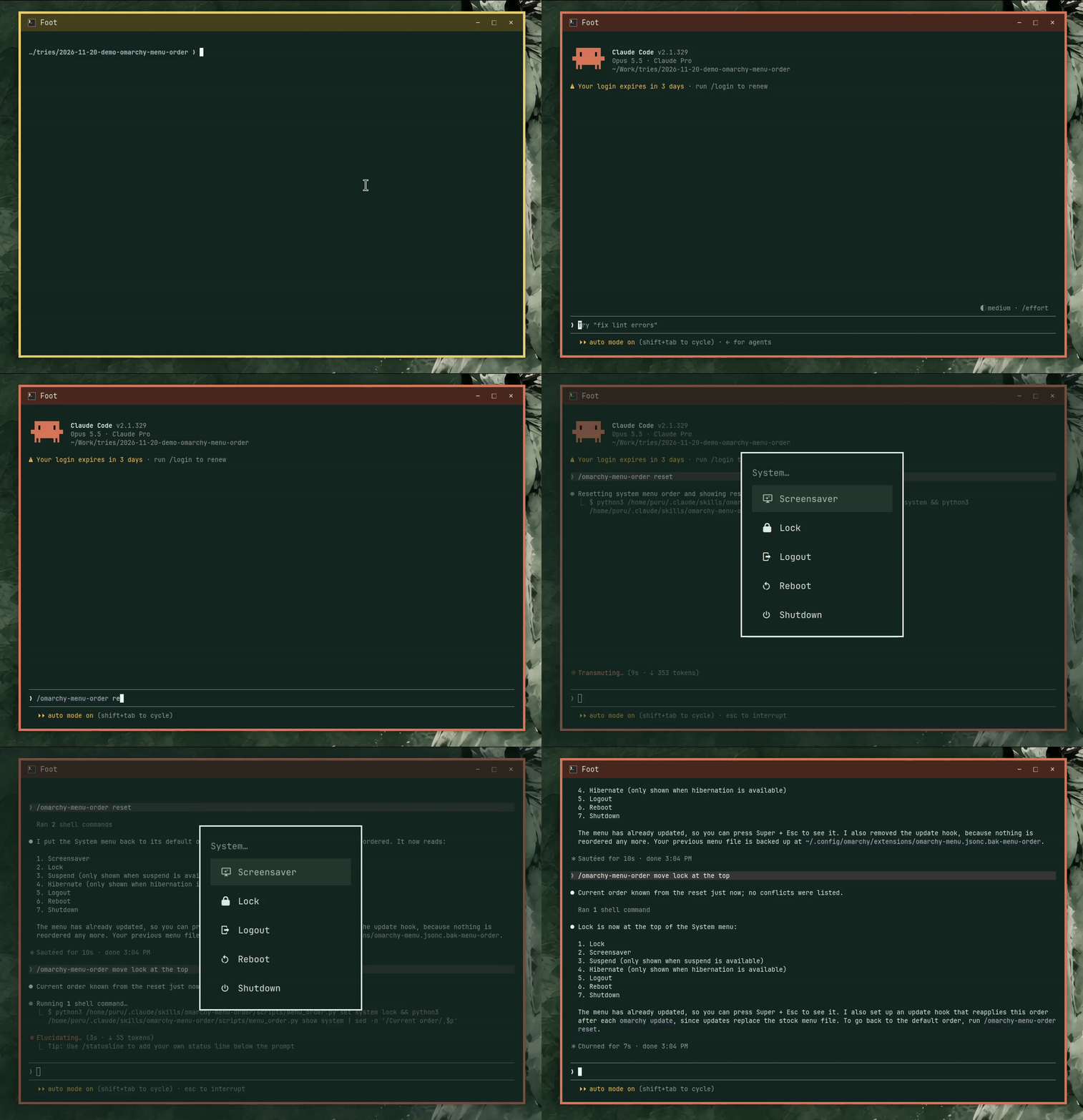
Claude reads the menu on your machine, works out the new order and applies it. The change shows up straight away, with no restart. Only the user's own menu file is changed, inside clearly marked lines, and a backup is kept. Omarchy's own files are never edited.
Omarchy updates can change menu items, and a hand-made copy would quietly go stale. To prevent that, the skill installs a small update hook that rebuilds your order from the new menu after every omarchy update. reset removes the reorder and the hook.
The skill only reorders existing items. If a request needs anything riskier, like changing what an item runs or editing Omarchy's system files, Claude explains why and doesn't do it.
Needs python3.
Plugins
A plugin bundles skills with hooks, so it can change how Claude works in every session, not only when you call a skill.
better-prompt-suggestions
After Claude replies, Claude Code often shows a grey suggestion in the prompt box that you accept with Tab. Often it doesn't, even when Claude has just told you the exact command to run, and you end up copying and pasting it by hand.
This plugin makes Claude end every reply with a short numbered list of the exact things you could type next, best first:
Suggested next:
[1] `! claude mcp add --scope user --transport http foo https://example.com/mcp`
[2] `/mcp`
[3] `run the full test in the playground`
That clear ending is what Claude Code's own suggestion picks up, so the grey Tab suggestion appears far more often, usually with [1]. To pick another option, type its number (for example 2) and press Enter, and Claude does it. An item can be a command for you to run (! ...), a Claude Code command (/mcp), the answer to a question Claude just asked (yes, go ahead), or the obvious follow-up (open a PR). When there is only one sensible next step, you only get [1].
A small hook loads the rules at the start of every session (and again after /clear or compaction), so there is nothing to call. Nothing new shows up in Claude Code itself.
Claude Code still decides whether to show a suggestion, and Tab only accepts the one it shows; it can't cycle through the list. No plugin can set that grey text directly, so on some turns you may still see none.
To keep suggestions on near usage limits and after long stretches without you, add this to ~/.claude/settings.json and restart Claude Code. A plugin can't set it for you, so if it's missing, Claude mentions it once per session.
{
  "env": {
    "CLAUDE_CODE_ENABLE_PROMPT_SUGGESTION": "true"
  }
}
Install:
/plugin install better-prompt-suggestions --marketplace tuladhar/my-claude-skills-as-devops-engineer
On Claude Code older than 2.1.275, add the marketplace first:
/plugin marketplace add tuladhar/my-claude-skills-as-devops-engineer
/plugin install better-prompt-suggestions@my-claude-skills-as-devops-engineer
Turn it off any time with /plugin disable better-prompt-suggestions.
How to use a skill
-
Copy the skill folder into your Claude skills folder:
cp -r skills/step-by-step ~/.claude/skills/ # or: cp -r skills/omarchy-menu-order ~/.claude/skills/ -
Open Claude Code and type the skill name, for example
/step-by-stepfollowed by your topic.
More skills coming
This is just the start. I'll keep adding skills and plugins that help with everyday DevOps work, such as debugging, incident notes and infrastructure reviews. Each new one will be listed in this README.
Free to use
Everything here is free to use, copy and change for your own work (MIT License). If a skill helps you, or you have an idea for a new one, feel free to open an issue or a pull request.
// faq
What is my-claude-skills-as-devops-engineer?
Claude skills I use every day as a DevOps engineer. Free to use, more coming.. It is open-source on GitHub.
Is my-claude-skills-as-devops-engineer free to use?
my-claude-skills-as-devops-engineer is open-source under the MIT license, so it is free to use.
What category does my-claude-skills-as-devops-engineer belong to?
my-claude-skills-as-devops-engineer is listed under devops in the Claudeers registry of Claude-compatible tools.
// embed badge

[](https://claudeers.com/my-claude-skills-as-devops-engineer)
// retro hit counter

[](https://claudeers.com/my-claude-skills-as-devops-engineer)
// reviews
// guestbook
// related in DevOps & CI/CD
 🔓
⭐AI-driven public opinion & trend monitor with multi-platform aggregation, RSS, and smart alerts.🎯 告别信息过载,你的 AI 舆情监控助手与热点筛选工具!聚合多平台热点 + RSS 订阅,支持关键词精准筛选。AI…
 🔓
Use Claude Code as the foundation for coding infrastructure, allowing you to decide how to interact with the model while enjoying updates from Anthropic.
 🔓
Professional Antigravity Account Manager & Switcher. One-click seamless account switching for Antigravity Tools. Built with Tauri v2 + React (Rust).专业的 Antig…
 🔓
Roadmap to becoming an ASP.NET Core developer in 2026