
multi-agent-shogun
Samurai-inspired multi-agent system for Claude Code. Orchestrate parallel AI tasks via tmux with shogun → karo → ashigaru hierarchy.
Install with your AI
Paste into Claude Code, Cursor, or any agent — it reads the repo and wires the tool into your project.
Install and set up multi-agent-shogun (release-binary project) into my current project.
Found on https://claudeers.com/multi-agent-shogun
Repo: https://github.com/yohey-w/multi-agent-shogun
Homepage/docs: —
Detected install method: release-binary → inspect the README
Category: automation. Platforms: cli, api, web, mobile.
Read the repo's README for exact setup and env vars, then install it and wire it into my project.

Claudeers Health Verdict:
slowing; community-verified: false. Confirm the source before running anything.
Grab the latest release asset from GitHub.
# download a build from https://github.com/yohey-w/multi-agent-shogun/releases
git clone https://github.com/yohey-w/multi-agent-shogun
// compatibility
| Platforms | cli, api, web, mobile |
|---|---|
| Operating systems | — |
| AI compatibility | claude |
| License | MIT |
| Pricing | open-source |
| Language | Shell |
multi-agent-shogun
Command your AI army like a feudal warlord.
Run 10 AI coding agents in parallel — Claude Code, OpenAI Codex, GitHub Copilot, Kimi Code, OpenCode, Cursor, Antigravity — orchestrated through a samurai-inspired hierarchy with zero coordination overhead.
Talk Coding, not Vibe Coding. Speak to your phone, AI executes.


One Karo (manager) coordinating 7 Ashigaru (workers) + 1 Gunshi (strategist) — real session, no mock data.
Quick Start
Requirements: tmux, bash 4+, at least one of: Claude Code / Codex / Copilot / Kimi / OpenCode / Antigravity
git clone https://github.com/yohey-w/multi-agent-shogun
cd multi-agent-shogun
bash first_setup.sh                        # one-time setup: config, dependencies, MCP
source ~/.bashrc                           # reload PATH
claude --dangerously-skip-permissions      # first run only: OAuth + accept Bypass Permissions → /exit
bash shutsujin_departure.sh                # launch all agents
For full install steps (incl. Windows) and the first-30-minutes walkthrough, see 🚀 Quick Start and the basic usage section below.
Type a command in the Shogun pane:
"Build a REST API for user authentication"
Shogun delegates → Karo breaks it down → 7 Ashigaru execute in parallel. You watch the dashboard. That's it.
Want to go deeper? The rest of this README covers architecture, configuration, memory design, and multi-CLI setup.
What is this?
multi-agent-shogun is a system that runs multiple AI coding CLI instances simultaneously, orchestrating them like a feudal Japanese army. Supports Claude Code, OpenAI Codex, GitHub Copilot, Kimi Code, OpenCode, Cursor, and Antigravity.
Why use it?
- One command spawns 7 AI workers + 1 strategist executing in parallel
- Zero wait time — give your next order while tasks run in the background
- AI remembers your preferences across sessions (Memory MCP)
- Real-time progress on a dashboard
        You (上様 / The Lord)
             │
             ▼  Give orders
      ┌─────────────┐
      │   SHOGUN    │  ← Receives your command, delegates instantly
      └──────┬──────┘
             │  YAML + tmux
      ┌──────▼──────┐
      │    KARO     │  ← Distributes tasks to workers
      └──────┬──────┘
             │
    ┌─┬─┬─┬─┴─┬─┬─┬─┬────────┐
    │1│2│3│4│5│6│7│ GUNSHI │  ← 7 workers + 1 strategist
    └─┴─┴─┴─┴─┴─┴─┴────────┘
       ASHIGARU      軍師
Why Shogun?
Most multi-agent frameworks burn API tokens on coordination. Shogun doesn't.
Claude Code Task tool | Claude Code Agent Teams | LangGraph | CrewAI | multi-agent-shogun | |
|---|---|---|---|---|---|
| Architecture | Subagents inside one process | Team lead + teammates (JSON mailbox) | Graph-based state machine | Role-based agents | Feudal hierarchy via tmux |
| Parallelism | Sequential (one at a time) | Multiple independent sessions | Parallel nodes (v0.2+) | Limited | 8 independent agents |
| Coordination cost | API calls per Task | Token-heavy (each teammate = separate context) | API + infra (Postgres/Redis) | API + CrewAI platform | Zero (YAML + tmux) |
| Multi-CLI | Claude Code only | Claude Code only | Any LLM API | Any LLM API | 7 CLIs (Claude/Codex/Copilot/Kimi/OpenCode/Cursor/Antigravity) |
| Observability | Claude logs only | tmux split-panes or in-process | LangSmith integration | OpenTelemetry | Live tmux panes + dashboard |
| Skill discovery | None | None | None | None | Bottom-up auto-proposal |
| Setup | Built into Claude Code | Built-in (experimental) | Heavy (infra required) | pip install | Shell scripts |
What makes this different
Zero coordination overhead — Agents talk through YAML files on disk. The only API calls are for actual work, not orchestration. Run 8 agents and pay only for 8 agents' work.
Full transparency — Every agent runs in a visible tmux pane. Every instruction, report, and decision is a plain YAML file you can read, diff, and version-control. No black boxes.
Battle-tested hierarchy — The Shogun → Karo → Ashigaru chain of command prevents conflicts by design: clear ownership, dedicated files per agent, event-driven communication, no polling.
Why CLI (Not API)?
Most AI coding tools charge per token. Running 8 Opus-grade agents through the API costs $100+/hour. CLI subscriptions flip this:
| API (Per-Token) | CLI (Flat-Rate) | |
|---|---|---|
| 8 agents × Opus | ~$100+/hour | ~$200/month |
| Cost predictability | Unpredictable spikes | Fixed monthly bill |
| Usage anxiety | Every token counts | Unlimited |
| Experimentation budget | Constrained | Deploy freely |
"Use AI recklessly" — With flat-rate CLI subscriptions, deploy 8 agents without hesitation. The cost is the same whether they work 1 hour or 24 hours. No more choosing between "good enough" and "thorough" — just run more agents.
Multi-CLI Support
Shogun isn't locked to one vendor. The system supports 7 CLI tools, each with unique strengths:
| CLI | Key Strength | Default Model |
|---|---|---|
| Claude Code | Battle-tested tmux integration, Memory MCP, dedicated file tools (Read/Write/Edit/Glob/Grep) | Claude Sonnet 4.6 |
| OpenAI Codex | Sandbox execution, JSONL structured output, codex exec headless mode, per-model --model flag | gpt-5.3-codex / gpt-5.3-codex-spark |
| GitHub Copilot | Built-in GitHub MCP, 4 specialized agents (Explore/Task/Plan/Code-review), /delegate to coding agent | Claude Sonnet 4.6 |
| Kimi Code | Free tier available, strong multilingual support | Kimi k2 |
| OpenCode | Shared AGENTS.md instructions, agent-specific definitions via --agent, /new context reset, restart-only model changes, deterministic interactive TUI launch, provider-qualified --model routing | provider/model |
| Cursor | Auto-loads CLAUDE.md/AGENTS.md/.cursor/rules/, built-in web search, inbox-write skill via .cursor/skills/, /model live switching, --yolo auto-run | Varies |
| Antigravity CLI | Google Antigravity CLI integration via agy, host-managed auth, YOLO-style launch, gemini/agy legacy aliases | host default / last-used |
OpenCode sessions load the agent-specific .opencode/agents/<agent_id>.md definition via --agent and keep automation resets on /new; model changes require a relaunch. Automation uses the repository-provided config/opencode-tui.json via OPENCODE_TUI_CONFIG, which disables app_exit and pins session_interrupt/input_clear to known bindings. Role boundaries are embedded in the generated agent frontmatter: Shogun can read queue/reports/* for oversight but cannot write them, Karo is limited to coordination files plus report aggregation, Ashigaru only touch their own task/report pair, and Gunshi reads ashigaru reports but only writes gunshi_report.yaml.
Antigravity sessions launch with agy --dangerously-skip-permissions. Shogun treats type: antigravity, type: agy, and legacy type: gemini as Antigravity. Authentication and default model selection stay in the host user's Antigravity CLI setup; settings.yaml may optionally pass a concrete model, but auto uses the host default or last-used model.
A unified instruction build system generates CLI-specific instruction files from shared templates:
instructions/
├── common/              # Shared rules (all CLIs)
├── cli_specific/        # CLI-specific tool descriptions
│   ├── claude_tools.md  # Claude Code tools & features
│   ├── copilot_tools.md # GitHub Copilot CLI tools & features
│   ├── opencode_tools.md # OpenCode tools, agent frontmatter, and permission model
│   └── cursor_tools.md  # Cursor Agent tools, skills, and session rules
└── roles/               # Role definitions (shogun, karo, ashigaru)
    ↓ build
CLAUDE.md / AGENTS.md / .github/copilot-instructions.md / .opencode/agents/*.md / .cursor/rules/*.md
  ← Generated per CLI
One source of truth, zero sync drift. Change a rule once, all CLIs get it.
Bottom-Up Skill Discovery
This is the feature no other framework has.
As Ashigaru execute tasks, they automatically identify reusable patterns and propose them as skill candidates. The Karo aggregates these proposals in dashboard.md, and you — the Lord — decide what gets promoted to a permanent skill.
Ashigaru finishes a task
    ↓
Notices: "I've done this pattern 3 times across different projects"
    ↓
Reports in YAML:  skill_candidate:
                     found: true
                     name: "api-endpoint-scaffold"
                     reason: "Same REST scaffold pattern used in 3 projects"
    ↓
Appears in dashboard.md → You approve → Skill created in .claude/commands/
    ↓
Any agent can now invoke /api-endpoint-scaffold
Skills grow organically from real work — not from a predefined template library. Your skill set becomes a reflection of your workflow.
Quick Start
Windows (WSL2)
|
Step 1 |
📥 Download the repository Download ZIP and extract to Or use git: |
|
Step 2 |
🖱️ Run Right-click → "Run as Administrator" (if WSL2 is not installed). Sets up WSL2 + Ubuntu automatically. |
|
Step 3 |
🐧 Open Ubuntu and run (first time only) |
|
Step 4 |
✅ Deploy! |
First-time only: Authentication
After first_setup.sh, run these commands once to authenticate:
# 1. Apply PATH changes
source ~/.bashrc

# 2. OAuth login + Bypass Permissions approval (one command)
claude --dangerously-skip-permissions
#    → Browser opens → Log in with Anthropic account → Return to CLI
#    → "Bypass Permissions" prompt appears → Select "Yes, I accept" (↓ to option 2, Enter)
#    → Type /exit to quit
This saves credentials to ~/.claude/ — you won't need to do it again.
Daily startup
Open an Ubuntu terminal (WSL) and run:
cd /mnt/c/tools/multi-agent-shogun
./shutsujin_departure.sh
📱 Mobile Access — Dedicated Android App (Recommended)


Monitor and command 10 AI agents from your phone with the dedicated Android companion app.
| Feature | Description |
|---|---|
| Shogun Terminal | SSH terminal + voice input + special key bar (C-c, C-b, Tab, etc.) |
| Agents Grid | 9-pane simultaneous monitoring. Tap to expand fullscreen + send commands |
| Dashboard | Renders dashboard.md with full table text selection/copy |
| Rate Limit | Tap the FAB on the Agents tab to check Claude Max 5h/7d usage with progress bars |
| Voice Input | Japanese continuous recognition via Google Speech API — higher accuracy than phone keyboard voice |
| Screenshot Share | Share images via Android share menu → SFTP transfer to server |
Note: Android only for now. No iOS version — the developer doesn't own an iPhone. If there's demand, please open an Issue. PRs welcome!
Setup
Prerequisites:
- Shogun system running on WSL2 (or Linux server)
- SSH server started (
sudo service ssh start) - Phone and server on same network (LAN or Tailscale)
Steps:
-
Install APK
- Download
android/release/multi-agent-shogun.apkon your phone (open the file on GitHub → "Download raw file") - Tap the download notification → "Install"
- If "Unknown sources" warning appears → "Settings" → enable "Allow from this source" for your browser → go back → "Install"
- Done → "Open"
- Download
-
Configure SSH (Settings tab)
Field Example Description SSH Host 100.xxx.xxx.xxxServer IP (e.g., Tailscale IP) SSH Port 22Usually 22 SSH User your_usernameSSH login username SSH Key Path /data/data/.../id_ed25519Private key path on phone (*1) SSH Password ****Use if no key available Project Path /mnt/c/tools/multi-agent-shogunServer-side project directory Shogun Session shoguntmux session name for Shogun Agent Session multiagenttmux session name for agents *1 Transfer your private key to the phone, or use password authentication
-
Save → Switch to Shogun tab → auto-connects
Using Tailscale (connect from anywhere):
# Server-side (WSL2)
curl -fsSL https://tailscale.com/install.sh | sh
sudo tailscaled &
sudo tailscale up --authkey tskey-auth-XXXXXXXXXXXX
sudo service ssh start
Install the Tailscale app on your phone, log in with the same account, and use the displayed Tailscale IP as the SSH Host in the app.
With ntfy notifications:
See ntfy setup section for push notifications from Karo on task completion.
📟 Termux Method (without the Android app) (click to expand)
SSH via Termux also works. More limited than the dedicated app, but requires no APK sideloading.
Requirements (all free):
| Name | In a nutshell | Role |
|---|---|---|
| Tailscale | A road to your home from anywhere | Connect to your home PC from anywhere |
| SSH | The feet that walk that road | Log into your home PC through Tailscale |
| Termux | A black screen on your phone | Required to use SSH — just install it |
Setup:
- Install Tailscale on both WSL and your phone
- In WSL (auth key method — browser not needed):
curl -fsSL https://tailscale.com/install.sh | sh sudo tailscaled & sudo tailscale up --authkey tskey-auth-XXXXXXXXXXXX sudo service ssh start - In Termux on your phone:
pkg update && pkg install openssh ssh youruser@your-tailscale-ip css # Connect to Shogun - Open a new Termux window (+ button) for workers:
ssh youruser@your-tailscale-ip
csm    # See all 9 panes
Disconnect: Just swipe the Termux window closed. tmux sessions survive — agents keep working.
🐧 Linux / macOS (click to expand)
First-time setup
# 1. Clone
git clone https://github.com/yohey-w/multi-agent-shogun.git ~/multi-agent-shogun
cd ~/multi-agent-shogun

# 2. Make scripts executable
chmod +x *.sh

# 3. Run first-time setup
./first_setup.sh
Daily startup
cd ~/multi-agent-shogun
./shutsujin_departure.sh
❓ What is WSL2? Why is it needed? (click to expand)
About WSL2
WSL2 (Windows Subsystem for Linux) lets you run Linux inside Windows. This system uses tmux (a Linux tool) to manage multiple AI agents, so WSL2 is required on Windows.
If you don't have WSL2 yet
No problem! Running install.bat will:
- Check if WSL2 is installed (auto-install if not)
- Check if Ubuntu is installed (auto-install if not)
- Guide you through next steps (running
first_setup.sh)
Quick install command (run PowerShell as Administrator):
wsl --install
Then restart your computer and run install.bat again.
📋 Script Reference (click to expand)
| Script | Purpose | When to run |
|---|---|---|
install.bat | Windows: WSL2 + Ubuntu setup | First time only |
first_setup.sh | Install tmux, Node.js, Claude Code CLI + Memory MCP config | First time only |
shutsujin_departure.sh | Create tmux sessions + launch the configured CLI for each agent + load instructions + start ntfy listener | Daily |
scripts/switch_cli.sh | Live switch agent CLI/model (settings.yaml → /exit → relaunch) | As needed |
What install.bat does automatically:
- ✅ Checks if WSL2 is installed (guides you if not)
- ✅ Checks if Ubuntu is installed (guides you if not)
- ✅ Shows next steps (how to run
first_setup.sh)
What shutsujin_departure.sh does:
- ✅ Creates tmux sessions (shogun + multiagent)
- ✅ Launches each agent with the CLI configured in
config/settings.yaml(Claude/Codex/Copilot/Kimi/OpenCode) - ✅ Auto-loads instruction files or generated agent definitions for each CLI
- ✅ Resets queue files for a fresh state
- ✅ Starts ntfy listener for phone notifications (if configured)
After running, all agents are ready to receive commands!
🔧 Manual Requirements (click to expand)
If you prefer to install dependencies manually:
| Requirement | Installation | Notes |
|---|---|---|
| WSL2 + Ubuntu | wsl --install in PowerShell | Windows only |
| Set Ubuntu as default | wsl --set-default Ubuntu | Required for scripts to work |
| tmux | sudo apt install tmux | Terminal multiplexer |
| Node.js v20+ | nvm install 20 | Required for MCP servers |
| Claude Code CLI | curl -fsSL https://claude.ai/install.sh | bash | Official Anthropic CLI (native version recommended; npm version deprecated) |
| OpenAI Codex CLI | Install from the official OpenAI Codex distribution | Required only for agents with type: codex |
| GitHub Copilot CLI | Install and authenticate GitHub Copilot CLI | Required only for agents with type: copilot |
| Kimi Code CLI | Install and authenticate Kimi Code | Required only for agents with type: kimi |
| OpenCode CLI | npm install -g opencode-ai | Required only for agents with type: opencode; provider API keys must be available in the agent shell |
| Cursor CLI | See Cursor CLI docs — use cursor-agent or agent command | Required only for agents with type: cursor |
| Antigravity CLI | Install and authenticate Google Antigravity CLI (agy) | Required only for agents with type: antigravity, type: agy, or legacy type: gemini |
After Setup
Whichever option you chose, 10 AI agents are automatically launched:
| Agent | Role | Count |
|---|---|---|
| 🏯 Shogun | Supreme commander — receives your orders | 1 |
| 📋 Karo | Manager — distributes tasks, quality checks | 1 |
| ⚔️ Ashigaru | Workers — execute implementation tasks in parallel | 7 |
| 🧠 Gunshi | Strategist — handles analysis, evaluation, and design | 1 |
Two tmux sessions are created:
shogun— connect here to give commandsmultiagent— Karo, Ashigaru, and Gunshi running in the background
How It Works
Step 1: Connect to the Shogun
After running shutsujin_departure.sh, all agents automatically load their instructions and are ready.
Open a new terminal and connect:
tmux attach-session -t shogun
Step 2: Give your first order
The Shogun is already initialized — just give a command:
Research the top 5 JavaScript frameworks and create a comparison table
The Shogun will:
- Write the task to a YAML file
- Notify the Karo (manager)
- Return control to you immediately — no waiting!
Meanwhile, the Karo distributes tasks to Ashigaru workers for parallel execution.
Step 3: Check progress
Open dashboard.md in your editor for a real-time status view:
## In Progress
| Worker | Task | Status |
|--------|------|--------|
| Ashigaru 1 | Research React | Running |
| Ashigaru 2 | Research Vue | Running |
| Ashigaru 3 | Research Angular | Completed |
Project-Unit Operation (Equivalent to Visual Studio "Solution")
Once set up, the Shogun system can handle multiple projects under the same Shogun, switching between them as needed. The unit equivalent to a Visual Studio "solution" is projects/{name}.yaml + context/{name}.md.
1. Running your first project
# (1) Connect to the Shogun (after shutsujin_departure.sh completes)
tmux attach-session -t shogun

# (2) Just give the Shogun your command — the project starts automatically
#     → Shogun writes cmd to queue/shogun_to_karo.yaml and notifies Karo
#     → Karo distributes to Ashigaru for parallel execution
#     → Results aggregate in dashboard.md
No explicit "create a project" command is needed. The Shogun attaches a project: field to the cmd when relevant, and related files are automatically separated.
2. Explicitly registering a project (optional, for long-term work)
For ongoing projects, you can place metadata in projects/{name}.yaml:
# projects/example.yaml
id: example
name: "Sample Project"
working_directory: /path/to/repo
north_star: "The ultimate goal for this project"
notes: |
  Project-specific notes, stakeholders, special rules
The Shogun and Karo reference this file and inject project context when issuing cmds.
Detailed project knowledge (requirements, design, past feedback) lives in context/{name}.md. When the Shogun issues a cmd related to the project, it automatically references this file.
3. Customizing the agent formation
The agent formation (which CLI each agent uses) lives in config/settings.yaml:
cli:
  agents:
    ashigaru1:
      type: codex          # codex / claude / copilot / kimi / opencode / antigravity
      model: gpt-5.5
    ashigaru2:
      type: claude
      model: claude-sonnet-4-6
    # Same for ashigaru3-7, gunshi, karo
OpenCode uses provider-qualified model IDs:
cli:
  agents:
    ashigaru3:
      type: opencode
      model: openrouter/openai/gpt-4o-mini
      variant: high  # optional provider-specific reasoning variant
OpenRouter setup has two separate pieces:
- Model routing goes in
config/settings.yamlas shown above (type: opencode,model: openrouter/...). - Provider authentication is configured in OpenCode, not in
settings.yaml. Run OpenCode once as the same OS user that will launch Shogun, then use/connect→OpenRouterand paste the API key. OpenCode stores provider credentials in its own user data under that OS user (for example under~/.local/share/opencode/; the exact file/database is OpenCode-internal). For headless deployments that use environment-based provider credentials, make sure the shell that runsshutsujin_departure.shhasOPENROUTER_API_KEYloaded.
Do not put API keys in config/settings.yaml, config/opencode-tui.json, or .opencode/agents/*.md. Those files only describe routing, tmux-safe keybindings, and generated agent definitions.
When OpenCode is selected, lib/cli_adapter.sh launches it with --agent <agent_id> and the repository-pinned OPENCODE_TUI_CONFIG=config/opencode-tui.json. The TUI command does not accept --variant; if variant: is configured, scripts/build_instructions.sh and scripts/switch_cli.sh synchronize model: / variant: into a git-ignored .opencode/agents/<agent_id>-runtime.md, which OpenCode loads via --agent <agent_id>-runtime.
To switch on the fly, use scripts/switch_cli.sh:
bash scripts/switch_cli.sh ashigaru3 --type claude --model claude-sonnet-4-6
bash scripts/switch_cli.sh ashigaru3 --type opencode --model openrouter/openai/gpt-4o-mini
bash scripts/switch_cli.sh ashigaru3 --type opencode --model openrouter/minimax/minimax-m2.5 --variant xhigh
4. Switching or closing a project
There is no explicit "close project" command. Issuing the next project's cmd automatically switches context.
- Pause temporarily: do nothing. Old cmds remain in
queue/as history, and the Shogun restores state when resumed - Fully retire: delete
projects/{name}.yaml, or add anarchived: trueflag - Run in parallel: use the
project:field in cmds to keep concurrent projects distinct
5. Carrying experience and settings between projects
What carries forward to future projects:
| What carries forward | Stored in | Referenced when |
|---|---|---|
| Lord's preferences and lessons | Memory MCP (persistent) | All agents at Session Start |
| Project-specific knowledge | context/{name}.md | When running the project's cmds |
| Past cmd history | queue/shogun_to_karo.yaml | When the Shogun needs it |
| Custom skills | ~/.claude/skills/, skills/ | When matching triggers fire |
| Agent formation | config/settings.yaml | At shutsujin startup |
Memory MCP is the heart of "experience." When you tell the Shogun "don't do X next time" or "remember Y," the Shogun records it in Memory MCP, and all future projects see it.
Detailed flow
You: "Research the top 5 MCP servers and create a comparison table"
The Shogun writes the task to queue/shogun_to_karo.yaml and wakes the Karo. Control returns to you immediately.
The Karo breaks the task into subtasks:
| Worker | Assignment |
|---|---|
| Ashigaru 1 | Research Notion MCP |
| Ashigaru 2 | Research GitHub MCP |
| Ashigaru 3 | Research Playwright MCP |
| Ashigaru 4 | Research Memory MCP |
| Ashigaru 5 | Research Sequential Thinking MCP |
All 5 Ashigaru research simultaneously. You can watch them work in real time:
Results appear in dashboard.md as they complete.
Key Features
⚡ 1. Parallel Execution
One command spawns up to 8 parallel tasks:
You: "Research 5 MCP servers"
→ 5 Ashigaru start researching simultaneously
→ Results in minutes, not hours
🔄 2. Non-Blocking Workflow
The Shogun delegates instantly and returns control to you:
You: Command → Shogun: Delegates → You: Give next command immediately
                                       ↓
                       Workers: Execute in background
                                       ↓
                       Dashboard: Shows results
No waiting for long tasks to finish.
🧠 3. Cross-Session Memory (Memory MCP)
Your AI remembers your preferences:
Session 1: Tell it "I prefer simple approaches"
            → Saved to Memory MCP

Session 2: AI loads memory on startup
            → Stops suggesting complex solutions
📡 4. Event-Driven Communication (Zero Polling)
Agents talk to each other by writing YAML files — like passing notes. No polling loops, no wasted API calls.
Karo wants to wake Ashigaru 3:

Step 1: Write the message          Step 2: Wake the agent up
┌──────────────────────┐           ┌──────────────────────────┐
│ inbox_write.sh       │           │ inbox_watcher.sh         │
│                      │           │                          │
│ Writes full message  │  file     │ Detects file change      │
│ to ashigaru3.yaml    │──change──▶│ (inotifywait, not poll)  │
│ with flock (no race) │           │                          │
└──────────────────────┘           │ Wakes agent via:         │
                                   │  1. Self-watch (skip)    │
                                   │  2. tmux send-keys       │
                                   │     (short nudge only)   │
                                   └──────────────────────────┘

Step 3: Agent reads its own inbox
┌──────────────────────────────────┐
│ Ashigaru 3 reads ashigaru3.yaml  │
│ → Finds unread messages          │
│ → Processes them                 │
│ → Marks as read                  │
└──────────────────────────────────┘
How the wake-up works:
| Priority | Method | What happens | When used |
|---|---|---|---|
| 1st | Self-Watch | Agent watches its own inbox file — wakes itself, no nudge needed | Agent has its own inotifywait running |
| 2nd | Stop Hook | Claude Code agents check inbox at turn end via .claude/settings.json Stop hook | Claude Code agents only |
| 3rd | tmux send-keys | Sends short nudge via tmux send-keys (text and Enter sent separately for Codex CLI compatibility) | Fallback — disabled in ASW Phase 2+ |
Agent Self-Watch (ASW) Phases — Controls how aggressively the system uses tmux send-keys nudges:
| ASW Phase | Nudge behavior | Delivery method | When to use |
|---|---|---|---|
| Phase 1 | Normal nudges enabled | self-watch + send-keys | Initial setup, mixed CLI environments |
| Phase 2 | Busy → suppressed, Idle → nudge | busy: stop hook delivers at turn end. idle: nudge (unavoidable) | Claude Code agents with stop hook (recommended) |
| Phase 3 | FINAL_ESCALATION_ONLY | send-keys only as last-resort recovery | Fully stable environments |
Phase 2 uses the idle flag file (/tmp/shogun_idle_{agent}) to distinguish busy vs idle agents. The Stop hook creates/removes this flag at turn boundaries. This eliminates nudge interruptions during active work while still waking idle agents.
Why can't nudges be fully eliminated? Claude Code's Stop hook only fires at turn end. An idle agent (sitting at the prompt) has no turn ending, so there's no hook to trigger inbox checks. A future
Notificationhook withidle_promptblocking support or a periodic timer hook could solve this.
Configure in config/settings.yaml:
asw_phase: 2 # Recommended for Claude Code setups
Or set the default directly in scripts/inbox_watcher.sh (ASW_PHASE variable). Restart inbox_watcher processes after changing.
3-Phase Escalation (v3.2) — If agent doesn't respond:
| Phase | Timing | Action |
|---|---|---|
| Phase 1 | 0-2 min | Standard nudge (inbox3 text + Enter) — skipped for busy agents in ASW Phase 2+ |
| Phase 2 | 2-4 min | Copilot/Kimi: Escape×2 + single Ctrl-C + nudge. Claude/Codex/OpenCode: plain nudge fallback |
| Phase 3 | 4+ min | Send CLI-specific context reset: Claude/Copilot/Kimi use /clear, Codex/OpenCode use /new (max once per 5 min) |
Key design choices:
- Message content is never sent through tmux — only a short "you have mail" nudge. The agent reads its own file. This eliminates character corruption and transmission hangs.
- Zero CPU while idle —
inotifywaitblocks on a kernel event (not a poll loop). CPU usage is 0% between messages. - Guaranteed delivery — If the file write succeeded, the message is there. No lost messages, no retries needed.
📊 5. Agent Status Check
See which agents are busy or idle — instantly, from one command:
# Project mode: full status with task/inbox info
bash scripts/agent_status.sh

# Standalone mode: works with any tmux session
bash scripts/agent_status.sh --session mysession --lang en
Project mode output:
Agent      CLI     Pane      Task ID                                    Status     Inbox
---------- ------- --------- ------------------------------------------ ---------- -----
karo       claude  待機中    ---                                        ---        0
ashigaru1  codex   稼働中    subtask_042a_research                      assigned   0
ashigaru2  codex   待機中    subtask_042b_review                        done       0
gunshi     claude  稼働中    subtask_042c_analysis                      assigned   0
Standalone mode output (no project config needed):
Pane                           State      Agent ID
------------------------------ ---------- ----------
multiagent:agents.0            IDLE       karo
multiagent:agents.1            BUSY       ashigaru1
multiagent:agents.8            BUSY       gunshi
Detection works for Claude Code, Codex CLI, and OpenCode by checking CLI-specific prompt/spinner patterns near the bottom of each tmux pane. The detection logic lives in lib/agent_status.sh — source it in your own scripts:
source lib/agent_status.sh
agent_is_busy_check "multiagent:agents.3" && echo "busy" || echo "idle"
📸 6. Screenshot Integration
VSCode's Claude Code extension lets you paste screenshots to explain issues. This CLI system provides the same capability:
# Set your screenshot folder in config/settings.yaml
screenshot:
  path: "/mnt/c/Users/YourName/Pictures/Screenshots"
# Just tell the Shogun:
You: "Check the latest screenshot"
You: "Look at the last 2 screenshots"
→ AI instantly reads and analyzes your screen captures
Windows tip: Press Win + Shift + S to take screenshots. Set the save path in settings.yaml for seamless integration.
Use cases:
- Explain UI bugs visually
- Show error messages
- Compare before/after states
📁 7. Context Management (4-Layer Architecture)
Efficient knowledge sharing through a four-layer context system:
| Layer | Location | Purpose |
|---|---|---|
| Layer 1: Memory MCP | memory/shogun_memory.jsonl | Cross-project, cross-session long-term memory |
| Layer 2: Project | config/projects.yaml, projects/<id>.yaml, context/{project}.md | Project-specific information and technical knowledge |
| Layer 3: YAML Queue | queue/shogun_to_karo.yaml, queue/tasks/, queue/reports/ | Task management — source of truth for instructions and reports |
| Layer 4: Session | CLAUDE.md, instructions/*.md | Working context (wiped by /clear) |
Persistent Agent Memory (memory/MEMORY.md)
Shogun reads memory/MEMORY.md at every session start. It contains Lord's preferences, lessons learned, and cross-session knowledge — written by Shogun, read by Shogun.
┌─────────────────────────────────────────────────────────────┐
│                    Git Repositories                          │
│                                                              │
│  ┌─────────────────────┐   ┌──────────────────────────┐    │
│  │  multi-agent-shogun │   │      shogun-private        │    │
│  │       (public OSS)  │   │   (your private repo)      │    │
│  │                     │   │                            │    │
│  │ scripts/            │   │ projects/client.yaml  ←──┐ │    │
│  │ instructions/       │   │ context/my-notes.md   ←──┤ │    │
│  │ lib/                │   │ queue/shogun_to_karo.yaml │ │    │
│  │ memory/             │   │ memory/MEMORY.md      ←──┘ │    │
│  │  ├─ MEMORY.md.sample│   │ config/settings.yaml       │    │
│  │  └─ MEMORY.md  ─────┼───┼── same file, tracked here  │    │
│  │     (gitignored)    │   │                            │    │
│  └─────────────────────┘   └──────────────────────────┘    │
│         ↑ anyone can fork        ↑ your data, your repo      │
└─────────────────────────────────────────────────────────────┘
How it works: memory/MEMORY.md lives in the same working directory as the OSS repo, but is excluded from the OSS .gitignore (whitelist-based). You track it in a separate private repo using a bare git repo technique:
# One-time setup (already done by first_setup.sh)
git init --bare ~/.shogun-private.git
alias privategit='git --git-dir=$HOME/.shogun-private.git --work-tree=/path/to/multi-agent-shogun'
privategit remote add origin https://github.com/YOU/shogun-private.git

# Daily use
privategit add -f memory/MEMORY.md projects/my-client.yaml
privategit commit -m "update memory"
privategit push
The OSS .gitignore uses a whitelist approach (default: exclude everything, then explicitly allow OSS files). So private files like memory/MEMORY.md are automatically excluded without needing explicit gitignore entries — just don't add them to the whitelist.
This design enables:
- Any Ashigaru can work on any project
- Context persists across agent switches
- Clear separation of concerns
- Knowledge survives across sessions
/clear Protocol (Cost Optimization)
As agents work, their session context (Layer 4) grows, increasing API costs. /clear wipes session memory and resets costs. Layers 1–3 persist as files, so nothing is lost.
Recovery cost after /clear: ~6,800 tokens (42% improved from v1 — CLAUDE.md YAML conversion + English-only instructions reduced token cost by 70%)
- CLAUDE.md (auto-loaded) → recognizes itself as part of the Shogun System
tmux display-message -t "$TMUX_PANE" -p '#{@agent_id}'→ identifies its own number- Memory MCP read → restores the Lord's preferences (~700 tokens)
- Task YAML read → picks up the next assignment (~800 tokens)
The key insight: designing what not to load is what drives cost savings.
Universal Context Template
All projects use the same 7-section template:
| Section | Purpose |
|---|---|
| What | Project overview |
| Why | Goals and success criteria |
| Who | Stakeholders and responsibilities |
| Constraints | Deadlines, budgets, limitations |
| Current State | Progress, next actions, blockers |
| Decisions | Decisions made and their rationale |
| Notes | Free-form observations and ideas |
This unified format enables:
- Quick onboarding for any agent
- Consistent information management across all projects
- Easy handoff between Ashigaru workers
📱 8. Phone Notifications (ntfy)
Two-way communication between your phone and the Shogun — no SSH, no Tailscale, no server needed.
| Direction | How it works |
|---|---|
| Phone → Shogun | Send a message from the ntfy app → ntfy_listener.sh receives it via streaming → auto-ACK reply (📱受信: {your message}) sent back to your phone → Shogun processes automatically |
| Karo → Phone (direct) | When Karo updates dashboard.md, it sends push notifications directly via scripts/ntfy.sh — Shogun is bypassed (Shogun is for human interaction, not progress reporting) |
📱 You (from bed)          🏯 Shogun
    │                          │
    │  "Research React 19"     │
    ├─────────────────────────►│
    │    (ntfy message)        │  → Delegates to Karo → Ashigaru work
    │                          │
    │  "✅ cmd_042 complete"   │
    │◄─────────────────────────┤
    │    (push notification)   │
Setup:
- Add
ntfy_topic: "shogun-yourname"toconfig/settings.yaml - Install the ntfy app on your phone and subscribe to the same topic
shutsujin_departure.shautomatically starts the listener — no extra steps
Notification examples:
| Event | Notification |
|---|---|
| Command completed | ✅ cmd_042 complete — 5/5 subtasks done |
| Task failed | ❌ subtask_042c failed — API rate limit |
| Action required | 🚨 Action needed: approve skill candidate |
| Streak update | 🔥 3-day streak! 12/12 tasks today |
Free, no account required, no server to maintain. Uses ntfy.sh — an open-source push notification service.
⚠️ Security: Your topic name is your password. Anyone who knows it can read your notifications and send messages to your Shogun. Choose a hard-to-guess name and never share it publicly (e.g., in screenshots, blog posts, or GitHub commits).
Verify it works:
# Send a test notification to your phone
bash scripts/ntfy.sh "Test notification from Shogun 🏯"
If your phone receives the notification, you're all set. If not, check:
config/settings.yamlhasntfy_topicset (not empty, no extra quotes)- The ntfy app on your phone is subscribed to the exact same topic name
- Your phone has internet access and ntfy notifications are enabled
Sending commands from your phone:
- Open the ntfy app on your phone
- Tap your subscribed topic
- Type a message (e.g.,
Research React 19 best practices) and send ntfy_listener.shreceives it, writes toqueue/ntfy_inbox.yaml, and wakes the Shogun- The Shogun reads the message and processes it through the normal Karo → Ashigaru pipeline
Any text you send becomes a command. Write it like you'd talk to the Shogun — no special syntax needed.
Manual listener start (if not using shutsujin_departure.sh):
# Start the listener in the background
nohup bash scripts/ntfy_listener.sh &>/dev/null &

# Check if it's running
pgrep -f ntfy_listener.sh

# View listener logs (stderr output)
bash scripts/ntfy_listener.sh  # Run in foreground to see logs
The listener automatically reconnects if the connection drops. shutsujin_departure.sh starts it automatically on deployment — you only need manual start if you skipped the deployment script.
Troubleshooting:
| Problem | Fix |
|---|---|
| No notifications on phone | Check topic name matches exactly in settings.yaml and ntfy app |
| Listener not starting | Run bash scripts/ntfy_listener.sh in foreground to see errors |
| Phone → Shogun not working | Verify listener is running: pgrep -f ntfy_listener.sh |
| Messages not reaching Shogun | Check queue/ntfy_inbox.yaml — if message is there, Shogun may be busy |
| "ntfy_topic not configured" error | Add ntfy_topic: "your-topic" to config/settings.yaml |
| Duplicate notifications | Normal on reconnect — Shogun deduplicates by message ID |
| Changed topic name but no notifications | The listener must be restarted: pkill -f ntfy_listener.sh && nohup bash scripts/ntfy_listener.sh &>/dev/null & |
Real-world notification screenshots:


Left: Bidirectional phone ↔ Shogun communication · Right: Real-time progress report from Ashigaru


Left: Command completion notification · Right: All 8 Ashigaru completing in parallel
Note: Topic names shown in screenshots are examples. Use your own unique topic name.
SayTask Notifications
Behavioral psychology-driven motivation through your notification feed:
- Streak tracking: Consecutive completion days counted in
saytask/streaks.yaml— maintaining streaks leverages loss aversion to sustain momentum - Eat the Frog 🐸: The hardest task of the day is marked as the "Frog." Completing it triggers a special celebration notification
- Daily progress:
12/12 tasks today— visual completion feedback reinforces the Arbeitslust effect (joy of work-in-progress)
🖼️ 9. Pane Border Task Display
Each tmux pane shows the agent's current task directly on its border:
┌ ashigaru1 Sonnet+T VF requirements ──┬ ashigaru3 Opus+T API research ──────┐
│                                      │                                     │
│  Working on SayTask requirements     │  Researching REST API patterns      │
│                                      │                                     │
├ ashigaru2 Sonnet ───────────────────┼ ashigaru4 Spark DB schema design ───┤
│                                      │                                     │
│  (idle — waiting for assignment)     │  Designing database schema          │
│                                      │                                     │
└──────────────────────────────────────┴─────────────────────────────────────┘
- Working:
ashigaru1 Sonnet+T VF requirements— agent name, model (with Thinking indicator), and task summary - Idle:
ashigaru2 Sonnet— model name only, no task - Display names: Sonnet, Opus, Haiku, Codex, Spark —
+Tsuffix = Extended Thinking enabled - Updated automatically by the Karo when assigning or completing tasks
- Glance at all 9 panes to instantly know who's doing what
🔊 10. Shout Mode (Battle Cries)
When an Ashigaru completes a task, it shouts a personalized battle cry in the tmux pane — a visual reminder that your army is working hard.
┌ ashigaru1 (Sonnet) ──────────┬ ashigaru2 (Sonnet) ──────────┐
│                               │                               │
│  ⚔️ 足軽1号、先陣切った!     │  🔥 足軽2号、二番槍の意地!   │
│  八刃一志!                   │  八刃一志!                   │
│  ❯                            │  ❯                            │
└───────────────────────────────┴───────────────────────────────┘
How it works:
The Karo writes an echo_message field in each task YAML. After completing all work (report + inbox notification), the Ashigaru runs echo as its final action. The message stays visible above the ❯ prompt.
# In the task YAML (written by Karo)
task:
  task_id: subtask_001
  description: "Create comparison table"
  echo_message: "🔥 足軽1号、先陣を切って参る!八刃一志!"
Shout mode is the default. To disable (saves API tokens on the echo call):
./shutsujin_departure.sh --silent    # No battle cries
./shutsujin_departure.sh             # Default: shout mode (battle cries enabled)
Silent mode sets DISPLAY_MODE=silent as a tmux environment variable. The Karo checks this when writing task YAMLs and omits the echo_message field.
🗣️ SayTask — Task Management for People Who Hate Task Management
What is SayTask?
Task management for people who hate task management. Just speak to your phone.
Talk Coding, not Vibe Coding. Speak your tasks, AI organizes them. No typing, no opening apps, no friction.
- Target audience: People who installed Todoist but stopped opening it after 3 days
- Your enemy isn't other apps — it's doing nothing. The competition is inaction, not another productivity tool
- Zero UI. Zero typing. Zero app-opening. Just talk
"Your enemy isn't other apps — it's doing nothing."
How it Works
- Install the ntfy app (free, no account needed)
- Speak to your phone: "dentist tomorrow", "invoice due Friday"
- AI auto-organizes → morning notification: "here's your day"
 🗣️ "Buy milk, dentist tomorrow, invoice due Friday"
       │
       ▼
 ┌──────────────────┐
 │  ntfy → Shogun   │  AI auto-categorize, parse dates, set priorities
 └────────┬─────────┘
          │
          ▼
 ┌──────────────────┐
 │   tasks.yaml     │  Structured storage (local, never leaves your machine)
 └────────┬─────────┘
          │
          ▼
 📱 Morning notification:
    "Today: 🐸 Invoice due · 🦷 Dentist 3pm · 🛒 Buy milk"
Before / After
| Before (v1) | After (v2) |
|---|---|
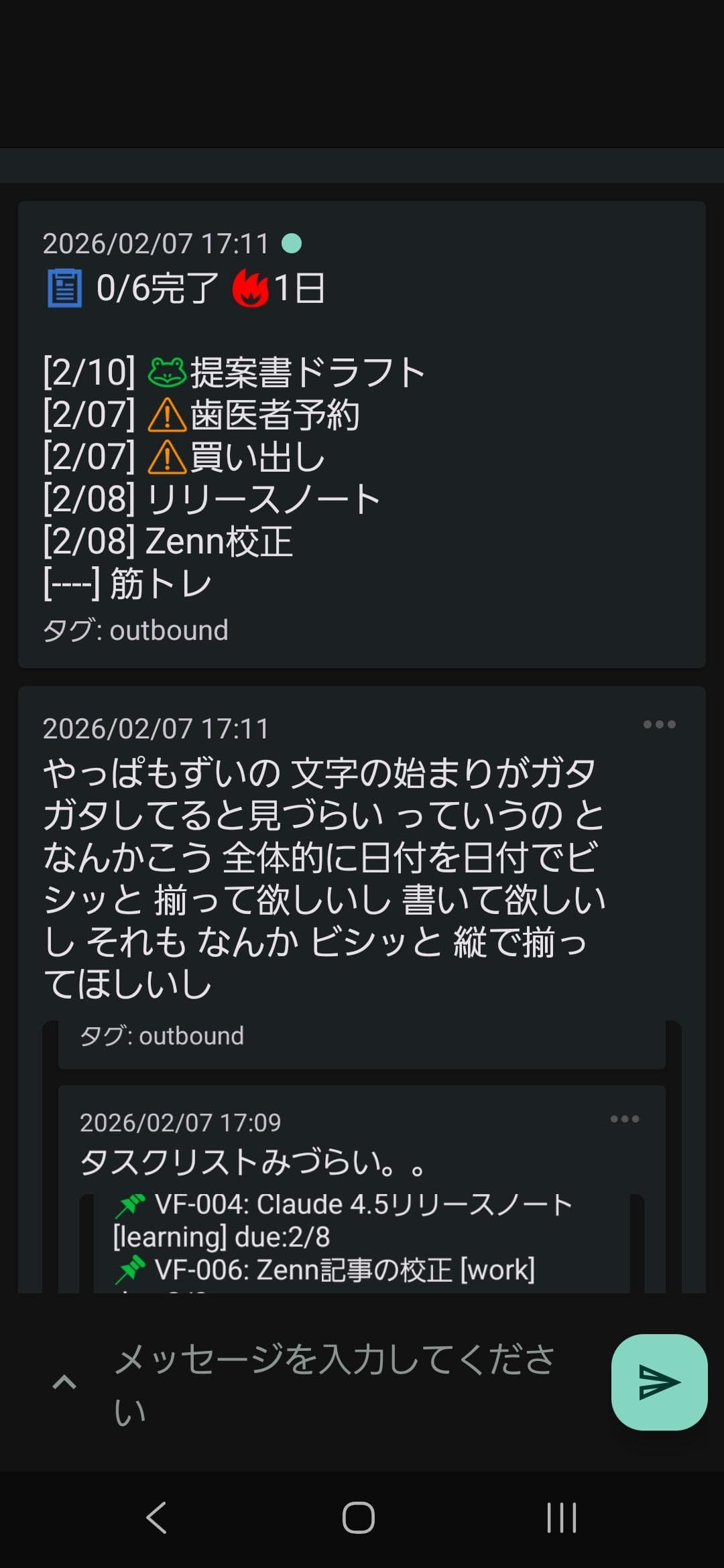 | 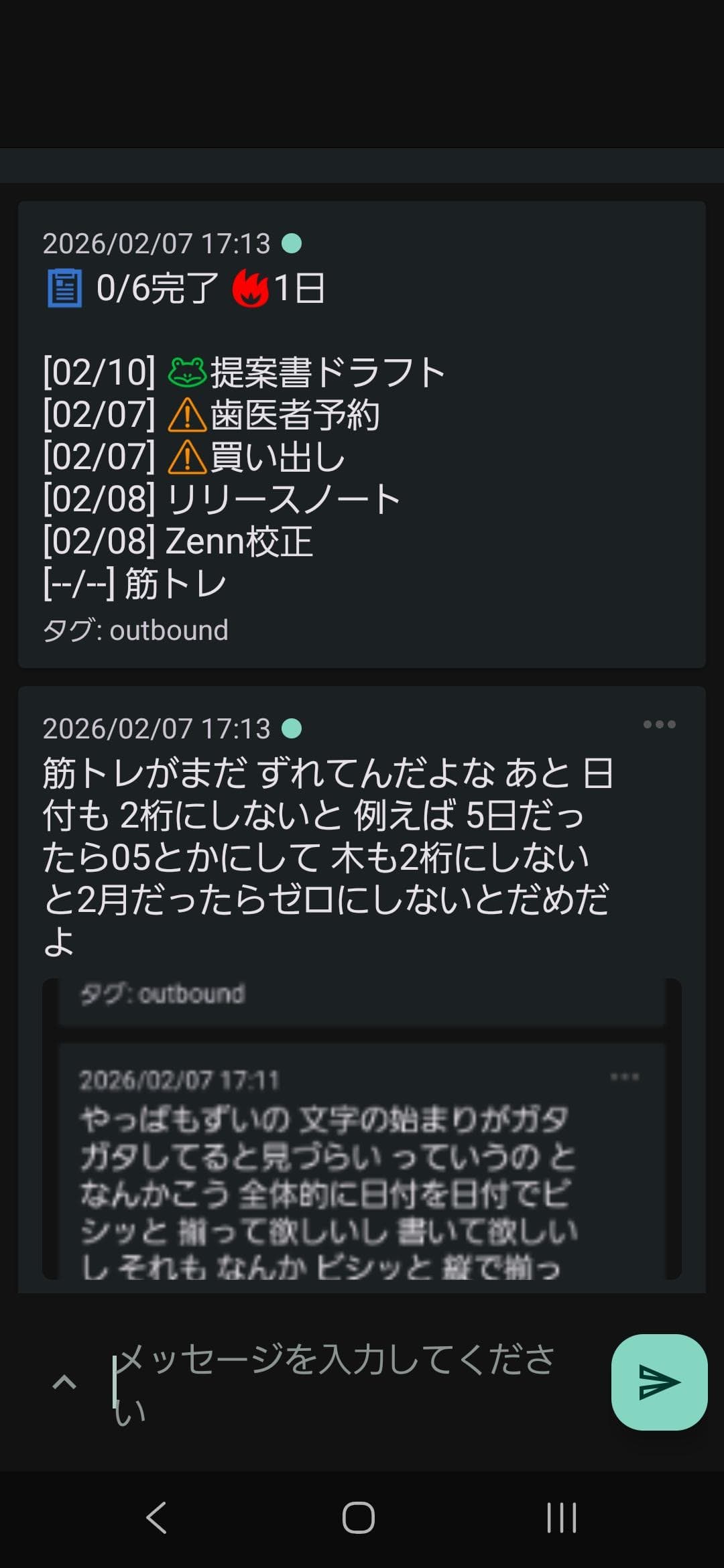 |
| Raw task dump | Clean, organized daily summary |
Note: Topic names shown in screenshots are examples. Use your own unique topic name.
Use Cases
- 🛏️ In bed: "Gotta submit the report tomorrow" — captured before you forget, no fumbling for a notebook
- 🚗 While driving: "Don't forget the estimate for client A" — hands-free, eyes on the road
- 💻 Mid-work: "Oh, need to buy milk" — dump it instantly and stay in flow
- 🌅 Wake up: Today's tasks already waiting in your notifications — no app to open, no inbox to check
- 🐸 Eat the Frog: AI picks your hardest task each morning — ignore it or conquer it first
FAQ
Q: How is this different from other task apps? A: You never open an app. Just speak. Zero friction. Most task apps fail because people stop opening them. SayTask removes that step entirely.
Q: Can I use SayTask without the full Shogun system? A: SayTask is a feature of Shogun. Shogun also works as a standalone multi-agent development platform — you get both capabilities in one system.
Q: What's the Frog 🐸? A: Every morning, AI picks your hardest task — the one you'd rather avoid. Tackle it first (the "Eat the Frog" method) or ignore it. Your call.
Q: Is it free? A: Everything is free and open-source. ntfy is free too. No account, no server, no subscription.
Q: Where is my data stored? A: Local YAML files on your machine. Nothing is sent to the cloud. Your tasks never leave your device.
Q: What if I say something vague like "that thing for work"? A: AI does its best to categorize and schedule it. You can always refine later — but the point is capturing the thought before it disappears.
SayTask vs cmd Pipeline
Shogun has two complementary task systems:
| Capability | SayTask (Voice Layer) | cmd Pipeline (AI Execution) |
|---|---|---|
| Voice input → task creation | ✅ | — |
| Morning notification digest | ✅ | — |
| Eat the Frog 🐸 selection | ✅ | — |
| Streak tracking | ✅ | ✅ |
| AI-executed tasks (multi-step) | — | ✅ |
// faq
What is multi-agent-shogun?
Samurai-inspired multi-agent system for Claude Code. Orchestrate parallel AI tasks via tmux with shogun → karo → ashigaru hierarchy.. It is open-source on GitHub.
Is multi-agent-shogun free to use?
multi-agent-shogun is open-source under the MIT license, so it is free to use.
What category does multi-agent-shogun belong to?
multi-agent-shogun is listed under automation in the Claudeers registry of Claude-compatible tools.
// embed badge

[](https://claudeers.com/multi-agent-shogun)
// retro hit counter

[](https://claudeers.com/multi-agent-shogun)
// reviews
// guestbook
// related in Automation & Workflows
 🔓
🔓 🔓
🔓The API to search, scrape, and interact with the web at scale. 🔥
 🔓
🔓🌐 Make websites accessible for AI agents. Automate tasks online with ease.
 🔓
🔓Taste-Skill - gives your AI good taste. stops the AI from generating boring, generic slop