
Moonglade
A quiet macOS notch indicator for Claude Code, OpenCode, and Codex CLI sessions
Install with your AI
Paste into Claude Code, Cursor, or any agent — it reads the repo and wires the tool into your project.
Install and set up Moonglade (release-binary project) into my current project.
Found on https://claudeers.com/moonglade
Repo: https://github.com/ixjosemi/Moonglade
Homepage/docs: —
Detected install method: release-binary → inspect the README
Category: devtools. Platforms: cli, api.
Read the repo's README for exact setup and env vars, then install it and wire it into my project.

Claudeers Health Verdict:
slowing; community-verified: false. Confirm the source before running anything.
Grab the latest release asset from GitHub.
# download a build from https://github.com/ixjosemi/Moonglade/releases
git clone https://github.com/ixjosemi/Moonglade
// compatibility
| Platforms | cli, api |
|---|---|
| Operating systems | — |
| AI compatibility | claude |
| License | MIT |
| Pricing | open-source |
| Language | Swift |
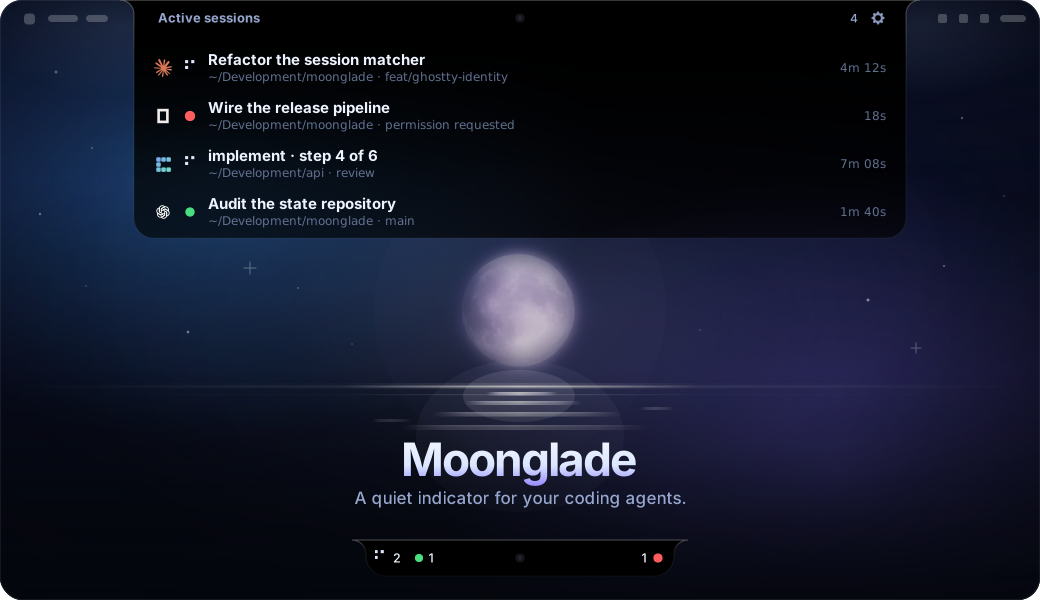
Know when your coding agents need you—without leaving the notch.
Moonglade is a quiet, native macOS indicator for Claude Code, OpenCode, Codex CLI, Pi, and Convoy pipeline sessions. It lives around the MacBook notch (or as a pill on displays without one) and returns you to the exact terminal tab or tmux pane with one click.
Why Moonglade?
- See global counts for running, waiting, and blocked sessions without having to infer them from provider icons.
- Click the status summary and its wide session menu grows out of the notch itself: provider, status light, session title taken from the live terminal tab, project directory, git branch (worktrees included) or Convoy pipeline step, and elapsed time.
- Focus the recorded Ghostty, iTerm2, Terminal, or tmux session with one click.
- Expand any row (chevron or right click) for inline actions: rename the session, copy the project path, reveal it in Finder, or kill the process — SIGTERM with SIGKILL escalation — and close its exact tmux pane or Ghostty tab.
- Watch Convoy pipeline runs as first-class sessions: the current step in the row, red light on human gates, and no duplicate rows for the OpenCode sessions a pipeline owns.
- Closed terminals disappear immediately through kernel exit notifications, with a five-second scanner/reaper backstop for missed hooks and stale state.
- Follow the screen with the pointer by default, or choose the screen with the focused window — or a panel on every connected display — in Settings.
- Read a panel that belongs on the hardware: it hangs from the notch as a liquid-glass drop, stays pure black across the camera band, and answers the click with a Metal ripple. Frost and tint are tunable per display kind, and optional sounds can announce a session that needs you or one that just finished its turn.
- Keep all observation and state on your Mac.
- Run without telemetry, accounts, servers, or third-party Swift dependencies, at ~1% CPU and ~16 MB of memory.
Session states
| State | In the bar | Meaning |
|---|---|---|
| Running | Braille dot-matrix spinner | The agent is processing. |
| Waiting | Green dot | The session waits at the prompt for your next input. |
| Blocked | Red dot | A question, permission ask, or failed pipeline step needs you. |
Running and waiting sit on the left of the camera and blocked on its right, and each pair puts its round glyph on the outer screen edge so both wings meet the notch shoulders symmetrically. The bar shows a count for each state that actually exists right now — zero-count states leave no slot behind — and collapses to a single dimmed moon when no agent is running at all.
The menu always shows the real status and provider per session, using the same three glyphs plus a grey dot for a session whose process has exited and is about to be reaped.
Requirements
- macOS 14 Sonoma or newer — macOS 26 for the real Liquid Glass backdrop, which degrades to a system blur below it;
- a MacBook with a notch for the intended UI placement;
- Swift 6.0 or newer to build from source;
- Node.js 20+ to run the OpenCode and Pi behavioral tests;
- Ghostty 1.3+ with AppleScript enabled, cmux, iTerm2, or Terminal.
Apple Silicon is the tested development platform. Intel builds have not yet been validated.
Install
One command builds the app, installs it into /Applications, wires the agent hooks, launches it, and verifies everything:
git clone https://github.com/ixjosemi/Moonglade.git
cd Moonglade
./scripts/install.sh
The same command reinstalls: it stops the running instance, replaces the app, relaunches, and re-verifies. The bundle is ad-hoc signed for local use — do not redistribute it as an official release.
Verify an existing installation at any time:
/Applications/Moonglade.app/Contents/Resources/bin/moonglade doctor
✓ hook binaries: all executables present in ~/.moonglade/bin
✓ state directory: ~/.moonglade/state exists
✓ Claude Code hooks: all lifecycle hooks registered in ~/.claude/settings.json
✓ OpenCode plugin: ~/.config/opencode/plugins/moonglade.js matches the bundled file
✓ Codex notify: notify hook registered in ~/.codex/config.toml
✓ Pi extension: ~/.pi/agent/extensions/moonglade.ts matches the bundled file
doctor is read-only and exits non-zero when something is broken, so it is also usable from scripts.
Manual build
For development without touching /Applications:
swift build
swift run moonglade-tests
./scripts/build-app.sh
open .build/Moonglade.app
SwiftPM cannot compile Metal sources, so the expansion ripple ships as a prebuilt Sources/MoongladeApp/Resources/default.metallib. After editing Ripple.metal, regenerate it with ./scripts/compile-shaders.sh and commit the result.
What the hook installer does
Without integrations the app still detects running agents (via a fast libproc process scan), but every session shows as permanently working — the hooks are what feed real status changes. install.sh runs moonglade install, which:
- installs the CLI and hook scripts under
~/.moonglade/bin; - merges Moonglade-owned Claude Code hooks into
~/.claude/settings.json, preserving every existing setting and hook (the merge is idempotent); - installs
~/.config/opencode/plugins/moonglade.jsonly when it can do so safely; - adds a Codex
notifyentry only when no notification command exists; - installs the Pi extension
~/.pi/agent/extensions/moonglade.tsonly when it can do so safely.
Installation fails instead of replacing an unknown Moonglade-named plugin. Integration directories may be symlinks — common in dotfile setups — as long as they resolve to a directory you own inside your home; ~/.moonglade itself must be symlink-free because hooks execute binaries from it. Agents started before installing need a restart to pick up the hooks. OpenCode additionally loads plugins in its detached background service, which survives TUI restarts — after installing, run pkill -f "opencode2 serve" once; the next opencode starts a fresh service with the plugin loaded.
To remove integrations and local state:
/Applications/Moonglade.app/Contents/Resources/bin/moonglade uninstall
Then quit Moonglade and delete the app bundle. Review your Claude or Codex configuration if you manually modified Moonglade entries after installation.
Terminal focus
| Host | Focus strategy | Notes |
|---|---|---|
| Ghostty | exact surface ID, foreground PID, or TTY; unique project/title fallback | Requires Ghostty 1.3+ |
| cmux | exact panel ID, no fallback | Resolved before Ghostty: cmux ships Ghostty's engine and reports the same TERM_PROGRAM |
| iTerm2 | exact normalized session ID, then TTY | Selects the split, tab, and window |
| Terminal | exact TTY | Selects the tab and raises its containing window |
| tmux | validated pane ID, then host activation | tmux must be in a trusted standard install location |
macOS asks for Automation access the first time Moonglade controls a terminal. If denied, enable it under System Settings → Privacy & Security → Automation.
How it works
Claude hooks, an OpenCode plugin, a Pi extension, the Codex rollout watcher, the Convoy runs watcher, and a process fallback produce versioned session documents under ~/.moonglade/state. The app observes that directory and renders active sessions. State is written atomically with user-only permissions. Convoy needs no hook at all: its run metadata under ~/.convoy/runs is read directly, and a run is only shown while its recorded server process is verifiably alive. OpenCode phase IDs named by Convoy are retained in a private ownership index and filtered at repository load time, so internal phases stay hidden even after a plugin rewrite or app restart.
Everything is event-driven and off the main thread: a libproc-based scanner (no subprocesses, ~2 ms per full sweep) runs on a 5-second heartbeat, kernel EVFILT_PROC exit watchers reap closed sessions instantly, and directory observation with debounce delivers state changes to the UI. A native session that has been quiet for a full scan interval is also checked against the detected agent set; removal requires two consecutive misses, so one transient metadata-read failure cannot hide a live session. Terminal identity disambiguates agents sharing a project directory. Claude and OpenCode status changes land in well under a second; Codex and Convoy ride the heartbeat. Session titles follow the live Ghostty tab title — cleaned of status decorations, then truncated by the row's width rather than a fixed character count — and a manual rename (persisted in ~/.moonglade/session-names.json) always wins. Agent matching accepts either the kernel-resolved executable path or argv[0], so versioned symlink installs like ~/.local/bin/claude → …/versions/x.y.z are detected correctly.
See Architecture for the full data flow and trust boundaries.
Privacy and security
Moonglade has no networking or telemetry. It stores local session metadata—including project paths, process IDs, timestamps, and terminal identifiers—but not prompts or model responses. Read PRIVACY.md before installing integrations and SECURITY.md before reporting a vulnerability.
Treat moonglade debug output as private because it includes session and project metadata:
/Applications/Moonglade.app/Contents/Resources/bin/moonglade debug
Known limitations
- Codex rollout formats are not a stable public contract; unknown lines are ignored and the notify hook is the reliable turn-complete signal.
- Same-directory Codex sessions can be ambiguous when upstream events provide no PID or terminal identifier.
- The app currently has no signed/notarized binary release, automatic updater, or Homebrew cask.
- The behavioral runner is an executable because the minimal Command Line Tools environment used during early development did not ship XCTest or Swift Testing. Run it with
swift run moonglade-tests.
Contributing
Read CONTRIBUTING.md and AGENTS.md. New runtime behavior requires a failing behavioral test first. All pull requests must pass:
swift build
swift run moonglade-tests
./scripts/build-app.sh
Trademark notice
Moonglade is independent and is not affiliated with Anthropic, OpenAI, SST, Ghostty, Apple, or tmux. Product names and marks identify compatible tools only. See NOTICE.
License
MIT © 2026 Josemi Hernandez
// faq
What is Moonglade?
A quiet macOS notch indicator for Claude Code, OpenCode, and Codex CLI sessions. It is open-source on GitHub.
Is Moonglade free to use?
Moonglade is open-source under the MIT license, so it is free to use.
What category does Moonglade belong to?
Moonglade is listed under devtools in the Claudeers registry of Claude-compatible tools.
// embed badge

[](https://claudeers.com/moonglade)
// retro hit counter

[](https://claudeers.com/moonglade)
// reviews
// guestbook
// related in Developer Tools
 🔓
🔓The agent harness performance optimization system. Skills, instincts, memory, security, and research-first development for Claude Code, Codex, Opencode, Curs…
 🔓
🔓Makes your AI agent think like the laziest senior dev in the room. The best code is the code you never wrote.
 🔓
🔓Use Garry Tan's exact Claude Code setup: 23 opinionated tools that serve as CEO, Designer, Eng Manager, Release Manager, Doc Engineer, and QA
 🔓
🔓AI coding assistant skill (Claude Code, Codex, OpenCode, Cursor, Gemini CLI, and more). Turn any folder of code, SQL schemas, R scripts, shell scripts, docs,…