
memU
From workspace to agent memory
Install with your AI
Paste into Claude Code, Cursor, or any agent — it reads the repo and wires the tool into your project.
Install and set up memU (claude-skill project) into my current project.
Found on https://claudeers.com/memu
Repo: https://github.com/NevaMind-AI/memU
Homepage/docs: https://memu.pro
Detected install method: claude-skill → # copy this skill into .claude/skills/memu/
Category: rag. Platforms: api.
Read the repo's README for exact setup and env vars, then install it and wire it into my project.

Claudeers Health Verdict:
active; community-verified: false. Confirm the source before running anything.
# copy the skill dir into your project:
# .claude/skills/memu/   (or ~/.claude/skills/memu/ for all projects)
git clone https://github.com/NevaMind-AI/memU
// compatibility
| Platforms | api |
|---|---|
| Operating systems | — |
| AI compatibility | claude |
| License | NOASSERTION |
| Pricing | open-source |
| Language | Python |

memU is a workspace runtime for AI agents.
Every agent needs a workspace runtime. memU compiles any workspace — chat logs, documents, code, images, audio, and tool traces — into three durable layers so agents can act with context, continuity, and control:
- Index — a navigable map across everything the agent knows, so it knows where to look before it reads (
INDEX.md) - Skill — learned skills and tool patterns: what worked, what to avoid, and how to repeat recurring tasks (
SKILL.md) - Memory — the agent's living memory: who the user is, their preferences, goals, and the events extracted from every source (
MEMORY.md)
workspace/
├── INDEX.md              ← Index: map of everything — categories, files, and summaries
├── MEMORY.md             ← Memory: profile, preferences, goals, and key events
└── skill/
    ├── {skill_name}/
    │   └── SKILL.md       ← Skill: a learned skill or tool pattern
    └── {another_skill}/
        └── SKILL.md
memU compiles raw sources into this workspace once, then serves it back on demand — the agent memorize()s new sources into the layers and retrieve()s only the parts that matter:
- Context — agents act on the right facts, preferences, and source material instead of a cold prompt.
- Continuity — the workspace persists and self-organizes across sessions, sources, and tasks, so nothing has to be relearned.
- Control — every layer is a structured, inspectable record that traces back to its source, so you can audit and edit what the agent knows.
🔄 How It Works
Think of it as two runtime operations: compiling raw sources into the workspace, and serving the right layers back to the agent.
WRITE — memorize()                                         READ — retrieve()
──────────────────────────────────────────────            ──────────────────────────────────────────────
raw files        →  extract  →  files + folders            query  →  walk folders  →  ranked files
─────────────       ─────────    ──────────────            ─────     ────────────     ─────────────
chat logs        →  parse    →  profile / event items      user / task query
documents / URLs →  facts    →  knowledge / skill items       │
images / video   →  caption  →  resources + summaries         ├─ route + scope    → relevant folders (categories)
audio            →  transcribe→ event / knowledge items       ├─ rank by relevance → matching files (items)
tool logs        →  mine      → tool / skill items            └─ trace to source   → original resources
Compiling the workspace (memorize)
- Ingest — store each source as a
Resource(the raw file) with its modality and source location - Preprocess — parse text, caption images/video, transcribe audio, and normalize inputs
- Extract — turn raw content into typed
MemoryItems (the files): profile, event, knowledge, behavior, skill, or tool memories - Organize — sort items into
MemoryCategoryfolders, cross-link, embed, and summarize into a browsable tree - Persist — write records, relations, embeddings, and folder summaries through the configured backend
Serving the workspace (retrieve)
- Retrieve — navigate the folders and return only the files relevant to the current user, agent, session, or task
🗂️ The Compiled Workspace
memU compiles its primary output into a navigable workspace — Index, Skill, and Memory layers backed by the source artifacts behind them — persisted through repository contracts and returned as dictionaries from memorize() and retrieve().
MemoryCategory                       ← folder: a topic with an evolving summary
├── name, description, summary
├── embedding
└── MemoryItem[]                     ← files: typed, atomic memories
    ├── memory_type: profile | event | knowledge | behavior | skill | tool
    ├── summary, extra, happened_at, embedding
    └── Resource                     ← source: the raw file this memory came from
        └── url, modality, local_path, caption, embedding
| Record | File-System Role | Used By |
|---|---|---|
MemoryCategory | Folder — groups related memories and keeps a topic-level summary | Load compact context for broad queries |
MemoryItem | File — a typed atomic memory with a summary and optional metadata | Inject precise facts, preferences, events, skills, and tool patterns |
Resource | Source artifact — the original file behind a memory, with caption/text | Trace context back to where it came from |
CategoryItem | Link — the edge that files an item under a folder | Navigate related memories without reprocessing the source |
This gives agents a stable workspace runtime: compile raw sources once, then request scoped and ranked layers instead of rereading every source artifact.
🧩 What memU Builds
Every layer of the workspace is stored as a structured record:
| Layer | What It Represents | Why Agents Use It |
|---|---|---|
| MemoryCategory | Auto-generated folder: a topic with an evolving summary | Load high-level context before drilling into details |
| MemoryItem | A file: atomic structured memory with a type and summary | Inject precise facts, preferences, events, skills, and tool patterns |
| Resource | Source artifact behind a file: conversation, document, image, video, audio, URL, or file | Trace memory back to its source |
| CategoryItem | The link that files an item under a folder | Navigate related memories without reprocessing the source |
| Embedding | Vector index over folders, files, and sources | Retrieve relevant context with low latency |
Example memorize() output:
{
  "resource": {
    "id": "res_01",
    "url": "files/launch-meeting.mp4",
    "modality": "video",
    "caption": "A product planning discussion about onboarding and launch risks."
  },
  "items": [
    {
      "id": "mem_01",
      "memory_type": "event",
      "summary": "The team decided to simplify onboarding before the next launch review."
    },
    {
      "id": "mem_02",
      "memory_type": "profile",
      "summary": "The user prefers concise implementation plans with explicit verification steps."
    },
    {
      "id": "mem_03",
      "memory_type": "tool",
      "summary": "Use repository-wide search before editing configuration files to avoid missing duplicated settings."
    }
  ],
  "categories": [
    {
      "id": "cat_01",
      "name": "product_goals",
      "summary": "Current launch priorities, onboarding decisions, and unresolved risks."
    }
  ],
  "relations": [
    { "item_id": "mem_01", "category_id": "cat_01" }
  ]
}
Then an agent can call retrieve() to get a scoped, ranked context payload:
context = await service.retrieve(
    queries=[{"role": "user", "content": {"text": "What context matters for this launch task?"}}],
    where={"user_id": "123"},
)
⭐️ Star the repository

If you find memU useful or interesting, a GitHub Star ⭐️ would be greatly appreciated.
✨ Core Features
| Capability | Description |
|---|---|
| 🗂️ Multimodal Ingestion | Write conversations, documents, images, video, audio, URLs, logs, and local files into memory |
| 📁 Compiled Workspace | Persist the Index, Skill, and Memory layers — folders (categories), files (items), source artifacts, links, summaries, and embeddings |
| 🧠 Typed Memory Extraction | Extract profile, event, knowledge, behavior, skill, and tool memories from raw sources |
| 🧭 Self-Organizing Folders | Auto-build categories, links, summaries, and embeddings without manual tagging |
| 🤖 Agent-Ready Retrieval | Read scoped, ranked context that can be injected into any agent workflow |
| 🧱 Pluggable Storage | Use in-memory, SQLite, or Postgres backends with the same repository contracts |
| 🔀 Profile-Based LLM Routing | Route chat, embedding, vision, and transcription work through configurable LLM profiles |
🎯 Use Cases
1. Conversation Memory
Turn chat logs into user preferences, goals, events, and relationship context.
await service.memorize(
    resource_url="examples/resources/conversations/conv1.json",
    modality="conversation",
    user={"user_id": "123"},
)

context = await service.retrieve(
    queries=[{"role": "user", "content": {"text": "What should I remember about this user?"}}],
    where={"user_id": "123"},
)
2. Workspace Context for Coding Agents
Convert docs, PR notes, logs, and design decisions into reusable project memory.
await service.memorize(resource_url="docs/architecture.md", modality="document")
await service.memorize(resource_url="examples/resources/logs/log1.txt", modality="document")

context = await service.retrieve(
    queries=[{"role": "user", "content": {"text": "How should I structure this module?"}}],
)
3. Multimodal Knowledge Layer
Extract searchable facts from documents, screenshots, images, videos, and audio notes.
await service.memorize(resource_url="examples/resources/docs/doc1.txt", modality="document")
await service.memorize(resource_url="examples/resources/images/image1.png", modality="image")
# Audio is supported for your own .mp3/.wav/.m4a files.
await service.memorize(resource_url="meeting-audio.mp3", modality="audio")

context = await service.retrieve(
    queries=[{"role": "user", "content": {"text": "What matters for the next research plan?"}}],
)
4. Tool and Agent Learning
Turn execution traces into tool memories that tell future agents when to use a tool and what mistakes to avoid.
await service.memorize(resource_url="examples/resources/logs/log1.txt", modality="document")

context = await service.retrieve(
    queries=[{"role": "user", "content": {"text": "Which tools worked for config editing?"}}],
)
🗂️ Architecture
The compiled workspace is hierarchical enough for browsing and structured enough for direct retrieval:
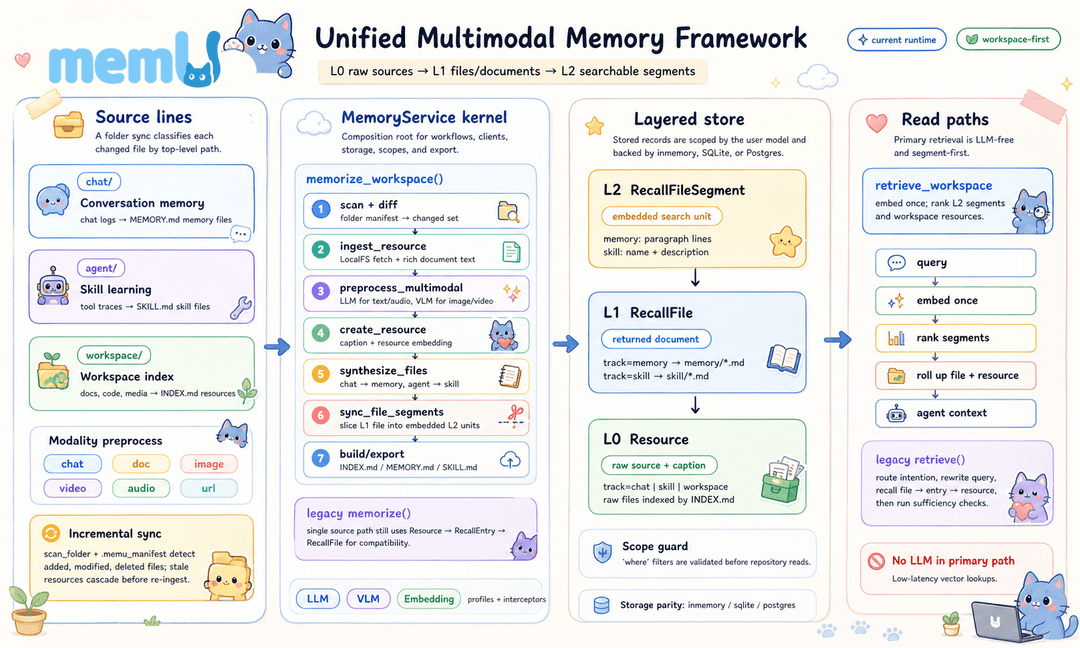
| Layer | Primary Role | Retrieval Role |
|---|---|---|
| Category (folder) | Maintain topic-level summaries | Assemble compact context for broad queries |
| Item (file) | Store typed atomic memories | Load precise facts, events, preferences, skills, and tool patterns |
| Resource (source) | Preserve source artifacts and captions | Recall original context when item/category summaries are not enough |
See docs/architecture.md for the runtime view of MemoryService, workflow pipelines, storage backends, and LLM routing.
🚀 Quick Start
Option 1: Cloud Version
👉 memu.so — Hosted API for managed ingestion, structured memory, and retrieval
For enterprise deployment: [email protected]
Cloud API (v3)
| Base URL | https://api.memu.so |
|---|---|
| Auth | Authorization: Bearer <token> |
| Method | Endpoint | Description |
|---|---|---|
POST | /api/v3/memory/memorize | Ingest raw data and build structured memory |
GET | /api/v3/memory/memorize/status/{task_id} | Check processing status |
POST | /api/v3/memory/categories | List auto-generated categories |
POST | /api/v3/memory/retrieve | Query memory for agent context |
Option 2: Self-Hosted
Installation
From a clone of this repository:
uv sync
# or, for the full development setup:
make install
To install the published package instead:
pip install memu-py
Requirements: Python 3.13+. The default examples use OpenAI, so set
OPENAI_API_KEYor pass another provider throughllm_profiles.
Run an in-memory smoke script:
export OPENAI_API_KEY=your_key
cd tests
uv run python test_inmemory.py
Run with PostgreSQL + pgvector:
uv sync --extra postgres
docker run -d --name memu-postgres \
  -e POSTGRES_USER=postgres \
  -e POSTGRES_PASSWORD=postgres \
  -e POSTGRES_DB=memu \
  -p 5432:5432 \
  pgvector/pgvector:pg16

export OPENAI_API_KEY=your_key
export POSTGRES_DSN=postgresql+psycopg://postgres:[email protected]:5432/memu
cd tests
uv run python test_postgres.py
Custom LLM and Embedding Providers
from memu import MemUService

service = MemUService(
    llm_profiles={
        "default": {
            "base_url": "https://dashscope.aliyuncs.com/compatible-mode/v1",
            "api_key": "your_key",
            "chat_model": "qwen3-max",
            "client_backend": "sdk"
        },
        "embedding": {
            "base_url": "https://api.voyageai.com/v1",
            "api_key": "your_key",
            "embed_model": "voyage-3.5-lite"
        }
    },
)
OpenRouter Integration
from memu import MemoryService

service = MemoryService(
    llm_profiles={
        "default": {
            "provider": "openrouter",
            "client_backend": "httpx",
            "base_url": "https://openrouter.ai",
            "api_key": "your_key",
            "chat_model": "anthropic/claude-3.5-sonnet",
            "embed_model": "openai/text-embedding-3-small",
        },
    },
    database_config={"metadata_store": {"provider": "inmemory"}},
)
📖 Core APIs
memorize() — Structure Raw Data
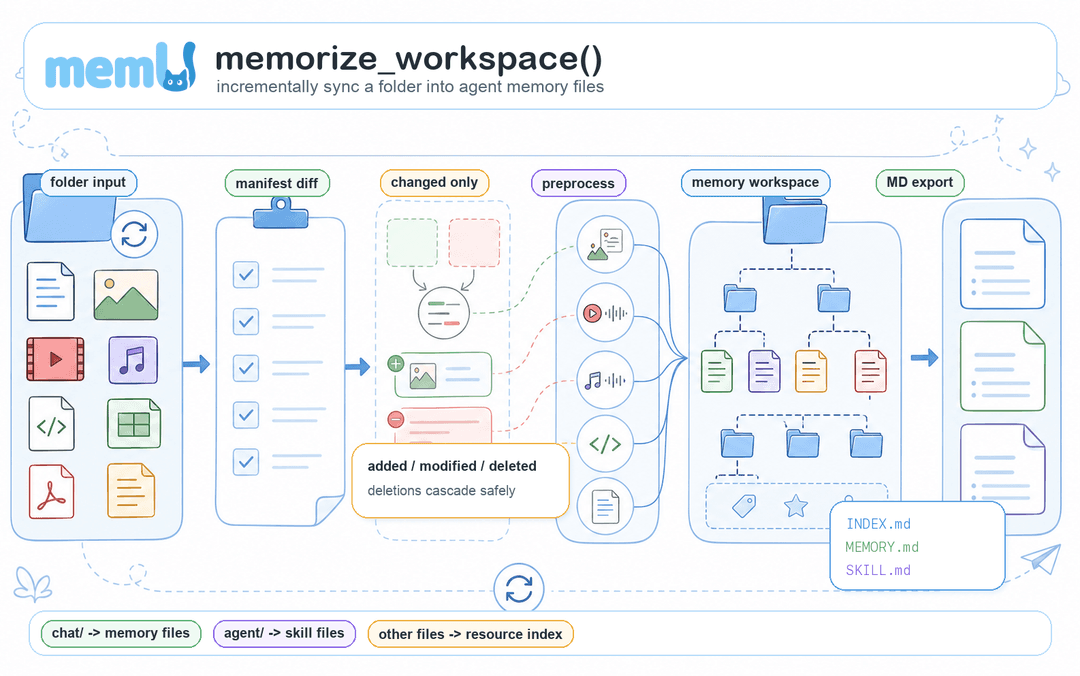
result = await service.memorize(
    resource_url="path/to/file.json",    # local file path or HTTP URL
    modality="conversation",            # conversation | document | image | video | audio
    user={"user_id": "123"},            # optional: scope to a user or agent
)
# Returns after processing completes:
# { "resource": {...}, "items": [...], "categories": [...], "relations": [...] }
- Converts raw input into typed memory items
- Categorizes and embeds items without manual tagging
- Preserves source resources and item-category relations
retrieve() — Load Agent Context
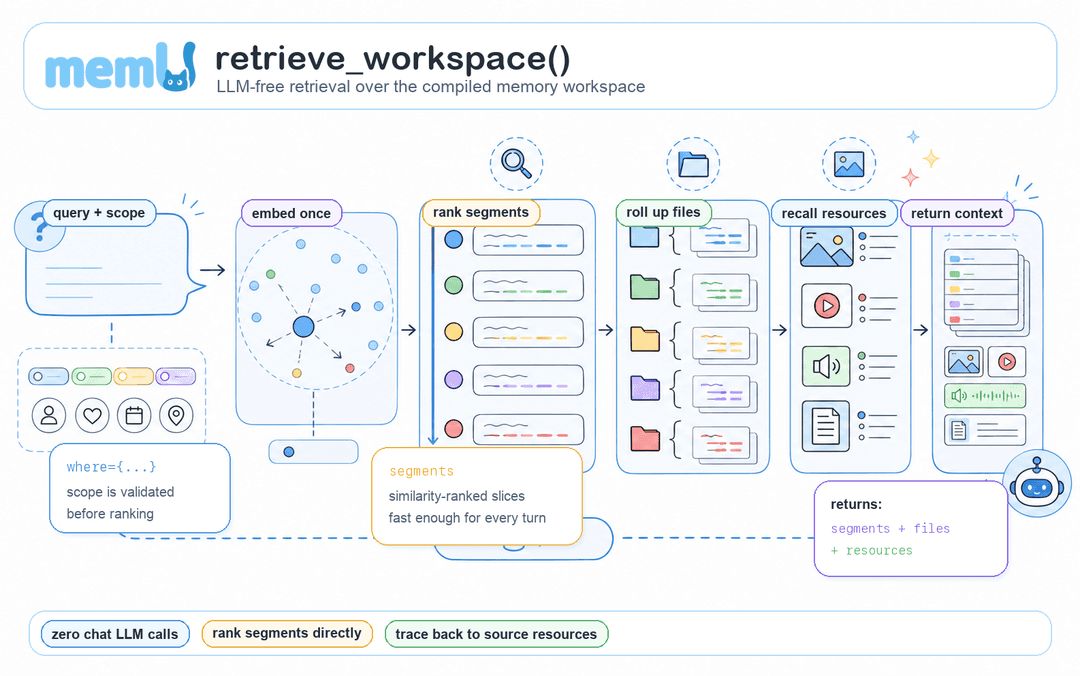
# The retrieval strategy is set once on the service via retrieve_config:
#   MemoryService(retrieve_config={"method": "rag"})   # vector-first recall
#   MemoryService(retrieve_config={"method": "llm"})   # LLM-ranked recall
result = await service.retrieve(
    queries=[{"role": "user", "content": {"text": "What are their preferences?"}}],
    where={"user_id": "123"},   # scope filter
)
# Returns:
# {
#   "needs_retrieval": true,
#   "original_query": "...",
#   "rewritten_query": "...",
#   "next_step_query": "...",
#   "categories": [...],
#   "items": [...],
#   "resources": [...]
# }
retrieve_config.method | Behavior | Cost | Best For |
|---|---|---|---|
rag | Vector-first category/item/resource recall, with optional LLM routing and sufficiency checks enabled by default | Embeddings plus LLM calls unless route_intention and sufficiency_check are disabled | Fast scoped recall with controllable reasoning |
llm | LLM-ranked category/item/resource recall | LLM ranking at each tier | Deeper semantic ranking |
💡 Example Workflows
Always-Learning Assistant
export OPENAI_API_KEY=your_key
uv run python examples/example_1_conversation_memory.py
Automatically extracts preferences, builds relationship models, and surfaces relevant context in future conversations.
Self-Improving Agent
uv run python examples/example_2_skill_extraction.py
Monitors agent actions, identifies patterns in successes and failures, auto-generates skill guides from experience.
Multimodal Context Builder
uv run python examples/example_3_multimodal_memory.py
Cross-references text, images, and documents automatically into a unified memory layer.
📊 Performance
memU achieves 92.09% average accuracy on the Locomo benchmark across all reasoning tasks.
View detailed results: memU-experiment
🧩 Ecosystem
| Repository | Description |
|---|---|
| memU | Core workspace runtime — ingestion, extraction, retrieval |
| memU-server | Backend with real-time sync and webhook triggers |
| memU-ui | Visual dashboard for browsing and monitoring memory |
Quick Links:
🤝 Partners








🤝 Contributing
# Fork and clone
git clone https://github.com/YOUR_USERNAME/memU.git
cd memU

# Install dev dependencies
make install

# Run quality checks before submitting
make check
See CONTRIBUTING.md for full guidelines.
Prerequisites: Python 3.13+, uv, Git
📄 License
🌍 Community
- GitHub Issues: Report bugs & request features
- Discord: Join the community
- X (Twitter): Follow @memU_ai
- Contact: [email protected]
⭐ Star us on GitHub to get notified about new releases!
// faq
What is memU?
From workspace to agent memory. It is open-source on GitHub.
Is memU free to use?
memU is open-source under the NOASSERTION license, so it is free to use.
What category does memU belong to?
memU is listed under mcp-servers in the Claudeers registry of Claude-compatible tools.
// embed badge

[](https://claudeers.com/memu)
// retro hit counter

[](https://claudeers.com/memu)
// reviews
// guestbook
// related in RAG & Knowledge
 🔓
🔓Persistent Context Across Sessions for Every Agent – Captures everything your agent does during sessions, compresses it with AI, and injects relevant contex…
 🔓
🔓✨ Light and Fast AI Assistant. Support: Web | iOS | MacOS | Android | Linux | Windows
 🔓
🔓Compress tool outputs, logs, files, and RAG chunks before they reach the LLM. 60-95% fewer tokens, same answers. Library, proxy, MCP server.
 🔓
🔓A light-weight and powerful meta-prompting, context engineering and spec-driven development system for Claude Code by TÂCHES.
// compare memU with
// built by
2 of its contributors also build on official projects — claude-cookbooks, typescript-sdk
→ see how memU connects across the ecosystem