
Memories
A macOS app to browse and manage the memory files Claude Code keeps for your projects.
Install with your AI
Paste into Claude Code, Cursor, or any agent — it reads the repo and wires the tool into your project.
Install and set up Memories (release-binary project) into my current project.
Found on https://claudeers.com/memories
Repo: https://github.com/macmade/Memories
Homepage/docs: —
Detected install method: release-binary → inspect the README
Category: devtools. Platforms: web.
Read the repo's README for exact setup and env vars, then install it and wire it into my project.

Claudeers Health Verdict:
slowing; community-verified: false. Confirm the source before running anything.
Grab the latest release asset from GitHub.
# download a build from https://github.com/macmade/Memories/releases
git clone https://github.com/macmade/Memories
// compatibility
| Platforms | web |
|---|---|
| Operating systems | — |
| AI compatibility | claude |
| License | MIT |
| Pricing | open-source |
| Language | Swift |
Memories
About
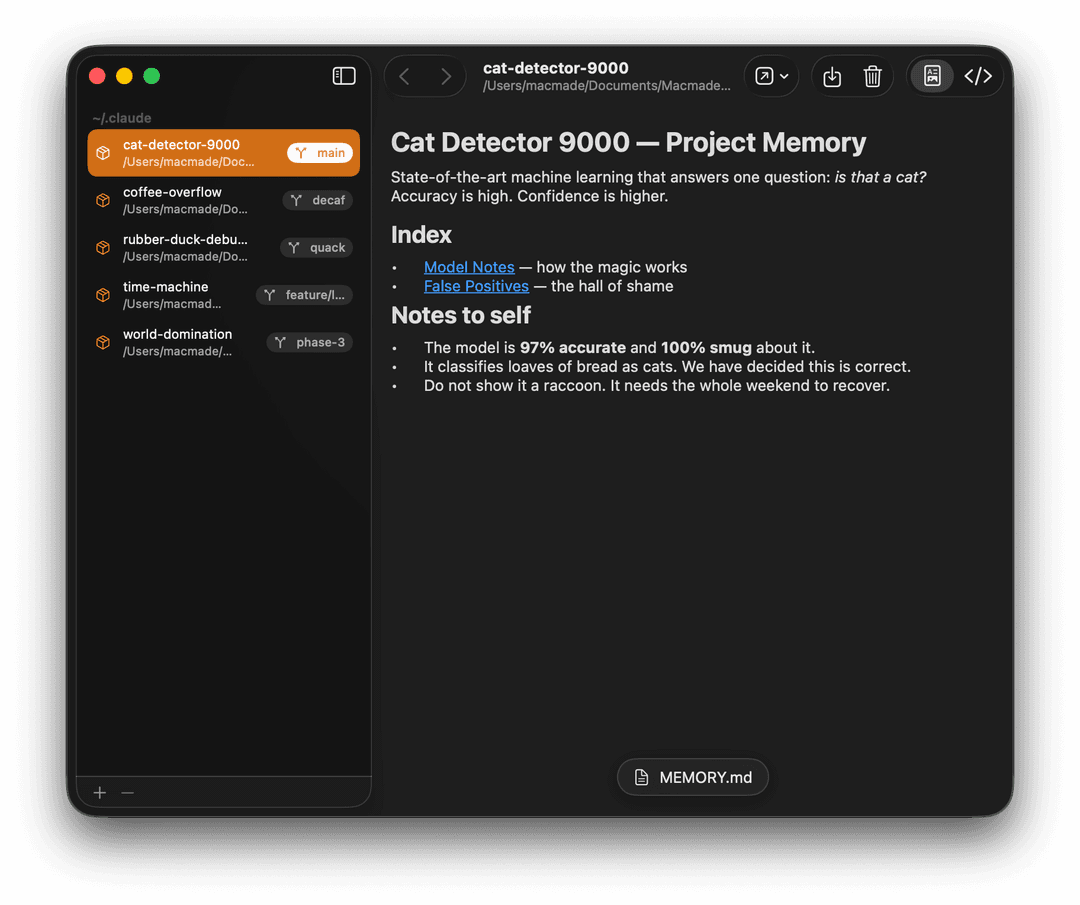
Memories is a macOS app for browsing and managing the memory files that Claude Code keeps for your projects.
Claude Code stores per-project notes as Markdown files under ~/.claude, which
are awkward to read directly from the filesystem. Memories lists them in one
window — from ~/.claude and any additional Claude folders you add — so you can
review what's stored and remove what you no longer need.
Features
-
Lists all Claude Code projects that have stored memory, found automatically under
~/.claudewith no setup required. The list refreshes when the app becomes active. -
Scans additional Claude directories beyond the default
~/.claude. Add or remove folders from a +/- bar at the bottom of the sidebar; projects are grouped into a section per directory, and the default~/.claudefolder is always present and cannot be removed. -
Shows the repository name and current branch for projects that are Git repositories, along with the full project path.
-
Displays each memory file as rendered Markdown, with a toggle to view the raw source.
-
Switches between a project's memory files from a floating menu. Links within a note open the referenced memory file; external links open in the browser.
-
Moves back and forward through the memory files you have viewed, browser-style, from toolbar buttons or the Go menu (⌘[ and ⌘]). The history is scoped to each project and preserved when you switch between projects.
-
Opens a memory file in another application, or reveals the project folder in the Finder.
-
Saves a copy of the current memory file to a location you choose.
-
Exports a project's entire memory to a folder you choose, preserving the layout of the files and prompting before overwriting any that already exist.
-
Moves a single memory file, a project's whole memory folder, or a project's Claude folder to the Trash. The real project on disk is left untouched.
Cloning
This project uses submodules.
To clone it, use the following command:
git clone --recursive https://github.com/macmade/Memories.git
License
Project is released under the terms of the MIT License.
Repository Infos
Owner:          Jean-David Gadina - XS-Labs
Web:            www.xs-labs.com
Blog:           www.noxeos.com
Twitter:        @macmade
GitHub:         github.com/macmade
LinkedIn:       ch.linkedin.com/in/macmade/
StackOverflow:  stackoverflow.com/users/182676/macmade
// faq
What is Memories?
A macOS app to browse and manage the memory files Claude Code keeps for your projects.. It is open-source on GitHub.
Is Memories free to use?
Memories is open-source under the MIT license, so it is free to use.
What category does Memories belong to?
Memories is listed under devtools in the Claudeers registry of Claude-compatible tools.
// embed badge

[](https://claudeers.com/memories)
// retro hit counter

[](https://claudeers.com/memories)
// reviews
// guestbook
// related in Developer Tools
 🔓
🔓The agent harness performance optimization system. Skills, instincts, memory, security, and research-first development for Claude Code, Codex, Opencode, Curs…
 🔓
🔓Makes your AI agent think like the laziest senior dev in the room. The best code is the code you never wrote.
 🔓
🔓Use Garry Tan's exact Claude Code setup: 23 opinionated tools that serve as CEO, Designer, Eng Manager, Release Manager, Doc Engineer, and QA
 🔓
🔓AI coding assistant skill (Claude Code, Codex, OpenCode, Cursor, Gemini CLI, and more). Turn any folder of code, SQL schemas, R scripts, shell scripts, docs,…