
mcp_excalidraw
MCP server and Claude Code skill for Excalidraw — programmatic canvas toolkit to create, edit, and export diagrams via AI agents with real-time canvas sync.
Install with your AI
Paste into Claude Code, Cursor, or any agent — it reads the repo and wires the tool into your project.
Install and set up mcp_excalidraw (mcp-stdio project) into my current project.
Found on https://claudeers.com/mcpexcalidraw
Repo: https://github.com/yctimlin/mcp_excalidraw
Homepage/docs: https://mcp-excalidraw-landing.vercel.app/
Detected install method: mcp-stdio → claude mcp add mcp-excalidraw -- npx -y mcp-excalidraw-server
Category: mcp-servers. Platforms: cli, api, desktop, web.
Read the repo's README for exact setup and env vars, then install it and wire it into my project.

Claudeers Health Verdict:
unknown; community-verified: false. Confirm the source before running anything.
⚠ Unverified / not recently updated — review before pasting a run-this config.
claude mcp add mcp-excalidraw -- npx -y mcp-excalidraw-server
git clone https://github.com/yctimlin/mcp_excalidraw
// compatibility
| Platforms | cli, api, desktop, web |
|---|---|
| Operating systems | — |
| AI compatibility | claude |
| License | MIT |
| Pricing | open-source |
| Language | TypeScript |
Excalidraw MCP Server, CLI & Agent Skill
mcp-excalidraw-server gives AI agents a live Excalidraw canvas they can draw on, look at, refine, and save into your repo. Your agent creates architecture diagrams and flowcharts programmatically, sees its own work via screenshots, fixes layout problems, and exports .excalidraw files you can commit next to your code.
One canvas, three ways to drive it:
- Agent Skill + CLI — recommended for coding agents (Claude Code, Codex CLI, Cursor, OpenCode):
npx -y mcp-excalidraw-server <command>. Zero config, auto-starts the canvas, composable JSON in/out. - MCP Server — 26 tools over stdio for any Model Context Protocol client (Claude Desktop, Cursor, Codex CLI, Antigravity, ...). Speaks MCP
2026-07-28(server/discover, per-request_metaenvelope, tool calls without a handshake) and stays compatible with 2025-era clients that open withinitialize. - REST API — plain HTTP for LangChain and custom frameworks.
Core drawing runs fully local (Node ≥ 20, MIT licensed) — no API keys. Mermaid conversion runs in the local browser canvas; share is optional and uploads an encrypted scene to excalidraw.com.
Demo
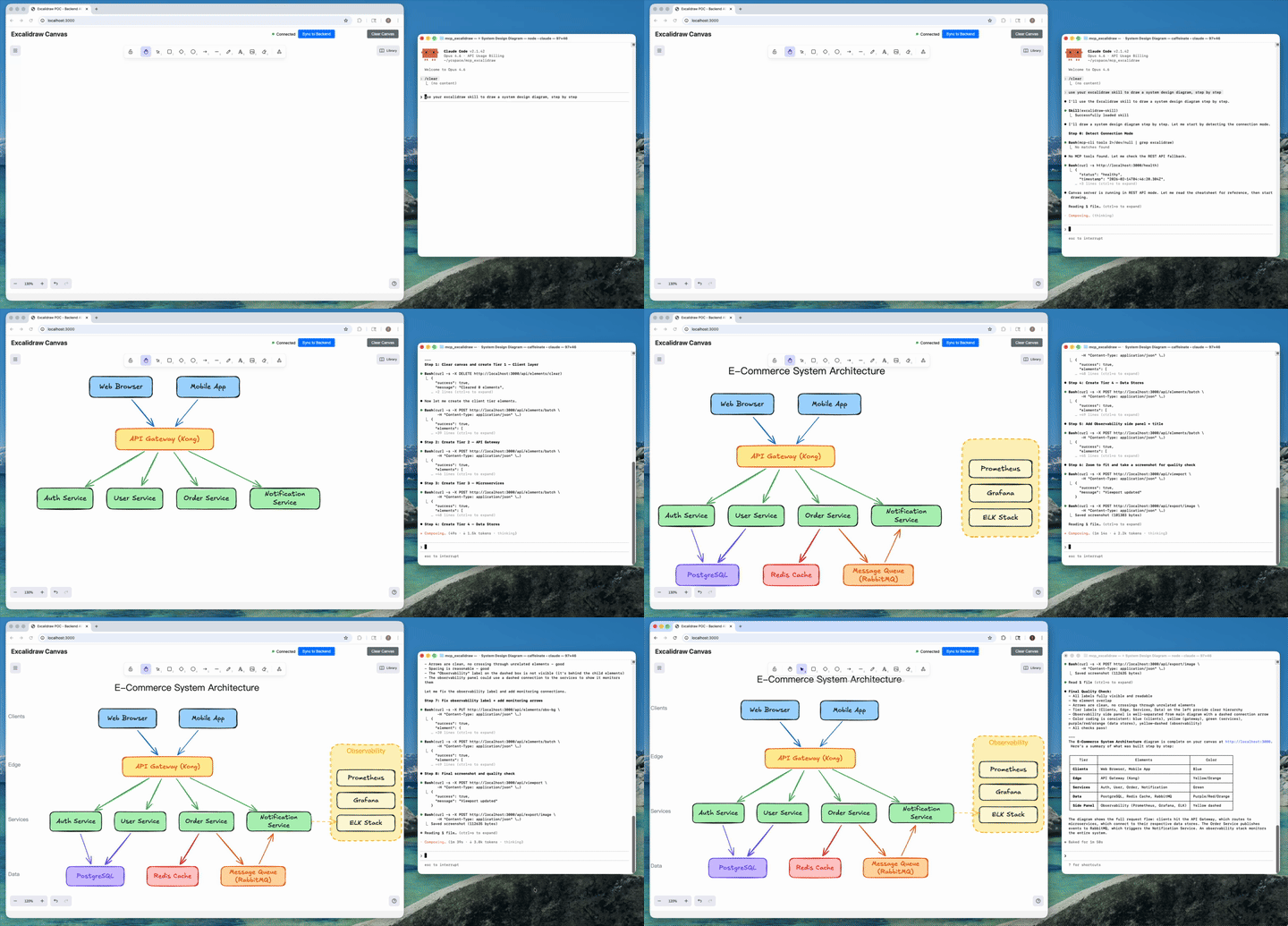
AI agent creates a complete architecture diagram from a single prompt (4x speed). Watch full video on YouTube
What It Is
Ask your agent to "draw the architecture of this service" and it produces a real, editable Excalidraw diagram — not a one-shot image. Because the agent can query, screenshot, and update individual elements, it iterates until labels fit, nothing overlaps, and arrows route cleanly; then it exports the result as a .excalidraw file that lives in your repo and gets updated when the code changes.
Under the hood there are two processes, one product:
- Canvas server: Excalidraw web UI + REST API + WebSocket real-time sync (default
http://127.0.0.1:3000) - A thin front-end of your choice: the CLI, the MCP stdio server, or raw HTTP — all drive the same canvas
Since v1.1 the canvas server starts itself: canvas-driving CLI commands (and the MCP server on launch) auto-spawn it if nothing is listening. status only inspects the current server state. Set EXCALIDRAW_NO_AUTOSTART=1 to opt out.
How We Differ from the Official Excalidraw MCP
Excalidraw has an official MCP — a chat widget that streams a diagram inline from a single prompt (the model gets two tools: a format reference and create_view). It's great for "draw me a cat" in Claude or ChatGPT. We solve a different problem: giving coding agents a persistent canvas workbench.
| Official Excalidraw MCP | This Project | |
|---|---|---|
| Approach | Prompt in, diagram out (one-shot widget) | Programmatic element-level control (CLI + 26 MCP tools) |
| State | Checkpoints inside the chat widget | Persistent live canvas with real-time sync |
| Element CRUD | Declarative re-send with delete markers | Full create / read / update / delete per element |
| AI sees the canvas | No | describe (structured text) + screenshot (image) |
| Iterative refinement | Regenerate from checkpoint | Draw → look → adjust → look again, element by element |
| Layout tools | No | align, distribute, group / ungroup, lock, duplicate |
| File I/O | No model-facing export | .excalidraw export/import — diagrams as repo artifacts |
| Snapshot & rollback | Widget-side checkpoints | Named server-side snapshots |
| Mermaid conversion | No | mermaid / create_from_mermaid |
| Shareable URLs | Widget-only | share / export_to_excalidraw_url |
| Viewport control | Camera animations | set_viewport (zoom-to-fit all or selected elements, center on one element, manual zoom) |
| Works without MCP | No | Yes — CLI + agent skill + REST API |
| Multi-agent | Single chat | Multiple agents on the same canvas concurrently |
TL;DR — The official MCP shows Excalidraw diagrams in your chat. This project gives your coding agent a full Excalidraw workbench: a canvas it can draw on, inspect, refine, and commit to your repo.
What's New
Current package version: 2.1.0. The current release line is v2.1 — Headless Rendering.
v2.1 — Headless Rendering
- Screenshots and image exports no longer need a browser tab.
screenshot,export_to_imageandget_canvas_screenshotrender inside the canvas server: Excalidraw's own SVG exporter runs under Node (jsdom) and resvg rasterizes to PNG with bundled Excalifont/Virgil/Cascadia/Liberation fonts. Same output as the tab, deterministic (byte-identical for an unchanged scene), a few milliseconds per render, works in CI and Docker. See Headless Rendering. - New render options on the CLI, REST and MCP:
dark,scale(1–4),padding,elementIds(render a subset),frameId(render one frame),embedFonts.--renderer browserkeeps the old tab path. - New
rendercommand:npx -y mcp-excalidraw-server render docs/arch.excalidraw --out docs/arch.pngrenders a committed file offline — no canvas server at all. - Shapes created without
width/heightnow default to 100×100 in exports and renders (matching the canvas) instead of collapsing to 0×0. - Text stored with
width: 0, height: 0(scenes from pre-2.0 servers) is re-measured on export instead of exporting invisible. (#107)
v2.0 — Interchange-Grade Exports & MCP 2026-07-28
- Breaking: Node >= 20 required (was 18) — the MCP TypeScript SDK v2 sets the floor. Everything else is backward compatible, including existing MCP client configs.
- MCP protocol revision 2026-07-28: modern clients can call tools statelessly without an initialization handshake (
server/discover, per-request_metaenvelopes); legacy initialization-based clients keep working unchanged. (#98, thanks @anxkhn) - Exports render everywhere now:
.excalidraw/.excalidraw.mdfiles contain real Excalidraw elements — shape and arrow labels as bound text, live arrow bindings — so they open correctly on excalidraw.com and in the Obsidian Excalidraw plugin instead of losing labels (or being re-saved empty by the plugin). (#93, #95) - Byte-stable exports: deterministic ids, seeds, and key order — re-exporting an unchanged scene is byte-identical, so committed diagrams and vault files never produce phantom git diffs, and Obsidian block references survive re-exports.
- Obsidian vault fixes: Windows/CRLF
.excalidraw.mdfiles import correctly (#94, thanks @cason-miles);## Text Elementsblock references now cover shape labels too. - Element fields are never silently dropped: unknown Excalidraw properties (
containerId,textAlign,originalText, ...) pass through the server intact — fixes browser-edited text vanishing after sync. (#92, thanks @junuxyz) - Mermaid conversion merges into the existing canvas instead of replacing it, and each browser tab holds exactly one WebSocket connection (no more doubled labels). (#91)
- Viewport control:
set_viewportgainsscrollToElementIds(multi-element zoom-to-fit) andviewportZoomFactor, with strict single-mode validation and real error reporting. (#86, thanks @acercyc) - Dark mode: the canvas page chrome follows the editor theme and persists it across reloads. (#89, thanks @danielsvane)
v1.1 — CLI-First
- First-class CLI: every capability is now a composable command —
npx -y mcp-excalidraw-server add|query|describe|screenshot|export|import|mermaid|snapshot|arrange|share|...— JSON on stdout, meaningful exit codes. Also installed as theexcalidraw-canvasalias. - Zero-setup: canvas-driving CLI commands and the MCP server auto-start the canvas server if it isn't running (closes #66). Opt out with
EXCALIDRAW_NO_AUTOSTART=1. apply: multi-op patches ({"create":[...],"update":[{"id":"a","set":{...}}],"delete":[...]}) in a single invocation.install-skill:npx -y mcp-excalidraw-server install-skill --dir <skills-root>copies the portable agent skill into the directory your agent chooses (project or global), cleanly replacing older versions.- Skill is now CLI-first and no longer needs a cloned repo or configured MCP server to work.
- Typed queries:
query --filter locked=true --filter label.text=API— booleans, numbers, and nested keys work. - Internals: shared core library (
src/core/) behind both the CLI and MCP server; canvasgroupIdsare the source of truth for grouping (ungroup now works across restarts);node-fetchdropped; MCP version metadata derived frompackage.json; canvas server writes a pidfile and shuts down cleanly.
Installation
The only prerequisite is Node.js ≥ 20.
Easiest: let your agent install it
Copy this into your coding agent — it installs the portable skill into the project/global skill directory that agent already knows how to use, then verifies it by drawing a test diagram:
Install the Excalidraw canvas toolkit so you can draw diagrams for me:

1. Choose the right skill directory for this agent and scope (project or global).
2. Run: npx -y mcp-excalidraw-server install-skill --dir <that-skills-directory>
3. Read the installed excalidraw-skill/SKILL.md so you know the drawing workflow.
4. Start the canvas with: npx -y mcp-excalidraw-server start
   then tell me to open http://127.0.0.1:3000 in my browser (screenshots need an open tab).
5. Draw a small test diagram — two labeled boxes connected by an arrow — take a
   screenshot, and show me the result to confirm everything works.
Manual install
| You are... | Install with | Then |
|---|---|---|
| Modern coding agent | npx -y mcp-excalidraw-server install-skill --dir <skills-root> | Let the agent choose project/global scope and its skill root |
| Claude Code shortcut | npx -y mcp-excalidraw-server install-skill | Installs to ~/.claude/skills for backward compatibility |
| Codex shortcut | npx -y mcp-excalidraw-server install-skill --target codex | Installs to ~/.codex/skills for backward compatibility |
| MCP client user (Claude Desktop, Cursor, ...) | Add the npx config below | See Configure MCP Clients |
| CLI user / scripting | Nothing — npx -y mcp-excalidraw-server <command> | See CLI Reference |
| Contributor / from source | git clone + npm ci + npm run build | See Quick Start (From Source / Docker) |
There is no separate server setup: any drawing command auto-starts the local canvas server on http://127.0.0.1:3000.
60-Second Quick Start (CLI)
No clone, no config:
# start the canvas (drawing commands auto-start it too) and open it
npx -y mcp-excalidraw-server start
open http://127.0.0.1:3000   # browser tab enables screenshots & mermaid

# draw something
echo '[
  {"id":"api","type":"rectangle","x":100,"y":100,"width":160,"height":80,"text":"API Server","backgroundColor":"#a5d8ff"},
  {"id":"db","type":"rectangle","x":400,"y":100,"width":160,"height":80,"text":"Database","backgroundColor":"#99e9f2"},
  {"type":"arrow","x":0,"y":0,"startElementId":"api","endElementId":"db","text":"SQL"}
]' | npx -y mcp-excalidraw-server add

# let your agent see its work
npx -y mcp-excalidraw-server describe
npx -y mcp-excalidraw-server screenshot --out diagram.png

# diagrams as repo artifacts
mkdir -p docs
npx -y mcp-excalidraw-server export --out docs/architecture.excalidraw

# or straight into an Obsidian vault (.md extension → Obsidian Excalidraw plugin format)
npx -y mcp-excalidraw-server export --out ~/vault/diagrams/architecture.excalidraw.md
Give your agent the full playbook:
npx -y mcp-excalidraw-server install-skill --dir <skills-root>
npx -y mcp-excalidraw-server install-skill --print-source  # inspect bundled source path
Security note: The canvas server binds
127.0.0.1only by default. If you expose it on a network interface (HOST=0.0.0.0), put network-level access controls in front — the API has no built-in authentication.
Agent Skill
The skill at skills/excalidraw-skill/ teaches agents the full workflow — layout planning, the screenshot-verify-fix quality loop, arrow routing, anti-patterns, snapshots, and file I/O. It works through the CLI (preferred, zero setup), MCP tools (if configured), or raw REST — in that order.
npx -y mcp-excalidraw-server install-skill --dir <skills-root>
The command copies the bundled excalidraw-skill/ directory into <skills-root>/excalidraw-skill. Let your agent choose whether that root should be project-level or global. Re-running install-skill upgrades in place — it replaces the target directory, so files removed upstream don't linger.
Where the skill shines:
- Diagrams as code artifacts: export
.excalidrawfiles into the repo, commit them, re-import + refine when the architecture changes. - Obsidian vaults: export with a
.excalidraw.mdextension and the file opens natively in the Obsidian Excalidraw plugin — no compatibility-mode warning, block references and sync work;importreads both plain and lz-string-compressed vault files back. - Self-verifying diagrams: the agent screenshots its own work and fixes truncation/overlap before calling it done.
- No-MCP environments: CI jobs, plain shells, and frameworks get the same capabilities through the CLI.
CLI Reference
npx -y mcp-excalidraw-server <command> or (after npm i -g mcp-excalidraw-server) excalidraw-canvas <command>.
Conventions: JSON results on stdout — except describe (plain text by design) and raw-content output when --out is omitted (export prints the scene JSON, screenshot --format svg prints SVG). Diagnostics on stderr. Exit codes: 0 ok, 1 error, 2 usage, 3 canvas unreachable, 4 browser tab required (only mermaid and screenshot --renderer browser). Canvas URL from EXPRESS_SERVER_URL or --url. Canvas-driving commands auto-start the server; status only reports current state. Explicit start overrides the EXCALIDRAW_NO_AUTOSTART=1 opt-out (it's user intent, not auto-start).
| Command | Description |
|---|---|
start / stop / status | Manage the canvas server (detached; stop identity-checks the live server via /health before signaling) |
add [file|-] | Batch-create elements from a JSON array (file or stdin); --one '{...}' for a single element |
apply [file|-] | One-call multi-op patch: {"create":[...],"update":[{"id":"a","set":{...}}],"delete":["id"]} |
get <id> / delete <id...> | Read / remove elements |
update <id> --set '{...}' | Update an element |
query | --type, --bbox x0,y0,x1,y1, --filter k=v (typed, nested keys), --filter-json '{...}' |
describe | AI-readable scene summary (plain text) |
screenshot | Render the canvas headless (no browser tab): --out f.png|f.svg, --format png|svg, --scale 1-4, --dark, --padding N, --no-background, --ids a,b, --frame <id>, --no-embed-fonts; --renderer browser uses an open tab instead |
render [file|-] | Render a .excalidraw / .excalidraw.md file to PNG/SVG offline — no canvas server, same flags as screenshot |
export [--out f.excalidraw] [--format json|obsidian] / import [file|-] [--replace] | Scene file I/O — a .md out path writes Obsidian's .excalidraw.md format; import reads it back |
mermaid [file|-] | Mermaid → canvas (browser tab required) |
snapshot save|list|restore <name> | Named snapshots |
arrange align|distribute|group|ungroup|lock|unlock|duplicate | Layout ops (--ids a,b,c, --to left|horizontal|...) |
share | Encrypted upload → shareable excalidraw.com URL |
clear --yes | Wipe the canvas |
install-skill [--dir <skills-root>] | Install the portable agent skill |
Labels and arrow bindings use the agent-friendly format everywhere in the CLI: "text" on any shape, "startElementId"/"endElementId" on arrows — normalization is automatic.
Headless Rendering
Since v2.1, screenshot, export_to_image and get_canvas_screenshot render without a browser. Inside the canvas server, the scene is prepared with the canvas tab's own code (label sizing, wrapping and centering, defaults) and Excalidraw's own exportToSvg draws it under Node (a small jsdom shim supplies the DOM it expects, and text is measured with the bundled fonts' real glyph widths); resvg rasterizes the SVG to PNG. The output is what the Excalidraw canvas draws — same SVG structure as a browser export, text within half a pixel — and it is deterministic: an unchanged scene renders to byte-identical SVG and PNG, so committed images stay diff-clean.
- Fonts: Excalifont, Virgil, Cascadia Code and Liberation Sans ship as TTFs in
assets/fonts(all SIL OFL 1.1; seeassets/fonts/LICENSES.md). SVGs embed the faces they use, so they look right in browsers, GitHub and editors. Nunito, Lilita One and Comic Shanns render with the closest bundled face for now. Text in other scripts (CJK, emoji) falls back to the machine's fonts, with a warning. - Options (CLI flags / REST body / MCP params):
background,dark,scale1–4 (PNG),padding,elementIdsorframeIdto render a subset,embedFonts.EXCALIDRAW_RENDER_MAX_DIM(default 8192) caps the PNG's largest side. --renderer browserasks an open canvas tab to render instead (the pre-2.1 path). Useful for a second opinion; it is slower and the tab's unsynced edits are discarded first.- Offline:
render docs/arch.excalidraw --out docs/arch.pngneeds no canvas server at all — a natural fit for CI jobs that keep images next to committed diagrams. - Still browser-bound: Mermaid conversion (
mermaid,create_from_mermaid) andset_viewport.
The renderer bundle is built by npm run build:server (dist/render/excalidraw-node.mjs); npm run test:render exercises it without a browser.
Configure MCP Clients
The MCP server runs over stdio. Since v1.1 the simplest config is npx — no clone, no absolute paths, and the canvas auto-starts:
Environment Variables
| Variable | Description | Default |
|---|---|---|
EXPRESS_SERVER_URL | URL of the canvas server | http://127.0.0.1:3000 |
ENABLE_CANVAS_SYNC | Enable real-time canvas sync | true |
EXCALIDRAW_NO_AUTOSTART | Set 1 to disable canvas auto-start | (unset) |
EXCALIDRAW_EXPORT_DIR | Base directory MCP file exports may write to | current working dir |
PORT / HOST | Canvas server bind address | 3000 / 127.0.0.1 |
Claude Desktop
Config location:
- macOS:
~/Library/Application Support/Claude/claude_desktop_config.json - Windows:
%APPDATA%\Claude\claude_desktop_config.json - Linux:
~/.config/Claude/claude_desktop_config.json
npx (recommended)
{
  "mcpServers": {
    "excalidraw": {
      "command": "npx",
      "args": ["-y", "mcp-excalidraw-server"]
    }
  }
}
Local (node)
{
  "mcpServers": {
    "excalidraw": {
      "command": "node",
      "args": ["/absolute/path/to/mcp_excalidraw/dist/index.js"],
      "env": {
        "EXPRESS_SERVER_URL": "http://127.0.0.1:3000",
        "ENABLE_CANVAS_SYNC": "true"
      }
    }
  }
}
Docker
{
  "mcpServers": {
    "excalidraw": {
      "command": "docker",
      "args": [
        "run", "-i", "--rm",
        "-e", "EXPRESS_SERVER_URL=http://host.docker.internal:3000",
        "-e", "ENABLE_CANVAS_SYNC=true",
        "ghcr.io/yctimlin/mcp_excalidraw:latest"
      ]
    }
  }
}
Claude Code
npx (recommended)
claude mcp add excalidraw --scope user -- npx -y mcp-excalidraw-server
Tip: for coding agents, the skill + CLI often beats MCP config entirely — let the agent pick its skill root, then run
npx -y mcp-excalidraw-server install-skill --dir <skills-root>.
Local (node) - User-level (available across all projects):
claude mcp add excalidraw --scope user \
  -e EXPRESS_SERVER_URL=http://127.0.0.1:3000 \
  -e ENABLE_CANVAS_SYNC=true \
  -- node /absolute/path/to/mcp_excalidraw/dist/index.js
Docker
claude mcp add excalidraw --scope user \
  -- docker run -i --rm \
  -e EXPRESS_SERVER_URL=http://host.docker.internal:3000 \
  -e ENABLE_CANVAS_SYNC=true \
  ghcr.io/yctimlin/mcp_excalidraw:latest
Manage servers:
claude mcp list              # List configured servers
claude mcp remove excalidraw # Remove a server
Cursor
Config location: .cursor/mcp.json in your project root (or ~/.cursor/mcp.json for global config)
npx (recommended)
{
  "mcpServers": {
    "excalidraw": {
      "command": "npx",
      "args": ["-y", "mcp-excalidraw-server"]
    }
  }
}
Docker
{
  "mcpServers": {
    "excalidraw": {
      "command": "docker",
      "args": [
        "run", "-i", "--rm",
        "-e", "EXPRESS_SERVER_URL=http://host.docker.internal:3000",
        "-e", "ENABLE_CANVAS_SYNC=true",
        "ghcr.io/yctimlin/mcp_excalidraw:latest"
      ]
    }
  }
}
Codex CLI
npx (recommended)
codex mcp add excalidraw -- npx -y mcp-excalidraw-server
Docker
codex mcp add excalidraw \
  -- docker run -i --rm \
  -e EXPRESS_SERVER_URL=http://host.docker.internal:3000 \
  -e ENABLE_CANVAS_SYNC=true \
  ghcr.io/yctimlin/mcp_excalidraw:latest
Manage servers:
codex mcp list              # List configured servers
codex mcp remove excalidraw # Remove a server
OpenCode
Config location: ~/.config/opencode/opencode.json or project-level opencode.json
{
  "$schema": "https://opencode.ai/config.json",
  "mcp": {
    "excalidraw": {
      "type": "local",
      "command": ["npx", "-y", "mcp-excalidraw-server"],
      "enabled": true
    }
  }
}
Antigravity (Google)
Config location: ~/.gemini/antigravity/mcp_config.json
{
  "mcpServers": {
    "excalidraw": {
      "command": "npx",
      "args": ["-y", "mcp-excalidraw-server"]
    }
  }
}
Notes
- Docker networking: Use
host.docker.internalto reach the canvas server running on your host machine. On Linux, you may need--add-host=host.docker.internal:host-gatewayor use172.17.0.1. The Docker MCP image setsEXCALIDRAW_NO_AUTOSTART=1(it has no frontend build) — run the canvas as its own container. - In-memory storage: The canvas server stores elements in memory. Restarting the server clears all elements — use
export/snapshotfor persistence.
MCP Tools (26 Total)
| Category | Tools |
|---|---|
| Element CRUD | create_element, get_element, update_element, delete_element, query_elements, batch_create_elements, duplicate_elements |
| Layout | align_elements, distribute_elements, group_elements, ungroup_elements, lock_elements, unlock_elements |
| Scene Awareness | describe_scene, get_canvas_screenshot |
| File I/O | export_scene, import_scene, export_to_image, export_to_excalidraw_url, create_from_mermaid |
| State Management | clear_canvas, snapshot_scene, restore_snapshot |
| Viewport | set_viewport |
| Design Guide | read_diagram_guide |
| Resources | get_resource |
Full schemas are discoverable via tools/list or in skills/excalidraw-skill/references/cheatsheet.md.
Viewport group focus can tune framing with viewportZoomFactor:
{
  "scrollToElementIds": ["id1", "id2", "id3"],
  "viewportZoomFactor": 0.85
}
scrollToElementIds zooms to fit every requested element, while scrollToElementId centers one element without changing the current zoom. Specify only one viewport mode per request. viewportZoomFactor accepts values greater than 0 and at most 1.
Quick Start (From Source / Docker)
From source (Node >= 20):
npm ci
npm run build
PORT=3000 npm run canvas          # canvas server (terminal 1)
node dist/index.js                # MCP server over stdio (terminal 2, usually launched by your MCP client)
node dist/bin.js status           # or drive the CLI straight from the build
Docker canvas server:
docker run -d -p 3000:3000 --name mcp-excalidraw-canvas ghcr.io/yctimlin/mcp_excalidraw-canvas:latest
MCP server image: ghcr.io/yctimlin/mcp_excalidraw:latest (stdio; point EXPRESS_SERVER_URL at the canvas container).
Testing
CLI Smoke Test
npx -y mcp-excalidraw-server start
npx -y mcp-excalidraw-server status
npx -y mcp-excalidraw-server add --one '{"type":"rectangle","x":100,"y":100,"width":300,"height":200}'
npx -y mcp-excalidraw-server describe
Canvas Smoke Test (HTTP)
curl http://127.0.0.1:3000/health
Local Bind Regression Test
npm run test:bind
Canvas Browser Regression Tests
These Chromium tests build the app and start an isolated localhost server. They
cover frame reload/reconnect, mixed scenes, failed-load sync protection, stale
responses, clearing/deletion, Mermaid imports, and SVG export. They refuse to
reuse an existing server; set CANVAS_TEST_PORT if port 51910 is occupied.
npx playwright install chromium
npm run type-check:frontend
npm run test:canvas
MCP Stdio Wire Test
Drives dist/index.js with raw JSON-RPC frames and checks both protocol eras:
server/discover, tool calls sent without any handshake, refusal of unsupported
protocol revisions and malformed _meta envelopes, and the legacy initialize
path.
npm run test:mcp
MCP Smoke Test (MCP Inspector)
List tools:
npx @modelcontextprotocol/inspector --cli \
  -e EXPRESS_SERVER_URL=http://127.0.0.1:3000 \
  -e ENABLE_CANVAS_SYNC=true -- \
  node dist/index.js --method tools/list
Create a rectangle:
npx @modelcontextprotocol/inspector --cli \
  -e EXPRESS_SERVER_URL=http://127.0.0.1:3000 \
  -e ENABLE_CANVAS_SYNC=true -- \
  node dist/index.js --method tools/call --tool-name create_element \
  --tool-arg type=rectangle --tool-arg x=100 --tool-arg y=100 \
  --tool-arg width=300 --tool-arg height=200
Frontend Screenshots (agent-browser)
If you use agent-browser for UI checks:
agent-browser install
agent-browser open http://127.0.0.1:3000
agent-browser wait --load networkidle
agent-browser screenshot /tmp/canvas.png
FAQ
How is this different from the official Excalidraw MCP?
The official Excalidraw MCP is a chat widget: you prompt, it streams a diagram into the conversation (the model gets two tools). This project is a workbench for coding agents: a persistent local canvas with element-level create/read/update/delete, layout tools, screenshots the model can see, snapshots, and .excalidraw file I/O — driveable via CLI, MCP, or REST. See the full comparison table.
Which AI tools does it work with?
Claude Code, Claude Desktop, Cursor, Codex CLI, OpenCode, and Google Antigravity are documented below — but any agent that can run shell commands can use the CLI, any MCP client can use the MCP server, and anything else (LangChain, custom apps) can use the REST API.
Can the AI actually see the diagram it drew?
Yes — that's the core feature. describe returns a structured text summary (ids, positions, labels, connections) and screenshot returns a rendered PNG. Agents use both to catch truncated labels, overlaps, and bad arrow routing, then fix them element by element.
Do I need a browser open?
No. Screenshots and PNG/SVG exports render headless inside the canvas server (see Headless Rendering), and everything else — creating, querying, updating elements, .excalidraw files — never needed one. Only two things still need an open tab: Mermaid conversion (it lays out in the browser) and viewport control (it moves a camera). The CLI exits with code 4 and tells you when that is the case. Opening the URL is still the way for a human to watch the agent draw.
Are my diagrams persistent?
The canvas is in-memory by design (restart = blank canvas). Persist by exporting .excalidraw files into your repo (export --out docs/architecture.excalidraw) or with named snapshots while working. Re-import a file to keep refining it later.
Are excalidraw.com share links private?
share encrypts the scene locally with AES-GCM before uploading; the decryption key is only in the URL fragment, which excalidraw.com's server never sees. Anyone you give the full link to can view the diagram.
Does it need an API key or cloud service?
No API key is required. Core drawing runs locally under MIT license. The only outbound call is the optional share upload to excalidraw.com.
Can I use it without configuring MCP?
Yes — that's the recommended path for coding agents: npx -y mcp-excalidraw-server install-skill --dir <skills-root> and the agent drives everything through the CLI. MCP configuration is only needed for chat clients like Claude Desktop.
Troubleshooting
- CLI exit code 3 (canvas unreachable): the server is not running for an inspecting command such as
status, auto-start is disabled (EXCALIDRAW_NO_AUTOSTART=1), orEXPRESS_SERVER_URLpoints at a non-loopback host. Runstartexplicitly or fix the env. - CLI exit code 4 (browser required): only
mermaidandscreenshot --renderer browserneed an open tab — openhttp://127.0.0.1:3000in a browser and retry, or drop--renderer browserto render headless. - Headless PNG shows boxes instead of CJK/emoji text: the bundled fonts cover Latin scripts; for other scripts resvg falls back to the machine's fonts (a warning is printed). Install a CJK font on the machine running the canvas server.
- Canvas not updating: confirm
EXPRESS_SERVER_URLpoints at the running canvas server (statusshows the URL in use). - Updates/deletes fail after batch creation: ensure you are on a build that includes the batch id preservation fix (merged via PR #34).
Known Issues / TODO
- Persistent storage: Elements are stored in-memory — restarting the server clears everything. Use
export/ snapshots as a workaround. - Mermaid conversion requires a browser:
mermaid/create_from_mermaidlay out the diagram in the frontend. Image export and screenshots are headless since v2.1.
Contributions welcome!
Development
npm run type-check
npm run build
npm run cli -- status      # run the CLI from the local build
npm run sync:skills        # after editing skills/excalidraw-skill, sync the repo-local agent copy
Bug reports and pull requests are welcome on GitHub issues. If this project helps you, a ⭐ helps others find it.
License
MIT © yctimlin — not affiliated with the Excalidraw team. Excalidraw is its own MIT-licensed project; this toolkit builds on it with love.
Links: npm package · GitHub · Issues · Demo video
// faq
What is mcp_excalidraw?
MCP server and Claude Code skill for Excalidraw — programmatic canvas toolkit to create, edit, and export diagrams via AI agents with real-time canvas sync.. It is open-source on GitHub.
Is mcp_excalidraw free to use?
mcp_excalidraw is open-source under the MIT license, so it is free to use.
What category does mcp_excalidraw belong to?
mcp_excalidraw is listed under mcp-servers in the Claudeers registry of Claude-compatible tools.
// embed badge

[](https://claudeers.com/mcpexcalidraw)
// retro hit counter

[](https://claudeers.com/mcpexcalidraw)
// reviews
// guestbook
// related in MCP Servers
 🔓
🔓f.k.a. Awesome ChatGPT Prompts. Share, discover, and collect prompts from the community. Free and open source — self-host for your organization with complete…
 🔓
🔓A cross-platform desktop All-in-One assistant for Claude Code, Codex, OpenCode, OpenClaw, Gemini CLI & Hermes Agent. Only official website: ccswitch.io
 🔓
🔓🪨 why use many token when few token do trick — Claude Code skill that cuts 65% of tokens by talking like caveman
 🔓
🔓An open-source AI agent that brings the power of Gemini directly into your terminal.