
mcpcan
MCPCAN is a centralized management platform for MCP services. It deploys each MCP service using a container deployment method. The platform supports containe…
Install with your AI
Paste into Claude Code, Cursor, or any agent — it reads the repo and wires the tool into your project.
⚠ Unverified source (community-unclaimed, low activity) — reveal the prompt
⚠ Unverified source (community-unclaimed, low activity). Inspect the repo before letting your agent install it.

Install and set up mcpcan (release-binary project) into my current project.
Found on https://claudeers.com/mcpcan
Repo: https://github.com/Kymo-MCP/mcpcan
Homepage/docs: https://www.mcpcan.com
Detected install method: release-binary → inspect the README
Category: devops. Platforms: api, web.
Read the repo's README for exact setup and env vars, then install it and wire it into my project.

Claudeers Health Verdict:
dormant; community-verified: false. Confirm the source before running anything.
Grab the latest release asset from GitHub.
# download a build from https://github.com/Kymo-MCP/mcpcan/releases
git clone https://github.com/Kymo-MCP/mcpcan
// compatibility
| Platforms | api, web |
|---|---|
| Operating systems | — |
| AI compatibility | claude |
| License | NOASSERTION |
| Pricing | open-source |
| Language | Go |
MCP CAN
The open source integration platform for MCP Server.
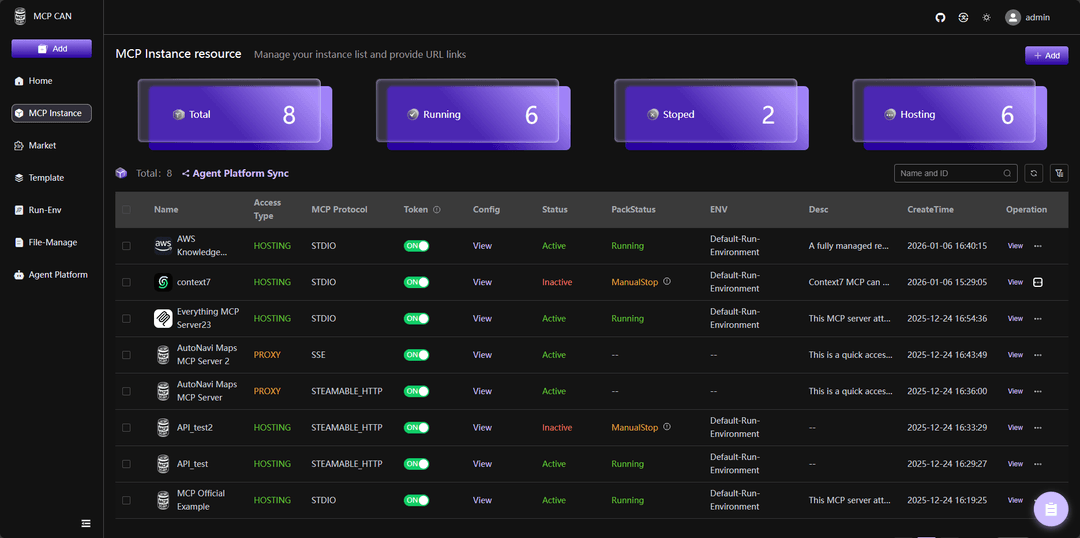
MCPCAN uses containers for flexible deployment of MCP services, resolving potential system configuration conflicts. It supports multi-protocol compatibility and conversion, enabling seamless integration between different MCP service architectures. It also provides visual monitoring, security authentication, and one-stop deployment capabilities.
English | 中文版
DemoSite : demo.mcpcan.com(login: admin/admin123) | MainSite : www.mcpcan.com
Document
MCPCan is an open-source platform focused on efficient management of MCP (Model Context Protocol) services, providing DevOps and development teams with comprehensive MCP service lifecycle management capabilities through a modern web interface. MCPCan supports multi-protocol compatibility and conversion, enabling seamless integration between different MCP service architectures while providing visual monitoring, security authentication, and one-stop deployment capabilities.
💡 Introduction
MCPCan is an open-source platform focused on efficient management of MCP (Model Context Protocol) services, providing DevOps and development teams with comprehensive MCP service lifecycle management capabilities through a modern web interface.
MCPCan supports multi-protocol compatibility and conversion, enabling seamless integration between different MCP service architectures while providing visual monitoring, security authentication, and one-stop deployment capabilities.
✨ Core Features
- 🎯 Unified Management: Centralized management of all MCP service instances and configurations
- 🔄 Protocol Conversion: Supports seamless conversion between various MCP protocols
- 📊 Real-time Monitoring: Provides detailed service status and performance monitoring data
- 🔐 Security Authentication: Built-in identity authentication and permission management system
- 🚀 One-stop Deployment: Quick release, configuration, and distribution of MCP services
- 📈 Scalability: Cloud-native architecture based on Kubernetes
✨ Demo and Official Website
For the best demo experience, try directly DemoSite : demo.mcpcan.com(login: admin/admin123).
Watch our demo video on Bilibili: BV1htBXBbECr
To view our official website address, simply click MainSite : www.mcpcan.com.
👨🚀 Quick Start
For detailed deployment instructions, please refer to our Deployment Guide.
1. Get Deployment Repository
# Recommended: GitHub
git clone https://github.com/Kymo-MCP/mcpcan.git
cd mcpcan/deploy/docker-compose/
2. Start Services
Docker Compose Quick Start (Recommended)
Suitable for local development, testing, and lightweight production deployments.
# 1. Initialize configuration
cp example.env .env
# (Optional) Modify .env file for settings like REGISTRY_PREFIX to switch between global/CN mirrors

# 2. Generate final configuration
chmod +x replace.sh
./replace.sh

# 3. Start services
docker compose up -d

# 4. Access Web UI
Login: admin/admin123
After successful installation, access http://localhost (or http://<Your Public IP>) to start using.
Helm Installation
Suitable for Kubernetes environment deployment, please refer to Helm Deployment Guide.
🚀 Components
MCPCan adopts a microservices architecture, consisting of the following core components:
| Component Name | Directory Path | Functional Description |
|---|---|---|
| MCPCan-Web | frontend/ | Management UI based on Vue 3 |
| MCP-Market | backend/cmd/market/ | Core business: Marketplace & Instance management |
| MCP-Authz | backend/cmd/authz/ | RBAC, User & Dept management |
🐧 Technology Stack
🐧 Frontend
- Framework: Vue 3.5.x (Composition API)
- Build Tool: Vite 7.0
- UI Components: Element Plus
- State Management: Pinia 3.0
- Styling: UnoCSS, SCSS
- Editor: Monaco Editor, Markdown-it
🐧 Backend
- Language: Go 1.25.x
- Web Framework: Gin, gRPC (grpc-gateway)
- Data Storage: MySQL (GORM), Redis (Cache/Token)
- Core Libraries: LangChainGo, MCP-Go, Docker SDK, Client-go
- Ops & Deployment: Traefik (Edge Gateway), Docker Compose, Helm (Kubernetes)
🐧 Related Projects
- MCPCan Helm Charts - Official Helm charts index for MCPCan
- Deployment Guide - Detailed deployment and configuration guide
💝 Contributing Guide
Welcome to submit PR to contribute! Please refer to Contributing for detailed guidelines.
Before contributing, please ensure:
- Read our Code of Conduct
- Check existing issues and pull requests (avoid duplicate work)
- Follow our coding standards and commit message conventions
✅ Security
If you discover a security vulnerability, please refer to our Security Policy for responsible disclosure guidelines.
📄 License
Copyright (c) 2024-2025 MCPCan Team, All rights reserved.
Licensed under the Sustainable Use License. Portions of this software (specifically Enterprise features in .ee folders) are subject to the Enterprise License (LICENSE_EE.md).
Unless required by applicable law or agreed to in writing, software distributed under the License is distributed on an "AS IS" BASIS, WITHOUT WARRANTIES OR CONDITIONS OF ANY KIND, either express or implied. See the License for the specific language governing permissions and limitations under the License.
👥 Community & Support
- 📖 Documentation
- 💬 Discord Community
- 🐛 Issue Tracker
- 📧 Mailing List
- 🌐 WeChat

💕 Acknowledgments
- Thanks to the MCP Protocol community
- Thanks to all contributors and supporters
- Special thanks to the open-source projects that make MCPCan possible
🌟 Star History
// faq
What is mcpcan?
MCPCAN is a centralized management platform for MCP services. It deploys each MCP service using a container deployment method. The platform supports container monitoring and MCP service token verification, solving security risks and enabling rapid deployment of MCP services. It uses SSE, STDIO, and STREAMABLEHTTP access protocols to deploy MCP。. It is open-source on GitHub.
Is mcpcan free to use?
mcpcan is open-source under the NOASSERTION license, so it is free to use.
What category does mcpcan belong to?
mcpcan is listed under devops in the Claudeers registry of Claude-compatible tools.
// embed badge

[](https://claudeers.com/mcpcan)
// retro hit counter

[](https://claudeers.com/mcpcan)
// reviews
// guestbook
// related in DevOps & CI/CD
 🔓
🔓⭐AI-driven public opinion & trend monitor with multi-platform aggregation, RSS, and smart alerts.🎯 告别信息过载,你的 AI 舆情监控助手与热点筛选工具!聚合多平台热点 + RSS 订阅,支持关键词精准筛选。AI…
 🔓
🔓Use Claude Code as the foundation for coding infrastructure, allowing you to decide how to interact with the model while enjoying updates from Anthropic.
 🔓
🔓Professional Antigravity Account Manager & Switcher. One-click seamless account switching for Antigravity Tools. Built with Tauri v2 + React (Rust).专业的 Antig…
 🔓
🔓Roadmap to becoming an ASP.NET Core developer in 2026