
marshal-factory
Software factory on Claude Code + PStack + T3 Code, with a supervision panel
Install with your AI
Paste into Claude Code, Cursor, or any agent — it reads the repo and wires the tool into your project.
Install and set up marshal-factory (git-clone project) into my current project.
Found on https://claudeers.com/marshal-factory
Repo: https://github.com/ski043/marshal-factory
Homepage/docs: https://marshal-factory.vercel.app
Detected install method: git-clone → git clone https://github.com/ski043/marshal-factory
Category: productivity. Platforms: cli, api, web.
Read the repo's README for exact setup and env vars, then install it and wire it into my project.

Claudeers Health Verdict:
active; community-verified: false. Confirm the source before running anything.
git clone https://github.com/ski043/marshal-factory
// compatibility
| Platforms | cli, api, web |
|---|---|
| Operating systems | — |
| AI compatibility | claude |
| License | — |
| Pricing | open-source |
| Language | TypeScript |
marshal-factory
A software factory that turns Linear issues into pull requests while you watch.
You label an issue in Linear, file one from the panel, or send one from Slack. A runner on your Mac picks it up within seconds and starts a T3 Code thread for it on its own branch, factory/<issue>, either on the Mac itself or in its own Modal sandbox in the cloud. The thread runs a harness (Claude Code, Codex, or another agent T3 offers, such as Cursor) with PStack, and works the issue on its own: triage, investigation, implementation, verification, and a pull request. Every stage, subagent, model and dollar spent streams live to a web panel, and Slack tells you when something needs you. When the agent needs a decision, it asks on the Linear issue and continues once you reply.
When the PR is ready, the agent reports whether it is confident it built what the issue asked for. In repos you switch to Merge when confident, the factory merges every PR the agent is confident about and that clears the hard limits (green checks, no conflicts, no open Bugbot findings, checks verified at the PR head), and reverts a merge that turns main red. Everything else is handed to you to review and merge from the panel, Slack or GitHub (Merge decisions).
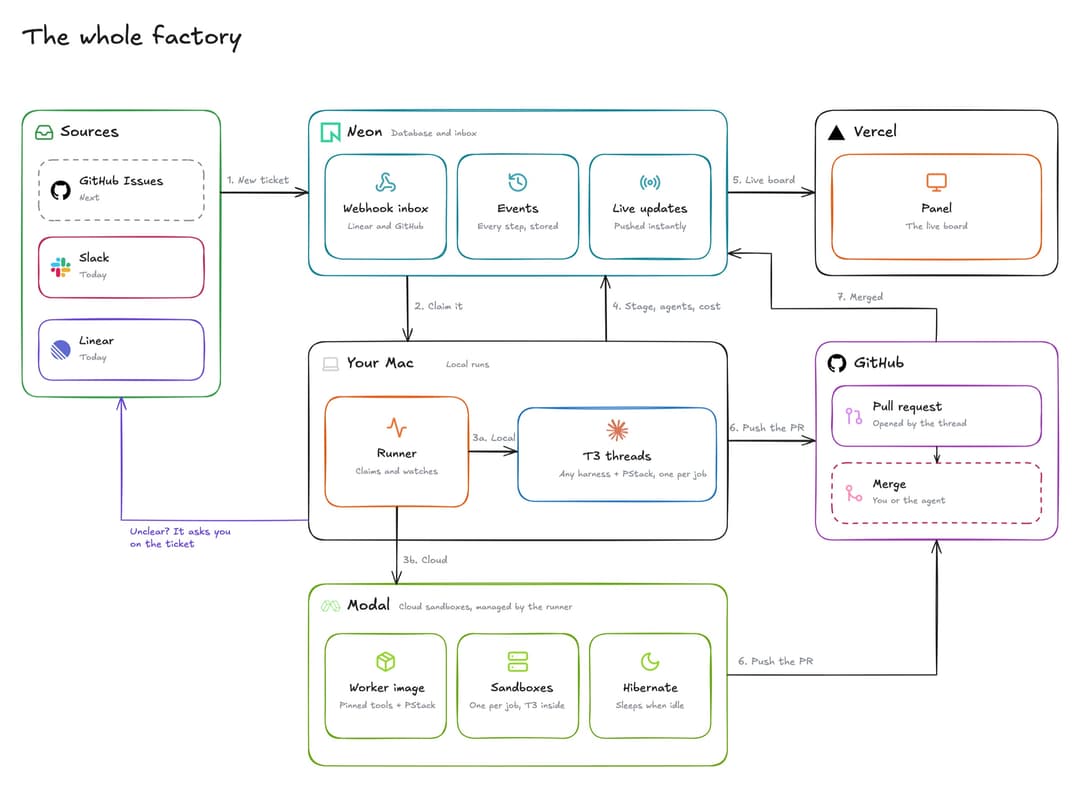
The pieces:
- Panel (
app/,components/): a Next.js app on Vercel. Its Jobs page shows every job as a board or a list (the header's Board/List switch; the panel remembers your pick), with each run's timeline and cost in a side panel you can expand to full view. Inbox lists what needs you: questions, PRs to review, failures. The panel files jobs and approves merges. Only the owner can sign in. - Ingest Function (
functions/ingest/): a Neon Function that receives the Linear and GitHub webhooks and the reporter's events, and writes them to Postgres. - Runner (
runner/): a Bun daemon on your Mac, run by launchd. It is the only part that touches T3, git and the GitHub API, starts and hibernates the Modal sandboxes, makes every merge, and posts the Slack notifications. - Slack app (
app/api/slack/, optional): notifications, buttons to answer, merge or request changes, and/factoryto file jobs. The routes run on Vercel and act through the same inbox actions as the panel. - Reporter (
hooks/,mcp/): Claude Code hooks and a small MCP server, installed into each target repo. They send the run's progress to the ingest Function. - Playbook (
playbooks/factory.md): the instructions every factory thread follows. It extends PStack's bug-fix and feature playbooks.
What you need
Accounts:
- Linear, with a team for factory work and a personal API key.
- GitHub, for the target repo and a GitHub App the setup creates for you.
- Neon, for Postgres, Auth, Realtime and the ingest Function.
- Vercel, for the panel.
- Optional: Modal, to run jobs in cloud sandboxes (Running jobs in Modal sandboxes), and Slack, for notifications and acting from Slack (Connecting Slack).
On the Mac that runs the factory:
- macOS. The runner installs as a launchd agent and identifies the Mac by its hardware UUID.
- Bun, git, and the GitHub CLI signed in (
gh auth login). Threads push branches and open PRs with your own git andghcredentials. - Claude Code with the PStack plugin installed.
- T3 Code, running, with its
t3command line tool. The installer looks for it at~/.t3/bin/t3, then on yourPATH, or you can setT3CODE_CLI_PATH. - The
neonCLI, signed in, and thevercelCLI. jqandopenssl, used by a few commands below.
Install
These steps set up one factory: one Neon project, one panel, and one Mac running the runner. Do them in order. Several steps depend on values an earlier step creates.
1. Clone the factory
git clone https://github.com/<you>/marshal-factory.git ~/code/marshal-factory
cd ~/code/marshal-factory
bun install
Fork the repo first if you want Vercel to deploy your copy. This checkout is the live checkout. The runner, and the hooks installed into your target repos, run code straight from this path. Keep it on main and don't move it. Do development work in a separate clone or worktree.
2. Change the two values tied to the original setup
scripts/setup-github-app.ts: change the manifest'sname(marshal-factory-ski043) andurl. GitHub App names are unique across GitHub, so you need your own, such asmarshal-factory-<you>.lib/migrate-guard.ts:PRODUCTION_ENDPOINTSnames the production database endpoint, so a preview build can never migrate production. You fill it in at step 4.
3. Prepare Linear
In the Linear team you want the factory to work in:
- Note the team key, the prefix of its issue ids. The defaults assume
FAC. - Make sure the team has the workflow states Todo, In Progress, In Review and Done. The factory moves issues between them by name.
- Create a label named
factory. Only issues with this label in an unstarted state (such as Todo) are picked up. - Create a personal API key under Settings → Security & access.
If your team key or label differs, set them in every place listed under Settings.
4. Create the Neon backend
Create a project, link this checkout to it, and turn on Realtime for main:
neon projects create --name marshal-factory
neon init --no-agent-setup      # links this directory to the project; writes .neon
neon realtime enable --branch main --allowed-origin '*'
Create .env.local with the secrets you choose yourself:
cat > .env.local <<EOF
FACTORY_INGEST_SECRET=$(openssl rand -hex 32)
LINEAR_WEBHOOK_SECRET=$(openssl rand -hex 32)
NEON_AUTH_COOKIE_SECRET=$(openssl rand -base64 32)
[email protected]
LINEAR_API_KEY=<your Linear API key>
FACTORY_TEAM_KEY=FAC
FACTORY_LABEL=factory
EOF
chmod 600 .env.local
Deploy neon.ts to main, which turns on Neon Auth and deploys the ingest Function. The GitHub App doesn't exist yet, so pass a placeholder for its webhook secret. Step 6 replaces it.
GITHUB_APP_WEBHOOK_SECRET=pending neon deploy --branch main --env .env.local --no-env-pull
Pull the values Neon generated (connection strings, Auth, Realtime, and the Function's URL), then create the tables:
neon env pull --branch main
echo "NEXT_PUBLIC_NEON_REALTIME_URL=$(grep '^NEON_REALTIME_URL=' .env.local | cut -d= -f2-)" >> .env.local
bun run db:migrate
.env.local now also holds DATABASE_URL, DATABASE_URL_UNPOOLED, NEON_AUTH_BASE_URL, NEON_REALTIME_URL, NEON_REALTIME_SECRET and NEON_FUNCTION_INGEST_BASE_URL.
Finally, put the production endpoint id into PRODUCTION_ENDPOINTS in lib/migrate-guard.ts. It is the ep-… part of the host in DATABASE_URL, without -pooler.
5. Write the runner's config
The runner and the reporter read ~/.config/marshal-factory/config.json:
mkdir -p ~/.config/marshal-factory
set -a; source .env.local; set +a
jq -n --arg key "$LINEAR_API_KEY" --arg url "$NEON_FUNCTION_INGEST_BASE_URL/ingest" --arg secret "$FACTORY_INGEST_SECRET" \
  '{linearApiKey: $key, ingestUrl: $url, secret: $secret, factory: {teamKey: "FAC", label: "factory"}}' \
  > ~/.config/marshal-factory/config.json
chmod 600 ~/.config/marshal-factory/config.json
secret must equal FACTORY_INGEST_SECRET, or ingest rejects the reporter's events. Settings lists the optional limits you can add under factory.
6. Create the GitHub App
The runner reads and merges PRs as a GitHub App, not as your gh login:
bun scripts/setup-github-app.ts
A browser page opens and sends the app manifest to GitHub. Click Create GitHub App, pick the repos the factory may work in, and click Install. The script saves the app's id, private key and webhook secret to ~/.config/marshal-factory/github-app.json (mode 600). You can add repos to the installation later in GitHub's app settings.
Now give the ingest Function the real webhook secret:
neon functions deploy ingest --branch main --src functions/ingest/index.ts \
  --env GITHUB_APP_WEBHOOK_SECRET="$(jq -r .webhook_secret ~/.config/marshal-factory/github-app.json)"
7. Create the Linear webhook
bun scripts/install-webhooks.ts
This registers a webhook on your team (Issue and Comment events) that points at the ingest Function, and records its id in the config. Running it again reuses the existing webhook.
8. Deploy the panel
Import the repo into Vercel as a Next.js project. vercel.json already sets the build command (migration guard, then migrations, then build) and the region. Then:
- Add these environment variables for Production. Mark the secrets as Sensitive.
DATABASE_URL,DATABASE_URL_UNPOOLEDNEON_AUTH_BASE_URL,NEON_AUTH_COOKIE_SECRETNEON_REALTIME_URL,NEXT_PUBLIC_NEON_REALTIME_URL,NEON_REALTIME_SECRETFACTORY_OWNER_EMAILSLINEAR_API_KEY, used by the New job formGITHUB_APP_IDandGITHUB_APP_PRIVATE_KEY, from~/.config/marshal-factory/github-app.json, so Add repository can list the repos the App reachesFACTORY_TEAM_KEYandFACTORY_LABEL, if they differ fromFACandfactory- Optional:
MODAL_TOKEN_IDandMODAL_TOKEN_SECRET, so you can paste a repo's secrets in the panel instead of running a command on the Mac - Optional:
SLACK_BOT_TOKEN,SLACK_SIGNING_SECRETandSLACK_OWNER_USER_ID(Connecting Slack)
- Set the Ignored Build Step to
[ -z "$DATABASE_URL" ], so previews without a database are skipped. To get previews with their own Neon branch, connect Neon's Vercel integration. Each preview then migrates its own branch, and the migration guard stops any preview that points at production.
Deploy, then create your owner account. Sign-up is off by default. The owner account steps turn it on briefly, so you can register with an address from FACTORY_OWNER_EMAILS and confirm it with the emailed code.
9. Start the runner
bun scripts/install-runner.ts
tail -f ~/Library/Logs/marshal-factory/runner.log
This installs the LaunchAgent com.marshal-factory.runner. It starts at login and restarts if it exits. Within a minute the log shows realtime live and a heartbeat, and your Mac appears under Machines in the panel. The runner still needs a repo to work in, which the next section adds.
Add your repo
A target repo is any git repo whose origin is on GitHub and whose default branch is main. The GitHub App must be installed on it.
bun scripts/install-target.ts ~/code/my-app
This writes three things into the repo, all pointing at your live checkout:
.claude/settings.json: the reporter hooks..mcp.json: thefactory-reportMCP server..agents/playbooks/factory.md: a copy of the factory playbook. Threads follow the factory's ownplaybooks/factory.md, which every launch message names; the copy may only add notes about the repo.
It merges with any settings the repo already has, adds .claude/** to the ESLint ignores when it can, and adds the repo to factory.repos in your config. Running it again changes nothing.
Commit those files and push them to main. Every thread starts from a fresh worktree of origin/main, so a thread can only see the hooks once they're on main.
Then restart the runner so it loads the new repo: bun scripts/install-runner.ts --uninstall && bun scripts/install-runner.ts. At startup the runner adds each checkout in factory.repos to the panel's Repositories page, and the first one becomes the default repo when there is none yet.
Repositories
The factory can work in several repos. Repositories in the panel lists each one with its open jobs, its last job, where its jobs can run (Modal, a runner's local checkout, or neither yet) and how far the factory may merge there. Open a repo to change its display name, make it the default, disable it, give it a default harness and place, or set merging and Require Bugbot review.
An issue picks its repo with a child of the Repository label group in Linear, named by the repo's display name (factory-demo for ski043/factory-demo unless you rename it). An issue without one goes to the default repo. A label that names an unknown or disabled repo also goes to the default, and the issue gets one comment saying so. New job has a Repository select and always files the issue with its Repository label.
Per repo, a default harness and place apply when the ticket has no Harness or Runs on label: the ticket's label beats the repo default, which beats Settings. A local run needs the runner's checkout of the repo; without one the job runs in a Modal sandbox when Modal is ready, and otherwise stays queued.
To add a repo, click Add repository on the Repositories page and pick one of the repos the GitHub App can reach. Grant access to more repositories opens the App's installation settings when the one you want is missing. The factory then onboards it without you:
- If the repo's
mainhas a.factory/setup.json, the factory uses it. Otherwise an agent reads the repo in a Modal sandbox, writes that setup recipe, runs the setup and every check until they pass, and opens a pull request titled Add the factory setup recipe. Merge it when it looks right. - If the recipe names secrets the checks need, the repo shows Needs input with each name and what it is for. Paste the values in the repo's detail pane, or, when the panel has no Modal token, run the command it shows on the runner Mac (
bun scripts/repo-secret.ts owner/name NAME), which asks for the value without echoing it. Values go straight to a Modal secret for that repo and are never stored by the factory. - The factory builds a warm sandbox image with the repo cloned and set up, and the repo turns Ready. Its Modal jobs start from that image, and a push to
mainthat changes the recipe or a lockfile rebuilds it in the background.
The new repo also gets its child in the Repository label group. A repo you also want to run locally still needs bun scripts/install-target.ts on the runner Mac (Add your repo). docs/operations.md has the details.
The Jobs page and the Inbox have a repository filter in the header. It is kept in ?repo=owner/name and remembered for the next visit. Cards and rows show their repo once more than one repo has jobs.
Use it
Start a job. Either:
- In Linear, add the
factorylabel to an issue in Todo. - In the panel, click New job, then write a title, a description, and optionally paste or drop images. The panel files the issue in Linear for you.
- In Slack, type
/factory <what to build>, or pick Send to factory from a message's ⋯ menu. Both open the same form (Connecting Slack).
To run one issue on another harness or place than Settings, add a child of the Harness or Runs on label group, and to send it to another repo than the default, a child of Repository; bun scripts/sync-linear-labels.ts creates the groups (Per-ticket overrides, Repositories).
Within seconds the issue moves to In Progress, a comment says the factory took it, and a card appears on the board. Write the issue the way you would for a colleague who can't ask questions: what's wrong or what you want, and how you'll know it's done. Images on the issue are downloaded and given to the thread.
Watch it. Cards move through Queued, Triage, Investigating, Implementing, Verifying and PR. Open a card to see the stage history, the agents and subagents, the models, and the spend; the expand button next to its close button (or ?full=1 in the link) opens it in full view, and Esc goes back. Other activity lists Claude Code sessions that report no factory stage, such as work you start by hand in a target repo. Machines shows each runner's Mac, its load, and its T3 projects.
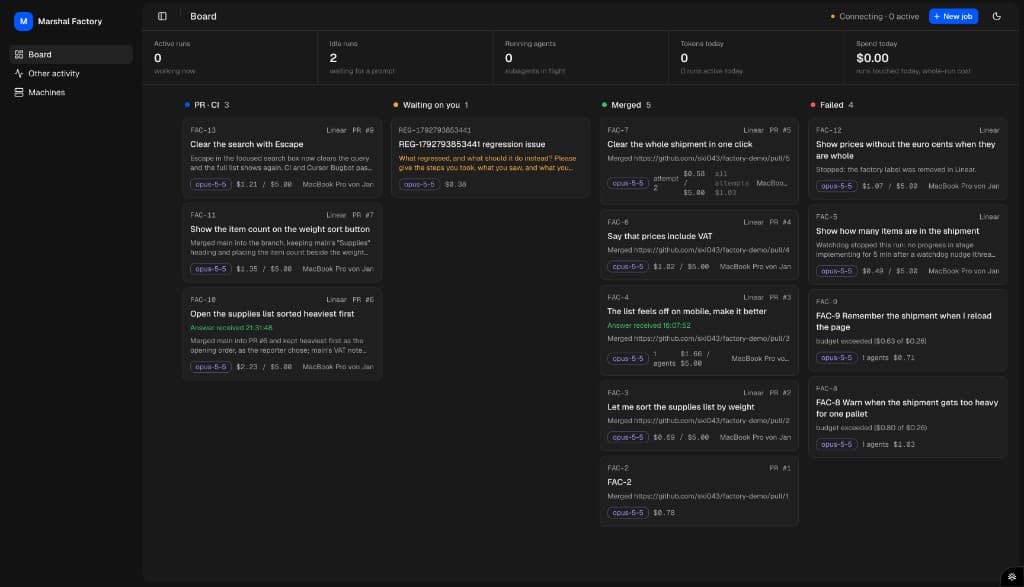
What needs you. The panel's Inbox collects everything waiting on you: questions, PRs handed over for review, failures, failed reverts and stops that couldn't be confirmed, each with its actions. With Slack connected, each one also arrives as a message with the same buttons, which is edited once the item is resolved.
Answer questions. When the issue is ambiguous or something blocks the run, the card moves to Waiting, and the question is posted as a comment on the Linear issue, usually with options to pick from. Reply on the issue, in the Inbox, or with Answer in Slack. The thread continues with your answer.
Review and merge. At the PR stage, the issue moves to In Review with a link to the pull request, and the agent reports whether it is confident in what it built. In a repo set to Merge when confident, a confident PR that clears the hard limits is merged by the factory. Otherwise it lands in the Inbox: review it as you would any PR, then merge from the panel (Merge, or Approve and merge in the Inbox), with Approve and merge in Slack, or on GitHub, or send it back with Request changes. Every merge the factory makes, including your approvals, is done by the runner. Either way, the issue moves to Done and the worktree or sandbox is cleaned up. If main moves on and the PR conflicts, the factory tells the thread to merge main and fix it.
Stop a job. Remove the factory label, or cancel the issue. The runner stops the thread.
When it fails. A job fails when the agent gives up, or when it stays stuck after one nudge. The reason is posted on the issue, the issue goes back to Todo, and the label changes to factory-failed. To retry, press Retry on the job's item in the panel's Needs you inbox or in its Slack message, with an optional note for the next attempt, or add factory to the issue again. The retry runs on a new branch (factory/FAC-7-a2). A failed job's worktree is kept for three days, so you can look at what it did. Spend is measured per attempt and shown on the card; no amount stops a run.
Settings
The panel's Settings page holds what you change day to day: the default harness and model for new jobs, where jobs run (Run jobs on: this Mac or Modal, with what's still missing for Modal), and Slack notifications. Per repo, Repositories sets merging (Off, Trial or Merge when confident) and Require Bugbot review. A ticket's Harness, Runs on and Repository labels beat the repo's defaults, which beat Settings.
The optional factory object in ~/.config/marshal-factory/config.json overrides these defaults (from lib/config.ts):
teamKey(FAC) andlabel(factory): the Linear team and label to work on.maxInFlight(4): how many jobs this Mac runs at once.provider(claudeAgent) andmodel(claude-opus-5-5): what new threads run on.stuckAfterMinutes(30) andfailAfterNudgeMinutes(30): when a quiet job gets nudged, and when it fails after the nudge.cleanupGraceDays(3): how long a failed job's worktree is kept.
docs/operations.md lists the rest.
If you change the team key or label, also change them in the ingest Function (FACTORY_TEAM_KEY and FACTORY_LABEL, with the neon functions deploy command from step 6) and in Vercel. Then rerun bun scripts/install-webhooks.ts for a new team.
Running jobs in Modal sandboxes
Instead of this Mac's T3, the runner can start each job in its own Modal sandbox, so jobs don't share a machine and more of them run at once. On the runner Mac:
uv tool install modal && modal token new
bun scripts/sandbox-image.ts
mkdir -p ~/.codex-factory-1 && CODEX_HOME=~/.codex-factory-1 codex login --device-auth
For Claude Code jobs, run claude setup-token, add the token as CLAUDE_CODE_OAUTH_TOKEN=... to .env.local in the live checkout and restart the runner. Without it, those jobs run on Codex. A Claude Code job needs no Codex login, so with the token any number of them run side by side, up to factory.sandbox.maxParallel (4) and factory.maxInFlight (4). Each Codex job holds one Codex login while its sandbox runs: each extra login (~/.codex-factory-2 and so on) lets one more Codex sandbox run; list them in factory.sandbox.codexSlots.
Then set Run jobs on to Modal in the panel's Settings, which shows anything still missing. A job waiting for review or an answer hibernates to a snapshot after five minutes and wakes when it is needed, so it does not pay for a running sandbox while it waits. Claude Code and Codex jobs show stages and cost; other harnesses show neither. The runner rebuilds the image itself when a pin or a playbook changes; rebuild it by hand (bun scripts/sandbox-image.ts) when you change the hooks or the MCP server. docs/operations.md has the details, including opening a sandboxed job in T3.
Connecting Slack
Optional. With Slack connected, the runner messages you when a job needs you or the factory merges or reverts on its own, and edits the message once it's resolved. The messages carry the Inbox's buttons (Approve and merge, Request changes, Answer, Close, Dismiss), and /factory or the Send to factory message shortcut files new jobs. Only your own Slack account can act.
- Create the app at api.slack.com/apps → Create New App → From a manifest, with the manifest in docs/operations.md, then install it to your workspace. Change the panel URL in it if yours isn't
marshal-factory.vercel.app. - Add three values to
.env.localin the live checkout:SLACK_BOT_TOKEN(OAuth & Permissions → Bot User OAuth Token),SLACK_SIGNING_SECRET(Basic Information → App Credentials) andSLACK_OWNER_USER_ID(your Slack profile → ⋯ → Copy member ID). - Add the same three to the panel's Vercel environment for Production, redeploy, and restart the runner (
bun scripts/install-runner.ts --uninstall && bun scripts/install-runner.ts). - In the panel's Settings → Notifications, pick your DMs or a channel, the events you want and optional quiet hours, then Send test message.
docs/operations.md has the details.
Updating
After a merge to main, update the live checkout with:
bun scripts/rollout.ts
It waits for Vercel's production deploy (which runs the migrations), stops the runner, pulls, migrates, redeploys the ingest Function and rebuilds the sandbox image when they changed, and starts the runner again. docs/operations.md has the steps and the opt-in canary.
Troubleshooting
- Start with the runner log:
~/Library/Logs/marshal-factory/runner.log. Each line is one JSON event. Errors name the step that failed. - An issue isn't picked up. Check that it is in your team (
teamKey), has the label, and is in an unstarted state such as Todo. Also check that Repositories lists at least one repo orfactory.reposisn't empty, and that the Linear webhook exists under Linear → Settings → API. The runner also polls every 90 seconds, so a missed webhook only delays the job. - Machine shows offline. The runner isn't sending heartbeats. Check
launchctl list | grep marshal-factory, then the log. Runbun runner/index.ts --oncein the live checkout to do one pass by hand and see its output. - The board has no live updates. Check the three Realtime variables in Vercel. Previews never subscribe to live updates; only production does.
- A run has no stages or costs. The target repo's hooks aren't reaching ingest. Check that the files from
install-targetare on the repo'smain, and thatsecretin your config equalsFACTORY_INGEST_SECRETin the Function. - You moved the live checkout. The hooks and the LaunchAgent hold its old path. Run
install-targetfor each repo andinstall-runneragain.
Developing
Work in a separate clone or worktree, never in the live checkout. Run bun dev for the panel against a Neon branch of your own, not main.
bun run test:regressions runs every scripts/*-regressions.ts against a throwaway Neon branch made from production. It deletes the branch when the run ends. Pass a prefix to run a subset, for example bun run test:regressions ingest. During a test run, the real Linear client, the GitHub App and t3 commands refuse to run, so a test can't touch real work.
Further reading
- docs/operations.md: how each part behaves, including the runner, write-back, retries, spend, cleanup, the watchdog, sign-in and deploys.
- playbooks/factory.md: what each factory thread is told to do.
- docs/research/: background reports from the initial investigation.
// faq
What is marshal-factory?
Software factory on Claude Code + PStack + T3 Code, with a supervision panel. It is open-source on GitHub.
Is marshal-factory free to use?
marshal-factory is open-source, so it is free to use.
What category does marshal-factory belong to?
marshal-factory is listed under productivity in the Claudeers registry of Claude-compatible tools.
// embed badge

[](https://claudeers.com/marshal-factory)
// retro hit counter

[](https://claudeers.com/marshal-factory)
// reviews
// guestbook
// related in Productivity
 🔓
Agent skills for Obsidian. Teach your agent to use Obsidian CLI and open formats including Markdown, Bases, JSON Canvas.
 🔓
Open source repository of plugins primarily intended for knowledge workers to use in Claude Cowork
 🔓
Garry's Opinionated OpenClaw/Hermes Agent Brain
 🔓
An open-source alternative to Claude Cowork (powered by opencode)